It is possible to generate Protegrity Synthetic Data with minimal, default configuration. It is also possible to control several aspects of the generation process, ranging from privacy controls to enforcing business logic. This section details the various configurations available for advanced usage.
This is the multi-page printable view of this section. Click here to print.
Building the Protegrity Synthetic Data Request
Use the APIs to build and configure a Protegrity Synthetic Data request.
1 - High-Level Workflow
High-level workflow of the Protegrity Synthetic Data generation process.
The Protegrity Synthetic Data follows a structured pipeline to generate Synthetic Data:
- Configuration Validation
- Optimal Real Data Usage
- Automatic Data Preprocessing
- Training of Protegrity Synthetic Data Generator Model
- Evaluation Against Real Data
- Protegrity Synthetic Data Generation
- Machine Learning Operations
Configuration Validation
Training Protegrity Synthetic Data generators is a slow process, taking from a couple of minutes to several hours depending on the configurations used. To optimize compute time, several validations are proactively done to ensure a valid configuration before any training takes place. If any violations are found, descriptive exceptions are returned to the user.
- Existence Validation: Ensures that the specified column exists in the real data.
- Data Type Validation: Ensures required types, for example, categorical or integer are present for features like bias customization.
- Unique ID Validation: Ensures unique identifiers are not used inappropriately, for example, bias customization on a unique identifier.
Optimal Real Data Usage
The performance of any machine learning model is influenced by the size of training data or learning curve. The API estimates a learning curve from the real data and may randomly sample data to reduce its size.
required_groupsParameter: Ensures downsampling includes all unique values in a specified categorical column.
Automatic Data Preprocessing
No manual preprocessing is necessary. The API automatically performs all required preprocessing.
- Optional Data Type Specification: It is preferred for users to pass the data types of each column to ensure that the generated data respects them (for example, integer instead of float). Users can also specify data types for only some columns. However, if the user does not provide data types, the system will automatically infer them. This is particularly useful when a column appears to be an integer but encodes a categorical variable.
Training of Protegrity Synthetic Data Generator Model
Two training modes are available:
- Default Mode: Uses default configurations for modest to high fidelity results.
- Autolearn Mode: Performs hyperparameter optimization. Requires:
- Time budget specification
- Option to start from scratch or continue previous tuning session
Evaluation Against Real Data
The API evaluates Protegrity Synthetic Data against real data using default metrics and charts:
- Correlation measures
- Composite score
- Information preserved
- Similarity
An HTML and PDF evaluation report is returned. Real data is also evaluated against samples of real data to assess theoretical limits of closeness.
Protegrity Synthetic Data Generation
A job represents a single event of training and generation or generation only, if a model already exists.
Machine Learning Operations
Organizations may have multiple data domains with distinct requirements. The API manages Protegrity Synthetic Data generators using:
- Data Domains and Subdomains: It is useful for auditing and lifecycle management.
- Model in Production: It indicates generators and artifacts are stored and ready for future use.
2 - Building the Request Using the REST API
Build the REST API request for performing the Protegrity Synthetic Data.
Identifying the Source and Target
In this step, you specify the source real dataset from which you wish to produce Protegrity Synthetic Data and a target, where corresponding Synthetic Data will be saved.
The following file formats are supported:
- Comma separated values (CSV)
The following data storages have been tested for Protegrity Synthetic Data:
- Local File System
- Amazon S3
The following data storage types can also be used for the Protegrity Synthetic Data:
- Google Cloud Storage
- Microsoft Azure Storage
- S3 bucket Storage
- Other S3 Compatible Services
Use the following code to specify the source:
Note: Modify the source and destination code for your provider.
For more cloud-related sample codes, refer to the section Samples for cloud-related source and destination files.
"source": {
    "file": {
      "name": "string",
      "format": "CSV",
      "props": {},
      "access_options": {}
    }
  }
Note: When uploading a file to the cloud service, wait till the entire source file is uploaded before running the Protegrity Synthetic Data job.
Similarly, specify the target file using the following code:
"target": {
    "file": {
      "name": "string",
      "format": "CSV",
      "props": {},
      "access_options": {}
    }
  }
Specify additional parameters about the source and target file, such as, the character used to separate the values in the file, using the following properties attribute. If a property is not specified, then the default attribute shown here will be used.
"props": {
    "sep": ",",
    "decimal": ".",
    "quotechar": "\"",
    "escapechar": "\\",
    "encoding": "utf-8",
    "line_terminator": "\n"
}
If the required files are in cloud storage, then specify the cloud-related access information using the following code:
"accessOptions": {
}
For more information and help on specifying the source and target files, refer to Dask remote data configuration.
Note: If the target file already exists, then the file will be overwritten. Additionally, some cloud services have limitations on the file size. If such a limitation exists, then you can set the single_file switch to no when writing large files to the cloud storage. This saves the output as multiple files to avoid any errors related to saving large files to cloud storage.
Tagging the Job
You are required to tag a job by specifying the domain and subdomain. The other parameters are optional. Use the following structure to specify tag information:
"tag": {
    "domain": "card_transactions",
    "subdomain": "fraud_detection"
  },
Specifying Learning Configuration
This optional learning configuration section allows you to control learning aspects, that is, hyperparameter tuning and model operations. Use the following structure to specify learning parameters:
"learning": {
    "autolearn": {
        "minutes": int,
        "continue_previous_exploration": bool,
    },
    "relearn": bool
 }
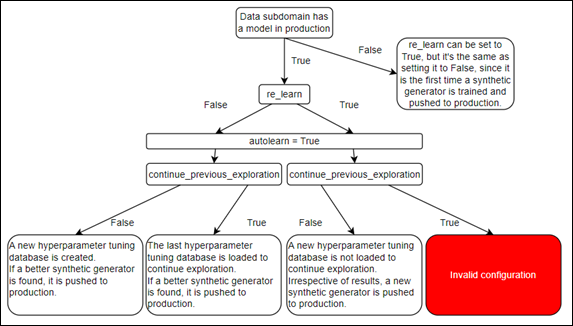
- autolearn: This is an optional parameter.
- minutes: This is a mandatory parameter if autolearn is enabled. . It is the amount of time to invest in hyperparameter tuning. The total execution time will be approximate. If you specify 60 minutes and by that time there is a model in training, that training session will be allowed to complete. There are intermediate checkpoints saved, to optimize compute time in case of system failure.
- continue_previous_exploration: This is an optional parameter. Whenever hyperparameter tuning is triggered, a dedicated database is created. This enables resuming the process later. By tweaking this parameter, it is possible to leverage this database, or not, later. Situations where this parameter might be set to false: hyperparameter tuning cannot find better models after significant processing. In this case, resetting the search space could overcome this situation. The data schema is the same, but the underlying behavior captured by the data is distinct. Therefore, resetting the search space makes sense.
- relearn: This is an optional parameter. It is set to false by default. If set to true, irrespective of the model metric comparison, the model trained on the current job will be pushed to production and used to start producing Synthetic Data. This is useful in cases where the data schema remains the same, but the underlying behavior captured by that data changes, for example, online purchasing behaviors during COVID-19.
The following figure shows the different combinations of these settings and their implication.
Specifying Evaluation Parameters
The optional evaluation configuration section allows you to compute additional metrics. Use the following structure to specify evaluation parameters:
"evaluation": {
  "metrics": ["association_risk", "membership_inference_attack", "sensitive_attribute_reconstruction"],
  "synthetic_fairness": ["religion"]
   }
- association_risk: Measures the association between real records and synthetic records.
- membership_inference_attack: Calculates the probability of success of a membership inference attack. It is the probability of an attacker inferring that a real person was included on the training data that resulted in a given Synthetic Data output.
- sensitive_attribute_reconstruction: Measures the success of an attacker guessing a real sensitive attribute based on Synthetic Data and real quasi-identifiers.
- synthetic_fairness: Provides insights into data fidelity asymmetries between categories. This is useful, for example, to understand if synthetic people from distinct nationalities have the same data fidelity. This is a key ingredient in ensuring algorithmic fairness.
Specifying Supervise Parameters
The optional supervise parameters allow you to filter and change real data and Synthetic Data. Use the following structure to specify supervise parameters:
"supervise": {
    "input_filters": {
        "outlier_detection": {"outlier_frac": float}
    },
    "output_filters": {
        "fabricate_random_data": {
            "date": ["col_name"],
            "word": ["col_name"],
            "sentence": ["col_name"],
            "datetime": ["col_name"],
            "time": ["col_name"],
            "timestamp": ["col_name"],
            "email": ["col_name"],
            "float": ["col_name"],
            "positive_integer": ["col_name"],
        },
        "association_risk": {"threshold": float},
        "bias_customization": {"balance": ["col_a", "col_b"]},
        "business_rules": {
            "intervals": {"numeric_column": [numeric lower bound, numeric upper bound]},
            "unique_combinations": [
                ["categorical_col_a", "categorical_col_b"],
                ["categorical_col_c", "categorical_col_d"]
            ]
        },
        "sample_from_external": {
            "col_a": ["a", "b", "c", "d", "e"],
            "col_b": [0.0, 0.0, 0.0, 0.0, 0.0],
            "col_c": ["06611", "06611", "06611", "06611", "06611"],
        }

}
  },
The following parameters are available for this configuration:
- input_filters: Specifies filters applied to real data before training a Synthetic Data generator.
The following option is available for input_filters:
outlier_detection: Removes a percentage of outliers from real data before training a Synthetic Data generator. Must be a value between 0 and 0.5.
output_filters: Specifies the filters applied to Synthetic Data before being returned to the user. In certain scenarios, the engine might generate slightly more records than requested, due to generation retries needed to adhere to certain filters. If the filters are too restrictive and the generation retries are exhausted, then less records might be returned.
The following options are available for output_filters:
fabricate_random_data: For generating random data, that is, with no connection to the real data of a given type. The following datatypes are available:
- date
- datetime
- float
- positive_integer
- sentence
- time
- timestamp
- word
input_filters: Specifies the learning data that must be used for training.
output_filters: Specifies the filters for the output data. Additional samples cannot be generated after the filter is applied. Hence, records are generated before filtering to compensate, so that the number of records requested by the user can be generated. The final number might be less than the number of records requested.
The following options are available for output_filters:
sample_from_external: External sampler allows you to substitute synthetic output data attributes with values from external data. Using this filter, you can substitute columns in the Synthetic Data with data from a data source. Before using the external data source, the validity of external data is checked. Additionally, if applicable, the external data is validated using the business rules filters specified. The following checks are performed on the external data:
- A data type check to ensure that the type of the external data attributes is the same as the original data.
- An existence check to ensure that the attributes exist.
- A business rules interval conformity check with external data is performed.
- A business rules unique combinations conformity check with external data is performed.
bias_customization: In bias_customization a validity check is performed on the user specified attribute and settings. In this release, only the balance option is supported. The balance option runs the data generation process for a certain amount of retries. This ensures that all categories of the specified column for bias customization are equally proportioned (support for bias customization on one column). However, given the nature of the dataset, especially when you have an extremely small representation of a certain category, it might not be possible to balance the dataset. The following checks are performed:
- An existence check ensures that the attribute exists.
- A unique id check ensures that unique identifiers are not used.
- A categorical check ensures that float attributes are not used.
- A balance check for a given column, if it is specified.
association_risk: Uses an association risk metric to filter Synthetic Data records that have a high risk of being associated with real data records. Given a threshold by the user, it removes the highly associated synthetic records (above that certain threshold).
business_rules: Ensure business logic is observed on Synthetic Data. There are certain configurations that can be used:
- unique_combinations: Relationships between several categorical variables are maintained. For example, country and city columns. If the values on those two columns are always unique in the original data, we ensure that the generated Synthetic Data will never generate invalid combinations.
- intervals: The minimum and maximum numeric values for an attribute.