1 - Memory Usage of the AP C
The memory usage in the AP C for different policy sizes with a sample.
The memory used for the different policy sizes using a sample AP C application is described in this section. This is a sample memory usage. You can use this as a reference for memory usage in the AP C for different policy sizes.
Sample application
For more information about the sample application, refer to samples installed in directory.
Expected memory usage
The process to find the policy size and expected memory usage for different policy sizes used by the C application is described in this section.
To find the policy size:
- On Insights dashboard, under the Discover section, navigate to the troubleshooting index.
- Search using the
process.module.keyword: coreprovider filter. - Navigate to the logs with description as Policy successfully loaded.
The
additional_info.memoryUsed field depicts the policy size.
The following is the expected memory usage for different policy sizes used by the AP C application.
| Policy size | Process memory consumption |
|---|
| 14 MB | 42.13MB |
| 37 MB | 94.98 MB |
| 533 MB | 1.23 GB |
Note: The process memory increases substantially for a few milliseconds when the application is running in the following cases:
- The policy is replaced with another policy.
- Changes are made in the current policy.
Conclusion
The results for memory required by various policy sizes using the sample AP C application can be used to determine the memory requirements of the C application.
2 - DevOps Approach for Application Protector C
The DevOps approach for package deployment.
The DevOps approach enables immutable package deployment. It uses a REST API call to download packages from the ESA in an encrypted format.
Note: The RP Agent should not be installed for immutable package deployments using DevOps.
For more information about package deployment approaches, refer to Resilient Package Deployment.
A REST API call is used to download the package on your local machine. Configure the package path in the config.ini file within the DevOps section and the decryptor shared library.
If a downloaded path is overwritten, a new package will be reflected in the running application at the set time interval (cadence). This occurs when another package with the same name overwrites the existing one. This changes the protector’s behavior. The protector no longer functions as an immutable protector. To keep it immutable, set the cadence value in config.ini file to 0.
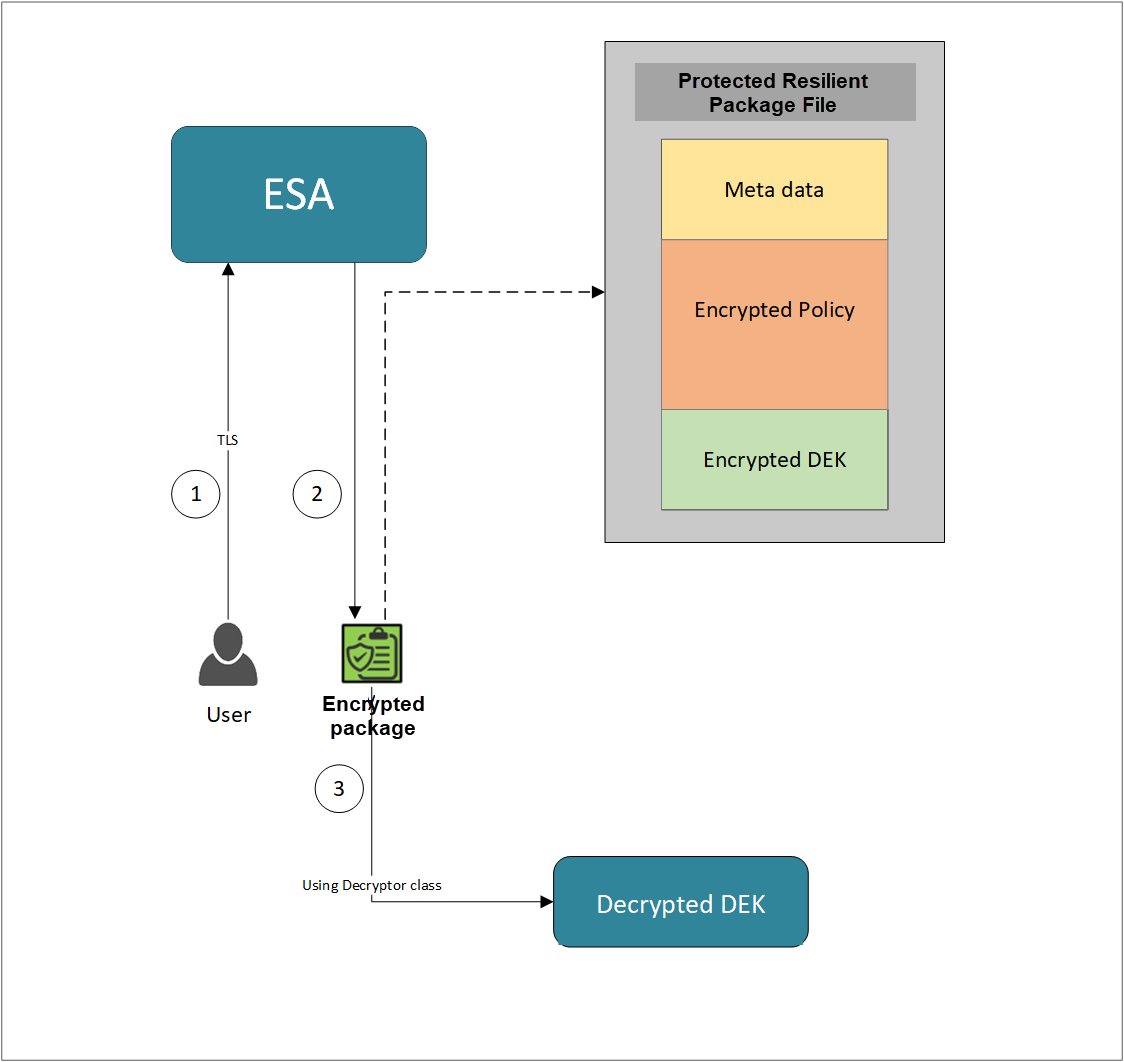
- A REST API call is used to download the policy from the ESA in an envelope encrypted format. A public key is created using a Key Management System (KMS) or Hardware Security Module (HSM). This public key must be passed to the REST API.
- The ESA generates a JSON file for the package with policy.
- The encrypted DEK needs to be decrypted to perform the security operations. A Decryptor class is implemented using the Decryptor interface, to decrypt the Data Encryption Key (DEK) using a private key.
Before you begin
Ensure the following prerequisites are met:
- The installation of the RP Agent is not required for immutable package deployment using the DevOps approach.
- The
decryptor parameter must be the full path to the decryptor shared library.
A decryptor shared library must implement the decrypt() function, which decrypts the Data Encryption Key (DEK) using a private key. It returns the decrypted DEK in bytes.
For more information on the decryptor interface of AP C, refer to Configuring the Decryptor interface.
- The data store is properly configured before exporting your Application Protector policy. For ESA 10.0.1 and 10.1.0 versions, define allowed servers for seamless policy deployment and secure access control.
For more information about configuring a data store, refer to: - For ESA version 10.2.0 and higher, export key must be created in the data store for secure access control.
For more information refer to Using the Encrypted Resilient Package REST APIs.
AP C
Using the DevOps approach
Perform the following steps to use the DevOps approach for immutable package deployment.
Create the RSA decryptor file, for example: rsa_decryptor.c, using decrypt() function and then compile it which will create a .so shared library.
For example -
gcc -shared -fPIC -o /opt/apc/rsa_decryptor.so /opt/apc/rsa_decryptor.c -lssl -lcrypto
Add the [devops] parameter in the config.ini file.
[devops]
package.path = /path/to/policyFile
decryptor = /path/to/decryptor_shared_library.so
The following is an example for adding the [devops] parameter in the config.ini file.
[devops]
package.path = /opt/policies/policy1.json
decryptor = /opt/apc/rsa_decryptor.so
Note: For ESA 10.2.0 and later, Application Protector DevOps must use the Encrypted Resilient Package REST APIs using GET method. The legacy Export API using POST method is deprecated and not supported for Teams (PPC). The deprecated API remains supported only for the Enterprise edition for backward compatibility.
For more information about exporting Resilient Package using POST method for 10.0.1 and 10.1.0 ESA, refer to Using the Encrypted Resilient Package REST APIs.
For more information about exporting Resilient Package using GET method for 10.2 ESA, refer to Using the Encrypted Resilient Package REST APIs.
For more information about exporting Resilient Package using GET method for PPC, refer to Using the Encrypted Resilient Package REST APIs.
Sample code for DevOps approach for AP C
The following sections provide sample code for the DevOps approach for Application Protectors using different cloud platforms.
Configuring the Decryptor interface
The decrypt function provides key_label, algorithm, encrypted_dek, and encrypted_dek_len parameters. The decrypted DEK must be returned as an unsigned char *, and its length written to *decrypted_dek_len. The path to the compiled .so is set using decryptor= in the [devops] section of config.ini.
Custom DEK Decryptor Implementation Requirements:
Exact function signature — must match precisely, including parameter names and types:
unsigned char *decrypt(char *key_label, const unsigned char *encrypted_dek,
                       char *algorithm, int encrypted_dek_len, int *decrypted_dek_len);
Include the header — #include "decryptor.h" is required; the AP C runtime provides this header.
Memory allocation — the return value must be allocated with OPENSSL_malloc(), not malloc(), because the APC runtime frees it with OPENSSL_free().
Return contract — return NULL on failure; on success write the plaintext length to *decrypted_dek_len and return the plaintext buffer.
Algorithm strings — the algorithm parameter will be one of: RSA_OAEP_SHA1, RSA_OAEP_SHA256, RSA_OAEP_SHA512, RSA_PKCS1_v1_5. The code must handle whichever algorithm was used to encrypt the DEK.
Private key path — hardcode or configure the path to the private key (PKCS#8 PEM format) inside the .c file before compiling.
Build — compile as a shared library:
gcc -shared -fPIC -o rsa_decryptor.so rsa_decryptor.c -lssl -lcrypto
Register the .so — set decryptor=<absolute_path_to_rsa_decryptor.so> in the [devops] section of config.ini.
Using AWS
The following is a sample implementation using the private key from AWS KMS.
/*
 * Prerequisites to build and run this file:
 *
 * 1. Install AWS C++ SDK (kms + core only):
 *      cmake .. -DBUILD_ONLY="kms;core"
 *      make && sudo make install
 *    Ref: GitHub - aws/aws-sdk-cpp: AWS SDK for C++
 *
 * 2. Set LD_LIBRARY_PATH to include AWS SDK and APC libraries:
 *      export LD_LIBRARY_PATH=/home/ec2-user/c_sdk/apc/build/lib:/usr/local/lib64
 *    Ensure libaws-cpp-sdk-kms.so and libaws-cpp-sdk-core.so are present.
 *
 * 3. Configure AWS credentials (one of):
 *    a) CLI:  aws configure
 *    b) Env:  export AWS_ACCESS_KEY_ID="..."
 *             export AWS_SECRET_ACCESS_KEY="..."
 *             export AWS_REGION="..."
 *
 * 4. Ensure the KMS key (RSA_4096, ENCRYPT_DECRYPT) exists in your AWS account.
 *    Retrieve the key ID from AWS KMS Console or:
 *      aws kms get-public-key --key-id <your-key-id>
 *
 * 5. Compile:
 *      g++ -g -shared -o aws.so test.cpp -lcrypto -laws-cpp-sdk-kms -laws-cpp-sdk-core -fPIC
 */
#include <aws/core/Aws.h>
#include <aws/kms/KMSClient.h>
#include <aws/kms/model/DecryptRequest.h>
#include "../../../apc/decryptor.h"

extern "C"{
unsigned char* decrypt(char* key_label, const unsigned char *encrypted_dek, char* algorithm, int encrypted_dek_len, int *decrypted_dek_len)
{
    Aws::SDKOptions options;
    /* Initialize AWS SDK*/
    Aws::InitAPI(options);
    Aws::Client::ClientConfiguration clientConfig;
    /* Disable SSL verification */
    clientConfig.verifySSL = false;
    /* Create KMS Client */
    Aws::KMS::KMSClient kms(clientConfig);
    /* Create Decrypt Request*/
    Aws::KMS::Model::DecryptRequest decrypt_request;
    unsigned char* decrypted_data = nullptr;
    decrypt_request.SetCiphertextBlob(Aws::Utils::ByteBuffer(encrypted_dek, encrypted_dek_len));
    decrypt_request.WithEncryptionAlgorithm(Aws::KMS::Model::EncryptionAlgorithmSpec::RSAES_OAEP_SHA_256);
    decrypt_request.WithKeyId("3068b3ef-4924-4be5-9e9a-440b418553b3");
    auto decryptOutcome = kms.Decrypt(decrypt_request);
    if(!decryptOutcome.IsSuccess()){
       std::cerr << "Error Decrypting data: " << decryptOutcome.GetError().GetMessage() << std::endl;
    }
    Aws::Utils::ByteBuffer plaintext = decryptOutcome.GetResult().GetPlaintext();
    /* Allocate memory for decrypted data */
    decrypted_data = new unsigned char[plaintext.GetLength()];
    std::memcpy(decrypted_data, plaintext.GetUnderlyingData(), plaintext.GetLength());
    *decrypted_dek_len = plaintext.GetLength();
    return decrypted_data;
}
}
Using Azure
The following is a sample implementation using the private key from Azure Key Vault.
/*
 * Prerequisites to build and run this file:
 *
 * 1. Install Azure SDK and the dependencies required by azure.cpp.
 *
 * 2. Log in to Azure:
 *      az login
 *
 *      Verify the active subscription:
 *      az account show
 *
 * 3. Create an Azure Key Vault:
 *      az keyvault create \
 *        --name <key-vault-name> \
 *        --resource-group <resource-group> \
 *        --location <location>
 *
 * 4. Create an RSA key in the Key Vault:
 *      az keyvault key create \
 *        --vault-name <key-vault-name> \
 *        --name <key-name> \
 *        --kty RSA \
 *        --size 2048 \
 *        --ops encrypt decrypt wrapKey unwrapKey sign verify
 *
 * 5. Get the VM Managed Identity Object ID:
 *      az vm identity show \
 *        --resource-group <resource-group> \
 *        --name <vm-name> \
 *        --query principalId -o tsv
 *
 * 6. Grant Key Vault permissions:
 *      az keyvault set-policy \
 *        --name <key-vault-name> \
 *        --object-id <principal-id> \
 *        --key-permissions get list decrypt unwrapKey
 *
 * 7. Get the Key Vault key URI (key_label):
 *      az keyvault key show \
 *        --vault-name <key-vault-name> \
 *        --name <key-name> \
 *        --query "key.kid" -o tsv
 *
 *      Example:
 *      https://<key-vault-name>.vault.azure.net/keys/<key-name>/<version>
 *
 * 8. Download the public key:
 *      az keyvault key download \
 *        --vault-name <key-vault-name> \
 *        --name <key-name> \
 *        --file <public-key>.pem \
 *        --encoding PEM
 *
 * 9. Export the APC policy package:
 *      curl -k -u <user>:<password> -X POST \
 *        'https://<rps-host>/pty/v1/rps/export?version=1&coreversion=1' \
 *        -H 'Content-Type: application/json' \
 *        -d '{
 *              "kek": {
 *                "publicKey": {
 *                  "label": "<key_label>",
 *                  "algorithm": "RSA-OAEP-256",
 *                  "value": "-----BEGIN PUBLIC KEY----- ... -----END PUBLIC KEY-----"
 *                }
 *              }
 *            }' \
 *        -o pkg_azure.json
 *
 * 10. Compile:
 *      g++ -std=c++17 -fPIC -shared -o azure.so azure.cpp \
 *          -I<azure-sdk-include-dir> \
 *          -I<apc-source-dir> \
 *          -lcurl \
 *          -lpthread
 *
 * 11. Set environment variables:
 *      export LD_LIBRARY_PATH=<apc-library-dir>:$LD_LIBRARY_PATH
 *      export PTY_APC_CONFIG=<config-file>
 *
 * 12. Run:
 *      ./xcapcsample -p <parameter> -u <user> -d1 <data-element-name>
 */
/*******************************************************************************
 * azure.cpp
 *
 * Azure Key Vault decryptor plug-in — C++ implementation via REST API.
 *
 * Calls the Azure Key Vault decrypt REST endpoint using libcurl and OpenSSL
 * for base64url encoding/decoding.  No Azure C++ SDK required.
 *
 * key_label must be the full Azure Key Vault key identifier URL:
 *   https://<vault-name>.vault.azure.net/keys/<key-name>/<key-version>
 *
 * Authentication (in priority order):
 *   1. AZURE_ACCESS_TOKEN env var   — pre-obtained Bearer token.
 *   2. Client credentials flow      — set AZURE_TENANT_ID, AZURE_CLIENT_ID,
 *                                     AZURE_CLIENT_SECRET env vars.
 *   3. Azure Managed Identity (IMDS)— works on Azure VMs / AKS / App Service.
 *
 * Build:
 *   g++ -std=c++17 -fPIC -shared -o azure.so azure.cpp \
 *       -I<path-to-apc-includes> \
 *       -lcurl -lssl -lcrypto
 ******************************************************************************/

#include <cstdlib>
#include <cstring>
#include <iostream>
#include <string>
#include <vector>

#include <curl/curl.h>
#include <openssl/bio.h>
#include <openssl/buffer.h>
#include <openssl/evp.h>

#include "../../../apc/decryptor.h"

/* ==========================================================================
 * Internal helpers
 * ========================================================================== */

namespace {

/* --------------------------------------------------------------------------
 * libcurl write callback — appends received data to a std::string.
 * -------------------------------------------------------------------------- */
std::size_t curlWriteCallback(char* ptr, std::size_t size,
                               std::size_t nmemb, void* userdata)
{
    auto* buf = static_cast<std::string*>(userdata);
    buf->append(ptr, size * nmemb);
    return size * nmemb;
}

/* --------------------------------------------------------------------------
 * base64urlEncode
 *
 * Azure Key Vault uses base64url (RFC 4648 §5): '+' → '-', '/' → '_',
 * no '=' padding.
 * -------------------------------------------------------------------------- */
std::string base64urlEncode(const unsigned char* src, int len)
{
    /* Standard base64 first */
    BIO* b64 = BIO_new(BIO_f_base64());
    BIO* mem = BIO_new(BIO_s_mem());
    BUF_MEM* bptr = nullptr;

    BIO_set_flags(b64, BIO_FLAGS_BASE64_NO_NL);
    BIO_push(b64, mem);
    BIO_write(b64, src, len);
    BIO_flush(b64);
    BIO_get_mem_ptr(b64, &bptr);
    BIO_set_close(b64, BIO_NOCLOSE);
    BIO_free_all(b64);

    std::string result(bptr->data, bptr->length);
    BUF_MEM_free(bptr);

    /* Convert to base64url */
    for (char& c : result) {
        if (c == '+') c = '-';
        else if (c == '/') c = '_';
    }
    /* Strip padding */
    while (!result.empty() && result.back() == '=')
        result.pop_back();

    return result;
}

/* --------------------------------------------------------------------------
 * base64urlDecode
 *
 * Converts base64url back to standard base64 then decodes.
 * -------------------------------------------------------------------------- */
std::vector<unsigned char> base64urlDecode(const std::string& src)
{
    std::string b64 = src;

    /* Convert base64url → standard base64 */
    for (char& c : b64) {
        if (c == '-') c = '+';
        else if (c == '_') c = '/';
    }
    /* Re-add padding */
    while (b64.size() % 4 != 0)
        b64 += '=';

    std::vector<unsigned char> out(b64.size());
    BIO* bmem = BIO_new_mem_buf(b64.data(), static_cast<int>(b64.size()));
    BIO* b64bio = BIO_new(BIO_f_base64());
    BIO_set_flags(b64bio, BIO_FLAGS_BASE64_NO_NL);
    BIO_push(b64bio, bmem);

    int n = BIO_read(b64bio, out.data(), static_cast<int>(b64.size()));
    BIO_free_all(b64bio);

    if (n <= 0)
        return {};
    out.resize(static_cast<std::size_t>(n));
    return out;
}

/* --------------------------------------------------------------------------
 * jsonGetString
 *
 * Extracts the value of a flat JSON string field.
 * Handles optional whitespace around ':'.
 * -------------------------------------------------------------------------- */
std::string jsonGetString(const std::string& json, const std::string& field)
{
    const std::string key = "\"" + field + "\"";
    auto pos = json.find(key);
    if (pos == std::string::npos)
        return {};

    pos += key.size();

    /* Skip whitespace then ':' */
    while (pos < json.size() && (json[pos] == ' ' || json[pos] == '\t' ||
                                  json[pos] == '\r' || json[pos] == '\n'))
        ++pos;
    if (pos >= json.size() || json[pos] != ':')
        return {};
    ++pos;

    /* Skip whitespace after ':' */
    while (pos < json.size() && (json[pos] == ' ' || json[pos] == '\t' ||
                                  json[pos] == '\r' || json[pos] == '\n'))
        ++pos;
    if (pos >= json.size() || json[pos] != '"')
        return {};
    ++pos; /* skip opening '"' */

    auto end = json.find('"', pos);
    if (end == std::string::npos)
        return {};
    return json.substr(pos, end - pos);
}

/* --------------------------------------------------------------------------
 * getTokenClientCredentials
 *
 * Fetches an Azure AD Bearer token using the client credentials OAuth2 flow.
 * Requires: AZURE_TENANT_ID, AZURE_CLIENT_ID, AZURE_CLIENT_SECRET env vars.
 * -------------------------------------------------------------------------- */
std::string getTokenClientCredentials()
{
    const char* tenantId     = std::getenv("AZURE_TENANT_ID");
    const char* clientId     = std::getenv("AZURE_CLIENT_ID");
    const char* clientSecret = std::getenv("AZURE_CLIENT_SECRET");

    if (!tenantId || !clientId || !clientSecret ||
        tenantId[0] == '\0' || clientId[0] == '\0' || clientSecret[0] == '\0')
        return {};

    const std::string tokenUrl =
        "https://login.microsoftonline.com/" + std::string(tenantId) +
        "/oauth2/v2.0/token";

    const std::string body =
        "grant_type=client_credentials"
        "&client_id="     + std::string(clientId) +
        "&client_secret=" + std::string(clientSecret) +
        "&scope=https%3A%2F%2Fvault.azure.net%2F.default";

    std::string response;
    CURL* curl = curl_easy_init();
    if (!curl) return {};

    curl_easy_setopt(curl, CURLOPT_URL,           tokenUrl.c_str());
    curl_easy_setopt(curl, CURLOPT_POSTFIELDS,    body.c_str());
    curl_easy_setopt(curl, CURLOPT_WRITEFUNCTION, curlWriteCallback);
    curl_easy_setopt(curl, CURLOPT_WRITEDATA,     &response);
    curl_easy_setopt(curl, CURLOPT_TIMEOUT,       10L);

    CURLcode rc = curl_easy_perform(curl);
    curl_easy_cleanup(curl);

    if (rc != CURLE_OK) {
        std::cerr << "[Azure KV] token request failed: "
                  << curl_easy_strerror(rc) << std::endl;
        return {};
    }

    /* {"access_token":"<TOKEN>","token_type":"Bearer",...} */
    std::string token = jsonGetString(response, "access_token");
    if (token.empty())
        std::cerr << "[Azure KV] unexpected token response: " << response << std::endl;
    return token;
}

/* --------------------------------------------------------------------------
 * getTokenManagedIdentity
 *
 * Fetches a Bearer token from the Azure IMDS endpoint (Azure VMs / AKS).
 * -------------------------------------------------------------------------- */
std::string getTokenManagedIdentity()
{
    std::string response;
    CURL* curl = curl_easy_init();
    if (!curl) return {};

    curl_slist* headers = nullptr;
    headers = curl_slist_append(headers, "Metadata: true");

    curl_easy_setopt(curl, CURLOPT_URL,
        "http://169.254.169.254/metadata/identity/oauth2/token"
        "?api-version=2018-02-01&resource=https://vault.azure.net");
    curl_easy_setopt(curl, CURLOPT_HTTPHEADER,    headers);
    curl_easy_setopt(curl, CURLOPT_WRITEFUNCTION, curlWriteCallback);
    curl_easy_setopt(curl, CURLOPT_WRITEDATA,     &response);
    curl_easy_setopt(curl, CURLOPT_TIMEOUT,       5L);

    CURLcode rc = curl_easy_perform(curl);
    curl_slist_free_all(headers);
    curl_easy_cleanup(curl);

    if (rc != CURLE_OK) {
        std::cerr << "[Azure KV] IMDS token fetch failed: "
                  << curl_easy_strerror(rc) << std::endl;
        return {};
    }

    std::string token = jsonGetString(response, "access_token");
    if (token.empty())
        std::cerr << "[Azure KV] unexpected IMDS response: " << response << std::endl;
    return token;
}

/* --------------------------------------------------------------------------
 * getAccessToken
 *
 * Returns a Bearer token for Azure Key Vault API calls.
 *
 * Priority:
 *   1. AZURE_ACCESS_TOKEN env var   (any environment)
 *   2. Client credentials flow      (AZURE_TENANT_ID + CLIENT_ID + SECRET)
 *   3. Azure Managed Identity IMDS  (Azure VMs / AKS / App Service)
 * -------------------------------------------------------------------------- */
std::string getAccessToken()
{
    const char* env = std::getenv("AZURE_ACCESS_TOKEN");
    if (env && env[0] != '\0')
        return std::string(env);

    std::string token = getTokenClientCredentials();
    if (!token.empty())
        return token;

    token = getTokenManagedIdentity();
    if (!token.empty())
        return token;

    std::cerr << "[Azure KV] could not obtain access token. Set "
                 "AZURE_ACCESS_TOKEN, or AZURE_TENANT_ID + AZURE_CLIENT_ID + "
                 "AZURE_CLIENT_SECRET, or run on an Azure VM with Managed Identity."
              << std::endl;
    return {};
}

} /* anonymous namespace */

/* ==========================================================================
 * decrypt — public interface
 * ========================================================================== */

extern "C" {

/*******************************************************************************
 * decrypt
 *
 * Decrypts an RSA-OAEP-wrapped DEK via Azure Key Vault decrypt REST API.
 *
 * Parameters:
 *   key_label         - Full Azure Key Vault key identifier URL:
 *                       https://<vault>.vault.azure.net/keys/<key>/<version>
 *   encrypted_dek     - Raw ciphertext bytes.
 *   algorithm         - Encryption algorithm (e.g. "RSA-OAEP-256").
 *                       Passed directly to the Azure KV API.
 *   encrypted_dek_len - Length of encrypted_dek in bytes.
 *   decrypted_dek_len - Out: length of the returned plaintext buffer.
 *
 * Returns:
 *   Heap-allocated plaintext on success (caller must free with delete[]),
 *   or nullptr on failure.
 ******************************************************************************/
unsigned char* decrypt(char*                key_label,
                       const unsigned char* encrypted_dek,
                       char*                algorithm,
                       int                  encrypted_dek_len,
                       int*                 decrypted_dek_len)
{
    if (!key_label || !encrypted_dek || encrypted_dek_len <= 0 || !decrypted_dek_len)
    {
        std::cerr << "[Azure KV] decrypt: invalid argument(s)." << std::endl;
        return nullptr;
    }

    *decrypted_dek_len = 0;

    /* -- 1. Determine algorithm ------------------------------------------- */
    /* Normalize algorithm name to Azure Key Vault format.
     * xcpep.plm passes underscore-style names (e.g. RSA_OAEP_SHA256) but
     * Azure KV REST API expects hyphen-style (e.g. RSA-OAEP-256). */
    auto normalizeAlg = [](const std::string& a) -> std::string {
        if (a == "RSA_OAEP_SHA256" || a == "RSA-OAEP-SHA256") return "RSA-OAEP-256";
        if (a == "RSA_OAEP_SHA384" || a == "RSA-OAEP-SHA384") return "RSA-OAEP-384";
        if (a == "RSA_OAEP_SHA512" || a == "RSA-OAEP-SHA512") return "RSA-OAEP-512";
        if (a == "RSA_OAEP" || a == "RSA_OAEP_SHA1")           return "RSA-OAEP";
        if (a == "RSA_PKCS1")                                   return "RSA1_5";
        return a; /* pass through if already correct or unknown */
    };
    const std::string alg = normalizeAlg(
        (algorithm && algorithm[0] != '\0') ? std::string(algorithm) : "RSA-OAEP-256"
    );

    /* -- 2. Base64url-encode the ciphertext ------------------------------- */
    const std::string b64urlCipher = base64urlEncode(encrypted_dek, encrypted_dek_len);

    /* -- 3. Obtain a Bearer token ----------------------------------------- */
    const std::string token = getAccessToken();
    if (token.empty())
        return nullptr;

    /* -- 4. Build request URL --------------------------------------------- */
    /* https://<vault>.vault.azure.net/keys/<key>/<ver>/decrypt?api-version=7.4 */
    const std::string url = std::string(key_label) + "/decrypt?api-version=7.4";

    /* -- 5. Build JSON request body --------------------------------------- */
    /* {"alg":"RSA-OAEP-256","value":"<base64url-ciphertext>"} */
    const std::string body =
        "{\"alg\":\"" + alg + "\","
        "\"value\":\"" + b64urlCipher + "\"}";

    const std::string authHdr = "Authorization: Bearer " + token;

    /* -- 6. POST to Azure Key Vault decrypt endpoint ---------------------- */
    std::string response;
    CURL* curl = curl_easy_init();
    if (!curl)
    {
        std::cerr << "[Azure KV] curl_easy_init failed." << std::endl;
        return nullptr;
    }

    curl_slist* headers = nullptr;
    headers = curl_slist_append(headers, "Content-Type: application/json");
    headers = curl_slist_append(headers, authHdr.c_str());

    curl_easy_setopt(curl, CURLOPT_URL,           url.c_str());
    curl_easy_setopt(curl, CURLOPT_POSTFIELDS,    body.c_str());
    curl_easy_setopt(curl, CURLOPT_HTTPHEADER,    headers);
    curl_easy_setopt(curl, CURLOPT_WRITEFUNCTION, curlWriteCallback);
    curl_easy_setopt(curl, CURLOPT_WRITEDATA,     &response);
    curl_easy_setopt(curl, CURLOPT_TIMEOUT,       30L);

    CURLcode rc = curl_easy_perform(curl);

    long httpCode = 0;
    curl_easy_getinfo(curl, CURLINFO_RESPONSE_CODE, &httpCode);
    curl_slist_free_all(headers);
    curl_easy_cleanup(curl);

    if (rc != CURLE_OK)
    {
        std::cerr << "[Azure KV] HTTP request failed: "
                  << curl_easy_strerror(rc) << std::endl;
        return nullptr;
    }
    if (httpCode != 200)
    {
        std::cerr << "[Azure KV] HTTP " << httpCode << ": " << response << std::endl;
        return nullptr;
    }

    /* -- 7. Extract "value" (plaintext) from JSON response ---------------- */
    /* Response: {"kid":"...","value":"<base64url-plaintext>"} */
    const std::string b64urlPlain = jsonGetString(response, "value");
    if (b64urlPlain.empty())
    {
        std::cerr << "[Azure KV] could not parse 'value' field: "
                  << response << std::endl;
        return nullptr;
    }

    /* -- 8. Base64url-decode the plaintext -------------------------------- */
    std::vector<unsigned char> plaintext = base64urlDecode(b64urlPlain);
    if (plaintext.empty())
    {
        std::cerr << "[Azure KV] base64url decode of plaintext failed." << std::endl;
        return nullptr;
    }

    /* -- 9. Return caller-owned buffer ------------------------------------ */
    unsigned char* out = new unsigned char[plaintext.size()];
    std::memcpy(out, plaintext.data(), plaintext.size());
    *decrypted_dek_len = static_cast<int>(plaintext.size());
    return out;
}

} /* extern "C" */
Using GCP
The following is a sample implementation using the private key from Google Cloud KMS.
/*
 * Prerequisites to build and run this file:
 *
 * 1. Install Google Cloud SDK and required dependencies.
 *
 * 2. Authenticate with GCP:
 *      gcloud init
 *
 *      Verify active account:
 *      gcloud auth list
 *
 * 3. Create a KMS Key Ring:
 *      gcloud kms keyrings create <key-ring-name> \
 *          --location global
 *
 * 4. Create an Asymmetric RSA Key:
 *      gcloud kms keys create <key-name> \
 *          --location global \
 *          --keyring <key-ring-name> \
 *          --purpose asymmetric-encryption \
 *          --default-algorithm rsa-decrypt-oaep-2048-sha256
 *
 * 5. Get the Key Label:
 *      gcloud kms keys versions list \
 *          --location global \
 *          --keyring <key-ring-name> \
 *          --key <key-name>
 *
 *      Example:
 *      projects/<project-id>/locations/global/keyRings/<key-ring-name>/cryptoKeys/<key-name>/cryptoKeyVersions/1
 *
 * 6. Download the public key:
 *      gcloud kms keys versions get-public-key 1 \
 *          --location global \
 *          --keyring <key-ring-name> \
 *          --key <key-name> \
 *          --output-file gcp_public_key.pem
 *
 * 7. Export the APC policy package:
 *      curl -k -u <user>:<password> -X POST \
 *        'https://<rps-host>/pty/v1/rps/export?version=1&coreversion=1' \
 *        -H 'Content-Type: application/json' \
 *        -d '{
 *              "kek": {
 *                "publicKey": {
 *                  "label": "<key-label>",
 *                  "algorithm": "RSA-OAEP-256",
 *                  "value": "-----BEGIN PUBLIC KEY----- ... -----END PUBLIC KEY-----"
 *                }
 *              }
 *            }' \
 *        -o pkg_gcp.json
 *
 * 8. Generate an access token:
 *      export GOOGLE_ACCESS_TOKEN=$(gcloud auth print-access-token)
 *
 * 9. Compile:
 *      g++ -std=c++17 -fPIC -shared -o gcp.so gcp.cpp \
 *          -I<apc-source-dir> \
 *          -lcurl -lssl -lcrypto
 *
 * 10. Build xapcsample:
 *      cc -g -o xcapcsample -DUNIX \
 *          -I<apc-include-dir> \
 *          -L<apc-library-dir> \
 *          -lxcpep \
 *          xcapcsample.c
 *
 * 11. Set environment variables:
 *      export LD_LIBRARY_PATH=<apc-library-dir>:$LD_LIBRARY_PATH
 *      export PTY_APC_CONFIG=<config-file>
 *
 * 12. Run:
 *      ./xcapcsample -p <parameter> -u <user> -d1 <data-element-name>
 */
/*******************************************************************************
 * gcp.cpp
 *
 * GCP Cloud KMS decryptor plug-in — C++ implementation via REST API.
 *
 * Calls the GCP KMS AsymmetricDecrypt REST endpoint using libcurl and
 * OpenSSL for base64.  No google-cloud-cpp SDK required.
 *
 * key_label must be the full CryptoKeyVersion resource name:
 *   projects/<P>/locations/<L>/keyRings/<R>/cryptoKeys/<K>/cryptoKeyVersions/<V>
 *
 * Authentication (in priority order):
 *   1. GOOGLE_ACCESS_TOKEN env var  — any environment.
 *   2. GCE metadata server          — GCE / GKE / Cloud Run.
 *      Requires roles/cloudkms.cryptoKeyDecrypter on the service account.
 *
 * Build:
 *   g++ -std=c++17 -fPIC -shared -o gcp.so gcp.cpp \
 *       -I<path-to-apc-includes> \
 *       -lcurl -lssl -lcrypto
 ******************************************************************************/

#include <cstdlib>
#include <cstring>
#include <iostream>
#include <memory>
#include <stdexcept>
#include <string>
#include <vector>

#include <curl/curl.h>
#include <openssl/bio.h>
#include <openssl/buffer.h>
#include <openssl/evp.h>

#include "../../../apc/decryptor.h"

/* ==========================================================================
 * Internal helpers
 * ========================================================================== */

namespace {

/* --------------------------------------------------------------------------
 * libcurl write callback — appends received data to a std::string.
 * -------------------------------------------------------------------------- */
std::size_t curlWriteCallback(char* ptr, std::size_t size,
                               std::size_t nmemb, void* userdata)
{
    auto* buf = static_cast<std::string*>(userdata);
    buf->append(ptr, size * nmemb);
    return size * nmemb;
}

/* --------------------------------------------------------------------------
 * base64Encode — standard base64, no line breaks.
 * -------------------------------------------------------------------------- */
std::string base64Encode(const unsigned char* src, int len)
{
    BIO* b64 = BIO_new(BIO_f_base64());
    BIO* mem = BIO_new(BIO_s_mem());
    BUF_MEM* bptr = nullptr;

    BIO_set_flags(b64, BIO_FLAGS_BASE64_NO_NL);
    BIO_push(b64, mem);
    BIO_write(b64, src, len);
    BIO_flush(b64);
    BIO_get_mem_ptr(b64, &bptr);
    BIO_set_close(b64, BIO_NOCLOSE);
    BIO_free_all(b64);

    std::string result(bptr->data, bptr->length);
    BUF_MEM_free(bptr);
    return result;
}

/* --------------------------------------------------------------------------
 * base64Decode — standard base64, no line breaks.
 * -------------------------------------------------------------------------- */
std::vector<unsigned char> base64Decode(const std::string& src)
{
    std::vector<unsigned char> out(src.size());
    BIO* bmem = BIO_new_mem_buf(src.data(), static_cast<int>(src.size()));
    BIO* b64  = BIO_new(BIO_f_base64());
    BIO_set_flags(b64, BIO_FLAGS_BASE64_NO_NL);
    BIO_push(b64, bmem);

    int n = BIO_read(b64, out.data(), static_cast<int>(src.size()));
    BIO_free_all(b64);

    if (n <= 0)
        return {};
    out.resize(static_cast<std::size_t>(n));
    return out;
}

/* --------------------------------------------------------------------------
 * jsonGetString — extracts the value of a flat JSON string field.
 * Handles optional whitespace between ':' and the opening '"'.
 * -------------------------------------------------------------------------- */
std::string jsonGetString(const std::string& json, const std::string& field)
{
    /* Search for "field" : "  (with optional spaces around colon) */
    const std::string key = "\"" + field + "\"";
    auto pos = json.find(key);
    if (pos == std::string::npos)
        return {};

    pos += key.size();

    /* Skip whitespace and the colon */
    while (pos < json.size() && (json[pos] == ' ' || json[pos] == '\t' || json[pos] == '\r' || json[pos] == '\n'))
        ++pos;
    if (pos >= json.size() || json[pos] != ':')
        return {};
    ++pos; /* skip ':' */

    /* Skip whitespace after colon */
    while (pos < json.size() && (json[pos] == ' ' || json[pos] == '\t' || json[pos] == '\r' || json[pos] == '\n'))
        ++pos;
    if (pos >= json.size() || json[pos] != '"')
        return {};
    ++pos; /* skip opening '"' */

    auto end = json.find('"', pos);
    if (end == std::string::npos)
        return {};
    return json.substr(pos, end - pos);
}

/* --------------------------------------------------------------------------
 * getAccessToken — fetches a Bearer token.
 *   1. GOOGLE_ACCESS_TOKEN env var.
 *   2. GCE instance metadata server.
 * -------------------------------------------------------------------------- */
std::string getAccessToken()
{
    const char* env = std::getenv("GOOGLE_ACCESS_TOKEN");
    if (env && env[0] != '\0')
        return std::string(env);

    /* Query GCE metadata server. */
    std::string response;
    CURL* curl = curl_easy_init();
    if (!curl)
        return {};

    curl_slist* headers = nullptr;
    headers = curl_slist_append(headers, "Metadata-Flavor: Google");

    curl_easy_setopt(curl, CURLOPT_URL,
        "http://metadata.google.internal/computeMetadata/v1"
        "/instance/service-accounts/default/token");
    curl_easy_setopt(curl, CURLOPT_HTTPHEADER,    headers);
    curl_easy_setopt(curl, CURLOPT_WRITEFUNCTION, curlWriteCallback);
    curl_easy_setopt(curl, CURLOPT_WRITEDATA,     &response);
    curl_easy_setopt(curl, CURLOPT_TIMEOUT,       5L);

    CURLcode rc = curl_easy_perform(curl);
    curl_slist_free_all(headers);
    curl_easy_cleanup(curl);

    if (rc != CURLE_OK) {
        std::cerr << "[GCP KMS] metadata token fetch failed: "
                  << curl_easy_strerror(rc) << std::endl;
        return {};
    }

    /* {"access_token":"<TOKEN>","expires_in":...,"token_type":"Bearer"} */
    std::string token = jsonGetString(response, "access_token");
    if (token.empty())
        std::cerr << "[GCP KMS] unexpected token response: " << response << std::endl;
    return token;
}

} /* anonymous namespace */

/* ==========================================================================
 * decrypt — public interface
 * ========================================================================== */

extern "C" {

/*******************************************************************************
 * decrypt
 *
 * Decrypts an RSA-OAEP-wrapped DEK via GCP Cloud KMS AsymmetricDecrypt REST.
 *
 * Parameters:
 *   key_label         - Full GCP KMS CryptoKeyVersion resource name.
 *   encrypted_dek     - Raw ciphertext bytes.
 *   algorithm         - Algorithm string (informational; derived by GCP KMS
 *                       from the key version).
 *   encrypted_dek_len - Length of encrypted_dek in bytes.
 *   decrypted_dek_len - Out: length of the returned plaintext buffer.
 *
 * Returns:
 *   Heap-allocated plaintext on success (caller must free with delete[]),
 *   or nullptr on failure.
 ******************************************************************************/
unsigned char* decrypt(char*                key_label,
                       const unsigned char* encrypted_dek,
                       char*                algorithm,
                       int                  encrypted_dek_len,
                       int*                 decrypted_dek_len)
{
    if (!key_label || !encrypted_dek || encrypted_dek_len <= 0 || !decrypted_dek_len)
    {
        std::cerr << "[GCP KMS] decrypt: invalid argument(s)." << std::endl;
        return nullptr;
    }

    *decrypted_dek_len = 0;

    /* -- 1. Base64-encode the ciphertext ---------------------------------- */
    const std::string b64Cipher = base64Encode(encrypted_dek, encrypted_dek_len);

    /* -- 2. Obtain a Bearer token ----------------------------------------- */
    const std::string token = getAccessToken();
    if (token.empty())
    {
        std::cerr << "[GCP KMS] failed to obtain access token." << std::endl;
        return nullptr;
    }

    /* -- 3. Build request body and headers -------------------------------- */
    const std::string body    = "{\"ciphertext\":\"" + b64Cipher + "\"}";
    const std::string authHdr = "Authorization: Bearer " + token;
    const std::string url     = "https://cloudkms.googleapis.com/v1/" +
                                 std::string(key_label) + ":asymmetricDecrypt";

    /* -- 4. POST to GCP KMS REST endpoint --------------------------------- */
    std::string response;
    CURL* curl = curl_easy_init();
    if (!curl)
    {
        std::cerr << "[GCP KMS] curl_easy_init failed." << std::endl;
        return nullptr;
    }

    curl_slist* headers = nullptr;
    headers = curl_slist_append(headers, "Content-Type: application/json");
    headers = curl_slist_append(headers, authHdr.c_str());

    curl_easy_setopt(curl, CURLOPT_URL,           url.c_str());
    curl_easy_setopt(curl, CURLOPT_POSTFIELDS,    body.c_str());
    curl_easy_setopt(curl, CURLOPT_HTTPHEADER,    headers);
    curl_easy_setopt(curl, CURLOPT_WRITEFUNCTION, curlWriteCallback);
    curl_easy_setopt(curl, CURLOPT_WRITEDATA,     &response);
    curl_easy_setopt(curl, CURLOPT_TIMEOUT,       30L);

    CURLcode rc = curl_easy_perform(curl);

    long httpCode = 0;
    curl_easy_getinfo(curl, CURLINFO_RESPONSE_CODE, &httpCode);
    curl_slist_free_all(headers);
    curl_easy_cleanup(curl);

    if (rc != CURLE_OK)
    {
        std::cerr << "[GCP KMS] HTTP request failed: "
                  << curl_easy_strerror(rc) << std::endl;
        return nullptr;
    }
    if (httpCode != 200)
    {
        std::cerr << "[GCP KMS] HTTP " << httpCode << ": " << response << std::endl;
        return nullptr;
    }

    /* -- 5. Extract and decode plaintext from JSON response --------------- */
    const std::string b64Plain = jsonGetString(response, "plaintext");
    if (b64Plain.empty())
    {
        std::cerr << "[GCP KMS] could not parse 'plaintext' field: "
                  << response << std::endl;
        return nullptr;
    }

    std::vector<unsigned char> plaintext = base64Decode(b64Plain);
    if (plaintext.empty())
    {
        std::cerr << "[GCP KMS] base64 decode of plaintext failed." << std::endl;
        return nullptr;
    }

    /* -- 6. Return caller-owned buffer ------------------------------------ */
    unsigned char* out = new unsigned char[plaintext.size()];
    std::memcpy(out, plaintext.data(), plaintext.size());
    *decrypted_dek_len = static_cast<int>(plaintext.size());
    return out;
}

} /* extern "C" */
3 - Application Protector API Return Codes
Learn about the Application Protector API Return Codes.
When an application is developed using the APIs of the Protegrity Application Protector Suite, you may encounter the Application Protector API Return Codes.
For more information about log return codes, refer to Log return codes.
Sample Log for AP Return Codes
The following is a sample log generated in Discover on the Audit Store Dashboards in the ESA.
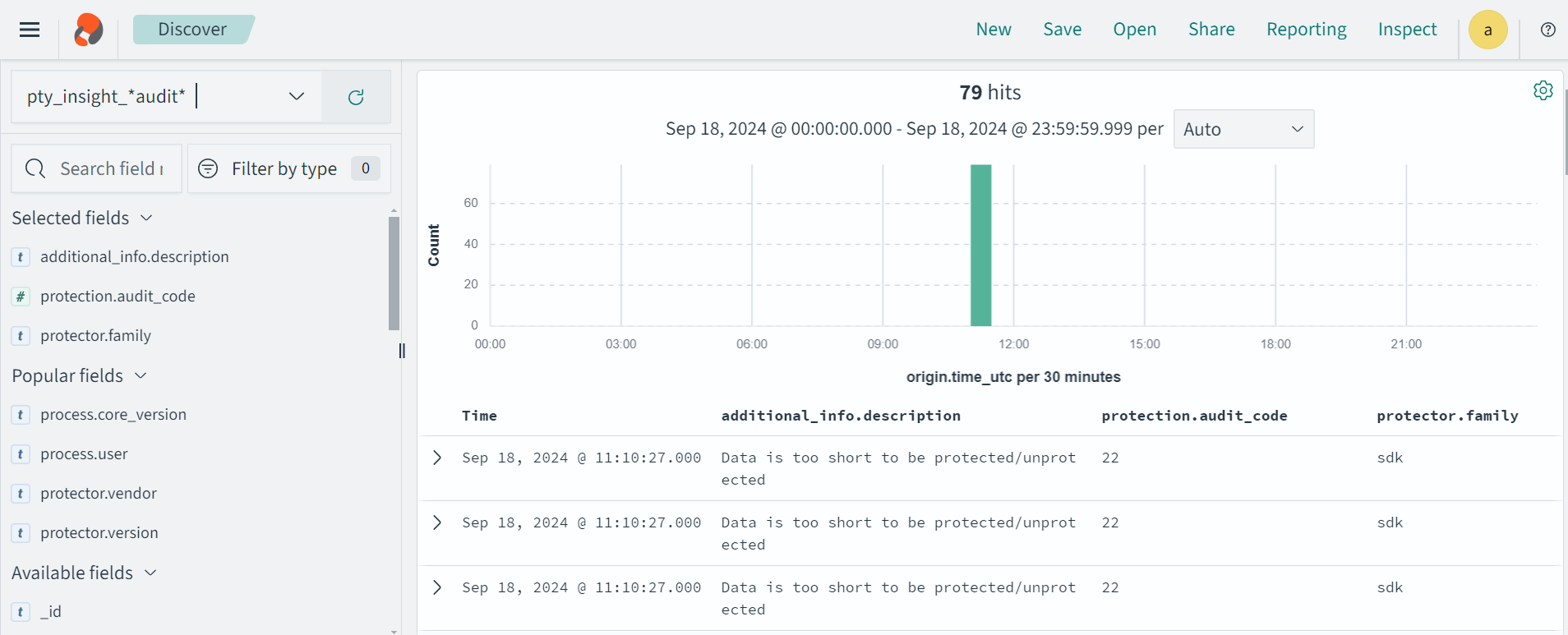
Protection audit logs are stored in the Audit Store. Select the pty_insight_*audit* index to view the protection logs.
For more information about viewing the logs, refer to Working with Discover.
4 - Config.ini file for Application Protector
Sample config.ini file for Application Protector.
The Application Protector can be configured using the config.ini file. By default, this file is located in the <installation directory>/sdk/<protector>/data/ directory.
The various configurations required for setting up the Application Protector are described in this section.
Sample config.ini file
The following represents a sample config.ini file.
# -----------------------------
# Protector configuration
# -----------------------------
[protector]

# Cadence determines how often the protector connects with shared memory to fetch the policy updates in background.
# Default is 60 seconds. So by default, every 60 seconds protector tries to fetch the policy updates.
#
# Default 60.
cadence = 60

# The time during which an session object is valid. Default = 15 minutes.
session.sessiontimeout = 15

###############################################################################
# Log Provider Config
###############################################################################
[log]

# In case that connection to fluent-bit is lost, set how audits/logs are handled
#
# drop  : (default) Protector throws logs away if connection to the fluentbit is lost
# error : Protector returns error without protecting/unprotecting
#         data if connection to the fluentbit is lost
mode = drop

# Host/IP to fluent-bit where audits/logs will be forwarded from the protector
#
# Default localhost
host = localhost
Different configurations for Application Protector
The following are the various configurations:
Protector configurations
cadence: The interval at which the protector synchronizes with the shared memory for fetching the package with policy. The default value for cadence is 60 seconds. The maximum and minimum value that can be set for cadence are 86400 seconds (24 hours) and 0 respectively.
For more information about the policy deployment with different cadence configurations, refer to Policy Deployment.
For more information about the Resilient Package sync configuration parameters, refer to Resilient Package Sync Configuration Parameters.
For more information about changing protector status interval, refer to Resilient Package Status Configuration Parameter.session.sessiontimeout: The time during which a session object is valid. The default value for session.sessiontimeout is 15 minutes.Note: The session.sessiontimeout parameter is supported only by AP Java. Other Application Protectors do not support this parameter.
Log Provider configurations
mode: This describes how the protector logs are handled if you lose connection to the Log Forwarder host, can be set to one of the following values:drop: The logs are dropped when the connection to the Log Forwarder is lost. The default mode is drop.error: The data security operations are stopped and an error is generated when the connection to the Log Forwarder is lost.
host: The Log Forwarder hostname or IP address where the logs will be forwarded from the protector. The default host for Log Forwarder is localhost.
For more information about the configuration parameters for forwarding the audits and logs, refer to Configuration Parameters for Forwarding Audits and Logs.
5 - Multi-node Application Protector Architecture
Architecture for multi-node Application Protector.
The multi-node Application Protector (AP) architecture, its individual components, and how logs are collected using the Log Forwarder are described in this section.
The following figure describes the multi-node AP architecture.
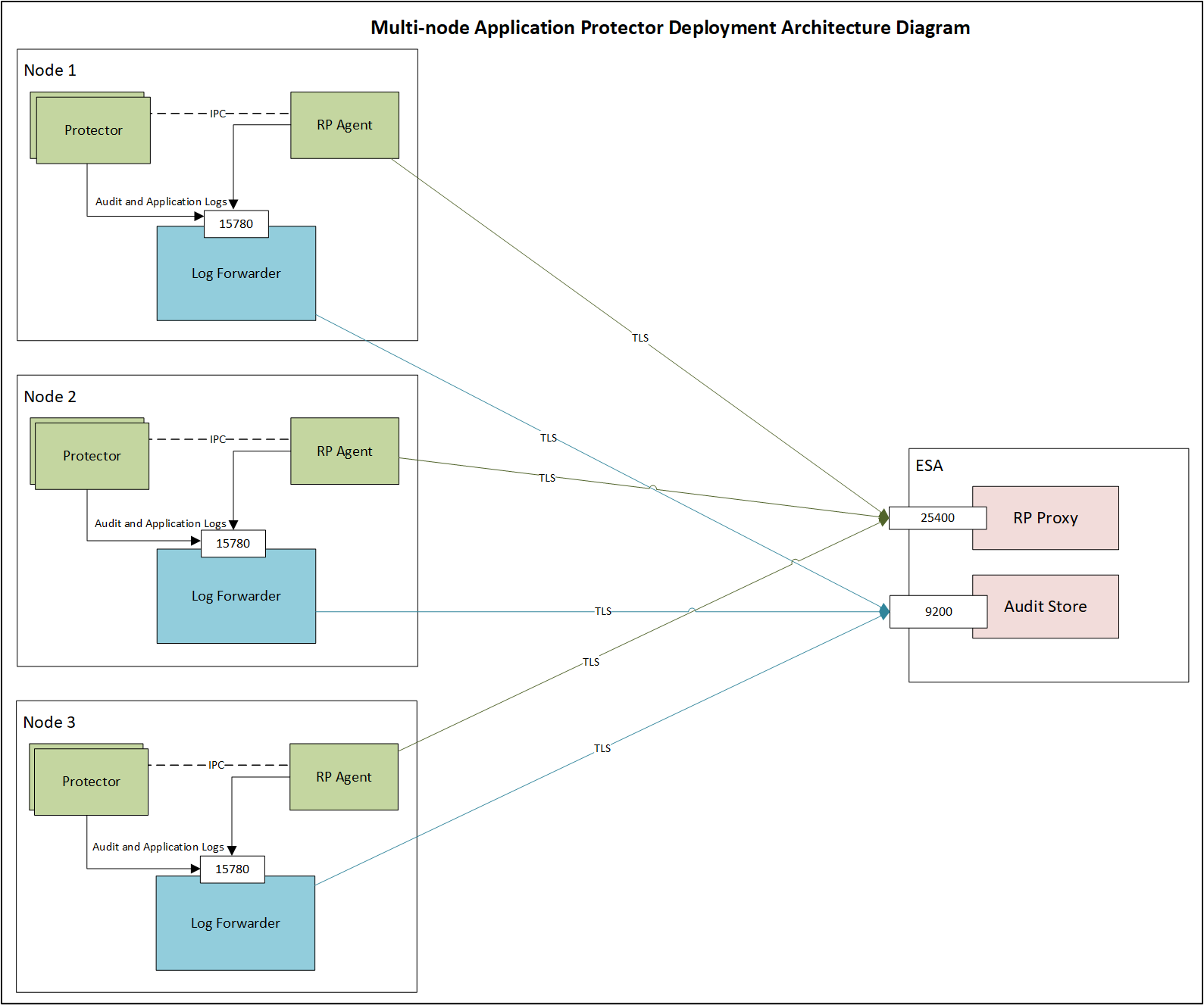
For example, some AP nodes are connected to an ESA, which includes the Audit Store component. Each AP node contains a Log Forwarder, RP Agent, and AP instance for sending logs to the ESA.
Protector: The AP can be configured using the config.ini file.
For more information about the configurations, refer to Config.ini file for Application Protector.
RP Agent: The RP Agent downloads the package with policy from the ESA, which is used by the protector to perform the protect, unprotect, or reprotect operations. It checks for the updates in the policy at set intervals and downloads the latest policy package when an update is detected.
Log Forwarder: The Log Forwarder component collects the logs from the AP and forwards them to the Audit Store. The Log Forwarder uses the 15780 port which is configurable to transport protection and audit logs to the ESA. The ESA receives the logs and stores it in the Audit Store.
6 - Uninstalling the Application Protector
Uninstalling the AP C Installation on different platforms
Uninstalling Application Protector (AP) C from Linux
This section outlines the steps to uninstall the various components of AP C from a Linux platform.
Uninstalling the Log Forwarder from Linux
Note: To preserve all the configurations while upgrading the Log Forwarder, ensure all the files present under the /opt/protegrity/logforwarder/data/config.d directory are backed up.
To uninstall the Log Forwarder from a Linux platform:
Navigate to the /opt/protegrity/logforwarder/bin directory.
Stop the Log Forwarder using the following command.
Delete the /opt/protegrity/logforwarder directory.
The Log Forwarder is uninstalled.
Uninstalling the RP Agent from Linux
Note: Before uninstalling the RP Agent, ensure that all the files present under the /opt/protegrity/rpagent/data directory are backed up.
To uninstall the RP Agent from a Linux platform:
Navigate to the /opt/protegrity/rpagent/bin directory.
Stop the RP Agent using the following command.
Delete the /opt/protegrity/rpagent directory.
The RP Agent is uninstalled.
Uninstalling the AP C from Linux
To uninstall the AP C from a Linux platform:
Navigate to the /opt/protegrity/sdk directory.
Delete the /c directory.
The AP C is uninstalled.