6 - Application Protector Java APIs
The various APIs of the AP Java.
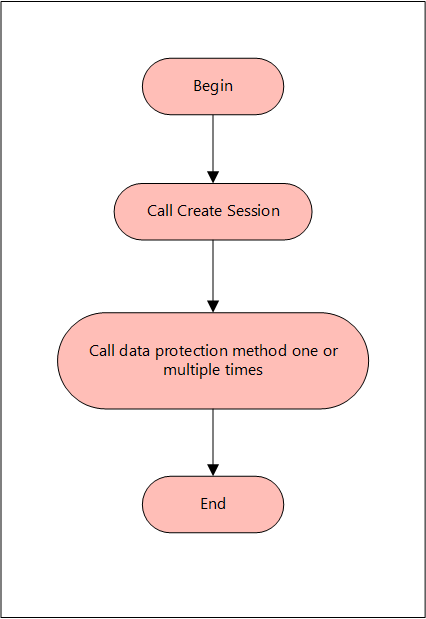
A session must be created to run the Application Protector (AP) Java. The session enables AP Java to access information about the Trusted Application from the policy stored in memory. If the application is trusted, then the protect, unprotect, or reprotect method is called, one or many times, depending on the data.
The AP Java can be initialized by an OS User who is registered and deployed as the Trusted Application User in the ESA. The OS User can also be a Policy User.
The following diagram represents the basic flow of a session.
Note: The AP Java only supports bytes converted from the string data type.
If any other data type is directly converted to bytes and passed as an input to the API that supports byte as an input and provides byte as an output, then data corruption might occur.
Supported data types for the AP Java
The AP Java supports the following data types:
- Bytes
- Double
- Float
- Integer
- java.util.Date
- Long
- Short
- String
The following are the various APIs provided by the AP Java.
getProtector
The getProtector method returns the Protector object associated with the AP Java APIs. After initialization, this object is used to create a session. The session is then passed as a parameter to protect, unprotect, or reprotect methods.
static Protector getProtector()
Parameters
None
Returns
Protector Object: An object associated with the Protegrity Application Protector API.
Exception
ProtectorException: If the configurations are invalid, then an exception is thrown indicating a
failed initialization.
getVersion
The getVersion method returns the product version of the AP Java in use.
public java.lang.String getVersion()
Parameters
None
Returns
String: Product version
getVersionEx
The getVersionEx method returns the extended version of the AP Java in use. The extended version consists of the Product version number and the CORE version number.
Note: The Core version is a sub-module used for troubleshooting protector issues.
public java.lang.String getVersionEx()
Parameters
None
Returns
String: Product version and CORE version
getLastError
The getLastError method returns the last error and a description of why this error was returned. When the methods used for protecting, unprotecting, or reprotecting data return an exception or a Boolean false, the getLastError method is called that describes why the method failed.
public java.lang.String getLastError(SessionObject session)
Parameters
Session: Session ID that is obtained by calling the createSession method.
Returns
String: Error message
Exception
ProtectorException: If the SessionObject is null, then an exception is thrown
SessionTimeoutException: If the session is invalid or has timed out, then an exception is thrown
For more information about the return codes, refer to Application Protector API Return Codes.
createSession
The createSession method creates a new session. The sessions that have not been utilized for a while, are automatically removed according to the sessiontimeout parameter defined in the [protector] section of the config.ini file.
The methods in the Protector API that take the SessionObject as a parameter, might throw an exception SessionTimeoutException if the session is invalid or has timed out. The application developers can handle the SessionTimeoutException and create a new session with a new SessionObject.
public SessionObject createSession(java.lang.String policyUser)
Parameters
policyUser: User name defined in the policy, as a string value.
Returns
SessionObject: Object of the SessionObject class.
Exception
ProtectionException: If input is null or empty, then an exception is thrown.
protect - Short array data
It It protects the data provided as a short array that uses the preservation data type or No Encryption data element. It supports bulk protection. There is no maximum data limit. For more information about the data limit, refer to AES Encryption.
If the data type preservation methods are used for data protection, then the protected data can be stored in the same data type as used for the input data.
public boolean protect(SessionObject sessionObj, java.lang.String dataElementName, short[] input, short[] output, byte[] externalIv)
Parameters
sessionObj: SessionObject that is obtained by calling the createSession method.
dataElementName: String containing the data element name defined in policy.
input: Input array with short format data.
output: Resultant output array with short format data.
externalIv: Buffer containing data that will be used as external IV, when externalIv = null, the value is ignored.
Result
True: The data is successfully protected.
False: The parameters passed are accurate, but the method failed when:
- The protection methods failed to perform the required action
- The data element is null or empty
For more information, such as, a text explanation and reason for the failure, call getLastError(session).
Exception
Protector Exception: If the SessionObject is null or if policy is configured to throw an exception, then an exception is thrown.
SessionTimeoutException: If the session is invalid or has timed out, then an exception is thrown.
protect - Short array data for encryption
It protects the data provided as a short array that uses an encryption data element. It supports bulk protection. There is no maximum data limit.
For more information about the data limit, refer to AES Encryption.
When the encryption method is used to protect data, the output of data protection (protected data) should be stored in byte[].
public boolean protect(SessionObject sessionObj, java.lang.String dataElementName, short[] input, byte[][] output, byte[] externalIv)
Parameters
sessionObj: SessionObject that is obtained by calling the createSession method.
dataElementName: String containing the data element name defined in policy.
input: Input array with short format data.
output: Resultant output array with byte format data.
externalIv: Optional parameter, which is a buffer containing data that will be used as external IV, when externalIv = null, the value is ignored.
Note: Encryption data elements do not support external IV.
Result
True: The data is successfully protected.
False: The parameters passed are accurate, but the method failed when:
- The protection methods failed to perform the required action
- The data element is null or empty
For more information, such as, a text explanation and reason for the failure, call getLastError(session).
Exception
Protector Exception: If the SessionObject is null or if policy is configured to throw an exception, then an exception is thrown.
SessionTimeoutException: If the session is invalid or has timed out, then an exception is thrown.
protect - Int array data
It It protects the data provided as an int array that uses the preservation data type or No Encryption data element. It supports bulk protection. However, you are recommended to pass not more than 1 MB of input data for each protection call.
If the data type preservation methods are used for data protection, then the protected data can be stored in the same data type as used for the input data.
public boolean protect(SessionObject sessionObj, java.lang.String dataElementName, int[] input, int[] output, byte[] externalIv)
Parameters
sessionObj: SessionObject that is obtained by calling the createSession method.
dataElementName: String containing the data element name defined in policy.
input: Input array with int data.
output: Resultant output array with int data.
externalIv: Optional parameter, which is a buffer containing data that will be used as external IV, when externalIv = null, the value is ignored.
Result
True: The data is successfully protected.
False: The parameters passed are accurate, but the method failed when:
- The protection methods failed to perform the required action
- The data element is null or empty
For more information, such as, a text explanation and reason for the failure, call getLastError(session).
Exception
Protector Exception: If the SessionObject is null or if policy is configured to throw an exception, then an exception is thrown.
SessionTimeoutException: If the session is invalid or has timed out, then an exception is thrown.
protect - Int array data for encryption
It protects the data provided as an int array that uses an encryption data element. It supports bulk protection. There is no maximum data limit. However, you are recommended to pass not more than 1 MB of input data for each protection call.
Data protected by using encryption data elements with input as integers, long or short data types, and output as bytes, cannot move between platforms with different endianness.
For example, you cannot move the protected data from the AIX platform to Linux or Windows platform and vice versa while using encryption data elements in the following scenarios:
- Input as integers and output as bytes
- Input as short integers and output as bytes
- Input as long integers and output as bytes
When the encryption method is used to protect data, the output of data protection (protected data) should be stored in byte[].
public boolean protect(SessionObject sessionObj, java.lang.String dataElementName, int[] input, byte[][] output, byte[] externalIv)
Parameters
sessionObj: SessionObject that is obtained by calling the createSession method.
dataElementName: String containing the data element name defined in policy.
input: Input array with int data.
output: Resultant output array with byte data.
externalIv: Optional parameter, which is a buffer containing data that will be used as external IV, when externalIv = null, the value is ignored.
Note: Encryption data elements do not support external IV.
Result
True: The data is successfully protected.
False: The parameters passed are accurate, but the method failed when:
- The protection methods failed to perform the required action
- The data element is null or empty
For more information, such as, a text explanation and reason for the failure, call getLastError(session).
Exception
Protector Exception: If the SessionObject is null or if policy is configured to throw an exception, then an exception is thrown.
SessionTimeoutException: If the session is invalid or has timed out, then an exception is thrown.
protect - Long array data
It protects the data provided as a long array that uses the preservation data type or No Encryption data element. It supports bulk protection. There is no maximum data limit. However, you are recommended to pass not more than 1 MB of input data for each protection call.
If the data type preservation methods are used for data protection, then the protected data can be stored in the same data type as used for the input data.
public boolean protect(SessionObject sessionObj, java.lang.String dataElementName, long[] input, long[] output, byte[] externalIv)
Parameters
sessionObj: SessionObject that is obtained by calling the createSession method.
dataElementName: String containing the data element name defined in policy.
input: Input array with long format data.
output: Resultant output array with long format data.
externalIv: Optional parameter, which is a buffer containing data that will be used as external IV, when externalIv = null, the value is ignored.
Result
True: The data is successfully protected.
False: The parameters passed are accurate, but the method failed when:
- The protection methods failed to perform the required action
- The data element is null or empty
For more information, such as, a text explanation and reason for the failure, call getLastError(session).
Exception
Protector Exception: If the SessionObject is null or if policy is configured to throw an exception, then an exception is thrown.
SessionTimeoutException: If the session is invalid or has timed out, then an exception is thrown.
protect - Long array data for encryption
It protects the data provided as a long array that uses an encryption data element. It supports bulk protection. There is no maximum data limit. However, you are recommended to pass not more than 1 MB of input data for each protection call.
When the encryption method is used to protect data, the output of data protection (protected data) should be stored in byte[].
protect(SessionObject sessionObj, java.lang.String dataElementName, long[] input, byte[][] output)
Parameters
sessionObj: SessionObject that is obtained by calling the createSession method.
dataElementName: String containing the data element name defined in policy.
input: Input array with long format data.
output: Resultant output array with byte format data.
externalIv: Optional parameter, which is a buffer containing data that will be used as external IV, when externalIv = null, the value is ignored.
Note: Encryption data elements do not support external IV.
Result
True: The data is successfully protected.
False: The parameters passed are accurate, but the method failed when:
- The protection methods failed to perform the required action
- The data element is null or empty
For more information, such as, a text explanation and reason for the failure, call getLastError(session).
Exception
Protector Exception: If the SessionObject is null or if policy is configured to throw an exception, then an exception is thrown.
SessionTimeoutException: If the session is invalid or has timed out, then an exception is thrown.
protect - Float array data
It protects the data provided as a float array that uses the No Encryption data element. It supports bulk protection. There is no maximum data limit. However, you are recommended to pass not more than 1 MB of input data for each protection call.
If the data type preservation methods are used for data protection, then the protected data can be stored in the same data type as used for the input data.
public boolean protect(SessionObject sessionObj, java.lang.String dataElementName, float[] input, float[] output, byte[] externalIv)
Parameters
sessionObj: SessionObject that is obtained by calling the createSession method.
dataElementName: String containing the data element name defined in policy.
input: Input array with float format data.
output: Resultant output array with float format data.
Result
True: The data is successfully protected.
False: The parameters passed are accurate, but the method failed when:
- The protection methods failed to perform the required action
- The data element is null or empty
For more information, such as, a text explanation and reason for the failure, call getLastError(session).
Exception
Protector Exception: If the SessionObject is null or if policy is configured to throw an exception, then an exception is thrown.
SessionTimeoutException: If the session is invalid or has timed out, then an exception is thrown.
protect - Float array data for encryption
It protects the data provided as a float array that uses an encryption data element. It supports bulk protection. There is no maximum data limit. However, you are recommended to pass not more than 1 MB of input data for each protection call.
When the encryption method is used to protect data, the output of data protection (protected data) should be stored in byte[].
public boolean protect(SessionObject sessionObj, java.lang.String dataElementName, float[] input, byte[][] output)
Parameters
sessionObj: SessionObject that is obtained by calling the createSession method.
dataElementName: String containing the data element name defined in policy.
input: Input array with float format data.
output: Resultant output array with byte format data.
Result
True: The data is successfully protected.
False: The parameters passed are accurate, but the method failed when:
- The protection methods failed to perform the required action
- The data element is null or empty
For more information, such as, a text explanation and reason for the failure, call getLastError(session).
Exception
Protector Exception: If the SessionObject is null or if policy is configured to throw an exception, then an exception is thrown.
SessionTimeoutException: If the session is invalid or has timed out, then an exception is thrown.
protect - Double array data
It protects the data provided as a double array that uses the No Encryption data element. It supports bulk protection. There is no maximum data limit. However, you are recommended to pass not more than 1 MB of input data for each protection call.
When the data type preservation methods are used to protect data, the output of data protection can be stored in the same data type that was used for the input data.
public boolean protect(SessionObject sessionObj, java.lang.String dataElementName, double[] input, double[] output)
Parameters
sessionObj: SessionObject that is obtained by calling the createSession method.
dataElementName: String containing the data element name defined in policy.
input: Input array with double format data.
output: Resultant output array with double format data.
Result
True: The data is successfully protected.
False: The parameters passed are accurate, but the method failed when:
- The protection methods failed to perform the required action
- The data element is null or empty
For more information, such as, a text explanation and reason for the failure, call getLastError(session).
Exception
Protector Exception: If the SessionObject is null or if policy is configured to throw an exception, then an exception is thrown.
SessionTimeoutException: If the session is invalid or has timed out, then an exception is thrown.
protect - Double array data for encryption
It protects the data provided as a double array that uses an encryption data element. It supports bulk protection. There is no maximum data limit. However, you are recommended to pass not more than 1 MB of input data for each protection call.
When the encryption method is used to protect data, the output of data protection (protected data) should be stored in byte[].
public boolean protect(SessionObject sessionObj, java.lang.String dataElementName, double[] input, byte[][] output)
Parameters
sessionObj: SessionObject that is obtained by calling the createSession method.
dataElementName: String containing the data element name defined in policy.
input: Input array with double format data.
output: Resultant output array with byte format data.
Result
True: The data is successfully protected.
False: The parameters passed are accurate, but the method failed when:
- The protection methods failed to perform the required action
- The data element is null or empty
For more information, such as, a text explanation and reason for the failure, call getLastError(session).
Exception
Protector Exception: If the SessionObject is null or if policy is configured to throw an exception, then an exception is thrown.
SessionTimeoutException: If the session is invalid or has timed out, then an exception is thrown.
protect - Date array data
It protects the data provided as a java.util.Data array that uses a preservation data type. It supports bulk protection. There is no maximum data limit. However, you are recommended to pass not more than 1 MB of input data for each protection call.
If the data type preservation methods are used for data protection, then the protected data can be stored in the same data type as used for the input data.
If the protect and unprotect operations are performed in different time zones using the java.util.Date API, then the unprotected data does not match with the input data.
For example, if you perform the protect operation in EDT time zone using the java.util.Date API, then you must perform the unprotect operation only in EDT time zone. This ensures that the unprotect operation returns back the original data.
public boolean protect(SessionObject sessionObj, java.lang.String dataElementName, java.util.Date[] input, java.util.Date[] output)
Parameters
sessionObj: SessionObject that is obtained by calling the createSession method.
dataElementName: String containing the data element name defined in policy.
input: Input array with date format data.
output: Resultant output array with date format data.
Result
True: The data is successfully protected.
False: The parameters passed are accurate, but the method failed when:
- The protection methods failed to perform the required action
- The data element is null or empty
For more information, such as, a text explanation and reason for the failure, call getLastError(session).
Exception
Protector Exception: If the SessionObject is null or if policy is configured to throw an exception, then an exception is thrown.
SessionTimeoutException: If the session is invalid or has timed out, then an exception is thrown.
protect - String array data
It protects the data provided as a string array that uses a preservation data type or the No Encryption data element. It supports bulk protection. There is no maximum data limit. However, you are recommended to pass not more than 1 MB of input data for each protection call.
For String and Byte data types, the maximum length for tokenization is 4096 bytes, while for encryption there is no maximum length defined.
If the data type preservation methods are used for data protection, then the protected data can be stored in the same data type as used for the input data.
For Date and Datetime type of data elements, an invalid input data error is returned by the protect API if the input value falls between the non-existent date range. It ranges from 05-OCT-1582 to 14-OCT-1582 of the Gregorian Calendar.
For more information about the tokenization and de-tokenization of the cutover dates of the Proleptic Gregorian Calendar, refer to section Datetime Tokenization for Cutover Dates of the Proleptic Gregorian Calendar.
public boolean protect(SessionObject sessionObj, java.lang.String dataElementName, java.lang.String[] input, java.lang.String[] output, byte[] externalIv)
Parameters
sessionObj: SessionObject that is obtained by calling the createSession method.
dataElementName: String containing the data element name defined in policy.
input: Input array with string format data.
output: Resultant output array with string format data.
externalIv: Optional parameter, which is a buffer containing data that will be used as external IV, when externalIv = null, the value is ignored.
Result
True: The data is successfully protected.
False: The parameters passed are accurate, but the method failed when:
- The protection methods failed to perform the required action
- The data element is null or empty
For more information, such as, a text explanation and reason for the failure, call getLastError(session).
Exception
Protector Exception: If the SessionObject is null or if policy is configured to throw an exception, then an exception is thrown.
SessionTimeoutException: If the session is invalid or has timed out, then an exception is thrown.
protect - String array data for encryption
It protects the data provided as s string array that uses an encryption data element. It supports bulk protection. There is no maximum data limit. However, you are recommended to pass not more than 1 MB of input data for each protection call.
For String and Byte data types, the maximum length for tokenization is 4096 bytes, while for encryption there is no maximum length defined.
The output of data protection is stored in byte[] when:
- Encryption method is used to protect data
- Format Preserving Encryption (FPE) method is used for Char and String APIs
The string as an input and byte as an output API is unsupported by Unicode Gen2 and FPE data elements for the AP Java.
public boolean protect(SessionObject sessionObj, java.lang.String dataElementName, java.lang.String[] input, byte[][] output, byte[] externalIv)
Parameters
sessionObj: SessionObject that is obtained by calling the createSession method.
dataElementName: String containing the data element name defined in policy.
input: Input array with string format data.
output: Resultant output array with byte format data.
externalIv: Optional parameter, which is a buffer containing data that will be used as external IV, when externalIv = null, the value is ignored.
Note: Encryption data elements do not support external IV.
Result
True: The data is successfully protected.
False: The parameters passed are accurate, but the method failed when:
- The protection methods failed to perform the required action
- The data element is null or empty
For more information, such as, a text explanation and reason for the failure, call getLastError(session).
Exception
Protector Exception: If the SessionObject is null or if policy is configured to throw an exception, then an exception is thrown.
SessionTimeoutException: If the session is invalid or has timed out, then an exception is thrown.
protect - Char array data
It protects the data provided as a char array that uses a preservation data type or the No Encryption data element. It supports bulk protection. There is no maximum data limit. However, you are recommended to pass not more than 1 MB of input data for each protection call.
If the data type preservation methods are used for data protection, then the protected data can be stored in the same data type as used for the input data.
For Date and Datetime type of data elements, an invalid input data error is returned by the protect API if the input value falls between the non-existent date range. It ranges from 05-OCT-1582 to 14-OCT-1582 of the Gregorian Calendar.
For more information about the tokenization and de-tokenization of the cutover dates of the Proleptic Gregorian Calendar, refer to section Datetime Tokenization for Cutover Dates of the Proleptic Gregorian Calendar.
public boolean protect(SessionObject sessionObj, java.lang.String dataElementName, char[][] input, char[][] output, byte[] externalIv)
Parameters
sessionObj: SessionObject that is obtained by calling the createSession method.
dataElementName: String containing the data element name defined in policy.
input: Input array with char format data.
output: Resultant output array with char format data.
externalIv: Optional parameter, which is a buffer containing data that will be used as external IV, when externalIv = null, the value is ignored.
Result
True: The data is successfully protected.
False: The parameters passed are accurate, but the method failed when:
- The protection methods failed to perform the required action
- The data element is null or empty
For more information, such as, a text explanation and reason for the failure, call getLastError(session).
Exception
Protector Exception: If the SessionObject is null or if policy is configured to throw an exception, then an exception is thrown.
SessionTimeoutException: If the session is invalid or has timed out, then an exception is thrown.
protect - Char array data for encryption
It protects the data provided as a char array that uses an encryption data element. It supports bulk protection. There is no maximum data limit. However, you are recommended to pass not more than 1 MB of input data for each protection call.
The output of data protection is stored in byte[] when:
- Encryption method is used to protect data
- Format Preserving Encryption (FPE) method is used for Char and String APIs
public boolean protect(SessionObject sessionObj, java.lang.String dataElementName, char[][] input, byte[][] output, byte[] externalIv)
Parameters
sessionObj: SessionObject that is obtained by calling the createSession method.
dataElementName: String containing the data element name defined in policy.
input: Input array with char format data.
output: Resultant output array with byte format data.
externalIv: Optional parameter, which is a buffer containing data that will be used as external IV, when externalIv = null, the value is ignored.
Note: Encryption data elements do not support external IV.
Result
True: The data is successfully protected.
False: The parameters passed are accurate, but the method failed when:
- The protection methods failed to perform the required action
- The data element is null or empty
For more information, such as, a text explanation and reason for the failure, call getLastError(session).
Exception
Protector Exception: If the SessionObject is null or if policy is configured to throw an exception, then an exception is thrown.
SessionTimeoutException: If the session is invalid or has timed out, then an exception is thrown.
protect - Byte array data
It protects the data provided as a byte array that uses the encryption data element, No Encryption data element, and preservation data type. It supports bulk protection. There is no maximum data limit. However, you are recommended to pass not more than 1 MB of input data for each protection call.
For String and Byte data types, the maximum length for tokenization is 4096 bytes, while for encryption there is no maximum length defined.
The Protegrity AP Java protector only supports bytes converted from the string data type.
If any data type is converted to bytes and passed as input to the API supporting byte as input and providing byte as output, then data corruption might occur.
If the data type preservation methods are used for data protection, then the protected data can be stored in the same data type as used for the input data.
For Date and Datetime type of data elements, an invalid input data error is returned by the protect API if the input value falls between the non-existent date range. It ranges from 05-OCT-1582 to 14-OCT-1582 of the Gregorian Calendar.
For more information about the tokenization and de-tokenization of the cutover dates of the Proleptic Gregorian Calendar, refer to section Datetime Tokenization for Cutover Dates of the Proleptic Gregorian Calendar.
public boolean protect(SessionObject sessionObj, java.lang.String dataElementName, byte[][] input, byte[][] output, PTYCharset ...ptyCharsets)
Parameters
sessionObj: SessionObject that is obtained by calling the createSession method.
dataElementName: String containing the data element name defined in policy.
input: Input array with byte format data.
output: Resultant output array with byte format data.
ptyCharsets: Encoding associated with the bytes of the input data.
PTYCharset ptyCharsets = PTYCharset.<encoding>;
The ptyCharsets parameter supports the following encodings:
The ptyCharsets parameter is mandatory for the data elements created with Unicode Gen2 tokenization method and the FPE encryption method for byte APIs.
The encoding set for the ptyCharsets parameter must match the encoding of the input data passed.
The default value for the ptyCharsets parameter is UTF-8.
Result
True: The data is successfully protected.
False: The parameters passed are accurate, but the method failed when:
- The protection methods failed to perform the required action
- The data element is null or empty
For more information, such as, a text explanation and reason for the failure, call getLastError(session).
Exception
Protector Exception: If the SessionObject is null or if policy is configured to throw an exception, then an exception is thrown.
SessionTimeoutException: If the session is invalid or has timed out, then an exception is thrown.
protect - String array data with External Tweak
It protects the data provided as a string array using the FPE (FF1) that uses a preservation data type with FPE data elements. It supports bulk protection. There is no maximum data limit. However, you are recommended to pass not more than 1 MB of input data for each protection call.
When FPE method is used with FPE data elements for data protection, the protected data can be stored in the same data type that was used for input data.
public boolean protect(SessionObject sessionObj, java.lang.String dataElementName, java.lang.String[] input, java.lang.String[] output, byte[] externalIv, byte[] externalTweak)
Parameters
sessionObj: SessionObject that is obtained by calling the createSession method.
dataElementName: String containing the data element name defined in policy.
input: Input array with string format data.
output: Resultant output array with string format data.
externalIv: Optional parameter, which is a buffer containing data that will be used as external IV, when externalIv = null, the value is ignored.
externalTweak: Optional parameter, which is a buffer containing data that will be used as Tweak, when externalTweak = null, the value is ignored.
Result
True: The data is successfully protected.
False: The parameters passed are accurate, but the method failed when:
- The protection methods failed to perform the required action
- The data element is null or empty
For more information, such as, a text explanation and reason for the failure, call getLastError(session).
Exception
Protector Exception: If the SessionObject is null or if policy is configured to throw an exception, then an exception is thrown.
SessionTimeoutException: If the session is invalid or has timed out, then an exception is thrown.
unprotect - Short array data
It unprotects the data provided as a short array that uses the preservation data type or the No Encryption data element. It supports the bulk unprotection. There is no maximum data limit. However, you are recommended to pass not more than 1 MB of input data for each unprotection call.
public boolean unprotect(SessionObject sessionObj, java.lang.String dataElementName, short[] input, short[] output, byte[] externalIv)
Parameters
sessionObj: SessionObject that is obtained by calling the createSession method.
dataElementName: String containing the data element name defined in policy.
input: Input array with short format data.
output: Resultant output array with short format data.
externalIv: Optional parameter, which is a buffer containing data that will be used as external IV, when externalIv = null, the value is ignored.
Result
True: The data is successfully unprotected.
False: The parameters passed are accurate, but the method failed to perform the required action
For more information, such as, a text explanation and reason for the failure, call getLastError(session).
Exception
Protector Exception: If the SessionObject is null or if policy is configured to throw an exception, then an exception is thrown.
SessionTimeoutException: If the session is invalid or has timed out, then an exception is thrown.
unprotect - Short array data for encryption
It unprotects the data provided as a short array that uses an encryption data element. It supports the bulk unprotection. There is no maximum data limit. However, you are recommended to pass not more than 1 MB of input data for each unprotection call.
public boolean unprotect(SessionObject sessionObj, java.lang.String dataElementName, byte[][] input, short[] output, byte[] externalIv)
Parameters
sessionObj: SessionObject that is obtained by calling the createSession method.
dataElementName: String containing the data element name defined in policy.
input: Input array with byte format data.
output: Resultant output array with short format data.
externalIv: Optional parameter, which is a buffer containing data that will be used as external IV, when externalIv = null, the value is ignored.
Note: Encryption data elements do not support external IV.
Result
True: The data is successfully unprotected.
False: The parameters passed are accurate, but the method failed to perform the required action.
For more information, such as, a text explanation and reason for the failure, call getLastError(session).
Exception
Protector Exception: If the SessionObject is null or if policy is configured to throw an exception, then an exception is thrown.
SessionTimeoutException: If the session is invalid or has timed out, then an exception is thrown.
unprotect - Int array data
It unprotects the data provided as an int array that uses a preservation data type or a No Encryption data element. It supports the bulk unprotection. There is no maximum data limit. However, you are recommended to pass not more than 1 MB of input data for each unprotection call.
public boolean unprotect(SessionObject sessionObj, java.lang.String dataElementName, int[] input, int[] output, byte[] externalIv)
Parameters
sessionObj: SessionObject that is obtained by calling the createSession method.
dataElementName: String containing the data element name defined in policy.
input: Input array with int format data.
output: Resultant output array with int format data.
externalIv: Optional parameter, which is a buffer containing data that will be used as external IV, when externalIv = null, the value is ignored.
Result
True: The data is successfully unprotected.
False: The parameters passed are accurate, but the method failed to perform the required action.
For more information, such as, a text explanation and reason for the failure, call getLastError(session).
Exception
Protector Exception: If the SessionObject is null or if policy is configured to throw an exception, then an exception is thrown.
SessionTimeoutException: If the session is invalid or has timed out, then an exception is thrown.
unprotect - Int array data for encryption
It unprotects the data provided as an int array that uses an encryption data element. It supports the bulk unprotection. There is no maximum data limit. However, you are recommended to pass not more than 1 MB of input data for each unprotection call.
public boolean unprotect(SessionObject sessionObj, java.lang.String dataElementName, byte[][] input, int[] output, byte[] externalIv)
Parameters
sessionObj: SessionObject that is obtained by calling the createSession method.
dataElementName: String containing the data element name defined in policy.
input: Input array with byte format data.
output: Resultant output array with int format data.
externalIv: Optional parameter, which is a buffer containing data that will be used as external IV, when externalIv = null, the value is ignored.
Note: Encryption data elements do not support external IV.
Result
True: The data is successfully unprotected.
False: The parameters passed are accurate, but the method failed to perform the required action.
For more information, such as, a text explanation and reason for the failure, call getLastError(session).
Exception
Protector Exception: If the SessionObject is null or if policy is configured to throw an exception, then an exception is thrown.
SessionTimeoutException: If the session is invalid or has timed out, then an exception is thrown.
unprotect - Long array data
It unprotects the data provided as a long array that uses the preservation data type or the No Encryption data element. It supports the bulk unprotection. However, you are recommended to pass not more
than 1 MB of input data for each unprotection call.
public boolean unprotect(SessionObject sessionObj, java.lang.String dataElementName, long[] input, long[] output, byte[] externalIv)
Parameters
sessionObj: SessionObject that is obtained by calling the createSession method.
dataElementName: String containing the data element name defined in policy.
input: Input array with long format data.
output: Resultant output array with long format data.
externalIv: Optional parameter, which is a buffer containing data that will be used as external IV, when externalIv = null, the value is ignored.
Result
True: The data is successfully unprotected.
False: The parameters passed are accurate, but the method failed to perform the required action.
For more information, such as, a text explanation and reason for the failure, call getLastError(session).
Exception
Protector Exception: If the SessionObject is null or if policy is configured to throw an exception, then an exception is thrown.
SessionTimeoutException: If the session is invalid or has timed out, then an exception is thrown.
unprotect - Long array data for encryption
It unprotects the data provided as a long array that uses an encryption data element. It supports the bulk unprotection. There is no maximum data limit. However, you are recommended to pass not more than 1 MB of input data for each unprotection call.
public boolean unprotect(SessionObject sessionObj, java.lang.String dataElementName, byte[][] input, long[] output, byte[] externalIv)
Parameters
sessionObj: SessionObject that is obtained by calling the createSession method.
dataElementName: String containing the data element name defined in policy.
input: Input array with byte format data.
output: Resultant output array with long format data.
externalIv: Optional parameter, which is a buffer containing data that will be used as external IV, when externalIv = null, the value is ignored.
Note: Encryption data elements do not support external IV.
Result
True: The data is successfully unprotected.
False: The parameters passed are accurate, but the method failed to perform the required action.
For more information, such as, a text explanation and reason for the failure, call getLastError(session).
Exception
Protector Exception: If the SessionObject is null or if policy is configured to throw an exception, then an exception is thrown.
SessionTimeoutException: If the session is invalid or has timed out, then an exception is thrown.
unprotect - Float array data
It unprotects the data provided as a float array that uses a No Encryption data element. It supports the bulk unprotection. There is no maximum data limit. However, you are recommended to pass not more than 1 MB of input data for each unprotection call.
public boolean unprotect(SessionObject sessionObj, java.lang.String dataElementName, float[] input, float[] output)
Parameters
sessionObj: SessionObject that is obtained by calling the createSession method.
dataElementName: String containing the data element name defined in policy.
input: Input array with float format data.
output: Resultant output array with float format data.
Result
True: The data is successfully unprotected.
False: The parameters passed are accurate, but the method failed to perform the required action.
For more information, such as, a text explanation and reason for the failure, call getLastError(session).
Exception
Protector Exception: If the SessionObject is null or if policy is configured to throw an exception, then an exception is thrown.
SessionTimeoutException: If the session is invalid or has timed out, then an exception is thrown.
unprotect - Float array data for encryption
It unprotects the data provided as a float array that uses an encryption data element. It supports the bulk unprotection. There is no maximum data limit. However, you are recommended to pass not more than 1 MB of input data for each unprotection call.
public boolean unprotect(SessionObject sessionObj, java.lang.String dataElementName, byte[][] input, float[] output)
Parameters
sessionObj: SessionObject that is obtained by calling the createSession method.
dataElementName: String containing the data element name defined in policy.
input: Input array with byte format data.
output: Resultant output array with float format data.
Result
True: The data is successfully unprotected.
False: The parameters passed are accurate, but the method failed to perform the required action.
For more information, such as, a text explanation and reason for the failure, call getLastError(session).
Exception
Protector Exception: If the SessionObject is null or if policy is configured to throw an exception, then an exception is thrown.
SessionTimeoutException: If the session is invalid or has timed out, then an exception is thrown.
unprotect - Double array data
It unprotects the data provided as a double array that uses the No Encryption data element. It supports the bulk unprotection. There is no maximum data limit. However, you are recommended to pass not more than 1 MB of input data for each unprotection call.
public boolean unprotect(SessionObject sessionObj, java.lang.String dataElementName, double[] input, double[] output)
Parameters
sessionObj: SessionObject that is obtained by calling the createSession method.
dataElementName: String containing the data element name defined in policy.
input: Input array with double format data.
output: Resultant output array with double format data.
Result
True: The data is successfully unprotected.
False: The parameters passed are accurate, but the method failed to perform the required action.
For more information, such as, a text explanation and reason for the failure, call getLastError(session).
Exception
Protector Exception: If the SessionObject is null or if policy is configured to throw an exception, then an exception is thrown.
SessionTimeoutException: If the session is invalid or has timed out, then an exception is thrown.
unprotect - Double array data for encryption
It unprotects the data provided as a double array that uses an encryption data element. It supports the bulk unprotection. There is no maximum data limit. However, you are recommended to pass not more than 1 MB of input data for each unprotection call.
public boolean unprotect(SessionObject sessionObj, java.lang.String dataElementName, byte[][] input, double[] output)
Parameters
sessionObj: SessionObject that is obtained by calling the createSession method.
dataElementName: String containing the data element name defined in policy.
input: Input array with byte format data.
output: Resultant output array with double format data.
Result
True: The data is successfully unprotected.
False: The parameters passed are accurate, but the method failed to perform the required action.
For more information, such as, a text explanation and reason for the failure, call getLastError(session).
Exception
Protector Exception: If the SessionObject is null or if policy is configured to throw an exception, then an exception is thrown.
SessionTimeoutException: If the session is invalid or has timed out, then an exception is thrown.
unprotect - Date array data
It unprotects the data provided as a java.util.Date array using the preservation data type. It supports the bulk unprotection. There is no maximum data limit. However, you are recommended to pass not more than 1 MB of input data for each unprotection call.
If the protect and unprotect operations are performed in different time zones using the java.util.Date API, then the unprotected data does not match with the input data.
For example, if you perform the protect operation in EDT time zone using the java.util.Date API, then you must perform the unprotect operation only in EDT time zone. This ensures that the unprotect operation returns back the original data.
public boolean unprotect(SessionObject sessionObj, java.lang.String dataElementName, java.util.Date[] input, java.util.Date[] output)
Parameters
sessionObj: SessionObject that is obtained by calling the createSession method.
dataElementName: String containing the data element name defined in policy.
input: Input array with date format data.
output: Resultant output array with date format data.
Result
True: The data is successfully unprotected.
False: The parameters passed are accurate, but the method failed to perform the required action.
For more information, such as, a text explanation and reason for the failure, call getLastError(session).
Exception
Protector Exception: If the SessionObject is null or if policy is configured to throw an exception, then an exception is thrown.
SessionTimeoutException: If the session is invalid or has timed out, then an exception is thrown.
unprotect - String array data
It unprotects the data provided as a string array that uses a preservation data type or a No Encryption data element. It supports the bulk unprotection. There is no maximum data limit. However, you are recommended to pass not more than 1 MB of input data for each unprotection call.
public boolean unprotect(SessionObject sessionObj, java.lang.String dataElementName, String[] input, String[] output, byte[] externalIv)
Parameters
sessionObj: SessionObject that is obtained by calling the createSession method.
dataElementName: String containing the data element name defined in policy.
input: Input array with string format data.
output: Resultant output array with string format data.
externalIv: This is optional. Buffer containing data that will be used as external IV, when externalIv = null, the value is ignored.
Result
True: The data is successfully unprotected.
False: The parameters passed are accurate, but the method failed to perform the required action.
For more information, such as, a text explanation and reason for the failure, call getLastError(session).
Exception
Protector Exception: If the SessionObject is null or if policy is configured to throw an exception, then an exception is thrown.
SessionTimeoutException: If the session is invalid or has timed out, then an exception is thrown.
unprotect - String array data for encryption
It unprotects the data provided as a string array that uses an encryption data element. It supports the bulk unprotection. There is no maximum data limit. However, you are recommended to pass not more than 1 MB of input data for each unprotection call.
public boolean unprotect(SessionObject sessionObj, java.lang.String dataElementName, byte[][] input, String[] output, byte[] externalIv)
Parameters
sessionObj: SessionObject that is obtained by calling the createSession method.
dataElementName: String containing the data element name defined in policy.
input: Input array with byte format data.
output: Resultant output array with string format data.
externalIv: This is optional. Buffer containing data that will be used as external IV, when externalIv = null, the value is ignored.
Note: Encryption data elements do not support external IV.
Result
True: The data is successfully unprotected
False: The parameters passed are accurate, but the method failed to perform the required action.
For more information, such as, a text explanation and reason for the failure, call getLastError(session).
Exception
Protector Exception: If the SessionObject is null or if policy is configured to throw an exception, then an exception is thrown.
SessionTimeoutException: If the session is invalid or has timed out, then an exception is thrown.
unprotect - Char array data
It unprotects the data provided as a char array that uses a preservation data type or a No Encryption data element. It supports the bulk unprotection. There is no maximum data limit. However, you are recommended to pass not more than 1 MB of input data for each unprotection call.
public boolean unprotect(SessionObject sessionObj, java.lang.String dataElementName, char[][] input, char[][] output, byte[] externalIv)
Parameters
sessionObj: SessionObject that is obtained by calling the createSession method.
dataElementName: String containing the data element name defined in policy.
input: Input array with char format data.
output: Resultant output array with char data.
externalIv: Optional parameter, which is a buffer containing data that will be used as external IV, when externalIv = null, the value is ignored.
Result
True: The data is successfully unprotected.
False: The parameters passed are accurate, but the method failed to perform the required action.
For more information, such as, a text explanation and reason for the failure, call getLastError(session).
Exception
Protector Exception: If the SessionObject is null or if policy is configured to throw an exception, then an exception is thrown.
SessionTimeoutException: If the session is invalid or has timed out, then an exception is thrown.
unprotect - Char array data for encryption
It unprotects the data provided as a char array that uses an encryption data element. It supports the bulk unprotection. There is no maximum data limit. However, you are recommended to pass not more than 1 MB of input data for each unprotection call.
public boolean unprotect(SessionObject sessionObj, java.lang.String dataElementName, byte[][] input, char[][] output, byte[] externalIv)
Parameters
sessionObj: SessionObject that is obtained by calling the createSession method.
dataElementName: String containing the data element name defined in policy.
input: Input array with byte format data.
output: Resultant output array with char format data.
externalIv: This is optional. Buffer containing data that will be used as external IV, when externalIv = null, the value is ignored.
Result
True: The data is successfully unprotected.
False: The parameters passed are accurate, but the method failed to perform the required action.
For more information, such as, a text explanation and reason for the failure, call getLastError(session).
Exception
Protector Exception: If the SessionObject is null or if policy is configured to throw an exception, then an exception is thrown.
SessionTimeoutException: If the session is invalid or has timed out, then an exception is thrown.
unprotect - Byte array data
It unprotects the data provided as a byte array that uses an encryption data element or a No Encryption data element, or a preservation data type. It supports the bulk unprotection. There is no maximum data limit. However, you are recommended to pass not more than 1 MB of input data for each unprotection call.
The Protegrity AP Java protector only supports bytes converted from the string data type.
If any data type is converted to bytes and passed as input to the API supporting byte as input and providing byte as output, then data corruption might occur.
public boolean unprotect(SessionObject sessionObj, java.lang.String dataElementName, byte[][] input, byte[][] output, byte[] externalIv, PTYCharset ...ptyCharsets)
Parameters
sessionObj: SessionObject that is obtained by calling the createSession method.
dataElementName: String containing the data element name defined in policy.
input: Input array with byte format data.
output: Resultant output array with byte format data.
externalIv: This is optional. Buffer containing data that will be used as external IV, when externalIv = null, the value is ignored.
ptyCharsets: Encoding associated with the bytes of the input data.
PTYCharset ptyCharsets = PTYCharset.<encoding>;
The ptyCharsets parameter supports the following encodings:
The ptyCharsets parameter is mandatory for the data elements created with Unicode Gen2 tokenization method and the FPE encryption method for byte APIs. The encoding set for the ptyCharsets parameter must match the encoding of the input data passed.
The default value for the ptyCharsets parameter is UTF-8.
Result
True: The data is successfully unprotected.
False: The parameters passed are accurate, but the method failed to perform the required action.
For more information, such as, a text explanation and reason for the failure, call getLastError(session).
Exception
Protector Exception: If the SessionObject is null or if policy is configured to throw an exception, then an exception is thrown.
SessionTimeoutException: If the session is invalid or has timed out, then an exception is thrown.
unprotect - String array data with External Tweak
It unprotects the data provided as a string array using the FPE (FF1) that uses a preservation data type with FPE data elements. It supports the bulk unprotection. There is no maximum data limit. However, you are recommended to pass not more than 1 MB of input data for each unprotection call.
public boolean unprotect(SessionObject sessionObj, java.lang.String dataElementName, String[] input, String[] output, byte[] externalIv, byte[] externalTweak)
Parameters
sessionObj: SessionObject that is obtained by calling the createSession method.
dataElementName: String containing the data element name defined in policy.
input: Input array with byte format data.
output: Resultant output array with byte format data.
externalIv: This is optional. Buffer containing data that will be used as external IV, when externalIv = null, the value is ignored.
Result
True: The data is successfully unprotected.
False: The parameters passed are accurate, but the method failed to perform the required action.
For more information, such as, a text explanation and reason for the failure, call getLastError(session).
Exception
Protector Exception: If the SessionObject is null or if policy is configured to throw an exception, then an exception is thrown.
SessionTimeoutException: If the session is invalid or has timed out, then an exception is thrown.
reprotect - String array data
It reprotects the data provided as a string array that uses a preservation data type or a No Encryption data element. The protected data is first unprotected and then protected again with a new data element. It supports the bulk reprotection. There is no maximum data limit. However, you are recommended to pass not more than 1 MB of input data for each reprotection call.
For String and Byte data types, the maximum length for tokenization is 4096 bytes.
If you are using the reprotect API, then the old data element and the new data element must have the same data type.
For example, if you have used Alpha-Numeric data element to protect the data, then you must use only Alpha-Numeric data element to reprotect the data.
public boolean reprotect(SessionObject sessionObj, String newDataElementName, String oldDataElementName, java.lang.String[] input, java.lang.String[] output, byte[] newExternalIv, byte[] oldExternalIv)
Parameters
sessionObj: SessionObject that is obtained by calling the createSession method.
newdataElementName: String containing the data element name defined in policy to create the output data.
olddataElementName: String containing the data element name defined in policy for the input data.
input: Input array with string format data.
output: Resultant output array with string format data.
newexternalIv: Optional parameter, which is a buffer containing data that will be used as external IV, when newExternalIv = null, the value is ignored.
oldexternalIv: Optional parameter, which is a buffer containing data that will be used as external IV, when oldExternalIv = null, the value is ignored.
Result
True: The data is successfully reprotected.
False: The parameters passed are accurate, but the method failed to perform the required action.
For more information, such as a text explanation and reason for the failure, call getLastError(session).
Exception
ProtectorException: If the SessionObject is null or if policy is configured to throw an exception, then an exception is thrown.
SessionTimeoutException: If the session is invalid or has timed out, then an exception is thrown.
reprotect - Short array data
It reprotects the data provided as a short array that uses a preservation data type or a No Encryption data element. The protected data is first unprotected and then protected again with a new data element. It supports the bulk reprotection. There is no maximum data limit. However, you are recommended to pass not more than 1 MB of input data for each reprotection call.
If you are using the reprotect API, then the old data element and the new data element must have the same data type.
For example, if you have used Alpha-Numeric data element to protect the data, then you must use only Alpha-Numeric data element to reprotect the data.
public boolean reprotect(SessionObject sessionObj, String newDataElementName, String oldDataElementName, short[] input, short[] output, byte[] newExternalIv, byte[] oldExternalIv)
Parameters
sessionObj: SessionObject that is obtained by calling the createSession method.
newdataElementName: String containing the data element name defined in policy to create the output data.
olddataElementName: String containing the data element name defined in policy for the input data.
input: Input array with short format data.
output: Resultant output array with short format data.
newexternalIv: Optional parameter, which is a buffer containing data that will be used as external IV, when newExternalIv = null, the value is ignored.
oldexternalIv: Optional parameter, which is a buffer containing data that will be used as external IV, when oldExternalIv = null, the value is ignored.
Result
True: The data is successfully reprotected.
False: The parameters passed are accurate, but the method failed to perform the required action.
For more information, such as, a text explanation and reason for the failure, call getLastError(session).
Exception
Protector Exception: If the SessionObject is null or if policy is configured to throw an exception, then an exception is thrown.
SessionTimeoutException: If the session is invalid or has timed out, then an exception is thrown.
reprotect - Int array data
It reprotects the data provided as an int array that uses a preservation data type or a No Encryption data element. The protected data is first unprotected and then protected again with a new data element. It supports the bulk reprotection. There is no maximum data limit. However, you are recommended to pass not more than 1 MB of input data for each reprotection call.
If you are using the reprotect API, then the old data element and the new data element must have the same data type.
For example, if you have used Alpha-Numeric data element to protect the data, then you must use only Alpha-Numeric data element to reprotect the data.
public boolean reprotect(SessionObject sessionObj, String newDataElementName, String oldDataElementName, int[] input, int[] output, byte[] newExternalIv, byte[] oldExternalIv)
Parameters
sessionObj: SessionObject that is obtained by calling the createSession method.
newdataElementName: String containing the data element name defined in policy to create the output data.
olddataElementName: String containing the data element name defined in policy for the input data.
input: Input array with int format data.
output: Resultant output array with int format data.
newexternalIv: Optional parameter, which is a buffer containing data that will be used as external IV, when newExternalIv = null, the value is ignored.
oldexternalIv: Optional parameter, which is a buffer containing data that will be used as external IV, when oldExternalIv = null, the value is ignored.
Result
True: The data is successfully reprotected.
False: The parameters passed are accurate, but the method failed to perform the required action.
For more information, such as, a text explanation and reason for the failure, call getLastError(session).
Exception
Protector Exception: If the SessionObject is null or if policy is configured to throw an exception, then an exception is thrown.
SessionTimeoutException: If the session is invalid or has timed out, then an exception is thrown.
reprotect - Long array data
It reprotects the data provided as a long array that uses a preservation data type or a No Encryption data element. The protected data is first unprotected and then protected again with a new data element. It supports the bulk reprotection. There is no maximum data limit. However, you are recommended to pass not more than 1 MB of input data for each reprotection call.
If you are using the reprotect API, then the old data element and the new data element must have the same data type.
For example, if you have used Alpha-Numeric data element to protect the data, then you must use only Alpha-Numeric data element to reprotect the data.
public boolean reprotect(SessionObject sessionObj, String newDataElementName, String oldDataElementName, long[] input, long[] output, byte[] newExternalIv, byte[] oldExternalIv)
Parameters
sessionObj: SessionObject that is obtained by calling the createSession method.
newdataElementName: String containing the data element name defined in policy to create the output data.
olddataElementName: String containing the data element name defined in policy for the input data.
input: Input array with long format data.
output: Resultant output array with long format data.
newexternalIv: Optional parameter, which is a buffer containing data that will be used as external IV, when newExternalIv = null, the value is ignored.
oldexternalIv: Optional parameter, which is a buffer containing data that will be used as external IV, when oldExternalIv = null, the value is ignored.
Result
True: The data is successfully reprotected.
False: The parameters passed are accurate, but the method failed to perform the required action.
For more information, such as, a text explanation and reason for the failure, call getLastError(session).
Exception
Protector Exception: If the SessionObject is null or if policy is configured to throw an exception, then an exception is thrown.
SessionTimeoutException: If the session is invalid or has timed out, then an exception is thrown.
reprotect - Float array data
It reprotects the data provided as a float array that uses a No Encryption data element. The protected data is first unprotected and then protected again with a new data element. It supports the bulk reprotection. There is no maximum data limit. However, you are recommended to pass not more than 1 MB of input data for each reprotection call.
If you are using the reprotect API, then the old data element and the new data element must have the same data type.
For example, if you have used Alpha-Numeric data element to protect the data, then you must use only Alpha-Numeric data element to reprotect the data.
public boolean reprotect(SessionObject sessionObj, String newDataElementName, String oldDataElementName, float[] input, float[] output)
Parameters
sessionObj: SessionObject that is obtained by calling the createSession method.
newdataElementName: String containing the data element name defined in policy to create the output data.
olddataElementName: String containing the data element name defined in policy for the input data.
input: Input array with float format data.
output: Resultant output array with float format data.
newexternalIv: Optional parameter, which is a buffer containing data that will be used as external IV, when newExternalIv = null, the value is ignored.
oldexternalIv: Optional parameter, which is a buffer containing data that will be used as external IV, when oldExternalIv = null, the value is ignored.
Result
True: The data is successfully reprotected.
False: The parameters passed are accurate, but the method failed to perform the required action.
For more information, such as, a text explanation and reason for the failure, call getLastError(session).
Exception
Protector Exception: If the SessionObject is null or if policy is configured to throw an exception, then an exception is thrown.
SessionTimeoutException: If the session is invalid or has timed out, then an exception is thrown.
reprotect - Double array data
It reprotects the data provided as a double array that uses a No Encryption data element. The protected data is first unprotected and then protected again with a new data element. It supports the bulk reprotection. There is no maximum data limit. However, you are recommended to pass not more than 1 MB of input data for each reprotection call.
If you are using the reprotect API, then the old data element and the new data element must have the same data type.
For example, if you have used Alpha-Numeric data element to protect the data, then you must use only Alpha-Numeric data element to reprotect the data.
public boolean reprotect(SessionObject sessionObj, String newDataElementName, String oldDataElementName, double[] input, double[] output)
Parameters
sessionObj: SessionObject that is obtained by calling the createSession method.
newdataElementName: String containing the data element name defined in policy to create the output data
olddataElementName: String containing the data element name defined in policy for the input data.
input: Input array with double format data.
output: Resultant output array with double format data.
Result
True: The data is successfully reprotected.
False: The parameters passed are accurate, but the method failed to perform the required action.
For more information, such as, a text explanation and reason for the failure, call getLastError(session).
Exception
Protector Exception: If the SessionObject is null or if policy is configured to throw an exception, then an exception is thrown.
SessionTimeoutException: If the session is invalid or has timed out, then an exception is thrown.
reprotect - Date array data
It reprotects the data provided as a date array that uses a preservation data type. The protected data is first unprotected and then protected again with a new data element. It supports the bulk reprotection. There is no maximum data limit. However, you are recommended to pass not more than 1 MB of input data for each reprotection call.
If you are using the reprotect API, then the old data element and the new data element must have the same data type.
For example, if you have used Alpha-Numeric data element to protect the data, then you must use only Alpha-Numeric data element to reprotect the data.
If the protect and unprotect operations are performed in different time zones using the java.util.Date API, then the unprotected data does not match with the input data.
For example, if you perform the protect operation in EDT time zone using the java.util.Date API, then you must perform the unprotect operation only in EDT time zone. This ensures that the unprotect operation returns back the original data.
public boolean reprotect(SessionObject sessionObj, String newDataElementName, String oldDataElementName, java.util.Date[] input, java.util.Date[] output)
Parameters
sessionObj: SessionObject that is obtained by calling the createSession method.
newdataElementName: String containing the data element name defined in policy to create the output data.
olddataElementName: String containing the data element name defined in policy for the input data.
input: Input array with date format data.
output: Resultant output array with date format data.
Result
True: The data is successfully reprotected.
False: The parameters passed are accurate, but the method failed to perform the required action.
For more information, such as, a text explanation and reason for the failure, call getLastError(session).
Exception
Protector Exception: If the SessionObject is null or if policy is configured to throw an exception, then an exception is thrown.
SessionTimeoutException: If the session is invalid or has timed out, then an exception is thrown.
reprotect - Byte array data
It reprotects the data provided as a byte array that uses an encryption data element or a No Encryption data element, or a preservation data type. The protected data is first unprotected and then protected again with a new data element. However, you are recommended to pass not more than 1 MB of input data for each reprotection call.
When the data type preservation methods, such as, Tokenization and No Encryption are used to reprotect data, the output of data protection (protected data) can be stored in the same data type that was used for input data.
The Protegrity AP Java protector only supports bytes converted from the string data type.
If any data type is converted to bytes and passed as input to the API supporting byte as input and providing byte as output, then data corruption might occur.
If you are using the reprotect API, then the old data element and the new data element must have the same data type.
For example, if you have used Alpha-Numeric data element to protect the data, then you must use only Alpha-Numeric data element to reprotect the data.
public boolean reprotect(SessionObject sessionObj, String newDataElementName, String oldDataElementName, byte[][] input, byte[][] output, byte[] newExternalIv, byte[] oldExternalIv, PTYCharset ...ptyCharsets)
Parameters
sessionObj: SessionObject that is obtained by calling the createSession method.
newdataElementName: String containing the data element name defined in policy to create the output data.
olddataElementName: String containing the data element name defined in policy for the input data.
input: Input array with byte format data.
output: Resultant output array with byte format data.
newexternalIv: Optional parameter, which is a buffer containing data that will be used as external IV, when newExternalIv = null, the value is ignored.
oldexternalIv: Optional parameter, which is a buffer containing data that will be used as external IV, when oldExternalIv = null, the value is ignored.
ptyCharsets: Encoding associated with the bytes of the input data.
PTYCharset ptyCharsets = PTYCharset.<encoding>;
The ptyCharsets parameter supports the following encodings:
The ptyCharsets parameter is mandatory for the data elements created with Unicode Gen2 tokenization method and the FPE encryption method for byte APIs. The encoding set for the ptyCharsets parameter must match the encoding of the input data passed.
The default value for the ptyCharsets parameter is UTF-8.
Result
True: The data is successfully reprotected.
False: The parameters passed are accurate, but the method failed to perform the required action.
For more information, such as, a text explanation and reason for the failure, call getLastError(session).
Exception
Protector Exception: If the SessionObject is null or if policy is configured to throw an exception, then an exception is thrown.
SessionTimeoutException: If the session is invalid or has timed out, then an exception is thrown.
reprotect - String array data with External Tweak
It reprotects the data provided as a string array using the FPE (FF1) that uses a preservation data type with FPE data elements. The protected data is first unprotected and then protected again with a new FPE data element. It supports the bulk reprotection. There is no maximum data limit. However, you are recommended to pass not more than 1 MB of input data for each reprotection call.
If you are using the reprotect API, then the old data element and the new data element must have the same data type.
For example, if you have used Alpha-Numeric data element to protect the data, then you must use only Alpha-Numeric data element to reprotect the data.
public boolean reprotect(SessionObject sessionObj, String newDataElementName, String oldDataElementName, String[] input, String[] output, byte[] newExternalIv, byte[] oldExternalIv, byte[] newExternalTweak, byte[] oldExternalTweak)
Parameters
sessionObj: SessionObject that is obtained by calling the createSession method.
newdataElementName: String containing the data element name defined in policy to create the output data.
olddataElementName: String containing the data element name defined in policy for the input data.
input: Input array with String format data.
output: Resultant output array with String format data.
newexternalIv: Optional parameter, which is a buffer containing data that will be used as external IV, when newExternalIv = null, the value is ignored.
oldexternalIv: Optional parameter, which is a buffer containing data that will be used as external IV, when oldExternalIv = null, the value is ignored.
newExternalTweak: Optional parameter, which is a buffer containing data that will be used as Tweak, when newExternalTweak = null, the value is ignored.
oldExternalTweak: Optional parameter, which is a buffer containing data that will be used as Tweak, when oldExternalTweak = null, the value is ignored.
Result
True: The data is successfully reprotected.
False: The parameters passed are accurate, but the method failed to perform the required action.
For more information, such as, a text explanation and reason for the failure, call getLastError(session).
Exception
Protector Exception: If the SessionObject is null or if policy is configured to throw an exception, then an exception is thrown.
SessionTimeoutException: If the session is invalid or has timed out, then an exception is thrown.
reprotect - Char array data
It reprotects the data provided as a char array that uses a preservation data type or a No Encryption data element. The protected data is first unprotected and then protected again with a new data element. It supports the bulk reprotection. There is no maximum data limit. However, you are recommended to pass not more than 1 MB of input data for each reprotection call.
If you are using the reprotect API, then the old data element and the new data element must have the same data type.
For example, if you have used Alpha-Numeric data element to protect the data, then you must use only Alpha-Numeric data element to reprotect the data.
public boolean reprotect(SessionObject sessionObj, String newDataElementName, String oldDataElementName, char[][] input, char[][] output, byte[] newExternalIv, byte[] oldExternalIv)
Parameters
sessionObj: SessionObject that is obtained by calling the createSession method.
newdataElementName: String containing the data element name defined in policy to create the output data.
olddataElementName: String containing the data element name defined in policy for the input data.
input:Input array with char format data.
output: Resultant output array with char format data.
newexternalIv: Optional parameter, which is a buffer containing data that will be used as external IV, when newExternalIv = null, the value is ignored.
oldexternalIv: Optional parameter, which is a buffer containing data that will be used as external IV, when oldExternalIv = null, the value is ignored.
Result
True: The data is successfully reprotected.
False: The parameters passed are accurate, but the method failed to perform the required action.
For more information, such as a text explanation and reason for the failure, call getLastError(session).
Exception
ProtectorException: If the SessionObject is null or if policy is configured to throw an exception, then an exception is thrown.
SessionTimeoutException: If the session is invalid or has timed out, then an exception is thrown.