DevOps Approach for Application Protector Python
The DevOps approach enables immutable package deployment. It uses a REST API call to download packages from the ESA in an encrypted format.
Note: The RP Agent should not be installed for immutable package deployments using DevOps.
For more information about package deployment approaches, refer to Resilient Package Deployment.
A REST API call is used to download the package on your local machine. Configure the package path in the config.ini file within the DevOps section and the decryptor class.
If a downloaded path is overwritten, a new package will be reflected in the running application at the set time interval (cadence). This occurs when another package with the same name overwrites the existing one. This changes the protector’s behaviour. The protector no longer functions as an immutable protector. To keep it immutable, set the cadence value in config.ini file to 0.
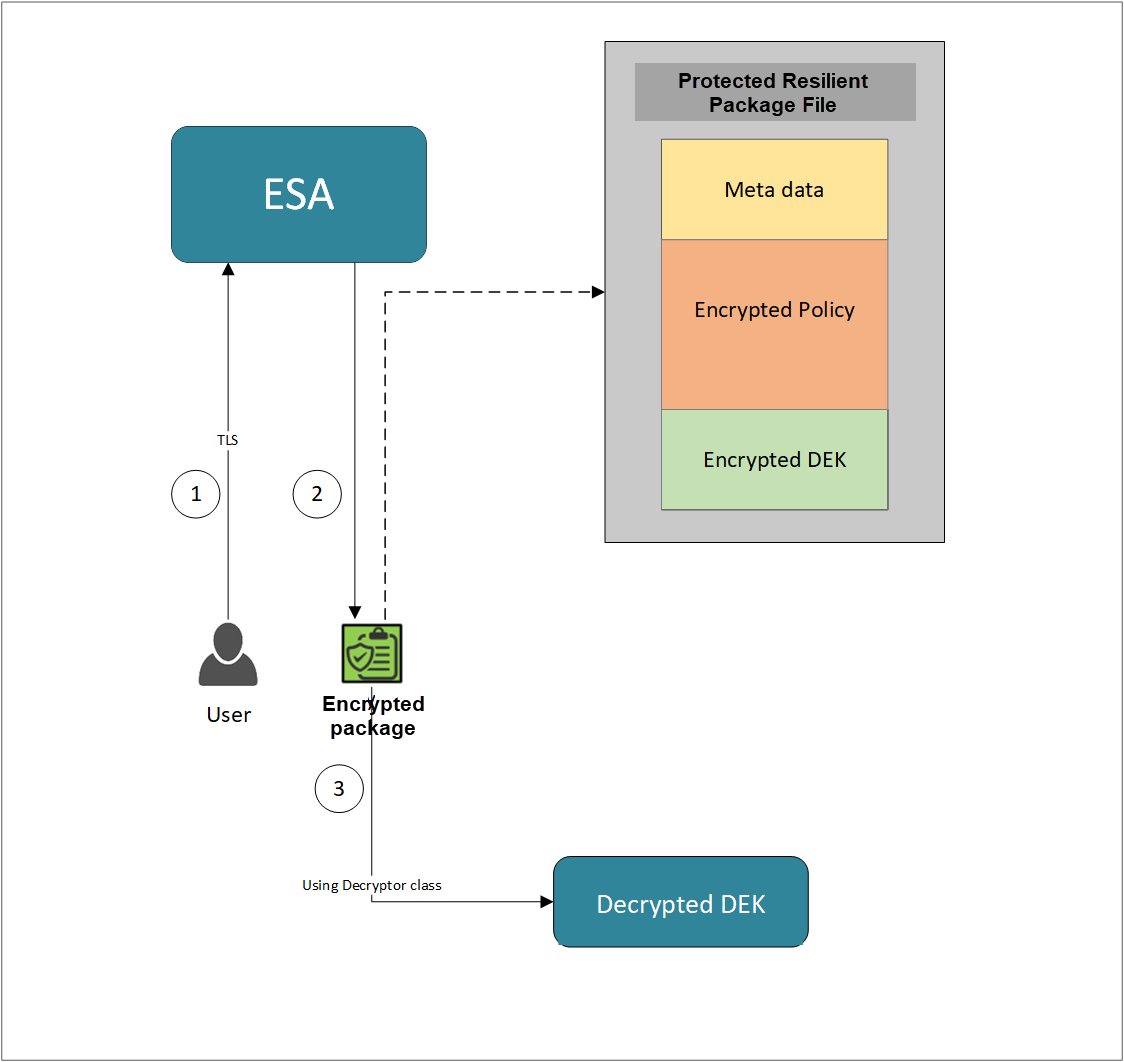
- A REST API call is used to download the policy from the ESA in an envelop encrypted format. A public key is created using a Key Management System (KMS) or Hardware Security Module (HSM). This public key must be passed to the REST API.
- The ESA generates a JSON file for the package with policy.
- The encrypted DEK needs to be decrypted to perform the security operations. A Decryptor class is implemented using the Decryptor interface, to decrypt the Data Encryption Key (DEK) using a private key.
Before you begin
Ensure the following prerequisites are met:
- The installation of the RP Agent is not required for immutable package deployment using the DevOps approach.
- The
decryptorparameter must have a fully qualified name of the decryptor class.
A Decryptor class needs to be implemented using the Decryptor interface, which decrypts the Data Encryption Key (DEK) using a private key. It returns the decrypted DEK in bytes.
For more information on the decryptor interface of AP Python, refer to Configuring the Decryptor interface. - The data store is properly configured before exporting your Application Protector policy. For ESA 10.0.1 and 10.1.0 versions, define allowed servers for seamless policy deployment and secure access control.
For more information about configuring a data store, refer to - - For ESA version 10.2.0 and higher, export key must be created in the data store for secure access control. For more information refer to Using the Encrypted Resilient Package REST APIs.
AP Python
Using the DevOps approach
Perform the following steps to use the DevOps approach for immutable package deployment.
Add the [devops] parameter in the config.ini file.
Ensure the decryptor class has a fully qualified domain name.[devops] package.path = /path/to/policyFile decryptor.path = /path/to/decryptorClassFile decryptor.class = decryptorClassNameThe following is an example for adding the
[devops]parameter in theconfig.inifile.[devops] package.path = /opt/policies/test.json decryptor.path = /opt/protegrity/sdk/python/lib/RSADecryptor.py decryptor.class = RSADecryptor
Note: For ESA 10.2.0 and later, Application Protector DevOps must use the Encrypted Resilient Package REST APIs using GET method. The legacy Export API using POST method is deprecated and not supported for Teams (PPC). The deprecated API remains supported only for the Enterprise edition for backward compatibility.
For more information about exporting Resilient Package using POST method for 10.0.1 and 10.1.0 ESA, refer to Using the Encrypted Resilient Package REST APIs.
For more information about exporting Resilient Package using GET method for 10.2 ESA, refer to Using the Encrypted Resilient Package REST APIs.
For more information about exporting Resilient Package using GET method for PPC, refer to Using the Encrypted Resilient Package REST APIs.
Sample code for DevOps approach for AP Python
The following sections provide sample code for the DevOps approach for Application Protectors using different cloud platforms.
Configuring the Decryptor interface
A Decryptor class must implement the DEKDecryptor interface to decrypt the DEK. This interface includes the decrypt method. The decrypt method provides keyLabel, algorithmId, and encDek parameters. The decrypted DEK must be returned in byte[] format.
The following is a sample code for implementing the DEKDecryptor interface.
from abc import ABC, abstractmethod

class DEKDecryptor(ABC):
   @abstractmethod
   def decrypt(self,keylabel:str,algorithm_id:str,enc_dek:bytes) -> bytes:
      """
      Provides keyLabel,algorithmID and encDEK
      """
Using AWS
The following is a sample implementation using the private key from AWS KMS.
import logging
import boto3
from botocore.exceptions import ClientError
from pycoreprovider.utils.DEKDecryptor import DEKDecryptor


logger = logging.getLogger(__name__)

class KeyDecrypt:
    def __init__(self, kms_client):
        self.kms_client = kms_client

    @classmethod
    def from_client(cls) -> "KeyDecrypt":
        """
        Creates a KeyDecrypt instance with a default KMS client.

        :return: An instance of KeyDecrypt initialized with the default KMS client.
        """
        kms_client = boto3.client("kms",region_name="us-east-1")
        return cls(kms_client)


    def decrypt(self, key_id: str, cipher_text: bytes) -> bytes:
        """
        Decrypts text previously encrypted with a key.

        :param key_id: The ARN or ID of the key used to decrypt the data.
        :param cipher_text: The encrypted text to decrypt.
        :return: The decrypted text.
        """
        try:
            return self.kms_client.decrypt(KeyId=key_id, CiphertextBlob=cipher_text,EncryptionAlgorithm="ALGORITHM_NAME")[
                "Plaintext"
            ]
        except ClientError as err:
            logger.error(
                "Couldn't decrypt your ciphertext. Here's why: %s",
                err.response,
            )
            raise


class AWSKMSDecryptor(DEKDecryptor):
    def decrypt(self,keyLabel,algorithmID,encDek):
        key_decrypt = KeyDecrypt.from_client()
        return key_decrypt.decrypt("key:arn",encDek)
Using Azure
The following is a sample implementation using the private key from Azure Key Vault.
from azure.identity import DefaultAzureCredential
from azure.keyvault.keys.crypto import CryptographyClient, EncryptionAlgorithm
from pycoreprovider.utils.DEKDecryptor import DEKDecryptor

"""
Sample Decryptor class for decrypting the encrypted DEK using Azure Key Vault

[Azure Prerequisite]
* Install azure cli
* Login to azure : az login --use-device-code

[Protegrity Prerequisite]
* For creating a key in Azure Key Vault using Azure CLI, refer :
  https://learn.microsoft.com/en-us/azure/key-vault/keys/quick-create-cli
* Download the public key from the key vault :
  az keyvault key download --vault-name test -n testkey -e PEM -f publickey.pem
* Replace all the new lines with '\n' in publickey.pem
* Public key is now ready to be used for downloading the ESA policy
* Azure supports RSA1_5, RSA_OAEP and RSA_OAEP_256 algorithms, whose
  correspoding names in REST API call are RSA1_5, RSA-OAEP-SHA1 and
  RSA-OAEP-256 respectively. Refer:
  https://azuresdkdocs.blob.core.windows.net/$web/python/azure-keyvault-keys/latest/azure.keyvault.keys.crypto.html
* Make sure that decrypt permission is present for the key vault :
  az keyvault set-policy -n "test" --key-permissions decrypt --object-id 7e821e4c-e0ad-4a6f-aa26-f445c7c7e3ea
* To get the private key URI from azure key vault, refer :
  https://learn.microsoft.com/en-us/azure/key-vault/keys/quick-create-cli
[Python Prerequisite]
* Refer the minimum required python version from here -
  https://learn.microsoft.com/en-us/python/api/overview/azure/keyvault-keys-readme?view=azure-python
* pip install azure-keyvault-keys azure-identity cryptography

"""

class AzureKeyVaultDecryptor(DEKDecryptor):
    key_id = "https://automation-cntrs.vault.azure.net/keys/testkey/aaf3861366a24b1bb4f6871eb11afafe"

    def decrypt(self,keyLabel,algorithmID,encDek):
        credential = DefaultAzureCredential()
        crypto_client = CryptographyClient(AzureKeyVaultDecryptor.key_id, credential=credential)
        decrypted = crypto_client.decrypt(EncryptionAlgorithm.rsa_oaep_256, encDek)
        return decrypted.plaintext
Using GCP
The following is a sample implementation using the private key from Google Cloud KMS.
from pycoreprovider.utils.DEKDecryptor import DEKDecryptor

# Import the client library.
from google.cloud import kms

def decrypt_asymmetric(
    project_id: str,
    location_id: str,
    key_ring_id: str,
    key_id: str,
    version_id: str,
    ciphertext: bytes,
) -> kms.DecryptResponse:
    """
    Decrypt the ciphertext using an asymmetric key.

    Args:
        project_id (string): Google Cloud project ID (e.g. 'my-project').
        location_id (string): Cloud KMS location (e.g. 'us-east1').
        key_ring_id (string): ID of the Cloud KMS key ring (e.g. 'my-key-ring').
        key_id (string): ID of the key to use (e.g. 'my-key').
        version_id (string): ID of the key version to use (e.g. '1').
        ciphertext (bytes): Encrypted bytes to decrypt.

    Returns:
        DecryptResponse: Response including plaintext.

    """

    # Create the client.
    client = kms.KeyManagementServiceClient()

    # Build the key version name.
    key_version_name = client.crypto_key_version_path(
        project_id, location_id, key_ring_id, key_id, version_id
    )

    # Optional, but recommended: compute ciphertext's CRC32C.
    # See crc32c() function defined below.
    ciphertext_crc32c = crc32c(ciphertext)

    # Call the API.
    decrypt_response = client.asymmetric_decrypt(
        request={
            "name": key_version_name,
            "ciphertext": ciphertext,
            "ciphertext_crc32c": ciphertext_crc32c,
        }
    )

    # Optional, but recommended: perform integrity verification on decrypt_response.
    # For more details on ensuring E2E in-transit integrity to and from Cloud KMS visit:
    # https://cloud.google.com/kms/docs/data-integrity-guidelines
    if not decrypt_response.verified_ciphertext_crc32c:
        raise Exception("The request sent to the server was corrupted in-transit.")
    if not decrypt_response.plaintext_crc32c == crc32c(decrypt_response.plaintext):
        raise Exception(
            "The response received from the server was corrupted in-transit."
        )
    # End integrity verification

    print(f"Plaintext: {decrypt_response.plaintext!r}")
    return decrypt_response


def crc32c(data: bytes) -> int:
    """
    Calculates the CRC32C checksum of the provided data.
    Args:
        data: the bytes over which the checksum should be calculated.
    Returns:
        An int representing the CRC32C checksum of the provided bytes.
    """
    import crcmod  # type: ignore

    crc32c_fun = crcmod.predefined.mkPredefinedCrcFun("crc-32c")
    return crc32c_fun(data)

class GCPKMSDecryptor(DEKDecryptor):
    def decrypt(self,keyLabel,algorithmID,encDek):
        print(keyLabel,algorithmID,encDek)
        decDek=decrypt_asymmetric("project_id","location_id","key_ring_id","key_id","version_id","ciphertext")
        return decDek.plaintext
- ←Previous: Setting Up AP Python on Linux in a Development Environment
- Next: Application Protector API Return Codes→
Feedback
Was this page helpful?