This is the multi-page printable view of this section. Click here to print.

Return to the regular view of this page.

Application Protector Java

Learn about the Application Protector (AP) Java.

Protegrity Application Protector (AP) Java Overview

AP Java provides a set of APIs that integrate with Java-based customer applications to perform data protection operations such as:

  • Protect
  • Unprotect
  • Reprotect
  • Get Product Version
  • Get Last Error

Key Features

Supported Java Distributions

  • Java by Oracle Corporation, versions 1.8 and later
  • Open JRE, versions 1.8 and later
  • IBM J9, versions 1.8 and later

Trusted Applications

The AP Java can be accessed only by the trusted applications. Any application that protects, unprotects, or reprotects data, must first be created as a trusted application in the ESA.

A trusted application name should be the name of the running application. For example, refer to the sample program in the section Running IAP - Example in the Protegrity Application Protector On-Premises Immutable Policy User Guide 9.1.0.0. Here, the trusted application name is “HelloWorld”. The trusted application user is the user who is running the program.

For AP Java, the logic is to determine the fully qualified name of the Main class. For console applications, the Main class is the one with the main method, while for web applications, the logic uses the JVM’s name represented by RuntimeMXBean (Java Platform SE 8).

For more information about how to make an application trusted, refer to Creating a Trusted Application.

Session Validity

A session is valid until the sessiontimeout is reached, which is passed as a parameter in the config.ini file. The default validity of a session is 15 minutes. An active session is renewed every time the session is used.

Audit Logs

  • Single Data Item Operations

    • Each operation (protect/unprotect/reprotect) generates audit events.
    • Example:
      • Protect on element a → 1 event.
      • 5 protect on element b → 5 events.
      • 1000 unprotect on element a → 1000 events.
  • Bulk Data Item Operations

    • Audit logs are generated per operation.
    • Example:
      • 2 bulk protect operations with size 3 → 1 audit log with count 6
  • Initialization Logs

    • Audit logs are created when an application initializes, indicating whether initialization was successful or not.
    • Audits are available in ESA forensics after jcorelite.plm is loaded.

Protector Status Logs

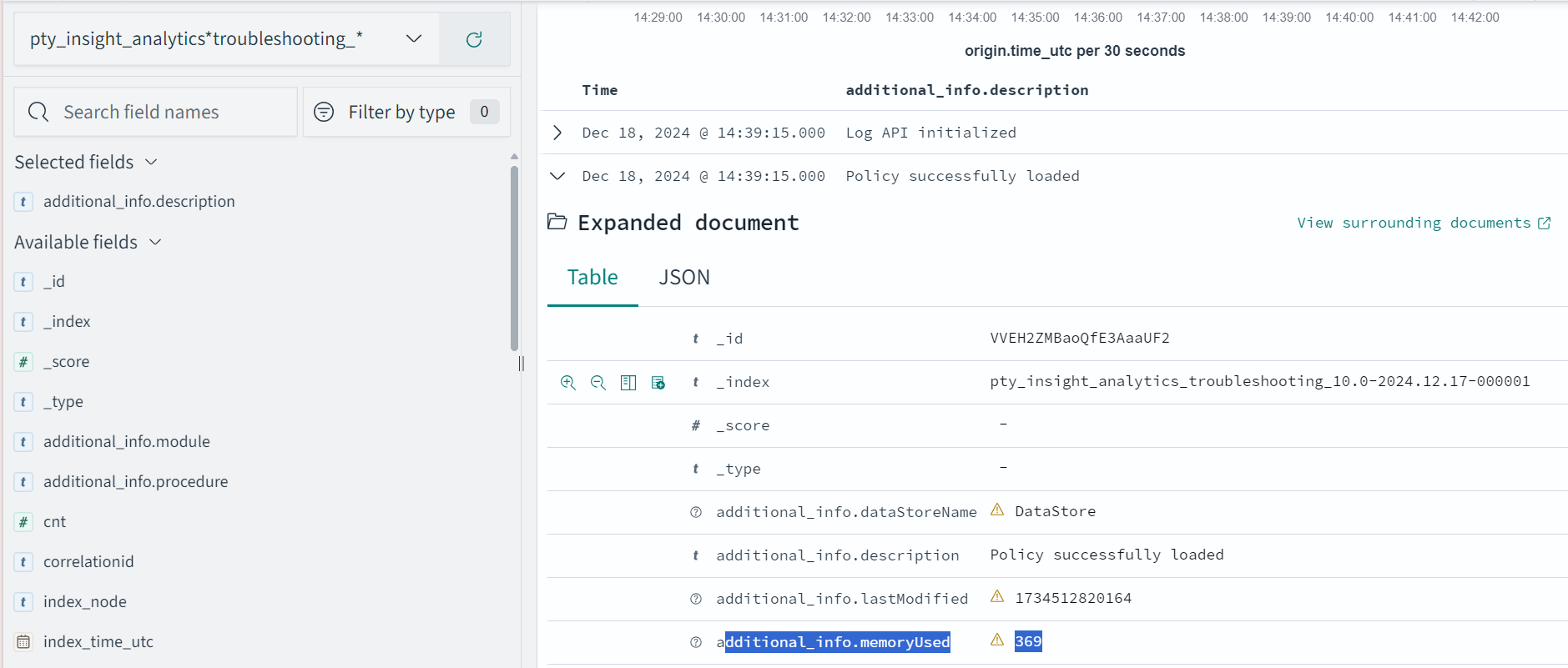
While the protector is running, a status log is sent to Discover, which can be viewed using the pty_insight_analytics\*protector_status_* index on Discover in the Audit Store.
For more information about viewing the status logs, refer to Protector Status Dashboard index.

The protector status dashboard displays the protector connectivity status through a pie chart and a table visualization. This dashboard uses status logs sent by the protector, so the protector which performed at least one security operation shows up on this dashboard.
For more information about the protector status dashboard, refer to Viewing the Protector Status Dashboard.

Error Handling

If the AP Java is used to perform a security operation on bulk data, then an exception appears for all errors except for the error codes 22, 23, and 44. Instead, an error list is returned for the individual items in the bulk data.

For more information about the log return codes, refer to Log return codes.

AP Java Upgrade

AP Java Upgrade allows the Protegrity Application Protector (AP) Java SDK to be upgraded with zero downtime by hot‑reloading updated SDK libraries at runtime. Upgrade eliminates application restarts while ensuring uninterrupted protection operations during the upgrade.

1 - Understanding the Architecture

The architecture and workflow of Application Protector.

This page describes the architecture, the individual components, and the workflow of the Protegrity Application Protector (AP) solution.

Architecture and Workflow

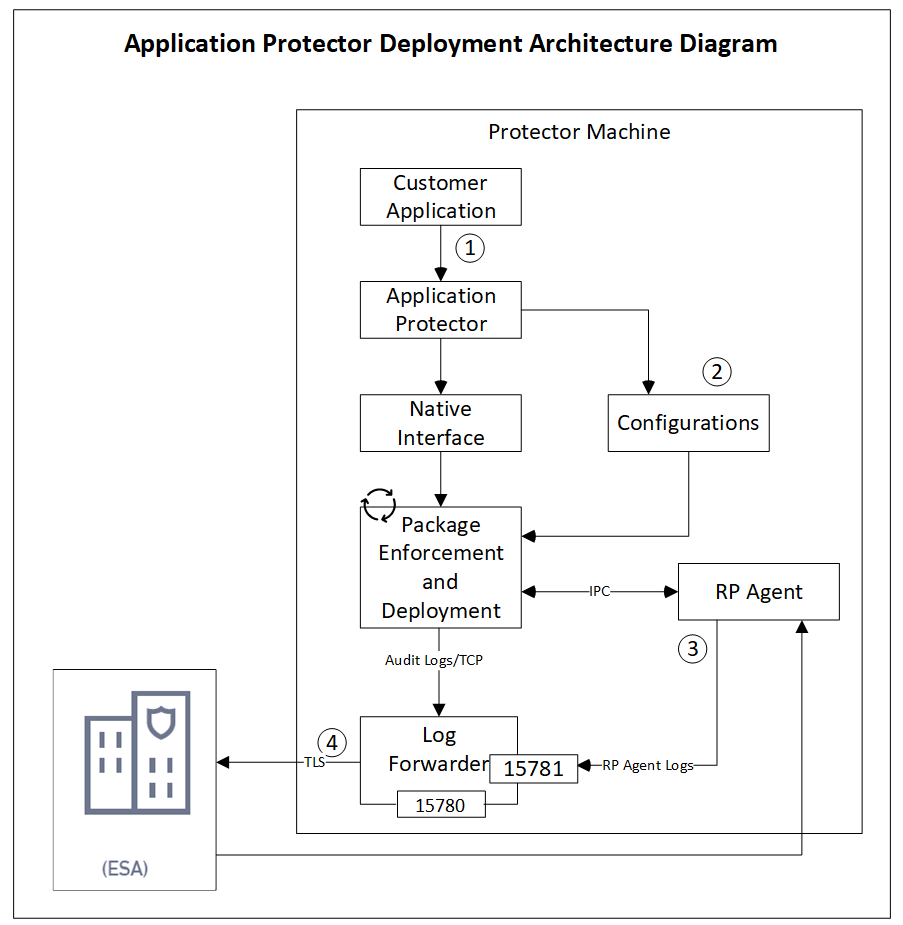
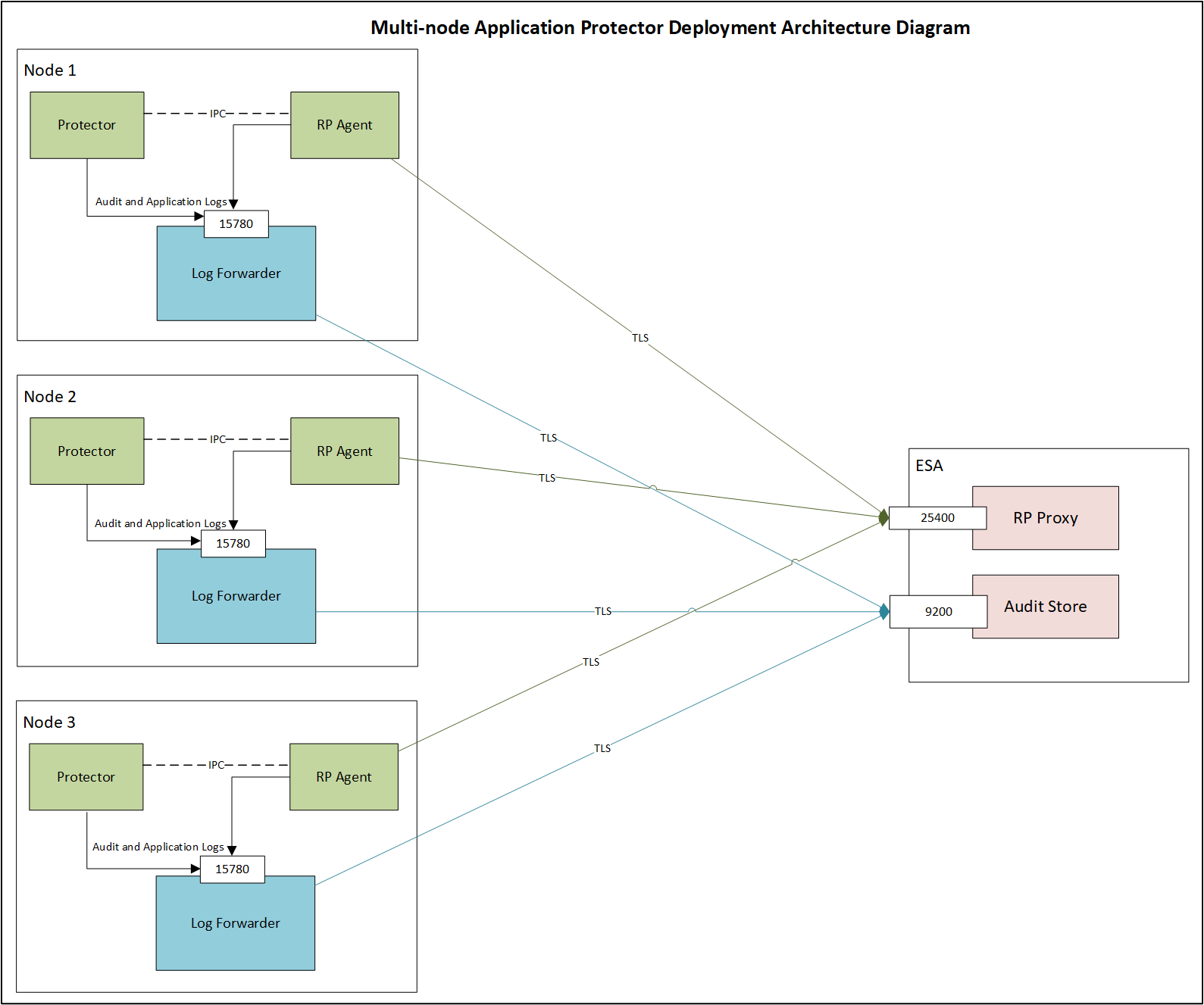
The following figure illustrates the deployment architecture of the Application Protector (AP).

Architecture and Workflow of Application Protector

The following table describes the components of the AP deployment architecture.

ComponentDescription
Customer ApplicationProvides built-in supported programming languages and integrates with AP for data protection.
Application ProtectorActs as the Core protection engine that enforces security policies and performs data protection operations.
Configuration File (config.ini)Stores initialization parameters that are passed to AP during startup.
Native InterfaceProvides a native interface between AP and the C layer.
Java: Java Native Interface (JNI) layer
Package Enforcement and DeploymentRetrieves policy packages from the RP Agent and executes protection operations, such as, protect, unprotect, and reprotect.
Log ForwarderCollects logs from AP and forwards them to the Audit Store for centralized auditing.
Resilient Package (RP) AgentOperates as a standalone process that retrieves policy packages from ESA and shares them with AP processes using shared memory IPC.

The following steps describe the workflow of a sample AP deployment in the production environment.

  1. The customer application initializes the SDK.
  2. The required configuration parameters are passed to the protector using the config.ini file.
    The configurations can be set through environment variables. ENV overrides values in the config.ini file, except for cadence and session timeout which must be set in the config file.
    For more information about environment variables configuration, refer to Configuration Parameters for Protector.
  3. The RP Agent regularly syncs with the RP Proxy or ESA to check for policy updates. If a change is detected, the updated policy package is securely downloaded over a TLS channel and stored in shared memory.
  4. The protector synchronizes with shared memory based on the cadence value defined in config.ini file. If a new package is available, it is fetched into process memory. This updated package is then used to perform data protection operations such as, protect, unprotect, and reprotect.
  5. The audit logs generated during protection operations are forwarded to the Audit Store:
    • Logs from the application are sent through the Log Forwarder.
    • Logs from the RP Agent are also forwarded using the Log Forwarder.

Components of the Application Protector

The Protegrity Application Protector (AP) solution comprises several key components that work together to enforce data protection policies and ensure secure operations.

Application Protector

The core engine that integrates with customer applications to perform data protection operations:

  • Protect
  • Unprotect
  • Reprotect

AP is available in multiple language-specific variants. One of which is:

  • AP Java: For applications developed in Java

Resilient Package (RP) Agent

A standalone process responsible for policy synchronization:

  • To sync with the RP Proxy or ESA at regular intervals of 60 seconds
  • To detect policy changes and download updated packages over a secure TLS channel
  • To store the packages in shared memory for use by the protector

Log Forwarder

A log processing tool that handles audit and protection logs:

  • Collects logs generated by AP and RP Agent
  • Forwards logs to the Audit Store within ESA

Ports used to transport the protection and audit logs to the ESA:

  • 15780: Configurable
  • 15781: Non-configurable

Package Deployment

The different approaches for package deployment during the initialization process of the Application Protector are described in this section.

Dynamic Package Deployment

Use this approach when the protector needs to continuously check for policy updates after initialization.

  • Set the cadence parameter to a non-zero value in the config.ini file.
  • This value defines the interval in seconds at which the protector synchronizes with the RP Agent.
  • If a policy change is detected, the protector automatically fetches the updated package and applies it during protection operations.

    Note: This method ensures that the protector always operates with the latest policy.

Immutable Package Deployment

Use this approach when the protector does not need to check for policy changes after initialization.

  • Add the [devops] parameter in the config.ini file before initializing the protector.
  • A REST API call is used to download an envelope-encrypted package from the ESA.
  • The protector uses this static package for all operations without further synchronization.
    For more information about the DevOps approach, refer to DevOps Approach for Application Protector.

2 - System Requirements

Lists the recommended minimum system requirements

The following table lists the minimum hardware configurations.

Hardware ComponentConfiguration Details
CPUDepends on the application.
Disk SpaceUnder 200 MB - including Log Forwarder, RP Agent, and AP Java.
RAMMemory usage depends on the AP flavor and application behavior.
Refer to AP Java.

3 - Preparing the Environment

The prerequisites to install the AP Java Installation on Linux are described in the section.

Preparing the Environment for AP Java Installation on Linux

Before installing Protegrity Application Protector (AP) Java on a Linux platform, ensure the following prerequisites are met:

Prerequisites

  • The Enterprise Security Administrator (ESA) is installed, configured, and running.
  • The IP address or host name of the Load Balancer, Proxy, or ESA is noted.
  • The Policy Management (PIM) is initialized on the ESA. It creates cryptographic keys and the policy repository for data protection.
    For more information about initializing the PIM, refer to Initializing the Policy Management.

4 - Installing the AP Java Protector

Steps to setup AP Java on Linux

Extracting the Setup Scripts and Package

Important:
If the Upgrade Agent is already installed, do not extract the product build .tgz file manually. The Upgrade Agent automatically extracts the build as part of the upgrade workflow.

To extract the setup scripts and package:

  1. Download the ApplicationProtector_Linux-ALL-64_x86-64_JRE-1.8-64_<version>.tgz file to any location on the machine where you want to install the protector.
  2. Extract the AP Java installation package using the following command.
    tar –xvf ApplicationProtector_Linux-ALL-64_x86-64_JRE-1.8-64_<version>.tgz
    
    The following setup files are extracted:
    • ApplicationProtector_Linux-ALL-64_x86-64_JRE-1.8-64_<version>.tgz
    • signatures/ApplicationProtector_Linux-ALL-64_x86-64_JRE-1.8-64_<version>.sig
  3. Verify the digital signature of the signed AP Java build.
    For more information about verifying the signed AP Java build, refer to Verification of Signed Protector Build.
  4. Extract the AP Java installation package again using the following command.
    tar –xvf ApplicationProtector_Linux-ALL-64_x86-64_JRE-1.8-64_<version>.tgz
    
    The following setup files are extracted:
    • LogforwarderSetup_Linux_x64_<version>.sh
    • RPAgentSetup_Linux_x64_<version>.sh
    • APJavaSetup_Linux_x64_<version>.sh
    • UpgradeAgentSetup_Linux_x64_<version>.sh

Installing Log Forwarder on Linux

The steps to install the Log Forwarder on a Linux platform using the Interactive mode or through the Silent mode are described in this section.

Note: To preserve all the configurations while upgrading the Log Forwarder, ensure that you backup all the files present under the /opt/protegrity/logforwarder/data/config.d directory.

For more information about installing Log Forwarder on Linux platform, refer to Installing Log Forwarder on Linux.

Using Interactive Mode

For more information about installing Log Forwarder using Interactive Mode, refer to Installing Log Forwarder on Linux using Interactive Mode.

Using Silent Mode

For more information about installing Log Forwarder using Silent Mode, refer to Installing Log Forwarder on Linux using Silent Mode.

Installing RP Agent on Linux

The steps to install the RP Agent on a Linux platform using the Interactive mode or through the Silent mode of installation are described in this section.

RPA Secure Mode with ESA on Linux

Before proceeding with the RPA installation in secure mode, ensure that the required CA certificate is available and trusted on the system.

  • For ESA

    Download the certificate from ESA.

    For more information about downloading certificates from ESA, refer to Manage Certificates.

After obtaining the certificate, configure the environment variable:

VariableValue
SSL_CERT_FILEFull path to the certificate file (for example, /opt/ca.crt)

When prompted for the ESA hostname or IP during RPA installation, ensure it is included in the ESA TLS certificate (CN or SAN) and is resolvable from the RPAgent host.

After the CA certificate is available, proceed with the RPA installation.

For more information about installing RP Agent, refer to Installing RP Agent on Linux or Unix.

Using Interactive Mode

For more information about installing RP Agent on Linux using Interactive Mode, refer to Installing RP Agent on Linux or Unix using Interactive Mode.

Using Silent Mode

For more information about installing RP Agent using Silent Mode, refer to Installing RP Agent on Linux or Unix using Silent Mode.

Installing Application Protector Java on Linux

The steps to install the AP Java on a Linux platform using the Linux installer or through the Silent mode of installation, are described in this section.

Using Linux Installer

To install the AP Java on the Linux platform using the Linux installer:

  1. Run the AP Java installer using the following command.

    ./APJavaSetup_Linux_x64_<version>.sh
    

    The prompt to continue the installation appears.

    *****************************************************
    Welcome to the AP Java SDK Setup Wizard
    *****************************************************
    
    This will install AP Java SDK on your computer.
    
    Do you want to continue? [yes or no]
    
  2. If you want to continue with the installation of the AP Java SDK, then type yes else type no.

    If you type yes, then the prompt to enter the installation directory appears.

    Please enter installation directory
    [/opt/protegrity]:
    

    If you type no, then the installation of the AP Java aborts.

The AP Java is installed successfully.

The default installation directory for the AP Java on a Linux platform is /opt/protegrity/sdk/java.

Using Silent Mode

You can also execute the AP Java installer without any manual intervention, which is also known as the Silent mode of installation. The following parameter must be provided to execute the installer in the Silent mode.

ParameterDescription
-dirOptional install directory
Default: /opt/protegrity
./APJavaSetup_Linux_x64_<version>.sh [-dir <directory>]

Installing the Upgrade Agent

Agent‑based upgrade is supported only when AP Java version 10.1.0 or later is already installed.

For more information about installing the Upgrade Agent, refer to Installing the Upgrade Agent.

5 - Configuring the Protector

Configuring and Verifying AP Java Installation on different platforms

Configuring AP Java on Linux

To configure the AP Java on the Linux platform:

  1. Setup the Java classpath.

    Operating SystemClasspath
    Linux/opt/protegrity/sdk/java/lib
  2. Before the trusted application can successfully load the ApplicationProtectorJava.jar file, ensure that -

    • The Java classpath is set accurately.
    • The path to jcorelite.plm is configured properly.
  3. Deploy a policy to test the application.

    For more information about deploying a policy, refer to Deploying Policies.

For more information about configuring the various parameters for the AP Java using the config.ini file, refer to Config.ini file for Application Protector.

Verifying Installation of AP Java

The steps to verify the successful installation of the AP Java are described in this section.

  1. Configure the application as a trusted application in the ESA.
    For more information about trusted applications, refer to Working With Trusted Applications.

  2. Initialize AP Java.
    For more information about the AP Java initialization API, refer to getProtector.

  3. Run the GetVersion method using the following command to check the version of the installed AP Java.

    public java.lang.String getVersion()
    

Before running the following program, update the GetVersion.java file with the policy username and data element name.

Compile and Run the Sample Application

Compile the sample application using the following command.

cd /opt/protegrity/sdk/java/lib
javac -cp .:ApplicationProtectorJava.jar GetVersion.java

Run the sample application using the following command.

java -cp .:ApplicationProtectorJava.jar GetVersion

By default, the config.ini file is located in the SDK data directory /opt/protegrity/sdk/java/data and is picked up automatically at runtime.

If the config.ini file is moved to a different location, specify its path explicitly when running the application:

java -Dconfig.path=/opt/config.ini -cp .:ApplicationProtectorJava.jar GetVersion

If config.ini is present in the same directory as ApplicationProtectorJava.jar and jcorelite.plm, the SDK loads it automatically and the -Dconfig.path option is not required.

The following is a sample code to check the version number of the installed AP Java.

/* Illustrates how to call getVersion() api to know the version of Application Protector
* Executing this for the first time creates a forensic entry that should be added to the authorized app
*
*/
 import com.protegrity.ap.java.*;
 public class GetVersion {
     public static void main(String[] args) throws ProtectorException {
 
     Protector protector=null;
     try {
     protector=Protector.getProtector();
     System.out.println("Product version : "+protector.getVersion());
     } catch (ProtectorException e) {
     e.printStackTrace();
     throw e;
         }
     }
 }

6 - Upgrading the Application Protector Java

Upgrading the Application Protector Java from version 10.1.0 to any higher version.

Purpose

The AP Java Upgrade feature enables zero‑downtime upgrades of the Protegrity Application Protector Java SDK.

Traditionally, upgrading the SDK required restarting the Java application, resulting in service disruption. The upgrade process removes this requirement by dynamically reloading updated SDK libraries at runtime, ensuring that protection operations continue uninterrupted throughout the upgrade process.

Overview

AP Java Upgrade is implemented through coordination between two primary components:

  • Upgrade Agent
  • Protector SDK (AP Java)

Upgrade Agent

An external process, installed and run separately from the application, that orchestrates the upgrade. The Upgrade Agent deploys new SDK binaries, upgrades shared companion components, such as RP Agent and Log Forwarder, and signals upgrade availability to running protector instances through a shared metadata.ini metadata file.

Protector SDK for Zero-downtime Upgrade

The AP Java SDK embedded in the customer’s Java application. It continuously monitors metadata.ini for version changes. When an upgrade is detected, the SDK performs a hot reload and upgrades the protector seamlessly without requiring a restart.

TermDefinition
Upgrade AgentAn external process that orchestrates the upgrade lifecycle, including deploying new binaries, upgrading shared components, and coordinating with running protector instances.
metadata.iniA shared control file located at /opt/protegrity/upgrader/data/metadata.inithat acts as the communication channel between the Upgrade Agent and the Protector SDK.
PID fileA per‑process file located at /opt/protegrity/upgrader/active_processes/<pid>.pid that identifies active protector processes and records their current upgrade state and version.
Hot ReloadThe process of replacing the active SDK implementation at runtime by loading updated JARs without restarting the Java application.

6.1 - About Upgrade Agent

Purpose of the Upgrade Agent in Application Protector.

The Upgrade Agent is a new component introduced in the AP Java 10.1.0 build package to enable upgrade capability. It is the core module that provides safe, automated, coordinated, and reversible upgrades for AP Java protectors.

The Upgrade Agent is responsible for upgrading the AP Java protector, regardless of whether it is online or offline. It also handles rollback operations for online and offline protectors. To ensure seamless upgrades in the future without needing to stop the protector application, it is essential to install the Upgrade Agent before running the protector application.

Features of AP Java Upgrade Agent

  • Ensures that protection operations are never interrupted during an upgrade.
  • Supports upgrades and rollbacks for protectors.
  • Executes upgrade and rollback operations on a single node in a coordinated manner.
  • Monitors and coordinates multiple protector processes.
  • Automatically creates backups of existing components to enable safe and reliable restoration during rollback.

Note:
Only one protector type is supported per node. The upgrade agent can upgrade only one protector at a time and currently supports AP Java only.

Upgrading AP Java also upgrades the shared RP Agent (RPA) and Log Forwarder components. If additional protectors (for example, AP Python) are installed on the same node, they must be manually upgraded to a version compatible with the upgraded AP Java core, because RPA and Log Forwarder are shared across protectors.

For more information about core version compatibility, refer to the README.

After a successful upgrade, the Upgrade Agent automatically creates a backup of the previous protector version at /opt/protegrity/upgrader/backup/.
The backup includes:

  • AP Java protector directory
  • RP Agent directory
  • Log Forwarder directory

This backup is required for rollback operations.

6.2 - Installing the Upgrade Agent

Steps to install the Upgrade Agent for Application Protector.

Agent‑based upgrade is supported only when AP Java version 10.1.0 or later is already installed.

The Agent coordinates AP Java upgrade, takes backup, validates signatures, and manages services during upgrade or rollback operation.

To perform seamless upgrades in the future without stopping the protector, ensure that the Upgrade Agent is installed before running the protector.

Installation Scenarios

Fresh Installation - Manual, Without Upgrade Agent

  • Fresh installation must be performed manually.
  • The Upgrade Agent is not used during fresh installation.
  • Agent upgrader installation is silent which means there are no prompts or user interaction.

To perform the fresh installation of SDK Upgrader:

When you extract the ApplicationProtector_Linux-ALL-64_x86-64_JRE-1.8-64_<version>.tgz package, the UpgradeAgentSetup_Linux_x64_<version>.sh agent installer file is extracted along with other files.

For more information about extracting the build package, refer to Extracting the Setup Scripts and Package.

Run the AP Java installer using the following command.

./UpgradeAgentSetup_Linux_x64_<version>.sh

The SDK Upgrader Agent installation starts.

*****************************************************
Welcome to the SDK Upgrader Agent Setup Wizard
*****************************************************

This will install the SDK Upgrader Agent on your computer.
Unpacking...
Extracting files...

Protegrity SDK Upgrader Agent is installed in /opt/protegrity/upgrader.

Upgrading the Agent

Manual extraction of the product build .tgz is not required. If a newer Upgrade Agent is included, the agent self‑upgrades itself and prompts the user to re‑run the agent to continue the upgrade.

The installation of the new Upgrade Agent does not impact existing backups or log files. The update is limited to the following components:

  • upgrader/bin/sdkupgrd binary
  • upgrader/data/sdkupgrd.conf
  • upgrader/data/metadata.ini

The installation directory is organized into clearly defined subdirectories.
For more information about the installation directory structure and the purpose of each subdirectory, refer to Installation Directory Structure Overview.

6.3 - Setting Up the Upgrade Agent

Configurations required to set up the Upgrade Agent.

This section explains how users should interact with the Upgrade Agent for performing upgrades and rollback operations for AP Java protectors.

AP Java Upgrade allows you to upgrade the AP Java SDK, RP Agent, and Log Forwarder without stopping your applications.

Note: For both online and offline upgrade, you should not pass the path of the extracted local .tgz build file. The Upgrade agent must extract the .tgz file to generate the signatures/ directory.

Before performing an online or offline upgrade or rollback, review the following important considerations and limitations.

Scalability and Performance Considerations

With a policy size of approximately 5MB, upgrade and rollback operations are validated safely for up to 70 concurrent processes on the tested machine configuration.

Supported Deployment

  • Ensure that only one RPA and one Log Forwarder are installed on the system.
  • Upgrading multiple RPAs on the same host is not supported.
  • Upgrading or rolling back only one version of AP Java at a time is allowed on the same host.

Log Forwarder Upgrade Behavior and Requirements

  • The Upgrade Agent does not perform fresh installations of the Log Forwarder. The Log Forwarder must already be installed for the agent to upgrade it.
  • To skip the Log Forwarder upgrade when it is not required or not installed, set the isFluentBit parameter to no in the sdkupgrd.conf file.
  • If isFluentBit is set to yes in sdkupgrd.conf, you must also configure the Log Forwarder endpoint in the sdkupgrd.conf file.
  • When Log Forwarder mode is set to error, upgrading renames the Log Forwarder directory from logforwarder to logforwarder_<new_version>.

Port Requirements for Error Mode

  • If mode=error is enabled in config.ini, ensure that ports 15780 and 15781 are open.
  • The Upgrade Agent uses port 15781 to run the new Log Forwarder during upgrade.
  • Although port 15780 is released after an upgrade, it is required again if an online rollback is initiated.

Backup and Rollback Limitations

  • Backup is maintained only for the most recent upgrade.
  • Rollback is supported only for that most recent upgrade.

Online vs Offline Upgrade and Rollback Rules

  • During upgrade or rollback, multiple AP Java installations on a node must be in a consistent state. All processes must be either running or stopped. Mixed process states are not supported.
  • Offline upgrade and offline rollback requires all AP Java processes to be stopped, while online upgrade and online rollback requires at least one AP Java process to be running.

DevOps Flow Limitations

  • When using the DevOps flow, only offline upgrade and rollback are supported.
  • Online upgrade is not supported with the DevOps flow.
  • To enable the DevOps flow, set the devops parameter to yes in the sdkupgrd.conf file.

Upgrade and Hot Reload Logging

A hot upgrade or reload refers to replacing AP Java JAR and PLM files while the AP Java process is running, without restarting the service.

  • Protector hot-reload logs are created by the protector and stored under /opt/protegrity/upgrader/logs/<protector_version>/. Protector upgrade logs are not sent to Protegrity Insights.
  • Upgrade Agent logs are created under /opt/protegrity/upgrader/logs/Agent/. When Fluent Bit is enabled, Upgrade Agent logs are removed after being successfully pushed to Protegrity Insights.

Viewing Upgrade Agent Audit Logs

Upgrade and rollback audit logs generated by the Upgrade Agent are available in Protegrity Insights.

To locate Upgrade Agent logs:

Index:

pty_insight_analytics*troubleshooting_*

Filter:

process.name: sdkupgrd

Use this filter to view audit and troubleshooting logs related specifically to Upgrade Agent execution, including upgrade and rollback activities.

Note: Upgrade is not supported if Log Forwarder contains custom configurations for forwarding audit logs to an external SIEM.

6.3.1 - Upgrade Configurations

Settings required to perform upgrades for AP Java.

View the Agent Help

Generic Agent Help

Before running any upgrade or rollback operation, run the agent help using the following command.

/opt/protegrity/upgrader/bin/sdkupgrd -h

OR

/opt/protegrity/upgrader/bin/sdkupgrd --help  
/opt/protegrity/upgrader/bin/sdkupgrd -help

This command displays all supported parameters and usage instructions.

The following help parameters are listed.

SDK Upgrader Agent Version: 1.0.0+5.g0493

Usage:
 ./sdkupgrd upgrade [--conf <path>] [--esa-user <user>] [--esa-password <pass>]
 ./sdkupgrd rollback
 ./sdkupgrd version | -v | --version
 ./sdkupgrd -h | --help | -help

Commands:
 upgrade                Upgrade agent and protectors to a new version
 rollback               Rollback agent and protectors to a previous version
 version                Display agent version information

Configuration:
 All parameters are read from data/sdkupgrd.conf
 Use --conf <path> to specify a custom conf file path

ESA Credentials (security):
 ESA username and password are NOT stored in the conf file.
 Provide via --esa-user / --esa-password arguments,
 or they will be prompted interactively (password is hidden).

For detailed help on a specific command:
 ./sdkupgrd upgrade -h
 ./sdkupgrd rollback -h

Agent Upgrade Help

Run the agent upgrade help using the following command.

/opt/protegrity/upgrader/bin/sdkupgrd upgrade -h

The following help parameters are listed.

SDK Upgrader Agent Version: 1.0.0+5.g0493

Usage:
 ./sdkupgrd upgrade [--conf <path>] [--esa-user <user>] [--esa-password <pass>]

Description:
 Upgrades the agent, RPAgent, LogForwarder, and protectors to a new version.
 Supports both online (ESA-connected) and offline upgrade modes.

Configuration keys (read from data/sdkupgrd.conf or --conf <path>):

  Key                     Description                                      Default
  ----------------------  -----------------------------------------------  --------------------------------
  location-of-build       URL or local path to the build file (REQUIRED)   -
  offline                 Enable offline upgrade mode (yes/no)              no
  rpagent-path            Path to RPAgent installation                     /opt/protegrity/rpagent
  logforwarder-path       Path to LogForwarder installation                /opt/protegrity/logforwarder
  endpoints               LogForwarder endpoints (comma-separated)         -
  protector-paths         Protector paths (comma-separated)                /opt/protegrity/sdk/java
  devops                  Enable DevOps mode / skip RPAgent (yes/no)       no
  isFluentBit             Enable LogForwarder upgrade (yes/no)              yes
  insecure                RPAgent insecure mode (yes/no)                   no
  esa-host                ESA server hostname or IP address                -
  esa-port                ESA server port                                 25400
  new-logforwarder-path   New logforwarder path (error mode)               /opt/protegrity/logforwarder_{version}
  stdout                  Print logs to console (yes/no)                   no
  debug                   Enable debug logging (yes/no)                    no

ESA Credentials (NOT stored in conf file for security):

  ESA username and password must be provided via CLI arguments or interactive prompt.
  They are never read from the conf file to prevent credential exposure.
  Password input is always masked/hidden for security.

  --esa-user <username>   ESA username (prompted interactively if not provided)
  --esa-password <pass>   ESA password (prompted with hidden input if not provided)

  Note: In DevOps mode (devops=yes), ESA credentials are not required.

Options:
 --conf <path>          Path to sdkupgrd.conf file (default: data/sdkupgrd.conf)
 --esa-user <username>  ESA username
 --esa-password <pass>  ESA password (hidden in logs, masked with *)
 -v, --version          Show agent version
 -h, --help             Show this help message

Examples:
 ./sdkupgrd upgrade                                              # interactive mode
 ./sdkupgrd upgrade --esa-user admin --esa-password secret       # credentials via args
 ./sdkupgrd upgrade --conf /path/to/sdkupgrd.conf                # custom conf file
 ./sdkupgrd upgrade --esa-user admin                             # password prompted

Agent Rollback Help

Run the agent rollback help using the following command.

/opt/protegrity/upgrader/bin/sdkupgrd rollback -h

The following help parameters are listed.

SDK Upgrader Agent Version: 1.0.0+5.g0493

Usage:
 ./sdkupgrd rollback

Description:
 Rolls back the agent, RPAgent, LogForwarder, and protectors to a previous version.
 Restores from the most recent backup created during an upgrade.

Options:
 -v, --version          Show agent version
 -h, --help             Show this help message

Examples:
 ./sdkupgrd rollback                                    # rollback with defaults
 ./sdkupgrd rollback --offline                          # rollback in offline mode

Note: The sdkupgrd rollback -h (or --help) output provides the lists command line options. However, the parameters, such as --offline, --stdout, and --debug are not supported on the command line. These parameters must be configured in the sdkupgrd.conf file instead.

GPG Signature Verification

The Upgrade Agent performs GPG signature verification before upgrade to ensure the integrity and authenticity of the build file. Ensure that the .gpg file is obtained from the ESA and placed in the /opt/protegrity/upgrader/bin/ directory for the signature verification.

Note: Without the .gpg file, the Upgrade Agent cannot verify or upgrade the protector.

To get the GPG encryption key from the ESA, which is in the /opt/verification_keys/ directory, run the following command on the protector machine.

sshpass -p <ESA root password> scp -r root@<ESA ip>:/opt/verification_keys/10.0.gpg /opt/protegrity/upgrader/bin

For more information about verification of signed protector build, refer to Verification of Signed Protector Build.

Build File Path

When initiating an upgrade, ensure that the compressed .tgz build file is available, or provide the build URL.

location-of-build = <path_to_build.tgz>

Caution: Do not set the path of the extracted .tgz build file manually. The Upgrade Agent expects the raw .tgz file and handles extraction internally.

Upgrade Modes Supported

The Upgrade Agent supports upgrades in two modes:

  • Online upgrade: When AP Java application is running.
  • Offline upgrade: When AP Java application is not running.

Offline upgrade mode should be used when:

Upgrade Process

Protector Upgrade

For an upgrade, update the sdkupgrd.conf configuration file located in the data/ directory.

For more information about the configuration file, refer to SDK Upgrader Agent Configuration File.

ESA Credential Requirements

  • ESA credentials, username and password are required when performing upgrade operations.

6.3.2 - Rollback Behavior

Settings required to perform rollbacks for AP Java.

The Upgrade Agent restores all backed-up components to their previous state. Rollback supports both online and offline mode.

  • If the backup folder is missing or deleted, rollback cannot proceed.
  • Always verify that the backup directory exists before performing any rollback. The agent performs automatic rollback in case of upgrade failure.
  • Rollback is supported only for the most recent upgrade, as a backup is created only for the last upgrade performed.

6.3.3 - Protegrity SDK Upgrade Permissions and Deployment

Lists user or group configuration, file and folder permissions, and deployment steps.

Overview

Protegrity deployments include the following components:

  • Upgrade Agent
  • Application Protector (AP) Java SDK
  • Resilient Package (RP) Agent
  • Log Forwarder

It requires a structured permission model to ensure that only authorized users can access protected resources. The permissions define the ability to execute, read, or modify protected resources. This section provides recommended user and group configurations, file and folder permissions, and step‑by‑step deployment guidance for a common use case.

6.3.3.1 - User Roles and Groups

Details about user roles and groups for a common setup.

Groups

GroupPurposeExample
Admin groupUsers who manage the Upgrade Agent, RPAgent, and Log Forwarder. This group is always required.ptyadmin
SDK users groupAP Java users who run applications using the SDK.ptyusers

User Configuration Examples

UserPrimary GroupPurpose
ptyadminptyadminAdmin user who can install and run Upgrade Agent, RPAgent, Log Forwarder, and AP Java.
ptyuser1, ptyuser2, and so onptyadminAP Java user who can run application using the SDK.

User and Group Setup Commands

This section provide commands to create users and groups on Linux.

sudo groupadd ptyadmin
sudo useradd -m -g ptyadmin ptyadmin
sudo useradd -m -g ptyadmin ptyuser1

Here, ptyuser1 uses ptyadmin as the primary group. PID files are created with the following ownership:

ptyuser1:ptyadmin

The Upgrade Agent can read the files with this permission automatically.

6.3.3.2 - Component Overview

Details about ownership of all Protegrity components.

All Protegrity components are owned and primarily run by the ptyadmin user. The following table lists the components and their ownership.

ComponentDescriptionOwner or User*Who Runs It
Upgrade AgentUpgrades and rolls back Protegrity components.ptyadminptyadmin user
AP Java SDKJava libraries used by applications to protect and unprotect data.ptyadminUser (ptyuser1) in the ptyadmin group.
RPAgentDownloads and keeps security policy packages in sync.ptyadminptyadmin user
Log Forwarder- Collects logs and forwards them to the ESA.
- It is based on Fluent Bit.
ptyadminptyadmin user

* - All components are owned by ptyadmin.

The 10.0.gpg file is used by the Upgrade Agent for signature verification. However, it is not a part of the product build. Complete the following steps.

  1. Copy it manually from the ESA machine.
  2. Place it in upgrader/bin/.
  3. Set permissions to 640.

6.3.3.3 - Recommended File and Folder Permissions

List of permissions required for users and groups, core components, and files.

This section explains the required users and groups, core components, and recommended file permissions for running Protegrity Upgrade Agent and the AP Java SDK securely on Linux systems.

Note: The user running the Upgrade Agent must own the extracted old SDK build used for the upgrade. If a local path is configured in sdkupgrd.conf, the user must also own the downloaded new build.

The following tables describe which users can access specific directories under the Upgrade Agent installation and explain why these permissions are required.

  • ptyadmin - Admin user who owns and manages the Upgrade Agent, RPAgent, and Log Forwarder.
  • ptyuser1 - AP Java application user.

Upgrader Agent

The Upgrade Agent is always installed under /opt/protegrity/upgrader/.

PathOwner:GroupModeNotes
/opt/protegrity/ptyadmin:ptyadmin751Allows users to traverse into subdirectories without listing the contents of /opt/protegrity.
upgrader/ptyadmin:ptyadmin750-
upgrader/bin/ptyadmin:ptyadmin750-
upgrader/bin/sdkupgrdptyadmin:ptyadmin700Ensures upgrades and rollbacks can be initiated only by ptyadmin.
upgrader/data/ptyadmin:ptyadmin750-
upgrader/data/metadata.iniptyadmin:ptyadmin660Enables the SDK to read and update active version information required for upgrade coordination.
upgrader/data/sdkupgrd.confptyadmin:ptyadmin660-
upgrader/logs/ptyadmin:ptyadmin770Allows SDK users to create and write log files during runtime and upgrades.
upgrader/active_processes/ptyadmin:ptyadmin770Allows SDK users to create PID files so the Upgrade Agent can detect running processes.
upgrader/backup/ptyadmin:ptyadmin750Stores backup and rollback data.

AP Java SDK

PathOwner:GroupModeNotes
sdk/ptyadmin:ptyadmin750Grants AP Java users read and execute access to the SDK.
sdk/java/lib/ptyadmin:ptyadmin750Contains SDK JARs and native libraries.
sdk/java/lib/ApplicationProtectorJava.jarptyadmin:ptyadmin640Read‑only access for AP Java users.
sdk/java/lib/jcorelite.plmptyadmin:ptyadmin640Native library used by the SDK runtime.
sdk/java/data/ptyadmin:ptyadmin750SDK configuration directory.
sdk/java/data/config.iniptyadmin:ptyadmin640SDK configuration file. Read‑only access for AP Java users.

RPAgent

PathOwner:GroupModeNotes
rpagent/ptyadmin:ptyadmin755Allows read and execute access without exposing writable permissions.
rpagent/bin/rpagentptyadmin:ptyadmin750RPAgent runtime binary.
rpagent/bin/rpagentctrlptyadmin:ptyadmin750RPAgent control script.
rpagent/data/rpagent.cfgptyadmin:ptyadmin640RPAgent configuration file.

Log Forwarder

PathOwner:GroupModeNotes
logforwarder/ptyadmin:ptyadmin755Allows read and execute access without write permissions.
logforwarder/bin/fluent-bitptyadmin:ptyadmin750Log Forwarder runtime binary.
logforwarder/bin/logforwarderctrlptyadmin:ptyadmin750Log Forwarder control script.
logforwarder/data/logforwarder.confptyadmin:ptyadmin640Log Forwarder configuration file.

6.4 - AP Java Upgrade and Rollback Examples

Examples for Upgrade and Rollback operations.

6.4.1 - Online and Offline Upgrade

Steps to perform online and offline upgrade operations for Application Protector Java.

This section outlines the online and offline upgrade of the Protegrity Application Protector (AP) Java.

In online mode, the upgrade runs without interrupting ongoing Java protector processes. The Protegrity Upgrade Agent manages state transitions, metadata updates, and version synchronization during the upgrade.

In offline mode, there are no protector processes that are in a running state.

Specifying Custom Configuration File Location

To perform an online upgrade, the offline parameter in the sdkupgrd.conf file must be set to no.
To perform an offline upgrade, the offline parameter in the sdkupgrd.conf file must be set to yes.

Before running the sdkupgrd binary, ensure to update the sdkupgrd.conf file with the required configuration values. By default, the configuration file is located at /opt/protegrity/upgrader/data/sdkupgrd.conf.

For more information about the configuration values, refer to SDK Upgrader Agent Configuration File.

To perform the upgrade:

  1. Run the following command to start the upgrade.

    /opt/protegrity/upgrader/bin/sdkupgrd upgrade
    

    The prompt to add the ESA username and password appears.

    Note: If the configuration file is moved to a different location, specify the custom path using the --conf option.

    /opt/protegrity/upgrader/bin/sdkupgrd upgrade --conf /opt/sdkupgrd.conf
    
  2. Run the upgrade in silent mode using the following command. Provide the ESA credentials with the command.

    /opt/protegrity/upgrader/bin/sdkupgrd upgrade --esa-user <esa_username> --esa-password <esa_user_password>
    

    Important: Do not set the path of the extracted .tgz build file manually. The Upgrade Agent expects the raw .tgz file and handles extraction internally.

    Do not extract the build manually. The Upgrade Agent validates the /signatures/ directory inside the .tgz bundle. If the /signatures/ directory is properly extracted, only then does the upgrade proceed.

For online and offline upgrade, these steps ensure that a smooth, zero‑downtime upgrade of AP Java protectors.

To confirm a successful online and offline upgrade -

  • Review the Upgrade Agent logs in Insight for a success message indicating that the operation completed.
  • Check the audit logs to verify that protection operations are being performed using the new AP Java version.
  • Use Insight to review protector and audit logs.
  • Confirm that logs reflect the new protector version after upgrade.

The application continues to serve protect and unprotect requests without interruption during the upgrade. In‑flight requests complete on the existing SDK version, while new requests are handled by the upgraded version after the reload. No requests are dropped, blocked, or fail during upgrade.

6.4.2 - Online and Offline Rollback

Steps to perform online and offline rollback procedure for Application Protector Java.

This section describes the complete procedure to perform an online and offline rollback operation for the Protegrity Application Protector Java components. It is assumed that the protector is already in the upgraded state.

Specifying Custom Configuration File Location

To perform an online rollback, the offline parameter in the sdkupgrd.conf file must be set to no.
To perform an offline rollback, the offline parameter in the sdkupgrd.conf file must be set to yes.

For rollback, the Upgrade Agent reads stdout, offline, and debug parameters from the sdkupgrd.conf file.

To perform online and offline rollback operation:

Run the following command to start the rollback.

/opt/protegrity/upgrader/bin/sdkupgrd rollback

Note: If the configuration file is moved to a different location, specify the custom path using the --conf option.

/opt/protegrity/upgrader/bin/sdkupgrd rollback --conf /opt/sdkupgrd.conf

For online and offline rollback, these steps ensure a smooth, zero‑downtime rollback of AP Java protectors. It safely restores the system to the previously backed-up protector version, ensuring continuity if an upgrade fails or needs to be aborted.

To confirm a successful rollback -

  • Ensure that the protector version has reverted.
  • Review the Upgrade Agent logs in Insight for a success message indicating that the operation completed.
  • Verify that the running AP Java processes report the expected older version after rollback.
  • Use Insight to review protector and audit logs.
  • Confirm that logs reflect the rolled‑back version after rollback.

7 - Application Protector Java APIs

The various APIs of the AP Java.

A session must be created to run the Application Protector (AP) Java. The session enables AP Java to access information about the Trusted Application from the policy stored in memory. If the application is trusted, then the protect, unprotect, or reprotect method is called, one or many times, depending on the data.

The AP Java can be initialized by an OS User who is registered and deployed as the Trusted Application User in the ESA. The OS User can also be a Policy User.

The following diagram represents the basic flow of a session.
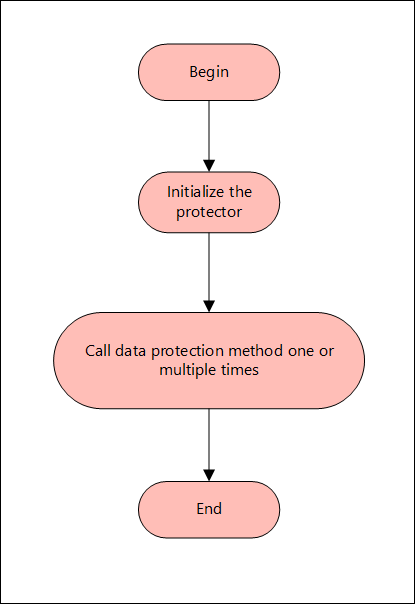
AP Java APIs

Note: The AP Java only supports bytes converted from the string data type.
If any other data type is directly converted to bytes and passed as an input to the API that supports byte as an input and provides byte as an output, then data corruption might occur.

Supported data types for the AP Java

The AP Java supports the following data types:

  • Bytes
  • Double
  • Float
  • Integer
  • java.util.Date
  • Long
  • Short
  • String

The following are the various APIs provided by the AP Java.

getProtector

The getProtector method returns the Protector object associated with the AP Java APIs. After initialization, this object is used to create a session. The session is then passed as a parameter to protect, unprotect, or reprotect methods.

static Protector getProtector() 

Parameters
None

Returns
Protector Object: An object associated with the Protegrity Application Protector API.

Exception
ProtectorException: If the configurations are invalid, then an exception is thrown indicating a failed initialization.

getVersion

The getVersion method returns the product version of the AP Java in use.

public java.lang.String getVersion()

Parameters
None

Returns
String: Product version

getVersionEx

The getVersionEx method returns the extended version of the AP Java in use. The extended version consists of the Product version number and the CORE version number.

Note: The Core version is a sub-module used for troubleshooting protector issues.

public java.lang.String getVersionEx()

Parameters
None

Returns
String: Product version and CORE version

getLastError

The getLastError method returns the last error and a description of why this error was returned. When the methods used for protecting, unprotecting, or reprotecting data return an exception or a Boolean false, the getLastError method is called that describes why the method failed.

public java.lang.String getLastError(SessionObject session)

Parameters
Session: Session ID that is obtained by calling the createSession method.

Returns
String: Error message

Exception
ProtectorException: If the SessionObject is null, then an exception is thrown
SessionTimeoutException: If the session is invalid or has timed out, then an exception is thrown

For more information about the return codes, refer to Application Protector API Return Codes.

createSession

The createSession method creates a new session. The sessions that have not been utilized for a while, are automatically removed according to the sessiontimeout parameter defined in the [protector] section of the config.ini file.

The methods in the Protector API that take the SessionObject as a parameter, might throw an exception SessionTimeoutException if the session is invalid or has timed out. The application developers can handle the SessionTimeoutException and create a new session with a new SessionObject.

public SessionObject createSession(java.lang.String policyUser)

Parameters
policyUser: User name defined in the policy, as a string value.

Returns
SessionObject: Object of the SessionObject class.

Exception
ProtectionException: If input is null or empty, then an exception is thrown.

protect - Short array data

It It protects the data provided as a short array that uses the preservation data type or No Encryption data element. It supports bulk protection. There is no maximum data limit. For more information about the data limit, refer to AES Encryption.

If the data type preservation methods are used for data protection, then the protected data can be stored in the same data type as used for the input data.

public boolean protect(SessionObject sessionObj, java.lang.String dataElementName, short[] input, short[] output, byte[] externalIv)

Parameters
sessionObj: SessionObject that is obtained by calling the createSession method.
dataElementName: String containing the data element name defined in policy.
input: Input array with short format data.
output: Resultant output array with short format data.
externalIv: Buffer containing data that will be used as external IV, when externalIv = null, the value is ignored.

Result
True: The data is successfully protected.
False: The parameters passed are accurate, but the method failed when:

  • The protection methods failed to perform the required action
  • The data element is null or empty

For more information, such as, a text explanation and reason for the failure, call getLastError(session).

Exception
Protector Exception: If the SessionObject is null or if policy is configured to throw an exception, then an exception is thrown.
SessionTimeoutException: If the session is invalid or has timed out, then an exception is thrown.
protect - Short array data for encryption

It protects the data provided as a short array that uses an encryption data element. It supports bulk protection. There is no maximum data limit.
For more information about the data limit, refer to AES Encryption.

When the encryption method is used to protect data, the output of data protection (protected data) should be stored in byte[].

public boolean protect(SessionObject sessionObj, java.lang.String dataElementName, short[] input, byte[][] output, byte[] externalIv)

Parameters
sessionObj: SessionObject that is obtained by calling the createSession method.
dataElementName: String containing the data element name defined in policy.
input: Input array with short format data.
output: Resultant output array with byte format data.
externalIv: Optional parameter, which is a buffer containing data that will be used as external IV, when externalIv = null, the value is ignored.

Note: Encryption data elements do not support external IV.

Result
True: The data is successfully protected.
False: The parameters passed are accurate, but the method failed when:

  • The protection methods failed to perform the required action
  • The data element is null or empty

For more information, such as, a text explanation and reason for the failure, call getLastError(session).

Exception
Protector Exception: If the SessionObject is null or if policy is configured to throw an exception, then an exception is thrown.
SessionTimeoutException: If the session is invalid or has timed out, then an exception is thrown.
protect - Int array data

It It protects the data provided as an int array that uses the preservation data type or No Encryption data element. It supports bulk protection. However, you are recommended to pass not more than 1 MB of input data for each protection call.

If the data type preservation methods are used for data protection, then the protected data can be stored in the same data type as used for the input data.

public boolean protect(SessionObject sessionObj, java.lang.String dataElementName, int[] input, int[] output, byte[] externalIv)

Parameters
sessionObj: SessionObject that is obtained by calling the createSession method.
dataElementName: String containing the data element name defined in policy.
input: Input array with int data.
output: Resultant output array with int data.
externalIv: Optional parameter, which is a buffer containing data that will be used as external IV, when externalIv = null, the value is ignored.

Result
True: The data is successfully protected.
False: The parameters passed are accurate, but the method failed when:

  • The protection methods failed to perform the required action
  • The data element is null or empty

For more information, such as, a text explanation and reason for the failure, call getLastError(session).

Exception
Protector Exception: If the SessionObject is null or if policy is configured to throw an exception, then an exception is thrown.
SessionTimeoutException: If the session is invalid or has timed out, then an exception is thrown.
protect - Int array data for encryption

It protects the data provided as an int array that uses an encryption data element. It supports bulk protection. There is no maximum data limit. However, you are recommended to pass not more than 1 MB of input data for each protection call.

Data protected by using encryption data elements with input as integers, long or short data types, and output as bytes, cannot move between platforms with different endianness.
For example, you cannot move the protected data from the AIX platform to Linux or Windows platform and vice versa while using encryption data elements in the following scenarios:

  • Input as integers and output as bytes
  • Input as short integers and output as bytes
  • Input as long integers and output as bytes

When the encryption method is used to protect data, the output of data protection (protected data) should be stored in byte[].

public boolean protect(SessionObject sessionObj, java.lang.String dataElementName, int[] input, byte[][] output, byte[] externalIv)

Parameters
sessionObj: SessionObject that is obtained by calling the createSession method.
dataElementName: String containing the data element name defined in policy.
input: Input array with int data.
output: Resultant output array with byte data.
externalIv: Optional parameter, which is a buffer containing data that will be used as external IV, when externalIv = null, the value is ignored.

Note: Encryption data elements do not support external IV.

Result
True: The data is successfully protected.
False: The parameters passed are accurate, but the method failed when:

  • The protection methods failed to perform the required action
  • The data element is null or empty

For more information, such as, a text explanation and reason for the failure, call getLastError(session).

Exception
Protector Exception: If the SessionObject is null or if policy is configured to throw an exception, then an exception is thrown.
SessionTimeoutException: If the session is invalid or has timed out, then an exception is thrown.
protect - Long array data

It protects the data provided as a long array that uses the preservation data type or No Encryption data element. It supports bulk protection. There is no maximum data limit. However, you are recommended to pass not more than 1 MB of input data for each protection call.

If the data type preservation methods are used for data protection, then the protected data can be stored in the same data type as used for the input data.

public boolean protect(SessionObject sessionObj, java.lang.String dataElementName, long[] input, long[] output, byte[] externalIv)

Parameters
sessionObj: SessionObject that is obtained by calling the createSession method.
dataElementName: String containing the data element name defined in policy.
input: Input array with long format data.
output: Resultant output array with long format data.
externalIv: Optional parameter, which is a buffer containing data that will be used as external IV, when externalIv = null, the value is ignored.

Result
True: The data is successfully protected.
False: The parameters passed are accurate, but the method failed when:

  • The protection methods failed to perform the required action
  • The data element is null or empty

For more information, such as, a text explanation and reason for the failure, call getLastError(session).

Exception
Protector Exception: If the SessionObject is null or if policy is configured to throw an exception, then an exception is thrown.
SessionTimeoutException: If the session is invalid or has timed out, then an exception is thrown.

protect - Long array data for encryption

It protects the data provided as a long array that uses an encryption data element. It supports bulk protection. There is no maximum data limit. However, you are recommended to pass not more than 1 MB of input data for each protection call.

When the encryption method is used to protect data, the output of data protection (protected data) should be stored in byte[].

protect(SessionObject sessionObj, java.lang.String dataElementName, long[] input, byte[][] output)

Parameters
sessionObj: SessionObject that is obtained by calling the createSession method.
dataElementName: String containing the data element name defined in policy.
input: Input array with long format data.
output: Resultant output array with byte format data.
externalIv: Optional parameter, which is a buffer containing data that will be used as external IV, when externalIv = null, the value is ignored.

Note: Encryption data elements do not support external IV.

Result
True: The data is successfully protected.
False: The parameters passed are accurate, but the method failed when:

  • The protection methods failed to perform the required action
  • The data element is null or empty

For more information, such as, a text explanation and reason for the failure, call getLastError(session).

Exception
Protector Exception: If the SessionObject is null or if policy is configured to throw an exception, then an exception is thrown.
SessionTimeoutException: If the session is invalid or has timed out, then an exception is thrown.

protect - Float array data

It protects the data provided as a float array that uses the No Encryption data element. It supports bulk protection. There is no maximum data limit. However, you are recommended to pass not more than 1 MB of input data for each protection call.

If the data type preservation methods are used for data protection, then the protected data can be stored in the same data type as used for the input data.

public boolean protect(SessionObject sessionObj, java.lang.String dataElementName, float[] input, float[] output, byte[] externalIv)

Parameters
sessionObj: SessionObject that is obtained by calling the createSession method.
dataElementName: String containing the data element name defined in policy.
input: Input array with float format data.
output: Resultant output array with float format data.

Result
True: The data is successfully protected.
False: The parameters passed are accurate, but the method failed when:

  • The protection methods failed to perform the required action
  • The data element is null or empty

For more information, such as, a text explanation and reason for the failure, call getLastError(session).

Exception
Protector Exception: If the SessionObject is null or if policy is configured to throw an exception, then an exception is thrown.
SessionTimeoutException: If the session is invalid or has timed out, then an exception is thrown.

protect - Float array data for encryption

It protects the data provided as a float array that uses an encryption data element. It supports bulk protection. There is no maximum data limit. However, you are recommended to pass not more than 1 MB of input data for each protection call.

When the encryption method is used to protect data, the output of data protection (protected data) should be stored in byte[].

public boolean protect(SessionObject sessionObj, java.lang.String dataElementName, float[] input, byte[][] output)

Parameters
sessionObj: SessionObject that is obtained by calling the createSession method.
dataElementName: String containing the data element name defined in policy.
input: Input array with float format data.
output: Resultant output array with byte format data.

Result
True: The data is successfully protected.
False: The parameters passed are accurate, but the method failed when:

  • The protection methods failed to perform the required action
  • The data element is null or empty

For more information, such as, a text explanation and reason for the failure, call getLastError(session).

Exception
Protector Exception: If the SessionObject is null or if policy is configured to throw an exception, then an exception is thrown.
SessionTimeoutException: If the session is invalid or has timed out, then an exception is thrown.

protect - Double array data

It protects the data provided as a double array that uses the No Encryption data element. It supports bulk protection. There is no maximum data limit. However, you are recommended to pass not more than 1 MB of input data for each protection call.

When the data type preservation methods are used to protect data, the output of data protection can be stored in the same data type that was used for the input data.

public boolean protect(SessionObject sessionObj, java.lang.String dataElementName, double[] input, double[] output)

Parameters
sessionObj: SessionObject that is obtained by calling the createSession method.
dataElementName: String containing the data element name defined in policy.
input: Input array with double format data.
output: Resultant output array with double format data.

Result
True: The data is successfully protected.
False: The parameters passed are accurate, but the method failed when:

  • The protection methods failed to perform the required action
  • The data element is null or empty

For more information, such as, a text explanation and reason for the failure, call getLastError(session).

Exception
Protector Exception: If the SessionObject is null or if policy is configured to throw an exception, then an exception is thrown.
SessionTimeoutException: If the session is invalid or has timed out, then an exception is thrown.

protect - Double array data for encryption

It protects the data provided as a double array that uses an encryption data element. It supports bulk protection. There is no maximum data limit. However, you are recommended to pass not more than 1 MB of input data for each protection call.

When the encryption method is used to protect data, the output of data protection (protected data) should be stored in byte[].

public boolean protect(SessionObject sessionObj, java.lang.String dataElementName, double[] input, byte[][] output)

Parameters
sessionObj: SessionObject that is obtained by calling the createSession method.
dataElementName: String containing the data element name defined in policy.
input: Input array with double format data.
output: Resultant output array with byte format data.

Result
True: The data is successfully protected.
False: The parameters passed are accurate, but the method failed when:

  • The protection methods failed to perform the required action
  • The data element is null or empty

For more information, such as, a text explanation and reason for the failure, call getLastError(session).

Exception
Protector Exception: If the SessionObject is null or if policy is configured to throw an exception, then an exception is thrown.
SessionTimeoutException: If the session is invalid or has timed out, then an exception is thrown.

protect - Date array data

It protects the data provided as a java.util.Data array that uses a preservation data type. It supports bulk protection. There is no maximum data limit. However, you are recommended to pass not more than 1 MB of input data for each protection call.

If the data type preservation methods are used for data protection, then the protected data can be stored in the same data type as used for the input data.

If the protect and unprotect operations are performed in different time zones using the java.util.Date API, then the unprotected data does not match with the input data.
For example, if you perform the protect operation in EDT time zone using the java.util.Date API, then you must perform the unprotect operation only in EDT time zone. This ensures that the unprotect operation returns back the original data.

public boolean protect(SessionObject sessionObj, java.lang.String dataElementName, java.util.Date[] input, java.util.Date[] output)

Parameters
sessionObj: SessionObject that is obtained by calling the createSession method.
dataElementName: String containing the data element name defined in policy.
input: Input array with date format data.
output: Resultant output array with date format data.

Result
True: The data is successfully protected.
False: The parameters passed are accurate, but the method failed when:

  • The protection methods failed to perform the required action
  • The data element is null or empty

For more information, such as, a text explanation and reason for the failure, call getLastError(session).

Exception
Protector Exception: If the SessionObject is null or if policy is configured to throw an exception, then an exception is thrown.
SessionTimeoutException: If the session is invalid or has timed out, then an exception is thrown.

protect - String array data

It protects the data provided as a string array that uses a preservation data type or the No Encryption data element. It supports bulk protection. There is no maximum data limit. However, you are recommended to pass not more than 1 MB of input data for each protection call.

For String and Byte data types, the maximum length for tokenization is 4096 bytes, while for encryption there is no maximum length defined.

If the data type preservation methods are used for data protection, then the protected data can be stored in the same data type as used for the input data.

For Date and Datetime type of data elements, an invalid input data error is returned by the protect API if the input value falls between the non-existent date range. It ranges from 05-OCT-1582 to 14-OCT-1582 of the Gregorian Calendar.

For more information about the tokenization and de-tokenization of the cutover dates of the Proleptic Gregorian Calendar, refer to section Datetime Tokenization for Cutover Dates of the Proleptic Gregorian Calendar.

public boolean protect(SessionObject sessionObj, java.lang.String dataElementName, java.lang.String[] input, java.lang.String[] output, byte[] externalIv)

Parameters
sessionObj: SessionObject that is obtained by calling the createSession method.
dataElementName: String containing the data element name defined in policy.
input: Input array with string format data.
output: Resultant output array with string format data.
externalIv: Optional parameter, which is a buffer containing data that will be used as external IV, when externalIv = null, the value is ignored.

Result
True: The data is successfully protected.
False: The parameters passed are accurate, but the method failed when:

  • The protection methods failed to perform the required action
  • The data element is null or empty

For more information, such as, a text explanation and reason for the failure, call getLastError(session).

Exception
Protector Exception: If the SessionObject is null or if policy is configured to throw an exception, then an exception is thrown.
SessionTimeoutException: If the session is invalid or has timed out, then an exception is thrown.

protect - String array data for encryption

It protects the data provided as s string array that uses an encryption data element. It supports bulk protection. There is no maximum data limit. However, you are recommended to pass not more than 1 MB of input data for each protection call.

For String and Byte data types, the maximum length for tokenization is 4096 bytes, while for encryption there is no maximum length defined.

The output of data protection is stored in byte[] when:

  • Encryption method is used to protect data
  • Format Preserving Encryption (FPE) method is used for Char and String APIs

The string as an input and byte as an output API is unsupported by Unicode Gen2 and FPE data elements for the AP Java.

public boolean protect(SessionObject sessionObj, java.lang.String dataElementName, java.lang.String[] input, byte[][] output, byte[] externalIv)

Parameters
sessionObj: SessionObject that is obtained by calling the createSession method.
dataElementName: String containing the data element name defined in policy.
input: Input array with string format data.
output: Resultant output array with byte format data.
externalIv: Optional parameter, which is a buffer containing data that will be used as external IV, when externalIv = null, the value is ignored.

Note: Encryption data elements do not support external IV.

Result
True: The data is successfully protected.
False: The parameters passed are accurate, but the method failed when:

  • The protection methods failed to perform the required action
  • The data element is null or empty

For more information, such as, a text explanation and reason for the failure, call getLastError(session).

Exception
Protector Exception: If the SessionObject is null or if policy is configured to throw an exception, then an exception is thrown.
SessionTimeoutException: If the session is invalid or has timed out, then an exception is thrown.

protect - Char array data

It protects the data provided as a char array that uses a preservation data type or the No Encryption data element. It supports bulk protection. There is no maximum data limit. However, you are recommended to pass not more than 1 MB of input data for each protection call.

If the data type preservation methods are used for data protection, then the protected data can be stored in the same data type as used for the input data.

For Date and Datetime type of data elements, an invalid input data error is returned by the protect API if the input value falls between the non-existent date range. It ranges from 05-OCT-1582 to 14-OCT-1582 of the Gregorian Calendar.

For more information about the tokenization and de-tokenization of the cutover dates of the Proleptic Gregorian Calendar, refer to section Datetime Tokenization for Cutover Dates of the Proleptic Gregorian Calendar.

public boolean protect(SessionObject sessionObj, java.lang.String dataElementName, char[][] input, char[][] output, byte[] externalIv)

Parameters
sessionObj: SessionObject that is obtained by calling the createSession method.
dataElementName: String containing the data element name defined in policy.
input: Input array with char format data.
output: Resultant output array with char format data.
externalIv: Optional parameter, which is a buffer containing data that will be used as external IV, when externalIv = null, the value is ignored.

Result
True: The data is successfully protected.
False: The parameters passed are accurate, but the method failed when:

  • The protection methods failed to perform the required action
  • The data element is null or empty

For more information, such as, a text explanation and reason for the failure, call getLastError(session).

Exception
Protector Exception: If the SessionObject is null or if policy is configured to throw an exception, then an exception is thrown.
SessionTimeoutException: If the session is invalid or has timed out, then an exception is thrown.

protect - Char array data for encryption

It protects the data provided as a char array that uses an encryption data element. It supports bulk protection. There is no maximum data limit. However, you are recommended to pass not more than 1 MB of input data for each protection call.

The output of data protection is stored in byte[] when:

  • Encryption method is used to protect data
  • Format Preserving Encryption (FPE) method is used for Char and String APIs
public boolean protect(SessionObject sessionObj, java.lang.String dataElementName, char[][] input, byte[][] output, byte[] externalIv)

Parameters
sessionObj: SessionObject that is obtained by calling the createSession method.
dataElementName: String containing the data element name defined in policy.
input: Input array with char format data.
output: Resultant output array with byte format data.
externalIv: Optional parameter, which is a buffer containing data that will be used as external IV, when externalIv = null, the value is ignored.

Note: Encryption data elements do not support external IV.

Result
True: The data is successfully protected.
False: The parameters passed are accurate, but the method failed when:

  • The protection methods failed to perform the required action
  • The data element is null or empty

For more information, such as, a text explanation and reason for the failure, call getLastError(session).

Exception
Protector Exception: If the SessionObject is null or if policy is configured to throw an exception, then an exception is thrown.
SessionTimeoutException: If the session is invalid or has timed out, then an exception is thrown.

protect - Byte array data

It protects the data provided as a byte array that uses the encryption data element, No Encryption data element, and preservation data type. It supports bulk protection. There is no maximum data limit. However, you are recommended to pass not more than 1 MB of input data for each protection call.

For String and Byte data types, the maximum length for tokenization is 4096 bytes, while for encryption there is no maximum length defined.

The Protegrity AP Java protector only supports bytes converted from the string data type.
If any data type is converted to bytes and passed as input to the API supporting byte as input and providing byte as output, then data corruption might occur.

If the data type preservation methods are used for data protection, then the protected data can be stored in the same data type as used for the input data.

For Date and Datetime type of data elements, an invalid input data error is returned by the protect API if the input value falls between the non-existent date range. It ranges from 05-OCT-1582 to 14-OCT-1582 of the Gregorian Calendar.

For more information about the tokenization and de-tokenization of the cutover dates of the Proleptic Gregorian Calendar, refer to section Datetime Tokenization for Cutover Dates of the Proleptic Gregorian Calendar.

public boolean protect(SessionObject sessionObj, java.lang.String dataElementName, byte[][] input, byte[][] output, PTYCharset ...ptyCharsets)

Parameters
sessionObj: SessionObject that is obtained by calling the createSession method.
dataElementName: String containing the data element name defined in policy.
input: Input array with byte format data.
output: Resultant output array with byte format data.
ptyCharsets: Encoding associated with the bytes of the input data.

PTYCharset ptyCharsets = PTYCharset.<encoding>;

The ptyCharsets parameter supports the following encodings:

  • UTF-8
  • UTF-16LE
  • UTF-16BE

The ptyCharsets parameter is mandatory for the data elements created with Unicode Gen2 tokenization method and the FPE encryption method for byte APIs. The encoding set for the ptyCharsets parameter must match the encoding of the input data passed.

The default value for the ptyCharsets parameter is UTF-8.

Result
True: The data is successfully protected.
False: The parameters passed are accurate, but the method failed when:

  • The protection methods failed to perform the required action
  • The data element is null or empty

For more information, such as, a text explanation and reason for the failure, call getLastError(session).

Exception
Protector Exception: If the SessionObject is null or if policy is configured to throw an exception, then an exception is thrown.
SessionTimeoutException: If the session is invalid or has timed out, then an exception is thrown.

protect - String array data with External Tweak

It protects the data provided as a string array using the FPE (FF1) that uses a preservation data type with FPE data elements. It supports bulk protection. There is no maximum data limit. However, you are recommended to pass not more than 1 MB of input data for each protection call.

When FPE method is used with FPE data elements for data protection, the protected data can be stored in the same data type that was used for input data.

public boolean protect(SessionObject sessionObj, java.lang.String dataElementName, java.lang.String[] input, java.lang.String[] output, byte[] externalIv, byte[] externalTweak)

Parameters
sessionObj: SessionObject that is obtained by calling the createSession method.
dataElementName: String containing the data element name defined in policy.
input: Input array with string format data.
output: Resultant output array with string format data.
externalIv: Optional parameter, which is a buffer containing data that will be used as external IV, when externalIv = null, the value is ignored.
externalTweak: Optional parameter, which is a buffer containing data that will be used as Tweak, when externalTweak = null, the value is ignored.

Result
True: The data is successfully protected.
False: The parameters passed are accurate, but the method failed when:

  • The protection methods failed to perform the required action
  • The data element is null or empty

For more information, such as, a text explanation and reason for the failure, call getLastError(session).

Exception
Protector Exception: If the SessionObject is null or if policy is configured to throw an exception, then an exception is thrown.
SessionTimeoutException: If the session is invalid or has timed out, then an exception is thrown.

unprotect - Short array data

It unprotects the data provided as a short array that uses the preservation data type or the No Encryption data element. It supports the bulk unprotection. There is no maximum data limit. However, you are recommended to pass not more than 1 MB of input data for each unprotection call.

public boolean unprotect(SessionObject sessionObj, java.lang.String dataElementName, short[] input, short[] output, byte[] externalIv)

Parameters
sessionObj: SessionObject that is obtained by calling the createSession method.
dataElementName: String containing the data element name defined in policy.
input: Input array with short format data.
output: Resultant output array with short format data.
externalIv: Optional parameter, which is a buffer containing data that will be used as external IV, when externalIv = null, the value is ignored.

Result
True: The data is successfully unprotected.
False: The parameters passed are accurate, but the method failed to perform the required action

For more information, such as, a text explanation and reason for the failure, call getLastError(session).

Exception
Protector Exception: If the SessionObject is null or if policy is configured to throw an exception, then an exception is thrown.
SessionTimeoutException: If the session is invalid or has timed out, then an exception is thrown.

unprotect - Short array data for encryption

It unprotects the data provided as a short array that uses an encryption data element. It supports the bulk unprotection. There is no maximum data limit. However, you are recommended to pass not more than 1 MB of input data for each unprotection call.

public boolean unprotect(SessionObject sessionObj, java.lang.String dataElementName, byte[][] input, short[] output, byte[] externalIv)

Parameters
sessionObj: SessionObject that is obtained by calling the createSession method.
dataElementName: String containing the data element name defined in policy.
input: Input array with byte format data.
output: Resultant output array with short format data.
externalIv: Optional parameter, which is a buffer containing data that will be used as external IV, when externalIv = null, the value is ignored.

Note: Encryption data elements do not support external IV.

Result
True: The data is successfully unprotected.
False: The parameters passed are accurate, but the method failed to perform the required action.

For more information, such as, a text explanation and reason for the failure, call getLastError(session).

Exception
Protector Exception: If the SessionObject is null or if policy is configured to throw an exception, then an exception is thrown.
SessionTimeoutException: If the session is invalid or has timed out, then an exception is thrown.

unprotect - Int array data

It unprotects the data provided as an int array that uses a preservation data type or a No Encryption data element. It supports the bulk unprotection. There is no maximum data limit. However, you are recommended to pass not more than 1 MB of input data for each unprotection call.

public boolean unprotect(SessionObject sessionObj, java.lang.String dataElementName, int[] input, int[] output, byte[] externalIv)

Parameters
sessionObj: SessionObject that is obtained by calling the createSession method.
dataElementName: String containing the data element name defined in policy.
input: Input array with int format data.
output: Resultant output array with int format data.
externalIv: Optional parameter, which is a buffer containing data that will be used as external IV, when externalIv = null, the value is ignored.

Result
True: The data is successfully unprotected.
False: The parameters passed are accurate, but the method failed to perform the required action.

For more information, such as, a text explanation and reason for the failure, call getLastError(session).

Exception
Protector Exception: If the SessionObject is null or if policy is configured to throw an exception, then an exception is thrown.
SessionTimeoutException: If the session is invalid or has timed out, then an exception is thrown.

unprotect - Int array data for encryption

It unprotects the data provided as an int array that uses an encryption data element. It supports the bulk unprotection. There is no maximum data limit. However, you are recommended to pass not more than 1 MB of input data for each unprotection call.

public boolean unprotect(SessionObject sessionObj, java.lang.String dataElementName, byte[][] input, int[] output, byte[] externalIv)

Parameters
sessionObj: SessionObject that is obtained by calling the createSession method.
dataElementName: String containing the data element name defined in policy.
input: Input array with byte format data.
output: Resultant output array with int format data.
externalIv: Optional parameter, which is a buffer containing data that will be used as external IV, when externalIv = null, the value is ignored.

Note: Encryption data elements do not support external IV.

Result
True: The data is successfully unprotected.
False: The parameters passed are accurate, but the method failed to perform the required action.

For more information, such as, a text explanation and reason for the failure, call getLastError(session).

Exception
Protector Exception: If the SessionObject is null or if policy is configured to throw an exception, then an exception is thrown.
SessionTimeoutException: If the session is invalid or has timed out, then an exception is thrown.

unprotect - Long array data

It unprotects the data provided as a long array that uses the preservation data type or the No Encryption data element. It supports the bulk unprotection. However, you are recommended to pass not more than 1 MB of input data for each unprotection call.

public boolean unprotect(SessionObject sessionObj, java.lang.String dataElementName, long[] input, long[] output, byte[] externalIv)

Parameters
sessionObj: SessionObject that is obtained by calling the createSession method.
dataElementName: String containing the data element name defined in policy.
input: Input array with long format data.
output: Resultant output array with long format data.
externalIv: Optional parameter, which is a buffer containing data that will be used as external IV, when externalIv = null, the value is ignored.

Result
True: The data is successfully unprotected.
False: The parameters passed are accurate, but the method failed to perform the required action.

For more information, such as, a text explanation and reason for the failure, call getLastError(session).

Exception
Protector Exception: If the SessionObject is null or if policy is configured to throw an exception, then an exception is thrown.
SessionTimeoutException: If the session is invalid or has timed out, then an exception is thrown.

unprotect - Long array data for encryption

It unprotects the data provided as a long array that uses an encryption data element. It supports the bulk unprotection. There is no maximum data limit. However, you are recommended to pass not more than 1 MB of input data for each unprotection call.

public boolean unprotect(SessionObject sessionObj, java.lang.String dataElementName, byte[][] input, long[] output, byte[] externalIv)

Parameters
sessionObj: SessionObject that is obtained by calling the createSession method.
dataElementName: String containing the data element name defined in policy.
input: Input array with byte format data.
output: Resultant output array with long format data.
externalIv: Optional parameter, which is a buffer containing data that will be used as external IV, when externalIv = null, the value is ignored.

Note: Encryption data elements do not support external IV.

Result
True: The data is successfully unprotected.
False: The parameters passed are accurate, but the method failed to perform the required action.

For more information, such as, a text explanation and reason for the failure, call getLastError(session).

Exception
Protector Exception: If the SessionObject is null or if policy is configured to throw an exception, then an exception is thrown.
SessionTimeoutException: If the session is invalid or has timed out, then an exception is thrown.

unprotect - Float array data

It unprotects the data provided as a float array that uses a No Encryption data element. It supports the bulk unprotection. There is no maximum data limit. However, you are recommended to pass not more than 1 MB of input data for each unprotection call.

public boolean unprotect(SessionObject sessionObj, java.lang.String dataElementName, float[] input, float[] output)

Parameters
sessionObj: SessionObject that is obtained by calling the createSession method.
dataElementName: String containing the data element name defined in policy.
input: Input array with float format data.
output: Resultant output array with float format data.

Result
True: The data is successfully unprotected.
False: The parameters passed are accurate, but the method failed to perform the required action.

For more information, such as, a text explanation and reason for the failure, call getLastError(session).

Exception
Protector Exception: If the SessionObject is null or if policy is configured to throw an exception, then an exception is thrown.
SessionTimeoutException: If the session is invalid or has timed out, then an exception is thrown.

unprotect - Float array data for encryption

It unprotects the data provided as a float array that uses an encryption data element. It supports the bulk unprotection. There is no maximum data limit. However, you are recommended to pass not more than 1 MB of input data for each unprotection call.

public boolean unprotect(SessionObject sessionObj, java.lang.String dataElementName, byte[][] input, float[] output)

Parameters
sessionObj: SessionObject that is obtained by calling the createSession method.
dataElementName: String containing the data element name defined in policy.
input: Input array with byte format data.
output: Resultant output array with float format data.

Result
True: The data is successfully unprotected.
False: The parameters passed are accurate, but the method failed to perform the required action.

For more information, such as, a text explanation and reason for the failure, call getLastError(session).

Exception
Protector Exception: If the SessionObject is null or if policy is configured to throw an exception, then an exception is thrown.
SessionTimeoutException: If the session is invalid or has timed out, then an exception is thrown.

unprotect - Double array data

It unprotects the data provided as a double array that uses the No Encryption data element. It supports the bulk unprotection. There is no maximum data limit. However, you are recommended to pass not more than 1 MB of input data for each unprotection call.

public boolean unprotect(SessionObject sessionObj, java.lang.String dataElementName, double[] input, double[] output)

Parameters
sessionObj: SessionObject that is obtained by calling the createSession method.
dataElementName: String containing the data element name defined in policy.
input: Input array with double format data.
output: Resultant output array with double format data.

Result
True: The data is successfully unprotected.
False: The parameters passed are accurate, but the method failed to perform the required action.

For more information, such as, a text explanation and reason for the failure, call getLastError(session).

Exception
Protector Exception: If the SessionObject is null or if policy is configured to throw an exception, then an exception is thrown.
SessionTimeoutException: If the session is invalid or has timed out, then an exception is thrown.

unprotect - Double array data for encryption

It unprotects the data provided as a double array that uses an encryption data element. It supports the bulk unprotection. There is no maximum data limit. However, you are recommended to pass not more than 1 MB of input data for each unprotection call.

public boolean unprotect(SessionObject sessionObj, java.lang.String dataElementName, byte[][] input, double[] output)

Parameters
sessionObj: SessionObject that is obtained by calling the createSession method.
dataElementName: String containing the data element name defined in policy.
input: Input array with byte format data.
output: Resultant output array with double format data.

Result
True: The data is successfully unprotected.
False: The parameters passed are accurate, but the method failed to perform the required action.

For more information, such as, a text explanation and reason for the failure, call getLastError(session).

Exception
Protector Exception: If the SessionObject is null or if policy is configured to throw an exception, then an exception is thrown.
SessionTimeoutException: If the session is invalid or has timed out, then an exception is thrown.

unprotect - Date array data

It unprotects the data provided as a java.util.Date array using the preservation data type. It supports the bulk unprotection. There is no maximum data limit. However, you are recommended to pass not more than 1 MB of input data for each unprotection call.

If the protect and unprotect operations are performed in different time zones using the java.util.Date API, then the unprotected data does not match with the input data.
For example, if you perform the protect operation in EDT time zone using the java.util.Date API, then you must perform the unprotect operation only in EDT time zone. This ensures that the unprotect operation returns back the original data.

public boolean unprotect(SessionObject sessionObj, java.lang.String dataElementName, java.util.Date[] input, java.util.Date[] output)

Parameters
sessionObj: SessionObject that is obtained by calling the createSession method.
dataElementName: String containing the data element name defined in policy.
input: Input array with date format data.
output: Resultant output array with date format data.

Result
True: The data is successfully unprotected.
False: The parameters passed are accurate, but the method failed to perform the required action.

For more information, such as, a text explanation and reason for the failure, call getLastError(session).

Exception
Protector Exception: If the SessionObject is null or if policy is configured to throw an exception, then an exception is thrown.
SessionTimeoutException: If the session is invalid or has timed out, then an exception is thrown.

unprotect - String array data

It unprotects the data provided as a string array that uses a preservation data type or a No Encryption data element. It supports the bulk unprotection. There is no maximum data limit. However, you are recommended to pass not more than 1 MB of input data for each unprotection call.

public boolean unprotect(SessionObject sessionObj, java.lang.String dataElementName, String[] input, String[] output, byte[] externalIv)

Parameters
sessionObj: SessionObject that is obtained by calling the createSession method.
dataElementName: String containing the data element name defined in policy.
input: Input array with string format data.
output: Resultant output array with string format data.
externalIv: This is optional. Buffer containing data that will be used as external IV, when externalIv = null, the value is ignored.

Result
True: The data is successfully unprotected.
False: The parameters passed are accurate, but the method failed to perform the required action.

For more information, such as, a text explanation and reason for the failure, call getLastError(session).

Exception
Protector Exception: If the SessionObject is null or if policy is configured to throw an exception, then an exception is thrown.
SessionTimeoutException: If the session is invalid or has timed out, then an exception is thrown.

unprotect - String array data for encryption

It unprotects the data provided as a string array that uses an encryption data element. It supports the bulk unprotection. There is no maximum data limit. However, you are recommended to pass not more than 1 MB of input data for each unprotection call.

public boolean unprotect(SessionObject sessionObj, java.lang.String dataElementName, byte[][] input, String[] output, byte[] externalIv)

Parameters
sessionObj: SessionObject that is obtained by calling the createSession method.
dataElementName: String containing the data element name defined in policy.
input: Input array with byte format data.
output: Resultant output array with string format data.
externalIv: This is optional. Buffer containing data that will be used as external IV, when externalIv = null, the value is ignored.

Note: Encryption data elements do not support external IV.

Result
True: The data is successfully unprotected
False: The parameters passed are accurate, but the method failed to perform the required action.

For more information, such as, a text explanation and reason for the failure, call getLastError(session).

Exception
Protector Exception: If the SessionObject is null or if policy is configured to throw an exception, then an exception is thrown.
SessionTimeoutException: If the session is invalid or has timed out, then an exception is thrown.

unprotect - Char array data

It unprotects the data provided as a char array that uses a preservation data type or a No Encryption data element. It supports the bulk unprotection. There is no maximum data limit. However, you are recommended to pass not more than 1 MB of input data for each unprotection call.

public boolean unprotect(SessionObject sessionObj, java.lang.String dataElementName, char[][] input, char[][] output, byte[] externalIv)

Parameters
sessionObj: SessionObject that is obtained by calling the createSession method.
dataElementName: String containing the data element name defined in policy.
input: Input array with char format data.
output: Resultant output array with char data.
externalIv: Optional parameter, which is a buffer containing data that will be used as external IV, when externalIv = null, the value is ignored.

Result
True: The data is successfully unprotected.
False: The parameters passed are accurate, but the method failed to perform the required action.

For more information, such as, a text explanation and reason for the failure, call getLastError(session).

Exception
Protector Exception: If the SessionObject is null or if policy is configured to throw an exception, then an exception is thrown.
SessionTimeoutException: If the session is invalid or has timed out, then an exception is thrown.

unprotect - Char array data for encryption

It unprotects the data provided as a char array that uses an encryption data element. It supports the bulk unprotection. There is no maximum data limit. However, you are recommended to pass not more than 1 MB of input data for each unprotection call.

public boolean unprotect(SessionObject sessionObj, java.lang.String dataElementName, byte[][] input, char[][] output, byte[] externalIv)

Parameters
sessionObj: SessionObject that is obtained by calling the createSession method.
dataElementName: String containing the data element name defined in policy.
input: Input array with byte format data.
output: Resultant output array with char format data.
externalIv: This is optional. Buffer containing data that will be used as external IV, when externalIv = null, the value is ignored.

Result
True: The data is successfully unprotected.
False: The parameters passed are accurate, but the method failed to perform the required action.

For more information, such as, a text explanation and reason for the failure, call getLastError(session).

Exception
Protector Exception: If the SessionObject is null or if policy is configured to throw an exception, then an exception is thrown.
SessionTimeoutException: If the session is invalid or has timed out, then an exception is thrown.

unprotect - Byte array data

It unprotects the data provided as a byte array that uses an encryption data element or a No Encryption data element, or a preservation data type. It supports the bulk unprotection. There is no maximum data limit. However, you are recommended to pass not more than 1 MB of input data for each unprotection call.

The Protegrity AP Java protector only supports bytes converted from the string data type.
If any data type is converted to bytes and passed as input to the API supporting byte as input and providing byte as output, then data corruption might occur.

public boolean unprotect(SessionObject sessionObj, java.lang.String dataElementName, byte[][] input, byte[][] output, byte[] externalIv, PTYCharset ...ptyCharsets)

Parameters
sessionObj: SessionObject that is obtained by calling the createSession method.
dataElementName: String containing the data element name defined in policy.
input: Input array with byte format data.
output: Resultant output array with byte format data.
externalIv: This is optional. Buffer containing data that will be used as external IV, when externalIv = null, the value is ignored.
ptyCharsets: Encoding associated with the bytes of the input data.

PTYCharset ptyCharsets = PTYCharset.<encoding>;

The ptyCharsets parameter supports the following encodings:

  • UTF-8
  • UTF-16LE
  • UTF-16BE

The ptyCharsets parameter is mandatory for the data elements created with Unicode Gen2 tokenization method and the FPE encryption method for byte APIs. The encoding set for the ptyCharsets parameter must match the encoding of the input data passed.

The default value for the ptyCharsets parameter is UTF-8.

Result
True: The data is successfully unprotected.
False: The parameters passed are accurate, but the method failed to perform the required action.

For more information, such as, a text explanation and reason for the failure, call getLastError(session).

Exception
Protector Exception: If the SessionObject is null or if policy is configured to throw an exception, then an exception is thrown.
SessionTimeoutException: If the session is invalid or has timed out, then an exception is thrown.

unprotect - String array data with External Tweak

It unprotects the data provided as a string array using the FPE (FF1) that uses a preservation data type with FPE data elements. It supports the bulk unprotection. There is no maximum data limit. However, you are recommended to pass not more than 1 MB of input data for each unprotection call.

public boolean unprotect(SessionObject sessionObj, java.lang.String dataElementName, String[] input, String[] output, byte[] externalIv, byte[] externalTweak)

Parameters
sessionObj: SessionObject that is obtained by calling the createSession method.
dataElementName: String containing the data element name defined in policy.
input: Input array with byte format data.
output: Resultant output array with byte format data.
externalIv: This is optional. Buffer containing data that will be used as external IV, when externalIv = null, the value is ignored.

Result
True: The data is successfully unprotected.
False: The parameters passed are accurate, but the method failed to perform the required action.

For more information, such as, a text explanation and reason for the failure, call getLastError(session).

Exception
Protector Exception: If the SessionObject is null or if policy is configured to throw an exception, then an exception is thrown.
SessionTimeoutException: If the session is invalid or has timed out, then an exception is thrown.

reprotect - String array data

It reprotects the data provided as a string array that uses a preservation data type or a No Encryption data element. The protected data is first unprotected and then protected again with a new data element. It supports the bulk reprotection. There is no maximum data limit. However, you are recommended to pass not more than 1 MB of input data for each reprotection call.

For String and Byte data types, the maximum length for tokenization is 4096 bytes.

If you are using the reprotect API, then the old data element and the new data element must have the same data type. For example, if you have used Alpha-Numeric data element to protect the data, then you must use only Alpha-Numeric data element to reprotect the data.

public boolean reprotect(SessionObject sessionObj, String newDataElementName, String oldDataElementName, java.lang.String[] input, java.lang.String[] output, byte[] newExternalIv, byte[] oldExternalIv)

Parameters
sessionObj: SessionObject that is obtained by calling the createSession method.
newdataElementName: String containing the data element name defined in policy to create the output data.
olddataElementName: String containing the data element name defined in policy for the input data.
input: Input array with string format data.
output: Resultant output array with string format data.
newexternalIv: Optional parameter, which is a buffer containing data that will be used as external IV, when newExternalIv = null, the value is ignored.
oldexternalIv: Optional parameter, which is a buffer containing data that will be used as external IV, when oldExternalIv = null, the value is ignored.

Result
True: The data is successfully reprotected.
False: The parameters passed are accurate, but the method failed to perform the required action.

For more information, such as a text explanation and reason for the failure, call getLastError(session).

Exception
ProtectorException: If the SessionObject is null or if policy is configured to throw an exception, then an exception is thrown.
SessionTimeoutException: If the session is invalid or has timed out, then an exception is thrown.

reprotect - Short array data

It reprotects the data provided as a short array that uses a preservation data type or a No Encryption data element. The protected data is first unprotected and then protected again with a new data element. It supports the bulk reprotection. There is no maximum data limit. However, you are recommended to pass not more than 1 MB of input data for each reprotection call.

If you are using the reprotect API, then the old data element and the new data element must have the same data type.
For example, if you have used Alpha-Numeric data element to protect the data, then you must use only Alpha-Numeric data element to reprotect the data.

public boolean reprotect(SessionObject sessionObj, String newDataElementName, String oldDataElementName, short[] input, short[] output, byte[] newExternalIv, byte[] oldExternalIv)

Parameters
sessionObj: SessionObject that is obtained by calling the createSession method.
newdataElementName: String containing the data element name defined in policy to create the output data.
olddataElementName: String containing the data element name defined in policy for the input data.
input: Input array with short format data.
output: Resultant output array with short format data.
newexternalIv: Optional parameter, which is a buffer containing data that will be used as external IV, when newExternalIv = null, the value is ignored.
oldexternalIv: Optional parameter, which is a buffer containing data that will be used as external IV, when oldExternalIv = null, the value is ignored.

Result
True: The data is successfully reprotected.
False: The parameters passed are accurate, but the method failed to perform the required action.

For more information, such as, a text explanation and reason for the failure, call getLastError(session).

Exception
Protector Exception: If the SessionObject is null or if policy is configured to throw an exception, then an exception is thrown.
SessionTimeoutException: If the session is invalid or has timed out, then an exception is thrown.

reprotect - Int array data

It reprotects the data provided as an int array that uses a preservation data type or a No Encryption data element. The protected data is first unprotected and then protected again with a new data element. It supports the bulk reprotection. There is no maximum data limit. However, you are recommended to pass not more than 1 MB of input data for each reprotection call.

If you are using the reprotect API, then the old data element and the new data element must have the same data type.
For example, if you have used Alpha-Numeric data element to protect the data, then you must use only Alpha-Numeric data element to reprotect the data.

public boolean reprotect(SessionObject sessionObj, String newDataElementName, String oldDataElementName, int[] input, int[] output, byte[] newExternalIv, byte[] oldExternalIv)

Parameters
sessionObj: SessionObject that is obtained by calling the createSession method.
newdataElementName: String containing the data element name defined in policy to create the output data.
olddataElementName: String containing the data element name defined in policy for the input data.
input: Input array with int format data.
output: Resultant output array with int format data.
newexternalIv: Optional parameter, which is a buffer containing data that will be used as external IV, when newExternalIv = null, the value is ignored.
oldexternalIv: Optional parameter, which is a buffer containing data that will be used as external IV, when oldExternalIv = null, the value is ignored.

Result
True: The data is successfully reprotected.
False: The parameters passed are accurate, but the method failed to perform the required action.

For more information, such as, a text explanation and reason for the failure, call getLastError(session).

Exception
Protector Exception: If the SessionObject is null or if policy is configured to throw an exception, then an exception is thrown.
SessionTimeoutException: If the session is invalid or has timed out, then an exception is thrown.

reprotect - Long array data

It reprotects the data provided as a long array that uses a preservation data type or a No Encryption data element. The protected data is first unprotected and then protected again with a new data element. It supports the bulk reprotection. There is no maximum data limit. However, you are recommended to pass not more than 1 MB of input data for each reprotection call.

If you are using the reprotect API, then the old data element and the new data element must have the same data type.
For example, if you have used Alpha-Numeric data element to protect the data, then you must use only Alpha-Numeric data element to reprotect the data.

public boolean reprotect(SessionObject sessionObj, String newDataElementName, String oldDataElementName, long[] input, long[] output, byte[] newExternalIv, byte[] oldExternalIv)

Parameters
sessionObj: SessionObject that is obtained by calling the createSession method.
newdataElementName: String containing the data element name defined in policy to create the output data.
olddataElementName: String containing the data element name defined in policy for the input data.
input: Input array with long format data.
output: Resultant output array with long format data.
newexternalIv: Optional parameter, which is a buffer containing data that will be used as external IV, when newExternalIv = null, the value is ignored.
oldexternalIv: Optional parameter, which is a buffer containing data that will be used as external IV, when oldExternalIv = null, the value is ignored.

Result
True: The data is successfully reprotected.
False: The parameters passed are accurate, but the method failed to perform the required action.

For more information, such as, a text explanation and reason for the failure, call getLastError(session).

Exception
Protector Exception: If the SessionObject is null or if policy is configured to throw an exception, then an exception is thrown.
SessionTimeoutException: If the session is invalid or has timed out, then an exception is thrown.

reprotect - Float array data

It reprotects the data provided as a float array that uses a No Encryption data element. The protected data is first unprotected and then protected again with a new data element. It supports the bulk reprotection. There is no maximum data limit. However, you are recommended to pass not more than 1 MB of input data for each reprotection call.

If you are using the reprotect API, then the old data element and the new data element must have the same data type.
For example, if you have used Alpha-Numeric data element to protect the data, then you must use only Alpha-Numeric data element to reprotect the data.

public boolean reprotect(SessionObject sessionObj, String newDataElementName, String oldDataElementName, float[] input, float[] output)

Parameters
sessionObj: SessionObject that is obtained by calling the createSession method.
newdataElementName: String containing the data element name defined in policy to create the output data.
olddataElementName: String containing the data element name defined in policy for the input data.
input: Input array with float format data.
output: Resultant output array with float format data.
newexternalIv: Optional parameter, which is a buffer containing data that will be used as external IV, when newExternalIv = null, the value is ignored.
oldexternalIv: Optional parameter, which is a buffer containing data that will be used as external IV, when oldExternalIv = null, the value is ignored.

Result
True: The data is successfully reprotected.
False: The parameters passed are accurate, but the method failed to perform the required action.

For more information, such as, a text explanation and reason for the failure, call getLastError(session).

Exception
Protector Exception: If the SessionObject is null or if policy is configured to throw an exception, then an exception is thrown.
SessionTimeoutException: If the session is invalid or has timed out, then an exception is thrown.

reprotect - Double array data

It reprotects the data provided as a double array that uses a No Encryption data element. The protected data is first unprotected and then protected again with a new data element. It supports the bulk reprotection. There is no maximum data limit. However, you are recommended to pass not more than 1 MB of input data for each reprotection call.

If you are using the reprotect API, then the old data element and the new data element must have the same data type.
For example, if you have used Alpha-Numeric data element to protect the data, then you must use only Alpha-Numeric data element to reprotect the data.

public boolean reprotect(SessionObject sessionObj, String newDataElementName, String oldDataElementName, double[] input, double[] output)

Parameters
sessionObj: SessionObject that is obtained by calling the createSession method.
newdataElementName: String containing the data element name defined in policy to create the output data
olddataElementName: String containing the data element name defined in policy for the input data.
input: Input array with double format data.
output: Resultant output array with double format data.

Result
True: The data is successfully reprotected.
False: The parameters passed are accurate, but the method failed to perform the required action.

For more information, such as, a text explanation and reason for the failure, call getLastError(session).

Exception
Protector Exception: If the SessionObject is null or if policy is configured to throw an exception, then an exception is thrown.
SessionTimeoutException: If the session is invalid or has timed out, then an exception is thrown.

reprotect - Date array data

It reprotects the data provided as a date array that uses a preservation data type. The protected data is first unprotected and then protected again with a new data element. It supports the bulk reprotection. There is no maximum data limit. However, you are recommended to pass not more than 1 MB of input data for each reprotection call.

If you are using the reprotect API, then the old data element and the new data element must have the same data type.
For example, if you have used Alpha-Numeric data element to protect the data, then you must use only Alpha-Numeric data element to reprotect the data.

If the protect and unprotect operations are performed in different time zones using the java.util.Date API, then the unprotected data does not match with the input data.
For example, if you perform the protect operation in EDT time zone using the java.util.Date API, then you must perform the unprotect operation only in EDT time zone. This ensures that the unprotect operation returns back the original data.

public boolean reprotect(SessionObject sessionObj, String newDataElementName, String oldDataElementName, java.util.Date[] input, java.util.Date[] output)

Parameters
sessionObj: SessionObject that is obtained by calling the createSession method.
newdataElementName: String containing the data element name defined in policy to create the output data.
olddataElementName: String containing the data element name defined in policy for the input data.
input: Input array with date format data.
output: Resultant output array with date format data.

Result
True: The data is successfully reprotected.
False: The parameters passed are accurate, but the method failed to perform the required action.

For more information, such as, a text explanation and reason for the failure, call getLastError(session).

Exception
Protector Exception: If the SessionObject is null or if policy is configured to throw an exception, then an exception is thrown.
SessionTimeoutException: If the session is invalid or has timed out, then an exception is thrown.

reprotect - Byte array data

It reprotects the data provided as a byte array that uses an encryption data element or a No Encryption data element, or a preservation data type. The protected data is first unprotected and then protected again with a new data element. However, you are recommended to pass not more than 1 MB of input data for each reprotection call.

When the data type preservation methods, such as, Tokenization and No Encryption are used to reprotect data, the output of data protection (protected data) can be stored in the same data type that was used for input data.

The Protegrity AP Java protector only supports bytes converted from the string data type.
If any data type is converted to bytes and passed as input to the API supporting byte as input and providing byte as output, then data corruption might occur.

If you are using the reprotect API, then the old data element and the new data element must have the same data type.
For example, if you have used Alpha-Numeric data element to protect the data, then you must use only Alpha-Numeric data element to reprotect the data.

public boolean reprotect(SessionObject sessionObj, String newDataElementName, String oldDataElementName, byte[][] input, byte[][] output, byte[] newExternalIv, byte[] oldExternalIv, PTYCharset ...ptyCharsets)

Parameters
sessionObj: SessionObject that is obtained by calling the createSession method.
newdataElementName: String containing the data element name defined in policy to create the output data.
olddataElementName: String containing the data element name defined in policy for the input data.
input: Input array with byte format data.
output: Resultant output array with byte format data.
newexternalIv: Optional parameter, which is a buffer containing data that will be used as external IV, when newExternalIv = null, the value is ignored.
oldexternalIv: Optional parameter, which is a buffer containing data that will be used as external IV, when oldExternalIv = null, the value is ignored.
ptyCharsets: Encoding associated with the bytes of the input data.

PTYCharset ptyCharsets = PTYCharset.<encoding>;

The ptyCharsets parameter supports the following encodings:

  • UTF-8
  • UTF-16LE
  • UTF-16BE

The ptyCharsets parameter is mandatory for the data elements created with Unicode Gen2 tokenization method and the FPE encryption method for byte APIs. The encoding set for the ptyCharsets parameter must match the encoding of the input data passed.

The default value for the ptyCharsets parameter is UTF-8.

Result
True: The data is successfully reprotected.
False: The parameters passed are accurate, but the method failed to perform the required action.

For more information, such as, a text explanation and reason for the failure, call getLastError(session).

Exception
Protector Exception: If the SessionObject is null or if policy is configured to throw an exception, then an exception is thrown.
SessionTimeoutException: If the session is invalid or has timed out, then an exception is thrown.

reprotect - String array data with External Tweak

It reprotects the data provided as a string array using the FPE (FF1) that uses a preservation data type with FPE data elements. The protected data is first unprotected and then protected again with a new FPE data element. It supports the bulk reprotection. There is no maximum data limit. However, you are recommended to pass not more than 1 MB of input data for each reprotection call.

If you are using the reprotect API, then the old data element and the new data element must have the same data type.
For example, if you have used Alpha-Numeric data element to protect the data, then you must use only Alpha-Numeric data element to reprotect the data.

public boolean reprotect(SessionObject sessionObj, String newDataElementName, String oldDataElementName, String[] input, String[] output, byte[] newExternalIv, byte[] oldExternalIv, byte[] newExternalTweak, byte[] oldExternalTweak)

Parameters
sessionObj: SessionObject that is obtained by calling the createSession method.
newdataElementName: String containing the data element name defined in policy to create the output data.
olddataElementName: String containing the data element name defined in policy for the input data.
input: Input array with String format data.
output: Resultant output array with String format data.
newexternalIv: Optional parameter, which is a buffer containing data that will be used as external IV, when newExternalIv = null, the value is ignored.
oldexternalIv: Optional parameter, which is a buffer containing data that will be used as external IV, when oldExternalIv = null, the value is ignored.
newExternalTweak: Optional parameter, which is a buffer containing data that will be used as Tweak, when newExternalTweak = null, the value is ignored.
oldExternalTweak: Optional parameter, which is a buffer containing data that will be used as Tweak, when oldExternalTweak = null, the value is ignored.

Result
True: The data is successfully reprotected.
False: The parameters passed are accurate, but the method failed to perform the required action.

For more information, such as, a text explanation and reason for the failure, call getLastError(session).

Exception
Protector Exception: If the SessionObject is null or if policy is configured to throw an exception, then an exception is thrown.
SessionTimeoutException: If the session is invalid or has timed out, then an exception is thrown.

reprotect - Char array data

It reprotects the data provided as a char array that uses a preservation data type or a No Encryption data element. The protected data is first unprotected and then protected again with a new data element. It supports the bulk reprotection. There is no maximum data limit. However, you are recommended to pass not more than 1 MB of input data for each reprotection call.

If you are using the reprotect API, then the old data element and the new data element must have the same data type. For example, if you have used Alpha-Numeric data element to protect the data, then you must use only Alpha-Numeric data element to reprotect the data.

public boolean reprotect(SessionObject sessionObj, String newDataElementName, String oldDataElementName, char[][] input, char[][] output, byte[] newExternalIv, byte[] oldExternalIv)

Parameters
sessionObj: SessionObject that is obtained by calling the createSession method.
newdataElementName: String containing the data element name defined in policy to create the output data.
olddataElementName: String containing the data element name defined in policy for the input data.
input:Input array with char format data.
output: Resultant output array with char format data.
newexternalIv: Optional parameter, which is a buffer containing data that will be used as external IV, when newExternalIv = null, the value is ignored.
oldexternalIv: Optional parameter, which is a buffer containing data that will be used as external IV, when oldExternalIv = null, the value is ignored.

Result
True: The data is successfully reprotected.
False: The parameters passed are accurate, but the method failed to perform the required action.

For more information, such as a text explanation and reason for the failure, call getLastError(session).

Exception
ProtectorException: If the SessionObject is null or if policy is configured to throw an exception, then an exception is thrown.
SessionTimeoutException: If the session is invalid or has timed out, then an exception is thrown.

7.1 - Using the AP Java APIs

Sample application for the AP Java.

The process to use the AP Java protect, unprotect, and reprotect methods are described on this page.

It is assumed that the ESA is already available.

The tasks can be divided in the following order.

  1. Create the data elements and data store in the Policy Management on the ESA Web UI.
  2. Create the member sources and roles.
  3. Configure the policy.
  4. Configure the trusted application.
  5. Add a trusted application to the data store.
  6. Install the AP Java.
  7. Run the sample application.

Creating a data element and data store

Determine how the data needs to be protected either by using encryption or tokenization before running the application. Protection and unprotection methods are available for both.

Create a data element and data store in the ESA by performing the following.

  1. To create a data element, from the ESA Web UI, navigate to Policy ManagementData Elements & MasksData Elements.
    For more information about creating data elements, refer to Working With Data Elements.
  2. To create a data store, navigate to Policy ManagementData Stores.
    For more information about creating data stores, refer to Creating a Data Store.

Creating a member source and role

Create a member source and role in the ESA by performing the following.

  1. To create a member source, from the ESA Web UI, navigate to Policy ManagementRoles & Member SourcesMember Sources.
    For more information about creating a member source, refer to Working With Member Sources.
  2. To create a role, from the ESA Web UI, navigate to Policy ManagementRoles & Member SourcesRoles.
    For more information about creating a role, refer to Working with Roles.

Configuring a policy

Configure a policy in the ESA by performing the following.

  1. From the ESA Web UI, navigate to Policy ManagementPolicies & Trusted ApplicationsPolicies.
  2. Click Add New Policy.
    The New Policy screen appears.
  3. After the policy is configured for the application user, add the permissions, data elements, roles, and data stores to the policy and then save it.
  4. Deploy the policy using the Policy Management Web UI.

For more information about creating a data security policy, refer to Creating Policies.

Configuring a trusted application

Only the applications and users configured as trusted applications under the ESA security policy can access the AP APIs.
If a policy is deployed but the application or the user is not trusted, then the AP aborts with the following message while performing the protect or unprotect operations.
API consumer is not part of the trusted applications, please contact the Security Officer

Configure a trusted application in the ESA by performing the following.

  1. From the ESA Web UI, navigate to Policy ManagementPolicies & Trusted ApplicationsTrusted Application.
  2. Create a trusted application.
  3. Deploy the trusted application using the Policy Management Web UI.

For more information about trusted applications, refer to Working With Trusted Applications.

Adding a trusted application to data store

Add a trusted application to data store by performing the following.

  1. From the ESA Web UI, navigate to Policy ManagementData Stores.
    The list of all the data stores appear.
  2. Select the required data store.
    The screen to edit the data store appears.
  3. Under the Trusted Applications tab, click Add.
    The screen to add the trusted application appears.
  4. Select the required trusted application and click Add.
  5. Select the required policy and deploy it using the Policy Management Web UI.

For more information about adding a trusted application to data store, refer to Linking Data Store to a Trusted Application.

Installing the AP Java

Install the AP Java by performing the following.

  1. To install the AP Java, refer to Application Protector Java Installation.

  2. Verify if the AP Java is successfully installed by performing the following.
    a. Configure the application as a trusted application in the ESA.
    For more information about trusted applications, refer to Working With Trusted Applications.
    b. Initialize the AP Java.
    For more information about the AP Java initialization API, refer to getProtector.
    c. Run the GetVersion method using the following command to check the version of the installed AP Java.

    public java.lang.String getVersion()
    

    For more information about sample code to check the version number of the installed AP Java, refer to sample AP Java application for performing the protect, unprotect, and reprotect operations.

Running the AP Java APIs

After setting up the policy and trusted application, you can begin testing the AP Java APIs for protection, unprotection, and reprotection.

For more information about the AP Java APIs, refer to Application Protector Java APIs.

For more information about the AP Java return codes, refer to Application Protector API Return Codes.

To run this sample application, ensure that the Application Name in the Trusted Application is set as HelloWorld.

Before running the following program, update the HelloWorld.java file with the policy username and data element name.

Compile and Run the Sample Application

Compile the sample application using the following command.

cd /opt/protegrity/sdk/java/lib
javac -cp .:ApplicationProtectorJava.jar HelloWorld.java

Run the sample application using the following command.

java -cp .:ApplicationProtectorJava.jar HelloWorld

By default, the config.ini file is located in the SDK data directory /opt/protegrity/sdk/java/data and is picked up automatically at runtime.

If the config.ini file is moved to a different location, specify its path explicitly when running the application:

java -Dconfig.path=/opt/config.ini -cp .:ApplicationProtectorJava.jar HelloWorld

If config.ini is present in the same directory as ApplicationProtectorJava.jar and jcorelite.plm, the SDK loads it automatically and the -Dconfig.path option is not required.

The following represents a sample AP Java application for performing the protect, unprotect, and reprotect operations.

/* Save the file as: HelloWorld.java
*
* This is sample program demonstrating the usage of Java SDK API
*
* Configure Trusted Application policy in ESA with
* - Application name: HelloWorld
* - Application user: <SYSTEM USER>
*
* Compiled as : javac -cp .:<PATH_TO_INSTALL_DIR>/sdk/java/lib/ApplicationProtectorJava.jar HelloWorld.java
* Run as :
* java -cp .:<PATH_TO_INSTALL_DIR>/sdk/java/lib/ApplicationProtectorJava.jar HelloWorld policyUser dataElement inputData
* 
* Example: java -cp .:/opt/protegrity/sdk/java/lib/ApplicationProtectorJava.jar HelloWorld user1 TE_AN_SLT13_L0R0_N "This is data"
*
* Use either Token Elements or NoEncryption as dataElement while running this code.
*/

import com.protegrity.ap.java.Protector;
import com.protegrity.ap.java.ProtectorException;
import com.protegrity.ap.java.SessionObject;

public class HelloWorld {

  public static void performProtectionOperation(
      String policyUser, String dataElement, String inputData) throws ProtectorException {

    String[] input = {inputData};
    String[] protectedOutput = new String[input.length];
    String[] unprotectedOutput = new String[input.length];

    // Initialize Java SDK Protector
    Protector protector = Protector.getProtector();

    // Create a new protection operation session for policyUser
    SessionObject session = protector.createSession(policyUser);

    // Get Java SDK and Core Version
    System.out.println(protector.getVersionEx());

    // Perform Protect Operation
    boolean res = protector.protect(session, dataElement, input, protectedOutput);
    if (!res) {
      System.out.println(protector.getLastError(session));
    } else {
      System.out.println("Protected Data:");
      for (String out : protectedOutput) {
        System.out.print(out + " ");
      }
      System.out.println();
    }

    // Perform Unprotect Operation
    res = protector.unprotect(session, dataElement, protectedOutput, unprotectedOutput);
    if (!res) {
      System.out.println(protector.getLastError(session));
    } else {
      System.out.println("Unprotected Data:");
      for (String out : unprotectedOutput) {
        System.out.print(out + " ");
      }
      System.out.println();
    }
  }

  public static void main(String[] args) throws ProtectorException {

    if (args.length == 3) {
      System.out.println(
          "Testing input data "
              + args[2]
              + " "
              + "with dataElement "
              + args[1]
              + " "
              + "and policyUser "
              + args[0]);

      performProtectionOperation(args[0], args[1], args[2]);

    } else {
      System.out.println(
          " Usage : java -cp .:<PATH_TO_INSTALL_DIR>/sdk/java/lib/ApplicationProtectorJava.jar HelloWorld PolicyUser DataElement Data");
      System.out.println(
          " Example : java -cp .:<PATH_TO_INSTALL_DIR>/sdk/java/lib/ApplicationProtectorJava.jar HelloWorld user1 TE_AN_SLT13_L0R0_N Protegrity");
      System.exit(0);
    }
  }
}

8 - Additional Topics

Learn about the AP Java documentation with advanced operational insights and platform-specific guidance.

This section expands the core Application Protector (AP) Java documentation.

8.1 - Memory Usage of the AP Java

The memory usage in the AP Java for different policy sizes with a sample.

The memory used for the different policy sizes using a sample HelloWorld java application is described in this section. This is a sample memory usage. You can use this as a reference for memory usage in the AP Java for different policy sizes.

Sample application

Before running the following program, update the HelloWorld.java file with the policy username and data element name.

Compile and Run the Sample Application

Compile the sample application using the following command.

cd /opt/protegrity/sdk/java/lib
javac -cp .:ApplicationProtectorJava.jar HelloWorld.java

Run the sample application using the following command.

java -cp .:ApplicationProtectorJava.jar HelloWorld

By default, the config.ini file is located in the SDK data directory /opt/protegrity/sdk/java/data and is picked up automatically at runtime.

If the config.ini file is moved to a different location, specify its path explicitly when running the application:

java -Dconfig.path=/opt/config.ini -cp .:ApplicationProtectorJava.jar HelloWorld

If config.ini is present in the same directory as ApplicationProtectorJava.jar and jcorelite.plm, the SDK loads it automatically and the -Dconfig.path option is not required.

The following is a sample HelloWorld.java application.

/* HelloWorld.java
*
* This is sample program demonstrating the usage of Java SDK API
*
* Configure Trusted Application policy in ESA with
* - Application name: lib.HelloWorld
* - Application user: <SYSTEM USER>
*
* Compiled as : javac -cp .:<PATH_TO_INSTALL_DIR>/sdk/java/lib/ApplicationProtectorJava.jar HelloWorld.java
* Run as :
* java -cp .:<PATH_TO_INSTALL_DIR>/sdk/java/lib/ApplicationProtectorJava.jar HelloWorld policyUser dataElement inputData
*
* Use either Token Elements or NoEncryption as dataElement while running this code.
*/

package lib;

import com.protegrity.ap.java.Protector;
import com.protegrity.ap.java.ProtectorException;
import com.protegrity.ap.java.SessionObject;

public class HelloWorld {

  public static void performProtectionOperation(
      String policyUser, String dataElement, String inputData) throws ProtectorException {

    String[] input = {inputData};
    String[] protectedOutput = new String[input.length];
    String[] unprotectedOutput = new String[input.length];

    // Initialize Java SDK Protector
    Protector protector = Protector.getProtector();

    // Create a new protection operation session for policyUser
    SessionObject session = protector.createSession(policyUser);
    // Get Java SDK Version
    System.out.println("Java SDK Version:" + protector.getVersion());

    // Perform Protect Operation
    boolean res = protector.protect(session, dataElement, input, protectedOutput);
    if (!res) {
      System.out.println(protector.getLastError(session));
    } else {
      System.out.println("Protected Data:");
      for (String out : protectedOutput) {
        System.out.print(out + " ");
      }
      System.out.println();
    }

    // Perform Unprotect Operation
    res = protector.unprotect(session, dataElement, protectedOutput, unprotectedOutput);
    if (!res) {
      System.out.println(protector.getLastError(session));
    } else {
      System.out.println("Unprotected Data:");
      for (String out : unprotectedOutput) {
        System.out.print(out + " ");
      }
      System.out.println();
    }
  }

  public static void main(String[] args) throws ProtectorException {

    if (args.length == 3) {
      System.out.println(
          "Testing input data "
              + args[2]
              + " "
              + "with dataElement "
              + args[1]
              + " "
              + "and policyUser "
              + args[0]);

      performProtectionOperation(args[0], args[1], args[2]);

    } else {
      System.out.println(
          " Usage : java -cp .:<PATH_TO_INSTALL_DIR>/sdk/java/lib/ApplicationProtectorJava.jar HelloWorld PolicyUser DataElement Data");
      System.out.println(
          " Example : java -cp .:<PATH_TO_INSTALL_DIR>/sdk/java/lib/ApplicationProtectorJava.jarr HelloWorld user1 TE_AN_SLT13_L0R0_N"
              + " Protegrity");
      System.exit(0);
    }
  }
}

Expected memory usage

The process to find the policy size and expected memory usage for different policy sizes used by the java application is described in this section.

To find the policy size:

  1. On Insight dashboard, under the Discover section, navigate to the troubleshooting index.
  2. Search using the process.module.keyword: coreprovider filter.
  3. Navigate to the logs with description as Policy successfully loaded. The additional_info.memoryUsed field depicts the policy size.

Memory Usage

The following is the expected memory usage for different policy sizes used by the HelloWorld java application.

Policy sizeProcess memory consumption
13 MB36.4 MB
34 MB59.4 MB
536 MB932.7 MB

The process memory increases substantially for a few milliseconds when the application is running in the following cases:

  • The policy is replaced with another policy
  • Changes are made in the current policy

Conclusion

The results for memory required by various policy sizes using the sample HelloWorld.java application can be used to determine the memory requirements of the Java application.

8.2 - DevOps Approach for Application Protector Java

The DevOps approach for package deployment.

The DevOps approach enables immutable package deployment. It uses a REST API call to download packages from the ESA in an encrypted format.

Note: The RP Agent should not be installed for immutable package deployments using DevOps.

For more information about package deployment approaches, refer to Resilient Package Deployment.

A REST API call is used to download the package on your local machine. Configure the package path in the config.ini file within the DevOps section and the decryptor class.

If a downloaded path is overwritten, a new package will be reflected in the running application at the set time interval. This occurs when another package with the same name overwrites the existing one. This changes the protector’s behaviour. The protector no longer functions as an immutable protector.

DevOps approach architecture

  1. A REST API call is used to download the policy from the ESA in an envelop encrypted format. A public key is created using a Key Management System (KMS) or Hardware Security Module (HSM). This public key must be passed to the REST API.
  2. The ESA generates a JSON file for the package with policy.
  3. The encrypted DEK needs to be decrypted to perform the security operations. A Decryptor class is implemented using the Decryptor interface, to decrypt the Data Encryption Key (DEK) using a private key.

Before you begin

Ensure the following prerequisites are met:

  • The installation of the RP Agent is not required for immutable package deployment using the DevOps approach.
  • The decryptor parameter must have a fully qualified name of the decryptor class.
    A Decryptor class needs to be implemented using the Decryptor interface, which decrypts the Data Encryption Key (DEK) using a private key. It returns the decrypted DEK in bytes.
    For more information on the decryptor interface of AP Java, refer to Configuring the Decryptor interface.
    For more information on the decryptor interface of AP Python, refer to Configuring the Decryptor interface.
  • The data store is properly configured before exporting your Application Protector policy. Define allowed servers for seamless policy deployment and secure access control.
    For more information about configuring a data store, refer to -

AP Java

Using the DevOps approach

Perform the following steps to use the DevOps approach for immutable package deployment.

  1. Add the [devops] parameter in the config.ini file.
    Ensure the decryptor class has a fully qualified domain name.

    [devops]
    package.path = /path/to/policyFile
    decryptor = packageName.DecryptorClassName
    

    The following is an example for adding the [devops] parameter in the config.ini file.

    [devops]
    package.path = /opt/policies/policy1.json
    decryptor = com.protegrity.apjava.test.RSADecryptor
    

Note: For ESA 10.2.0 and later, Application Protector DevOps must use the Encrypted Resilient Package REST APIs using GET method. The legacy Export API using POST method is deprecated and not supported for Teams (PPC). The deprecated API remains supported only for the Enterprise edition for backward compatibility.

For more information about exporting Resilient Package using POST method for 10.0.1 and 10.1.0 ESA, refer to Using the Encrypted Resilient Package REST APIs.

For more information about exporting Resilient Package using GET method for 10.2 ESA, refer to Using the Encrypted Resilient Package REST APIs.

For more information about exporting Resilient Package using GET method for PPC, refer to Using the Encrypted Resilient Package REST APIs.

Sample code for DevOps approach

The sample code for DevOps approach for various Application Protectors using different cloud platforms is provided in this section.

DevOps approach for AP Java

The sample code for DevOps approach for the AP Java using different cloud platforms is provided in this section.

Configuring the Decryptor interface

A Decryptor class must implement the DEKDecryptor interface to decrypt the DEK. This interface includes the decrypt method. The decrypt method provides keyLabel, algorithmId, and encDek parameters. The decrypted DEK must be returned in byte[] format.

The following is a sample code for implementing the DEKDecryptor interface.

package com.protegrity.jcorelite.decryptor;

import com.protegrity.jcorelite.constants.KEK_ALGO;
import com.protegrity.jcorelite.exceptions.PtyDecryptorException;

public interface DEKDecryptor {

    public byte[] decrypt(String keyLabel, KEK_ALGO algorithmId, byte[] encDek) throws PtyDecryptorException;
}
Using AWS

The following is a sample implementation using the private key from AWS KMS.

/* Sample Application for decrypting encrypted DEK using AWS KMS keys.
 *
 * [Protegrity Prerequisite]
 * Create an asymmetric KMS key in the AWS KMS.
 * Use the public key of the generated asymmetric key to download ESA policy using the curl request.
 *
 * [AWS Prerequisite]
 * Install AWS CLI.
 * Ensure that the AWS credentials and configurations are properly set before running the code that interacts with the AWS services.
 * There are multiple ways to configure the AWS credentials and configurations.
 * 1. AWS CLI configuration:
 *    Command: $aws configure
 *    A prompt appears to enter the following information:
 *     - AWS Access Key ID: The access key associated with the AWS account or IAM user.
 *     - AWS Secret Access Key: The secret key associated with the access key.
 *     - Default region name: The AWS region to use by default.
 *     - Default output format: The format for CLI command output.
 *    The AWS credentials and configuration settings are set up in the ~/.aws/credentials and ~/.aws/config files.
 *  
 * 2. Environment variables:
 *    The AWS credentials using environment variables can be set using the following commands.
 *       export AWS_ACCESS_KEY_ID = "your_access_key_id"
 *       export AWS_SECRET_ACCESS_KEY = "your_secret_access_key"
 *       export AWS_REGION= "your_aws_default_region"
 *
 * [Java Prerequisite]
 * Add AWS KMS Java SDK as part of your dependency:
 *      implementation 'com.amazonaws:aws-java-sdk-kms:1.12.423'
 */
 
import com.amazonaws.services.kms.AWSKMS;
import com.amazonaws.services.kms.AWSKMSClientBuilder;
import com.amazonaws.services.kms.model.DecryptRequest;
import com.amazonaws.services.kms.model.DecryptResult;
import com.protegrity.jcorelite.constants.KEK_ALGO;
import com.protegrity.jcorelite.decryptor.DEKDecryptor;
import com.protegrity.jcorelite.exceptions.PtyDecryptorException;
import java.nio.ByteBuffer;
import java.util.Base64;
 
public class AWSKMSDecryptor implements DEKDecryptor {
    private static final String KEY_ID  = "3068b3ef-4924-4be5-9e9a-440b418553b3";
    public byte[] decrypt(String keyLabel, KEK_ALGO algorithm, byte[] encDek) throws PtyDecryptorException {
        getEncoder().encodeToString(encDek));
        /* create an AWS KMS client */
        AWSKMS kmsClient = AWSKMSClientBuilder.standard().build();
        /* wrap byte array into buffer */
        ByteBuffer ciphertextBuffer = ByteBuffer.wrap(encDek);
        /* decrypt request */
        DecryptRequest decryptRequest =  new DecryptRequest().withCiphertextBlob(ciphertextBuffer).withEncryptionAlgorithm("RSAES_OAEP_SHA_256").withKeyId(KEY_ID);
        /* decrypt the ciphertext */
        DecryptResult decryptResult = kmsClient.decrypt(decryptRequest);
        /* get the decrypted data */
        ByteBuffer decryptedBuffer = decryptResult.getPlaintext();
        /* buffer to byte array */
        byte[] decryptedDek = decryptedBuffer.array();
       
        return decryptedDek;
       
    }    
}
Using Azure

The following is a sample implementation using the private key from Azure Key Vault.

/*
* Sample Application for decrypting encrypted DEK using Azure Key Vault
*
* [Azure Prerequisite]
* Install azure cli
* Login to azure :
  az login --use-device-code
*
* [Protegrity Prerequisite]
* For creating a key in Azure Key Vault using Azure CLI, refer :
  https://learn.microsoft.com/en-us/azure/key-vault/keys/quick-create-cli 
* Download the public key from the key vault : 
  az keyvault key download --vault-name test -n testkey -e PEM -f publickey.pem
* Replace all the new lines with \n in publickey.pem
* Public key is now ready to be used for downloading your ESA policy
* Azure supports RSA1_5, RSA_OAEP and RSA_OAEP_256 algorithms, 
  whose correspoding names in REST API call are RSA1_5, RSA-OAEP-SHA1 and RSA-OAEP-256 respectively
  Refer : https://learn.microsoft.com/en-us/java/api/com.azure.security.keyvault.keys.cryptography.models.encryptionalgorithm?view=azure-java-stable
* Make sure that decrypt permission is present for the key vault : 
  az keyvault set-policy -n "test" --key-permissions decrypt --object-id 7e821e4c-e0ad-4a6f-aa26-f445c7c7e3ea
* To get the private key URI from azure key vault, refer :
  https://learn.microsoft.com/en-us/azure/key-vault/keys/quick-create-cli
*
* [Java Prerequisite]
* Add Azure key vault and azure identity as part of your dependency
  artifactIds : azure-security-keyvault-keys, azure-identity
*
* The below code demonstrates decryption of encrypted DEK using private key URI received from Azure key vault
*/

import com.azure.identity.DefaultAzureCredentialBuilder;
import com.azure.security.keyvault.keys.cryptography.CryptographyClient;
import com.azure.security.keyvault.keys.cryptography.CryptographyClientBuilder;
import com.azure.security.keyvault.keys.cryptography.models.EncryptionAlgorithm;
import com.azure.security.keyvault.keys.cryptography.models.EncryptResult;
import com.azure.security.keyvault.keys.cryptography.models.DecryptResult;

import com.protegrity.jcorelite.constants.KEK_ALGO;
import com.protegrity.jcorelite.decryptor.DEKDecryptor;
import com.protegrity.jcorelite.exceptions.PtyDecryptorException;

public class AzureDecryptor2 {
    private static final String KEY_ID  = "https://test.vault.azure.net/keys/testkey/aaf3861366a24b1bb4f6871eb11afafe";
    
    public byte[] decrypt(String keyLabel, KEK_ALGO algorithm, byte[] encDek) throws PtyDecryptorException {
        /*
         * Instantiate a CryptographyClient that will be used to call the service.
         * Notice that the client is using
         * default Azure credentials. For more information on this and other types of
         * credentials, see this document:
         * https://docs.microsoft.com/java/api/overview/azure/identity-readme?view=azure
         * -java-stable.
         * 
         * To get started, you'll need a key identifier for a key stored in a key vault.
         * See the README
         * (https://github.com/Azure/azure-sdk-for-java/blob/main/sdk/keyvault/azure-
         * security-keyvault-keys/README.md)
         * for links and instructions.
         */
        CryptographyClient cryptoClient = new CryptographyClientBuilder()
                .credential(new DefaultAzureCredentialBuilder().build())
                .keyIdentifier(KEY_ID)
                .buildClient();
        
        DecryptResult decryptResult = cryptoClient.decrypt(EncryptionAlgorithm.RSA_OAEP, encDek);

        return decryptResult.getPlainText();
    }  
}
Using GCP

The following is a sample implementation using the private key from Google Cloud KMS.

/*
* Sample Application decrypting encrypted DEK using Google Cloud Key Management
*
* [Protegrity Prerequisite]
* Create an asymmetric key using Google Cloud Key Management with key purpose of ASYMMETRIC_DECRYPT.
* This example uses a key with algorithm 2048 bit RSA key OAEP Padding - SHA256 Digest
* Now use the public key of the generated asymmetric key to download your ESA policy
*
* Example curl command to download policy
* curl --location 'https://{ESA_IP}/pty/v1/rps/export?version=1&coreversion=1' \
       --header 'accept: application/json' \
       --header 'Content-Type: application/json' \
       --header 'Authorization: Basic' \
       --data '{
         "kek":{
         "publicKey":{
         "label": "LABEL_NAME",
         "algorithm": "ALGORITHM_NAME",
         "value": "-----BEGIN PUBLIC KEY-----
                   [asymmetric public key using Google Cloud Key Management]
                   -----END PUBLIC KEY-----"}
       }
       }'
*
* The below code demonstrates decrypting encrypted DEK using key generated using Google Cloud Key Management
*
* [Google Prerequisite]
* Google Cloud Account with Google Cloud Key Management enabled
* Install gcloud cli
  gcloud auth application-default command creates application_default_credentials.json
*
* [Java Prerequisite]
* Add Google Cloud KMS as part of your dependency
  implementation 'com.google.cloud:google-cloud-kms:<version_number>'
*
* Check Google Cloud API Documentation for more information
*/

package com.protegrity.test;

import com.google.cloud.kms.v1.AsymmetricDecryptResponse;
import com.google.cloud.kms.v1.CryptoKeyVersionName;
import com.google.cloud.kms.v1.KeyManagementServiceClient;
import com.google.protobuf.ByteString;
import com.protegrity.jcorelite.constants.KEK_ALGO;
import com.protegrity.jcorelite.exceptions.PtyDecryptorException;
import java.io.IOException;

public class GCPKMSDecryptor {

  public byte[] decryptAsymmetricKey(byte[] encDek) throws IOException {
    // Replace these variables before running the sample.
    String projectId = "your-project-id";
    String locationId = "us-east1";
    String keyRingId = "my-key-ring";
    String keyId = "my-key";
    String keyVersionId = "123";
    return decryptAsymmetricKey(projectId, locationId, keyRingId, keyId, keyVersionId, encDek);
  }

  // Decrypt data that was encrypted using the public key component of the given
  // key version.
  public byte[] decryptAsymmetricKey(
      String projectId,
      String locationId,
      String keyRingId,
      String keyId,
      String keyVersionId,
      byte[] ciphertext)
      throws IOException {
    // Initialize client that will be used to send requests. This client only
    // needs to be created once, and can be reused for multiple requests. After
    // completing all of your requests, call the "close" method on the client to
    // safely clean up any remaining background resources.
    try (KeyManagementServiceClient client = KeyManagementServiceClient.create()) {
      // Build the key version name from the project, location, key ring, key,
      // and key version.
      CryptoKeyVersionName keyVersionName =
          CryptoKeyVersionName.of(projectId, locationId, keyRingId, keyId, keyVersionId);
      // Decrypt the ciphertext.
      AsymmetricDecryptResponse response =
          client.asymmetricDecrypt(keyVersionName, ByteString.copyFrom(ciphertext));
      return response.getPlaintext().toByteArray();
    }
  }

  public byte[] decrypt(String keyLabel, KEK_ALGO algorithm, byte[] encDek)
      throws PtyDecryptorException, IOException {
    return decryptAsymmetricKey(encDek);
  }
}

8.3 - Application Protector API Return Codes

Learn about the Application Protector API Return Codes.

When an application is developed using the APIs of the Protegrity Application Protector Suite, you may encounter the Application Protector API Return Codes. For more information about log return codes, refer to Log return codes.

Sample Log for AP Return Codes

The following is a sample log generated in Discover on the Audit Store Dashboards in the ESA.

Sample log for AP return codes

Protection audit logs are stored in the Audit Store. Select the pty_insight_*audit* index to view the protection logs.

For more information about viewing the logs, refer to Working with Discover.

8.4 - Config.ini file for Application Protector

Sample config.ini file for Application Protector.

The Application Protector can be configured using the config.ini file. By default, this file is located in the <installation directory>/sdk/<protector>/data/ directory.

The various configurations required for setting up the Application Protector are described in this section.

Sample config.ini file

The following represents a sample config.ini file.

# -----------------------------
# Protector configuration
# ----------------------------- 
[protector]

# Cadence determines how often the protector connects with shared memory to fetch the policy updates in background.
# Default is 60 seconds. So by default, every 60 seconds protector tries to fetch the policy updates.
#
# Default 60.
cadence = 60

# The time during which an session object is valid. Default = 15 minutes.
session.sessiontimeout = 15

###############################################################################
# Log Provider Config
###############################################################################
[log]

# In case that connection to fluent-bit is lost, set how audits/logs are handled
# 
# drop  : (default) Protector throws logs away if connection to the fluentbit is lost
# error : Protector returns error without protecting/unprotecting 
#         data if connection to the fluentbit is lost
mode = drop

# Host/IP to fluent-bit where audits/logs will be forwarded from the protector
#
# Default localhost
host = localhost

Different configurations for Application Protector

The following are the various configurations:

Protector configurations

  • cadence: The interval at which the protector synchronizes with the shared memory for fetching the package with policy. The default value for cadence is 60 seconds. The maximum and minimum value that can be set for cadence are 86400 seconds (24 hours) and 1 respectively.
    For more information about the package deployment with different cadence configurations, refer to Package Deployment.
    For more information about the Resilient Package sync configuration parameters, refer to Resilient Package Sync Configuration Parameters.
    For more information about changing protector status interval, refer to Resilient Package Status Configuration Parameter.
  • session.sessiontimeout: The time during which a session object is valid. The default value for session.sessiontimeout is 15 minutes.

Log Provider configurations

  • mode: This describes how the protector logs are handled if you lose connection to the Log Forwarder host, can be set to one of the following values:
    • drop: The logs are dropped when the connection to the Log Forwarder is lost. The default mode is drop.
    • error: The data security operations are stopped and an error is generated when the connection to the Log Forwarder is lost.
  • host: The Log Forwarder hostname or IP address where the logs will be forwarded from the protector. The default host for Log Forwarder is localhost.

For more information about the configuration parameters for forwarding the audits and logs, refer to Configuration Parameters for Forwarding Audits and Logs.

8.5 - Multi-node Application Protector Architecture

Architecture for multi-node Application Protector.

The multi-node Application Protector (AP) architecture, its individual components, and how logs are collected using the Log Forwarder are described in this section.

The following figure describes the multi-node AP architecture.

Multi-node AP architecture

For example, some AP nodes are connected to an ESA, which includes the Audit Store component. Each AP node contains a Log Forwarder, RP Agent, and AP instance for sending logs to the ESA.

Protector: The AP can be configured using the config.ini file.
For more information about the configurations, refer to Config.ini file for Application Protector.

RP Agent: The RP Agent downloads the package with policy from the ESA, which is used by the protector to perform the protect, unprotect, or reprotect operations. It checks for the updates in the policy at set intervals and downloads the latest policy package when an update is detected.

Log Forwarder: The Log Forwarder component collects the logs from the AP and forwards them to the Audit Store. The Log Forwarder uses the 15780 port which is configurable to transport protection and audit logs to the ESA. The ESA receives the logs and stores it in the Audit Store.

8.6 - Installation Directory Structure Overview

Details about subdirectories contained in the Installation Directory.

The installation directory is organized into clearly defined subdirectories. This directory structure applies specifically to the /opt/protegrity/upgrade directory. Each directory has a specific role during installation, upgrade, rollback, and runtime operations.

bin/ Directory

The bin directory contains the executable component required to perform upgrade and rollback operations. This directory includes:

  • The sdkupgrd binary, which is the primary executable used for upgrade and rollback workflows.

  • The 10.0.gpg file must be manually added to this directory from ESA and is required for verification purposes.

    For more information about GPG signature verification, refer to GPG Signature Verification.

Note: No additional binaries or scripts are stored in this directory.

data/ Directory

The data directory stores configuration and metadata files that drive upgrade and rollback behavior. It also enables coordination between components. This directory contains:

  • sdkupgrd.conf, which is the main configuration file used to provide inputs for:
    • Upgrade operations
    • Rollback operations

Note: The configuration file supports both mandatory and optional settings and is updated as part of upgrade workflows.

  • metadata.ini, which acts as a coordination and interaction point between the protector and the agent upgrader. It is used to exchange state and progress information during upgrades and ensures both components remain synchronized.

logs/ Directory

The logs directory is used to store runtime and upgrade‑related logs. It is logically divided into two types of logs with different lifecycles and purposes.

  • Agent logs are stored here temporarily. These logs are sent to ESA Insight and are automatically removed once their contents are successfully uploaded.
  • A version‑defined subdirectory is used to store protector logs. These logs are retained locally and are not sent to ESA Insight.

active_processes/ Directory

The active_processes directory is used to track currently running protector processes. This directory contains:

  • active_pid files, where each file represents an active protector process.
  • Each active_pid file includes metadata related to the corresponding running AP Java process.

This directory is used to track running protector instances and to prevent conflicting upgrade or rollback operations. It also provides visbility into currently running processes.

8.7 - SDK Upgrader Agent Configuration File

Configuration parameters for the SDK Upgrader Agent.

Note: All configuration file parameters must be reviewed and updated as needed prior to upgrade or rollback, except for new-logforwarder-path.

# ==============================================================================
# SDK Upgrader Agent Configuration File
# ==============================================================================
# This file contains all configuration parameters for the SDK Upgrader Agent.
# The agent reads values from this file instead of command-line arguments.
#
# Format: key = value
# Lines starting with '#' are comments and ignored.
# Empty lines are ignored.
# Leading/trailing whitespace around keys and values is trimmed.
# ==============================================================================

# ------------------------------------------------------------------------------
# Build Location (REQUIRED)
# URL or local path to the build file
# Examples:
#   location-of-build = https://example.com/build/sdk-10.1.0.tgz
#   location-of-build = /tmp/sdk-10.1.0.tgz
# ------------------------------------------------------------------------------
location-of-build =

# ------------------------------------------------------------------------------
# Upgrade Mode
# Set to "yes" to enable offline upgrade mode (default: no)
# ------------------------------------------------------------------------------
offline = no

# ------------------------------------------------------------------------------
# RPAgent Configuration
# Path to RPAgent installation directory
# Default: /opt/protegrity/rpagent
# ------------------------------------------------------------------------------
rpagent-path = /opt/protegrity/rpagent

# ------------------------------------------------------------------------------
# LogForwarder Configuration
# Path to LogForwarder installation directory
# Default: /opt/protegrity/logforwarder
# ------------------------------------------------------------------------------
logforwarder-path = /opt/protegrity/logforwarder

# ------------------------------------------------------------------------------
# LogForwarder Endpoints
# Comma-separated list of LogForwarder endpoints (host[:port])
# Default port is 9200 if not specified
# Example: endpoints = eshost1:9200,eshost2:9200
# ------------------------------------------------------------------------------
endpoints =

# ------------------------------------------------------------------------------
# ESA (Enterprise Security Administrator) Configuration
# Note: ESA username and password are NOT stored in this file for security.
# They will be prompted interactively (password hidden) or can be passed
# via --esa-user and --esa-password command-line arguments.
# ------------------------------------------------------------------------------
esa-host =
esa-port = 25400

# ------------------------------------------------------------------------------
# DevOps Mode
# When enabled, skips RPAgent installation
# Values: yes | no (default: no)
# ------------------------------------------------------------------------------
devops = no

# ------------------------------------------------------------------------------
# LogForwarder Upgrade
# Enable or disable LogForwarder upgrade
# Values: yes | no (default: yes)
# ------------------------------------------------------------------------------
isFluentBit = yes

# ------------------------------------------------------------------------------
# Insecure Mode
# RPAgent with insecure mode
# Values: yes | no (default: no)
# ------------------------------------------------------------------------------
insecure = no

# ------------------------------------------------------------------------------
# Protector Paths
# Comma-separated list of protector installation paths
# Example: protector-paths = /opt/protegrity/sdk/java,/opt/protegrity/sdk/python
# Default: /opt/protegrity/sdk/java
# ------------------------------------------------------------------------------
protector-paths = /opt/protegrity/sdk/java

# ------------------------------------------------------------------------------
# New LogForwarder Path (Error Mode)
# Path to install new logforwarder for error mode parallel upgrade.
# The {version} placeholder will be replaced with the actual build version at runtime.
# Default is derived from logforwarder-path by stripping the trailing directory
# name and appending logforwarder_{version}. For example:
#   logforwarder-path = /opt/protegrity/logforwarder
#     → new-logforwarder-path = /opt/protegrity/logforwarder_{version}
#   logforwarder-path = /root/abcc/logforwarder
#     → new-logforwarder-path = /root/abcc/logforwarder_{version}
# ------------------------------------------------------------------------------
new-logforwarder-path =

# ------------------------------------------------------------------------------
# Logging Options
# ------------------------------------------------------------------------------
# Print logs to console (yes | no, default: no)
stdout = no

# Enable debug logging (yes | no, default: no)
debug = no

8.8 - Troubleshooting for AP Java Upgrade

List of common issues that occur during AP Java upgrade.

This section describes common issues that may occur during AP Java upgrades and how to resolve them.

IssueSymptomResolution
Offline upgrade fails due to a running process errorThe offline upgrade fails with an error indicating that a process is still running, even though no AP Java process is active.1. Navigate to the <INSTALL_DIR>/upgrader/active_processes directory.
2. Check for any stale PID files.
3. Remove the stale PID files.
4. Retry the offline upgrade.
Upgrade fails during build extraction when using a local build fileThe upgrade fails during the build extraction phase when a local build file path .tgz is provided to the Agent.
This happens if an extracted build directory or an inner .tgz file is passed instead of the original build archive.
Ensure that:
- You pass only the unextracted build file (.tgz) to the Agent.
- The path does not point to any inner or manually extracted .tgz file.
Retry the upgrade after correcting the build file path.
Upgrade or auto-rollback failsThe upgrade or the automatic rollback operation does not complete successfully.- Perform an offline rollback to recover the system state.
- After the offline rollback completes, verify system stability before retrying the upgrade.
“Upgrade is still in progress” error when starting AP JavaAP Java fails to start and reports that an upgrade is still in progress.1. Open the <INSTALL_DIR>/upgrader/data/metadata.ini file.
2. Verify that the IsUpgradeInProgress parameter value is set to false.
3. If the value is set to true, update it to false.
4. Save the file.
5. Restart the AP Java application.

8.9 - Uninstalling the Application Protector

Uninstalling the AP Java Installation on different platforms

Uninstalling Application Protector (AP) Java from Linux

This section outlines the steps to uninstall the various components of AP Java from a Linux platform.

Uninstalling the Log Forwarder from Linux

Note: To preserve all the configurations while upgrading the Log Forwarder, ensure all the files present under the /opt/protegrity/logforwarder/data/config.d directory are backed up.

To uninstall the Log Forwarder from a Linux platform:

  1. Navigate to the /opt/protegrity/logforwarder/bin directory.

  2. Stop the Log Forwarder using the following command.

    ./logforwarderctrl stop
    
  3. Delete the /opt/protegrity/logforwarder directory.

    The Log Forwarder is uninstalled.

Uninstalling the RP Agent from Linux

Note: Before uninstalling the RP Agent, ensure that all the files present under the /opt/protegrity/rpagent/data directory are backed up.

To uninstall the RP Agent from a Linux platform:

  1. Navigate to the /opt/protegrity/rpagent/bin directory.

  2. Stop the RP Agent using the following command.

    ./rpagentctrl stop
    
  3. Delete the /opt/protegrity/rpagent directory.

    The RP Agent is uninstalled.

Uninstalling the AP Java from Linux

To uninstall the AP Java from a Linux platform:

  1. Navigate to the /opt/protegrity/sdk directory.

  2. Delete the /java directory.

    The AP Java is uninstalled.