DevOps Approach for Application Protector Java
The DevOps approach enables immutable package deployment. It uses a REST API call to download packages from the ESA in an encrypted format.
Note: The RP Agent should not be installed for immutable package deployments using DevOps.
For more information about package deployment approaches, refer to Resilient Package Deployment.
A REST API call is used to download the package on your local machine. Configure the package path in the config.ini file within the DevOps section and the decryptor class.
If a downloaded path is overwritten, a new package will be reflected in the running application at the set time interval (cadence). This occurs when another package with the same name overwrites the existing one. This changes the protector’s behaviour. The protector no longer functions as an immutable protector. To keep it immutable, set the cadence value in config.ini file to 0.
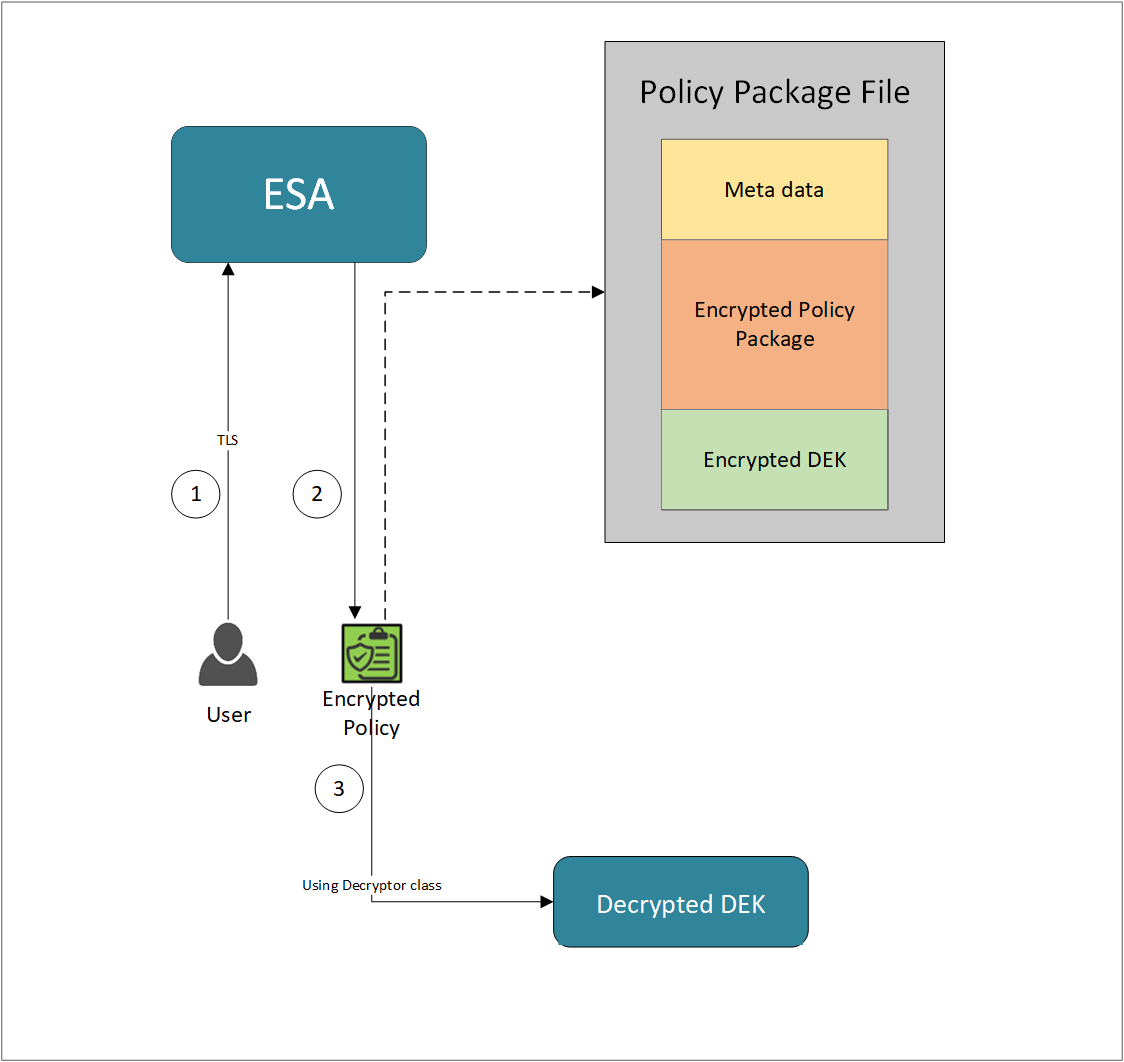
- A REST API call is used to download the policy from the ESA in an envelop encrypted format. A public key is created using a Key Management System (KMS) or Hardware Security Module (HSM). This public key must be passed to the REST API.
- The ESA generates a JSON file for the package with policy.
- The encrypted DEK needs to be decrypted to perform the security operations. A Decryptor class is implemented using the Decryptor interface, to decrypt the Data Encryption Key (DEK) using a private key.
Before you begin
Ensure the following prerequisites are met:
- The installation of the RP Agent is not required for immutable package deployment using the DevOps approach.
- The
decryptorparameter must have a fully qualified name of the decryptor class.
A Decryptor class needs to be implemented using the Decryptor interface, which decrypts the Data Encryption Key (DEK) using a private key. It returns the decrypted DEK in bytes.
For more information on the decryptor interface of AP Java, refer to Configuring the Decryptor interface.
For more information on the decryptor interface of AP Python, refer to Configuring the Decryptor interface. - The data store is properly configured before exporting your Application Protector policy. For ESA 10.0.1 and 10.1.0 versions, define allowed servers for seamless policy deployment and secure access control.
For more information about configuring a data store, refer to - - For ESA version 10.2.0 and higher, export key must be created in the data store for secure access control. For more information refer to Using the Encrypted Resilient Package REST APIs.
AP Java
Using the DevOps approach
Perform the following steps to use the DevOps approach for immutable package deployment.
Add the [devops] parameter in the config.ini file.
Ensure the decryptor class has a fully qualified domain name.[devops] package.path = /path/to/policyFile decryptor = packageName.DecryptorClassNameThe following is an example for adding the
[devops]parameter in theconfig.inifile.[devops] package.path = /opt/policies/policy1.json decryptor = com.protegrity.apjava.test.RSADecryptor
Note: For ESA 10.2.0 and later, Application Protector DevOps must use the Encrypted Resilient Package REST APIs using GET method. The legacy Export API using POST method is deprecated and not supported for Teams (PPC). The deprecated API remains supported only for the Enterprise edition for backward compatibility.
For more information about exporting Resilient Package using POST method for 10.0.1 and 10.1.0 ESA, refer to Using the Encrypted Resilient Package REST APIs.
For more information about exporting Resilient Package using GET method for 10.2 ESA, refer to Using the Encrypted Resilient Package REST APIs.
For more information about exporting Resilient Package using GET method for PPC, refer to Using the Encrypted Resilient Package REST APIs.
Sample code for DevOps approach
The sample code for DevOps approach for various Application Protectors using different cloud platforms is provided in this section.
DevOps approach for AP Java
The sample code for DevOps approach for the AP Java using different cloud platforms is provided in this section.
Configuring the Decryptor interface
A Decryptor class must implement the DEKDecryptor interface to decrypt the DEK. This interface includes the decrypt method. The decrypt method provides keyLabel, algorithmId, and encDek parameters. The decrypted DEK must be returned in byte[] format.
The following is a sample code for implementing the DEKDecryptor interface.
package com.protegrity.jcorelite.decryptor;

import com.protegrity.jcorelite.constants.KEK_ALGO;
import com.protegrity.jcorelite.exceptions.PtyDecryptorException;

public interface DEKDecryptor {

    public byte[] decrypt(String keyLabel, KEK_ALGO algorithmId, byte[] encDek) throws PtyDecryptorException;
}
Using AWS
The following is a sample implementation using the private key from AWS KMS.
/* Sample Application for decrypting encrypted DEK using AWS KMS keys.
 *
 * [Protegrity Prerequisite]
 * Create an asymmetric KMS key in the AWS KMS.
 * Use the public key of the generated asymmetric key to download ESA policy using the curl request.
 *
 * [AWS Prerequisite]
 * Install AWS CLI.
 * Ensure that the AWS credentials and configurations are properly set before running the code that interacts with the AWS services.
 * There are multiple ways to configure the AWS credentials and configurations.
 * 1. AWS CLI configuration:
 *    Command: $aws configure
 *    A prompt appears to enter the following information:
 *     - AWS Access Key ID: The access key associated with the AWS account or IAM user.
 *     - AWS Secret Access Key: The secret key associated with the access key.
 *     - Default region name: The AWS region to use by default.
 *     - Default output format: The format for CLI command output.
 *    The AWS credentials and configuration settings are set up in the ~/.aws/credentials and ~/.aws/config files.
 *
 * 2. Environment variables:
 *    The AWS credentials using environment variables can be set using the following commands.
 *       export AWS_ACCESS_KEY_ID = "your_access_key_id"
 *       export AWS_SECRET_ACCESS_KEY = "your_secret_access_key"
 *       export AWS_REGION= "your_aws_default_region"
 *
 * [Java Prerequisite]
 * Add AWS KMS Java SDK as part of your dependency:
 *      implementation 'com.amazonaws:aws-java-sdk-kms:1.12.423'
 */

import com.amazonaws.services.kms.AWSKMS;
import com.amazonaws.services.kms.AWSKMSClientBuilder;
import com.amazonaws.services.kms.model.DecryptRequest;
import com.amazonaws.services.kms.model.DecryptResult;
import com.protegrity.jcorelite.constants.KEK_ALGO;
import com.protegrity.jcorelite.decryptor.DEKDecryptor;
import com.protegrity.jcorelite.exceptions.PtyDecryptorException;
import java.nio.ByteBuffer;
import java.util.Base64;

public class AWSKMSDecryptor implements DEKDecryptor {
    private static final String KEY_ID  = "3068b3ef-4924-4be5-9e9a-440b418553b3";
    public byte[] decrypt(String keyLabel, KEK_ALGO algorithm, byte[] encDek) throws PtyDecryptorException {
        getEncoder().encodeToString(encDek));
        /* create an AWS KMS client */
        AWSKMS kmsClient = AWSKMSClientBuilder.standard().build();
        /* wrap byte array into buffer */
        ByteBuffer ciphertextBuffer = ByteBuffer.wrap(encDek);
        /* decrypt request */
        DecryptRequest decryptRequest =  new DecryptRequest().withCiphertextBlob(ciphertextBuffer).withEncryptionAlgorithm("RSAES_OAEP_SHA_256").withKeyId(KEY_ID);
        /* decrypt the ciphertext */
        DecryptResult decryptResult = kmsClient.decrypt(decryptRequest);
        /* get the decrypted data */
        ByteBuffer decryptedBuffer = decryptResult.getPlaintext();
        /* buffer to byte array */
        byte[] decryptedDek = decryptedBuffer.array();

        return decryptedDek;

    }
}
Using Azure
The following is a sample implementation using the private key from Azure Key Vault.
/*
* Sample Application for decrypting encrypted DEK using Azure Key Vault
*
* [Azure Prerequisite]
* Install azure cli
* Login to azure :
  az login --use-device-code
*
* [Protegrity Prerequisite]
* For creating a key in Azure Key Vault using Azure CLI, refer :
  https://learn.microsoft.com/en-us/azure/key-vault/keys/quick-create-cli
* Download the public key from the key vault :
  az keyvault key download --vault-name test -n testkey -e PEM -f publickey.pem
* Replace all the new lines with \n in publickey.pem
* Public key is now ready to be used for downloading your ESA policy
* Azure supports RSA1_5, RSA_OAEP and RSA_OAEP_256 algorithms,
  whose correspoding names in REST API call are RSA1_5, RSA-OAEP-SHA1 and RSA-OAEP-256 respectively
  Refer : https://learn.microsoft.com/en-us/java/api/com.azure.security.keyvault.keys.cryptography.models.encryptionalgorithm?view=azure-java-stable
* Make sure that decrypt permission is present for the key vault :
  az keyvault set-policy -n "test" --key-permissions decrypt --object-id 7e821e4c-e0ad-4a6f-aa26-f445c7c7e3ea
* To get the private key URI from azure key vault, refer :
  https://learn.microsoft.com/en-us/azure/key-vault/keys/quick-create-cli
*
* [Java Prerequisite]
* Add Azure key vault and azure identity as part of your dependency
  artifactIds : azure-security-keyvault-keys, azure-identity
*
* The below code demonstrates decryption of encrypted DEK using private key URI received from Azure key vault
*/

import com.azure.identity.DefaultAzureCredentialBuilder;
import com.azure.security.keyvault.keys.cryptography.CryptographyClient;
import com.azure.security.keyvault.keys.cryptography.CryptographyClientBuilder;
import com.azure.security.keyvault.keys.cryptography.models.EncryptionAlgorithm;
import com.azure.security.keyvault.keys.cryptography.models.EncryptResult;
import com.azure.security.keyvault.keys.cryptography.models.DecryptResult;

import com.protegrity.jcorelite.constants.KEK_ALGO;
import com.protegrity.jcorelite.decryptor.DEKDecryptor;
import com.protegrity.jcorelite.exceptions.PtyDecryptorException;

public class AzureDecryptor2 {
    private static final String KEY_ID  = "https://test.vault.azure.net/keys/testkey/aaf3861366a24b1bb4f6871eb11afafe";

    public byte[] decrypt(String keyLabel, KEK_ALGO algorithm, byte[] encDek) throws PtyDecryptorException {
        /*
         * Instantiate a CryptographyClient that will be used to call the service.
         * Notice that the client is using
         * default Azure credentials. For more information on this and other types of
         * credentials, see this document:
         * https://docs.microsoft.com/java/api/overview/azure/identity-readme?view=azure
         * -java-stable.
         *
         * To get started, you'll need a key identifier for a key stored in a key vault.
         * See the README
         * (https://github.com/Azure/azure-sdk-for-java/blob/main/sdk/keyvault/azure-
         * security-keyvault-keys/README.md)
         * for links and instructions.
         */
        CryptographyClient cryptoClient = new CryptographyClientBuilder()
                .credential(new DefaultAzureCredentialBuilder().build())
                .keyIdentifier(KEY_ID)
                .buildClient();

        DecryptResult decryptResult = cryptoClient.decrypt(EncryptionAlgorithm.RSA_OAEP, encDek);

        return decryptResult.getPlainText();
    }
}
Using GCP
The following is a sample implementation using the private key from Google Cloud KMS.
/*
* Sample Application decrypting encrypted DEK using Google Cloud Key Management
*
* [Protegrity Prerequisite]
* Create an asymmetric key using Google Cloud Key Management with key purpose of ASYMMETRIC_DECRYPT.
* This example uses a key with algorithm 2048 bit RSA key OAEP Padding - SHA256 Digest
* Now use the public key of the generated asymmetric key to download your ESA policy
*
* Example curl command to download policy
* curl --location 'https://{ESA_IP}/pty/v1/rps/export?version=1&coreversion=1' \
       --header 'accept: application/json' \
       --header 'Content-Type: application/json' \
       --header 'Authorization: Basic' \
       --data '{
         "kek":{
         "publicKey":{
         "label": "LABEL_NAME",
         "algorithm": "ALGORITHM_NAME",
         "value": "-----BEGIN PUBLIC KEY-----
                   [asymmetric public key using Google Cloud Key Management]
                   -----END PUBLIC KEY-----"}
       }
       }'
*
* The below code demonstrates decrypting encrypted DEK using key generated using Google Cloud Key Management
*
* [Google Prerequisite]
* Google Cloud Account with Google Cloud Key Management enabled
* Install gcloud cli
  gcloud auth application-default command creates application_default_credentials.json
*
* [Java Prerequisite]
* Add Google Cloud KMS as part of your dependency
  implementation 'com.google.cloud:google-cloud-kms:<version_number>'
*
* Check Google Cloud API Documentation for more information
*/

package com.protegrity.test;

import com.google.cloud.kms.v1.AsymmetricDecryptResponse;
import com.google.cloud.kms.v1.CryptoKeyVersionName;
import com.google.cloud.kms.v1.KeyManagementServiceClient;
import com.google.protobuf.ByteString;
import com.protegrity.jcorelite.constants.KEK_ALGO;
import com.protegrity.jcorelite.exceptions.PtyDecryptorException;
import java.io.IOException;

public class GCPKMSDecryptor {

  public byte[] decryptAsymmetricKey(byte[] encDek) throws IOException {
    // Replace these variables before running the sample.
    String projectId = "your-project-id";
    String locationId = "us-east1";
    String keyRingId = "my-key-ring";
    String keyId = "my-key";
    String keyVersionId = "123";
    return decryptAsymmetricKey(projectId, locationId, keyRingId, keyId, keyVersionId, encDek);
  }

  // Decrypt data that was encrypted using the public key component of the given
  // key version.
  public byte[] decryptAsymmetricKey(
      String projectId,
      String locationId,
      String keyRingId,
      String keyId,
      String keyVersionId,
      byte[] ciphertext)
      throws IOException {
    // Initialize client that will be used to send requests. This client only
    // needs to be created once, and can be reused for multiple requests. After
    // completing all of your requests, call the "close" method on the client to
    // safely clean up any remaining background resources.
    try (KeyManagementServiceClient client = KeyManagementServiceClient.create()) {
      // Build the key version name from the project, location, key ring, key,
      // and key version.
      CryptoKeyVersionName keyVersionName =
          CryptoKeyVersionName.of(projectId, locationId, keyRingId, keyId, keyVersionId);
      // Decrypt the ciphertext.
      AsymmetricDecryptResponse response =
          client.asymmetricDecrypt(keyVersionName, ByteString.copyFrom(ciphertext));
      return response.getPlaintext().toByteArray();
    }
  }

  public byte[] decrypt(String keyLabel, KEK_ALGO algorithm, byte[] encDek)
      throws PtyDecryptorException, IOException {
    return decryptAsymmetricKey(encDek);
  }
}
Feedback
Was this page helpful?