Protection Method Reference
A general overview of protection methods supported by Protegrity products. It guides you through Protegrity protection methods, providing a comparison of all the protection methods.
Protegrity products can protect sensitive data with the following protection methods:
The following table describes the protection methods for structured and unstructured data security policy types.
Table: Protection Methods by Data Security Policy Type
| Protection Method | Description | Structured | Unstructured |
|---|
| Tokenization (all types) | Tokenization is the process of replacing sensitive data with tokens that has no worth to someone who gains unauthorized access to the data. | √ | |
| Format Preserving Encryption (FPE) | A data encryption technique that preserves the ciphertext format using FF1 mode of operation for AES-256 block cipher algorithm. | √ | |
| AES-128 | A block cipher with 128 bit encryption keys. | √ | √ |
| AES-256 | A block cipher with 256 bit encryption keys. | √ | √ |
CUSP AES-128,
CUSP AES-256 | A modified block algorithm mainly used in environments where an IBM mainframe is present. | √ | |
| No Encryption | It does not protect data but lets the sensitive data be stored in clear. Protection comes from access control, monitoring, and masking. | √ | |
| Monitoring | It does not protect data but is used for monitoring and auditing. | √ | |
| Masking | It does not protect the data but applies masking to the sensitive data. | √ | |
| Hashing (HMAC-SHA256) | A Keyed-Hash Message Authentication Code. It is used only for protection of data using hashing. Since hashing is a one-way function, the original data cannot be restored. | √ | |
The following table describes the deprecated protection methods for structured and unstructured data security policy types.
Table: Deprecated Protection Methods by Data Security Policy Type
| Protection Method | Description | Structured | Unstructured |
|---|
| 3DES | A block cipher with 168 bit encryption keys. | √ | √ |
| CUSP 3DES | A modified block algorithm mainly used in environments where an IBM mainframe is present. | √ | |
| Hashing (HMAC-SHA1) | A Keyed-Hash Message Authentication Code. It is used only for protection of data using hashing. Since hashing is a one-way function, the original data cannot be restored. | √ | |
Protegrity protection methods, including tokenization, encryption, monitoring, masking, and hashing, support various input formats. This enables you to protect sensitive data using these methods. Some examples of input formats are as follows:
- Social Security Numbers (SSNs)
- Credit Card Numbers (CCNs)
- Electronic Personal Health Information (ePHI), which is controlled by Health Insurance Portability and Accountability Act (HIPPA) and Health Information Technology for Economic and Clinical Health (HITECH)
- Personally identifiable information (PII)
The following table shows different types of sensitive data that can be protected using different protection methods. It demonstrates input values and their corresponding protected values.
Table: Examples of Protected Data
| # | Type of Data | Input | Protected Value | Comments on Protected Value |
|---|
| 1 | SSN delimiters | 075-67-2278 | 287-38-2567 | Numeric token, delimiters in input |
| 2 | Credit Card | 5511 3092 3993 4975 | 8278 2789 2990 2789 | Numeric token |
| 3 | Credit Card | 5511 3092 3993 4975 | 8278 2789 2990 4975 | Numeric token, last 4 digits in clear |
| 4 | Credit Card | 5511309239934975 | 551130########## | No Encryption with mask exposing the first 6 digits. A mask is applied by the data security policy when a user tries to unprotect the protected value. |
| 5 | Credit Card | 5511309239934975 | 1437623387940746 | Credit Card token with invalid Luhn digit property. Tokenized value has invalid Luhn checksum. |
| 6 | Credit Card | 5511309239934975 | 8313123036143103 | Credit Card token with invalid card type identification. The first digit in tokenized value is not a valid card type. |
| 7 | Credit Card | 5511309239934975 | 1854817J97347370 | Credit Card token with alphabetic indicator on the 8th position. |
| 8 | Phone/Fax number | 1 888 397 8192 | 9 853 888 8435 | Numeric token |
| 9 | Medical ID | 29M2009ID | iA6wx0Mw1 | Alpha-Numeric token |
| 10 | Date and Time | 2012.12.31 12:23:34 | 1816.07.22 14:31:51 | Datetime token, date and time parts are tokenized |
| 11 | Proper names | Alfred Hitchcock | uRLzbg cvofdBFJh | Alpha token |
| 12 | Short names | Al | kKX | Alpha token non-length preserving |
| 13 | Abbreviations | CXR | GTP | Upper-case Alpha token |
| 14 | License plates | 583-LBE | 44J-KLT | Upper Alpha-Numeric token |
| 15 | Addresses | 5 High Ridge Park, Stamford | 5 hcY2 k9rLp Z0uA, KunZYNEM | Alpha-Numeric token. Punctuation marks and spaces are treated as delimiters. |
| 16 | E-mail Address | Protegrity1234@gmail.com | tzJkXJDRwjcNLU@02ici.com | Alpha-Numeric token, delimiters in input, last 3 characters in clear |
| 17 | E-mail Address | Protegrity1234@gmail.com | UNfOxcZ51jWbXMq@gmail.com | Email token |
| 18 | Password | 2$trongPa$$ | ]tlÙÖëÍÈÃW | Unicode Gen2 token with alphabet:
Printable (U+20-U+7E, U+A0-U+FF) |
| 19 | Fuzzy times | 1994-01-01_00.00.00 | wfÏÛöò·×ÚøÕuðÔt´þà8 | Unicode Gen2 token with alphabet:
Printable (U+20-U+7E, U+A0-U+FF) |
| 20 | Unicode text | ýç"ö÷Ó | Ƕf$ùI | Unicode Gen2 token with alphabet:
Printable (U+20-U+7E, U+A0-U+FF) |
| 21 | Unicode text | Протегрити | Чцдяайыбм | Unicode Gen2 token with alphabet:
Cyrillic (U+410-U+44F) |
| 22 | Japanese text | データ保護 | 睯窯闒懻辶 | Unicode Gen2 token with alphabet:
Numeric (U+0030-U+0039)
Hiragana (U+3041-U+3096)
Katakana (U+30A0-U+30FF)
Kanji (U+4E00-U+9FFF) |
| 23 | Japanese address | 〒106-0044東京都港区東麻布1-8-1 東麻布ISビル4F | 〒门醆湏-鑹晓侐晊秦龡箳蕛矱蝠苲四猿-蠵-堻 鞄眡莧IS閲楌蹬F | Unicode Gen2 token with alphabet:
Numeric (U+0030-U+0039)
Hiragana (U+3041-U+3096)
Katakana (U+30A0-U+30FF)
Kanji (U+4E00-U+9FFF) |
| 24 | Financial data | -3015.039 | -4416.646 | Decimal token. Protected value will never contain any zeroes. |
| 25 | Photographic images, media files | Media stored as BLOB type | Encrypted BLOB | Encryption (AES-256, AES-128) or hashing (HMAC-SHA256) |
| 26 | Irreversible data to be destroyed | AnyDataTo Destroy | Q2LKa2UhIhMTiRsi0l8BUF5xVag= | Hashing (HMAC-SHA256), data cannot be decrypted |
You can combine Protegrity protection methods to obtain the required level of data access control within the enterprise.
For example, a Security Officer can use a data security policy to control what is delivered to different roles in the policy. The following figure shows how Social Security Number access can vary by different users and applications.
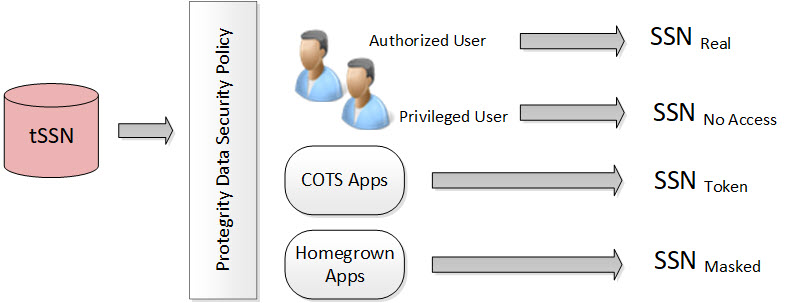
In the figure, the tokenized SSN is stored in the database. However, there are four roles defined in the policy:
Table: Different Roles in the Policy
| Users and Roles | Description |
|---|
| Authorized users - Real | It is the original or real value. A user with unprotect rights. |
| Privileged users - No Access | It is the default configuration. If the user does not have protect access rights, a null value is returned. |
| Commercial off-the-shelf (COTS) application users - Token | If the user does not have unprotect rights but the configuration is set as protect, then the configuration allows the output section to be protected. |
| Homegrown application users - Masked | It is how the masking data element is configured and the users are granted view access. For more information about masking, refer to Masking. |
Each role can receive a different form of the SSN based on its need. The Security Officer determines the SSN form by role.
Protegrity tokenization maintains a separation of duties by way of the data security policy.
The DBA, Developers, and System Administrators do not have direct access to the data. Everything goes through the data security policy, regardless of who manages the system.
For more information about data security policies, refer to Managing policies.
1 - Protegrity Tokenization
Protegrity tokenization is a method for tokenizing data. It is optimized to meet the performance, scalability, and manageability requirements of large and complex environments.
Tokenization is the process of replacing sensitive data with tokens that has no worth to someone who gains unauthorized access to the data. With tokenization, specific pieces of original data can be preserved, while the system tokenizes data according to design. Tokens can be set up and deployed directly on the protectors, depending on your enterprise configuration and data security needs. Once tokenization is deployed, operational systems continually work with the tokens. If the operational systems experience a security breach, then only the tokens are at risk of being compromised. Protegrity tokenization is transparent to end-users. Data integrity is strongly enforced by way of the data security policy.
Protegrity tokenization can be configured to preserve different parts of the original value in the token, such as the last 4 digits. It also recognizes and preserves delimiters, which are often used in SSNs, dates, etc.
Protegrity tokenization enables the user to tokenize various input data types, such as payment card industry (PCI), personally identifiable information (PII), and protected health information (PHI).
With Protegrity tokenization, there is a 1:1 relationship between the real data value and its token value. This enables token values to be used as alternative unique IDs that can be used for joining related information.
The following table describes the token types supported by Protegrity tokenization.
Table: Tokenization Types
| Tokenization Type | Alphabet Characters | Comment |
|---|
| Numeric (0-9) | Digits 0 through 9 | |
| Integer | Digits 0 through 9 | Data length: 2 bytes, 4 bytes, and 8 bytes |
| Credit Card | Digits 0 through 9 | Special settings: Invalid LUHN digit, invalid card type, alphabetic indicator |
| Alpha (a-z, A-Z) | Lowercase letters a through z
Uppercase letters A through Z | |
| Upper-case Alpha (A-Z) | Uppercase letters A through Z | Lower case characters will be converted to upper-case in tokenized output value. |
| Alpha-Numeric (0-9, a-z, A-Z) | Digits 0 through 9
Lowercase letters a through z
Uppercase letters A through Z | |
| Upper-Case Alpha-Numeric (0-9, A-Z) | Digits 0 through 9
Uppercase letters A through Z | Lower case characters will be converted to upper-case in tokenized output value. |
| Lower ASCII | The lower part of ASCII table. Hex character codes from 0x21 to 0x7E | Support of 94 printable characters (ASCII from 33 (!) to 126(~)), the rest are treated as delimiters |
| Datetime | YYYY-MM-DD HH:MM:SS | Special settings: Tokenize time, Distinguishable date, Date in clear |
| Decimal | Digits 0 through 9 sign and .(decimal delimiter) | Numeric data with precision and scale. The token will not contain any zeros. |
| Unicode Gen2 | Unicode code points between U+0020 and U+3FFFF | Result is based on the customized set of characters named as alphabet to generate token values. |
| Binary | Hex character codes from 0x00 to 0xFF | |
| Email | Digits 0 through 9
Lowercase letters a through z
Uppercase letters A through Z
Special characters with restrictions @ sign and .(dot) are delimiters | Domain part after @ sign will not be tokenized |
The following table describes the deprecated token types supported by Protegrity tokenization.
| Tokenization Type | Alphabet Characters | Comment |
|---|
| Printable | ASCII printable characters, which include letters, digits, punctuation marks, and miscellaneous symbols. Hex character codes from 0x20 to 0x7E, and from 0xA0 to 0xFF. | ISO 8859-15 Latin alphabet no. 9 |
| Date (YYYY-MM-DD) | Date in big endian form, starting with the year. The following separators are supported: .(dot), / (slash), - (dash). | |
| Date (DD/MM/YYYY) | Date in little endian form, starting with the day. The following separators are supported: . (dot), / (slash), - (dash). | |
| Date (MM.DD.YYYY) | Date in middle endian form, starting with the month. The following separators are supported: . (dot), / (slash), - (dash) supported. | |
| Unicode | UTF-8 text. Hex character codes from 0x00 to 0xFF | Result is Alpha-Numeric. |
| Unicode Base64 | UTF-8 text. Hex character codes from 0x00 to 0xFF | Result is Alpha-Numeric, +, /, and =. |
1.1 - Tokenization Support by Protegrity Products
Lists all token types used by different types of protectors.
Protegrity offers various types of protectors which helps to protect data in different software and platforms.
For example, we can use:
- Application Protectors: To protect data in C, C++, Python, Java, .Net, and Go programming languages.
- Big Data Protectors: To protect data in Big Data at various component levels, such as, Hive, Pig, MapReduce, etc.
- Data Warehouse Protectors: To protect data in the Teradata Data Warehouses.
- Gateway Protectors: To protect data in Gateway Protectors like Data Security Gateway (DSG).
- Cloud Protectors: To protect data in Cloud Protectors.
Each protector has certain tokenization types which are listed in the following sections.
Application Protector
The Protegrity Application Protector (AP) is a high-performance, versatile solution that provides a packaged interface to integrate comprehensive, granular security and auditing into enterprise applications.
Application Protectors support all types of tokens.
Table: Supported Tokenization Types by Application Protector
*1 - If the input and output types of the API are BYTE[], then the customer application should convert the input to and output from the byte array, before calling the API.
Table: Deprecated Tokenization Types supported by Application Protector
| Tokenization Type | AP Java*1 | AP Python | AP C |
|---|
| Printable | STRING
CHAR[]
BYTE[] | STRING
BYTES | STRING
CHAR[]
BYTE[] |
| Date | DATE
STRING
CHAR[]
BYTE[] | DATE
STRING
BYTES | DATE
STRING
CHAR[]
BYTE[] |
| Unicode | STRING
CHAR[]
BYTE[] | STRING
BYTES | STRING
CHAR[]
BYTE[] |
| Unicode Base64 | STRING
CHAR[]
BYTE[] | STRING
BYTES | STRING
CHAR[]
BYTE[] |
*1 - If the input and output types of the API are BYTE[], then the customer application should convert the input to and output from the byte array, before calling the API.
For more information about Application protectors, refer to Application Protector.
Big Data Protector
Protegrity supports MapReduce, Hive, Pig, HBase, Spark, and Impala, which utilizes Hadoop Distributed File System (HDFS) or Ozone as the data storage layer. The data is protected from internal and external threats, and users and business processes can continue to utilize the secured data. Protegrity protects data inside the files using tokenization and strong encryption protection methods.
The following table shows the tokenization types supported for Big Data Protectors.
Table: Supported Tokenization Types for Big Data Protectors
| Tokenization Type | MapReduce*1 | Hive | Pig | HBase*1 | Impala | Spark*1 | Spark SQL | Trino |
|---|
Credit Card
Numeric*3
Alpha*3
Upper-case Alpha*3
Alpha-Numeric*3
Upper Alpha-Numeric*3
Lower ASCII
Email*3 | BYTE[] | STRING | CHARARRAY | BYTE[] | STRING | VARCHAR
STRING | STRING | VARCHAR |
| Integer | INT: 4 bytes
LONG: 8 bytes | INT: 4 bytes
BIGINT: 8 bytes | INT: 4 bytes | BYTE[] | SMALL INT: 2 bytes
INT: 4 bytes
BIGINT: 8 bytes | SHORT: 2 bytes
INT: 4 bytes
LONG: 8 bytes | SHORT: 2 bytes
INT: 4 bytes
LONG: 8 bytes | SMALL INT: 2 bytes
INT: 4 bytes
BIGINT: 8 bytes |
| Datetime*2 | BYTE[] | STRING
DATE
DATETIME | CHARARRAY | BYTE[] | STRING | BYTE[]
STRING | STRING
DATE
DATETIME | VARCHAR
DATE
TIMESTAMP |
| Decimal | BYTE[] | STRING | CHARARRAY | BYTE[] | STRING | BYTE[]
STRING | STRING | VARCHAR |
| Unicode Gen2 | BYTE[] | STRING | Not supported | BYTE[] | STRING | BYTE[]
STRING | STRING | VARCHAR |
| Binary | BYTE[] | Not supported | Not supported | BYTE[] | Not supported | BYTE[] | Not supported | Not supported |
*1 - The customer application should convert the input into a byte array and generate the output from the byte array in the required data type.
*2 - The Datetime tokenization will only work with VARCHAR data type.
*3 - The Char tokenization UDFs only support Numeric, Alpha, Alpha Numeric, Upper-case Alpha, Upper Alpha-Numeric, and Email data elements, and with length preservation selected. Using any other data elements with Char tokenization UDFs is not supported. Using non-length preserving data elements with Char tokenization UDFs is not supported.
The following table shows the deprecated tokenization types supported for Big Data Protectors.
Table: Deprecated Tokenization Types supported for Big Data Protectors
| Tokenization Type | MapReduce*1 | Hive | Pig | HBase*1 | Impala | Spark*1 | Spark SQL | Trino |
|---|
| Printable | BYTE[] | Not supported | Not supported | BYTE[] | STRING | BYTE[] | Not supported | Not supported |
| Date | BYTE[] | STRING
DATE
DATETIME | CHARARRAY | BYTE[] | STRING | BYTE[]
STRING | STRING
DATE
DATETIME | VARCHAR
DATE
TIMESTAMP |
| Unicode | BYTE[] | STRING | Not supported | BYTE[] | STRING | BYTE[]
STRING | STRING | VARCHAR |
| Unicode Base64 | BYTE[] | STRING | Not supported | BYTE[] | STRING | BYTE[]
STRING | STRING | VARCHAR |
*1 - The customer application should convert the input into a byte array and generate the output from the byte array in the required data type.
For more information about Big Data protectors, refer to Big Data Protector.
Data Warehouse Protector
The Protegrity Data Warehouse Protector is an advanced security solution designed to protect sensitive data at the column level. This enables you to secure your data, while still permitting access to authorized users. Additionally, the Data Warehouse Protector integrates seamlessly with existing database systems using the User-Defined Functions for an enhanced security.
Protegrity protects data inside the data warehouses using various tokenization and encryption methods.
Table: Supported Tokenization Types for Data Warehouse Protector
Table: Deprecated Tokenization Types supported by Data Warehouse Protector
For more information about Data Warehouse protectors, refer to Data Warehouse Protector.
- If you have fixed-length data fields and the input data is shorter than the length of the field, then truncate the leading and trailing white spaces before passing the input to the respective Protect and Unprotect UDFs.
- The truncation of whitespaces ensures consistent data output for the protect and unprotect operations. This consistency holds true across all Protegrity products.
- For more information, refer to Truncating Whitespaces.
Database Protector
Oracle Database Protector
1.2 - Delimiters
A delimiter refers to a group of one or more characters which are used in data, such as mathematical expressions or plain text to separate data.
Protegrity tokenization can generate the same token regardless of how the data is formatted. Any character in the input that does not comply with the token types in the Tokenization Types is generally treated as a delimiter and remains unchanged during tokenization.
The following table shows how the Protegrity Token types handles delimiters and spaces as compared to plain numerical data.
Table: Tokenization with Delimiters
Note: Some tokenizers can tokenize delimiters. Unicode Gen2, lower ASCII, printable, and binary are examples of tokenizers that can tokenize delimiters.
| Input | Value returned by Protegrity Tokenization |
|---|
| 5332711989955364 | 8344588301109112 |
| 5332-7119-8995-5364 | 8344-5883-0110-9112 |
| 5332 7119 8995 5364 | 8344 5883 0110 9112 |
1.3 - Tokenization Properties
The tokenization properties are specified when the data element is created.
Table: Common Tokenization Properties
| Token Property | Description |
|---|
| User configured token properties | |
| Name | Unique name identifying the token element.
Maximum length is 56 characters. |
| Data Type | Type of data to tokenize. Name of the alphabet, which indicates the specific characters to tokenize. |
| Static Lookup Table (SLT) Tokenizers | Mentions the type of SLT tokenizers (SLT_1_3, SLT_1_6, SLT_2_3, SLT_2_6, SLT_6_DECIMAL, SLT_DATETIME, and SLT_X_1). |
| Preserve Case | Whether the case of the alphabets and position of the alphabets and numbers must be preserved when tokenizing the value. This is applicable when using the Alpha-Numeric (0-9, a-z, A-Z) token type and the SLT_2_3 tokenizer only. |
| Preserve Position | Whether the position of the alphabets and numbers must be preserved when tokenizing the value. This is applicable when using the Alpha-Numeric (0-9, a-z, A-Z) token type and the SLT_2_3 tokenizer only. |
| Preserve Length | Whether tokens will be the same length as the input or not. |
| Allow Short Data Tokenization | Whether short tokens will be enabled or not. We have the following options: “Yes”, “No, generate error”, or “No, return input as it is”. |
| From Left | Number of characters from left to keep in clear in tokenized output. |
| From Right | Number of characters from right to keep in clear in tokenized output. |
| Minimum Input Length | Minimum length of the input data that can be tokenized. |
| Maximum Input Length | Maximum length of the input data that can be tokenized. |
| Alphabet | Name of the alphabet, which is configured to enable specific set of characters to use for tokenization. |
| Automatically calculated token properties | |
| Internal Initialization Vector (IV) | Whether internal initialization vector (IV) will be used or not. |
| Other token properties | |
| External Initialization Vector (IV) | Whether external initialization vector (IV) will be used or not. |
The following table shows what properties can be set for the token types.
Table: Tokenization Properties for Token Types
| Tokenization Data Type | Tokenizer | Preserve length | Preserve Case/ Preserve Position | Allow Short Tokens | From Left, From Right | Minimum/ Maximum length | External IV | Internal IV |
|---|
| Numeric | SLT_1_3,
SLT_2_3,
SLT_1_6,
SLT_2_6 | √ | X | √ | √ | X | √ | √ |
| Integer | SLT_1_3 | √ | X | X | X | X | X | X |
| Credit Card | SLT_1_3,
SLT_2_3,
SLT_1_6,
SLT_2_6 | √
(always yes) | X | X | √ | X | √ | √ |
| Alpha | SLT_1_3,
SLT_2_3 | √ | X | √ | √ | X | √ | √ |
| Upper-case Alpha | SLT_1_3,
SLT_2_3 | √ | X | √ | √ | X | √ | √ |
| Alpha-Numeric | SLT_1_3 | √ | X | √ | √ | X | √ | √ |
| SLT_2_3 | √ | √ | √ | √ | X | √ | √ |
| Upper-Case Alpha-Numeric | SLT_1_3,
SLT_2_3 | √ | X | √ | √ | X | √ | √ |
| Lower ASCII | SLT_1_3 | √ | X | √ | √ | X | √ | √ |
| Datetime | SLT_DATETIME | √
(always yes) | X | X | X (Left in clear = 0, Right in clear = 0) | X | X | X |
| Decimal | SLT_6_DECIMAL | X
(always no) | X | X | X (Left in clear = 0, Right in clear = 0) | √ | X | X |
| Unicode Gen2 | SLT_1_3,
SLT_X_1 | √ | X | √ | √ | X | √ | √ |
| Binary | SLT_1_3,
SLT_2_3 | X
(always no) | X | X | √ | X | √ | √ |
| Email | SLT_1_3,
SLT_2_3 | √ | X | √ | X (Left in clear = 0, Right in clear = 0) | X | √ | X |
- X - means that Property is disabled and cannot be specified.
- √ - means that Property is enabled or can be specified.
The following table shows what properties can be set for the deprecated token types.
Table: Tokenization Properties for deprecated Token Types
| Tokenization Data Type | Tokenizer | Preserve length | Preserve Case/ Preserve Position | Allow Short Tokens | From Left, From Right | Minimum/ Maximum length | External IV | Internal IV |
|---|
| Printable | SLT_1_3 | √ | X | √ | √ | X | √ | √ |
| Date (YYYY-MM-DD) | SLT_1_3,
SLT_2_3,
SLT_1_6,
SLT_2_6 | √
(always yes) | X | X | X (Left in clear = 0, Right in clear = 0) | X | X | X |
| Date (DD/MM/YYYY) | SLT_1_3,
SLT_2_3,
SLT_1_6,
SLT_2_6 | √
(always yes) | X | X | X (Left in clear = 0, Right in clear = 0) | X | X | X |
| Date (MM.DD.YYYY) | SLT_1_3,
SLT_2_3,
SLT_1_6,
SLT_2_6 | √
(always yes) | X | X | X (Left in clear = 0, Right in clear = 0) | X | X | X |
| Unicode | SLT_1_3,
SLT_2_3 | X
(always no) | X | √ | X (Left in clear = 0, Right in clear = 0) | X | √ | X |
| Unicode Base64 | SLT_1_3,
SLT_2_3 | X
(always no) | X | √ | X (Left in clear = 0, Right in clear = 0) | X | √ | X |
- X - means that Property is disabled and cannot be specified.
- √ - means that Property is enabled or can be specified.
1.3.1 - Data Type and Alphabet
The data type specifies the data that should be tokenized, for instance with the characters to expect as input and the output to generate.
An alphabet contains all characters considered for tokenization, it is derived from the tokenization type. Characters outside the alphabet are considered delimiters.
Note: This is applicable only for Unicode Gen2 token.
Refer to Tokenization Types for the full list of supported token types.
1.3.2 - Static Lookup Table (SLT) Tokenizers
SLT tokenizer represents a method that uses multiple SLTs to generate tokens.
A static lookup table (SLT) contains a pre-generated list of all possible values from a given set of characters. An alphabetic lookup table for instance might contain all values from “Aa” to “Zz”. All entries are then shuffled so that they are in random order.
SLT tokenizer uses multiple SLTs to generate tokens. This is done by first dividing the input value into smaller pieces, called token blocks, which correspond to entries in the lookup tables. The token blocks are then substituted with values from the SLTs and chained together to form the final token value. This means that the token is a result of multiple lookups in multiple SLTs.
Another benefit of SLT tokenizers is that tokenization can be done locally on the protector. With this solution, tokenization is performed locally within the protector environment.
For more information, refer to Working with Data Elements.
There are several types of SLT tokenizers from which you can choose. They are distinguished by their block size and the number of lookup tables.
Table: SLT Tokenizer with block size and lookup tables
| Tokenizer | Allow Short Tokens | No. of lookup tables | Block size |
|---|
| SLT_1_3 | Yes | 1 | 1 |
| 1 | 2 |
| 1 | 3 |
No, return input as it is
No, generate error | 1 | 3 |
| SLT_2_3 | Yes | 2 | 1 |
| 2 | 2 |
| 2 | 3 |
No, return input as it is
No, generate error | 2 | 3 |
| SLT_1_6 | Yes | 1 | 1 |
| 1 | 2 |
| 1 | 3 |
| 1 | 6 |
No, return input as it is
No, generate error | 1 | 6 |
SLT_2_6 | Yes | 2 | 1 |
| 2 | 2 |
| 2 | 3 |
| 2 | 6 |
No, return input as it is
No, generate error | 2 | 6 |
| SLT_6_DECIMAL | NA | Multiple lookup tables:
One for each input length in the range 1 to 5
One for input lengths >= 6 |
| SLT_DATETIME | NA | Multiple lookup tables |
| SLT_X_1 | Yes |
5-98*1 | 1 |
No, return input as it is
No, generate error |
3-96*1 | 1 |
*1 - For the SLT_X_1 tokenizer, the number of lookup tables used for the security operations is determined during the creation of the data elements.
The following table describes the types of SLT tokenizers and compares their characteristics.
Table: SLT Tokenizer Memory Footprint for Token Types
| Token Type | Tokenizer | Allow Short Tokens | Size of Token Tables (number of entries) | Size of Token Tables (kB) | Amount of Memory used in the Protector (kB) | Comments |
|---|
| Numeric |
SLT_1_3
SLT_2_3
SLT_1_6
SLT_2_6 |
No, generate error
No, return input as it is |
1,000
2,000
1,000,000
2,000,000 |
4
8
3,906
7,812 |
8
16
7,812
15,624 | |
| Yes |
1,110
2,220
1,001,110
2,002,220 |
4.33
8.66
3,910.58
7,821.17 |
8.66
17.32
7,821.17
15,642.34 | |
| Integer | SLT_1_3 | NA | 4096 | 16 | 32 | |
| Credit Card |
SLT 1_3
SLT 2_3
SLT 1_6
SLT
2_6 | NA |
1,000
2,000
1,000,000
2,000,000 |
4
8
3,906
7,812 |
8
16
7,812
15,624 | |
| Alpha |
SLT 1_3
SLT 2_3 |
No, generate error
No, return input as it is |
140,608
281,216 |
549
1,098 |
1,098
2,196 | |
| Yes |
143,364
286,728 |
560.01
1,120.02 |
1,120.02
2,240.04 | |
| Upper-case Alpha |
SLT 1_3
SLT 2_3 |
No, generate error
No, return input as it is |
17,576
35,152 |
69
138 |
138
276 | |
| Yes |
18,278
36,556 |
71.39
142.79 |
142.79
285.59 | |
| Alpha-Numeric |
SLT 1_3
SLT 2_3 |
No, generate error
No, return input as it is |
238,328
476,656 |
931
1,862 |
1,862
3,724 | |
| Yes |
242,234
484,468 |
946.22
1,892.45 |
1,892.45
3,784.90 | |
| Upper-Case Alpha-Numeric |
SLT 1_3
SLT 2_3 |
No, generate error
No, return input as it is |
46,656
93,312 |
182
364 |
364
728 | |
| Yes |
47,988
95,976 |
187.45
374.90 |
374.90
749.81 | |
| Lower ASCII |
SLT 1_3 |
No, generate error
No, return input as it is |
830,584 |
3,244 |
6,488 | |
| Yes |
839,514 |
3,279.35 |
6,558.70 | |
| Datetime | SLT_DATETIME | NA |
1,086,400 |
4,244 |
8,488 |
Maximum memory is used when both date part and time part will be tokenized |
| Decimal | SLT_6_DECIMAL | NA |
597,870 |
2,335 |
4,670 | |
| Unicode Gen2 |
SLT_1_3
SLT_X_1
|
No, generate error
No, generate error
No, return input as it is |
4,096,000
359,994 |
16,384
1,440 |
32,768
2,880 | |
SLT_1_3
SLT_X_1 |
Yes
Yes |
4,121,760
500,000 |
16,488
2,000 |
32,975
4,000 | |
| Binary |
SLT_1_3
SLT_2_3 | NA |
238,328
476,656 |
931
1,862 |
1,862
3,724 | Same tokenizers and other values as for Alpha-Numeric token element |
| Email |
SLT_1_3
SLT_2_3 |
No, generate error
No, return input as it is |
238,328
476,656 |
931
1,862 |
1,862
3,724 | Same tokenizers and other values as for Alpha-Numeric token element |
| Yes |
242,234
484,468 |
946.22
1,892.45 |
1,892.45
3,784.90 |
Note: The amount of memory used in the protector is twice the size of the token tables (kB) because an inverted SLT is stored in the memory, in addition to the original SLT.
Table: SLT Tokenizer Characteristics for Deprecated Token Types
| Token Type | Tokenizer | Allow Short Tokens | Size of Token Tables (number of entries) | Size of Token Tables (kB) | Amount of Memory used in the Protector (kB) | Comments |
|---|
| Printable |
SLT 1_3 |
No, generate error
No, return input as it is |
6,967,871 |
27,218 |
54,436 | |
| Yes |
7,004,543 |
27,361.49 |
54,722.99 | |
| Date YYYY-MM-DD |
SLT_1_3
SLT_2_3
SLT_1_6
SLT_2_6 | NA |
1,000
2,000
1,000,000
2,000,000 |
4
8
3,906
7,812 |
8
16
7,812
15,624 | |
| Date DD/MM/YYYY |
SLT_1_3
SLT_2_3
SLT_1_6
SLT_2_6 | NA |
1,000
2,000
1,000,000
2,000,000 |
4
8
3,906
7,812 |
8
16
7,812
15,624 | |
| Date MM.DD.YYYY |
SLT_1_3
SLT_2_3
SLT_1_6
SLT_2_6 | NA |
1,000
2,000
1,000,000
2,000,000 |
4
8
3,906
7,812 |
8
16
7,812
15,624 | |
| Unicode |
SLT_1_3
SLT_2_3 |
No, generate error
No, return input as it is |
238,328
476,656 |
931
1,862 |
1,862
3,724 | Same tokenizers and other values as for Alpha-Numeric token element |
| Yes |
| Unicode Base64 |
SLT_1_3
SLT_2_3 |
No, generate error
No, return input as it is |
274,625
549,250 |
1,073
2,146 |
2,146
4,292 | Same tokenizers and other values as for Alpha-Numeric token elements. It also includes +, /, and =. |
| Yes |
1.3.3 - From Left and From Right Settings
The From Left and From Right settings can be configured to specify the number of characters to leave in clear while tokenizing.
This property indicates the number of characters from left and right that will remain in the clear and hence be excluded from tokenization. Not all token types will allow the end-user to specify these values. The From Left and From Right settings can be configured in the Tokenize Options during the Data Element creation on the ESA Web UI.
For example;
Input Value: 5511309239934975
Credit Card Token: Left=0 Right=4
Output Value: 8278278929904975
When processing input data, you must check the From Left and From Right settings. Validate the input data based on the From Left and From Right settings before applying the Allow Short Data settings.
For more information about how From Left and From Right settings work together with short data settings, refer to Calculating Token Length.
1.3.4 - Internal Initialization Vector (IV)
An Internal IV is used during the tokenization process to make it more difficult to detect patterns in multiple tokenized values.
Internal IV is automatically applied to the input value when the token element’s left and right properties are non-zero, designating some characters to remain in the clear. An Internal IV provides an additional security during the tokenization process.
Data to tokenize can be logically divided into three components: left, middle, and right. If an IV is used, then the left and right components are concatenated to form the IV. This IV is then added to the middle component before the value is tokenized.
Table: Examples of Tokenization with Internal IV
| Token Properties | Input Value | Output Value | Comments |
|---|
Alpha Token
Left=1
Right=0 | 1Protegrity
2Protegrity
3Protegrity | 1aOkCUXmhXC
2DeKeldVpKj
3hASBMvvfuL | Left=1 thus the first character in the input value is not tokenized but used as internal IV. For each of three input values the value “Protegrity” is tokenized, with internal IVs “1”, “2”, and “3” respectively. Tokenized value is different for all three cases. |
Alpha Token
Left=2
Right=4 | W2Protegrity2012
W2Protegrity2013
Q2Protegrity2013 | W2NXgfOdLQEy2012
W2XdjFTIFQNC2013
Q2gWjpyMwvDJ2013 | Left=2, Right=4 thus the first 2 and the last 4 characters in the input value are not tokenized but used as internal IV. For each of three input values the value “Protegrity” is tokenized, with internal IVs “W22012”, “W22013”, and “Q22013” respectively. Tokenized value is different for all three cases. |
Alpha Token
Left=0
Right=0 | Protegrity | RlfZVOmhQD | Left and Right are undefined thus the internal IV is not used. |
1.3.5 - Minimum and Maximum Input Length
The minimum and maximum input lengths are the boundaries that are used in input validation.
In Protegrity tokenization only the Decimal token type allows for defining the Minimum and Maximum length of the token element when created. Some token types, such as Datetime, have a fixed length. For the remainder, Minimum and Maximum length depends on token type, tokenizer, length preservation, and short token setting.
The following table illustrates length settings by token type.
Table: Minimum and Maximum Input Length for Token Types
Token Type |
Tokenizer |
Length Preservation |
Allow Short Data |
Minimum Length |
Maximum Length |
|---|
Numeric |
SLT_1_3
SLT_2_3 |
Yes |
Yes |
1 |
4096 |
No, return input as it is |
3 |
No, generate error |
No |
NA |
1 |
3933 |
SLT_1_6
SLT_2_6 |
Yes |
Yes |
1 |
4096 |
No, return input as it is |
6 |
No, generate error |
No |
NA |
1 |
3933 |
Integer |
SLT_1_3 |
Yes |
NA |
2 |
8 |
Credit Card |
SLT_1_3
SLT_2_3 |
Yes |
NA |
3 |
4096 |
SLT_1_6
SLT_2_6 |
Yes |
NA |
6 |
4096 |
Alpha |
SLT_1_3
SLT_2_3 |
Yes |
Yes |
1 |
4096 |
No, return input as it is |
3 |
No, generate error |
No |
NA |
1 |
4076 |
Upper-case Alpha |
SLT_1_3
SLT_2_3 |
Yes |
Yes |
1 |
4096 |
No, return input as it is |
3 |
No, generate error |
No |
NA |
1 |
4049 |
Alpha-Numeric |
SLT_1_3
SLT_2_3 |
Yes |
Yes |
1 |
4096 |
No, return input as it is |
3 |
No, generate error |
No |
NA |
1 |
4080 |
Upper-Case Alpha-Numeric |
SLT_1_3
SLT_2_3 |
Yes |
Yes |
1 |
4096 |
No, return input as it is |
3 |
No, generate error |
No |
NA |
1 |
4064 |
Lower ASCII |
SLT_1_3 |
Yes |
Yes |
1 |
4096 |
No, return input as it is |
3 |
No, generate error |
No |
NA |
1 |
4086 |
Datetime |
SLT_DATETIME |
Yes |
NA |
10 |
29 |
Decimal |
SLT_6_DECIMAL |
No |
NA |
1 |
36 |
Unicode Gen2 |
SLT_1_3
SLT_X_1 |
Yes |
Yes |
1 Code Point |
4096 Code Points |
| No, return input as it is |
3 Code Points |
| No, generate error |
Binary |
SLT_1_3
SLT_2_3 |
No |
NA |
3 |
4095 |
Email |
SLT_1_3
SLT_2_3 |
Yes |
Yes |
3 |
256 |
No, return input as it is |
5 |
No, generate error |
No |
NA |
3 |
256 |
- The minimum and maximum length validation on input data is done on the characters to tokenize.
- The From Left and From right clear characters are not counted. Additionally, characters outside of the alphabet for the selected token type are also not counted.
- The NULL values are accepted but not tokenized.
Table: Minimum and Maximum Input Length for Deprecated Token Types
1.3.5.1 - Calculating Token Length
The Calculating Token Length process calculates the number of tokens and shows how text is divided into tokens.
For a Numeric token type, non-numeric values are considered as delimiters. The unsupported characters will be treated as delimiters and left un-tokenized. This occurs when the input value does not contain tokenizable characters with the selected token type.
The number of characters to tokenize is calculated as described on the following image:

If the input value does not contain characters to tokenize, then it is considered a zero-length token. The tokenization of a zero-length input value will not produce an error during the tokenization, and input value will be returned as output.
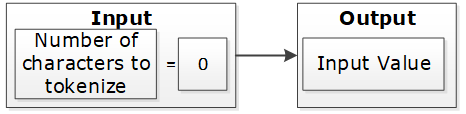
If the input value has at least one character and short data tokenization is enabled, then the source data can be tokenized. If short data tokenization is not enabled, then the source data will be returned as it is. Alternatively, an appropriate error will appear due to tokenization.
For more information on short data tokenization, refer to Short Data Tokenization.

If the input value contains more characters than the maximum for tokenization, then the value of tokenization is considered too long. The tokenization process provides an appropriate error message.

If the input value has a sufficient number of characters, the tokenization process is successful. This occurs when the character count falls between the minimum and maximum settings.

Table: Token Length Examples
| Token Properties | Input Value | Output Value | Comments |
|---|
Numeric Token
Left/Right undefined
Allow Short Data=Yes | ab1cd | ab6cd | Non-numeric values are considered as delimiters. Input is tokenized as short data is enabled and minimum length is 1
character. |
Numeric Token
Left=0
Right=0
Allow Short Data=No, generate error | ab1cd | Error. Input too short. | Non-numeric values are considered as delimiters. Input is short since short data is not enabled and the minimum number of characters to tokenize for this token type is 3 characters. |
Numeric Token
Left=0
Right=0
Allow Short Data= No, return input as it is | 12 | 12 | Input is returned as is as per the settings for short data. |
Numeric Token
Left=2Right=2 | 48ghdg83 | 48ghdg83 | The input value is left unchanged during tokenization. This is because it is an empty value for tokenization. In tokenization, both left and right settings remove all numeric characters during tokenization. |
Numeric Token
Left=2Right=2 | 4568 | 4568 | The input value is left unchanged by the tokenization since it is an empty value for tokenization. |
Numeric Token
Left=0
Right=0 | ab123cd | ab857cd | Input value has enough characters for tokenization, only supported by numeric token type values are tokenized. |
Alpha Numeric Token
Left=5Right=0
Allow Short Data=Yes | 345465 | 34546c | Input is evaluated first for left and right settings. Since left settings are set to 5, the first five digits are excluded and the sixth digit can be tokenized. As the Allow Short Data is set as yes, the sixth digit is tokenized. |
Alpha Numeric Token
Left=5Right=0
Allow Short Data=No, generate error | 345465 | error | Input is evaluated first for left and right settings. Since left settings are set to 5, the first five digits are excluded and the sixth digit can be tokenized. As the Allow Short Data is set as no, generate error and the length of data to be tokenized is less than 3, an Input too short error is generated. |
Alpha Numeric Token
Left=5Right=0
Allow Short Data=No, return input as it is | 345465 | 345465 | Input is evaluated first for left and right settings. Since left settings are set to 5, the first five digits are excluded and the sixth digit can be tokenized. As the Allow Short Data is set as No, return input as it is and the length of data to be tokenized is less than 3, the data is passed as is. |
Alpha Numeric Token
Left=5Right=0
Allow Short Data=Yes | 34546 | 34546 | Input is evaluated first for left and right settings. Since left settings are set to 5 and the input is five digits, no data exists to be tokenized. As no data exists, it is considered as a zero length token and the input is passed as is. |
Alpha Numeric Token
Left=5Right=0
Allow Short Data=No, generate error | 34546 | 34546 |
Alpha Numeric Token
Left=5Right=0
Allow Short Data=No, return input as it is | 34546 | 34546 |
Alpha Numeric Token
Left=5Right=0
Allow Short Data=Yes | 3454 | error | Input is evaluated first for left and right
settings. Since left settings are set to 5 and the input is four digits, the left and right settings condition is not met. This results in an Input too short error. |
Alpha Numeric Token
Left=5Right=0
Allow Short Data=No, generate error | 3454 | error |
Alpha Numeric Token
Left=5Right=0
Allow Short Data=No, return input as it is | 3454 | error |
Unicode Token (Cyrillic alphabet)
Left= 0Right=0
Allow Short Data=Yes | abдаcd | abшcd | Non-Cyrillic values are considered as delimiters. Input data is tokenized as as short data is enabled. |
Unicode Token (Cyrillic alphabet)
Left= 0Right=0
Allow Short Data=No | abдаcd | Error. Input too Short | Non-Cyrillic values are considered as delimiters. Input is too short since the word да (Cyrillic meaning yes - pronounced da) is only two codepoints. The minimum number of codepoints for this token type is 3 characters. |
1.3.6 - Length Preserving
The length preserving tokenization property provides an option to generate token values to preserve the length of input data.
With the Preserve Length flag enabled, the length of the input data and protected token value is the same.
For data elements with the Preserve Length flag available, you have an option to generate token values that are of the same length as the input data.
Note: The Unicode Gen2 token element is Code Point length preserving when this option is enabled. The length in bytes can vary depending on the alphabet selected during data element creation.
As an extension to this flag, the Allow Short Data flag provides multiple options to manage short input data handling. If the Preserve Length property is not set, then short input protected will not keep its original length. Generated tokens will at least have the minimum length defined for the token type.
For more information about short data tokenization, refer to Short Data Tokenization.
A check for maximum input length is performed regardless of the preservation setting. This check ensures that the input is within the allowed length limit.
If Preserve Length is not selected, then tokenized data may be longer than the input value up to +5%, or at least +1 symbol on a very small initial value (1-2 symbols). Here, symbol can represent a character or a code point.
If Preserve Length is not selected, then for applying protection in database columns, column length of the resulting protected table should be bigger than length of the column to tokenize in the initial table. This will allow inserting tokenized data during protection when tokenized data is longer than the input data.
1.3.7 - Short Data Tokenization
Data is considered short when the number of tokenizable characters is below the tokenizer’s limit. The behavior for short input data can be configured, as it generally produces weaker tokens.
When using tokenizers, such as, SLT_1_3, SLT_2_3, and SLT_X_1, the minimum input limit for tokenizable characters or bytes is three. When using tokenizers, such as, SLT_1_6 and SLT_2_6, the minimum input limit for tokenizable characters or bytes is six.
The possible flag values for short data tokenization are described in the following table.
Table: Short tokens flag values
| Short Token Flag Value | Action |
|---|
| No, generate error | Do not tokenize the short input but generate an error code and an audit log stating that the data is too short. |
| Yes | Tokenize the data if the input is short. |
| No, return input as it is | Do not tokenize the short input but return the input as it is. |
The following tokens support short data tokenization:
The following deprecated tokens support short data tokenization:
Important: Short input data tokenization can be at risk as a user can easily guess the lookup table and the original data by tokenizing some input data.
Consider carefully before using the short data tokenization. If possible, short data input must be avoided.
For more information about the maximum length setting for non-length-preserving token elements, refer to Minimum and Maximum Input Length by Token Types.
1.3.8 - Case-Preserving and Position-Preserving Tokenization
If you work with the Alpha-Numeric (0-9, a-z, A-Z) token type and SLT_2_3 tokenizer, you can specify additional tokenization options for case preservation and position preservation.
This section explains the Case-Preserving and Position-Preserving tokenization options.
- Case-Preserving and Position-Preserving tokenization was designed to support specific business requirements. However, this design comes with a trade-off, as it affects the cryptographic strength of the tokens.
- When preserving the case and position of Alpha-Numeric characters, some information may be leaked through the tokenized value.
- In addition, depending on the length of the Alpha and Numeric substrings, tokens may suffer the same weaknesses as Short Tokens, as described in the section Short Data Tokenization.
- It is recommended that this method should not be used for most use cases. Before using this method, contact Protegrity Support to ensure that the risks are fully understood.
1.3.8.1 - Case-Preserving Tokenization
The case-preserving tokenization secures sensitive data while preserving the original structure and layout of the input.
When working with data that is received from multiple sources, the data can contain different casing properties. The data processing stage makes the casing consistent prior to distributing the data to additional systems.
If tokenization is performed prior to the data processing stage, then it results in tokens that differ in its casing properties as per the non-processed data.
To preserve the casing of the non-processed data while tokenizing, an additional tokenization option is provided for the Alpha-Numeric (0-9, a-z, A-Z) token type. The casing of the alphabets in the tokenized value matches the casing of the alphabets in the input value.
Note:
You can specify the case-preserving tokenization option when using the SLT_2_3 tokenizer and Alpha-Numeric (0-9, a-z, A-Z) token type only.
If you select the Preserve Case property on the ESA Web UI, then the Preserve Position property is also selected, by default. Hence, the position of the alphabets and numbers is preserved along with the casing of the alphabets in the output tokenized value.
If you are selecting the Preserve Case or Preserve Position property on the ESA Web UI, then the following additional properties are set:
- The Preserve Length property is enabled and Allow Short Data property is set to Yes, by default. These two properties are not modifiable.
- The retention of characters or digits from the left and the right are disabled, by default. The From Left and From Right properties are both set to zero.
For more information about specifying the case-preserving tokenization option for the Alpha-Numeric (0-9, a-z, A-Z) token type, refer to Create Token Data Elements.
The following table provides some examples for the case-preserving tokenization option.
Table: Case-Preserving Tokenization Examples
| Input Value | Tokenized Value using the Case-Preserving Tokenization |
|---|
| Dan123 | Abc567 |
| DAn123 | ABc567 |
| daN123 | abC567 |
1.3.8.2 - Position-Preserving Tokenization
The position-preserving tokenization preserves the position of the alphabetic characters and numbers when tokenizing the alpha-numeric values.
The alphabetic and numeric positions in the position-preserving tokenized value matches the alphabetic and numeric positions in the input value.
You can specify the position-preserving tokenization option when using the SLT_2_3 tokenizer and Alpha-Numeric (0-9, a-z, A-Z) token type only.
If you are selecting the Preserve Case or Preserve Position property, then the following additional properties are set:
- The Preserve Length property is enabled and Allow Short Data property is set to Yes, by default. These two properties are not modifiable.
- The retention of characters or digits from the left and the right are disabled, by default. The From Left and From Right properties are both set to zero.
For more information about specifying the position-preserving tokenization option for the Alpha-Numeric (0-9, a-z, A-Z) token type, refer to Create Token Data Elements.
The following table provides some examples for the position-preserving tokenization option.
Table: Position-Preserving Tokenization Examples
| Input | Tokenized Value using the Position-Preserving Tokenization |
|---|
| Dan123 | pXz789 |
| DAn123 | Abp708 |
| daN123 | Axz642 |
1.3.9 - External Initialization Vector (EIV)
The External Initialization Vector (EIV) feature offers an additional level of security. It allows for different tokenized results across protectors for the same input data and token element. The tokenized results are based on the External IV setting on each protector.
1.3.9.1 - Tokenization Model with External IV
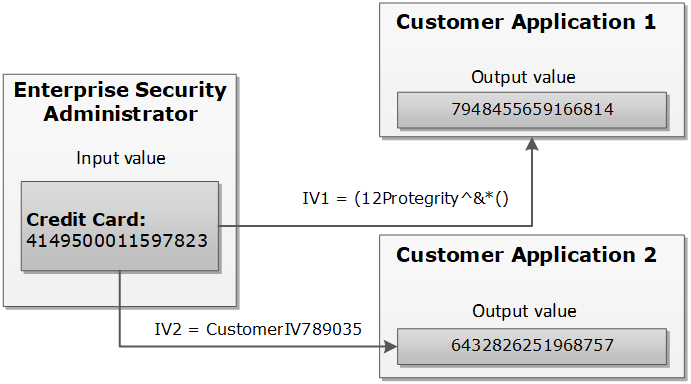
An example explains how the tokenization is performed with the External IV.
The External IV value is set as a new parameter when calling protect, unprotect or reprotect API from the client application.
The following example explains how the tokenization is performed with the External IV defined. As mentioned before, the main characteristic of the External IV feature is obtaining different outputs for the same input. To have different outputs, you need to specify different IVs.
Note: The External IV is used, prior to protection, as input to modify the data to protect. The External IV is ignored when using encryption.
1.3.9.2 - External IV Tokenization Properties
The External IV is supported by all token types, except Datetime and Decimal tokens.
The tokenization with the External IV is done only if the IV is specified during the protect operation through the end user API. When performing unprotect and re-protect operations, the same IV value used for protection must be identified.
If External IV is not provided in either a protect or unprotect function call, then the input is tokenized as-is without any IV.
The External IV value has the following properties:
- Supports ASCII and Unicode characters.
- Minimum 1 byte for the input.
- Maximum 256 bytes for the input.
- Empty and NULL strings are not supported as External IV values. These strings will be ignored during tokenization. The process will continue as if External IV was not used.
Here is an example of the tokenized input value with the External IV for a Numeric token:
Table: Example-External IV for a Numeric token
Input Value |
External IV |
Output Value |
Comments |
1234567890 |
None |
5108318538 |
External IV is not applied. |
1234567890 |
1234 |
0442985096 |
Output values differ because different external IVs were applied. |
12 |
1197578213 |
abc |
9423146024 |
1.3.10 - Truncating Whitespaces
Truncating Whitespaces ensures that only the actual data is considered during tokenization.
With fixed length fields or columns, input data may be shorter than the length of the field. When this happens, data may be appended with either, or both, trailing and leading whitespace. In those situations, the whitespace is considered during Tokenization. It will affect the tokenization results.
For instance, consider a scenario where the name “Hultgren Caylor” is stored in a Hive Char(30) column.
As the length of the data is less than 30 characters, trailing whitespaces are appended to it. In this case, assume that we need to protect this column with a data element that preserves the first and last character (L=1, R=1). Now with this setting, the expectation is to preserve character H at the start and the character r at the end, in the protected value output. However, the actual data has trailing whitespaces. This results in the output containing the character “H” at the start and a whitespace character " " at the end. The unnecessary trailing whitespaces cause the final protected output to generate a different token.
It is recommended to truncate trailing and leading whitespaces from the data. This applies before sending the data to Protect, Unprotect, or Reprotect UDFs. Truncating unnecessary whitespaces ensures that only the actual data is considered during tokenization. Any trailing and leading whitespaces are not taken into account.
In addition, it is important to follow a consistent approach for truncating the whitespaces across all operations, such as, Protect, Unprotect, Reprotect. For instance, if we have truncated unnecessary trailing whitespaces from the input before the Protect operation, then the same logic of truncating whitespaces from the input, during Unprotect and Reprotect operations needs to be followed.
1.4 - Tokenization Types
It describes the tokenization type properties for different protectors. It also provides some examples for tokenized values for different token types.
1.4.1 - Numeric (0-9)
Details about the Numeric (0-9) token type.
The Numeric token type tokenizes digits from 0 to 9.
Table: Numeric Tokenization Type properties
| Tokenization Type Properties | Settings |
|---|
Name |
Numeric |
Token type and Format |
Digits 0 through 9 |
| Tokenizer | Length Preservation | Allow Short Data | Minimum Length | Maximum Length |
|---|
SLT_1_3
SLT_2_3 |
Yes |
Yes |
1 |
4096 |
No, return input as it
is |
3 |
No, generate error |
No |
NA |
1 |
3933 |
SLT_1_6
SLT_2_6 |
Yes |
Yes |
1 |
4096 |
No, return input as it
is |
6 |
No, generate error |
No |
NA |
1 |
3933 |
Possibility to set Minimum/ maximum length |
No |
Left/Right settings |
Yes |
Internal IV |
Yes, if Left/Right settings
are non-zero |
External IV |
Yes |
Return of Protected value |
Yes |
Token specific properties |
None |
The following table lists the examples of numeric tokenization values.
Table: Examples of Numeric tokenization values
| Input Value | Tokenized Value | Comments |
|---|
| 123 | 977 | Numeric, SLT_1_3, Left=0, Right=0, Length Preservation=Yes The value has minimum length for SLT_1_3 tokenizer. |
| 1 | 555241 | Numeric, SLT_1_6, Left=0, Right=0, Length Preservation=No The value is padded up to 6 characters which is minimum length for SLT_1_6 tokenizer. |
| -7634.119 | -4306.861 | Numeric, SLT_1_3, Left=0, Right=0, Length Preservation=Yes Decimal point and sign are treated as delimiters and not tokenized. |
| 12+38=50 | 98+24=62 | Numeric, SLT_2_6, Left=0, Right=0, Length Preservation=Yes Arithmetic signs are treated as delimiters and not tokenized. |
| 704-BBJ | 134-BBJ | Numeric, SLT_1_3, Left=0, Right=0, Length Preservation=Yes Alpha characters are treated as delimiters and not tokenized. |
| 704-BBJ | Error. Input too short. | Numeric, SLT_2_6, Left=0, Right=0, Length Preservation=Yes, Allow Short Data=No, generate error
Input value has only three numeric characters to tokenize, which is short for SLT_2_6 tokenizer when Length Preservation=Yes and Allow Short Data=No, generate error. |
704-BBJ
704356 | 704-BBJ
134432 | Numeric, SLT_2_6, Left=0, Right=0, Length Preservation=Yes, Allow Short Data=No, return input as it is
If the input value has less than six characters to tokenize, then it is returned as is else it is tokenized. |
| 704-BBJ | 134-BBJ | Numeric, SLT_2_6, Left=0, Right=0, Length Preservation=Yes, Allow Short Data=Yes
Input value has three numeric characters to tokenize, which meets minimum length requirement for SLT_2_6 tokenizer when Length Preservation=Yes and Allow Short Data=Yes. |
| 704 | 134 | Numeric, SLT_1_3, Left=0, Right=0, Length Preservation=Yes, Allow Short Data=No, return input as it is
If the input value has less than three characters to tokenize, then it is returned as is else it is tokenized. |
| 704-BBJ | 669-BBJ642 | Numeric, SLT_1_6, Left=0, Right=0, Length Preservation=No Input value is padded up to 6 characters because Length Preservation=No. Alpha characters are treated as delimiters and not tokenized. |
| 704-BBJ | 764-6BBJ | Numeric, SLT_2_3, Left=1, Right=3, Length Preservation=No 1 character from left and 3 from right are left in clear. Two numeric characters left for tokenization “04” were padded and tokenized as “646”. |
Numeric Tokenization Properties for different protectors
Application Protector
The following table shows supported input data types for Application protectors with the Numeric token.
Table: Supported input data types for Application protectors with Numeric token
| Application Protectors*2 | AP Java*1 | AP Python |
|---|
| Supported input data types | STRING
CHAR[]
BYTE[] | STRING
BYTES |
*1 - The API accepts and returns data in BYTE[] format. The customer application needs to convert the input into byte arrays before calling the API, and similarly, convert the output from byte arrays after receiving the response from the API.
*2 - The Protegrity Application Protector only supports bytes converted from the string data type. If any other data type is directly converted to bytes and passed as input to the Application Protectors APIs that support byte as input and provide byte as output, then data corruption might occur.
For more information about Application protectors, refer to Application Protector.
Big Data Protector
Protegrity supports MapReduce, Hive, Pig, HBase, Spark, and Impala, which utilizes Hadoop Distributed File System (HDFS) or Ozone as the data storage layer. The data is protected from internal and external threats, and users and business processes can continue to utilize the secured data. Protegrity protects data inside the files using tokenization and strong encryption protection methods.
The following table shows supported input data types for Big Data protectors with the Numeric token.
Table: Supported input data types for Big Data protectors with Numeric token
| Big Data Protectors | MapReduce*2 | Hive | Pig | HBase*2 | Impala | Spark*2 | Spark SQL | Trino |
|---|
| Supported input data types*1 | BYTE[] | CHAR*3
STRING | CHARARRAY | BYTE[] | STRING | BYTE[]
STRING | STRING | VARCHAR |
*1 – If the input and output types of the API are BYTE[], then the customer application should convert the input to and output from the byte array, before calling the API.
*2 – The Protegrity MapReduce protector, HBase coprocessor, and Spark protector only support bytes converted from the string data type. Data types that are not bytes converted from the string data type might cause data corruption to occur when:
- Any other data type is directly converted to bytes and passed as input to the MapReduce or Spark API that supports byte as input and provides byte as output.
- Any other data type is directly converted to bytes and inserted in an HBase table. Where the HBase table is configured with the Protegrity HBase coprocessor.
*3 – If you are using the Char tokenization UDFs in Hive, then ensure that the data elements have length preservation selected. In Char tokenization UDFs, using data elements without length preservation selected, is not supported.
For more information about Big Data protectors, refer to Big Data Protector.
Data Warehouse Protector
The Protegrity Data Warehouse Protector is an advanced security solution designed to protect sensitive data at the column level. This enables you to secure your data, while still permitting access to authorized users. Additionally, the Data Warehouse Protector integrates seamlessly with existing database systems using the User-Defined Functions for an enhanced security.
Protegrity protects data inside the data warehouses using various tokenization and encryption methods.
The following table shows the supported input data types for the Teradata protector with the Numeric token.
Table: Supported input data types for Data Warehouse protectors with Numeric token
| Data Warehouse Protectors | Teradata |
|---|
| Supported input data types | VARCHAR LATIN |
For more information about Data Warehouse protectors, refer to Data Warehouse Protector.
Database Protectors
Oracle Database Protector
The supported input data types for the Oracle Database Protector are listed below.
| Protector | Supported Input Data Types |
|---|
| Oracle | VARCHAR2 |
| Oracle | CHAR |
Note: For numeric data elements where length preservation is not enabled, the maximum supported length is 3,842 characters. Data up to this length can be tokenized and de-tokenized without errors.
1.4.2 - Integer (0-9)
Details about the Integer token type.
The Integer token type tokenizes 2, 4, or 8 byte size integers.
Table: Integer Tokenization Type properties
The following table shows examples of the way in which a value will be tokenized with the Integer token.
Table: Examples of Integer tokenization values
| Input Value | Tokenized Value | Comments |
|---|
| 12 | 31345 | Integer, SLT_1_3, Left=0, Right=0, Length Preservation=Yes |
| 3 | 1465 | For 2 bytes, the values can range from -32768 to 32767. |
| 3 | 782939681 | For 4 bytes, the values can range from -2147483648 to 2147483647. |
| 3 | 7268379031142372719 | For 8 bytes, the value range can range from -9223372036854775808 to 9223372036854775807. |
The pty.ins_integer UDF in the Oracle, Teradata, and Impala Protectors, supports input data length of 4 bytes only. For 2 bytes, the following error is returned: Invalid input size.
Integer Tokenization Properties for different protectors
Application Protector
The following table shows supported input data types for Application protectors with the Integer token.
Table: Supported input data types for Application protectors with Integer token
| Application Protectors | AP Java | AP Python |
|---|
| Supported input data types | SHORT: 2 bytes
INT: 4 bytes
LONG: 8 bytes | INT: 4 bytes and 8 bytes |
If the user passes a 4-byte integer with values ranging from -2,147,483,648 to +2,147,483,647, the data element for the protect, unprotect, or reprotect APIs should be an 4-byte integer token type. However, if the user uses 2-byte integer token type, the data protection operation will not be successful. For a Bulk call using the protect, unprotect, and reprotect APIs, the error code, 44, appears. For a single call using the protect, unprotect, and reprotect APIs, an exception will be thrown and the error message, 44, Content of input data is not valid appears.
For more information about Application protectors, refer to Application Protector.
Big Data Protector
Protegrity supports MapReduce, Hive, Pig, HBase, Spark, and Impala, which utilizes Hadoop Distributed File System (HDFS) or Ozone as the data storage layer. The data is protected from internal and external threats, and users and business processes can continue to utilize the secured data. Protegrity protects data inside the files using tokenization and strong encryption protection methods.
The following table shows supported input data types for Big Data protectors with the Integer token.
Table: Supported input data types for Big Data protectors with Integer token
| Big Data Protectors | MapReduce*2 | Hive | Pig | HBase*2 | Impala | Spark*2 | Spark SQL | Trino |
|---|
| Supported input data types*1 | INT: 4 bytes
LONG: 8 bytes | INT: 4 bytes
BIGINT: 8 bytes | INT: 4 bytes | BYTE[] | SMALLINT: 2 bytes
INT: 4 bytes
BIGINT: 8 bytes | SHORT: 2 bytes
INT: 4 bytes
LONG: 8 bytes | SHORT: 2 bytes
INT: 4 bytes
LONG: 8 bytes | SMALLINT: 2 bytes
INT: 4 bytes
BIGINT: 8 bytes |
*1 – If the input and output types of the API are BYTE[], then the customer application should convert the input to and output from the byte array, before calling the API.
*2 – The Protegrity MapReduce protector, HBase coprocessor, and Spark protector only support bytes converted from the string data type. Bytes as input that are not generated from string data type might cause data corruption to occur when:
- Any other data type is directly converted to bytes should be passed as input to the MapReduce or Spark API that supports byte as input and provides byte as output.
- Any other data type is directly converted to bytes and inserted in an HBase table. Where the HBase table is configured with the Protegrity HBase coprocessor.
For more information about Big Data protectors, refer to Big Data Protector.
Data Warehouse Protector
The Protegrity Data Warehouse Protector is an advanced security solution designed to protect sensitive data at the column level. This enables you to secure your data, while still permitting access to authorized users. Additionally, the Data Warehouse Protector integrates seamlessly with existing database systems using the User-Defined Functions for an enhanced security.
Protegrity protects data inside the data warehouses using various tokenization and encryption methods.
The following table shows the supported input data types for the Teradata protector with the Integer token.
Table: Supported input data types for Data Warehouse protectors with Integer token
| Data Warehouse Protectors | Teradata |
|---|
| Supported input data types | SMALLINT: 2 bytes
INTEGER: 4 bytes
BIGINT: 8 bytes |
For more information about Data Warehouse protectors, refer to Data Warehouse Protector.
Database Protectors
Oracle Database Protector
The supported input data types for the Oracle Database Protector are listed below.
| Protector | Supported Input Data Types |
|---|
| Oracle | INTEGER |
1.4.3 - Credit Card
Details about the Credit Card token type.
The Credit Card token type helps maintain transparency. It provides ways to clearly distinguish a token from the real value which is a recommendation of the PCI DSS. The Credit Card token type supports only numeric input (no separators are allowed as input).
Table: Credit Card Tokenization properties
The credit card number real value is distinguished from the tokenized value based on the token value validation properties.
Table: Specific Properties of the Credit Card Token Type
| Credit Card Token Value Validation Properties | Left in Clear | Right in Clear | Comments | Validation Properties Compatibility |
| Invalid Luhn Checksum (On/Off) | Yes | Yes | Right characters which are to be left in the clear can be specified. This usually requires specifying a group of up to four characters. | Can be used together. |
| Invalid Card Type (On/Off) | 0 | Yes | Left cannot be specified, it is zero by default. |
| Alphabetic Indicator (On/Off) | Yes | Yes | The indicator will be in the token, which means that left and right can be specified. | Can be used only separately from the other token validation properties. |
You can create a Credit Card token element and select no validation property for it. If the Credit Card token is involved, it will be handled similar to a Numeric token. However, additional checks will be applied to the input based on the properties detailed in the Credit Card token general properties column in the table above.
To enable the Credit Card token properties, such as, Invalid LUHN checksum and Invalid Card Type, with the SLT Tokenizers, refer to Credit Card Properties with SLT Tokenizers.
Invalid Luhn Checksum
The purpose of the Luhn checksum is to detect incorrectly entered card details. If you enable Invalid Luhn Checksum token validation, then you must use valid credit cards otherwise tokenization will be denied for an invalid credit card number.
A valid credit card has a valid Luhn checksum. Upon tokenization, the tokenized value will have an invalid Luhn checksum. Here is an example of the tokenized credit card with the invalid Luhn digit.
Table: Credit Card Number with Luhn Checksum Examples
| Credit Card Number | Tokenized Values | Comments |
|---|
| 4067604564321453 | Token is not generated due to invalid input value. Error is returned. | The input value contains invalid Luhn checksum. The value cannot be tokenized with Luhn enabled. |
| 4067604564321454 | 2009071778438613 | The Luhn in the input value is correct, the value is tokenized. Tokenized value has invalid Luhn checksum. |
Invalid Card Type
An invalid credit card indicates an issue with the credit card details. An invalid card type will result in token values not starting with the digits that real credit card numbers begin with. The first digit in a real credit card number is the Major Industry Identifier. Thus, digits 3,4,5,6, and 0 can be the first digits of the real credit card number, which are then substituted during tokenization.
Table: Real Credit Card Values with Tokenized Values
| Real Credit Card Value | 3 | 4 | 5 | 6 | 0 |
|---|
| Tokenized Value | 2 | 7 | 8 | 9 | 1 |
Here is an example of the tokenized credit card with the invalid card type.
Table: Credit Card Number with Invalid Card Type Examples
| Credit Card Number | Tokenized Values | Comments |
|---|
| 4067604564321454 | 7335610268467066 | The credit card type is valid, the tokenization is successful. |
| 2067604564321454 | Token is not generated due to invalid input value. Error is returned. | The credit card type is invalid since the first digit of the value “2” does not belong to a real credit card. The value cannot be tokenized. |
Alphabetic Indicator
The alphabetic indicator replaces the tokenized value with an alphabet. If you enable Alphabetic Indicator validation, then the resulting token value will have one alphabetic character.
You will need to choose the position of the alphabetic character before tokenizing a credit card number otherwise the resulting token will have no alphabetic indicator.
The alphabetic indicator will substitute the tokenized value according to the following rule:
Table: Alphabetic Indicator with Tokenized Digits
| Tokenized digit | 0 | 1 | 2 | 3 | 4 | 5 | 6 | 7 | 8 | 9 |
|---|
| Alphabetic indicator | A | B | C | D | E | F | G | H | I | J |
In the following table, the Visa Card Number “4067604564321454” is tokenized. A tokenized value, represented by “7594107411315001”, is substituted with an alphabetic character in a selected position.
Table: Examples of Credit Card Tokenization with Alphabetic Indicator
| Credit Card Number (Input Value) | Position | Tokenized Values | Comments |
|---|
| 4067604564321454 | - | 7594107411315001 | No substitution since the position is undefined. |
| 4067604564321454 | 14 | 7594107411315A01 | Digit “0” is substituted with character “A” at position 14. |
Credit Card Properties with SLT Tokenizers
The Credit Card Properties with SLT Tokenizers explains the minimum data length required for tokenization. This occurs when the Credit Card token properties is used in combination with the SLT Tokenizers.
If you enable Credit Card token properties for tokenization, such as Invalid LUHN checksum and Invalid Card Type, you need to select an appropriate SLT Tokenizer. This is required to ensure the minimum data length is available for successful tokenization.
The following table represents the minimum data length required for tokenization as per the usage of Credit Card token properties with the SLT Tokenizers.
Table: Minimum Data Length - Credit Card Token Properties with SLT Tokenizers
| Enabled Credit Card Token Property | Minimum Data Length (in digits) Required for Tokenization |
| SLT_1_3/SLT_2_3 | SLT_1_6/SLT_2_6 |
| Invalid LUHN Checksum | 4 | 7 |
| Invalid Card Type | 4 | 7 |
| Invalid LUHN Checksum and Invalid Card Type | 5 | 8 |
Credit Card Tokenization Properties for different protectors
Application Protector
The following table shows supported input data types for Application protectors with the Credit Card token.
Table: Supported input data types for Application protectors with Credit Card token
| Application Protectors*2 | AP Java*1 | AP Python |
|---|
| Supported input data types | STRING
CHAR[]
BYTE[] | STRING
BYTES |
*1 - The API accepts and returns data in BYTE[] format. The customer application needs to convert the input into byte arrays before calling the API, and similarly, convert the output from byte arrays after receiving the response from the API.
*2 - The Protegrity Application Protector only supports bytes converted from the string data type. If any other data type is directly converted to bytes and passed as input to the Application Protectors APIs that support byte as input and provide byte as output, then data corruption might occur.
For more information about Application protectors, refer to Application Protector.
Big Data Protector
Protegrity supports MapReduce, Hive, Pig, HBase, Spark, and Impala, which utilizes Hadoop Distributed File System (HDFS) or Ozone as the data storage layer. The data is protected from internal and external threats, and users and business processes can continue to utilize the secured data. Protegrity protects data inside the files using tokenization and strong encryption protection methods.
The following table shows supported input data types for Big Data protectors with the Credit Card token.
Table: Supported input data types for Big Data protectors with Credit Card token
| Big Data Protectors | MapReduce*2 | Hive | Pig | HBase*2 | Impala | Spark*2 | Spark SQL | Trino |
|---|
| Supported input data types*1 | BYTE[] | STRING | CHARARRAY | BYTE[] | STRING | BYTE[]
STRING | STRING | VARCHAR |
*1 – If the input and output types of the API are BYTE[], then the customer application should convert the input to and output from the byte array, before calling the API.
*2 – The Protegrity MapReduce protector, HBase coprocessor, and Spark protector only support bytes converted from the string data type. Bytes as input that are not generated from string data type might cause data corruption to occur when:
- Any other data type is directly converted to bytes should be passed as input to the MapReduce or Spark API that supports byte as input and provides byte as output.
- Any other data type is directly converted to bytes and inserted in an HBase table. Where the HBase table is configured with the Protegrity HBase coprocessor.
For more information about Big Data protectors, refer to Big Data Protector.
Data Warehouse Protector
The Protegrity Data Warehouse Protector is an advanced security solution designed to protect sensitive data at the column level. This enables you to secure your data, while still permitting access to authorized users. Additionally, the Data Warehouse Protector integrates seamlessly with existing database systems using the User-Defined Functions for an enhanced security.
Protegrity protects data inside the data warehouses using various tokenization and encryption methods.
The following table shows the supported input data types for the Teradata protector with the Credit Card token.
Table: Supported input data types for Data Warehouse protectors with Credit Card token
| Data Warehouse Protectors | Teradata |
|---|
| Supported input data types | VARCHAR LATIN |
For more information about Data Warehouse protectors, refer to Data Warehouse Protector.
Database Protectors
Oracle Database Protector
The supported input data types for the Oracle Database Protector are listed below.
| Protector | Supported Input Data Types |
|---|
| Oracle | VARCHAR2 |
| Oracle | CHAR |
1.4.4 - Alpha (A-Z)
Details about the Alpha (A-Z) token type.
The Alpha token type tokenizes both uppercase and lowercase letters.
Table: Alpha Tokenization Type properties
Tokenization Type Properties | Settings |
|---|
Name | Alpha |
Token type and Format | Lowercase letters a through z Uppercase letters A through Z |
| | | | |
|---|
SLT_1_3
SLT_2_3 | Yes | Yes | 1 | 4096 |
No, return input as it is | 3 |
No, generate error |
No | NA | 1 | 4076 |
Possibility to set Minimum/ maximum length | No |
Left/Right settings | Yes |
Internal IV | Yes, if
Left/Right settings are non-zero |
External IV | Yes |
| Yes |
Token specific properties | None |
The following table shows examples of the way in which a value will be tokenized with the Alpha token.
Table: Examples of Numeric tokenization values
| Input Value | Tokenized Value | Comments |
|---|
| abc | nvr | Alpha, SLT_1_3, Left=0, Right=0, Length Preservation=Yes
The value has minimum length for SLT_1_3 tokenizer. |
| MA | TGi | Alpha, SLT_2_3, Left=0, Right=0, Length Preservation=No
The value is padded up to 3 characters which is minimum length for SLT_2_3 tokenizer. |
| MA | Error. Input too short. | Alpha, SLT_1_3, Left=0, Right=0, Length Preservation=Yes, Allow Short Data=No, generate error
Input value has only two alpha characters to tokenize, which is short for SLT_1_3 tokenizer when Length Preservation=Yes and Allow Short Data=No, generate error. |
MA
MAC | MA
TGH | Alpha, SLT_1_3, Left=0, Right=0, Length Preservation=Yes, Allow Short Data=No, return input as it is
If the input value has less than three characters to tokenize, then it is returned as is else it is tokenized. |
| MA | TG | Alpha, SLT_1_3, Left=0, Right=0, Length Preservation=Yes, Allow Short Data=Yes
Input value has only two alpha characters, which meets minimum length requirement for SLT_1_3 tokenizer when Length Preservation=Yes and Allow Short Data=Yes. |
| 131 Summer Street, Bridgewater | 131 VDYgAK q
vMDUn, zAEXmwqWYNQG | Alpha, SLT_2_3, Left=0, Right=0, Length Preservation=No
Numeric characters, spaces and comma are treated as delimiters and not tokenized. Output value is longer than initial value. |
| Albert Einstein | SldGzm OOCTzSFo | Alpha, SLT_1_3, Left=0, Right=0, Length Preservation=Yes
Space is treated as delimiters and not tokenized. Output value is the same length as initial value. |
| Albert Einstein | AjAkqD vvBFYLdo | Alpha, SLT_1_3, Left=1, Right=0, Length Preservation=Yes
1 character from left remains in the clear. |
Alpha Tokenization Properties for different protectors
Application Protector
The following table shows supported input data types for Application protectors with the Alpha token.
Note: For both SLT_1_3 and SLT_2_3, the maximum length of the protected data is 4096 bytes. This occurs for the Alpha token element for Application Protector with no length preservation.
Table: Supported input data types for Application protectors with Alpha token
| Application Protectors*2 | AP Java*1 | AP Python |
|---|
| Supported input data types | BYTE[]
CHAR[]
STRING | BYTES
STRING |
*1 - The API accepts and returns data in BYTE[] format. The customer application needs to convert the input into byte arrays before calling the API, and similarly, convert the output from byte arrays after receiving the response from the API.
*2 - The Protegrity Application Protector only supports bytes converted from the string data type. If any other data type is directly converted to bytes and passed as input to the Application Protector APIs that support byte as input and provide byte as output, then data corruption might occur.
For more information about Application protectors, refer to Application Protector.
Big Data Protector
Protegrity supports MapReduce, Hive, Pig, HBase, Spark, and Impala, which utilizes Hadoop Distributed File System (HDFS) or Ozone as the data storage layer. The data is protected from internal and external threats, and users and business processes can continue to utilize the secured data. Protegrity protects data inside the files using tokenization and strong encryption protection methods.
The following table shows supported input data types for Big Data protectors with the Alpha token.
Table: Supported input data types for Big Data protectors with Alpha token
| Big Data Protectors | MapReduce*2 | Hive | Pig | HBase*2 | Impala | Spark*2 | Spark SQL | Trino |
|---|
| Supported input data types*1 | BYTE[] | CHAR*3
STRING | CHARARRAY | BYTE[] | STRING | BYTE[]
STRING | STRING | VARCHAR |
*1 – If the input and output types of the API are BYTE[], then the customer application should convert the input to and output from the byte array, before calling the API.
*2– The Protegrity MapReduce protector, HBase coprocessor, and Spark protector only support bytes converted from the string data type. Data that is not converted to bytes from string data type might cause data corruption to occur when:
- Any other data type is directly converted to bytes and passed as input to the MapReduce or Spark API that supports byte as input and provides byte as output.
- Any other data type is directly converted to bytes and inserted in an HBase table. Where the HBase table is configured with the Protegrity HBase coprocessor.
*3 – If you are using the Char tokenization UDFs in Hive, then ensure that the data elements have length preservation selected. In Char tokenization UDFs, using data elements without length preservation selected, is not supported.
For more information about Big Data protectors, refer to Big Data Protector.
Data Warehouse Protector
The Protegrity Data Warehouse Protector is an advanced security solution designed to protect sensitive data at the column level. This enables you to secure your data, while still permitting access to authorized users. Additionally, the Data Warehouse Protector integrates seamlessly with existing database systems using the User-Defined Functions for an enhanced security.
Protegrity protects data inside the data warehouses using various tokenization and encryption methods.
The following table shows the supported input data types for the Teradata protector with the Alpha token.
Table: Supported input data types for Data Warehouse protectors with Alpha token
| Data Warehouse Protectors | Teradata |
|---|
| Supported input data types | VARCHAR LATIN |
For more information about Data Warehouse protectors, refer to Data Warehouse Protector.
Database Protectors
Oracle Database Protector
The supported input data types for the Oracle Database Protector are listed below.
| Protector | Supported Input Data Types |
|---|
| Oracle | VARCHAR2 |
| Oracle | CHAR |
1.4.5 - Upper-Case Alpha (A-Z)
Details about the Upper-Case Alpha (A-Z) token type.
The Upper-Case Alpha token type tokenizes all alphabetic symbols as uppercase. After de-tokenization, all alphabetic symbols are returned as uppercase. This means that initial and detokenized values would not match if the input contains lowercase letters.
Table: Upper-Case Alpha Tokenization Type properties
Tokenization Type Properties |
Settings |
|---|
Name |
Upper-Case Alpha |
Token type and Format |
Upper-Case letters A through Z |
Tokenizer |
Length Preservation |
Allow Short Data |
Minimum Length |
Maximum Length |
|---|
SLT_1_3
SLT_2_3 |
Yes |
Yes |
1 |
4096 |
No, return input as it
is |
3 |
No, generate error |
No |
NA |
1 |
4049 |
Possibility to set Minimum/ maximum length |
No |
Left/Right settings |
Yes |
Internal IV |
Yes, if
Left/Right settings are non-zero |
External IV |
Yes |
Return of Protected value |
Yes |
Token specific properties |
Lower case characters are accepted in the input but they will be converted to upper-case in output value. |
The following table shows examples of the way in which a value will be tokenized with the Upper-case Alpha token.
Table: Examples of Upper Case Alpha tokenization values
| Input Value | Tokenized Value | Comments |
|---|
| abc | OIM | Upper-case Alpha, SLT_2_3, Left=0, Right=0, Length Preservation=Yes
The value has minimum length for SLT_2_3 tokenizer.
Lowercase characters in the input are converted to uppercase in output. De-tokenization will return “ABC”. |
| NY | ZIZ | Upper-case Alpha, SLT_1_3, Left=0, Right=0, Length Preservation=No
The value is padded up to 3 characters which is minimum length for SLT_1_3 tokenizer. |
| NY | Error. Input too short. | Upper-case Alpha, SLT_2_3, Left=0, Right=0, Length Preservation=Yes, Allow Short Data=No, generate error
Input value has only two alpha characters to tokenize, which is short for SLT_2_3 tokenizer when Length Preservation=Yes and Allow Short Data=No, generate error. |
NY
NYA | NY
ZIO | Upper-case Alpha, SLT_2_3, Left=0, Right=0, Length Preservation=Yes, Allow Short Data=No, return input as it is
If the input value has less than three characters to tokenize, then it is returned as is else it is tokenized. |
| NY | ZI | Upper-case Alpha, SLT_2_3, Left=0, Right=0, Length Preservation=Yes, Allow Short Data=Yes
Input value has only two alpha characters to tokenize, which meets minimum length requirement for SLT_2_3 tokenizer when Length Preservation=Yes and Allow Short Data=Yes. |
| 131 Summer Street, Bridgewater | 131 ZBXDPW G
FYTZP, CRTTPXPLYGCU | Upper-case Alpha, SLT_1_3, Left=0, Right=0, Length Preservation=No
Numeric characters, spaces and comma are treated as delimiters and not tokenized. Output value is longer than initial value. |
| Albert Einstein | AOALXO POHLFHMU | Upper-case Alpha, SLT_2_3, Left=0, Right=0, Length Preservation=Yes
Space is treated as delimiters and not tokenized. Output value is the same length as initial value. |
| 704-BBJ | 704-GTU | Upper-case Alpha, SLT_1_3, Left=3, Right=0, Length Preservation=Yes
Three characters from left are left in clear. Dash is treated as delimiter. |
Upper-case Alpha Tokenization Properties for different protectors
Application Protector
The following table shows supported input data types for Application protectors with the Upper-case Alpha token.
Table: Supported input data types for Application protectors with Upper-case Alpha token
| Application Protectors*2 | AP Java*1 | AP Python |
|---|
| Supported input data types | BYTE[]
CHAR[]
STRING | BYTES
STRING |
*1 - The API accepts and returns data in BYTE[] format. The customer application needs to convert the input into byte arrays before calling the API, and similarly, convert the output from byte arrays after receiving the response from the API.
*2 - The Protegrity Application Protectors only support bytes converted from the string data type. If int, short, or long format data is directly converted to bytes and passed as input to the Application Protector APIs that support byte as input and provide byte as output, then data corruption might occur.
For more information about Application protectors, refer to Application Protector.
Big Data Protector
Protegrity supports MapReduce, Hive, Pig, HBase, Spark, and Impala, which utilizes Hadoop Distributed File System (HDFS) or Ozone as the data storage layer. The data is protected from internal and external threats, and users and business processes can continue to utilize the secured data. Protegrity protects data inside the files using tokenization and strong encryption protection methods.
The following table shows supported input data types for Big Data protectors with the Upper-Case Alpha token.
Table: Supported input data types for Big Data protectors with Upper-Case Alpha token
| Big Data Protectors | MapReduce*2 | Hive | Pig | HBase*2 | Impala | Spark*2 | Spark SQL | Trino |
|---|
| Supported input data types*1 | BYTE[] | CHAR*3
STRING | CHARARRAY | BYTE[] | STRING | BYTE[]
STRING | STRING | VARCHAR |
*1 – If the input and output types of the API are BYTE[], then the customer application should convert the input to and output from the byte array, before calling the API.
*2 – The Protegrity MapReduce protector, HBase coprocessor, and Spark protector only support bytes converted from the string data type. Data types that are not bytes converted from the string data type might cause data corruption to occur when:
- Any other data type is directly converted to bytes and passed as input to the MapReduce or Spark API that supports byte as input and provides byte as output.
- Any other data type is directly converted to bytes and inserted in an HBase table. Where the HBase table is configured with the Protegrity HBase coprocessor.
*3 – If you are using the Char tokenization UDFs in Hive, then ensure that the data elements have length preservation selected. In Char tokenization UDFs, using data elements without length preservation selected, is not supported.
For more information about Big Data protectors, refer to Big Data Protector.
Data Warehouse Protector
The Protegrity Data Warehouse Protector is an advanced security solution designed to protect sensitive data at the column level. This enables you to secure your data, while still permitting access to authorized users. Additionally, the Data Warehouse Protector integrates seamlessly with existing database systems using the User-Defined Functions for an enhanced security.
Protegrity protects data inside the data warehouses using various tokenization and encryption methods.
The following table shows the supported input data types for the Teradata protector with the Upper-case Alpha token.
Table: Supported input data types for Data Warehouse protectors with Upper-case Alpha token
| Data Warehouse Protectors | Teradata |
|---|
| Supported input data types | VARCHAR LATIN |
For more information about Data Warehouse protectors, refer to Data Warehouse Protector.
Database Protectors
Oracle Database Protector
The supported input data types for the Oracle Database Protector are listed below.
| Protector | Supported Input Data Types |
|---|
| Oracle | VARCHAR2 |
| Oracle | CHAR |
1.4.6 - Alpha-Numeric (0-9, a-z, A-Z)
Details about the Alpha-Numeric (0-9, a-z, A-Z) token type.
The Alpha-numeric token type tokenizes all alphabetic symbols, including lowercase and uppercase letters. It also tokenizes digits from 0 to 9.
Table: Alpha-Numeric Tokenization Type properties
Tokenization Type Properties |
Settings |
|---|
Name |
Alpha-Numeric |
Token type and Format |
Digits 0 through 9
Lowercase letters a through z
Uppercase letters A through Z |
Tokenizer |
Length Preservation |
Allow Short Data |
Minimum Length |
Maximum Length |
|---|
SLT_1_3
SLT_2_3 |
Yes |
Yes |
1 |
4096 |
No, return input as it is |
3 |
No, generate error |
No |
NA |
1 |
4080 |
| Preserve Case |
Yes, if SLT_2_3 tokenizer is selected
If you select the Preserve Case or Preserve Position property on the ESA Web UI, the Preserve Length property is enabled. If you set the Allow Short Data property to Yes, it is also enabled by default. In addition, these two properties are not modifiable. |
| Preserve Position |
Possibility to set Minimum/ maximum length |
No |
Left/Right settings |
Yes
If you are selecting the Preserve Case or Preserve Position property on the ESA Web UI, then the retention of characters or digits from the left and the right are disabled, by default. In addition, the From Left and From Right properties are both set to zero. |
Internal IV |
Yes, if Left/Right settings are non-zero
If you are selecting the Preserve Case or Preserve Position property on the ESA Web UI, then the alphabetic part of the input value is applied as an internal IV to the numeric part of the input value prior to tokenization. |
External IV |
Yes
If you are selecting the Preserve Case or Preserve Position property on the ESA Web UI, then the external IV property is not supported. |
Return of Protected value |
Yes |
Token specific properties |
None |
The following table shows examples of the way in which a value will be tokenized with the Alpha-Numeric token.
Table: Examples of Tokenization for Alpha-Numeric Values
| Input Value | Tokenized Value | Comments |
|---|
| 123 | sQO | Alpha-Numeric, SLT_1_3, Left=0, Right=0, Length Preservation=Yes
Input is numeric but tokenized value contains uppercase and lowercase alpha characters. |
| NY | 1DT | Alpha-Numeric, SLT_2_3, Left=0, Right=0, Length Preservation=No
The value is padded up to 3 characters which is minimum length for SLT_2_3 tokenizer. |
| j1 | 4t | Alpha-Numeric, SLT_1_3, Left=0, Right=0, Length Preservation=Yes, Allow Short Data=Yes
The minimum length meets the requirement for SLT_1_3 tokenizer when Length Preservation=Yes and Allow Short Data=Yes. |
| j1 | Error. Input too short. | Alpha-Numeric, SLT_1_3, Left=0, Right=0, Length Preservation=Yes, Allow Short Data=No, generate error
The input has two characters to tokenize, which is short for SLT_1_3 tokenizer when Length Preservation=Yes and Allow Short Data=No, generate error. |
j1
j1Y | j1
4tD | Alpha-Numeric, SLT_1_3, Left=0, Right=0, Length Preservation=Yes, Allow Short Data=No, return input as it is
If the input value has less than three characters to tokenize, then it is returned as is else it is tokenized. |
| 131 Summer Street, Bridgewater | ikC ejCxxp kLa
2ZZ, 5x8K2IMubcn | Alpha-Numeric, SLT_2_3, Left=0, Right=0, Length Preservation=No
Spaces and comma are treated as delimiters and not tokenized. |
| 704-BBJ | jf7-oVY | Alpha-Numeric, SLT_1_3, Left=3, Right=0, Length Preservation=Yes
Dash is treated as delimiter. The rest of value is tokenized. |
| 704-BBJ | uHq-fTr | Alpha-Numeric, SLT_2_3, Left=3, Right=0, Length Preservation=Yes
Dash is treated as delimiter. The rest of value is tokenized. |
| Protegrity2012 | Pr3CYMPilr9n12 | Alpha-Numeric, SLT_1_3, Left=2, Right=2, Length Preservation=Yes
Two characters from left and 2 characters from right are left in clear. The rest of value is tokenized. |
Alpha-Numeric Tokenization Properties for different protectors
Application Protector
The following table shows supported input data types for Application protectors with the Alpha-Numeric token.
Table: Supported input data types for Application protectors with Alpha-Numeric token
| Application Protectors*2 | AP Java*1 | AP Python |
|---|
| Supported input data types | STRING
CHAR[]
BYTE[] | STRING
BYTES |
*1 - The API accepts and returns data in BYTE[] format. The customer application needs to convert the input into byte arrays before calling the API, and similarly, convert the output from byte arrays after receiving the response from the API.
*2 - The Protegrity Application Protectors only support bytes converted from the string data type. If int, short, or long format data is directly converted to bytes and passed as input to the Application Protector APIs that support byte as input and provide byte as output, then data corruption might occur.
For more information about Application protectors, refer to Application Protector.
Big Data Protector
Protegrity supports MapReduce, Hive, Pig, HBase, Spark, and Impala, which utilizes Hadoop Distributed File System (HDFS) or Ozone as the data storage layer. The data is protected from internal and external threats, and users and business processes can continue to utilize the secured data. Protegrity protects data inside the files using tokenization and strong encryption protection methods.
The following table shows supported input data types for Big Data protectors with the Alpha-Numeric token.
Table: Supported input data types for Big Data protectors with Alpha-Numeric token
| Big Data Protectors | MapReduce*2 | Hive | Pig | HBase*2 | Impala | Spark*2 | Spark SQL | Trino |
|---|
| Supported input data types*1 | BYTE[] | CHAR*3
STRING | CHARARRAY | BYTE[] | STRING | BYTE[]
STRING | STRING | VARCHAR |
*1 – If the input and output types of the API are BYTE[], then the customer application should convert the input to and output from the byte array, before calling the API.
*2 – The Protegrity MapReduce protector, HBase coprocessor, and Spark protector only support bytes converted from the string data type. Data types that are not bytes converted from the string data type might cause data corruption to occur when:
- Any other data type is directly converted to bytes and passed as input to the MapReduce or Spark API that supports byte as input and provides byte as output.
- Any other data type is directly converted to bytes and inserted in an HBase table. Where the HBase table is configured with the Protegrity HBase coprocessor.
*3 – If you are using the Char tokenization UDFs in Hive, then ensure that the data elements have length preservation selected. In Char tokenization UDFs, using data elements without length preservation selected, is not supported.
For more information about Big Data protectors, refer to Big Data Protector.
Data Warehouse Protector
The Protegrity Data Warehouse Protector is an advanced security solution designed to protect sensitive data at the column level. This enables you to secure your data, while still permitting access to authorized users. Additionally, the Data Warehouse Protector integrates seamlessly with existing database systems using the User-Defined Functions for an enhanced security.
Protegrity protects data inside the data warehouses using various tokenization and encryption methods.
The following table shows the supported input data types for the Teradata protector with the Alpha-Numeric token.
Table: Supported input data types for Data Warehouse protectors with Alpha-Numeric token
| Data Warehouse Protectors | Teradata |
|---|
| Supported input data types | VARCHAR LATIN |
For more information about Data Warehouse protectors, refer to Data Warehouse Protector.
Database Protectors
Oracle Database Protector
The supported input data types for the Oracle Database Protector are listed below.
| Protector | Supported Input Data Types |
|---|
| Oracle | VARCHAR2 |
| Oracle | CHAR |
1.4.7 - Upper-Case Alpha-Numeric (0-9, A-Z)
Details about the Upper-Case Alpha-Numeric (0-9, A-Z) token type.
The Upper-Case Alpha-Numeric token type tokenizes uppercase letters A through Z and digits 0 to 9. It tokenizes all alphabetic symbols as uppercase. After de-tokenization, all alphabetic symbols are returned as uppercase. This means that initial and detokenized values would not match if the input contains lowercase letters.
Table: Upper-Case Alpha-Numeric Tokenization Type properties
Tokenization Type Properties |
Settings |
|---|
Name |
Upper-Case Alpha-Numeric |
Token type and Format |
Digits 0 through 9
Uppercase letters A through Z |
Tokenizer |
Length Preservation |
Allow Short Data |
Minimum Length |
Maximum Length |
|---|
SLT_1_3
SLT_2_3 |
Yes |
Yes |
1 |
4096 |
No, return input as it is |
3 |
No, generate error |
No |
NA |
1 |
4064 |
Possibility to set Minimum/ maximum length |
No |
Left/Right settings |
Yes |
Internal IV |
Yes, if Left/Right settings are non-zero |
External IV |
Yes |
Return of Protected value |
Yes |
Token specific properties |
Lower case characters are accepted in the input but they will be converted to upper-case in output value. |
The following table shows examples of the way in which a value will be tokenized with the Upper-Case Alpha-Numeric token.
Table: Examples of Tokenization for Upper-Case Alpha-Numeric Values
| Input Value | Tokenized Value | Comments |
|---|
| 123 | STD | Upper-Case Alpha-Numeric, SLT_1_3, Left=0, Right=0, Length Preservation=Yes
Input is numeric but tokenized value contains uppercase alpha characters. |
| J1 | 4T | Upper Alpha-Numeric, SLT_1_3, Left=0, Right=0, Length Preservation=Yes, Allow Short Data=Yes
The minimum length meets the requirement for SLT_1_3 tokenizer when Length Preservation=Yes and Allow Short Data=Yes. |
| J1 | Error. Input too short. | Upper-Case Alpha-Numeric, SLT_1_3, Left=0, Right=0, Length Preservation=Yes, Allow Short Data=No, generate error
The input has two characters to tokenize, which is short for SLT_1_3 tokenizer when Length Preservation=Yes and Allow Short Data=No, generate error. |
J1
J1Y | J1
4TD | Upper-Case Alpha-Numeric, SLT_1_3, Left=0, Right=0, Length Preservation=Yes, Allow Short Data=No, return input as it is
If the input value has less than three characters to tokenize, then it is returned as is else it is tokenized. |
| NY | AOZ | Upper-Case Alpha-Numeric, SLT_2_3, Left=0, Right=0, Length Preservation=No
The value is padded up to 3 characters which is minimum length for SLT_2_3 tokenizer. |
| 131 Summer Street, Bridgewater | 8C9 CSD5PS 1X5
ZJH, 231JHXW8CVF | Upper-Case Alpha-Numeric, SLT_2_3, Left=0, Right=0, Length Preservation=No
Spaces and comma are treated as delimiters and not tokenized. Lowercase characters in the input are converted to uppercase in output. De-tokenization will return all alpha characters in uppercase. |
| 704-BBJ | 704-EC0 | Upper-Case Alpha-Numeric, SLT_1_3, Left=3, Right=0, Length Preservation=Yes
Dash is treated as delimiter. The rest of value is tokenized. |
| 704-BBJ | 704-HHT | Upper-Case Alpha-Numeric, SLT_2_3, Left=3, Right=0, Length Preservation=Yes
Dash is treated as delimiter. The rest of value is tokenized. |
| support@protegrity.com | FKNKHHQ@72CN84UKEI.com | Upper-Case Alpha-Numeric, SLT_2_3, Left=0, Right=3, Length Preservation=Yes
Three characters from right are left in clear. “@” and “.” are treated as delimiters. The rest of value is tokenized. De-tokenization will return all alpha characters in uppercase. |
Upper-Case Alpha-Numeric Tokenization Properties for different protectors
Application Protector
The following table shows supported input data types for Application protectors with the Upper-Case Alpha-Numeric token.
Table: Supported input data types for Application protectors with Upper-Case Alpha-Numeric token
| Application Protectors*2 | AP Java*1 | AP Python |
|---|
| Supported input data types | STRING
CHAR[]
BYTE[] | STRING
BYTES |
*1 - The API accepts and returns data in BYTE[] format. The customer application needs to convert the input into byte arrays before calling the API, and similarly, convert the output from byte arrays after receiving the response from the API.
*2 - The Protegrity Application Protectors only support bytes converted from the string data type. If int, short, or long format data is directly converted to bytes and passed as input to the Application Protector APIs that support byte as input and provide byte as output, then data corruption might occur.
For more information about Application protectors, refer to Application Protector.
Big Data Protector
Protegrity supports MapReduce, Hive, Pig, HBase, Spark, and Impala, which utilizes Hadoop Distributed File System (HDFS) or Ozone as the data storage layer. The data is protected from internal and external threats, and users and business processes can continue to utilize the secured data. Protegrity protects data inside the files using tokenization and strong encryption protection methods.
The following table shows supported input data types for Big Data protectors with the Upper-Case Alpha-Numeric token.
Table: Supported input data types for Big Data protectors with Upper-Case Alpha-Numeric token
| Big Data Protectors | MapReduce*2 | Hive | Pig | HBase*2 | Impala | Spark*2 | Spark SQL | Trino |
|---|
| Supported input data types*1 | BYTE[] | CHAR*3
STRING | CHARARRAY | BYTE[] | STRING | BYTE[]
STRING | STRING | VARCHAR |
*1 – If the input and output types of the API are BYTE[], then the customer application should convert the input to and output from the byte array, before calling the API.
*2 – The Protegrity MapReduce protector, HBase coprocessor, and Spark protector only support bytes converted from the string data type. Data types that are not bytes converted from the string data type might cause data corruption to occur when:
- Any other data type is directly converted to bytes and passed as input to the MapReduce or Spark API that supports byte as input and provides byte as output.
- Any other data type is directly converted to bytes and inserted in an HBase table. Where the HBase table is configured with the Protegrity HBase coprocessor.
*3 – If you are using the Char tokenization UDFs in Hive, then ensure that the data elements have length preservation selected. In Char tokenization UDFs, using data elements without length preservation selected, is not supported.
For more information about Big Data protectors, refer to Big Data Protector.
Data Warehouse Protector
The Protegrity Data Warehouse Protector is an advanced security solution designed to protect sensitive data at the column level. This enables you to secure your data, while still permitting access to authorized users. Additionally, the Data Warehouse Protector integrates seamlessly with existing database systems using the User-Defined Functions for an enhanced security.
Protegrity protects data inside the data warehouses using various tokenization and encryption methods.
The following table shows the supported input data types for the Teradata protector with the Upper-Case Alpha-Numeric token.
Table: Supported input data types for Data Warehouse protectors with Upper-Case Alpha-Numeric token
| Data Warehouse Protectors | Teradata |
|---|
| Supported input data types | VARCHAR LATIN |
For more information about Data Warehouse protectors, refer to Data Warehouse Protector.
Database Protectors
Oracle Database Protector
The supported input data types for the Oracle Database Protector are listed below.
| Protector | Supported Input Data Types |
|---|
| Oracle | VARCHAR2 |
| Oracle | CHAR |
1.4.8 - Lower ASCII
Details about the Lower ASCII token type.
The Lower ASCII token type is used to tokenize printable ASCII characters.
Table: Lower ASCII Tokenization Type properties
Tokenization Type Properties |
Settings |
|---|
Name |
Lower ASCII |
Token type and Format |
The lower part of ASCII table.
Hex character codes from 0x21 to 0x7E.
For the list of ASCII characters supported by Lower ASCII token, refer to ASCII Character Codes. |
Tokenizer |
Length Preservation |
Allow Short Data |
Minimum Length |
Maximum Length |
|---|
SLT_1_3 |
Yes |
Yes |
1 |
4096 |
No, return input as it is |
3 |
No, generate error |
No |
NA |
1 |
4086 |
Possibility to set Minimum/ maximum length |
No |
Left/Right settings |
Yes |
Internal IV |
Yes, if
Left/Right settings are non-zero |
External IV |
Yes |
Return of Protected value |
Yes |
Token specific properties |
Space character is treated as delimiter |
The following table shows examples of the way in which a value will be tokenized with the Lower ASCII token.
Table: Examples of Tokenization for Lower ASCII Values
| Input Value | Tokenized Value | Comments |
|---|
| La Scala 05698 | :H HnwqP v/Q`> | All characters in the input value are tokenized. Spaces are excluded from the tokenization process. |
Ford Mondeo CA-0256TY
M34 567 K-45 | j`1$ nRSD<X T]!(~4MWF
l:f cF+ R?V{ | All characters in the input value are tokenized. Spaces are excluded from the tokenization process. |
| ac | ;H | Lower ASCII, SLT_1_3, Left=0, Right=0, Length Preservation=Yes, Allow Short Data=Yes
The minimum length meets the requirement for the SLT_1_3 tokenizer when Length Preservation=Yes and Allow Short Data=Yes. |
| ac | Error. Input too short. | Lower ASCII, SLT_1_3, Left=0, Right=0, Length Preservation=Yes, Allow Short Data=No, generate an error
The input has two characters to tokenize, which is short for SLT_1_3 tokenizer when Length Preservation=Yes and Allow Short Data=No, generate an error. |
ac
aca | ac
;HH | Lower ASCII, SLT_1_3, Left=0, Right=0, Length Preservation=Yes, Allow Short Data=No, return input as it is
If the input value has less than three characters to tokenize, then it is returned as is else it is tokenized. |
Lower ASCII Tokenization Properties for different protectors
Lower ASCII tokenization should not be used with JSON or XML UDFs.
Application Protector
The following table shows supported input data types for Application protectors with the Lower ASCII token.
Table: Supported input data types for Application protectors with Lower ASCII token
| Application Protectors*2 | AP Java*1 | AP Python |
|---|
| Supported input data types | STRING
CHAR[]
BYTE[] | STRING
BYTES |
*1 - The API accepts and returns data in BYTE[] format. The customer application needs to convert the input into byte arrays before calling the API, and similarly, convert the output from byte arrays after receiving the response from the API.
*2 - The Protegrity Application Protectors only support bytes converted from the string data type. If int, short, or long format data is directly converted to bytes and passed as input to the Application Protector APIs that support byte as input and provide byte as output, then data corruption might occur.
For more information about Application protectors, refer to Application Protector.
Big Data Protector
Protegrity supports MapReduce, Hive, Pig, HBase, Spark, and Impala, which utilizes Hadoop Distributed File System (HDFS) or Ozone as the data storage layer. The data is protected from internal and external threats, and users and business processes can continue to utilize the secured data. Protegrity protects data inside the files using tokenization and strong encryption protection methods.
The following table shows supported input data types for Big Data protectors with the Lower ASCII token.
Table: Supported input data types for Big Data protectors with Lower ASCII token
| Big Data Protectors | MapReduce*3 | Hive*2 | Pig*2 | HBase*3 | Impala*2 | Spark*3 | Spark SQL | Trino*2 |
|---|
| Supported input data types*1 | BYTE[] | STRING | CHARARRAY | BYTE[] | STRING | BYTE[]
STRING | STRING | VARCHAR |
*1 – If the input and output types of the API are BYTE[], then the customer application should convert the input to and output from the byte array, before calling the API.
*2 – Ensure that you use the Horizontal tab “\t” as the field or column delimiter when loading data that is tokenized using Lower ASCII tokens for Hive, Pig, Impala, and Trino.
*3 – The Protegrity MapReduce protector, HBase coprocessor, and Spark protector only support bytes converted from the string data type. Data types that are not bytes converted from the string data type might cause data corruption to occur when:
- Any other data type is directly converted to bytes and passed as input to the MapReduce or Spark API that supports byte as input and provides byte as output.
- Any other data type is directly converted to bytes and inserted in an HBase table. Where the HBase table is configured with the Protegrity HBase coprocessor.
For more information about Big Data protectors, refer to Big Data Protector.
Data Warehouse Protector
The Protegrity Data Warehouse Protector is an advanced security solution designed to protect sensitive data at the column level. This enables you to secure your data, while still permitting access to authorized users. Additionally, the Data Warehouse Protector integrates seamlessly with existing database systems using the User-Defined Functions for an enhanced security.
Protegrity protects data inside the data warehouses using various tokenization and encryption methods.
The following table shows the supported input data types for the Teradata protector with the Lower ASCII token.
Table: Supported input data types for Data Warehouse protectors with Lower ASCII token
| Data Warehouse Protectors | Teradata |
|---|
| Supported input data types | VARCHAR LATIN |
For more information about Data Warehouse protectors, refer to Data Warehouse Protector.
Database Protectors
Oracle Database Protector
The supported input data types for the Oracle Database Protector are listed below.
| Protector | Supported Input Data Types |
|---|
| Oracle | VARCHAR2 |
| Oracle | CHAR |
1.4.9 - Datetime (YYYY-MM-DD HH:MM:SS)
Details about the Datetime (YYYY-MM-DD HH:MM:SS) token type.
The Datetime token type was introduced in response to requirements to allow specific date parts to remain in the clear and for date tokens to be distinguishable from real dates. The Datetime token type allows time to be tokenized (HH:MM:SS) in fractions of a second, including milliseconds (MMM), microseconds (mmmmmm), and nanoseconds (nnnnnnnnn).
Extended DateTime Tokenization with Timezone Offsets
The ISO 8601 DateTime format with timezone offsets are supported only for the following protectors:
| Protector | Version |
|---|
| AP Java AMD64 | 10.1.0 |
| Teradata Data Warehouse Protector | 10.1.0 |
| Big Data Protector on EMR ARM64 | 10.1.0 |
Note: No other protectors support the ISO 8601 formatted DateTime inputs.
The extended DateTime tokenization now supports ISO 8601 formatted dates including timezone offsets. For example, +05:30. The tokenizer applies protection only to the date and time element up to seconds. The fractional seconds and additional identifiers remains unchanged. The Delimiters are preserved.
Supported Format:
- Examples of valid input:
- YYYY-MM-DD HH:MM:SS+hh:mm
- YYYY.MM.DD HH:MM:SS+hh:mm
- Maximum length: 37 bytes
For example, the longest supported format is -2019-11-07 13:37:00:000000000+05:30
Table: Datetime Tokenization Type properties
Tokenization Type Properties |
Settings |
|---|
Name |
Datetime |
Token type and Format |
Datetime in the following formats:
YYYY-MM-DD HH:MM:SS.MMM
YYYY-MM-DDTHH:MM:SS.MMM
YYYY-MM-DD HH:MM:SS.mmmmmm
YYYY-MM-DDTHH:MM:SS.mmmmmm
YYYY-MM-DD HH:MM:SS.nnnnnnnnn
YYYY-MM-DDTHH:MM:SS.nnnnnnnnn
YYYY-MM-DD HH:MM:SS
YYYY-MM-DDTHH:MM:SS
YYYY-MM-DD
YYYY-MM-DD HH:MM:SS.MMM +05:30*1
YYYY-MM-DDTHH:MM:SS.MMM +05:30*1
YYYY-MM-DD HH:MM:SS.mmmmmm +05:30*1
YYYY-MM-DDTHH:MM:SS.mmmmmm +05:30*1
YYYY-MM-DD HH:MM:SS.nnnnnnnnn +05:30*1
YYYY-MM-DDTHH:MM:SS.nnnnnnnnn +05:30*1
YYYY-MM-DD HH:MM:SS +05:30*1
YYYY-MM-DDTHH:MM:SS +05:30*1 |
Input separators "delimiter" between date, month and year |
dot ".", slash "/", or dash "-" |
Input separators "delimiter" between hours, minutes, and seconds |
colon ":" only |
Input separator "delimiter" between date and hour |
space " " or letter "T" |
Input separator "delimiter" between seconds and fractions of a second |
For DATE datatype dot "." |
For CHAR, VARCHAR, and STRING datatypes dot "." and comma "," |
Input separator "delimiter" between hours, minutes, seconds, and fractions of second and timezone offset*1 |
space " " or "+" or "-" |
Tokenizer |
Length Preservation |
Minimum Length |
Maximum Length |
|---|
SLT_DATETIME |
Yes |
10 |
29 |
Possibility to set Minimum/ maximum length |
No |
Left/Right settings |
No |
Internal IV |
No |
External IV |
No |
Return of Protected value |
Yes |
Token specific properties | |
Tokenize time |
Yes/No |
Distinguishable date |
Yes/No |
Date in clear |
Month/Year/None |
Supported range of input dates |
From "0600-01-01" to "3337-11-27" |
Non-supported range of Gregorian cutover dates |
From "1582-10-05" to "1582-10-14" |
Note:
*1 - Limitation. For more information, refer to Extended DateTime Tokenization with Timezone Offsets.
The Tokenize Time property defines whether the time part (HH:MM:SS) will be tokenized. If Tokenize Time is set to “No”, the time part will be treated as a delimiter. It will be added to the date after tokenization.
The Distinguishable Date property defines whether the tokenized values will be outside of the normal date range.
If the Distinguishable Date option is enabled, then all tokenized dates will be in the range from year 5596-09-06 to 8334-08-03. The tokenized value will become recognizable. As an example, tokenizing “2012-04-25” can result in “6457-07-12”, which is distinguishable.
If the Distinguishable Date option is disabled, then the tokenized dates will be in the range from year 0600-01-01 to 3337-11-27. As an example, tokenizing “2012-04-25” will result in “1856-12-03”, which is non-distinguishable.
The Date in Clear property defines whether Month or Year will be left in the clear in the tokenized value.
Note: You cannot use enabled Distinguishable Date and select month or year to be left in the clear at the same time.
The following points are applicable when you tokenize the Dates with Year as 3337 by setting the Year part to be in clear:
- The tokenized Date value can be outside of the accepted Date range.
- The tokenized Date value can be de-tokenized to obtain the original Date value.
For example, if the Date 3337-11-27 is tokenized by setting the Year part 3337 in clear, then the resultant tokenized value 3337-12-15 is outside of the accepted Date range. The detokenization of this tokenized value returns the original Date 3337-11-27.
The following table shows examples of the way in which a value will be tokenized with the Datetime token.
Table: Examples of Tokenization for DateTime Values
| Input Values | Tokenized Values | Comments |
|---|
| 2009.04.12 12:23:34.333 | 1595.06.19 14:31:51.333 | YYYY-MM-DD HH:MM:SS.MMM. The milliseconds value is left in the clear. |
| 2009.04.12 12:23:34.333666 | 1595.06.19 14:31:51.333666 | YYYY-MM-DD HH:MM:SS.mmmmmm. The microseconds value is left in the clear. |
| 2009.04.12 12:23:34.333666999 | 1595.06.19 14:31:51.333666999 | YYYY-MM-DD HH:MM:SS.nnnnnnnnn. The nanoseconds value is left in the clear. |
| 2009.04.12 12:23:34 | 1595.06.19 14:31:51 | YYYY-MM-DD HH:MM:SS with space separator between day and hour. |
| 2234.10.12T12:23:23 | 2755.08.04T22:33:43 | YYYY-MM-DDTHH:MM:SS with T separator between day and hour values. |
| 2009.04.12 12:23:34.333 | 5150.05.14T17:49:34.333 | Datetime with distinguishable date property enabled and the year value is outside the normal date range. |
| 2234.12.22 22:53:34 | 2755.03.15 19:03:21 | Datetime token in any format with distinguishable date property enabled and the year value is within the normal date range in the tokenized output. |
| 2009.04.12 12:23:34.333 | 1595.04.19 14:31:51.333 | Datetime token with month in the clear. |
| 2009.04.12 12:23:34.333 | 2009.06.19 14:31:51.333 | Datetime token with year in the clear. |
| 2009.04.12 12:23:34.333666999+05:30*1 | 2009.06.19 14:31:51.333666999+05:30 | Extended DateTime token with nanoseconds value and timezone identifier left in the clear. |
Note:
*1 - Limitation. For more information, refer to Extended DateTime Tokenization with Timezone Offsets.
Datetime Tokenization for Cutover Dates of the Proleptic Gregorian Calendar
The data systems, such as, Oracle or Java-based systems, do not accept the cutover dates of the Proleptic Gregorian Calendar. The cutover dates of the Proleptic Gregorian Calendar fall in the interval 1582-10-05 to 1582-10-14. These dates are converted to 1582-10-15. When using Oracle, conversion occurs by adding ten days to the source date. Due to this conversion, data loss occurs as the system is not capable to return the actual date value after the de-tokenization.
Note: The tokenization of the Date values in the cutover Date range of the Proleptic Gregorian Calendar results in an “Invalid Input” error.
The following points are applicable when the Distinguishable Date option is disabled:
- If the Distinguishable Date option is disabled, then the tokenized dates are in the range 0600-01-01 to 3337-11-27, which also includes the cutover date range. During tokenization, an internal validation is performed to check whether the value is tokenized to the cutover date. If it is a cutover date, then the Year part (1582) of the tokenized value is converted to 3338 and then returned.
- During de-tokenization, an internal check is performed to validate whether the Year is 3338. If the Year is 3338, then it is internally converted to 1582.
The following points are applicable when you tokenize the dates from the Year 1582 by setting the Year part to be in clear:
- The tokenized value can result in the cutover Date range. In such a scenario, the Year part of the tokenized Date value is converted to 3338.
- During de-tokenization, the Year part of the Date value is converted to 1582 to obtain the original date value.
For example, if the date 1582.04.30 12:12:12 is tokenized by setting the Year part in clear and the resultant tokenized value falls in the cutover Date range, then the Year part is converted to 3338 resulting in a tokenized value as 3338.10.10 12:12:12. The de-tokenization of this tokenized value returns the original Date 1582.04.30 12:12:12.
Note:
The tokenization accepts the date range 0600-01-01 to 3337-11-27 excluding the cutover date range.
The de-tokenization accepts the date range 0600-01-01 to 3337-11-27 and date values from the Year 3338. The year 3338 is accepted due to our support for tokenized value from the cutover date range.
Consider a scenario where you are migrating the protected data from Protector 1 to Protector 2. The Protector 1 includes the Datetime tokenizer update to process the cutover dates of the Proleptic Gregorian Calendar as input. The Protector 2 does not include this update. In such a scenario, an “Invalid Date Format” error occurs in Protector 2, when you try to unprotect the protected data as it fails to accept the input year 3338. The following steps must be performed to mitigate this issue:
- Unprotect the protected data from Protector 1.
- Migrate the unprotected data to Protector 2.
- Protect the data from Protector 2.
Time zone Normalization for Datetime Tokens
The Datetime tokenizer does not normalize the timestamp with respect to the timezone before protecting the data.
In a few Protectors, the timezone normalization is done by the APIs that are used by the Protectors to retrieve the timestamp. However, this behavior can also be configured.
There are differences in handling timestamps. Therefore, you cannot rely on Datetime tokens for migration or transfer to different systems or timezones.
So, before migrating the Datetime tokens, ensure that the timestamps are normalized for timezones so that unprotecting the token value returns the original expected value.
Datetime Tokenization Properties for different protectors
Application Protector
The following table shows supported input data types for Application protectors with the Datetime token.
Table: Supported input data types for Application protectors with Datetime token
| Application Protectors*2 | AP Java*1 | AP Python |
|---|
| Supported input data types | DATE
STRING
CHAR[]
BYTE[] | DATE
BYTES
STRING |
*1 - The API accepts and returns data in BYTE[] format. The customer application needs to convert the input into byte arrays before calling the API, and similarly, convert the output from byte arrays after receiving the response from the API.
*2 - The Protegrity Application Protectors only support bytes converted from the string data type. If int, short, or long format data is directly converted to bytes and passed as input to the Application Protector APIs that support byte as input and provide byte as output, then data corruption might occur.
For more information about Application protectors, refer to Application Protector.
Big Data Protector
Protegrity supports MapReduce, Hive, Pig, HBase, Spark, and Impala, which utilizes Hadoop Distributed File System (HDFS) or Ozone as the data storage layer. The data is protected from internal and external threats, and users and business processes can continue to utilize the secured data. Protegrity protects data inside the files using tokenization and strong encryption protection methods.
The following table shows supported input data types for Big Data protectors with the Datetime token.
Table: Supported input data types for Big Data protectors with Datetime token
| Big Data Protectors | MapReduce*2 | Hive | Pig | HBase*2 | Impala | Spark*2 | Spark SQL | Trino |
|---|
| Supported input data types*1 | BYTE[] | STRING
DATETIME | CHARARRAY | BYTE[] | STRING | BYTE[]
STRING | STRING
DATETIME | TIMESTAMP |
*1 – If the input and output types of the API are BYTE [], the customer application should convert the input to a byte array. Then, call the API and convert the output from the byte array.
*2 – The Protegrity MapReduce protector, HBase coprocessor, and Spark protector only support bytes converted from the string data type. Data types that are not bytes converted from the string data type might cause data corruption to occur when:
- Any other data type is directly converted to bytes and passed as input to the MapReduce or Spark API that supports byte as input and provides byte as output.
- Any other data type is directly converted to bytes and inserted in an HBase table. Where the HBase table is configured with the Protegrity HBase coprocessor.
For more information about Big Data protectors, refer to Big Data Protector.
Data Warehouse Protector
The Protegrity Data Warehouse Protector is an advanced security solution designed to protect sensitive data at the column level. This enables you to secure your data, while still permitting access to authorized users. Additionally, the Data Warehouse Protector integrates seamlessly with existing database systems using the User-Defined Functions for an enhanced security.
Protegrity protects data inside the data warehouses using various tokenization and encryption methods.
The following table shows the supported input data types for the Teradata protector with the Datetime token.
Table: Supported input data types for Data Warehouse protectors with Datetime token
| Data Warehouse Protectors | Teradata |
|---|
| Supported input data types | VARCHAR LATIN |
For more information about Data Warehouse protectors, refer to Data Warehouse Protector.
Database Protectors
Oracle Database Protector
The supported input data types for the Oracle Database Protector are listed below.
| Protector | Supported Input Data Types |
|---|
| Oracle | DATE |
| Oracle | VARCHAR2 |
| Oracle | CHAR |
1.4.10 - Decimal
Details about the Decimal token type.
The Decimal token type tokenizes numbers which may have a precision and scale. The resulting token does not contain any zeros which makes it suitable to store in a decimal data type in a database. Any sign or decimal point delimiter are stripped from the input value before tokenization and put back after tokenization.
Note: When data with decimal point delimiter is protected, the number of digits counted after the decimal point are length preserving. For example, consider decimal data “345645.345” is protected to return the protected value as “8638714.842”. The number of digits that exist after the decimal point remain the same in both the values.
Table: Decimal Tokenization Type properties
Tokenization Type Properties |
Settings |
|---|
Name |
Decimal |
Token type and Format |
Digits 0 through 9 in input value, 1 thorough 9 in output value
The sign "+" or "-" and decimal point "." or "," separator |
Tokenizer |
Length Preservation |
Minimum Length |
Maximum Length |
|---|
SLT_6_DECIMAL |
No |
1 |
36*1 |
Possibility to set Minimum/ maximum length |
Yes |
Left/Right settings |
No |
Internal IV |
No |
External IV |
No |
Return of Protected value |
Yes |
Token specific properties |
Supports Numeric data with precision and scale.
The token will not contain any zeros. |
*1 – The configurable input length for decimal values is between 1 and 36 digits. The upper range is 38 digits. However, since decimal token is not length preserving, only up to 36 digits are supported. Separators and sign characters are included in the length calculation.
Note: If you set custom maximum length for decimal token, then take into account that the actual maximum length of the input value should be 1-2 characters less than custom maximum. This type of token is non-length preserving, and the tokenized value can be 1-2 characters longer than the input value.
The following table shows examples of the way in which a value will be tokenized with the Decimal token.
Table: Examples of Tokenization for Decimal Values
| Input Values | Tokenized Values | Comments |
|---|
| 519.02 | 268.68 | Input value has “.” dot separator. |
| -0.333807 | -9.893967 | Input value has sign and “.” dot separator. |
| +,461 | +,918 | Input value has sign and “,” comma separator. |
| 0 | 1 | Minimum length, no sign or separator. |
Decimal Tokenization Properties for different protectors
Application Protector
The following table shows supported input data types for Application protectors with the Decimal token.
Table: Supported input data types for Application protectors with Decimal token
| Application Protectors*2 | AP Java*1 | AP Python |
|---|
| Supported input data types | STRING
CHAR[]
BYTE[] | STRING
BYTES |
*1 - The API accepts and returns data in BYTE[] format. The customer application needs to convert the input into byte arrays before calling the API, and similarly, convert the output from byte arrays after receiving the response from the API.
*2 - The Protegrity Application Protectors only support bytes converted from the string data type. If int, short, or long format data is directly converted to bytes and passed as input to the Application Protector APIs that support byte as input and provide byte as output, then data corruption might occur.
For more information about Application protectors, refer to Application Protector.
Big Data Protector
Protegrity supports MapReduce, Hive, Pig, HBase, Spark, and Impala, which utilizes Hadoop Distributed File System (HDFS) or Ozone as the data storage layer. The data is protected from internal and external threats, and users and business processes can continue to utilize the secured data. Protegrity protects data inside the files using tokenization and strong encryption protection methods.
The following table shows supported input data types for Big Data protectors with the Decimal token.
Table: Supported input data types for Big Data protectors with Decimal token
| Big Data Protectors | MapReduce*2 | Hive | Pig | HBase*2 | Impala | Spark*2 | Spark SQL | Trino |
|---|
| Supported input data types*1 | BYTE[] | STRING | CHARARRAY | BYTE[] | STRING | BYTE[]
STRING | STRING | VARCHAR |
*1 – If the input and output types of the API are BYTE [], the customer application should convert the input to a byte array. Then, call the API and convert the output from the byte array.
*2 – The Protegrity MapReduce protector, HBase coprocessor, and Spark protector only support bytes converted from the string data type. Data types that are not bytes converted from the string data type might cause data corruption to occur when:
- Any other data type is directly converted to bytes and passed as input to the MapReduce or Spark API that supports byte as input and provides byte as output.
- Any other data type is directly converted to bytes and inserted in an HBase table. Where the HBase table is configured with the Protegrity HBase coprocessor.
For more information about Big Data protectors, refer to Big Data Protector.
Data Warehouse Protector
The Protegrity Data Warehouse Protector is an advanced security solution designed to protect sensitive data at the column level. This enables you to secure your data, while still permitting access to authorized users. Additionally, the Data Warehouse Protector integrates seamlessly with existing database systems using the User-Defined Functions for an enhanced security.
Protegrity protects data inside the data warehouses using various tokenization and encryption methods.
The following table shows the supported input data types for the Teradata protector with the Decimal token.
Table: Supported input data types for Data Warehouse protectors with Decimal token
| Data Warehouse Protectors | Teradata |
|---|
| Supported input data types | VARCHAR LATIN |
For more information about Data Warehouse protectors, refer to Data Warehouse Protector.
Database Protectors
Oracle Database Protector
The supported input data types for the Oracle Database Protector are listed below.
| Protector | Supported Input Data Types |
|---|
| Oracle | NUMBER (p,s) |
| Oracle | VARCHAR2 |
| Oracle | CHAR |
1.4.11 - Unicode Gen2
Details about the Unicode Gen2 token type.
The Unicode Gen2 token type can be used to tokenize multi-byte code point character strings. The input Unicode data after protection returns a token value in the same Unicode character format. The Unicode Gen2 token type gives you the liberty to customize how the protected token value is returned. It allows you to leverage existing built-in alphabets or create custom alphabets by defining code points. The Unicode Gen2 token type preserves code point length. If the length preservation option is selected, the protected token length will be equal to the input data length in code points.
For instance, the respective lengths for UTF-8 and UTF-16 in bytes, is described in the following table. The input is protected with the Unicode Gen2 tokenizer. The example alphabet used is Basic Latin combined with Japanese characters. The code point length is preserved.
Table: Lengths for UTF-8 and UTF-16
| Input Value | Code Points | UTF-8 | UTF-16 | Output Value | UTF-8 | UTF-16 |
|---|
| データ保護 | 5 | 15 | 10 | 睯窯闒懻辶 | 15 | 10 |
| Protegrity | 10 | 10 | 20 | 鑹晓侐晊秦龡箳蕛矱蝠 | 30 | 20 |
| Protegrity_データ保護 | 16 | 26 | 32 | 门醆湏鞄眡莧閲楌蹬鑹_晓箳麻京眡 | 46 | 32 |
As the token type provides customizations through defining code points and creating custom token values, there are some considerations that must be taken before using such custom alphabets.
Note: For more information about the considerations, refer to Considerations while creating custom Unicode alphabets.
The performance benefits of this token type are higher compared to the other Unicode token types.
Table: Unicode Gen2 Tokenization Type properties
Tokenization Type Properties |
Settings |
|---|
Name |
Unicode Gen2 |
Token type and Format |
Application Protectors support UTF-8, UTF-16LE and UTF-16BE encoding.
Code points from U+0020 to U+3FFFF excluding D800-DFFF.
Encoding supported by the Unicode Gen2 data element is UTF-8,UTF-16LE, and UTF-16BE. |
Tokenizer |
Length Preservation |
Allow Short Data |
Minimum Length |
Maximum Length*1 |
|---|
SLT_1_3*2
SLT_X_1*3 |
Yes |
Yes |
1 Code Point |
4096 Code Points |
| No, return input as it is | 3 Code Points |
| No, generate error |
Possibility to set Minimum/Maximum length |
No |
Left/Right settings |
Yes |
Internal IV |
Yes |
External IV |
Yes |
Return of Protected value |
Yes |
Token specific properties |
Result is based on the alphabets selected while creating the token. |
*1 – The maximum input length to safely tokenize and detokenize the data is 4096 code points, which is irrespective of the byte representation.
*2 - The SLT_1_3 tokenizer supports small alphabet size from 10-160 code points.
*3 - The SLT_X_1 tokenizer supports large alphabet size from 161-100k code points.
The following table shows examples of the way in which a value will be tokenized with the Unicode Gen2 token.
Table: Examples of Tokenization for Unicode Gen2 Values
| Input Values | Tokenized Values | Comments |
|---|
| даних | Ухбыш | Input value contains Cyrillic characters. Tokenization results include Cyrillic characters as the data element is created with the Cyrillic alphabet in its definition. The length of the tokenized value is equal to the length of the input data. |
| Protegrity | 93VbLvI12g | Input value contains English characters. Tokenization results include English characters as the data element is created with the Basic Latin Alpha Numeric alphabet in its definition. Algorithm is length preserving. Hence, the length of the tokenized value is equal to the length of the input data. |
| ЕЖ | ao | Input value contains Cyrillic characters. Tokenization results include Cyrillic characters as the data element is created with the Cyrillic alphabet in its definition. Allow Short Data=Yes
Algorithm is length preserving. The length of the tokenized value is equal to the length of the input data. |
Considerations while creating custom Unicode alphabets
This section describes the important considerations to be aware of while working with Unicode.
When creating a custom alphabet, a combination of existing alphabets, individual code points or ranges of code points can be used. The alphabet determines which code points are considered for tokenization. The code points not in the alphabet function as delimiters.
While this feature gives you the flexibility to generate token values in Unicode characters, the data element creation does not validate if the code point is defined or undefined. For example, consider that you create a data element that protects Greek and Coptic Unicode block. Though not recommended, a way you might consider to create the custom alphabet would be using the code point range option to include the whole Unicode block that ranges from U+0370 to U+03FF. As seen from the following image, this range includes both defined and undefined code points.
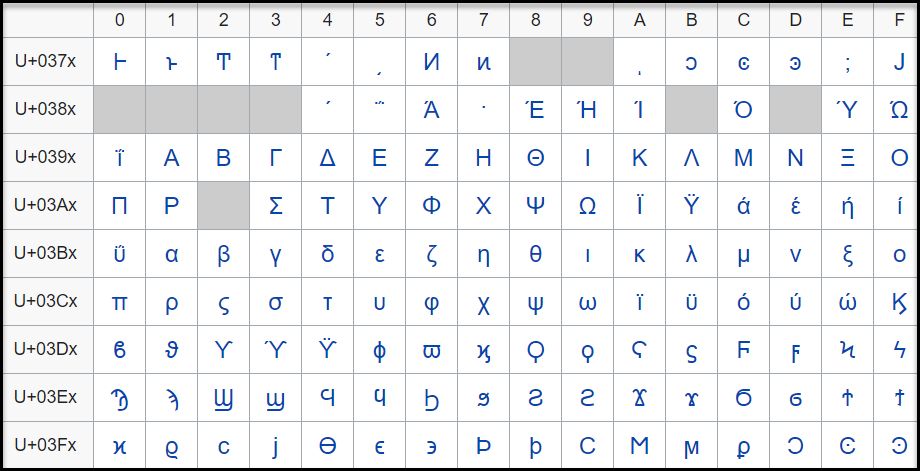
The code point, U+0378 in the defined Greek and Coptic code point range is an undefined code point. When any input data is protected, since the code point range includes both defined and undefined code points, it might result in a corrupted token value if the entire code point range is defined.
It is hence recommended that for Unicode code point ranges where both defined and undefined code points exist, you must create code points ranges excluding any undefined code points. So, in case of the Greek and Coptic characters, a recommended strategy to define alphabets would be to create multiple alphabet entries, such as a range to cover U+0371 to U+0377, another range to cover U+037A to U+037F, and so on, thus skipping undefined code points.
Note: Only the alphabet characters that are supported by the OS fonts are displayed on the Web UI.
Note: Ensure that code points in the alphabet are supported by the protectors using this alphabet.
Unicode Gen2 Tokenization Properties for different protectors
Application Protector
The following table shows supported input data types for Application protectors with the Unicode Gen2 token.
Note: The string as an input and byte as an output API is unsupported by Unicode Gen2 data elements for AP Java and AP Python.
Table: Supported input data types for Application protectors with Unicode Gen2 token
| Application Protectors*2 | AP Java*1 | AP Python |
|---|
| Supported input data types | BYTE[]
CHAR[]
STRING | BYTES
STRING |
*1 - The API accepts and returns data in BYTE[] format. The customer application needs to convert the input into byte arrays before calling the API, and similarly, convert the output from byte arrays after receiving the response from the API.
*2 - The Protegrity Application Protectors only support bytes converted from the string data type. If int, short, or long format data is directly converted to bytes and passed as input to the Application Protector APIs that support byte as input and provide byte as output, then data corruption might occur.
For more information about Application protectors, refer to Application Protector.
Big Data Protector
Protegrity supports MapReduce, Hive, Pig, HBase, Spark, and Impala, which utilizes Hadoop Distributed File System (HDFS) or Ozone as the data storage layer. The data is protected from internal and external threats, and users and business processes can continue to utilize the secured data. Protegrity protects data inside the files using tokenization and strong encryption protection methods.
The following table shows supported input data types for Big Data protectors with the Unicode Gen2 token.
Table: Supported input data types for Big Data protectors with Unicode Gen2 token
| Big Data Protectors | MapReduce*2 | Hive | Pig | HBase*2 | Impala | Spark*2 | Spark SQL | Trino |
|---|
| Supported input data types*1 | BYTE[] | STRING | Not supported | BYTE[] | STRING | BYTE[]
STRING | STRING | VARCHAR |
*1 – If the input and output types of the API are BYTE [], the customer application should convert the input to a byte array. Then, call the API and convert the output from the byte array.
*2 – The Protegrity MapReduce protector, HBase coprocessor, and Spark protector only support bytes converted from the string data type. Data types that are not bytes converted from the string data type might cause data corruption to occur when:
- Any other data type is directly converted to bytes and passed as input to the MapReduce or Spark API that supports byte as input and provides byte as output.
- Any other data type is directly converted to bytes and inserted in an HBase table. Where the HBase table is configured with the Protegrity HBase coprocessor.
For more information about Big Data protectors, refer to Big Data Protector.
Data Warehouse Protector
The Protegrity Data Warehouse Protector is an advanced security solution designed to protect sensitive data at the column level. This enables you to secure your data, while still permitting access to authorized users. Additionally, the Data Warehouse Protector integrates seamlessly with existing database systems using the User-Defined Functions for an enhanced security.
Protegrity protects data inside the data warehouses using various tokenization and encryption methods.
The External IV is not supported in Data Warehouse Protector.
The following table shows the supported input data types for the Teradata protector with the Unicode Gen2 token.
Table: Supported input data types for Data Warehouse protectors with Unicode Gen2 token
| Data Warehouse Protectors | Teradata |
|---|
| Supported input data types | VARCHAR UNICODE |
For more information about Data Warehouse protectors, refer to Data Warehouse Protector.
Database Protectors
Oracle Database Protector
The supported input data types for the Oracle Database Protector are listed below.
| Protector | Supported Input Data Types |
|---|
| Oracle | VARCHAR2 |
| Oracle | NVARCHAR2 |
The maximum input lengths supported for the Oracle database protector are as described by the following points:
- Unicode Gen2 – Data type : VARCHAR2:
- If the tokenizer length preservation parameter is selected as Yes, then the maximum limit that can be safely tokenized and detokenized is 4000 bytes.
- If the tokenizer length preservation parameter is selected as No, then the maximum limit that can be safely tokenized and detokenized is 3000 bytes.
- Unicode Gen2 – Data type : NVARCHAR2:
- If the tokenizer length preservation parameter is selected as Yes, then the maximum limit that can be safely tokenized and detokenized is 4000 bytes.
- If the tokenizer length preservation parameter is selected as No, then the maximum limit that can be safely tokenized and detokenized is 3000 bytes.
- Unicode Gen2 - Tokenizers
- The Unicode Gen2 data element supports SLT_1_3 and SLT_X_1 tokenizers.
- The SLT_1_3 tokenizer supports small alphabet size from 10-160 code points.
- The SLT_X_1 tokenizer supports large alphabet size from 161-100K code points.
1.4.12 - Binary
Details about the Binary token type.
The Binary token type can be used to tokenize binary data with Hex codes from 0x00 to 0xFF.
Table: Binary Tokenization Type properties
The following table shows examples of the way in which a value will be tokenized with the Binary token.
Table: Examples of Tokenization for Binary Values
| Input Values | Tokenized Values | Comments |
|---|
| Protegrity | 0x05C1CF0C310B2D38ACAD4C | Tokenization result is returned as a binary stream. |
| 123 | 0x19707E | Tokenization of the value with Minimum supported length. |
Binary Tokenization Properties for different protectors
Application Protector
It is recommended to use Binary tokenization only with APIs that accept BYTE[] as input and provide BYTE[] as output. If Binary
tokens are generated using APIs that accept BYTE[] as input and provide BYTE[] as output, and uniform encoding is maintained across
protectors, then the tokens can be used across various protectors.
The following table shows supported input data types for Application protectors with the Binary token.
Table: Supported input data types for Application protectors with Binary token
| Application Protectors*2 | AP Java*1 | AP Python |
|---|
| Supported input data types | BYTE[] | BYTES |
*1 - The API accepts and returns data in BYTE[] format. The customer application needs to convert the input into byte arrays before calling the API, and similarly, convert the output from byte arrays after receiving the response from the API.
*2 - The Protegrity Application Protectors only support bytes converted from the string data type. If int, short, or long format data is directly converted to bytes and passed as input to the Application Protector APIs that support byte as input and provide byte as output, then data corruption might occur.
For more information about Application protectors, refer to Application Protector.
Big Data Protector
Protegrity supports MapReduce, Hive, Pig, HBase, Spark, and Impala, which utilizes Hadoop Distributed File System (HDFS) or Ozone as the data storage layer. The data is protected from internal and external threats, and users and business processes can continue to utilize the secured data. Protegrity protects data inside the files using tokenization and strong encryption protection methods.
The following table shows supported input data types for Big Data protectors with the Binary token.
Table: Supported input data types for Big Data protectors with Binary token
| Big Data Protectors | MapReduce*2 | Hive | Pig | HBase*2 | Impala | Spark*2 | Spark SQL | Trino |
|---|
| Supported input data types*1 | BYTE[]*3 | Not supported | Not supported | BYTE[]*3 | Not supported | BYTE[]*3 | Not supported | Not supported |
*1 – If the input and output types of the API are BYTE [], the customer application should convert the input to a byte array. Then, call the API and convert the output from the byte array.
*2 – The Protegrity MapReduce protector, HBase coprocessor, and Spark protector only support bytes converted from the string data type. Data types that are not bytes converted from the string data type might cause data corruption to occur when:
- Any other data type is directly converted to bytes and passed as input to the MapReduce or Spark API that supports byte as input and provides byte as output.
- Any other data type is directly converted to bytes and inserted in an HBase table. Where the HBase table is configured with the Protegrity HBase coprocessor.
*3 – It is recommended to use Binary tokenization only with APIs that accept BYTE[] as input and provide BYTE[] as output. If Binary tokens are generated using APIs that accept input and provide output as BYTE[], these tokens can be used across various protectors. The Binary tokens is assumed to have uniform encoding across protectors.
For more information about Big Data protectors, refer to Big Data Protector.
Data Warehouse Protector
The Protegrity Data Warehouse Protector is an advanced security solution designed to protect sensitive data at the column level. This enables you to secure your data, while still permitting access to authorized users. Additionally, the Data Warehouse Protector integrates seamlessly with existing database systems using the User-Defined Functions for an enhanced security.
Protegrity protects data inside the data warehouses using various tokenization and encryption methods.
The following table shows the supported input data types for the Teradata protector with the Binary token.
Table: Supported input data types for Data Warehouse protectors with Binary token
| Data Warehouse Protectors | Teradata |
|---|
| Supported input data types | Not Supported |
For more information about Data Warehouse protectors, refer to Data Warehouse Protector.
Database Protectors
Oracle Database Protector
The supported input data types for the Oracle Database Protector are listed below.
| Protector | Supported Input Data Types |
|---|
| Oracle | Unsupported |
1.4.13 - Email
Details about the Email token type.
Email token type allows tokenization of an email address. Email tokens keep the domain name and all characters after the “@” sign in the clear. The local part, which is the part before the “@” sign, gets tokenized.
The table lists minimum and maximum length requirements for this token type, which should be applied for the local part, domain part and the entire e-mail.
Table: Email Tokenization Type Properties
Tokenization Type Properties |
Settings |
|---|
Name |
Email |
Token type and Format |
Alphabetic and numeric only. The rest of the characters will be treated as delimiters. |
Tokenizer |
Length Preservation |
Minimum Length |
Maximum Length |
|---|
Local |
Domain |
Entire |
Local |
Domain |
Entire |
SLT_1_3
SLT_2_3 |
No |
1 |
1 |
3 |
63 |
252 |
256 |
No |
1 |
1 |
3 |
63 |
252 |
256 |
SLT_1_3
SLT_2_3 |
Yes |
3*1 |
1 |
5 |
64 |
252*2 |
256 |
Yes |
3*1 |
1 |
5 |
64 |
252*2 |
256 |
Possibility to set minimum/ maximum length |
No |
Left/Right settings |
No |
Internal IV |
N/A |
External IV |
Yes |
Return of Protected value |
Yes |
Token specific properties |
At least one @ character is required in the input.
The right most @ character defines the delimiter between the local and domain parts. |
*1 – If the settings for short data tokenization is set to Yes, then the minimum tokenizable length for the local part of an email is one else it is three.
*2 – If the settings for short data tokenization is set to Yes, then the maximum length for the domain part of an email is 253 else it is 252.
An Email token format indicates the tokenization format for email. The email address consists of a local part and a domain, local-part@domain. The local part can be up to 64 characters and the domain name can be up to 254 characters, but the entire email address cannot be longer than 256 characters.
The following table explains email token format input requirements and tokenized output format:
Table: Output Values for Email Token Format
Local Part
Input value can consist |
Output value can consist |
Commonly used:- Uppercase and lower case characters through a-z/A-Z.
- Digits 0-9
- Special characters !#$%&'*+-/=?^_`|}{~ and
ASCII: 33, 35-39, 42, 43, 45, 47, 61, 63, 94-96, 123-126 - Comments are allowed with parentheses.
Used with restrictions: - dot character "." when it is not the first or the last and it does not appear more than one time consecutively.
- Special characters, ASCII: 32, 34, 40, 41, 44, 58, 59, 60, 62, 64, 91-93 are allowed with restrictions.
They must only be used when contained between quotation marks. These are the space "32", backslash "92", and quotation mark "34". It must also be preceded by a backslash, for example, "\ \\\". - International characters above U+007F are permitted by RFC 6531, though mail systems may restrict which characters to use when assigning local parts.
|
The part before “@” sign will be tokenized. The following will be tokenized:- All valid characters will be tokenized by the same rules as alpha-numeric token
- Comments will be tokenized.
The following characters will be considered as delimiters and not tokenized:- “.” dot character
- “()” left and right parenthesis
- Special characters in local part.
|
@ Part
The “@” character defines the delimiter between the local and domain parts, and will be left in clear. |
Domain Part
Input value can consist |
Output value can consist |
- Letters and digits
- Hyphens and dots
- IP address
within square brackets, for example,
john.smith@[1.1.1.1].
- Non-ASCII domain, internationalized domain parts.
- Comments are allowed within parentheses
|
The part after “@” sign will not be tokenized. |
Note:
Comments are allowed both in local and domain part of the e-mail token, and comments will be tokenized only if they are in the local part. Here are the examples of comments usage for the e-mail - john.smith@example.com:
- john.smith(comment)@example.com
- “john(comment).smith@example.com”
- john(comment)n.smith@example.com
- john.smith@(comment)example.com
- john.smith@example.com(comment)
The following table shows examples of the way in which a value will be tokenized with the Email token.
Table: Examples of Tokenization for Email Token Formats
| Input Values | Tokenized Values | Comments |
|---|
| Protegrity1234@gmail.com | UNfOxcZ51jWbXMq@gmail.com | All characters before @ symbol are tokenized. |
| john.smith!@#@$%$%^&@gmail.com | hX3p.yDcwD!@#@$%$%@gmail.com | All symbols except alphabetic are distinguish as delimiters. |
| email@protegrity@gmail.com | F00CJ@RjDEX9LMDq@gmail.com | The right most @ character defines the delimiter between the local and domain parts. |
| q@a | asj@a | Min 3 symbols in local part for none length preserving tokens |
| qdd@a | S0Y@a | Min 5 symbols in local part for length preserving tokens |
| a@protegrity.com | o@protegrity.com | Email, SLT_1_3, Length Preservation=Yes, Allow Short Data=Yes
The local part of the email has at least one character to tokenize, which meets the minimum length requirement for SLT_1_3 tokenizer when Length Preservation=Yes and Allow Short Data=Yes. |
a@protegrity.com
email@protegrity.com | a@protegrity.com
F00CJ@protegrity.com | Email, SLT_1_3, Length Preservation=Yes, Allow Short Data=No, return input as it is
If the input value has less than three characters to tokenize, then it is returned as is else it is tokenized. |
| a@protegrity.com | Error. Input too short. | Email, SLT_1_3, Length Preservation=Yes, Allow Short Data=No, generate an error
The local part of the email has one character to tokenize, which is short for SLT_1_3 tokenizer when Length Preservation=Yes and Allow Short Data=No, generate an error. |
Email Tokenization Properties for different protectors
Application Protector
The following table shows supported input data types for Application protectors with the Email token.
Table: Supported input data types for Application protectors with Email token
| Application Protectors*2 | AP Java*1 | AP Python |
|---|
| Supported input data types | STRING
CHAR[]
BYTE[] | STRING
BYTES |
*1 – The API accepts and returns data in BYTE[] format. The customer application needs to convert the input into byte arrays before calling the API, and similarly, convert the output from byte arrays after receiving the response from the API.
*2 – The Protegrity Application Protectors only support bytes converted from the string data type. If int, short, or long format data is directly converted to bytes and passed as input to the Application Protector APIs that support byte as input and provide byte as output, then data corruption might occur.
For more information about Application protectors, refer to Application Protector.
Big Data Protector
Protegrity supports MapReduce, Hive, Pig, HBase, Spark, and Impala, which utilizes Hadoop Distributed File System (HDFS) or Ozone as the data storage layer. The data is protected from internal and external threats, and users and business processes can continue to utilize the secured data. Protegrity protects data inside the files using tokenization and strong encryption protection methods.
The following table shows supported input data types for Big Data protectors with the Email token.
Table: Supported input data types for Big Data protectors with Email token
| Big Data Protectors | MapReduce*2 | Hive | Pig | HBase*2 | Impala | Spark*2 | Spark SQL | Trino |
|---|
| Supported input data types*1 | BYTE[] | CHAR*3
STRING | CHARARRAY | BYTE[] | STRING | BYTE[]
STRING | STRING | VARCHAR |
*1 – If the input and output types of the API are BYTE [], the customer application should convert the input to a byte array. Then, call the API and convert the output from the byte array.
*2 – The Protegrity MapReduce protector, HBase coprocessor, and Spark protector only support bytes converted from the string data type. Data types that are not bytes converted from the string data type might cause data corruption to occur when:
- Any other data type is directly converted to bytes and passed as input to the MapReduce or Spark API that supports byte as input and provides byte as output.
- Any other data type is directly converted to bytes and inserted in an HBase table. Where the HBase table is configured with the Protegrity HBase coprocessor.
*3 – If you are using the Char tokenization UDFs in Hive, then ensure that the data elements have length preservation selected. In Char tokenization UDFs, using data elements without length preservation selected, is not supported.
For more information about Big Data protectors, refer to Big Data Protector.
Data Warehouse Protector
The Protegrity Data Warehouse Protector is an advanced security solution designed to protect sensitive data at the column level. This enables you to secure your data, while still permitting access to authorized users. Additionally, the Data Warehouse Protector integrates seamlessly with existing database systems using the User-Defined Functions for an enhanced security.
Protegrity protects data inside the data warehouses using various tokenization and encryption methods.
The following table shows the supported input data types for the Teradata protector with the Email token.
Table: Supported input data types for Data Warehouse protectors with Email token
| Data Warehouse Protectors | Teradata |
|---|
| Supported input data types | VARCHAR LATIN |
For more information about Data Warehouse protectors, refer to Data Warehouse Protector.
Database Protectors
Oracle Database Protector
The supported input data types for the Oracle Database Protector are listed below.
| Protector | Supported Input Data Types |
|---|
| Oracle | VARCHAR2 |
| Oracle | CHAR |
1.4.14 - Printable
Details about the Printable token type.
Deprecated
Starting from v10.0.x, the Printable token type is deprecated.
It is recommended to use the Unicode Gen2 token type instead of the Printable token type.
The Printable token type tokenizes ASCII printable characters from the ISO 8859-15 alphabet, which include letters, digits, punctuation marks, and miscellaneous symbols.
Table: Printable Tokenization Type properties
Tokenization Type Properties |
Settings |
|---|
Name |
Printable |
Token type and Format |
ASCII printable characters, which include letters, digits, punctuation marks, and miscellaneous symbols.
Hex character codes from 0x20 to 0x7E and from 0xA0 to 0xFF.
Refer to ASCII Character Codes for the list of ASCII characters supported by Printable token. |
Tokenizer*1*2 |
Length Preservation |
Allow Short Data |
Minimum Length |
Maximum Length |
|---|
SLT_1_3 |
Yes |
Yes |
1 |
4096 |
No, return input as it is |
3 |
No, generate error |
No |
NA |
1 |
4091 |
Possibility to set Minimum/ maximum length |
No |
Left settings |
Yes |
Internal IV |
Yes, if
Left/Right settings are non-zero |
External IV |
Yes |
Return of Protected value |
Yes |
Token specific properties |
Token tables are large in size, approximately 27MB. Refer to SLT Tokenizer Characteristics for the exact numbers. |
*1 – The character column “CHAR” to protect is configured to remove trailing spaces before the tokenization. This means that the space character can be lost in translation for Printable tokens. To avoid this consider using Lower ASCII token instead of Printable for CHAR columns and input data having spaces.
*2 – Printable tokenization is not supported on databases where the character set is UTF.
The following table shows examples of the way in which a value will be tokenized with the Printable token.
Table: Examples of Tokenization for Printable Values
| Input Values | Tokenized Values | Comments |
|---|
| La Scala 05698 | F|ZpÙç|Ôä%s^¦4 | All characters in the input value, including spaces, are tokenized. |
Ford Mondeo CA-0256TY
M34 567 K-45 | §)%ß#)ðYjt{¬ÓÊEµV²ù² | All characters in the input value, including spaces, are tokenized. |
| qw | rD | Printable, SLT_1_3, Left=0, Right=0, Length Preservation=Yes, Allow Short Data=Yes
The minimum length meets the requirement for the SLT_1_3 tokenizer when Length Preservation=Yes and Allow Short Data=Yes. |
| qw | Error. Input too short. | Printable, SLT_1_3, Left=0, Right=0, Length Preservation=Yes, Allow Short Data=No, generate an error
The input has two characters to tokenize, which is short for SLT_1_3 tokenizer when Length Preservation=Yes and Allow Short Data=No, generate an error. |
qw
qwa | qw
rDZ | Printable, SLT_1_3, Left=0, Right=0, Length Preservation=Yes, Allow Short Data=No, return input as it is.
If the input value has less than three characters to tokenize, then it is returned as is else it is tokenized. |
Printable Tokenization Properties for different protectors
Application Protector
Printable tokenization is recommended for APIs that accept BYTE [] as input and provide BYTE [] as output. If uniform encoding is maintained across protectors, tokens generated by these APIs can be used across various protectors.
To ensure accurate tokenization results, user must use ISO 8859-15 character encoding when converting String data to Byte. This input should then be passed to Byte APIs.
Note: If Printable tokens are generated using APIs or UDFs that accept STRING or VARCHAR as input, then the protected values can only be unprotected using the protector with which it was protected. If you are unprotecting the protected data using any other protector, then you could get inconsistent results.
The following table shows supported input data types for Application protectors with the Printable token.
Table: Supported input data types for Application protectors with Printable token
| Application Protectors*2 | AP Java*1 | AP Python |
|---|
| Supported input data types | STRING
CHAR[]
BYTE[] | STRING
BYTES |
*1 - The API accepts and returns data in BYTE[] format. The customer application needs to convert the input into byte arrays before calling the API, and similarly, convert the output from byte arrays after receiving the response from the API.
*2 - The Protegrity Application Protector only supports bytes converted from the string data type. If any other data type is directly converted to bytes and passed as input to the Application Protectors APIs that support byte as input and provide byte as output, then data corruption might occur.
For more information about Application protectors, refer to Application Protector.
Big Data Protector
Protegrity supports MapReduce, Hive, Pig, HBase, Spark, and Impala, which utilizes Hadoop Distributed File System (HDFS) or Ozone as the data storage layer. The data is protected from internal and external threats, and users and business processes can continue to utilize the secured data. Protegrity protects data inside the files using tokenization and strong encryption protection methods.
The following table shows supported input data types for Big Data protectors with the Printable token.
Table: Supported input data types for Big Data protectors with Printable token
| Big Data Protectors | MapReduce*4*5 | Hive | Pig | HBase*4*5 | Impala*2*3 | Spark*4*5 | Spark SQL | Trino |
|---|
| Supported input data types*1*6 | BYTE[] | Not supported | Not supported | BYTE[] | STRING | BYTE[]*5 | Not supported | VARCHAR |
*1 – If the input and output types of the API are BYTE[], then the customer application should convert the input to and output from the byte array, before calling the API.
*2 – Ensure that you use the Horizontal tab “\t” as the field or column delimiter when loading data that is tokenized using Printable tokens for Impala.
*3 – Though the tokenization results for Impala may not be formatted and displayed accurately, they will be unprotected to the original values, using the respective protector.
*4 – The Protegrity MapReduce protector, HBase coprocessor, and Spark protector only support bytes converted from the string data type. Data types that are not bytes converted from the string data type might cause data corruption to occur when:
- Any other data type is directly converted to bytes and passed as input to the MapReduce or Spark API that supports byte as input and provides byte as output.
- Any other data type is directly converted to bytes and inserted in an HBase table. Where the HBase table is configured with the Protegrity HBase coprocessor.
*5 – It is recommended to use Printable tokenization with APIs that accepts BYTE[] as input and provides BYTE[] as output. If uniform encoding is maintained across protectors, Printable tokens generated by such APIs can be used across various protectors. To ensure accurate formatting and display of tokenization results, clients should use ISO 8859-15 character encoding. Before passing input to Byte APIs, clients must convert String data type to Byte and apply ISO 8859-15 character encoding.
*6 – Printable tokens are generated using APIs or UDFs. These APIs or UDFs accept STRING or VARCHAR as input. Then, the protected values can only be unprotected using the protector with which it was protected. If you are unprotecting the protected data using any other protector, then you could get inconsistent results.
For more information about Big Data protectors, refer to Big Data Protector.
Data Warehouse Protector
The Protegrity Data Warehouse Protector is an advanced security solution designed to protect sensitive data at the column level. This enables you to secure your data, while still permitting access to authorized users. Additionally, the Data Warehouse Protector integrates seamlessly with existing database systems using the User-Defined Functions for an enhanced security.
Protegrity protects data inside the data warehouses using various tokenization and encryption methods.
Printable tokens are generated using APIs or UDFs. These APIs or UDFs accept STRING or VARCHAR as input. Then, the protected values can only be unprotected using the protector with which it was protected. If you are unprotecting the protected data using any other protector, then you could get inconsistent results.
Important: Tokenizing XML or JSON data with Printable tokenization will not return valid XML or JSON format output.
JSON and XML UDFs are supported for the Teradata Data Warehouse Protector.
The following table shows the supported input data types for the Teradata protector with the Printable token.
Table: Supported input data types for Data Warehouse protectors with Printable token
| Data Warehouse Protectors | Teradata |
|---|
| Supported input data types | VARCHAR LATIN |
For more information about Data Warehouse protectors, refer to Data Warehouse Protector.
Database Protectors
Oracle Database Protector
The supported input data types for the Oracle Database Protector are listed below.
| Protector | Supported Input Data Types |
|---|
| Oracle | VARCHAR2 |
| Oracle | CHAR |
1.4.15 - Date (YYYY-MM-DD, DD/MM/YYYY, MM.DD.YYYY)
Details about the Date (YYYY-MM-DD, DD/MM/YYYY, MM.DD.YYYY) token type.
Deprecated
Starting from v10.0.x, the Date YYYY-MM-DD, Date DD/MM/YYYY, and Date MM.DD.YYYY tokenization types are deprecated.
It is recommended to use the Datetime (YYYY-MM-DD HH:MM:SS MMM) token type instead of the Date YYYY-MM-DD, Date DD/MM/YYYY, and Date MM.DD.YYYY token types.
The Date token type supports date formats corresponding to the big endian, little endian, and middle endian forms. It protects dates in one of the following formats:
- YYYY<delim>MM<delim>DD
- DD<delim>MM<delim>YYYY
- MM<delim>DD<delim>YYYY
Where <delim> is one of the allowed separators: dot “.”, slash “/”, or dash “-”.
Table: Date Tokenization Type properties
Tokenization Type Properties |
Settings |
|---|
Name |
Date |
Token type and Format |
Date in big endian form, starting with the year (YYYY-MM-DD).
Date in little endian form, starting with the day (DD/MM/YYYY).
Date in middle endian form, starting with the month (MM.DD.YYYY).
The following separators are supported: dot ".", slash "/", or dash "-". |
Tokenizer |
Length Preservation |
Minimum Length |
Maximum Length |
|---|
SLT_1_3
SLT_2_3
SLT_1_6
SLT_2_6 |
Yes |
10 |
10 |
Possibility to set Minimum/ maximum length |
No |
Left/Right settings |
No |
Internal IV |
No |
External IV |
No |
Return of Protected value |
Yes |
Token specific properties |
All separators, such as dot ".", slash "/", or dash "-" are allowed. |
Supported range of input dates |
From “0600-01-01” to “3337-11-27” |
Non-supported range of Gregorian cutover dates |
From "1582-10-05" to "1582-10-14" |
The following table shows examples of the way in which a value will be tokenized with the Date token.
Table: Examples for Tokenization of Date
| Input Values | Tokenized Values | Comments |
|---|
2012-02-29
2012/02/29
2012.02.29 | 2150-02-20
2150/02/20
2150.02.20 | Date (YYYY-MM-DD) token is used.
All three separators are successfully accepted. They are treated as delimiters not impacting tokenized value. |
| 31/01/0600 | 08/05/2215 | Date (DD/MM/YYYY) token is used.
Date in the past is tokenized. |
| 10.30.3337 | 09.05.2042 | Date (MM.DD.YYYY) token is used.
Date in the future is tokenized. |
2012:08:24
1975-01-32 | Token is not generated due to invalid input value. Error is returned. | Date (YYYY-MM-DD) token is used.
Input values with non-supported separators or with invalid dates produce error. |
Date Tokenization for Cutover Dates of the Proleptic Gregorian Calendar
The data systems, such as, Oracle or Java-based systems, do not accept the cutover dates of the Proleptic Gregorian Calendar. The cutover dates of the Proleptic Gregorian Calendar fall in the interval 1582-10-05 to 1582-10-14. These dates are converted to 1582-10-15. When using Oracle, conversion occurs by adding ten days to the source date. Due to this conversion, data loss occurs as the system is not capable to return the actual date value after the de-tokenization.
The following points are applicable for the tokenization and de-tokenization of the cutover dates of the Proleptic Gregorian Calendar:
- The tokenization of the date values in the cutover date range of the Proleptic Gregorian Calendar results in an ‘Invalid Input’ error.
- During tokenization, an internal validation is performed to check whether the value is tokenized to the cutover date. If it is a cutover date, then the Year part (1582) of the tokenized value is converted to 3338 and then returned. During de-tokenization, an internal check is performed to validate whether the Year is 3338. If the Year is 3338, then it is internally converted to 1582.
Note:
The tokenization accepts the date range 0600-01-01 to 3337-11-27 excluding the cutover date range.
The de-tokenization accepts the date ranges 0600-01-01 to 3337-11-27 and 3338-10-05 to 3338-10-14.
Consider a scenario where you are migrating the protected data from Protector 1 to Protector 2. The Protector 1 includes the Date tokenizer update to process the cutover dates of the Proleptic Gregorian Calendar as input. The Protector 2 does not include this update. In such a scenario, an “Invalid Date Format” error occurs in Protector 2, when you try to unprotect the protected data as it fails to accept the input year 3338. The following steps must be performed to mitigate this issue:
- Unprotect the protected data from Protector 1.
- Migrate the unprotected data to Protector 2.
- Protect the data from Protector 2.
Date Tokenization Properties for different protectors
Application Protector
The following table shows supported input data types for Application protectors with the Date token.
Table: Supported input data types for Application protectors with Date token
| Application Protectors*2 | AP Java*1 | AP Python |
|---|
| Supported input data types | DATE
STRING
CHAR[]
BYTE[] | DATE
BYTES
STRING |
*1 - The API accepts and returns data in BYTE[] format. The customer application needs to convert the input into byte arrays before calling the API, and similarly, convert the output from byte arrays after receiving the response from the API.
*2 - The Protegrity Application Protectors only support bytes converted from the string data type. If int, short, or long format data is directly converted to bytes and passed as input to the Application Protector APIs that support byte as input and provide byte as output, then data corruption might occur.
For more information about Application protectors, refer to Application Protector.
Big Data Protector
Protegrity supports MapReduce, Hive, Pig, HBase, Spark, and Impala, which utilizes Hadoop Distributed File System (HDFS) or Ozone as the data storage layer. The data is protected from internal and external threats, and users and business processes can continue to utilize the secured data. Protegrity protects data inside the files using tokenization and strong encryption protection methods.
The following table shows supported input data types for Big Data protectors with the Date token.
Table: Supported input data types for Big Data protectors with Date token
| Big Data Protectors | MapReduce*2 | Hive | Pig | HBase*2 | Impala | Spark*2 | Spark SQL | Trino |
|---|
| Supported input data types*1 | BYTE[] | STRING
DATE*3 | CHARARRAY | BYTE[] | STRING
DATE*3 | BYTE[]
STRING | STRING
DATE*3 | DATE*3 |
*1 – If the input and output types of the API are BYTE [], the customer application should convert the input to a byte array. Then, call the API and convert the output from the byte array.
*2 – The Protegrity MapReduce protector, HBase coprocessor, and Spark protector only support bytes converted from the string data type. Data types that are not bytes converted from the string data type might cause data corruption to occur when:
- Any other data type is directly converted to bytes and passed as input to the MapReduce or Spark API that supports byte as input and provides byte as output.
- Any other data type is directly converted to bytes and inserted in an HBase table. Where the HBase table is configured with the Protegrity HBase coprocessor.
*3 – In the Big Data Protector, the date format supported for Hive, Impala, Spark SQL, and Trino is YYYY-MM-DD only.
Date input values are not fully validated to ensure they represent valid dates. For instance, entering a day value greater than 31 or a month value greater than 12 will result in an error. However, the date 2011-02-30 does not cause an error but is converted to 2011-03-02, which is not the intended date.
For more information about Big Data protectors, refer to Big Data Protector.
Data Warehouse Protector
The Protegrity Data Warehouse Protector is an advanced security solution designed to protect sensitive data at the column level. This enables you to secure your data, while still permitting access to authorized users. Additionally, the Data Warehouse Protector integrates seamlessly with existing database systems using the User-Defined Functions for an enhanced security.
Protegrity protects data inside the data warehouses using various tokenization and encryption methods.
The following table shows the supported input data types for the Teradata protector with the Date token.
Table: Supported input data types for Data Warehouse protectors with Date token
| Data Warehouse Protectors | Teradata |
|---|
| Supported input data types | VARCHAR LATIN |
For more information about Data Warehouse protectors, refer to Data Warehouse Protector.
Database Protectors
Oracle Database Protector
The supported input data types for the Oracle Database Protector are listed below.
| Protector | Supported Input Data Types |
|---|
| Oracle | DATE |
| Oracle | VARCHAR2 |
| Oracle | CHAR |
1.4.16 - Unicode
Details about the Unicode token type.
Deprecated
Starting from v10.0.x, the Unicode token type is deprecated.
It is recommended to use the Unicode Gen2 token type instead of the Unicode token type.
The Unicode token type can be used to tokenize multi-byte character strings. The input is treated as a byte stream, hence there are no delimiters. There are also no character conversions or code point validation done on the input. The token value will be alpha-numeric.
The encoding and unicode character set of the input data will affect the protected data length. For instance, the respective lengths for UTF-8 and UTF-16, in bytes, is described in the following table.
Table: Lengths for UTF-8 and UTF-16
| Input Values | UTF-8 | UTF-16 |
|---|
| 導字社導字會 | 18 bytes | 12 bytes |
| Protegrity | 10 bytes | 20 bytes |
Table: Unicode Tokenization Type properties
*1 - If the input and output types of the API are BYTE[], then the customer application should convert the input to and output from the byte array, before calling the API.
*2 - The maximum input length to safely tokenize and detokenize the data is 4096 bytes, which is irrespective of the byte representation.
The following table shows examples of the way in which a value will be tokenized with the Unicode token.
Table: Examples of Tokenization for Unicode Values
Input Value |
Tokenized Value |
Comments |
| Протегріті |
WurIeXLFZPApXQorkFCKl3hpRaGR28K |
Input value contains Cyrillic characters.
Tokenization result is Alpha-Numeric. |
| 安全 |
xM2EcAQ0LVtQJ |
Input value contains characters in Simplified Chinese.
Tokenization result is Alpha-Numeric. |
Protegrity |
RsbQU8KdcQzHJ1 |
Algorithm is non-length preserving.
Tokenized value is longer than initial one. |
| a | V2wU |
Unicode, Allow Short Data=Yes
Algorithm is non-length preserving. Tokenized value is longer than initial one. |
| a9c | A0767Vo |
Unicode Tokenization Properties for different protectors
Unicode tokenization is supported only by Application Protectors, Big Data Protector and Data Warehouse Protector.
Application Protector
The following table shows supported input data types for Application protectors with the Unicode token.
Table: Supported input data types for Application protectors with Unicode token
| Application Protectors*2 | AP Java*1 | AP Python |
|---|
| Supported input data types | BYTE[]
CHAR[]
STRING | BYTES
STRING |
*1 - The API accepts and returns data in BYTE[] format. The customer application needs to convert the input into byte arrays before calling the API, and similarly, convert the output from byte arrays after receiving the response from the API.
*2 - The Protegrity Application Protectors only support bytes converted from the string data type. If int, short, or long format data is directly converted to bytes and passed as input to the Application Protector APIs that support byte as input and provide byte as output, then data corruption might occur.
For more information about Application protectors, refer to Application Protector.
Big Data Protector
Protegrity supports MapReduce, Hive, Pig, HBase, Spark, and Impala, which utilizes Hadoop Distributed File System (HDFS) or Ozone as the data storage layer. The data is protected from internal and external threats, and users and business processes can continue to utilize the secured data. Protegrity protects data inside the files using tokenization and strong encryption protection methods.
The minimum and maximum lengths supported for the Big Data Protector are as described by the following points:
- MapReduce: The maximum limit that can be safely tokenized and detokenized back is 4096 bytes. The user controls the encoding, as required.
- Spark: The maximum limit that can be safely tokenized and detokenized back is 4096 bytes. The user controls the encoding, as required.
- Hive: The ptyProtectUnicode and ptyUnprotectUnicode UDFs convert data to UTF-16LE encoding internally. These encoding has a minimum requirement of four bytes of data in UTF-16LE encoding. Additionally, it has a maximum limit of 4096 bytes in UTF-16LE encoding for safely tokenizing and detokenizing the data.
The pty_ProtectStr and pty_UnprotectStr UDFs convert data to UTF-8 encoding internally. This encoding has a minimum requirement of three bytes for data in UTF-8 encoding. Additionally, it has a maximum limit of 4096 bytes for safely tokenizing and detokenizing the data.
- Impala: The pty_UnicodeStringIns and pty_UnicodeStringSel UDFs convert data to UTF-16LE encoding internally. These encoding has a minimum requirement of four bytes of data in UTF-16LE encoding.
Additionally, it has a maximum limit of 4096 bytes in UTF-16LE encoding for safely tokenizing and detokenizing the data.
The pty_StringIns and pty_StringSel UDFs convert data to UTF-8 encoding internally. This encoding has a minimum requirement of three bytes for data in UTF-8 encoding. Additionally, it has a maximum limit of 4096 bytes for safely tokenizing and detokenizing the data.
The following table shows supported input data types for Big Data protectors with the Unicode token.
Table: Supported input data types for Big Data protectors with Unicode token
| Big Data Protectors | MapReduce*2 | Hive | Pig | HBase*2 | Impala | Spark*2 | Spark SQL | Trino |
|---|
| Supported input data types*1 | BYTE[] | STRING | Not supported | BYTE[] | STRING | BYTE[]
STRING | STRING | VARCHAR |
*1 – If the input and output types of the API are BYTE [], the customer application should convert the input to a byte array. Then, call the API and convert the output from the byte array.
*2 – The Protegrity MapReduce protector, HBase coprocessor, and Spark protector only support bytes converted from the string data type. Data types that are not bytes converted from the string data type might cause data corruption to occur when:
- Any other data type is directly converted to bytes and passed as input to the MapReduce or Spark API that supports byte as input and provides byte as output.
- Any other data type is directly converted to bytes and inserted in an HBase table. Where the HBase table is configured with the Protegrity HBase coprocessor.
For more information about Big Data protectors, refer to Big Data Protector.
Data Warehouse Protector
The Protegrity Data Warehouse Protector is an advanced security solution designed to protect sensitive data at the column level. This enables you to secure your data, while still permitting access to authorized users. Additionally, the Data Warehouse Protector integrates seamlessly with existing database systems using the User-Defined Functions for an enhanced security.
Protegrity protects data inside the data warehouses using various tokenization and encryption methods.
If short data tokenization is not enabled, the minimum length for Unicode tokenization type is 3 bytes. The input value in Teradata Unicode UDF is encoded using UTF16 due to which internally the data length is multiplied by 2 bytes. Hence, the Teradata Unicode UDF is able to tokenize a data length that is less than the minimum supported length of 3 bytes.
The External IV is not supported in Data Warehouse Protector.
The following table shows the supported input data types for the Teradata protector with the Unicode token.
Table: Supported input data types for Data Warehouse protectors with Unicode token
| Data Warehouse Protectors | Teradata |
|---|
| Supported input data types | VARCHAR UNICODE |
For more information about Data Warehouse protectors, refer to Data Warehouse Protector.
Database Protectors
Oracle Database Protector
The supported input data types for the Oracle Database Protector are listed below.
| Protector | Supported Input Data Types |
|---|
| Oracle | VARCHAR2 |
1.4.17 - Unicode Base64
Details about the Unicode Base64 token type.
Deprecated
Starting from v10.0.x, the Unicode Base64 token type is deprecated.
It is recommended to use the Unicode Gen2 token type instead of the Unicode Base64 token type.
The Unicode Base64 token type can be used to tokenize multi-byte character strings. The input is treated as a byte stream, hence there are no delimiters. Any character conversions or code point validation are not performed on the input. This token element uses Base64 encoding. This encoding results in better performance compared to Unicode token element. It includes three additional characters, namely +, /, and = along with alpha numeric characters. The token value generated includes alpha numeric, +, /, and =.
The encoding and unicode character set of the input data will affect the protected data length. For instance, the respective lengths for UTF-8 and UTF-16, in bytes, is described in the following table.
Table: Lengths for UTF-8 and UTF-16
| Input Values | UTF-8 | UTF-16 |
|---|
| 導字社導字會 | 18 bytes | 12 bytes |
| Protegrity | 10 bytes | 20 bytes |
Table: Unicode Base64 Tokenization Type properties
Tokenization Type Properties |
Settings |
|---|
Name |
Unicode Base64 |
Token type and Format |
Application protectors support UTF-8, UTF-16LE, and UTF-16BE encoding.
Hex character codes from 0x00 to 0xFF.
For the list of supported characters, refer to ASCII Character Codes. |
Tokenizer |
Length Preservation |
Allow Short Data |
Minimum Length |
Maximum Length*1 |
|---|
SLT_1_3
SLT_2_3 |
No |
Yes |
1 byte |
4096 |
| No, return input as it is | 3 bytes |
| No, generate error |
Possibility to set Minimum/Maximum length |
No |
Left/Right settings |
No |
Internal IV |
No |
External IV |
Yes |
Return of Protected value |
Yes |
Token specific properties |
Tokenization result is Alpha-Numeric, "+", "/", and "=". |
*1 - The maximum input length to safely tokenize and detokenize the data is 4096 bytes, which is irrespective of the byte representation.
The following table shows examples of the way in which a value will be tokenized with the Unicode Base64 token.
Table: Examples of Tokenization for Unicode Base64 Values
| Input Values | Tokenized Values | Comments |
|---|
| захист даних | B/ftgx=VysiXmq0t+O+I8v | Input value contains Cyrillic characters. Tokenization result include alpha numeric characters, such as =, /, and +. |
| Protegrity | 9NHI=znyLfgRiRvD | Algorithm is non-length preserving. Tokenized value is longer than initial one. |
| aÈ | =+bg | Unicode Base64 token element
Algorithm is non-length preserving. Tokenized value is longer than initial one. |
| P+ | +BIN | Unicode Base64 token element, Allow Short Data=Yes
Algorithm is non-length preserving. Tokenized value is longer than initial one. |
Unicode Base64 Tokenization Properties for different protectors
The Unicode Base64 tokenization is supported only by Application Protectors, Big Data Protector, Data Warehouse Protector, and Data Security Gateway.
Application Protector
The following table shows supported input data types for Application protectors with the Unicode Base64 token.
Table: Supported input data types for Application protectors with Unicode Base64 token
| Application Protectors*2 | AP Java*1 | AP Python |
|---|
| Supported input data types | BYTE[]
CHAR[]
STRING | BYTES
STRING |
*1 - The API accepts and returns data in BYTE[] format. The customer application needs to convert the input into byte arrays before calling the API, and similarly, convert the output from byte arrays after receiving the response from the API.
*2 - The Protegrity Application Protectors only support bytes converted from the string data type. If int, short, or long format data is directly converted to bytes and passed as input to the Application Protector APIs that support byte as input and provide byte as output, then data corruption might occur.
For more information about Application protectors, refer to Application Protector.
Big Data Protector
Protegrity supports MapReduce, Hive, Pig, HBase, Spark, and Impala, which utilizes Hadoop Distributed File System (HDFS) or Ozone as the data storage layer. The data is protected from internal and external threats, and users and business processes can continue to utilize the secured data. Protegrity protects data inside the files using tokenization and strong encryption protection methods.
The minimum and maximum lengths supported for the Big Data Protector are as described by the following points:
- MapReduce: The maximum limit that can be safely tokenized and detokenized back is 4096 bytes. The user controls the encoding, as required.
- Spark: The maximum limit that can be safely tokenized and detokenized back is 4096 bytes. The user controls the encoding, as required.
- Hive: The ptyProtectUnicode and ptyUnprotectUnicode UDFs convert data to UTF-16LE encoding internally. These encoding has a minimum requirement of four bytes of data in UTF-16LE encoding. Additionally, it has a maximum limit of 4096 bytes in UTF-16LE encoding for safely tokenizing and detokenizing the data.
The pty_ProtectStr and pty_UnprotectStr UDFs convert data to UTF-8 encoding internally. This encoding has a minimum requirement of three bytes for data in UTF-8 encoding. Additionally, it has a maximum limit of 4096 bytes for safely tokenizing and detokenizing the data. - Impala: The pty_UnicodeStringIns and pty_UnicodeStringSel UDFs convert data to UTF-16LE encoding internally. These encoding has a minimum requirement of four bytes of data in UTF-16LE encoding.
Additionally, it has a maximum limit of 4096 bytes in UTF-16LE encoding for safely tokenizing and detokenizing the data.
The pty_StringIns and pty_StringSel UDFs convert data to UTF-8 encoding internally. This encoding has a minimum requirement of three bytes for data in UTF-8 encoding. Additionally, it has a maximum limit of 4096 bytes for safely tokenizing and detokenizing the data.
The following table shows supported input data types for Big Data protectors with the Unicode Base64 token.
Table: Supported input data types for Big Data protectors with Unicode Base64 token
| Big Data Protectors | MapReduce*2 | Hive | Pig | HBase*2 | Impala | Spark*2 | Spark SQL | Trino |
|---|
| Supported input data types*1 | BYTE[] | STRING | Not supported | BYTE[] | STRING | BYTE[]
STRING | STRING | VARCHAR |
*1 – If the input and output types of the API are BYTE [], the customer application should convert the input to a byte array. Then, call the API and convert the output from the byte array.
*2 – The Protegrity MapReduce protector, HBase coprocessor, and Spark protector only support bytes converted from the string data type. Data types that are not bytes converted from the string data type might cause data corruption to occur when:
- Any other data type is directly converted to bytes and passed as input to the MapReduce or Spark API that supports byte as input and provides byte as output.
- Any other data type is directly converted to bytes and inserted in an HBase table. Where the HBase table is configured with the Protegrity HBase coprocessor.
For more information about Big Data protectors, refer to Big Data Protector.
Data Warehouse Protector
The Protegrity Data Warehouse Protector is an advanced security solution designed to protect sensitive data at the column level. This enables you to secure your data, while still permitting access to authorized users. Additionally, the Data Warehouse Protector integrates seamlessly with existing database systems using the User-Defined Functions for an enhanced security.
Protegrity protects data inside the data warehouses using various tokenization and encryption methods.
The External IV is not supported in Data Warehouse Protector.
The following table shows the supported input data types for the Teradata protector with the Unicode Base64 token.
Table: Supported input data types for Data Warehouse protectors with Unicode Base64 token
| Data Warehouse Protectors | Teradata |
|---|
| Supported input data types | VARCHAR UNICODE |
For more information about Data Warehouse protectors, refer to Data Warehouse Protector.
Database Protectors
Oracle Database Protector
The supported input data types for the Oracle Database Protector are listed below.
| Protector | Supported Input Data Types |
|---|
| Oracle | VARCHAR2 |
| Oracle | NVARCHAR2 |
The maximum input lengths supported for the Oracle database protector are as described by the following points:
- Base 64 – Data type : VARCHAR2: The maximum limit that can be safely tokenized and detokenized back is 3000 bytes.
1.4.18 -
The Protegrity Data Warehouse Protector is an advanced security solution designed to protect sensitive data at the column level. This enables you to secure your data, while still permitting access to authorized users. Additionally, the Data Warehouse Protector integrates seamlessly with existing database systems using the User-Defined Functions for an enhanced security.
Protegrity protects data inside the data warehouses using various tokenization and encryption methods.
The following table shows the supported input data types for the Teradata protector with the Alpha token.
Table: Supported input data types for Data Warehouse protectors with Alpha token
| Data Warehouse Protectors | Teradata |
|---|
| Supported input data types | VARCHAR LATIN |
For more information about Data Warehouse protectors, refer to Data Warehouse Protector.
1.4.19 -
The Protegrity Data Warehouse Protector is an advanced security solution designed to protect sensitive data at the column level. This enables you to secure your data, while still permitting access to authorized users. Additionally, the Data Warehouse Protector integrates seamlessly with existing database systems using the User-Defined Functions for an enhanced security.
Protegrity protects data inside the data warehouses using various tokenization and encryption methods.
The following table shows the supported input data types for the Teradata protector with the Alpha-Numeric token.
Table: Supported input data types for Data Warehouse protectors with Alpha-Numeric token
| Data Warehouse Protectors | Teradata |
|---|
| Supported input data types | VARCHAR LATIN |
For more information about Data Warehouse protectors, refer to Data Warehouse Protector.
1.4.20 -
The following table shows supported input data types for Application protectors with the Alpha-Numeric token.
Table: Supported input data types for Application protectors with Alpha-Numeric token
| Application Protectors*2 | AP Java*1 | AP Python |
|---|
| Supported input data types | STRING
CHAR[]
BYTE[] | STRING
BYTES |
*1 - The API accepts and returns data in BYTE[] format. The customer application needs to convert the input into byte arrays before calling the API, and similarly, convert the output from byte arrays after receiving the response from the API.
*2 - The Protegrity Application Protectors only support bytes converted from the string data type. If int, short, or long format data is directly converted to bytes and passed as input to the Application Protector APIs that support byte as input and provide byte as output, then data corruption might occur.
For more information about Application protectors, refer to Application Protector.
1.4.21 -
The following table shows supported input data types for Application protectors with the Alpha token.
Note: For both SLT_1_3 and SLT_2_3, the maximum length of the protected data is 4096 bytes. This occurs for the Alpha token element for Application Protector with no length preservation.
Table: Supported input data types for Application protectors with Alpha token
| Application Protectors*2 | AP Java*1 | AP Python |
|---|
| Supported input data types | BYTE[]
CHAR[]
STRING | BYTES
STRING |
*1 - The API accepts and returns data in BYTE[] format. The customer application needs to convert the input into byte arrays before calling the API, and similarly, convert the output from byte arrays after receiving the response from the API.
*2 - The Protegrity Application Protector only supports bytes converted from the string data type. If any other data type is directly converted to bytes and passed as input to the Application Protector APIs that support byte as input and provide byte as output, then data corruption might occur.
For more information about Application protectors, refer to Application Protector.
1.4.22 -
The Protegrity Data Warehouse Protector is an advanced security solution designed to protect sensitive data at the column level. This enables you to secure your data, while still permitting access to authorized users. Additionally, the Data Warehouse Protector integrates seamlessly with existing database systems using the User-Defined Functions for an enhanced security.
Protegrity protects data inside the data warehouses using various tokenization and encryption methods.
The following table shows the supported input data types for the Teradata protector with the Binary token.
Table: Supported input data types for Data Warehouse protectors with Binary token
| Data Warehouse Protectors | Teradata |
|---|
| Supported input data types | Not Supported |
For more information about Data Warehouse protectors, refer to Data Warehouse Protector.
1.4.23 -
It is recommended to use Binary tokenization only with APIs that accept BYTE[] as input and provide BYTE[] as output. If Binary
tokens are generated using APIs that accept BYTE[] as input and provide BYTE[] as output, and uniform encoding is maintained across
protectors, then the tokens can be used across various protectors.
The following table shows supported input data types for Application protectors with the Binary token.
Table: Supported input data types for Application protectors with Binary token
| Application Protectors*2 | AP Java*1 | AP Python |
|---|
| Supported input data types | BYTE[] | BYTES |
*1 - The API accepts and returns data in BYTE[] format. The customer application needs to convert the input into byte arrays before calling the API, and similarly, convert the output from byte arrays after receiving the response from the API.
*2 - The Protegrity Application Protectors only support bytes converted from the string data type. If int, short, or long format data is directly converted to bytes and passed as input to the Application Protector APIs that support byte as input and provide byte as output, then data corruption might occur.
For more information about Application protectors, refer to Application Protector.
1.4.24 -
The Protegrity Data Warehouse Protector is an advanced security solution designed to protect sensitive data at the column level. This enables you to secure your data, while still permitting access to authorized users. Additionally, the Data Warehouse Protector integrates seamlessly with existing database systems using the User-Defined Functions for an enhanced security.
Protegrity protects data inside the data warehouses using various tokenization and encryption methods.
The following table shows the supported input data types for the Teradata protector with the Credit Card token.
Table: Supported input data types for Data Warehouse protectors with Credit Card token
| Data Warehouse Protectors | Teradata |
|---|
| Supported input data types | VARCHAR LATIN |
For more information about Data Warehouse protectors, refer to Data Warehouse Protector.
1.4.25 -
The following table shows supported input data types for Application protectors with the Credit Card token.
Table: Supported input data types for Application protectors with Credit Card token
| Application Protectors*2 | AP Java*1 | AP Python |
|---|
| Supported input data types | STRING
CHAR[]
BYTE[] | STRING
BYTES |
*1 - The API accepts and returns data in BYTE[] format. The customer application needs to convert the input into byte arrays before calling the API, and similarly, convert the output from byte arrays after receiving the response from the API.
*2 - The Protegrity Application Protector only supports bytes converted from the string data type. If any other data type is directly converted to bytes and passed as input to the Application Protectors APIs that support byte as input and provide byte as output, then data corruption might occur.
For more information about Application protectors, refer to Application Protector.
1.4.26 -
The Protegrity Data Warehouse Protector is an advanced security solution designed to protect sensitive data at the column level. This enables you to secure your data, while still permitting access to authorized users. Additionally, the Data Warehouse Protector integrates seamlessly with existing database systems using the User-Defined Functions for an enhanced security.
Protegrity protects data inside the data warehouses using various tokenization and encryption methods.
The following table shows the supported input data types for the Teradata protector with the Date token.
Table: Supported input data types for Data Warehouse protectors with Date token
| Data Warehouse Protectors | Teradata |
|---|
| Supported input data types | VARCHAR LATIN |
For more information about Data Warehouse protectors, refer to Data Warehouse Protector.
1.4.27 -
The following table shows supported input data types for Application protectors with the Date token.
Table: Supported input data types for Application protectors with Date token
| Application Protectors*2 | AP Java*1 | AP Python |
|---|
| Supported input data types | DATE
STRING
CHAR[]
BYTE[] | DATE
BYTES
STRING |
*1 - The API accepts and returns data in BYTE[] format. The customer application needs to convert the input into byte arrays before calling the API, and similarly, convert the output from byte arrays after receiving the response from the API.
*2 - The Protegrity Application Protectors only support bytes converted from the string data type. If int, short, or long format data is directly converted to bytes and passed as input to the Application Protector APIs that support byte as input and provide byte as output, then data corruption might occur.
For more information about Application protectors, refer to Application Protector.
1.4.28 -
The Protegrity Data Warehouse Protector is an advanced security solution designed to protect sensitive data at the column level. This enables you to secure your data, while still permitting access to authorized users. Additionally, the Data Warehouse Protector integrates seamlessly with existing database systems using the User-Defined Functions for an enhanced security.
Protegrity protects data inside the data warehouses using various tokenization and encryption methods.
The following table shows the supported input data types for the Teradata protector with the Datetime token.
Table: Supported input data types for Data Warehouse protectors with Datetime token
| Data Warehouse Protectors | Teradata |
|---|
| Supported input data types | VARCHAR LATIN |
For more information about Data Warehouse protectors, refer to Data Warehouse Protector.
1.4.29 -
The following table shows supported input data types for Application protectors with the Datetime token.
Table: Supported input data types for Application protectors with Datetime token
| Application Protectors*2 | AP Java*1 | AP Python |
|---|
| Supported input data types | DATE
STRING
CHAR[]
BYTE[] | DATE
BYTES
STRING |
*1 - The API accepts and returns data in BYTE[] format. The customer application needs to convert the input into byte arrays before calling the API, and similarly, convert the output from byte arrays after receiving the response from the API.
*2 - The Protegrity Application Protectors only support bytes converted from the string data type. If int, short, or long format data is directly converted to bytes and passed as input to the Application Protector APIs that support byte as input and provide byte as output, then data corruption might occur.
For more information about Application protectors, refer to Application Protector.
1.4.30 -
The Protegrity Data Warehouse Protector is an advanced security solution designed to protect sensitive data at the column level. This enables you to secure your data, while still permitting access to authorized users. Additionally, the Data Warehouse Protector integrates seamlessly with existing database systems using the User-Defined Functions for an enhanced security.
Protegrity protects data inside the data warehouses using various tokenization and encryption methods.
The following table shows the supported input data types for the Teradata protector with the Decimal token.
Table: Supported input data types for Data Warehouse protectors with Decimal token
| Data Warehouse Protectors | Teradata |
|---|
| Supported input data types | VARCHAR LATIN |
For more information about Data Warehouse protectors, refer to Data Warehouse Protector.
1.4.31 -
The following table shows supported input data types for Application protectors with the Decimal token.
Table: Supported input data types for Application protectors with Decimal token
| Application Protectors*2 | AP Java*1 | AP Python |
|---|
| Supported input data types | STRING
CHAR[]
BYTE[] | STRING
BYTES |
*1 - The API accepts and returns data in BYTE[] format. The customer application needs to convert the input into byte arrays before calling the API, and similarly, convert the output from byte arrays after receiving the response from the API.
*2 - The Protegrity Application Protectors only support bytes converted from the string data type. If int, short, or long format data is directly converted to bytes and passed as input to the Application Protector APIs that support byte as input and provide byte as output, then data corruption might occur.
For more information about Application protectors, refer to Application Protector.
1.4.32 -
The Protegrity Data Warehouse Protector is an advanced security solution designed to protect sensitive data at the column level. This enables you to secure your data, while still permitting access to authorized users. Additionally, the Data Warehouse Protector integrates seamlessly with existing database systems using the User-Defined Functions for an enhanced security.
Protegrity protects data inside the data warehouses using various tokenization and encryption methods.
The following table shows the supported input data types for the Teradata protector with the Email token.
Table: Supported input data types for Data Warehouse protectors with Email token
| Data Warehouse Protectors | Teradata |
|---|
| Supported input data types | VARCHAR LATIN |
For more information about Data Warehouse protectors, refer to Data Warehouse Protector.
1.4.33 -
The following table shows supported input data types for Application protectors with the Email token.
Table: Supported input data types for Application protectors with Email token
| Application Protectors*2 | AP Java*1 | AP Python |
|---|
| Supported input data types | STRING
CHAR[]
BYTE[] | STRING
BYTES |
*1 – The API accepts and returns data in BYTE[] format. The customer application needs to convert the input into byte arrays before calling the API, and similarly, convert the output from byte arrays after receiving the response from the API.
*2 – The Protegrity Application Protectors only support bytes converted from the string data type. If int, short, or long format data is directly converted to bytes and passed as input to the Application Protector APIs that support byte as input and provide byte as output, then data corruption might occur.
For more information about Application protectors, refer to Application Protector.
1.4.34 -
The Protegrity Data Warehouse Protector is an advanced security solution designed to protect sensitive data at the column level. This enables you to secure your data, while still permitting access to authorized users. Additionally, the Data Warehouse Protector integrates seamlessly with existing database systems using the User-Defined Functions for an enhanced security.
Protegrity protects data inside the data warehouses using various tokenization and encryption methods.
The following table shows the supported input data types for the Teradata protector with the Integer token.
Table: Supported input data types for Data Warehouse protectors with Integer token
| Data Warehouse Protectors | Teradata |
|---|
| Supported input data types | SMALLINT: 2 bytes
INTEGER: 4 bytes
BIGINT: 8 bytes |
For more information about Data Warehouse protectors, refer to Data Warehouse Protector.
1.4.35 -
The following table shows supported input data types for Application protectors with the Integer token.
Table: Supported input data types for Application protectors with Integer token
| Application Protectors | AP Java | AP Python |
|---|
| Supported input data types | SHORT: 2 bytes
INT: 4 bytes
LONG: 8 bytes | INT: 4 bytes and 8 bytes |
If the user passes a 4-byte integer with values ranging from -2,147,483,648 to +2,147,483,647, the data element for the protect, unprotect, or reprotect APIs should be an 4-byte integer token type. However, if the user uses 2-byte integer token type, the data protection operation will not be successful. For a Bulk call using the protect, unprotect, and reprotect APIs, the error code, 44, appears. For a single call using the protect, unprotect, and reprotect APIs, an exception will be thrown and the error message, 44, Content of input data is not valid appears.
For more information about Application protectors, refer to Application Protector.
1.4.36 -
The Protegrity Data Warehouse Protector is an advanced security solution designed to protect sensitive data at the column level. This enables you to secure your data, while still permitting access to authorized users. Additionally, the Data Warehouse Protector integrates seamlessly with existing database systems using the User-Defined Functions for an enhanced security.
Protegrity protects data inside the data warehouses using various tokenization and encryption methods.
The following table shows the supported input data types for the Teradata protector with the Lower ASCII token.
Table: Supported input data types for Data Warehouse protectors with Lower ASCII token
| Data Warehouse Protectors | Teradata |
|---|
| Supported input data types | VARCHAR LATIN |
For more information about Data Warehouse protectors, refer to Data Warehouse Protector.
1.4.37 -
The following table shows supported input data types for Application protectors with the Lower ASCII token.
Table: Supported input data types for Application protectors with Lower ASCII token
| Application Protectors*2 | AP Java*1 | AP Python |
|---|
| Supported input data types | STRING
CHAR[]
BYTE[] | STRING
BYTES |
*1 - The API accepts and returns data in BYTE[] format. The customer application needs to convert the input into byte arrays before calling the API, and similarly, convert the output from byte arrays after receiving the response from the API.
*2 - The Protegrity Application Protectors only support bytes converted from the string data type. If int, short, or long format data is directly converted to bytes and passed as input to the Application Protector APIs that support byte as input and provide byte as output, then data corruption might occur.
For more information about Application protectors, refer to Application Protector.
1.4.38 -
The Protegrity Data Warehouse Protector is an advanced security solution designed to protect sensitive data at the column level. This enables you to secure your data, while still permitting access to authorized users. Additionally, the Data Warehouse Protector integrates seamlessly with existing database systems using the User-Defined Functions for an enhanced security.
Protegrity protects data inside the data warehouses using various tokenization and encryption methods.
The following table shows the supported input data types for the Teradata protector with the Numeric token.
Table: Supported input data types for Data Warehouse protectors with Numeric token
| Data Warehouse Protectors | Teradata |
|---|
| Supported input data types | VARCHAR LATIN |
For more information about Data Warehouse protectors, refer to Data Warehouse Protector.
1.4.39 -
The following table shows supported input data types for Application protectors with the Numeric token.
Table: Supported input data types for Application protectors with Numeric token
| Application Protectors*2 | AP Java*1 | AP Python |
|---|
| Supported input data types | STRING
CHAR[]
BYTE[] | STRING
BYTES |
*1 - The API accepts and returns data in BYTE[] format. The customer application needs to convert the input into byte arrays before calling the API, and similarly, convert the output from byte arrays after receiving the response from the API.
*2 - The Protegrity Application Protector only supports bytes converted from the string data type. If any other data type is directly converted to bytes and passed as input to the Application Protectors APIs that support byte as input and provide byte as output, then data corruption might occur.
For more information about Application protectors, refer to Application Protector.
1.4.40 -
The Protegrity Data Warehouse Protector is an advanced security solution designed to protect sensitive data at the column level. This enables you to secure your data, while still permitting access to authorized users. Additionally, the Data Warehouse Protector integrates seamlessly with existing database systems using the User-Defined Functions for an enhanced security.
Protegrity protects data inside the data warehouses using various tokenization and encryption methods.
Printable tokens are generated using APIs or UDFs. These APIs or UDFs accept STRING or VARCHAR as input. Then, the protected values can only be unprotected using the protector with which it was protected. If you are unprotecting the protected data using any other protector, then you could get inconsistent results.
Important: Tokenizing XML or JSON data with Printable tokenization will not return valid XML or JSON format output.
JSON and XML UDFs are supported for the Teradata Data Warehouse Protector.
The following table shows the supported input data types for the Teradata protector with the Printable token.
Table: Supported input data types for Data Warehouse protectors with Printable token
| Data Warehouse Protectors | Teradata |
|---|
| Supported input data types | VARCHAR LATIN |
For more information about Data Warehouse protectors, refer to Data Warehouse Protector.
1.4.41 -
Printable tokenization is recommended for APIs that accept BYTE [] as input and provide BYTE [] as output. If uniform encoding is maintained across protectors, tokens generated by these APIs can be used across various protectors.
To ensure accurate tokenization results, user must use ISO 8859-15 character encoding when converting String data to Byte. This input should then be passed to Byte APIs.
Note: If Printable tokens are generated using APIs or UDFs that accept STRING or VARCHAR as input, then the protected values can only be unprotected using the protector with which it was protected. If you are unprotecting the protected data using any other protector, then you could get inconsistent results.
The following table shows supported input data types for Application protectors with the Printable token.
Table: Supported input data types for Application protectors with Printable token
| Application Protectors*2 | AP Java*1 | AP Python |
|---|
| Supported input data types | STRING
CHAR[]
BYTE[] | STRING
BYTES |
*1 - The API accepts and returns data in BYTE[] format. The customer application needs to convert the input into byte arrays before calling the API, and similarly, convert the output from byte arrays after receiving the response from the API.
*2 - The Protegrity Application Protector only supports bytes converted from the string data type. If any other data type is directly converted to bytes and passed as input to the Application Protectors APIs that support byte as input and provide byte as output, then data corruption might occur.
For more information about Application protectors, refer to Application Protector.
1.4.42 -
The Protegrity Data Warehouse Protector is an advanced security solution designed to protect sensitive data at the column level. This enables you to secure your data, while still permitting access to authorized users. Additionally, the Data Warehouse Protector integrates seamlessly with existing database systems using the User-Defined Functions for an enhanced security.
Protegrity protects data inside the data warehouses using various tokenization and encryption methods.
The External IV is not supported in Data Warehouse Protector.
The following table shows the supported input data types for the Teradata protector with the Unicode Base64 token.
Table: Supported input data types for Data Warehouse protectors with Unicode Base64 token
| Data Warehouse Protectors | Teradata |
|---|
| Supported input data types | VARCHAR UNICODE |
For more information about Data Warehouse protectors, refer to Data Warehouse Protector.
1.4.43 -
The following table shows supported input data types for Application protectors with the Unicode Base64 token.
Table: Supported input data types for Application protectors with Unicode Base64 token
| Application Protectors*2 | AP Java*1 | AP Python |
|---|
| Supported input data types | BYTE[]
CHAR[]
STRING | BYTES
STRING |
*1 - The API accepts and returns data in BYTE[] format. The customer application needs to convert the input into byte arrays before calling the API, and similarly, convert the output from byte arrays after receiving the response from the API.
*2 - The Protegrity Application Protectors only support bytes converted from the string data type. If int, short, or long format data is directly converted to bytes and passed as input to the Application Protector APIs that support byte as input and provide byte as output, then data corruption might occur.
For more information about Application protectors, refer to Application Protector.
1.4.44 -
The Protegrity Data Warehouse Protector is an advanced security solution designed to protect sensitive data at the column level. This enables you to secure your data, while still permitting access to authorized users. Additionally, the Data Warehouse Protector integrates seamlessly with existing database systems using the User-Defined Functions for an enhanced security.
Protegrity protects data inside the data warehouses using various tokenization and encryption methods.
If short data tokenization is not enabled, the minimum length for Unicode tokenization type is 3 bytes. The input value in Teradata Unicode UDF is encoded using UTF16 due to which internally the data length is multiplied by 2 bytes. Hence, the Teradata Unicode UDF is able to tokenize a data length that is less than the minimum supported length of 3 bytes.
The External IV is not supported in Data Warehouse Protector.
The following table shows the supported input data types for the Teradata protector with the Unicode token.
Table: Supported input data types for Data Warehouse protectors with Unicode token
| Data Warehouse Protectors | Teradata |
|---|
| Supported input data types | VARCHAR UNICODE |
For more information about Data Warehouse protectors, refer to Data Warehouse Protector.
1.4.45 -
The Protegrity Data Warehouse Protector is an advanced security solution designed to protect sensitive data at the column level. This enables you to secure your data, while still permitting access to authorized users. Additionally, the Data Warehouse Protector integrates seamlessly with existing database systems using the User-Defined Functions for an enhanced security.
Protegrity protects data inside the data warehouses using various tokenization and encryption methods.
The External IV is not supported in Data Warehouse Protector.
The following table shows the supported input data types for the Teradata protector with the Unicode Gen2 token.
Table: Supported input data types for Data Warehouse protectors with Unicode Gen2 token
| Data Warehouse Protectors | Teradata |
|---|
| Supported input data types | VARCHAR UNICODE |
For more information about Data Warehouse protectors, refer to Data Warehouse Protector.
1.4.46 -
The following table shows supported input data types for Application protectors with the Unicode Gen2 token.
Note: The string as an input and byte as an output API is unsupported by Unicode Gen2 data elements for AP Java and AP Python.
Table: Supported input data types for Application protectors with Unicode Gen2 token
| Application Protectors*2 | AP Java*1 | AP Python |
|---|
| Supported input data types | BYTE[]
CHAR[]
STRING | BYTES
STRING |
*1 - The API accepts and returns data in BYTE[] format. The customer application needs to convert the input into byte arrays before calling the API, and similarly, convert the output from byte arrays after receiving the response from the API.
*2 - The Protegrity Application Protectors only support bytes converted from the string data type. If int, short, or long format data is directly converted to bytes and passed as input to the Application Protector APIs that support byte as input and provide byte as output, then data corruption might occur.
For more information about Application protectors, refer to Application Protector.
1.4.47 -
The following table shows supported input data types for Application protectors with the Unicode token.
Table: Supported input data types for Application protectors with Unicode token
| Application Protectors*2 | AP Java*1 | AP Python |
|---|
| Supported input data types | BYTE[]
CHAR[]
STRING | BYTES
STRING |
*1 - The API accepts and returns data in BYTE[] format. The customer application needs to convert the input into byte arrays before calling the API, and similarly, convert the output from byte arrays after receiving the response from the API.
*2 - The Protegrity Application Protectors only support bytes converted from the string data type. If int, short, or long format data is directly converted to bytes and passed as input to the Application Protector APIs that support byte as input and provide byte as output, then data corruption might occur.
For more information about Application protectors, refer to Application Protector.
1.4.48 -
The Protegrity Data Warehouse Protector is an advanced security solution designed to protect sensitive data at the column level. This enables you to secure your data, while still permitting access to authorized users. Additionally, the Data Warehouse Protector integrates seamlessly with existing database systems using the User-Defined Functions for an enhanced security.
Protegrity protects data inside the data warehouses using various tokenization and encryption methods.
The following table shows the supported input data types for the Teradata protector with the Upper-case Alpha token.
Table: Supported input data types for Data Warehouse protectors with Upper-case Alpha token
| Data Warehouse Protectors | Teradata |
|---|
| Supported input data types | VARCHAR LATIN |
For more information about Data Warehouse protectors, refer to Data Warehouse Protector.
1.4.49 -
The Protegrity Data Warehouse Protector is an advanced security solution designed to protect sensitive data at the column level. This enables you to secure your data, while still permitting access to authorized users. Additionally, the Data Warehouse Protector integrates seamlessly with existing database systems using the User-Defined Functions for an enhanced security.
Protegrity protects data inside the data warehouses using various tokenization and encryption methods.
The following table shows the supported input data types for the Teradata protector with the Upper-Case Alpha-Numeric token.
Table: Supported input data types for Data Warehouse protectors with Upper-Case Alpha-Numeric token
| Data Warehouse Protectors | Teradata |
|---|
| Supported input data types | VARCHAR LATIN |
For more information about Data Warehouse protectors, refer to Data Warehouse Protector.
1.4.50 -
The following table shows supported input data types for Application protectors with the Upper-Case Alpha-Numeric token.
Table: Supported input data types for Application protectors with Upper-Case Alpha-Numeric token
| Application Protectors*2 | AP Java*1 | AP Python |
|---|
| Supported input data types | STRING
CHAR[]
BYTE[] | STRING
BYTES |
*1 - The API accepts and returns data in BYTE[] format. The customer application needs to convert the input into byte arrays before calling the API, and similarly, convert the output from byte arrays after receiving the response from the API.
*2 - The Protegrity Application Protectors only support bytes converted from the string data type. If int, short, or long format data is directly converted to bytes and passed as input to the Application Protector APIs that support byte as input and provide byte as output, then data corruption might occur.
For more information about Application protectors, refer to Application Protector.
1.4.51 -
The following table shows supported input data types for Application protectors with the Upper-case Alpha token.
Table: Supported input data types for Application protectors with Upper-case Alpha token
| Application Protectors*2 | AP Java*1 | AP Python |
|---|
| Supported input data types | BYTE[]
CHAR[]
STRING | BYTES
STRING |
*1 - The API accepts and returns data in BYTE[] format. The customer application needs to convert the input into byte arrays before calling the API, and similarly, convert the output from byte arrays after receiving the response from the API.
*2 - The Protegrity Application Protectors only support bytes converted from the string data type. If int, short, or long format data is directly converted to bytes and passed as input to the Application Protector APIs that support byte as input and provide byte as output, then data corruption might occur.
For more information about Application protectors, refer to Application Protector.
1.5 -
The Protegrity Data Warehouse Protector is an advanced security solution designed to protect sensitive data at the column level. This enables you to secure your data, while still permitting access to authorized users. Additionally, the Data Warehouse Protector integrates seamlessly with existing database systems using the User-Defined Functions for an enhanced security.
Protegrity protects data inside the data warehouses using various tokenization and encryption methods.
Table: Supported Tokenization Types for Data Warehouse Protector
Table: Deprecated Tokenization Types supported by Data Warehouse Protector
For more information about Data Warehouse protectors, refer to Data Warehouse Protector.
1.6 -
The Protegrity Application Protector (AP) is a high-performance, versatile solution that provides a packaged interface to integrate comprehensive, granular security and auditing into enterprise applications.
Application Protectors support all types of tokens.
Table: Supported Tokenization Types by Application Protector
*1 - If the input and output types of the API are BYTE[], then the customer application should convert the input to and output from the byte array, before calling the API.
Table: Deprecated Tokenization Types supported by Application Protector
| Tokenization Type | AP Java*1 | AP Python | AP C |
|---|
| Printable | STRING
CHAR[]
BYTE[] | STRING
BYTES | STRING
CHAR[]
BYTE[] |
| Date | DATE
STRING
CHAR[]
BYTE[] | DATE
STRING
BYTES | DATE
STRING
CHAR[]
BYTE[] |
| Unicode | STRING
CHAR[]
BYTE[] | STRING
BYTES | STRING
CHAR[]
BYTE[] |
| Unicode Base64 | STRING
CHAR[]
BYTE[] | STRING
BYTES | STRING
CHAR[]
BYTE[] |
*1 - If the input and output types of the API are BYTE[], then the customer application should convert the input to and output from the byte array, before calling the API.
For more information about Application protectors, refer to Application Protector.
2 - Protegrity Format Preserving Encryption
The Protegrity Format Preserving Encryption (FPE) encrypts input data of a specified format and generates output data, ciphertext, of the same format.
In the Protegrity’s Format Preserving Encryption (FPE), input data is encrypted using a block cipher method. A cryptographic key and algorithm are applied to a block of data at once, rather than one bit at a time. For example, using FPE, a 16-digit credit card number is encrypted such that the generated ciphertext is another 16-digit number. Since encrypted data retains its original format with FPE, there is no need for any schema-related changes to the database or application.
Protegrity supports FPE using NIST-approved Format preserving, Feistel based type 1 (FF1) mode of operation with AES-256 block cipher encryption algorithm.
Protegrity Format Preserving Encryption (FPE) currently supports encryption using AES-256 block cipher algorithm.
For more information about the AES-256 algorithm, refer to AES-256.
2.1 - FPE Properties
The FPE properties are specified when creating a data element with FPE method.
The following table describes the properties provided by FPE.
Table: FPE Properties
FPE Property |
Description |
User configured FPE properties |
Name |
Unique name that identifies the FPE data element. |
Protection Method |
FPE NIST 800-38G
NIST 800-38G is the recommended FPE specification by NIST that identifies the supported FPE cipher. |
Plaintext Alphabet |
Plaintext alphabet type of the data that is to be encrypted. The following data types are supported for encryption:- Numeric
- Alpha
- Alpha-Numeric
- Unicode Basic Latin and Latin-1 Supplement Alpha
- Unicode Basic Latin and Latin-1 Supplement Alpha-Numeric
The plaintext alphabet maps to code points that denotes a range of accepted characters.
For more information about code point mappings, refer to Code points. |
Minimum Input Length |
The default minimum supported input data length is 2 bytes and configurable up to 10 bytes. The default minimum supported input length for Credit Card Number (CCN) is 8 bytes and configurable up to 10 bytes. |
Tweak Input Mode |
The tweak input process ensures that the same data in different position encrypts to a unique value.
Tweak input can be derived from the following options:- Extract from input message
- API Argument
|
From Left |
Number of characters from left to retain in clear in encrypted output. |
From Right |
Number of characters from right to retain in clear in encrypted output. |
Allow Short Data |
Data is considered short when the amount of encrypted characters is less than the "Minimum Input Length". Based on whether the short data is supported or not, the possible options are "No, generate error", or "No, return input as it is". This is supported by Numeric and Alpha-Numeric data types only.
The FPE does not support data less than 2 bytes, hence you can set the minimum input length value accordingly.
For more information about short data support, refer to Length Preserving. |
Special numeric alphabet handling |
Here are the specific options for numeric data type validation with different Credit Card Number (CCN) checks: |
Read-only FPE properties |
Ciphertext Alphabet |
Ciphertext alphabet type of the encrypted data. This property value is same as the Plaintext Alphabet value. |
Key Input |
Internally generated by the active Key Store.
For more information about the key store, refer to Key Store. |
FPE Mode |
Mode of operation for the block cipher algorithm with FF1 as the supported mode. |
Pseudorandom Function (PRF) |
Block cipher algorithm that is used for encryption with AES-256 as the supported algorithm. |
Feistel Rounds |
10 |
Max tweak length |
The maximum supported tweak input length is 256 bytes. |
Support Delimiters |
Any input other than the supported data type is treated as a delimiter. If the input contains only delimiters, then the output value is equal to the input.
By default, delimiters are supported for Numeric and Alpha-Numeric data type. Credit Card Number (CCN) data type does not support delimiters. |
Preserve Length |
The length preservation setting is true for:- Numeric
- Alpha
- Alpha-Numeric
- Unicode Basic Latin and Latin-1 Supplement Alpha
- Unicode Basic Latin and Latin-1 Supplement Alpha-Numeric
|
Other FPE properties |
Maximum Input Length
(including delimiters) |
The following are the maximum input lengths for the supported data types:- Numeric – 2 GB
- Alpha – 2 GB
- Alpha-Numeric – 2 GB
- Unicode Basic Latin and Latin-1 Supplement Alpha – 2GB
- Unicode Basic Latin and Latin-1 Supplement Alpha-Numeric – 2 GB
- Credit Card – 4096 bytes
The recommended maximum input size for the FPE data elements is 4096 characters. The performance decreases as the input length increases. |
Table: Examples of Format Preserving Encryption
| Input Value | Encrypted Value | Comments |
|---|
| 123456789012345 | 187868154999435 | Plaintext alphabet – Numeric
Tweak Input – Extract from Input Message
Left=1, Right=1
Allow Short Data = No, return input as it is
Minimum Input Length=3 |
| Protegrity1234567 | PyNqSJybYp1234567 | Plaintext alphabet – Alpha
Tweak Input – API Argument
Left=1, Right=0
Allow Short Data = No, generate error
Minimum Input Length=2 |
| Protegrity1234567 | ProZSNbyADNoPb2ns | Plaintext alphabet – Alpha-Numeric
Tweak Input – Extract from Input Message
Left=3, Right=0
Allow Short Data = No, return input as it is
Minimum Input Length=10 |
| 43211234567890 | 76454340562108 | Plaintext alphabet – CCN
Tweak Input – Extract from Input Message
Left=0, Right=0
Allow Short Data = No, generate error
Minimum Input Length=9
Invalid Card Type=True |
| þrõtégrîtÝ@123456789 | þràñTÿwõùÞ@123456789 | Plaintext alphabet – Unicode Basic Latin and Latin1 Supplement Alpha
Tweak Input – Extract from Input Message
Left=2, Right=1
Allow Short Data = No, generate error
Minimum Input Length=4 |
| þrõtégrîtÝ@123456789 | þrWtçjÑHÿÖ@9íKLksvp9 | Plaintext alphabet – Unicode Basic Latin and Latin1 Supplement Alpha-Numeric
Tweak Input – API Argument
Left=2, Right=1
Allow Short Data = No, return input as it is
Minimum Input Length=6 |
FPE Support for Protectors
- The maximum supported input length differs for different protectors based on the input length supported by the protector.
For more information maximum supported input length for different protectors, refer to Minimum and Maximum Input Length. - The maximum input length supported by the PTY.INS_UNICODENVARCHAR2 UDF for the Oracle Database Protectors is 2000 characters.
- If you are using Format Preserving Encryption (FPE) with Teradata UDFs, you can extend the maximum data length size provided by these UDFs, which is up to 47407 bytes by default.
- Starting from v10.0.x, the Format Preserving Encryption (FPE) is only supported by the following UDFs in Teradata Protector:
- pty_varcharunicodeins
- pty_varcharunicodesel
- pty_varcharunicodeselex
The maximum data length size for these UDFs can be modified in the createvarcharunicode.sql file.For more information about updating the output buffer parameter, refer to Updating the Output Buffer for the Teradata UDFs.
- The REPLACE_UDFVARCHARTOKENMAX parameter value for these functions can be set up to 64000. Teradata supports the maximum row size length of approximately 64000 bytes.
- Starting from v10.0.x, Masking is not supported for FPE data elements as the default encoding set is UTF-8.
- For FPE data elements, the External IV is only supported with the Alpha, Numeric, and Alpha-Numeric plaintext alphabets.
- The string as an input and byte as an output API is unsupported by FPE data elements for the AP Java and AP Python.
For more information about empty string handling by protectors, refer to Empty String Handling by Protectors.
2.2 - Code Points
The code points are coded character sets, where each character maps to unique numeric values for representation of that character.
The Unicode Standard is a character encoding system that supports the processing and representation of text from diverse languages. It includes various character encoding schemes, such as UTF-8 and UTF-16, which use character code points as input and generate encoded numeric values using pre-defined formulas.
The Unicode code space is divided into 17 planes:
- Basic Multilingual Plane (BMP): Contains the most commonly used characters.
- 16 Supplementary Planes
Format-Preserving Encryption (FPE) supports encryption for BMP with Basic Latin (ASCII) and Latin-1 supplement blocks of characters.
For more information about the Unicode Standard and code points, refer to http://www.unicode.org/ and http://www.unicode.org/charts/ respectively.
The following table represents the Unicode code points for FPE-supported plaintext alphabet types and encodings.
Table: Unicode Code Points for FPE-supported Plaintext Alphabet Types
| Plaintext Alphabet | Codepoint range |
|---|
| Numeric | U+0030 - U+0039 |
| Alpha | U+0041 - U+005A
U+0061 - U+007A |
| Alpha-Numeric | U+0030 - U+0039
U+0041 - U+005A
U+0061 - U+007A |
| Unicode Basic Latin and Latin-1 Supplement Alpha | U+0041 - U+005A
U+0061 - U+007A
U+00C0 - U+00FF
(excluding U+00D7 and U+00F7) |
| Unicode Basic Latin and Latin-1 Supplement Alpha-Numeric | U+0030 - U+0039
U+0041 - U+005A
U+0061 - U+007A
U+00C0 - U+00FF
(excluding U+00D7 and U+00F7) |
2.3 - Tweak Input
The tweak input can be used to encrypt the same input plaintext that results in different ciphertexts.
The tweak input is derived through either of the following methods:
- Extract from input message - If the tweak is set to be derived from input message, then the left and right property settings are used as a configurable tweak option.
- API argument - If the tweak is set to be derived through API argument, then the tweak value is provided as an input parameter through the API during the protect or unprotect operation.
The resultant tweak input is zero for the following conditions:
- When extracting the tweak from input message, the left and right property settings are set to zero.
- When tweak input is to be derived as an API argument, the tweak input parameter is empty or not specified.
The maximum supported tweak input length is 256 bytes.
2.4 - Left and Right Settings
The Left and Right Settings property indicates the number of characters from left and right that will remain in the clear and are excluded from format preserving encryption.
Starting from v10.0.x, the new FPE data elements created with the Left and Right settings cannot be deployed to the previous versions of protectors.
It is recommended not to use the Left and Right settings for the FPE token as these settings are not present in the version of FPE that has been approved by NIST. If you use the Left and Right settings, then it reduces the strength of the FPE token.
A maximum of 99 characters can be retained in clear with the left and right setting. These characters are used to generate the tweak.
2.5 - Handling Special Numeric Credit Card Data
The Handling Special Numeric Data process involves gathering a set of special numeric data and representing it in a different format.
The Format Preserving Encryption (FPE) for Credit Card Number (CCN) is handled by configuring numeric data type as the plaintext alphabet. The following default settings for CCN are applicable:
- Credit Card Number (CCN) data type does not support delimiters.
- Short Data Encryption is not supported by CCN. The CCN supports a minimum input length of 8 bytes.
For more information about Invalid Card Type (ICT), Invalid Luhn, and Alphabet Indicator validation for CCN, refer to Credit Card.
3 - Protegrity Encryption
Encryption is the conversion of data into a ciphertext using an algorithmic scheme.
Encryption algorithms vary by input and output data types they support. Some preserve length, while others do not.
Table: Encryption Algorithms - Supported Length
*1 - All CUSP are length preserving as long as no CRC or Key ID is configured.
Encryption Algorithms for Protectors
Application Protector
The Protegrity solutions can encode data with the following encryption algorithms:
Table: Input Data Types Supported by Application Protectors
*1 - If the input and output types of the API are BYTE [], the customer application should convert the input to a byte array. Then, call the API and convert the output from the byte array.
*2 - The output type is BYTE[] only. The input type String or Char is supported with the API that provides BYTE[] output type.
*3 - You must pass the encrypt_to=bytes keyword argument to the AP Python protect API for encrypting data. However, if you are encrypting or re-encrypting data already in bytes format, you do not need to pass the encrypt_to=bytes argument to the protect and reprotect APIs.
Data Warehouse Protector
The Protegrity solutions can encode data with the following encryption algorithms:
Table: Input Data Types Supported by Data Warehouse Protectors
Application Protector
For the Input type / Character set property, refer to Supported Input Data Types by Application Protectors for supported data types.
Big Data Protector
For the Input type / Character set property, refer to Supported Input Data Types by Big Data Protectors for supported data types.
3.1.2 - CUSP
List details about CUSP encryption algorithm.
Protegrity supports CUSP encryption. Cryptographic Unit Service Provider (CUSP) is used for handling data with length that is not a multiple of the key block length. It is often used when you want to maintain the original length of the data. The length of encrypted data in CUSP mode will always equal the length of clear text data.
CUSP is best suited for varying types of environments and usage scenarios. For very small-sized data, encrypting with a stream cipher such as CUSP could result in reduced security because it may not include an initialization vector (IV). CUSP is appropriate if the data is greater than one block in size. Larger amounts of data encrypted with CUSP are secure because the CUSP algorithm uses standard chaining block ciphering for the cipher block size pieces of data. For the final data piece less than a cipher block, the CUSP algorithm uses a generated IV only.
The CUSP mode of encryption is not certified by NIST. It is therefore not a part of the NIST standards, or of any other generally accepted body of standards, and has not been formally reviewed by the cryptographic community. Therefore, the use of CUSP mode would be outside the scope of most data security regulations.
Protegrity supports three types of CUSP encryption: CUSP 3DES, CUSP AES-128, and CUSP AES-256.
CUSP AES-128 and CUSP AES-256
CUSP AES-128 and CUSP AES-256 CBC encrypt data in 16 byte blocks using AES key. Any remaining data is ciphered using the same AES key. The IV for this encryption is derived from the double encrypted last full block. AES-128 uses a 128 bit key and AES-256 uses a 256 bit key.
Table: CUSP Encryption Algorithm Properties
| Properties | Values |
|---|
| Name | CUSP AES-128
CUSP AES-256 |
| Operation Mode | CBC – Cipher Block Chaining, combined with ECB - Electronic codebook |
| Encryption Properties | CRC, Key ID |
| Length Preservation with padding formula for non-length preserving algorithms | Yes
No, if CRC or Key ID are used. |
| Minimum Length | None |
| Maximum Length | 2147483610 bytes (2 GB) |
| Specifics of algorithm | A modified block algorithm mainly used in environments where an IBM mainframe is present. |
The following table shows examples of the way in which the value “Protegrity” will be encrypted with the CUSP algorithm.
Table: Examples of CUSP Encryption
| Encryption Algorithm | Output Value |
|---|
| CUSP AES-128 | 0x1D95BEFC71590AA7B5C3 |
| CUSP AES-256 | 0x1C7244BB85827D36435D |
CUSP Encryption Properties for Protectors
The Application Protector, Big Data Protector, and Database Protector can use CUSP encryption algorithm.
For the protect operation, the Input type / Character set can be any value depending upon the DB, then the Output type / Character set is Binary.
For the unprotect operation, the Input type / Character set is binary and the Output type / Character set can be any value depending upon the DB.
Application Protector
For the Input type / Character set property -
Big Data Protector
For the Input type / Character set property, refer to Supported Input Data Types by Big Data Protectors for supported data types.
3.1.3 - 3DES
List details about 3DES encryption algorithm.
Deprecated
Starting from v10.0.x, the 3DES protection method is deprecated based on NIST recommendations around weak ciphers.
It is recommended to use the AES-128 and AES-256 protection method instead of the 3DES protection method.
The 3DES algorithm applies the DES algorithm. It is the first USA national standard of block ciphering, three times to each data block.
The Triple Data Encryption Standard (3DES) cipher key size is 168 bits, compared to 56 bits key of DES. The 3DES algorithm, using the DES cipher algorithm, provides a simple method of data protection.
Table: 3DES Encryption Algorithm Properties
| Properties | Values |
|---|
| Name | 3DES |
| Operation Mode | EDE3 CBC - triple CBC DES encryption with three keys.
- CBC = Cipher Block Chaining
- EDE = E(ks3,D(ks2,E(ks1,M)))
- E=Encrypt
- D=Decrypt |
| Encryption Properties | IV, CRC, Key ID |
| Length Preservation with padding formula for non-length preserving algorithms | No
For explanation on calculating data length, refer to Data Length and Padding in Encryption. |
| Minimum Length | None |
| Maximum Length | 2147483610 bytes (2 GB) |
| Specifics of algorithm | A block cipher with 168 bit key |
The following table shows examples of the way in which the value “Protegrity” will be encrypted with the 3DES algorithm.
Table: Examples of 3DES Encryption
| Encryption Algorithm | Output Value | Comments |
|---|
| 3DES | 0x4AA7402C77808D80D093A15A51318D19 | The input value, which is 10 bytes long, is padded to become 16 bytes. This represents two blocks of 8 bytes. The output value consists of 16 bytes. |
| 3DES-CRC | 0xF1B7EFD118D27E5568AB192CE2A12E35 | The input value, which is 10 bytes long with a checksum of 4 bytes, is padded to become 16 bytes. This represents two blocks of 8 bytes. The output value consists of 16 bytes. |
| 3DES-IV | 0x5126D8EB02A213922FB7E6DEDA861ABF661A01AEF7CAEC86 | 8 bytes IV is added. The output value consists of 24 bytes. This represents three blocks of 8 bytes. |
| 3DES-KeyID | 0x200479E1CC7983040987362DA49DD68B6E16 | 2 bytes are added for the Key ID. The output value consists of 18 bytes. |
| 3DES-IV-CRC-KeyID | 0x20055B72BF6E9B55B799A9DF51587E93ED8CF42E48A80F9474C0 | The input value, which is 10 bytes long with a checksum of 4 bytes, is padded to a total length of 16 bytes. Additionally, 8 bytes IV and 2 bytes of Key ID are added to the output. The final output value consists of 26 bytes. |
CUSP 3DES
Deprecated
Starting from v10.0.x, the CUSP 3DES protection method is deprecated based on NIST recommendations around weak ciphers.
It is recommended to use the CUSP AES-128 and CUSP AES-256 protection method instead of the CUSP 3DES protection method.
CUSP 3DES uses a 3DES key with the CUSP expansion to the 3DES algorithm. Data is CBC encrypted in 8 byte blocks. Any remaining data is stream ciphered using the same 3DES key with an IV of a double encrypted last full block.
Table: CUSP 3DES Encryption Algorithm Properties
| Properties | Values |
|---|
| Name |
CUSP 3DES |
| Operation Mode | CBC – Cipher Block Chaining, combined with ECB - Electronic codebook |
| Encryption Properties | CRC, Key ID |
| Length Preservation with padding formula for non-length preserving algorithms | Yes
No, if CRC or Key ID are used. |
| Minimum Length | None |
| Maximum Length | 2147483610 bytes (2 GB) |
| Specifics of algorithm | A modified block algorithm mainly used in environments where an IBM mainframe is present. |
The following table shows examples of the way in which the value “Protegrity” will be encrypted with the CUSP 3DES algorithm.
| Encryption Algorithm | Output Value | Comments |
|---|
| CUSP 3DES | 0xD7DE903612B29BA825B4 | Length of the output value is the same as input value - 10 bytes as CUSP preserves length. |
| CUSP 3DES - CRC | 0x7920A9AF0CEE96E1C4EDB8F5E9EF | 4 bytes checksum is added. The output value consists of 14 bytes. |
| CUSP 3DES - KeyID | 0x200525200D62B05DCB17E8DB | 2 bytes Key ID is added. The output value consists of 12 bytes. |
| CUSP 3DES - CRC-KeyID | 0x20068C2A54ACB80DB3C3332421B8851B | 4 bytes checksum and 2 bytes of Key ID are added. The output value consists of 16 bytes. |
3DES Encryption Properties for Protectors
The Application Protector, Big Data Protector, and Database Protector can use 3DES encryption algorithm.
All protectors support encryption properties, such as, IV, CRC, and Key ID. The Key ID is a part of the encrypted data.
The 3DES encryption algorithm can also be used with File Protectors.
For the protect operation, the Input type / Character set can be any value depending upon the DB, then the Output type / Character set is Binary.
For the unprotect operation, the Input type / Character set is binary and the Output type / Character set can be any value depending upon the DB.
Application Protector
For the Input type / Character set property, refer to Supported Input Data Types by Application Protectors for supported data types.
Big Data Protector
For the Input type / Character set property, refer to Supported Input Data Types by Big Data Protectors for supported data types.
3.2 - Encryption Properties - IV, CRC, Key ID
List details about Encryption properties.
The encryption properties include Initialization Vector (IV), Integrity Check (CRC), and Key ID.
For encrypting Unstructured Data using File Protector, you can enable the Key ID property in the encryption data element to be used with unstructured policy.
The following table describes encryption properties.
Table: Encryption Properties
| Feature | Description |
|---|
| Initialization Vector (IV) | Encrypting the same value with the IV property will result in different crypto text for the same value. |
| Integrity Check (CRC) | A type of function that takes as input a data stream of any length and produces as output a value of a certain fixed size.
A CRC can be used as a checksum to detect alteration of data during transmission or storage. |
| Key ID | A Key ID is an identifier that associates encrypted data with the protection method so that the data can be decrypted regardless of where it ultimately resides.
A data element can have multiple instances of key IDs associated with it.
When the Key ID property is turned on there will be an extra 2 bytes in the beginning of the cipher text. This piece of information contains the reference to the Key ID that was used to produce the cipher text.
Caution: It is recommended not to create a large number of keys. All Data Encryption Keys (DEKs) are generated and decrypted using the configured Key Store. This process might take some time and incur costs. |
Key IDs
Key IDs are a way to correlate a data element key with its encrypted data. Data elements can have multiple key IDs associated with them. The Key IDs facilitate tasks related to the management of sensitive data such as archiving and key rotation. It is important to note that you can create a maximum number of 8191 keys.
Caution: It is recommended not to create a large number of keys. All Data Encryption Keys (DEKs) are generated and decrypted using the configured Key Store. This process might take some time and incur costs.
The following table describes the key ID states.
Table: Key ID States
| Feature | Description |
|---|
| Pre-Active | The initial state of a key that is created by the Create Key option. |
| Active | A key becomes Active once it is distributed to a protector by deploying the data security policy. |
| Deactivated | An Active key becomes automatically Deactivated when the data security policy is redeployed with a new Pre-Active key. |
For more information about key ID states, refer to Working with Keys.
Table: Examples of Encryption Properties for AES-256 algorithm (initial value is “Protegrity”)
| Encryption Property | Encrypted Values | Comments |
|---|
| AES-256-IV | 0x1361D69E18A692507895780C2FB26DD7869979CC1BB6612A994B5EA5585FCF0B
0xE2D579E937EE92C67167749151B30809A538CC6A6871B8D9B0C17FBA6F1A8D94 | Encrypting the same value with the IV property resulted in different output values. Decrypt will be performed correctly for both values. |
| AES-256-CRC | 0x7A0C701B4B30E6BF141196FE44F125BD
0x3964DD0ACAF5B39D159BE7518B46D84A8DCC0B62F2183B3888FEF82B65C7F87D | The first value is a result of encryption of “Protegrity1” along with a CRC checksum of 4-bytes. The resulting input is 15-bytes which fit a single AES block. The second value is a result of encryption of “Protegrity12” along with a CRC checksum of 4-bytes. The resulting input is 16-bytes which requires two AES blocks. |
| AES-256-KeyID | 0x200936F85C3BD86F008A57C3DF33F200BC42
0x20157C0E98A1C9E4E6F4D1DCB6FE72B2DA69 | Key ID of the first value equals to 9 (0x2009 in HEX), key ID of the second value equals to 21 (0x2015 in HEX). |
Key IDs in Protectors
For all protectors, the Key IDs can only be used with data elements that use AES, CUSP, or 3DES algorithms. The Key ID is included in the encrypted value.
For more information on the format of encrypted data, refer to Data Length and Padding in Encryption.
3.3 - Data Length and Padding in Encryption
Data length and padding in encryption refers to the padding used to fill the blocks of data with padding bytes in a block cipher.
Cipher text are formatted in a specific way depending on which encryption properties are being used.
The block ciphers operate on blocks of data. These encryption algorithms require padding. The block size for AES is 16 bytes, and for 3DES it is 8 bytes. The input is always padded, even if it is already a multiple of the block size. Padding ensures that the input data, along with the checksum, if enabled, equals the algorithm’s block size.
Ciphertext Format
Ciphertext format uses an encryption algorithm to convert the plaintext into encrypted text. The length of an encrypted value for a non-length-preserving encryption method, such as 3DES, AES-128, or AES-256, depends on the block size and the length of the input data. The encryption properties used, including Key ID, CRC, and IV also influence the encrypted value’s length.
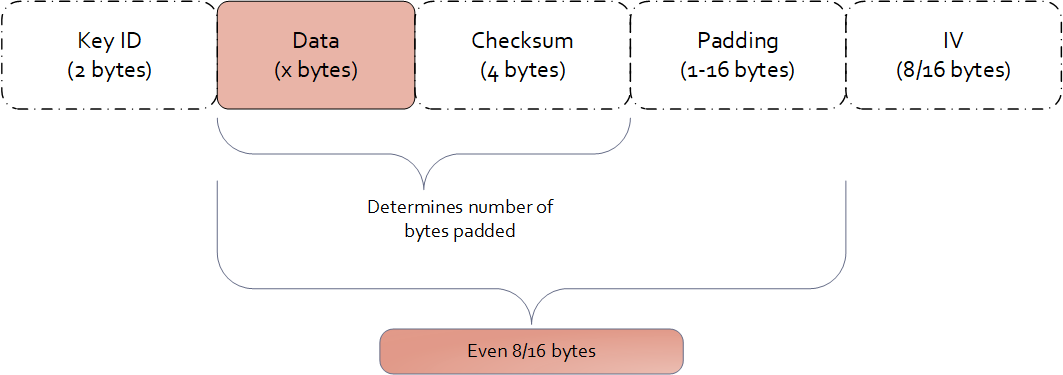
Examples of data length calculation by column types are provided in Examples of Column Sizes Calculation for Encryption.
3.5 -
The Protegrity solutions can encode data with the following encryption algorithms:
Table: Input Data Types Supported by Data Warehouse Protectors
3.6 -
The Protegrity solutions can encode data with the following encryption algorithms:
Table: Input Data Types Supported by Application Protectors
*1 - If the input and output types of the API are BYTE [], the customer application should convert the input to a byte array. Then, call the API and convert the output from the byte array.
*2 - The output type is BYTE[] only. The input type String or Char is supported with the API that provides BYTE[] output type.
*3 - You must pass the encrypt_to=bytes keyword argument to the AP Python protect API for encrypting data. However, if you are encrypting or re-encrypting data already in bytes format, you do not need to pass the encrypt_to=bytes argument to the protect and reprotect APIs.
4 - No Encryption
The No Encryption protection method uses the data security policy to access the clear data.
The No Encryption protection method when applied lets sensitive data be stored in the clear. It is highly transparent, which means that the implementation of this method does not cause any changes in the target environment.
If you are reprotecting data using the No Encryption method, then the reprotect operation fails in the following scenarios:
- If the data was previously protected using a tokenization or encryption method.
- If the user performing the reprotection of data does not have the unprotect privileges on the data element that was used to protect the data.
Table: No Encryption Algorithm Properties
| Properties | Values |
|---|
| Name | No Encryption |
| Operation Mode | N/A |
| Length Preservation | Yes |
| Minimum Length | None |
| Maximum Length | ≥500 bytes |
| Specifics of algorithm | Does not protect data at rest by changing it. |
The following table shows examples of the way in which a value will be protected with the No Encryption algorithm.
Table: Output Values for No Encryption Algorithm
| Protection Method | Input Value | Output Value | Comments |
|---|
| No Encryption | Protegrity | Protegrity | The value is stored in the clear. |
No Encryption for Protectors
The Input type / Character set for all protectors vary across DBs. The Output type / Character set is the same as the input type. For example; if the input type is an integer, then the output type is also an integer.
Application Protector
Table: Input Data Types Supported by Application Protectors
| Protection Method | AP Java*1 | AP Python |
|---|
| NoEncryption | SHORT
INT
LONG
FLOAT
DOUBLE
STRING
CHAR[]
BYTE[] | STRING
BYTES
FLOAT
INT |
*1 - If the input and output types of the API are BYTE [], the customer application should convert the input to a byte array. Then, call the API and convert the output from the byte array.
For more information about Application protectors, refer to Application Protector.
Big Data Protector
Table: Input Data Types Supported by Big Data Protectors
| Protection Method*1 | MapReduce | Hive | Pig | HBase | Impala | Spark | Spark SQL | Trino |
|---|
| NoEncryption | BYTE[]
INT
LONG | CHAR
STRING
FLOAT
DOUBLE
INT
BIGINT
HIVEDECIMAL | CHARARRAY
INT | BYTE[] | STRING
INT
FLOAT
DOUBLE | BYTE[]
STRING
FLOAT
DOUBLE
SHORT
INT
LONG | STRING
FLOAT
DOUBLE
SHORT
INT
LONG
BIGDECIMAL*2 | VARCHAR
SMALLINT
INT
BIGINT
DATE
TIMESTAMP
DOUBLE
DECIMAL |
*1 - The customer application should convert the input to and output from byte array.
*2 - If decimal format data is protected by the Decimal UDFs using the No Encryption data element, then the protected data is trimmed to the scale of 18 digits.
For more information about Big Data protectors, refer to Big Data Protector.
Data Warehouse Protector
Table: Input Data Types Supported for Data Warehouse Protectors
| Protection Method | Teradata |
|---|
| NoEncryption | VARCHAR
CHAR
INTEGER
FLOAT
DECIMAL
DATE
SMALLINT |
Database Protectors
Oracle Database Protector
The supported input data types for the Oracle Database Protector are listed below.
| Protection Method | Supported Input Data Types |
|---|
| NoEncryption | VARCHAR2 |
| NoEncryption | CHAR |
| NoEncryption | NUMBER |
| NoEncryption | REAL |
| NoEncryption | FLOAT |
| NoEncryption | DATE |
| NoEncryption | RAW |
| NoEncryption | BLOB |
| NoEncryption | CLOB |
5 - Monitoring
The Monitor protection method is generally used for auditing.
As an organization, if you plan to monitor and assess users that are trying to access the data without protection, choose the Monitor protection method. This element does not restrict any data security operation for any user, but instead audits attempts to add, access, or change data by users. The audit logs generated on the protectors are forwarded to Insight.
With the Monitor method, sensitive data is accessible by users. The usage of this data is monitored through audit logs that are generated on the protectors and then delivered to Insight.
The monitoring method is controlled by the security officer from the centrally administered ESA Appliance.
The Monitoring protection method works in a similar way as the No Encryption method. However, it gives full access to all users by default and does not require roles to be added to the policy. Access can be changed by adding a role and setting role permissions.
Table: Monitor Algorithm Properties
| Properties | Values |
|---|
| Name | Monitor |
| Operation Mode | N/A |
| Length Preservation with padding formula for non-length preserving algorithms | Yes |
| Specifics of algorithm | Does not protect data at rest by changing it. Used for monitoring and auditing. |
The following table shows examples of the way in which a value will be protected with the Monitor algorithm.
Table: Output Values for Monitor Algorithm
| Protection Method | Input Value | Output Value | Comments |
|---|
| Monitor | Protegrity | Protegrity | The value is stored in the clear. An audit log is generated. |
Monitoring for Protectors
The Input type / Character set for all protectors vary across DBs. The Output type / Character set is the same as the input type. For example; if the input type is an integer, then the output type is also an integer.
Application Protector
Table: Input Data Types Supported by Application Protectors
| Protection Method | AP Java | AP Python |
|---|
| Monitor | SHORT
INT
LONG
FLOAT
DOUBLE
STRING
CHAR[]
BYTE[] | STRING
BYTES
FLOAT
INT |
If the input and output types of the API are BYTE [], the customer application should convert the input to a byte array. Then, call the API and convert the output from the byte array.
For more information about Application protectors, refer to Application Protector.
Big Data Protector
Table: Input Data Types Supported by Big Data Protectors
| Protection Method*1 | MapReduce | Hive | Pig | HBase | Impala | Spark | Spark SQL | Trino |
|---|
| Monitor | BYTE[]
INT
LONG | CHAR
STRING
FLOAT
DOUBLE
INT
BIGINT
HIVEDECIMAL | CHARARRAY
INT | BYTE[] | STRING
INT
FLOAT
DOUBLE | BYTE[]
STRING
FLOAT
DOUBLE
SHORT
INT
LONG | STRING
FLOAT
DOUBLE
SHORT
INT
LONG
BIGDECIMAL*2 | VARCHAR
SMALLINT
INT
BIGINT
DATE
TIMESTAMP
DOUBLE
DECIMAL |
*1 - The customer application should convert the input to and output from byte array.
*2 - If decimal format data is protected by the Decimal UDFs using the Monitor data element, then the protected data is trimmed to the scale of 18 digits.
For more information about Big Data protectors, refer to Big Data Protector.
Data Warehouse Protector
Table: Input Data Types Supported for Data Warehouse Protectors
| Protection Method | Teradata |
|---|
| Monitor | VARCHAR
CHAR
INTEGER
FLOAT
DECIMAL
DATE
SMALLINT |
Database Protectors
Oracle Database Protector
The supported input data types for the Oracle Database Protector are listed below.
| Protection Method | Supported Input Data Types |
|---|
| Monitor | VARCHAR2 |
| Monitor | CHAR |
| Monitor | NUMBER |
| Monitor | REAL |
| Monitor | FLOAT |
| Monitor | DATE |
| Monitor | RAW |
| Monitor | BLOB |
| Monitor | CLOB |
6 - Masking
The Masking method is generally used where data output restrictions must be applied for users.
As an organization, if you plan to restrict access such that only users with required privileges can view sensitive data, while other users view masked data, the Masking method can be used. Considering the sensitive data is residing in protection endpoint in clear, based on how the Masking data element is configured, users are granted view access. The masking data element as a default considers all users as restricted users and displays masked sensitive data. If any user must be granted access to view clear data, then it must be configured through roles.
For example, consider policy users user1 and user2 trying to access CCN data. As default, when policy with the masking data element is created, both users view the CCN data in masked format, such as ****45856655****.
If the user1 is granted privilege to view data in clear, then user1 sees the CCN data in clear while the user2 still sees masked CCN data.
With the Masking method, the users who should not use sensitive assets can be prevented from receiving this data, even if the data is stored in the clear.
Unlike Masking data element, masking cannot be enabled for No Encryption data element. It can only be mapped to roles in policy. In contrast, when masking is enabled through a Masking data element, the data is masked for all users unless authorized users have permission to view it in clear.
Similar to the No Encryption method, implementation of the Masking method does not cause any changes in the target environment.
The Masking data element is created in combination with the Masks option. The Masks option helps define how the masked data output format is visible to users.
The masking method is controlled by the security officer from the centrally administered ESA Appliance.
For more information about creating masks, refer to Creating a Mask.
Note:
If a masking data element is configured in the policy, and username is not specified in the policy, an error message will display when the data is protected. That error message appears as:
The user does not have the appropriate permissions to perform the requested operation
Table: Masking Algorithm Properties
| Properties | Values |
|---|
| Name | Masking |
| Operation Mode | N/A |
| Length Preservation with padding formula for non-length preserving algorithms | Yes |
| Specifics of algorithm | Does not protect data at rest by changing it. Protection comes from masking. |
The following table shows examples in which a value will be protected with the Masking algorithm.
Table: Output Values for Masking Algorithm
| Protection Method | Roles in Data Element | Input Value | Output Value | Comments |
|---|
| Masking | None | Protegrity | None | The following error message appears:
“The user does not have the appropriate permissions to perform the requested operation” |
| Masking | exampleuser1 with Unprotect access and output format is set to “Clear” | Protegrity | - All users:
"****egrity"
- exampleuser1:
“Protegrity” | Any other user apart from exampleuser1 will see masked content. |
Using Masks
The Masks option is a data output restriction that is used in combination with the tokenization, encryption, no encryption, and masking protection methods. Masks define data output formatting, which means what data to disclose to users that want to view the data. The formatting includes unprotecting and transforming the result in a way that part of it is obfuscated. For example, a masked social security number could look like: 12345****, or ***456789.
Using a mask for the output is optional. If none is specified, then all data is returned in the masked output format by default for all users who are not a part of any policy. If users are a part of the policy:
- Data is shown in the clear for No Encryption data elements.
- Data is masked in output format for Masking data elements.
Masks are defined in the ESA and have the following properties:
- Mask name and description
- Number of characters from left
- Number of characters from right
- Whether “left” and “right” should be masked or clear
- Specific mask character - *,#,-,0,1,2,3,4,5,6,7,8, or 9.
The mask definition or how the mask looks like is implemented as per role and data element combination. This means that one data element can have multiple mask definitions.
When a mask is applied to data that is too short, that is, the data will not match to what has been defined in the mask, everything gets masked. For example, if a mask of 6 from the left and 2 from the right will be applied to data that has a length of 4, such as a name John, then all four characters will be masked.
If a user role is included in multiple policies with masks, then the masks may conflict in one of the following conditions:
- The user has different mask settings for both roles for the same data element. In this case, the unprotect access rights to the data element with the conflicting masks are revoked.
- The user has the data element with a mask in a role and another with no mask settings in the other role. In this case, the user’s access rights to the data element is set to the role with no mask settings.
For more information about masking rules for users in multiple roles, refer to Masking Rules for Users in Multiple Roles.
Important: Masking is supported only for character-based data types. If a role with masking is applied to unsupported data types, the operation will fail.
It is not recommended to use Masking with multibyte encodings, such as UTF-8, UTF-16, and so on, as it might corrupt the data.
| Properties | Examples |
|---|
| Sample Protected Data | Текст на русском |
| Left and Right Masking settings | L-3 and R-3 |
| Unprotected Data with Mask applied | ##?кст на русск?## |
| Sample Protected Data | Текст на русском |
| Left and Right Clear settings | L-3 and R-3 |
| Unprotected Data with Mask applied | Т?###### #### ##########?м |
The masked, unprotected value is distorted in the above case. Since each character in the input is represented by 2 bytes in UTF-8 encoding, we aim to preserve the first 3 bytes from the left and the next 3 bytes from the right. However, this approach results in a distorted output.
The following table shows examples of the way in which Masks can be used in combination with other protection methods.
Table: Examples of Masks
| Protection Method/ Mask | Input Value | Output Value | Comments |
|---|
CCN 6x4
Left=6, Right=4, Clear, * | 4537432557929840 | 453743******9840 | Pre-defined mask:
- Exposes the first 6 characters
- Exposes the last 4 characters |
CCN 12x0
Left=12, Right=0, Mask, * | 4537432557929840 | ************9840 | Pre-defined mask:
- Hides the first 12 characters |
CCN 4x4
Left=4, Right=4, Clear, * | 4537432557929840 | 4537********9840 | Pre-defined mask:
- Exposes the first 4 characters
- Exposes the last 4 characters |
CCN 6x4
Left=6, Right=4, Clear, 1 | 4537432557929840 | 4537431111119840 | Pre-defined mask:
- Exposes the first 6 characters
- Exposes the last 4 characters |
SSN x-4
Left=0, Right=4, Clear, * | 721-07-4426 | *******4426 | Pre-defined mask:
- Exposes the last 4 characters |
SSN 5-x
Left=5, Right=0, Clear, * | 72107-4426 | 72107***** | Pre-defined mask:
- Exposes the first 5 characters |
SSN 5-x
Left=5, Right=0, Clear, 0 | 72107-4426 | 7210700000 | Pre-defined mask:
- Exposes the first 5 characters |
CustomMask1
Left=6, Right=0, Mask, # | 721-07-4426 | ######-4426 | Custom mask:
- Illustrates the usage of “#” mask character |
CustomMask2
Left=4, Right=4, Mask, - | 4537432557929840 | ----43255792---- | Custom mask:
- Illustrates the usage of “-” mask character |
CustomMask3
Left=4, Right=4, Mask, 8 | 4537432557929840 | 8888432557928888 | Custom mask:
- Illustrates the usage of “8” mask character |
Combining Data Elements and Masks
Masks are always applied using the supported Data Elements. The Masks are applied right before the data is presented to the end-user.
Tokenization, Encryption, FPE, No Encryption, and Masking Data Elements all support Masks, with some exceptions as to the configuration. Refer to support matrix below to check whether a specific Data Element and Mask combination is supported.
When combining Masks with tokenization, encryption, and FPE, sensitive data will be unprotected before a Mask is applied. In the case of the Masking Data Element, data is masked during the unprotect operation only.
Table: Data Element and Mask Support Matrix
| Data Element Method | Data Type | Mask Support |
|---|
| Tokenization | Numeric (0-9) | Yes |
| Integer | No |
| Credit Card (0-9) | Yes |
| Alpha (a-z, A-Z) | Yes |
| Uppercase Alpha (A-Z) | Yes |
| Uppercase Alpha-Numeric (0-9, A-Z) | Yes |
| Lower ASCII | Yes |
| DateTime | No |
| Decimal | No |
| Unicode Gen2 | No |
| Binary | No |
| Email | Yes |
| Printable | Yes |
| Date (YYYY-MM-DD, DD/MM/YYYY, MM.DD.YYYY) | No |
| Unicode | No |
| Unicode Base64 | No |
| Encryption Algorithm | AES-128, AES-256, CUSP AES-128, CUSP AES-256, 3DES, CUSP 3DES | Yes |
| Format Preserving Encryption (FPE) | | Yes, only in version 10.0.X, with ASCII plaintext encoding without Left and Right settings. |
| No Encryption | | Yes |
| Masking | | Yes |
Masking for Protectors
The Input type / Character set for all protectors vary across DBs. The Output type / Character set is the same as the input type. For example; if the input type is an integer, then the output type is also an integer.
Application Protector
Table: Input Data Types Supported by Application Protectors
| Protection Method | AP Java | AP Python |
|---|
| Masking | STRING
CHAR[]
BYTE[] | STRING
BYTES |
If the input and output types of the API are BYTE [], the customer application should convert the input to a byte array. Then, call the API and convert the output from the byte array.
For more information about Application protectors, refer to Application Protector.
Big Data Protector
Table: Input Data Types Supported by Big Data Protectors
| Protection Method*1 | MapReduce | Hive | Pig | HBase | Impala | Spark | Spark SQL | Trino |
|---|
| Masking | BYTE[] | CHAR
STRING | CHARARRAY | BYTE[] | STRING | BYTE[]
STRING | STRING | VARCHAR |
*1 - The customer application should convert the input to and output from byte array.
For more information about Big Data protectors, refer to Big Data Protector.
Data Warehouse Protector
Table: Input Data Types Supported for Data Warehouse Protectors
| Protection Method | Teradata |
|---|
| Masking | VARCHAR
CHAR
INTEGER
FLOAT
DECIMAL
DATE
SMALLINT |
Important: Masking is supported only for character-based data types. If a data element with masking is applied to an unsupported data type, the operation will fail.
Database Protectors
Oracle Database Protector
The supported input data types for the Oracle Database Protector are listed below.
| Protection Method | Supported Input Data Types |
|---|
| Masking | VARCHAR2 |
| Masking | CHAR |
| Masking | NUMBER |
| Masking | REAL |
| Masking | FLOAT |
| Masking | DATE |
| Masking | BLOB |
| Masking | CLOB |
Note: While unprotecting the data, the masked value is passed to Oracle. These masked strings are not valid hex values. Therefore, the following error is observed; ORA-06502: PL/SQL: numeric or value error: hex to raw conversion error.
Important: Masking is supported only for character-based data types. If a data element with masking is applied to an unsupported data type, the operation will fail.
7 - Hashing
Hashing is an alternative method for protecting sensitive data.
A hash function produces a small number that serves as a digital fingerprint of the data. The resulting number is relatively small. The algorithm “chops and mixes” data to create fingerprints. For example, it substitutes or transposes the data.
Protegrity offers two different algorithms for creating hash values:
- The Hashed Message Authentication Code with SHA-256 (HMAC-SHA256) algorithm returns a 256 bit - 32 bytes hash value for any data.
- The HMAC-SHA1 algorithm returns a 160 bit - 20 bytes hash value for any data.
Deprecated
Starting from v10.0.x, the HMAC-SHA1 protection method is deprecated.
It is recommended to use the HMAC-SHA256 protection method instead of the HMAC-SHA1 protection method.
Hashing is utilized to transform sensitive data. HMAC-SHA1 and HMAC-SHA256 are specific hashing methods used for this purpose. Transformed data, which is the result of hashing, is irreversible as it is replaced with a checksum and not stored anywhere as an encrypted value. Unlike encryption, the original data can’t be retrieved back from the hashed value.
Table: Hashing Protection Algorithm Properties
Properties |
Keyed Hash Algorithm |
HMAC-SHA1 |
HMAC-SHA256 |
Operation Mode |
N/A |
N/A |
Encryption Properties - IV, CRC, Key ID |
No |
N/A |
Length Preservation with padding formula for non-length preserving algorithms |
No
Result is always 20 bytes regardless of input length. |
No
Result is always 32 bytes regardless of input length. |
Minimum Length |
None |
None |
Maximum Length |
≥ 500 bytes |
≥ 500 bytes |
Input type / Character set |
Vary across DBs |
Vary across DBs |
Output type / Character set |
Binary |
Binary |
Return of Protected value |
No |
No |
Specifics of algorithm |
Irreversible protection method. Original data is replaced with a checksum and cannot be retrieved back, when decrypted. |
Irreversible protection method. Original data is replaced with a checksum and cannot be retrieved back, when decrypted. |
The following table shows examples of the way in which a value will be replaced with the HMAC-SHA1 / HMAC-SHA256 hashing type.
Table: HMAC-SHA1 / HMAC-SHA256 Hashing Output Values
| Protection Method | Input Value | Output Value | Comments |
|---|
| HMAC-SHA1 | Protegrity | 0x5855682AB16B3C818C33CCA382B0F32A00EC2915 | Output value cannot be decrypted. |
| HMAC-SHA256 | Protegrity | 0x9EE0CD797365EA5E2A76DC6663E98D0147CAE004DE0D5E0D7F2730E7F9BF165A | Output value cannot be decrypted. |
Hashing for Protectors
Application Protector
Table: Supported Input Data Types by Application Protectors
| Protection Method | AP Java*1 | AP Python |
|---|
| HMAC-SHA1 | FLOAT
DOUBLE
STRING
CHAR[]
BYTE[] | STRING
BYTES |
*1 - If the input and output types of the API are BYTE [], the customer application should convert the input to a byte array. Then, call the API and convert the output from the byte array.
For more information about Application protectors, refer to Application Protector.
Big Data Protector
Table: Supported Input Data Types for Big Data Protectors
| Protection Method*1 | MapReduce | Hive | Pig | HBase | Impala | Spark | Spark SQL | Trino |
|---|
| HMAC-SHA1 | BYTE[] | Not supported | Not supported | BYTE[] | Not supported | BYTE[] | Not supported | Not supported |
| HMAC-SHA256 | BYTE[] | Not supported | Not supported | BYTE[] | Not supported | BYTE[] | Not supported | Not supported |
*1 – The customer application should convert the input to and output from byte array.
For more information about Big Data protectors, refer to Big Data Protector.
Data Warehouse Protector
Table: Supported Input Data Types for Data Warehouse Protectors
| Protection Method | Teradata |
|---|
| HMAC-SHA1 | VARCHAR
INTEGER
FLOAT |
| HMAC-SHA256 | VARCHAR
INTEGER
FLOAT |
Database Protectors
Oracle Database Protector
The supported input data types for the Oracle Database Protector are listed below.
| Protection Method | Supported Input Data Types |
|---|
| HMAC-SHA1 | VARCHAR2 |
| HMAC-SHA1 | CHAR |
| HMAC-SHA256 | VARCHAR2 |
| HMAC-SHA256 | CHAR |
8 - ASCII Character Codes
ASCII is a 7-bit character set. It consists of 128 characters which includes numbers from 0-9, upper and lower case alphabets (A-Z, a-z), and special characters.
Lower ASCII token – character codes 33-126 (Table A-1)
Printable token – character codes 32-126 (Table A-1), 160-255 (Table A-2)
Unicode token – character codes 32-127 (Table A-1), 128-255 (Table A-2), 0-31 (Table A-3)
Binary token – character codes 32-127 (Table A-1), 128-255 (Table A-2), 0-31 (Table A-3)
Table A-1: ASCII printable characters (character code 32-127)
Character ASCII code |
Character Description |
Character ASCII code |
Character Description |
DEC |
HEX |
Symbol |
Description |
DEC |
HEX |
Symbol |
Description |
32 |
20 |
Space |
Space |
80 |
50 |
P |
Uppercase P |
33 |
21 |
! |
Exclamation mark |
81 |
51 |
Q |
Uppercase Q |
34 |
22 |
" |
Double quotes (or speech marks) |
82 |
52 |
R |
Uppercase R |
35 |
23 |
# |
Number |
83 |
53 |
S |
Uppercase S |
36 |
24 |
$ |
Dollar |
84 |
54 |
T |
Uppercase T |
37 |
25 |
% |
Percent sign |
85 |
55 |
U |
Uppercase U |
38 |
26 |
& |
Ampersand |
86 |
56 |
V |
Uppercase V |
39 |
27 |
' |
Single quote |
87 |
57 |
W |
Uppercase W |
40 |
28 |
( |
Open parenthesis (or open bracket) |
88 |
58 |
X |
Uppercase X |
41 |
29 |
) |
Close parenthesis (or close bracket) |
89 |
59 |
Y |
Uppercase Y |
42 |
2A |
* |
Asterisk |
90 |
5A |
Z |
Uppercase Z |
43 |
2B |
+ |
Plus |
91 |
5B |
[ |
Opening bracket |
44 |
2C |
, |
Comma |
92 |
5C |
\ |
Backslash |
45 |
2D |
- |
Hyphen |
93 |
5D |
] |
Closing bracket |
46 |
2E |
. |
Period, dot or full stop |
94 |
5E |
^ |
Caret - circumflex |
47 |
2F |
/ |
Slash or divide |
95 |
5F |
_ |
Underscore |
48 |
30 |
0 |
Zero |
96 |
60 |
` |
Grave accent |
49 |
31 |
1 |
One |
97 |
61 |
a |
Lowercase a |
50 |
32 |
2 |
Two |
98 |
62 |
b |
Lowercase b |
51 |
33 |
3 |
Three |
99 |
63 |
c |
Lowercase c |
52 |
34 |
4 |
Four |
100 |
64 |
d |
Lowercase d |
53 |
35 |
5 |
Five |
101 |
65 |
e |
Lowercase e |
54 |
36 |
6 |
Six |
102 |
66 |
f |
Lowercase f |
55 |
37 |
7 |
Seven |
103 |
67 |
g |
Lowercase g |
56 |
38 |
8 |
Eight |
104 |
68 |
h |
Lowercase h |
57 |
39 |
9 |
Nine |
105 |
69 |
i |
Lowercase i |
58 |
3A |
: |
Colon |
106 |
6A |
j |
Lowercase j |
59 |
3B |
; |
Semicolon |
107 |
6B |
k |
Lowercase k |
60 |
3C |
|
Less than (or open angled bracket) |
108 |
6C |
l |
Lowercase l |
61 |
3D |
= |
Equals |
109 |
6D |
m |
Lowercase m |
62 |
3E |
|
Greater than (or close angled bracket) |
110 |
6E |
n |
Lowercase n |
63 |
3F |
? |
Question mark |
111 |
6F |
o |
Lowercase o |
64 |
40 |
@ |
At symbol |
112 |
70 |
p |
Lowercase p |
65 |
41 |
A |
Uppercase A |
113 |
71 |
q |
Lowercase q |
66 |
42 |
B |
Uppercase B |
114 |
72 |
r |
Lowercase r |
67 |
43 |
C |
Uppercase C |
115 |
73 |
s |
Lowercase s |
68 |
44 |
D |
Uppercase D |
116 |
74 |
t |
Lowercase t |
69 |
45 |
E |
Uppercase E |
117 |
75 |
u |
Lowercase u |
70 |
46 |
F |
Uppercase F |
118 |
76 |
v |
Lowercase v |
71 |
47 |
G |
Uppercase G |
119 |
77 |
w |
Lowercase w |
72 |
48 |
H |
Uppercase H |
120 |
78 |
x |
Lowercase x |
73 |
49 |
I |
Uppercase I |
121 |
79 |
y |
Lowercase y |
74 |
4A |
J |
Uppercase J |
122 |
7A |
z |
Lowercase z |
75 |
4B |
K |
Uppercase K |
123 |
7B |
{ |
Opening brace |
76 |
4C |
L |
Uppercase L |
124 |
7C |
| |
Vertical bar |
77 |
4D |
M |
Uppercase M |
125 |
7D |
} |
Closing brace |
78 |
4E |
N |
Uppercase N |
126 |
7E |
~ |
Equivalency sign - tilde |
79 |
4F |
O |
Uppercase O |
127 |
7F |
(Delete) |
Delete |
Table A-2: Extended ASCII codes (character code 128-255)
Character ASCII code |
Character Description |
Character ASCII code |
Character Description |
DEC |
HEX |
Symbol |
Description |
DEC |
HEX |
Symbol |
Description |
128 |
80 |
€ |
Euro sign |
192 |
C0 |
À |
Latin capital letter A with grave |
129 |
81 | | |
193 |
C1 |
Á |
Latin capital letter A with acute |
130 |
82 |
‚ |
Single low-9 quotation mark |
194 |
C2 |
 |
Latin capital letter A with circumflex |
131 |
83 |
ƒ |
Latin small letter f with hook |
195 |
C3 |
à |
Latin capital letter A with tilde |
132 |
84 |
„ |
Double low-9 quotation mark |
196 |
C4 |
Ä |
Latin capital letter A with diaeresis |
133 |
85 |
… |
Horizontal ellipsis |
197 |
C5 |
Å |
Latin capital letter A with ring above |
134 |
86 |
† |
Dagger |
198 |
C6 |
Æ |
Latin capital letter AE |
135 |
87 |
‡ |
Double dagger |
199 |
C7 |
Ç |
Latin capital letter C with cedilla |
136 |
88 |
ˆ |
Modifier letter circumflex accent |
200 |
C8 |
È |
Latin capital letter E with grave |
137 |
89 |
‰ |
Per mille sign |
201 |
C9 |
É |
Latin capital letter E with acute |
138 |
8A |
Š |
Latin capital letter S with caron |
202 |
CA |
Ê |
Latin capital letter E with circumflex |
139 |
8B |
‹ |
Single left-pointing angle quotation |
203 |
CB |
Ë |
Latin capital letter E with diaeresis |
140 |
8C |
Π|
Latin capital ligature OE |
204 |
CC |
Ì |
Latin capital letter I with grave |
141 |
8D | | |
205 |
CD |
Í |
Latin capital letter I with acute |
142 |
8E |
Ž |
Latin captial letter Z with caron |
206 |
CE |
Î |
Latin capital letter I with circumflex |
143 |
8F | | |
207 |
CF |
Ï |
Latin capital letter I with diaeresis |
144 |
90 | | |
208 |
D0 |
Ð |
Latin capital letter ETH |
145 |
91 |
‘ |
Left single quotation mark |
209 |
D1 |
Ñ |
Latin capital letter N with tilde |
146 |
92 |
’ |
Right single quotation mark |
210 |
D2 |
Ò |
Latin capital letter O with grave |
147 |
93 |
“ |
Left double quotation
mark |
211 |
D3 |
Ó |
Latin capital letter O with acute |
148 |
94 |
” |
Right double quotation mark |
212 |
D4 |
Ô |
Latin capital letter O with circumflex |
149 |
95 |
• |
Bullet |
213 |
D5 |
Õ |
Latin capital letter O with tilde |
150 |
96 |
– |
En dash |
214 |
D6 |
Ö |
Latin capital letter O with diaeresis |
151 |
97 |
— |
Em dash |
215 |
D7 |
× |
Multiplication sign |
152 |
98 |
˜ |
Small tilde |
216 |
D8 |
Ø |
Latin capital letter O with slash |
153 |
99 |
™ |
Trade mark sign |
217 |
D9 |
Ù |
Latin capital letter U with grave |
154 |
9A |
š |
Latin small letter S with caron |
218 |
DA |
Ú |
Latin capital letter U with acute |
155 |
9B |
› |
Single right-pointing angle quotation mark |
219 |
DB |
Û |
Latin capital letter U with circumflex |
156 |
9C |
œ |
Latin small ligature oe |
220 |
DC |
Ü |
Latin capital letter U with diaeresis |
157 |
9D | | |
221 |
DD |
Ý |
Latin capital letter Y with acute |
158 |
9E |
ž |
Latin small letter z with caron |
222 |
DE |
Þ |
Latin capital letter THORN |
159 |
9F |
Ÿ |
Latin capital letter Y with diaeresis |
223 |
DF |
ß |
Latin small letter sharp s - ess-zed |
160 |
A0 |
Non-breaking space |
Non-breaking space |
224 |
E0 |
à |
Latin small letter a with grave |
161 |
A1 |
¡ |
Inverted exclamation mark |
225 |
E1 |
á |
Latin small letter a with acute |
162 |
A2 |
¢ |
Cent sign |
226 |
E2 |
â |
Latin small letter a with circumflex |
163 |
A3 |
£ |
Pound sign |
227 |
E3 |
ã |
Latin small letter a with tilde |
164 |
A4 |
¤ |
Currency sign |
228 |
E4 |
ä |
Latin small letter a with diaeresis |
165 |
A5 |
¥ |
Yen sign |
229 |
E5 |
å |
Latin small letter a with ring above |
166 |
A6 |
¦ |
Pipe, Broken vertical bar |
230 |
E6 |
æ |
Latin small letter ae |
167 |
A7 |
§ |
Section sign |
231 |
E7 |
ç |
Latin small letter c with cedilla |
168 |
A8 |
¨ |
Spacing dieresis - umlaut |
232 |
E8 |
è |
Latin small letter e with grave |
169 |
A9 |
© |
Copyright sign |
233 |
E9 |
é |
Latin small letter e with acute |
170 |
AA |
ª |
Feminine ordinal indicator |
234 |
EA |
ê |
Latin small letter e with circumflex |
171 |
AB |
« |
Left double angle quotes |
235 |
EB |
ë |
Latin small letter e with diaeresis |
172 |
AC |
¬ |
Not sign |
236 |
EC |
ì |
Latin small letter i with grave |
173 |
AD |
Soft hyphen |
Soft hyphen |
237 |
ED |
í |
Latin small letter i with acute |
174 |
AE |
® |
Registered trade mark sign |
238 |
EE |
î |
Latin small letter i with circumflex |
175 |
AF |
¯ |
Spacing macron - overline |
239 |
EF |
ï |
Latin small letter i with diaeresis |
176 |
B0 |
° |
Degree sign |
240 |
F0 |
ð |
Latin small letter eth |
177 |
B1 |
± |
Plus-or-minus sign |
241 |
F1 |
ñ |
Latin small letter n with tilde |
178 |
B2 |
² |
Superscript two - squared |
242 |
F2 |
ò |
Latin small letter o with grave |
179 |
B3 |
³ |
Superscript three - cubed |
243 |
F3 |
ó |
Latin small letter o with acute |
180 |
B4 |
´ |
Acute accent - spacing acute |
244 |
F4 |
ô |
Latin small letter o with circumflex |
181 |
B5 |
µ |
Micro sign |
245 |
F5 |
õ |
Latin small letter o with tilde |
182 |
B6 |
¶ |
Pilcrow sign - paragraph sign |
246 |
F6 |
ö |
Latin small letter o with diaeresis |
183 |
B7 |
· |
Middle dot - Georgian comma |
247 |
F7 |
÷ |
Division sign |
184 |
B8 |
¸ |
Spacing cedilla |
248 |
F8 |
ø |
Latin small letter o with slash |
185 |
B9 |
¹ |
Superscript one |
249 |
F9 |
ù |
Latin small letter u with grave |
186 |
BA |
º |
Masculine ordinal indicator |
250 |
FA |
ú |
Latin small letter u with acute |
187 |
BB |
» |
Right double angle quotes |
251 |
FB |
û |
Latin small letter u with circumflex |
188 |
BC |
¼ |
Fraction one quarter |
252 |
FC |
ü |
Latin small letter u with diaeresis |
189 |
BD |
½ |
Fraction one half |
253 |
FD |
ý |
Latin small letter y with acute |
190 |
BE |
¾ |
Fraction three quarters |
254 |
FE |
þ |
Latin small letter thorn |
191 |
BF |
¿ |
Inverted question mark |
255 |
FF |
ÿ |
Latin small letter y with diaeresis |
Table A-3: ASCII control characters (character code 0-31)
Character ASCII code |
Character Description |
Character ASCII code |
Character Description |
DEC |
HEX |
Symbol |
Description |
DEC |
HEX |
Symbol |
Description |
0 |
0 |
NUL |
Null char |
16 |
10 |
DLE |
Data Line Escape |
1 |
1 |
SOH |
Start of Heading |
17 |
11 |
DC1 |
Device Control 1 (oft. XON) |
2 |
2 |
STX |
Start of Text |
18 |
12 |
DC2 |
Device Control 2 |
3 |
3 |
ETX |
End of Text |
19 |
13 |
DC3 |
Device Control 3 (oft. XOFF) |
4 |
4 |
EOT |
End of Transmission |
20 |
14 |
DC4 |
Device Control 4 |
5 |
5 |
ENQ |
Enquiry |
21 |
15 |
NAK |
Negative Acknowledgement |
6 |
6 |
ACK |
Acknowledgment |
22 |
16 |
SYN |
Synchronous Idle |
7 |
7 |
BEL |
Bell |
23 |
17 |
ETB |
End of Transmit Block |
8 |
8 |
BS |
Back Space |
24 |
18 |
CAN |
Cancel |
9 |
9 |
HT |
Horizontal Tab |
25 |
19 |
EM |
End of Medium |
10 |
0A |
LF |
Line Feed |
26 |
1A |
SUB |
Substitute |
11 |
0B |
VT |
Vertical Tab |
27 |
1B |
ESC |
Escape |
12 |
0C |
FF |
Form Feed |
28 |
1C |
FS |
File Separator |
13 |
0D |
CR |
Carriage Return |
29 |
1D |
GS |
Group Separator |
14 |
0E |
SO |
Shift Out / X-On |
30 |
1E |
RS |
Record Separator |
15 |
0F |
SI |
Shift In / X-Off |
31 |
1F |
US |
Unit Separator |
9 - Examples of Column Sized Calculation for AES and 3DES Encryption
The section provides examples of Column Sized Calculation for AES and 3DES Encryption.
The sizes of database native data types may vary, but the column sizes calculation provided in the following tables is generic.
Table: Column Sizes Calculation for AES encryption - AES-128 and AES-256
| Data Type | Size (bytes) | AES | AES-CRC | AES-IV | AES-IV-CRC | AES-IV-CRC-KeyID |
|---|
| Maximum padding size | - | 16 | 16 | 16 | 16 | 16 |
| Checksum size | - | 0 | 4 | 0 | 4 | 4 |
| IV Size | - | 0 | 0 | 16 | 16 | 16 |
| SMALLINT | 2 | 16 | 16 | 32 | 32 | 34 |
| INTEGER | 4 | 16 | 16 | 32 | 32 | 34 |
| BIGINT | 8 | 16 | 16 | 32 | 32 | 34 |
| DATE | 4 | 16 | 16 | 32 | 32 | 34 |
| DECIMAL(1..2) | 1 | 16 | 16 | 32 | 32 | 34 |
| DECIMAL(3..4) | 2 | 16 | 16 | 32 | 32 | 34 |
| DECIMAL(5..9) | 4 | 16 | 16 | 32 | 32 | 34 |
| DECIMAL(10..18) | 8 | 16 | 16 | 32 | 32 | 34 |
| DECIMAL(19..38) | 16 | 32 | 32 | 48 | 48 | 50 |
| FLOAT, REAL | 8 | 16 | 16 | 32 | 32 | 34 |
Latin
CHAR / VARCHAR | 5 | 16 | 16 | 32 | 32 | 34 |
Unicode
CHAR / VARCHAR | 5 | 16 | 16 | 32 | 32 | 34 |
The following table shows the column sized calculation for deprecated 3DES encryption.
Table: Column Sized Calculation for 3DES Encryption
| Data Type | Size (bytes) | 3DES | 3DES-CRC | 3DES-IV | 3DES-IV-CRC | 3DES-IV-CRC-KeyID |
|---|
| Maximum padding size | | 8 | 8 | 8 | 8 | 8 |
| Checksum size | | 0 | 4 | 0 | 4 | 4 |
| IV Size | | 0 | 0 | 8 | 8 | 8 |
| SMALLINT | 2 | 8 | 8 | 16 | 16 | 18 |
| INTEGER | 4 | 8 | 16 | 16 | 24 | 26 |
| BIGINT | 8 | 16 | 16 | 24 | 24 | 26 |
| DATE | 4 | 8 | 16 | 16 | 24 | 26 |
| DECIMAL(1..2) | 1 | 8 | 8 | 16 | 16 | 18 |
| DECIMAL(3..4) | 2 | 8 | 8 | 16 | 16 | 18 |
| DECIMAL(5..9) | 4 | 8 | 16 | 16 | 24 | 26 |
| DECIMAL(10..18) | 8 | 16 | 16 | 24 | 24 | 26 |
| DECIMAL(19..38) | 16 | 24 | 24 | 32 | 32 | 34 |
| FLOAT, REAL | 8 | 16 | 16 | 24 | 24 | 26 |
Latin
CHAR / VARCHAR | 5 | 8 | 16 | 16 | 24 | 26 |
Unicode
CHAR / VARCHAR | 5 | 16 | 16 | 24 | 24 | 26 |
10 - Empty String Handling by Protectors
Empty strings can be protected by tokenization and encryption.
Starting from v10.0.x, Protegrity Protectors handle empty string "" as NULL. If you protect an empty string, then the Protegrity APIs and UDFs will return a NULL value.
11 - Hashing Functions and Examples
Hashing functions take the same parameters and return a hash value.
Hashing is accomplished by two functions of the protector, an Insert hash function and an Update hash function. Both functions take the same parameters and return a hash value that is always a 160 bit (SHA1) or a 256 bit (SHA256) binary value. The difference between the functions is the access rights that they check.
Here is the functions syntax example, applicable to an Oracle database:
FUNCTION ins_hash_varchar2(dataelement IN CHAR, cdata IN VARCHAR, SCID IN BINARY_INTEGER) RETURN RAW;
FUNCTION upd_hash_varchar2(dataelement IN CHAR, cdata IN VARCHAR, SCID IN BINARY_INTEGER) RETURN RAW;
Table: Functions Syntax Example
| Where… | Is… |
|---|
| dataelement | The data element name. |
| cdata | The data. |
| SCID | The security ID.
Not used parameter. It is kept in signature due to backwards compatibility reasons. |
There is no decrypt function since a hash is a checksum and not data.
11.1 - Hash Data column size
Hash Data column size explains and provides an example of data with hash value.
A hash value is always 160 bits / 20 bytes (SHA1) or 256 bits / 32 bytes (SHA256) long regardless of what data it’s calculated on. Basically you should have a table with a binary column of 20 bytes or 32 bytes for the hash value.
Here is an example of an Oracle table with hash value instead of name:
CREATE TABLE NAMETABLE ( ident NUMBER PRIMARY KEY,
                  name RAW(32));
11.2 - Using Hashing Triggers and View
Hashing Triggers use protection functions in triggers in the same manner as encryption.
Oracle example:
CREATE OR REPLACE TRIGGER SCOTT.NAMETABLE_INS
INSTEAD OF INSERT ON SCOTT.NAMETABLE
FOR EACH ROW
DECLARE
NAME_ RAW(2000) := NULL;

BEGIN
           **NAME\_:=PTY.INS\_HASH\_VARCHAR2\('HashDE', :new.NAME, 0\)**;

           INSERT INTO SCOTT.NAMETABLE_ENC(IDENT, NAME)
           VALUES(:new.IDENT, NAME_);
END;


CREATE OR REPLACE TRIGGER SCOTT.NAMETABLE_UPD
INSTEAD OF UPDATE ON SCOTT.NAMETABLE
FOR EACH ROW
DECLARE
NAME_ RAW(2000) := NULL;

BEGIN
           **PTY.SEL\_CHECK\('HashDE'\);

           NAME\_:=PTY.UPD\_HASH\_VARCHAR2\('HashDE', :new.NAME, 0\)**;

           IF: old.IDENT = :new.IDENT THEN
                      UPDATE NAMETABLE_ENC SET
                      NAME= NAME_,
                      WHERE IDENT=:old.IDENT;
           ELSE
                      UPDATE NAMETABLE_ENC SET
                      IDENT=:new.IDENT,
                      NAME= NAME_,
                      WHERE IDENT=:old.IDENT;
           END IF;
END;
The view selects the hash value directly from the table instead of running a decrypt function. To make this work as a normal trigger/view solution, the binary data type is cast into the original data type. In Oracle it should be VARCHAR2. The data type must be cast to insert data through the view as usual.
CREATE OR REPLACE VIEW SCOTT.NAMETABLE(IDENT,
NAME)
AS SELECT IDENT, utl\_raw.cast\_to\_varchar2\(NAME\))
FROM SCOTT.NAMETABLE_ENC;
The application handles the return value, which will now be a 20 byte or 32 byte binary string converted into a character string.
12 - Codebook Re-shuffling in the Data Security Gateway
The Codebook Re-shuffling in DSG generates unique tokens for protected values for all the tokenization data elements.
You can enable the Codebook Re-shuffling in the Data Security Gateway (DSG) for all the tokenization data elements to generate unique tokens for protected values across the tokenization domains.
For more information about the Codebook Re-shuffling for the Data Security Gateway, refer to Codebook Re-shuffling.
Note: As the Codebook Re-shuffling feature is an advanced functionality, contact Protegrity Support.
13 -
Table: Supported Input Data Types for Data Warehouse Protectors
| Protection Method | Teradata |
|---|
| HMAC-SHA1 | VARCHAR
INTEGER
FLOAT |
| HMAC-SHA256 | VARCHAR
INTEGER
FLOAT |
14 -
Table: Input Data Types Supported for Data Warehouse Protectors
| Protection Method | Teradata |
|---|
| Masking | VARCHAR
CHAR
INTEGER
FLOAT
DECIMAL
DATE
SMALLINT |
Important: Masking is supported only for character-based data types. If a data element with masking is applied to an unsupported data type, the operation will fail.
15 -
Table: Input Data Types Supported for Data Warehouse Protectors
| Protection Method | Teradata |
|---|
| NoEncryption | VARCHAR
CHAR
INTEGER
FLOAT
DECIMAL
DATE
SMALLINT |
16 -
Table: Input Data Types Supported for Data Warehouse Protectors
| Protection Method | Teradata |
|---|
| Monitor | VARCHAR
CHAR
INTEGER
FLOAT
DECIMAL
DATE
SMALLINT |