This is the multi-page printable view of this section. Click here to print.
Protectors
- 1: Protection Method Reference
- 1.1: Protegrity Tokenization
- 1.1.1: Tokenization Support by Protegrity Products
- 1.1.2: Delimiters
- 1.1.3: Tokenization Properties
- 1.1.3.1: Data Type and Alphabet
- 1.1.3.2: Static Lookup Table (SLT) Tokenizers
- 1.1.3.3: From Left and From Right Settings
- 1.1.3.4: Internal Initialization Vector (IV)
- 1.1.3.5: Minimum and Maximum Input Length
- 1.1.3.5.1: Calculating Token Length
- 1.1.3.6: Length Preserving
- 1.1.3.7: Short Data Tokenization
- 1.1.3.8: Case-Preserving and Position-Preserving Tokenization
- 1.1.3.8.1: Case-Preserving Tokenization
- 1.1.3.8.2: Position-Preserving Tokenization
- 1.1.3.9: External Initialization Vector (EIV)
- 1.1.3.9.1: Tokenization Model with External IV
- 1.1.3.9.2: External IV Tokenization Properties
- 1.1.3.10: Truncating Whitespaces
- 1.1.4: Tokenization Types
- 1.1.4.1: Numeric (0-9)
- 1.1.4.2: Integer (0-9)
- 1.1.4.3: Credit Card
- 1.1.4.4: Alpha (A-Z)
- 1.1.4.5: Upper-Case Alpha (A-Z)
- 1.1.4.6: Alpha-Numeric (0-9, a-z, A-Z)
- 1.1.4.7: Upper-Case Alpha-Numeric (0-9, A-Z)
- 1.1.4.8: Lower ASCII
- 1.1.4.9: Datetime (YYYY-MM-DD HH:MM:SS)
- 1.1.4.10: Decimal
- 1.1.4.11: Unicode Gen2
- 1.1.4.12: Binary
- 1.1.4.13: Email
- 1.1.4.14: Printable
- 1.1.4.15: Date (YYYY-MM-DD, DD/MM/YYYY, MM.DD.YYYY)
- 1.1.4.16: Unicode
- 1.1.4.17: Unicode Base64
- 1.1.4.18:
- 1.1.4.19:
- 1.1.4.20:
- 1.1.4.21:
- 1.1.4.22:
- 1.1.4.23:
- 1.1.4.24:
- 1.1.4.25:
- 1.1.4.26:
- 1.1.4.27:
- 1.1.4.28:
- 1.1.4.29:
- 1.1.4.30:
- 1.1.4.31:
- 1.1.4.32:
- 1.1.4.33:
- 1.1.4.34:
- 1.1.4.35:
- 1.1.4.36:
- 1.1.4.37:
- 1.1.4.38:
- 1.1.4.39:
- 1.1.4.40:
- 1.1.4.41:
- 1.1.4.42:
- 1.1.4.43:
- 1.1.4.44:
- 1.1.4.45:
- 1.1.4.46:
- 1.1.4.47:
- 1.1.4.48:
- 1.1.4.49:
- 1.1.4.50:
- 1.1.4.51:
- 1.1.5:
- 1.1.6:
- 1.2: Protegrity Format Preserving Encryption
- 1.2.1: FPE Properties
- 1.2.2: Code Points
- 1.2.3: Tweak Input
- 1.2.4: Left and Right Settings
- 1.2.5: Handling Special Numeric Credit Card Data
- 1.3: Protegrity Encryption
- 1.3.1: Encryption Algorithms
- 1.3.1.1: AES-128 and AES-256
- 1.3.1.2: CUSP
- 1.3.1.3: 3DES
- 1.3.2: Encryption Properties - IV, CRC, Key ID
- 1.3.3: Data Length and Padding in Encryption
- 1.3.4:
- 1.3.5:
- 1.3.6:
- 1.4: No Encryption
- 1.5: Monitoring
- 1.6: Masking
- 1.7: Hashing
- 1.8: ASCII Character Codes
- 1.9: Examples of Column Sized Calculation for AES and 3DES Encryption
- 1.10: Empty String Handling by Protectors
- 1.11: Hashing Functions and Examples
- 1.11.1: Hash Data column size
- 1.11.2: Using Hashing Triggers and View
- 1.12: Codebook Re-shuffling in the Data Security Gateway
- 1.13:
- 1.14:
- 1.15:
- 1.16:
- 2: Big Data Protector
- 2.1: Amazon Elastic MapReduce Protector
- 2.1.1: Understanding the architecture
- 2.1.1.1: Bootstrap installer architecture
- 2.1.1.2: Static installer architecture
- 2.1.1.3: EMR Serverless architecture
- 2.1.2: Preparing the environment
- 2.1.2.1: Setting up for the Bootstrap Installer
- 2.1.2.1.1: Verifying the prerequisites
- 2.1.2.1.2: Extracting the Big Data Protector Package
- 2.1.2.1.3: Executing the Configurator Script
- 2.1.2.2: Setting up for the Static Installer
- 2.1.2.2.1: Verifying the prerequisites for Static Installer
- 2.1.2.2.2: Executing the Configurator Script
- 2.1.2.2.3: Extracting the Installation Package
- 2.1.2.2.4: Updating the BDP.Config File
- 2.1.2.3: Setting up for the EMR Serverless Installer
- 2.1.2.3.1: Extracting the Big Data Protector Package
- 2.1.2.3.2: Executing the Configurator Script
- 2.1.3: Installing the protector
- 2.1.3.1: Using the Bootstrap Installer
- 2.1.3.1.1: Creating a Cluster
- 2.1.3.1.2: Managing the Cluster Nodes
- 2.1.3.1.3: Verifying the Parameters
- 2.1.3.2: Using the Static Installer
- 2.1.3.2.1: Installing the Protector on all the Nodes
- 2.1.3.2.2: Installing the Protector on Specific Nodes
- 2.1.3.2.3: Verifying the Parameters
- 2.1.3.3: Using the EMR Serverless Installer
- 2.1.3.3.1: EMR Serverless Setup CLI
- 2.1.3.3.2: Setting up the Log Forwarder
- 2.1.3.3.3: Performing URP Operations
- 2.1.4: Configuring the protector
- 2.1.5: Working with Cluster Utilities
- 2.1.5.1: RPAgent Control Script
- 2.1.5.2: Log Forwarder Control Script
- 2.1.5.3: Sync Config.ini
- 2.1.5.4: Sync Log Forwarder Configuration
- 2.1.5.5: Sync RPAgent Configuration
- 2.1.6: Uninstalling the protector
- 2.2: User Defined Functions and APIs
- 2.2.1: MapReduce APIs
- 2.2.2: Hive UDFs
- 2.2.3: Pig UDFs
- 2.2.4: HBase Commands
- 2.2.5: Impala UDFs
- 2.2.6: Spark Java APIs
- 2.2.7: Spark SQL UDFs
- 2.2.8: PySpark - Scala Wrapper UDFs
- 2.2.9: Unity Catalog Batch Python UDFs
- 2.3: Additional Information
1 - Protection Method Reference
Protegrity products can protect sensitive data with the following protection methods:
The following table describes the protection methods for structured and unstructured data security policy types.
Table: Protection Methods by Data Security Policy Type
| Protection Method | Description | Structured | Unstructured |
|---|---|---|---|
| Tokenization (all types) | Tokenization is the process of replacing sensitive data with tokens that has no worth to someone who gains unauthorized access to the data. | √ | |
| Format Preserving Encryption (FPE) | A data encryption technique that preserves the ciphertext format using FF1 mode of operation for AES-256 block cipher algorithm. | √ | |
| AES-128 | A block cipher with 128 bit encryption keys. | √ | √ |
| AES-256 | A block cipher with 256 bit encryption keys. | √ | √ |
| CUSP AES-128, CUSP AES-256 | A modified block algorithm mainly used in environments where an IBM mainframe is present. | √ | |
| No Encryption | It does not protect data but lets the sensitive data be stored in clear. Protection comes from access control, monitoring, and masking. | √ | |
| Monitoring | It does not protect data but is used for monitoring and auditing. | √ | |
| Masking | It does not protect the data but applies masking to the sensitive data. | √ | |
| Hashing (HMAC-SHA256) | A Keyed-Hash Message Authentication Code. It is used only for protection of data using hashing. Since hashing is a one-way function, the original data cannot be restored. | √ |
The following table describes the deprecated protection methods for structured and unstructured data security policy types.
Table: Deprecated Protection Methods by Data Security Policy Type
| Protection Method | Description | Structured | Unstructured |
|---|---|---|---|
| 3DES | A block cipher with 168 bit encryption keys. | √ | √ |
| CUSP 3DES | A modified block algorithm mainly used in environments where an IBM mainframe is present. | √ | |
| Hashing (HMAC-SHA1) | A Keyed-Hash Message Authentication Code. It is used only for protection of data using hashing. Since hashing is a one-way function, the original data cannot be restored. | √ |
Protegrity protection methods, including tokenization, encryption, monitoring, masking, and hashing, support various input formats. This enables you to protect sensitive data using these methods. Some examples of input formats are as follows:
- Social Security Numbers (SSNs)
- Credit Card Numbers (CCNs)
- Electronic Personal Health Information (ePHI), which is controlled by Health Insurance Portability and Accountability Act (HIPPA) and Health Information Technology for Economic and Clinical Health (HITECH)
- Personally identifiable information (PII)
The following table shows different types of sensitive data that can be protected using different protection methods. It demonstrates input values and their corresponding protected values.
Table: Examples of Protected Data
| # | Type of Data | Input | Protected Value | Comments on Protected Value |
|---|---|---|---|---|
| 1 | SSN delimiters | 075-67-2278 | 287-38-2567 | Numeric token, delimiters in input |
| 2 | Credit Card | 5511 3092 3993 4975 | 8278 2789 2990 2789 | Numeric token |
| 3 | Credit Card | 5511 3092 3993 4975 | 8278 2789 2990 4975 | Numeric token, last 4 digits in clear |
| 4 | Credit Card | 5511309239934975 | 551130########## | No Encryption with mask exposing the first 6 digits. A mask is applied by the data security policy when a user tries to unprotect the protected value. |
| 5 | Credit Card | 5511309239934975 | 1437623387940746 | Credit Card token with invalid Luhn digit property. Tokenized value has invalid Luhn checksum. |
| 6 | Credit Card | 5511309239934975 | 8313123036143103 | Credit Card token with invalid card type identification. The first digit in tokenized value is not a valid card type. |
| 7 | Credit Card | 5511309239934975 | 1854817J97347370 | Credit Card token with alphabetic indicator on the 8th position. |
| 8 | Phone/Fax number | 1 888 397 8192 | 9 853 888 8435 | Numeric token |
| 9 | Medical ID | 29M2009ID | iA6wx0Mw1 | Alpha-Numeric token |
| 10 | Date and Time | 2012.12.31 12:23:34 | 1816.07.22 14:31:51 | Datetime token, date and time parts are tokenized |
| 11 | Proper names | Alfred Hitchcock | uRLzbg cvofdBFJh | Alpha token |
| 12 | Short names | Al | kKX | Alpha token non-length preserving |
| 13 | Abbreviations | CXR | GTP | Upper-case Alpha token |
| 14 | License plates | 583-LBE | 44J-KLT | Upper Alpha-Numeric token |
| 15 | Addresses | 5 High Ridge Park, Stamford | 5 hcY2 k9rLp Z0uA, KunZYNEM | Alpha-Numeric token. Punctuation marks and spaces are treated as delimiters. |
| 16 | E-mail Address | Protegrity1234@gmail.com | tzJkXJDRwjcNLU@02ici.com | Alpha-Numeric token, delimiters in input, last 3 characters in clear |
| 17 | E-mail Address | Protegrity1234@gmail.com | UNfOxcZ51jWbXMq@gmail.com | Email token |
| 18 | Password | 2$trongPa$$ | ]tlÙÖëÍÈÃW | Unicode Gen2 token with alphabet: Printable (U+20-U+7E, U+A0-U+FF) |
| 19 | Fuzzy times | 1994-01-01_00.00.00 | wfÏÛöò·×ÚøÕuðÔt´þà8 | Unicode Gen2 token with alphabet: Printable (U+20-U+7E, U+A0-U+FF) |
| 20 | Unicode text | ýç"ö÷Ó | Ƕf$ùI | Unicode Gen2 token with alphabet: Printable (U+20-U+7E, U+A0-U+FF) |
| 21 | Unicode text | Протегрити | Чцдяайыбм | Unicode Gen2 token with alphabet: Cyrillic (U+410-U+44F) |
| 22 | Japanese text | データ保護 | 睯窯闒懻辶 | Unicode Gen2 token with alphabet: Numeric (U+0030-U+0039) Hiragana (U+3041-U+3096) Katakana (U+30A0-U+30FF) Kanji (U+4E00-U+9FFF) |
| 23 | Japanese address | 〒106-0044東京都港区東麻布1-8-1 東麻布ISビル4F | 〒门醆湏-鑹晓侐晊秦龡箳蕛矱蝠苲四猿-蠵-堻 鞄眡莧IS閲楌蹬F | Unicode Gen2 token with alphabet: Numeric (U+0030-U+0039) Hiragana (U+3041-U+3096) Katakana (U+30A0-U+30FF) Kanji (U+4E00-U+9FFF) |
| 24 | Financial data | -3015.039 | -4416.646 | Decimal token. Protected value will never contain any zeroes. |
| 25 | Photographic images, media files | Media stored as BLOB type | Encrypted BLOB | Encryption (AES-256, AES-128) or hashing (HMAC-SHA256) |
| 26 | Irreversible data to be destroyed | AnyDataTo Destroy | Q2LKa2UhIhMTiRsi0l8BUF5xVag= | Hashing (HMAC-SHA256), data cannot be decrypted |
You can combine Protegrity protection methods to obtain the required level of data access control within the enterprise.
For example, a Security Officer can use a data security policy to control what is delivered to different roles in the policy. The following figure shows how Social Security Number access can vary by different users and applications.
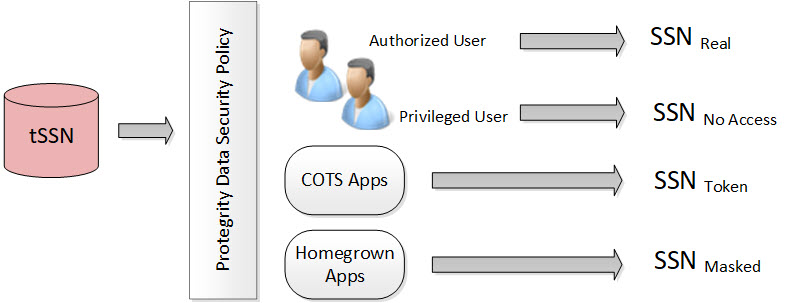
In the figure, the tokenized SSN is stored in the database. However, there are four roles defined in the policy:
Table: Different Roles in the Policy
| Users and Roles | Description |
|---|---|
| Authorized users - Real | It is the original or real value. A user with unprotect rights. |
| Privileged users - No Access | It is the default configuration. If the user does not have protect access rights, a null value is returned. |
| Commercial off-the-shelf (COTS) application users - Token | If the user does not have unprotect rights but the configuration is set as protect, then the configuration allows the output section to be protected. |
| Homegrown application users - Masked | It is how the masking data element is configured and the users are granted view access. For more information about masking, refer to Masking. |
Each role can receive a different form of the SSN based on its need. The Security Officer determines the SSN form by role.
Protegrity tokenization maintains a separation of duties by way of the data security policy.
The DBA, Developers, and System Administrators do not have direct access to the data. Everything goes through the data security policy, regardless of who manages the system.
For more information about data security policies, refer to Managing policies.
1.1 - Protegrity Tokenization
Tokenization is the process of replacing sensitive data with tokens that has no worth to someone who gains unauthorized access to the data. With tokenization, specific pieces of original data can be preserved, while the system tokenizes data according to design. Tokens can be set up and deployed directly on the protectors, depending on your enterprise configuration and data security needs. Once tokenization is deployed, operational systems continually work with the tokens. If the operational systems experience a security breach, then only the tokens are at risk of being compromised. Protegrity tokenization is transparent to end-users. Data integrity is strongly enforced by way of the data security policy.
Protegrity tokenization can be configured to preserve different parts of the original value in the token, such as the last 4 digits. It also recognizes and preserves delimiters, which are often used in SSNs, dates, etc.
Protegrity tokenization enables the user to tokenize various input data types, such as payment card industry (PCI), personally identifiable information (PII), and protected health information (PHI).
With Protegrity tokenization, there is a 1:1 relationship between the real data value and its token value. This enables token values to be used as alternative unique IDs that can be used for joining related information.
The following table describes the token types supported by Protegrity tokenization.
Table: Tokenization Types
| Tokenization Type | Alphabet Characters | Comment |
|---|---|---|
| Numeric (0-9) | Digits 0 through 9 | |
| Integer | Digits 0 through 9 | Data length: 2 bytes, 4 bytes, and 8 bytes |
| Credit Card | Digits 0 through 9 | Special settings: Invalid LUHN digit, invalid card type, alphabetic indicator |
| Alpha (a-z, A-Z) | Lowercase letters a through z Uppercase letters A through Z | |
| Upper-case Alpha (A-Z) | Uppercase letters A through Z | Lower case characters will be converted to upper-case in tokenized output value. |
| Alpha-Numeric (0-9, a-z, A-Z) | Digits 0 through 9 Lowercase letters a through z Uppercase letters A through Z | |
| Upper-Case Alpha-Numeric (0-9, A-Z) | Digits 0 through 9 Uppercase letters A through Z | Lower case characters will be converted to upper-case in tokenized output value. |
| Lower ASCII | The lower part of ASCII table. Hex character codes from 0x21 to 0x7E | Support of 94 printable characters (ASCII from 33 (!) to 126(~)), the rest are treated as delimiters |
| Datetime | YYYY-MM-DD HH:MM:SS | Special settings: Tokenize time, Distinguishable date, Date in clear |
| Decimal | Digits 0 through 9 sign and .(decimal delimiter) | Numeric data with precision and scale. The token will not contain any zeros. |
| Unicode Gen2 | Unicode code points between U+0020 and U+3FFFF | Result is based on the customized set of characters named as alphabet to generate token values. |
| Binary | Hex character codes from 0x00 to 0xFF | |
| Digits 0 through 9 Lowercase letters a through z Uppercase letters A through Z Special characters with restrictions @ sign and .(dot) are delimiters | Domain part after @ sign will not be tokenized |
The following table describes the deprecated token types supported by Protegrity tokenization.
| Tokenization Type | Alphabet Characters | Comment |
|---|---|---|
| Printable | ASCII printable characters, which include letters, digits, punctuation marks, and miscellaneous symbols. Hex character codes from 0x20 to 0x7E, and from 0xA0 to 0xFF. | ISO 8859-15 Latin alphabet no. 9 |
| Date (YYYY-MM-DD) | Date in big endian form, starting with the year. The following separators are supported: .(dot), / (slash), - (dash). | |
| Date (DD/MM/YYYY) | Date in little endian form, starting with the day. The following separators are supported: . (dot), / (slash), - (dash). | |
| Date (MM.DD.YYYY) | Date in middle endian form, starting with the month. The following separators are supported: . (dot), / (slash), - (dash) supported. | |
| Unicode | UTF-8 text. Hex character codes from 0x00 to 0xFF | Result is Alpha-Numeric. |
| Unicode Base64 | UTF-8 text. Hex character codes from 0x00 to 0xFF | Result is Alpha-Numeric, +, /, and =. |
1.1.1 - Tokenization Support by Protegrity Products
Protegrity offers various types of protectors which helps to protect data in different software and platforms. For example, we can use:
- Application Protectors: To protect data in C, C++, Python, Java, .Net, and Go programming languages.
- Big Data Protectors: To protect data in Big Data at various component levels, such as, Hive, Pig, MapReduce, etc.
- Data Warehouse Protectors: To protect data in the Teradata Data Warehouses.
- Gateway Protectors: To protect data in Gateway Protectors like Data Security Gateway (DSG).
- Cloud Protectors: To protect data in Cloud Protectors.
Each protector has certain tokenization types which are listed in the following sections.
Application Protector
The Protegrity Application Protector (AP) is a high-performance, versatile solution that provides a packaged interface to integrate comprehensive, granular security and auditing into enterprise applications.
Application Protectors support all types of tokens.
Table: Supported Tokenization Types by Application Protector
| Tokenization Type | AP Java*1 | AP Python | AP C |
|---|---|---|---|
| Credit Card Numeric Alpha Upper-case Alpha Alpha-Numeric Upper Alpha-Numeric Lower ASCII | STRING CHAR[] BYTE[] | STRING BYTES | STRING CHAR[] BYTE[] |
| Integer | SHORT: 2 bytes INT: 4 bytes LONG: 8 bytes | INT: 4 bytes and 8 bytes | SHORT: 2 bytes INT: 4 bytes LONG: 8 bytes |
| Datetime | DATE STRING CHAR[] BYTE[] | DATE STRING BYTES | DATE STRING CHAR[] BYTE[] |
| Decimal | STRING CHAR[] BYTE[] | STRING BYTES | STRING CHAR[] BYTE[] |
| Unicode Gen2 | STRING CHAR[] BYTE[] | STRING BYTES | STRING CHAR[] BYTE[] |
| Binary | BYTE[] | BYTES | BYTE[] |
*1 - If the input and output types of the API are BYTE[], then the customer application should convert the input to and output from the byte array, before calling the API.
Table: Deprecated Tokenization Types supported by Application Protector
| Tokenization Type | AP Java*1 | AP Python | AP C |
|---|---|---|---|
| Printable | STRING CHAR[] BYTE[] | STRING BYTES | STRING CHAR[] BYTE[] |
| Date | DATE STRING CHAR[] BYTE[] | DATE STRING BYTES | DATE STRING CHAR[] BYTE[] |
| Unicode | STRING CHAR[] BYTE[] | STRING BYTES | STRING CHAR[] BYTE[] |
| Unicode Base64 | STRING CHAR[] BYTE[] | STRING BYTES | STRING CHAR[] BYTE[] |
*1 - If the input and output types of the API are BYTE[], then the customer application should convert the input to and output from the byte array, before calling the API.
For more information about Application protectors, refer to Application Protector.
Big Data Protector
Protegrity supports MapReduce, Hive, Pig, HBase, Spark, and Impala, which utilizes Hadoop Distributed File System (HDFS) or Ozone as the data storage layer. The data is protected from internal and external threats, and users and business processes can continue to utilize the secured data. Protegrity protects data inside the files using tokenization and strong encryption protection methods.
The following table shows the tokenization types supported for Big Data Protectors.
Table: Supported Tokenization Types for Big Data Protectors
| Tokenization Type | MapReduce*1 | Hive | Pig | HBase*1 | Impala | Spark*1 | Spark SQL | Trino |
|---|---|---|---|---|---|---|---|---|
| Credit Card Numeric*3 Alpha*3 Upper-case Alpha*3 Alpha-Numeric*3 Upper Alpha-Numeric*3 Lower ASCII Email*3 | BYTE[] | STRING | CHARARRAY | BYTE[] | STRING | VARCHAR STRING | STRING | VARCHAR |
| Integer | INT: 4 bytes LONG: 8 bytes | INT: 4 bytes BIGINT: 8 bytes | INT: 4 bytes | BYTE[] | SMALL INT: 2 bytes INT: 4 bytes BIGINT: 8 bytes | SHORT: 2 bytes INT: 4 bytes LONG: 8 bytes | SHORT: 2 bytes INT: 4 bytes LONG: 8 bytes | SMALL INT: 2 bytes INT: 4 bytes BIGINT: 8 bytes |
| Datetime*2 | BYTE[] | STRING DATE DATETIME | CHARARRAY | BYTE[] | STRING | BYTE[] STRING | STRING DATE DATETIME | VARCHAR DATE TIMESTAMP |
| Decimal | BYTE[] | STRING | CHARARRAY | BYTE[] | STRING | BYTE[] STRING | STRING | VARCHAR |
| Unicode Gen2 | BYTE[] | STRING | Not supported | BYTE[] | STRING | BYTE[] STRING | STRING | VARCHAR |
| Binary | BYTE[] | Not supported | Not supported | BYTE[] | Not supported | BYTE[] | Not supported | Not supported |
*1 - The customer application should convert the input into a byte array and generate the output from the byte array in the required data type.
*2 - The Datetime tokenization will only work with VARCHAR data type.
*3 - The Char tokenization UDFs only support Numeric, Alpha, Alpha Numeric, Upper-case Alpha, Upper Alpha-Numeric, and Email data elements, and with length preservation selected. Using any other data elements with Char tokenization UDFs is not supported. Using non-length preserving data elements with Char tokenization UDFs is not supported.
The following table shows the deprecated tokenization types supported for Big Data Protectors.
Table: Deprecated Tokenization Types supported for Big Data Protectors
| Tokenization Type | MapReduce*1 | Hive | Pig | HBase*1 | Impala | Spark*1 | Spark SQL | Trino |
|---|---|---|---|---|---|---|---|---|
| Printable | BYTE[] | Not supported | Not supported | BYTE[] | STRING | BYTE[] | Not supported | Not supported |
| Date | BYTE[] | STRING DATE DATETIME | CHARARRAY | BYTE[] | STRING | BYTE[] STRING | STRING DATE DATETIME | VARCHAR DATE TIMESTAMP |
| Unicode | BYTE[] | STRING | Not supported | BYTE[] | STRING | BYTE[] STRING | STRING | VARCHAR |
| Unicode Base64 | BYTE[] | STRING | Not supported | BYTE[] | STRING | BYTE[] STRING | STRING | VARCHAR |
*1 - The customer application should convert the input into a byte array and generate the output from the byte array in the required data type.
For more information about Big Data protectors, refer to Big Data Protector.
Data Warehouse Protector
The Protegrity Data Warehouse Protector is an advanced security solution designed to protect sensitive data at the column level. This enables you to secure your data, while still permitting access to authorized users. Additionally, the Data Warehouse Protector integrates seamlessly with existing database systems using the User-Defined Functions for an enhanced security. Protegrity protects data inside the data warehouses using various tokenization and encryption methods.
Table: Supported Tokenization Types for Data Warehouse Protector
| Tokenization Type | Teradata |
|---|---|
| Credit Card Numeric Alpha Upper-case Alpha Alpha-Numeric Upper Alpha-Numeric Lower ASCII Datetime Decimal | VARCHAR LATIN |
| Integer | SMALLINT: 2 bytes INTEGER: 4 bytes BIGINT: 8 bytes |
| Unicode Gen2 | VARCHAR UNICODE |
| Binary | Not supported |
Table: Deprecated Tokenization Types supported by Data Warehouse Protector
| Tokenization Type | Teradata |
|---|---|
| Printable | VARCHAR LATIN |
| Date | DATE CHAR |
| Unicode | VARCHAR UNICODE |
| Unicode Base64 | Not supported |
For more information about Data Warehouse protectors, refer to Data Warehouse Protector.
- If you have fixed-length data fields and the input data is shorter than the length of the field, then truncate the leading and trailing white spaces before passing the input to the respective Protect and Unprotect UDFs.
- The truncation of whitespaces ensures consistent data output for the protect and unprotect operations. This consistency holds true across all Protegrity products.
- For more information, refer to Truncating Whitespaces.
Database Protector
Oracle Database Protector
| Tokenization Type | Oracle |
|---|---|
| Credit Card Numeric Alpha Upper-case Alpha Alpha-Numeric Upper Alpha-Numeric Lower ASCII | VARCHAR2 CHAR |
| Integer | INTEGER |
| Datetime | DATE VARCHAR2 CHAR[] |
| Decimal | NUMBER VARCHAR2 CHAR[] |
| Unicode | Not Supported |
| Unicode Base64 | VARCHAR2 NVARCHAR2 |
| Binary | Not Supported |
1.1.2 - Delimiters
Protegrity tokenization can generate the same token regardless of how the data is formatted. Any character in the input that does not comply with the token types in the Tokenization Types is generally treated as a delimiter and remains unchanged during tokenization.
The following table shows how the Protegrity Token types handles delimiters and spaces as compared to plain numerical data.
Table: Tokenization with Delimiters
Note: Some tokenizers can tokenize delimiters. Unicode Gen2, lower ASCII, printable, and binary are examples of tokenizers that can tokenize delimiters.
| Input | Value returned by Protegrity Tokenization |
|---|---|
| 5332711989955364 | 8344588301109112 |
| 5332-7119-8995-5364 | 8344-5883-0110-9112 |
| 5332 7119 8995 5364 | 8344 5883 0110 9112 |
1.1.3 - Tokenization Properties
Table: Common Tokenization Properties
| Token Property | Description |
|---|---|
| User configured token properties | |
| Name | Unique name identifying the token element. Maximum length is 56 characters. |
| Data Type | Type of data to tokenize. Name of the alphabet, which indicates the specific characters to tokenize. |
| Static Lookup Table (SLT) Tokenizers | Mentions the type of SLT tokenizers (SLT_1_3, SLT_1_6, SLT_2_3, SLT_2_6, SLT_6_DECIMAL, SLT_DATETIME, and SLT_X_1). |
| Preserve Case | Whether the case of the alphabets and position of the alphabets and numbers must be preserved when tokenizing the value. This is applicable when using the Alpha-Numeric (0-9, a-z, A-Z) token type and the SLT_2_3 tokenizer only. |
| Preserve Position | Whether the position of the alphabets and numbers must be preserved when tokenizing the value. This is applicable when using the Alpha-Numeric (0-9, a-z, A-Z) token type and the SLT_2_3 tokenizer only. |
| Preserve Length | Whether tokens will be the same length as the input or not. |
| Allow Short Data Tokenization | Whether short tokens will be enabled or not. We have the following options: “Yes”, “No, generate error”, or “No, return input as it is”. |
| From Left | Number of characters from left to keep in clear in tokenized output. |
| From Right | Number of characters from right to keep in clear in tokenized output. |
| Minimum Input Length | Minimum length of the input data that can be tokenized. |
| Maximum Input Length | Maximum length of the input data that can be tokenized. |
| Alphabet | Name of the alphabet, which is configured to enable specific set of characters to use for tokenization. |
| Automatically calculated token properties | |
| Internal Initialization Vector (IV) | Whether internal initialization vector (IV) will be used or not. |
| Other token properties | |
| External Initialization Vector (IV) | Whether external initialization vector (IV) will be used or not. |
The following table shows what properties can be set for the token types.
Table: Tokenization Properties for Token Types
| Tokenization Data Type | Tokenizer | Preserve length | Preserve Case/ Preserve Position | Allow Short Tokens | From Left, From Right | Minimum/ Maximum length | External IV | Internal IV |
|---|---|---|---|---|---|---|---|---|
| Numeric | SLT_1_3, SLT_2_3, SLT_1_6, SLT_2_6 | √ | X | √ | √ | X | √ | √ |
| Integer | SLT_1_3 | √ | X | X | X | X | X | X |
| Credit Card | SLT_1_3, SLT_2_3, SLT_1_6, SLT_2_6 | √ (always yes) | X | X | √ | X | √ | √ |
| Alpha | SLT_1_3, SLT_2_3 | √ | X | √ | √ | X | √ | √ |
| Upper-case Alpha | SLT_1_3, SLT_2_3 | √ | X | √ | √ | X | √ | √ |
| Alpha-Numeric | SLT_1_3 | √ | X | √ | √ | X | √ | √ |
| SLT_2_3 | √ | √ | √ | √ | X | √ | √ | |
| Upper-Case Alpha-Numeric | SLT_1_3, SLT_2_3 | √ | X | √ | √ | X | √ | √ |
| Lower ASCII | SLT_1_3 | √ | X | √ | √ | X | √ | √ |
| Datetime | SLT_DATETIME | √ (always yes) | X | X | X (Left in clear = 0, Right in clear = 0) | X | X | X |
| Decimal | SLT_6_DECIMAL | X (always no) | X | X | X (Left in clear = 0, Right in clear = 0) | √ | X | X |
| Unicode Gen2 | SLT_1_3, SLT_X_1 | √ | X | √ | √ | X | √ | √ |
| Binary | SLT_1_3, SLT_2_3 | X (always no) | X | X | √ | X | √ | √ |
| SLT_1_3, SLT_2_3 | √ | X | √ | X (Left in clear = 0, Right in clear = 0) | X | √ | X |
- X - means that Property is disabled and cannot be specified.
- √ - means that Property is enabled or can be specified.
The following table shows what properties can be set for the deprecated token types.
Table: Tokenization Properties for deprecated Token Types
| Tokenization Data Type | Tokenizer | Preserve length | Preserve Case/ Preserve Position | Allow Short Tokens | From Left, From Right | Minimum/ Maximum length | External IV | Internal IV |
|---|---|---|---|---|---|---|---|---|
| Printable | SLT_1_3 | √ | X | √ | √ | X | √ | √ |
| Date (YYYY-MM-DD) | SLT_1_3, SLT_2_3, SLT_1_6, SLT_2_6 | √ (always yes) | X | X | X (Left in clear = 0, Right in clear = 0) | X | X | X |
| Date (DD/MM/YYYY) | SLT_1_3, SLT_2_3, SLT_1_6, SLT_2_6 | √ (always yes) | X | X | X (Left in clear = 0, Right in clear = 0) | X | X | X |
| Date (MM.DD.YYYY) | SLT_1_3, SLT_2_3, SLT_1_6, SLT_2_6 | √ (always yes) | X | X | X (Left in clear = 0, Right in clear = 0) | X | X | X |
| Unicode | SLT_1_3, SLT_2_3 | X (always no) | X | √ | X (Left in clear = 0, Right in clear = 0) | X | √ | X |
| Unicode Base64 | SLT_1_3, SLT_2_3 | X (always no) | X | √ | X (Left in clear = 0, Right in clear = 0) | X | √ | X |
- X - means that Property is disabled and cannot be specified.
- √ - means that Property is enabled or can be specified.
1.1.3.1 - Data Type and Alphabet
An alphabet contains all characters considered for tokenization, it is derived from the tokenization type. Characters outside the alphabet are considered delimiters.
Note: This is applicable only for Unicode Gen2 token.
Refer to Tokenization Types for the full list of supported token types.
1.1.3.2 - Static Lookup Table (SLT) Tokenizers
A static lookup table (SLT) contains a pre-generated list of all possible values from a given set of characters. An alphabetic lookup table for instance might contain all values from “Aa” to “Zz”. All entries are then shuffled so that they are in random order.
SLT tokenizer uses multiple SLTs to generate tokens. This is done by first dividing the input value into smaller pieces, called token blocks, which correspond to entries in the lookup tables. The token blocks are then substituted with values from the SLTs and chained together to form the final token value. This means that the token is a result of multiple lookups in multiple SLTs.
Another benefit of SLT tokenizers is that tokenization can be done locally on the protector. With this solution, tokenization is performed locally within the protector environment.
For more information, refer to Working with Data Elements.
There are several types of SLT tokenizers from which you can choose. They are distinguished by their block size and the number of lookup tables.
Table: SLT Tokenizer with block size and lookup tables
| Tokenizer | Allow Short Tokens | No. of lookup tables | Block size |
|---|---|---|---|
| SLT_1_3 | Yes | 1 | 1 |
| 1 | 2 | ||
| 1 | 3 | ||
No, return input as it is No, generate error | 1 | 3 | |
| SLT_2_3 | Yes | 2 | 1 |
| 2 | 2 | ||
| 2 | 3 | ||
No, return input as it is No, generate error | 2 | 3 | |
| SLT_1_6 | Yes | 1 | 1 |
| 1 | 2 | ||
| 1 | 3 | ||
| 1 | 6 | ||
No, return input as it is No, generate error | 1 | 6 | |
SLT_2_6 | Yes | 2 | 1 |
| 2 | 2 | ||
| 2 | 3 | ||
| 2 | 6 | ||
No, return input as it is No, generate error | 2 | 6 | |
| SLT_6_DECIMAL | NA | Multiple lookup tables: One for each input length in the range 1 to 5 One for input lengths >= 6 | |
| SLT_DATETIME | NA | Multiple lookup tables | |
| SLT_X_1 | Yes | 5-98*1 | 1 |
No, return input as it is No, generate error | 3-96*1 | 1 | |
*1 - For the SLT_X_1 tokenizer, the number of lookup tables used for the security operations is determined during the creation of the data elements.
The following table describes the types of SLT tokenizers and compares their characteristics.
Table: SLT Tokenizer Memory Footprint for Token Types
| Token Type | Tokenizer | Allow Short Tokens | Size of Token Tables (number of entries) | Size of Token Tables (kB) | Amount of Memory used in the Protector (kB) | Comments |
|---|---|---|---|---|---|---|
| Numeric | SLT_1_3 SLT_2_3 SLT_1_6 SLT_2_6 | No, generate error No, return input as it is | 1,000 2,000 1,000,000 2,000,000 | 4 8 3,906 7,812 | 8 16 7,812 15,624 | |
| Yes | 1,110 2,220 1,001,110 2,002,220 | 4.33 8.66 3,910.58 7,821.17 | 8.66 17.32 7,821.17 15,642.34 | |||
| Integer | SLT_1_3 | NA | 4096 | 16 | 32 | |
| Credit Card | SLT 1_3 SLT 2_3 SLT 1_6 SLT 2_6 | NA | 1,000 2,000 1,000,000 2,000,000 | 4 8 3,906 7,812 | 8 16 7,812 15,624 | |
| Alpha | SLT 1_3 SLT 2_3 | No, generate error No, return input as it is | 140,608 281,216 | 549 1,098 | 1,098 2,196 | |
| Yes | 143,364 286,728 | 560.01 1,120.02 | 1,120.02 2,240.04 | |||
| Upper-case Alpha | SLT 1_3 SLT 2_3 | No, generate error No, return input as it is | 17,576 35,152 | 69 138 | 138 276 | |
| Yes | 18,278 36,556 | 71.39 142.79 | 142.79 285.59 | |||
| Alpha-Numeric | SLT 1_3 SLT 2_3 | No, generate error No, return input as it is | 238,328 476,656 | 931 1,862 | 1,862 3,724 | |
| Yes | 242,234 484,468 | 946.22 1,892.45 | 1,892.45 3,784.90 | |||
| Upper-Case Alpha-Numeric | SLT 1_3 SLT 2_3 | No, generate error No, return input as it is | 46,656 93,312 | 182 364 | 364 728 | |
| Yes | 47,988 95,976 | 187.45 374.90 | 374.90 749.81 | |||
| Lower ASCII | SLT 1_3 | No, generate error No, return input as it is | 830,584 | 3,244 | 6,488 | |
| Yes | 839,514 | 3,279.35 | 6,558.70 | |||
| Datetime | SLT_DATETIME | NA | 1,086,400 | 4,244 | 8,488 | Maximum memory is used when both date part and time part will be tokenized |
| Decimal | SLT_6_DECIMAL | NA | 597,870 | 2,335 | 4,670 | |
| Unicode Gen2 | SLT_1_3 SLT_X_1 | No, generate error No, generate error No, return input as it is | 4,096,000 359,994 | 16,384 1,440 | 32,768 2,880 | |
SLT_1_3 SLT_X_1 | Yes Yes | 4,121,760 500,000 | 16,488 2,000 | 32,975 4,000 | ||
| Binary | SLT_1_3 SLT_2_3 | NA | 238,328 476,656 | 931 1,862 | 1,862 3,724 | Same tokenizers and other values as for Alpha-Numeric token element |
SLT_1_3 SLT_2_3 | No, generate error No, return input as it is | 238,328 476,656 | 931 1,862 | 1,862 3,724 | Same tokenizers and other values as for Alpha-Numeric token element | |
| Yes | 242,234 484,468 | 946.22 1,892.45 | 1,892.45 3,784.90 |
Note: The amount of memory used in the protector is twice the size of the token tables (kB) because an inverted SLT is stored in the memory, in addition to the original SLT.
Table: SLT Tokenizer Characteristics for Deprecated Token Types
| Token Type | Tokenizer | Allow Short Tokens | Size of Token Tables (number of entries) | Size of Token Tables (kB) | Amount of Memory used in the Protector (kB) | Comments |
|---|---|---|---|---|---|---|
| Printable | SLT 1_3 | No, generate error No, return input as it is | 6,967,871 | 27,218 | 54,436 | |
| Yes | 7,004,543 | 27,361.49 | 54,722.99 | |||
| Date YYYY-MM-DD | SLT_1_3 SLT_2_3 SLT_1_6 SLT_2_6 | NA | 1,000 2,000 1,000,000 2,000,000 | 4 8 3,906 7,812 | 8 16 7,812 15,624 | |
| Date DD/MM/YYYY | SLT_1_3 SLT_2_3 SLT_1_6 SLT_2_6 | NA | 1,000 2,000 1,000,000 2,000,000 | 4 8 3,906 7,812 | 8 16 7,812 15,624 | |
| Date MM.DD.YYYY | SLT_1_3 SLT_2_3 SLT_1_6 SLT_2_6 | NA | 1,000 2,000 1,000,000 2,000,000 | 4 8 3,906 7,812 | 8 16 7,812 15,624 | |
| Unicode | SLT_1_3 SLT_2_3 | No, generate error No, return input as it is | 238,328 476,656 | 931 1,862 | 1,862 3,724 | Same tokenizers and other values as for Alpha-Numeric token element |
| Yes | ||||||
| Unicode Base64 | SLT_1_3 SLT_2_3 | No, generate error No, return input as it is | 274,625 549,250 | 1,073 2,146 | 2,146 4,292 | Same tokenizers and other values as for Alpha-Numeric token elements. It also includes +, /, and =. |
| Yes |
1.1.3.3 - From Left and From Right Settings
This property indicates the number of characters from left and right that will remain in the clear and hence be excluded from tokenization. Not all token types will allow the end-user to specify these values. The From Left and From Right settings can be configured in the Tokenize Options during the Data Element creation on the ESA Web UI.
For example;
Input Value: 5511309239934975
Credit Card Token: Left=0 Right=4
Output Value: 8278278929904975
When processing input data, you must check the From Left and From Right settings. Validate the input data based on the From Left and From Right settings before applying the Allow Short Data settings.
For more information about how From Left and From Right settings work together with short data settings, refer to Calculating Token Length.
1.1.3.4 - Internal Initialization Vector (IV)
Internal IV is automatically applied to the input value when the token element’s left and right properties are non-zero, designating some characters to remain in the clear. An Internal IV provides an additional security during the tokenization process.
Data to tokenize can be logically divided into three components: left, middle, and right. If an IV is used, then the left and right components are concatenated to form the IV. This IV is then added to the middle component before the value is tokenized.
Table: Examples of Tokenization with Internal IV
| Token Properties | Input Value | Output Value | Comments |
|---|---|---|---|
| Alpha Token Left=1 Right=0 | 1Protegrity 2Protegrity 3Protegrity | 1aOkCUXmhXC 2DeKeldVpKj 3hASBMvvfuL | Left=1 thus the first character in the input value is not tokenized but used as internal IV. For each of three input values the value “Protegrity” is tokenized, with internal IVs “1”, “2”, and “3” respectively. Tokenized value is different for all three cases. |
| Alpha Token Left=2 Right=4 | W2Protegrity2012 W2Protegrity2013 Q2Protegrity2013 | W2NXgfOdLQEy2012 W2XdjFTIFQNC2013 Q2gWjpyMwvDJ2013 | Left=2, Right=4 thus the first 2 and the last 4 characters in the input value are not tokenized but used as internal IV. For each of three input values the value “Protegrity” is tokenized, with internal IVs “W22012”, “W22013”, and “Q22013” respectively. Tokenized value is different for all three cases. |
| Alpha Token Left=0 Right=0 | Protegrity | RlfZVOmhQD | Left and Right are undefined thus the internal IV is not used. |
1.1.3.5 - Minimum and Maximum Input Length
In Protegrity tokenization only the Decimal token type allows for defining the Minimum and Maximum length of the token element when created. Some token types, such as Datetime, have a fixed length. For the remainder, Minimum and Maximum length depends on token type, tokenizer, length preservation, and short token setting.
The following table illustrates length settings by token type.
Table: Minimum and Maximum Input Length for Token Types
Token Type | Tokenizer | Length Preservation | Allow Short Data | Minimum Length | Maximum Length |
|---|---|---|---|---|---|
Numeric | SLT_1_3 SLT_2_3 | Yes | Yes | 1 | 4096 |
No, return input as it is | 3 | ||||
No, generate error | |||||
No | NA | 1 | 3933 | ||
SLT_1_6 SLT_2_6 | Yes | Yes | 1 | 4096 | |
No, return input as it is | 6 | ||||
No, generate error | |||||
No | NA | 1 | 3933 | ||
Integer | SLT_1_3 | Yes | NA | 2 | 8 |
Credit Card | SLT_1_3 SLT_2_3 | Yes | NA | 3 | 4096 |
SLT_1_6 SLT_2_6 | Yes | NA | 6 | 4096 | |
Alpha | SLT_1_3 SLT_2_3 | Yes | Yes | 1 | 4096 |
No, return input as it is | 3 | ||||
No, generate error | |||||
No | NA | 1 | 4076 | ||
Upper-case Alpha | SLT_1_3 SLT_2_3 | Yes | Yes | 1 | 4096 |
No, return input as it is | 3 | ||||
No, generate error | |||||
No | NA | 1 | 4049 | ||
Alpha-Numeric | SLT_1_3 SLT_2_3 | Yes | Yes | 1 | 4096 |
No, return input as it is | 3 | ||||
No, generate error | |||||
No | NA | 1 | 4080 | ||
Upper-Case Alpha-Numeric | SLT_1_3 SLT_2_3 | Yes | Yes | 1 | 4096 |
No, return input as it is | 3 | ||||
No, generate error | |||||
No | NA | 1 | 4064 | ||
Lower ASCII | SLT_1_3 | Yes | Yes | 1 | 4096 |
No, return input as it is | 3 | ||||
No, generate error | |||||
No | NA | 1 | 4086 | ||
Datetime | SLT_DATETIME | Yes | NA | 10 | 29 |
Decimal | SLT_6_DECIMAL | No | NA | 1 | 36 |
Unicode Gen2 | SLT_1_3 SLT_X_1 | Yes | Yes | 1 Code Point | 4096 Code Points |
| No, return input as it is | 3 Code Points | ||||
| No, generate error | |||||
Binary | SLT_1_3 SLT_2_3 | No | NA | 3 | 4095 |
SLT_1_3 SLT_2_3 | Yes | Yes | 3 | 256 | |
No, return input as it is | 5 | ||||
No, generate error | |||||
No | NA | 3 | 256 |
- The minimum and maximum length validation on input data is done on the characters to tokenize.
- The From Left and From right clear characters are not counted. Additionally, characters outside of the alphabet for the selected token type are also not counted.
- The NULL values are accepted but not tokenized.
Table: Minimum and Maximum Input Length for Deprecated Token Types
Token Type | Tokenizer | Length Preservation | Allow Short Data | Minimum Length | Maximum Length |
|---|---|---|---|---|---|
Printable | SLT_1_3 | Yes | Yes | 1 | 4096 |
No, return input as it is | 3 | ||||
No, generate error | |||||
No | NA | 1 | 4091 | ||
Date YYYY-MM-DD Date DD/MM/YYYY Date MM.DD.YYYY | SLT_1_3 SLT_2_3 SLT_1_6 SLT_2_6 | Yes | NA | 10 | 10 |
Unicode | SLT_1_3 SLT_2_3 | No | Yes | 1 byte | 4096 bytes |
| No, return input as it is | 3 bytes | ||||
| No, generate error | |||||
Unicode Base64 | SLT_1_3 | No | Yes | 1 byte | 4096 bytes |
1.1.3.5.1 - Calculating Token Length
For a Numeric token type, non-numeric values are considered as delimiters. The unsupported characters will be treated as delimiters and left un-tokenized. This occurs when the input value does not contain tokenizable characters with the selected token type.
The number of characters to tokenize is calculated as described on the following image:

If the input value does not contain characters to tokenize, then it is considered a zero-length token. The tokenization of a zero-length input value will not produce an error during the tokenization, and input value will be returned as output.
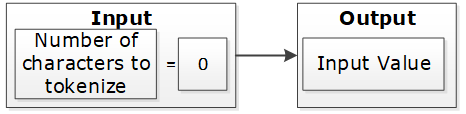
If the input value has at least one character and short data tokenization is enabled, then the source data can be tokenized. If short data tokenization is not enabled, then the source data will be returned as it is. Alternatively, an appropriate error will appear due to tokenization.
For more information on short data tokenization, refer to Short Data Tokenization.

If the input value contains more characters than the maximum for tokenization, then the value of tokenization is considered too long. The tokenization process provides an appropriate error message.

If the input value has a sufficient number of characters, the tokenization process is successful. This occurs when the character count falls between the minimum and maximum settings.

Table: Token Length Examples
| Token Properties | Input Value | Output Value | Comments |
|---|---|---|---|
Numeric Token Left/Right undefined Allow Short Data=Yes | ab1cd | ab6cd | Non-numeric values are considered as delimiters. Input is tokenized as short data is enabled and minimum length is 1 character. |
Numeric Token Left=0 Right=0 Allow Short Data=No, generate error | ab1cd | Error. Input too short. | Non-numeric values are considered as delimiters. Input is short since short data is not enabled and the minimum number of characters to tokenize for this token type is 3 characters. |
Numeric Token Left=0 Right=0 Allow Short Data= No, return input as it is | 12 | 12 | Input is returned as is as per the settings for short data. |
Numeric Token Left=2Right=2 | 48ghdg83 | 48ghdg83 | The input value is left unchanged during tokenization. This is because it is an empty value for tokenization. In tokenization, both left and right settings remove all numeric characters during tokenization. |
Numeric Token Left=2Right=2 | 4568 | 4568 | The input value is left unchanged by the tokenization since it is an empty value for tokenization. |
Numeric Token Left=0 Right=0 | ab123cd | ab857cd | Input value has enough characters for tokenization, only supported by numeric token type values are tokenized. |
Alpha Numeric Token Left=5Right=0 Allow Short Data=Yes | 345465 | 34546c | Input is evaluated first for left and right settings. Since left settings are set to 5, the first five digits are excluded and the sixth digit can be tokenized. As the Allow Short Data is set as yes, the sixth digit is tokenized. |
Alpha Numeric Token Left=5Right=0 Allow Short Data=No, generate error | 345465 | error | Input is evaluated first for left and right settings. Since left settings are set to 5, the first five digits are excluded and the sixth digit can be tokenized. As the Allow Short Data is set as no, generate error and the length of data to be tokenized is less than 3, an Input too short error is generated. |
Alpha Numeric Token Left=5Right=0 Allow Short Data=No, return input as it is | 345465 | 345465 | Input is evaluated first for left and right settings. Since left settings are set to 5, the first five digits are excluded and the sixth digit can be tokenized. As the Allow Short Data is set as No, return input as it is and the length of data to be tokenized is less than 3, the data is passed as is. |
Alpha Numeric Token Left=5Right=0 Allow Short Data=Yes | 34546 | 34546 | Input is evaluated first for left and right settings. Since left settings are set to 5 and the input is five digits, no data exists to be tokenized. As no data exists, it is considered as a zero length token and the input is passed as is. |
Alpha Numeric Token Left=5Right=0 Allow Short Data=No, generate error | 34546 | 34546 | |
Alpha Numeric Token Left=5Right=0 Allow Short Data=No, return input as it is | 34546 | 34546 | |
Alpha Numeric Token Left=5Right=0 Allow Short Data=Yes | 3454 | error | Input is evaluated first for left and right settings. Since left settings are set to 5 and the input is four digits, the left and right settings condition is not met. This results in an Input too short error. |
Alpha Numeric Token Left=5Right=0 Allow Short Data=No, generate error | 3454 | error | |
Alpha Numeric Token Left=5Right=0 Allow Short Data=No, return input as it is | 3454 | error | |
Unicode Token (Cyrillic alphabet) Left= 0Right=0 Allow Short Data=Yes | abдаcd | abшcd | Non-Cyrillic values are considered as delimiters. Input data is tokenized as as short data is enabled. |
Unicode Token (Cyrillic alphabet) Left= 0Right=0 Allow Short Data=No | abдаcd | Error. Input too Short | Non-Cyrillic values are considered as delimiters. Input is too short since the word да (Cyrillic meaning yes - pronounced da) is only two codepoints. The minimum number of codepoints for this token type is 3 characters. |
1.1.3.6 - Length Preserving
With the Preserve Length flag enabled, the length of the input data and protected token value is the same.
For data elements with the Preserve Length flag available, you have an option to generate token values that are of the same length as the input data.
Note: The Unicode Gen2 token element is Code Point length preserving when this option is enabled. The length in bytes can vary depending on the alphabet selected during data element creation.
As an extension to this flag, the Allow Short Data flag provides multiple options to manage short input data handling. If the Preserve Length property is not set, then short input protected will not keep its original length. Generated tokens will at least have the minimum length defined for the token type.
For more information about short data tokenization, refer to Short Data Tokenization.
A check for maximum input length is performed regardless of the preservation setting. This check ensures that the input is within the allowed length limit.
If Preserve Length is not selected, then tokenized data may be longer than the input value up to +5%, or at least +1 symbol on a very small initial value (1-2 symbols). Here, symbol can represent a character or a code point.
If Preserve Length is not selected, then for applying protection in database columns, column length of the resulting protected table should be bigger than length of the column to tokenize in the initial table. This will allow inserting tokenized data during protection when tokenized data is longer than the input data.
1.1.3.7 - Short Data Tokenization
When using tokenizers, such as, SLT_1_3, SLT_2_3, and SLT_X_1, the minimum input limit for tokenizable characters or bytes is three. When using tokenizers, such as, SLT_1_6 and SLT_2_6, the minimum input limit for tokenizable characters or bytes is six.
The possible flag values for short data tokenization are described in the following table.
Table: Short tokens flag values
| Short Token Flag Value | Action |
|---|---|
| No, generate error | Do not tokenize the short input but generate an error code and an audit log stating that the data is too short. |
| Yes | Tokenize the data if the input is short. |
| No, return input as it is | Do not tokenize the short input but return the input as it is. |
The following tokens support short data tokenization:
- Numeric (0-9)
- Alpha (a-z, A-Z)
- Upper-case Alpha (A-Z)
- Alpha-Numeric (0-9, a-z, A-Z)
- Upper-Case Alpha-Numeric (0-9, A-Z)
- Lower ASCII
- Unicode Gen2
The following deprecated tokens support short data tokenization:
Important: Short input data tokenization can be at risk as a user can easily guess the lookup table and the original data by tokenizing some input data. Consider carefully before using the short data tokenization. If possible, short data input must be avoided.
For more information about the maximum length setting for non-length-preserving token elements, refer to Minimum and Maximum Input Length by Token Types.
1.1.3.8 - Case-Preserving and Position-Preserving Tokenization
This section explains the Case-Preserving and Position-Preserving tokenization options.
- Case-Preserving and Position-Preserving tokenization was designed to support specific business requirements. However, this design comes with a trade-off, as it affects the cryptographic strength of the tokens.
- When preserving the case and position of Alpha-Numeric characters, some information may be leaked through the tokenized value.
- In addition, depending on the length of the Alpha and Numeric substrings, tokens may suffer the same weaknesses as Short Tokens, as described in the section Short Data Tokenization.
- It is recommended that this method should not be used for most use cases. Before using this method, contact Protegrity Support to ensure that the risks are fully understood.
1.1.3.8.1 - Case-Preserving Tokenization
When working with data that is received from multiple sources, the data can contain different casing properties. The data processing stage makes the casing consistent prior to distributing the data to additional systems.
If tokenization is performed prior to the data processing stage, then it results in tokens that differ in its casing properties as per the non-processed data.
To preserve the casing of the non-processed data while tokenizing, an additional tokenization option is provided for the Alpha-Numeric (0-9, a-z, A-Z) token type. The casing of the alphabets in the tokenized value matches the casing of the alphabets in the input value.
Note:
You can specify the case-preserving tokenization option when using the SLT_2_3 tokenizer and Alpha-Numeric (0-9, a-z, A-Z) token type only.
If you select the Preserve Case property on the ESA Web UI, then the Preserve Position property is also selected, by default. Hence, the position of the alphabets and numbers is preserved along with the casing of the alphabets in the output tokenized value.
If you are selecting the Preserve Case or Preserve Position property on the ESA Web UI, then the following additional properties are set:
- The Preserve Length property is enabled and Allow Short Data property is set to Yes, by default. These two properties are not modifiable.
- The retention of characters or digits from the left and the right are disabled, by default. The From Left and From Right properties are both set to zero.
For more information about specifying the case-preserving tokenization option for the Alpha-Numeric (0-9, a-z, A-Z) token type, refer to Create Token Data Elements.
The following table provides some examples for the case-preserving tokenization option.
Table: Case-Preserving Tokenization Examples
| Input Value | Tokenized Value using the Case-Preserving Tokenization |
|---|---|
| Dan123 | Abc567 |
| DAn123 | ABc567 |
| daN123 | abC567 |
1.1.3.8.2 - Position-Preserving Tokenization
The alphabetic and numeric positions in the position-preserving tokenized value matches the alphabetic and numeric positions in the input value.
You can specify the position-preserving tokenization option when using the SLT_2_3 tokenizer and Alpha-Numeric (0-9, a-z, A-Z) token type only.
If you are selecting the Preserve Case or Preserve Position property, then the following additional properties are set:
- The Preserve Length property is enabled and Allow Short Data property is set to Yes, by default. These two properties are not modifiable.
- The retention of characters or digits from the left and the right are disabled, by default. The From Left and From Right properties are both set to zero.
For more information about specifying the position-preserving tokenization option for the Alpha-Numeric (0-9, a-z, A-Z) token type, refer to Create Token Data Elements.
The following table provides some examples for the position-preserving tokenization option.
Table: Position-Preserving Tokenization Examples
| Input | Tokenized Value using the Position-Preserving Tokenization |
|---|---|
| Dan123 | pXz789 |
| DAn123 | Abp708 |
| daN123 | Axz642 |
1.1.3.9 - External Initialization Vector (EIV)
1.1.3.9.1 - Tokenization Model with External IV
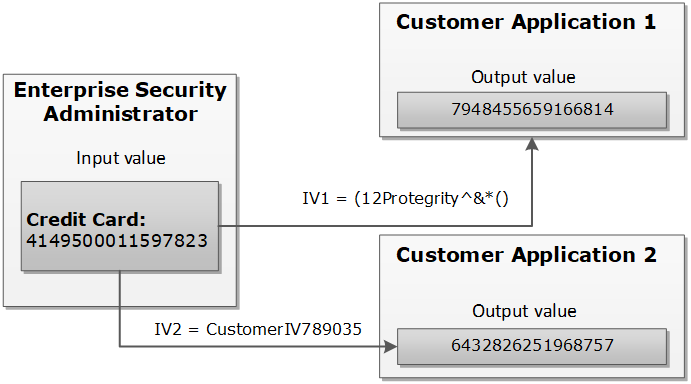
The External IV value is set as a new parameter when calling protect, unprotect or reprotect API from the client application.
The following example explains how the tokenization is performed with the External IV defined. As mentioned before, the main characteristic of the External IV feature is obtaining different outputs for the same input. To have different outputs, you need to specify different IVs.
Note: The External IV is used, prior to protection, as input to modify the data to protect. The External IV is ignored when using encryption.
1.1.3.9.2 - External IV Tokenization Properties
The tokenization with the External IV is done only if the IV is specified during the protect operation through the end user API. When performing unprotect and re-protect operations, the same IV value used for protection must be identified.
If External IV is not provided in either a protect or unprotect function call, then the input is tokenized as-is without any IV.
The External IV value has the following properties:
- Supports ASCII and Unicode characters.
- Minimum 1 byte for the input.
- Maximum 256 bytes for the input.
- Empty and NULL strings are not supported as External IV values. These strings will be ignored during tokenization. The process will continue as if External IV was not used.
Here is an example of the tokenized input value with the External IV for a Numeric token:
Table: Example-External IV for a Numeric token
Input Value | External IV | Output Value | Comments |
1234567890 | None | 5108318538 | External IV is not applied. |
1234567890 | 1234 | 0442985096 | Output values differ because different external IVs were applied. |
12 | 1197578213 | ||
abc | 9423146024 |
1.1.3.10 - Truncating Whitespaces
With fixed length fields or columns, input data may be shorter than the length of the field. When this happens, data may be appended with either, or both, trailing and leading whitespace. In those situations, the whitespace is considered during Tokenization. It will affect the tokenization results.
For instance, consider a scenario where the name “Hultgren Caylor” is stored in a Hive Char(30) column.
As the length of the data is less than 30 characters, trailing whitespaces are appended to it. In this case, assume that we need to protect this column with a data element that preserves the first and last character (L=1, R=1). Now with this setting, the expectation is to preserve character H at the start and the character r at the end, in the protected value output. However, the actual data has trailing whitespaces. This results in the output containing the character “H” at the start and a whitespace character " " at the end. The unnecessary trailing whitespaces cause the final protected output to generate a different token.
It is recommended to truncate trailing and leading whitespaces from the data. This applies before sending the data to Protect, Unprotect, or Reprotect UDFs. Truncating unnecessary whitespaces ensures that only the actual data is considered during tokenization. Any trailing and leading whitespaces are not taken into account.
In addition, it is important to follow a consistent approach for truncating the whitespaces across all operations, such as, Protect, Unprotect, Reprotect. For instance, if we have truncated unnecessary trailing whitespaces from the input before the Protect operation, then the same logic of truncating whitespaces from the input, during Unprotect and Reprotect operations needs to be followed.
1.1.4 - Tokenization Types
1.1.4.1 - Numeric (0-9)
The Numeric token type tokenizes digits from 0 to 9.
Table: Numeric Tokenization Type properties
| Tokenization Type Properties | Settings | |||||||||||||||
|---|---|---|---|---|---|---|---|---|---|---|---|---|---|---|---|---|
Name | Numeric | |||||||||||||||
Token type and Format | Digits 0 through 9 | |||||||||||||||
| Tokenizer | Length Preservation | Allow Short Data | Minimum Length | Maximum Length | ||||||||||||
SLT_1_3 SLT_2_3 | Yes | Yes | 1 | 4096 | ||||||||||||
No, return input as it is | 3 | |||||||||||||||
No, generate error | ||||||||||||||||
No | NA | 1 | 3933 | |||||||||||||
SLT_1_6 SLT_2_6 | Yes | Yes | 1 | 4096 | ||||||||||||
No, return input as it is | 6 | |||||||||||||||
No, generate error | ||||||||||||||||
No | NA | 1 | 3933 | |||||||||||||
Possibility to set Minimum/ maximum length | No | |||||||||||||||
Left/Right settings | Yes | |||||||||||||||
Internal IV | Yes, if Left/Right settings are non-zero | |||||||||||||||
External IV | Yes | |||||||||||||||
Return of Protected value | Yes | |||||||||||||||
Token specific properties | None | |||||||||||||||
The following table lists the examples of numeric tokenization values.
Table: Examples of Numeric tokenization values
| Input Value | Tokenized Value | Comments |
|---|---|---|
| 123 | 977 | Numeric, SLT_1_3, Left=0, Right=0, Length Preservation=Yes The value has minimum length for SLT_1_3 tokenizer. |
| 1 | 555241 | Numeric, SLT_1_6, Left=0, Right=0, Length Preservation=No The value is padded up to 6 characters which is minimum length for SLT_1_6 tokenizer. |
| -7634.119 | -4306.861 | Numeric, SLT_1_3, Left=0, Right=0, Length Preservation=Yes Decimal point and sign are treated as delimiters and not tokenized. |
| 12+38=50 | 98+24=62 | Numeric, SLT_2_6, Left=0, Right=0, Length Preservation=Yes Arithmetic signs are treated as delimiters and not tokenized. |
| 704-BBJ | 134-BBJ | Numeric, SLT_1_3, Left=0, Right=0, Length Preservation=Yes Alpha characters are treated as delimiters and not tokenized. |
| 704-BBJ | Error. Input too short. | Numeric, SLT_2_6, Left=0, Right=0, Length Preservation=Yes, Allow Short Data=No, generate error Input value has only three numeric characters to tokenize, which is short for SLT_2_6 tokenizer when Length Preservation=Yes and Allow Short Data=No, generate error. |
| 704-BBJ 704356 | 704-BBJ 134432 | Numeric, SLT_2_6, Left=0, Right=0, Length Preservation=Yes, Allow Short Data=No, return input as it is If the input value has less than six characters to tokenize, then it is returned as is else it is tokenized. |
| 704-BBJ | 134-BBJ | Numeric, SLT_2_6, Left=0, Right=0, Length Preservation=Yes, Allow Short Data=Yes Input value has three numeric characters to tokenize, which meets minimum length requirement for SLT_2_6 tokenizer when Length Preservation=Yes and Allow Short Data=Yes. |
| 704 | 134 | Numeric, SLT_1_3, Left=0, Right=0, Length Preservation=Yes, Allow Short Data=No, return input as it is If the input value has less than three characters to tokenize, then it is returned as is else it is tokenized. |
| 704-BBJ | 669-BBJ642 | Numeric, SLT_1_6, Left=0, Right=0, Length Preservation=No Input value is padded up to 6 characters because Length Preservation=No. Alpha characters are treated as delimiters and not tokenized. |
| 704-BBJ | 764-6BBJ | Numeric, SLT_2_3, Left=1, Right=3, Length Preservation=No 1 character from left and 3 from right are left in clear. Two numeric characters left for tokenization “04” were padded and tokenized as “646”. |
Numeric Tokenization Properties for different protectors
Application Protector
The following table shows supported input data types for Application protectors with the Numeric token.
Table: Supported input data types for Application protectors with Numeric token
| Application Protectors*2 | AP Java*1 | AP Python |
|---|---|---|
| Supported input data types | STRING CHAR[] BYTE[] | STRING BYTES |
*1 - The API accepts and returns data in BYTE[] format. The customer application needs to convert the input into byte arrays before calling the API, and similarly, convert the output from byte arrays after receiving the response from the API.
*2 - The Protegrity Application Protector only supports bytes converted from the string data type. If any other data type is directly converted to bytes and passed as input to the Application Protectors APIs that support byte as input and provide byte as output, then data corruption might occur.
For more information about Application protectors, refer to Application Protector.
Big Data Protector
Protegrity supports MapReduce, Hive, Pig, HBase, Spark, and Impala, which utilizes Hadoop Distributed File System (HDFS) or Ozone as the data storage layer. The data is protected from internal and external threats, and users and business processes can continue to utilize the secured data. Protegrity protects data inside the files using tokenization and strong encryption protection methods.
The following table shows supported input data types for Big Data protectors with the Numeric token.
Table: Supported input data types for Big Data protectors with Numeric token
| Big Data Protectors | MapReduce*2 | Hive | Pig | HBase*2 | Impala | Spark*2 | Spark SQL | Trino |
|---|---|---|---|---|---|---|---|---|
| Supported input data types*1 | BYTE[] | CHAR*3 STRING | CHARARRAY | BYTE[] | STRING | BYTE[] STRING | STRING | VARCHAR |
*1 – If the input and output types of the API are BYTE[], then the customer application should convert the input to and output from the byte array, before calling the API.
*2 – The Protegrity MapReduce protector, HBase coprocessor, and Spark protector only support bytes converted from the string data type. Data types that are not bytes converted from the string data type might cause data corruption to occur when:
- Any other data type is directly converted to bytes and passed as input to the MapReduce or Spark API that supports byte as input and provides byte as output.
- Any other data type is directly converted to bytes and inserted in an HBase table. Where the HBase table is configured with the Protegrity HBase coprocessor.
*3 – If you are using the Char tokenization UDFs in Hive, then ensure that the data elements have length preservation selected. In Char tokenization UDFs, using data elements without length preservation selected, is not supported.
For more information about Big Data protectors, refer to Big Data Protector.
Data Warehouse Protector
The Protegrity Data Warehouse Protector is an advanced security solution designed to protect sensitive data at the column level. This enables you to secure your data, while still permitting access to authorized users. Additionally, the Data Warehouse Protector integrates seamlessly with existing database systems using the User-Defined Functions for an enhanced security. Protegrity protects data inside the data warehouses using various tokenization and encryption methods.
The following table shows the supported input data types for the Teradata protector with the Numeric token.
Table: Supported input data types for Data Warehouse protectors with Numeric token
| Data Warehouse Protectors | Teradata |
|---|---|
| Supported input data types | VARCHAR LATIN |
For more information about Data Warehouse protectors, refer to Data Warehouse Protector.
Database Protectors
Oracle Database Protector
The supported input data types for the Oracle Database Protector are listed below.
| Protector | Supported Input Data Types |
|---|---|
| Oracle | VARCHAR2 |
| Oracle | CHAR |
Note: For numeric data elements where length preservation is not enabled, the maximum supported length is 3,842 characters. Data up to this length can be tokenized and de-tokenized without errors.
1.1.4.2 - Integer (0-9)
The Integer token type tokenizes 2, 4, or 8 byte size integers.
Table: Integer Tokenization Type properties
Tokenization Type Properties | Settings | |||||||||||||
|---|---|---|---|---|---|---|---|---|---|---|---|---|---|---|
Name | Integer | |||||||||||||
Token type and Format | 2, 4, or 8 byte size integers | |||||||||||||
Tokenizer | Length Preservation | Minimum Length | Maximum Length | |||||||||||
SLT_1_3 | Yes | 2 bytes | 8 bytes | |||||||||||
Possibility to set Minimum/ maximum length | No | |||||||||||||
Left/Right settings | No | |||||||||||||
Internal IV | No | |||||||||||||
External IV | Yes | |||||||||||||
Return of Protected value | Yes | |||||||||||||
Token specific properties | Size 2, 4, or 8 bytes | |||||||||||||
The following table shows examples of the way in which a value will be tokenized with the Integer token.
Table: Examples of Integer tokenization values
| Input Value | Tokenized Value | Comments |
|---|---|---|
| 12 | 31345 | Integer, SLT_1_3, Left=0, Right=0, Length Preservation=Yes |
| 3 | 1465 | For 2 bytes, the values can range from -32768 to 32767. |
| 3 | 782939681 | For 4 bytes, the values can range from -2147483648 to 2147483647. |
| 3 | 7268379031142372719 | For 8 bytes, the value range can range from -9223372036854775808 to 9223372036854775807. |
The pty.ins_integer UDF in the Oracle, Teradata, and Impala Protectors, supports input data length of 4 bytes only. For 2 bytes, the following error is returned: Invalid input size.
Integer Tokenization Properties for different protectors
Application Protector
The following table shows supported input data types for Application protectors with the Integer token.
Table: Supported input data types for Application protectors with Integer token
| Application Protectors | AP Java | AP Python |
|---|---|---|
| Supported input data types | SHORT: 2 bytes INT: 4 bytes LONG: 8 bytes | INT: 4 bytes and 8 bytes |
If the user passes a 4-byte integer with values ranging from -2,147,483,648 to +2,147,483,647, the data element for the protect, unprotect, or reprotect APIs should be an 4-byte integer token type. However, if the user uses 2-byte integer token type, the data protection operation will not be successful. For a Bulk call using the protect, unprotect, and reprotect APIs, the error code, 44, appears. For a single call using the protect, unprotect, and reprotect APIs, an exception will be thrown and the error message, 44, Content of input data is not valid appears.
For more information about Application protectors, refer to Application Protector.
Big Data Protector
Protegrity supports MapReduce, Hive, Pig, HBase, Spark, and Impala, which utilizes Hadoop Distributed File System (HDFS) or Ozone as the data storage layer. The data is protected from internal and external threats, and users and business processes can continue to utilize the secured data. Protegrity protects data inside the files using tokenization and strong encryption protection methods.
The following table shows supported input data types for Big Data protectors with the Integer token.
Table: Supported input data types for Big Data protectors with Integer token
| Big Data Protectors | MapReduce*2 | Hive | Pig | HBase*2 | Impala | Spark*2 | Spark SQL | Trino |
|---|---|---|---|---|---|---|---|---|
| Supported input data types*1 | INT: 4 bytes LONG: 8 bytes | INT: 4 bytes BIGINT: 8 bytes | INT: 4 bytes | BYTE[] | SMALLINT: 2 bytes INT: 4 bytes BIGINT: 8 bytes | SHORT: 2 bytes INT: 4 bytes LONG: 8 bytes | SHORT: 2 bytes INT: 4 bytes LONG: 8 bytes | SMALLINT: 2 bytes INT: 4 bytes BIGINT: 8 bytes |
*1 – If the input and output types of the API are BYTE[], then the customer application should convert the input to and output from the byte array, before calling the API.
*2 – The Protegrity MapReduce protector, HBase coprocessor, and Spark protector only support bytes converted from the string data type. Bytes as input that are not generated from string data type might cause data corruption to occur when:
- Any other data type is directly converted to bytes should be passed as input to the MapReduce or Spark API that supports byte as input and provides byte as output.
- Any other data type is directly converted to bytes and inserted in an HBase table. Where the HBase table is configured with the Protegrity HBase coprocessor.
For more information about Big Data protectors, refer to Big Data Protector.
Data Warehouse Protector
The Protegrity Data Warehouse Protector is an advanced security solution designed to protect sensitive data at the column level. This enables you to secure your data, while still permitting access to authorized users. Additionally, the Data Warehouse Protector integrates seamlessly with existing database systems using the User-Defined Functions for an enhanced security. Protegrity protects data inside the data warehouses using various tokenization and encryption methods.
The following table shows the supported input data types for the Teradata protector with the Integer token.
Table: Supported input data types for Data Warehouse protectors with Integer token
| Data Warehouse Protectors | Teradata |
|---|---|
| Supported input data types | SMALLINT: 2 bytes INTEGER: 4 bytes BIGINT: 8 bytes |
For more information about Data Warehouse protectors, refer to Data Warehouse Protector.
Database Protectors
Oracle Database Protector
The supported input data types for the Oracle Database Protector are listed below.
| Protector | Supported Input Data Types |
|---|---|
| Oracle | INTEGER |
1.1.4.3 - Credit Card
The Credit Card token type helps maintain transparency. It provides ways to clearly distinguish a token from the real value which is a recommendation of the PCI DSS. The Credit Card token type supports only numeric input (no separators are allowed as input).
Table: Credit Card Tokenization properties
Tokenization Type Properties | Settings | |||||||||||||
|---|---|---|---|---|---|---|---|---|---|---|---|---|---|---|
Name | Credit Card | |||||||||||||
Token type and Format | Digits 0 through 9 (no separators are allowed as input) | |||||||||||||
Tokenizer | Length Preservation | Minimum Length | Maximum Length | |||||||||||
SLT_1_3 SLT_2_3 | Yes | 3 | 4096 | |||||||||||
SLT_1_6 SLT_2_6 | Yes | 6 | 4096 | |||||||||||
Possibility to set Minimum/ maximum length | No | |||||||||||||
Left/Right settings | Yes | |||||||||||||
Internal IV | Yes, if Left/Right settings are non-zero | |||||||||||||
External IV | Yes | |||||||||||||
Return of Protected value | Yes | |||||||||||||
Token specific properties | Invalid LUHN Checksum Invalid Card Type Alphabetic Indicator | |||||||||||||
The credit card number real value is distinguished from the tokenized value based on the token value validation properties.
Table: Specific Properties of the Credit Card Token Type
| Credit Card Token Value Validation Properties | Left in Clear | Right in Clear | Comments | Validation Properties Compatibility |
| Invalid Luhn Checksum (On/Off) | Yes | Yes | Right characters which are to be left in the clear can be specified. This usually requires specifying a group of up to four characters. | Can be used together. |
| Invalid Card Type (On/Off) | 0 | Yes | Left cannot be specified, it is zero by default. | |
| Alphabetic Indicator (On/Off) | Yes | Yes | The indicator will be in the token, which means that left and right can be specified. | Can be used only separately from the other token validation properties. |
You can create a Credit Card token element and select no validation property for it. If the Credit Card token is involved, it will be handled similar to a Numeric token. However, additional checks will be applied to the input based on the properties detailed in the Credit Card token general properties column in the table above.
To enable the Credit Card token properties, such as, Invalid LUHN checksum and Invalid Card Type, with the SLT Tokenizers, refer to Credit Card Properties with SLT Tokenizers.
Invalid Luhn Checksum
The purpose of the Luhn checksum is to detect incorrectly entered card details. If you enable Invalid Luhn Checksum token validation, then you must use valid credit cards otherwise tokenization will be denied for an invalid credit card number.
A valid credit card has a valid Luhn checksum. Upon tokenization, the tokenized value will have an invalid Luhn checksum. Here is an example of the tokenized credit card with the invalid Luhn digit.
Table: Credit Card Number with Luhn Checksum Examples
| Credit Card Number | Tokenized Values | Comments |
|---|---|---|
| 4067604564321453 | Token is not generated due to invalid input value. Error is returned. | The input value contains invalid Luhn checksum. The value cannot be tokenized with Luhn enabled. |
| 4067604564321454 | 2009071778438613 | The Luhn in the input value is correct, the value is tokenized. Tokenized value has invalid Luhn checksum. |
Invalid Card Type
An invalid credit card indicates an issue with the credit card details. An invalid card type will result in token values not starting with the digits that real credit card numbers begin with. The first digit in a real credit card number is the Major Industry Identifier. Thus, digits 3,4,5,6, and 0 can be the first digits of the real credit card number, which are then substituted during tokenization.
Table: Real Credit Card Values with Tokenized Values
| Real Credit Card Value | 3 | 4 | 5 | 6 | 0 |
|---|---|---|---|---|---|
| Tokenized Value | 2 | 7 | 8 | 9 | 1 |
Here is an example of the tokenized credit card with the invalid card type.
Table: Credit Card Number with Invalid Card Type Examples
| Credit Card Number | Tokenized Values | Comments |
|---|---|---|
| 4067604564321454 | 7335610268467066 | The credit card type is valid, the tokenization is successful. |
| 2067604564321454 | Token is not generated due to invalid input value. Error is returned. | The credit card type is invalid since the first digit of the value “2” does not belong to a real credit card. The value cannot be tokenized. |
Alphabetic Indicator
The alphabetic indicator replaces the tokenized value with an alphabet. If you enable Alphabetic Indicator validation, then the resulting token value will have one alphabetic character.
You will need to choose the position of the alphabetic character before tokenizing a credit card number otherwise the resulting token will have no alphabetic indicator.
The alphabetic indicator will substitute the tokenized value according to the following rule:
Table: Alphabetic Indicator with Tokenized Digits
| Tokenized digit | 0 | 1 | 2 | 3 | 4 | 5 | 6 | 7 | 8 | 9 |
|---|---|---|---|---|---|---|---|---|---|---|
| Alphabetic indicator | A | B | C | D | E | F | G | H | I | J |
In the following table, the Visa Card Number “4067604564321454” is tokenized. A tokenized value, represented by “7594107411315001”, is substituted with an alphabetic character in a selected position.
Table: Examples of Credit Card Tokenization with Alphabetic Indicator
| Credit Card Number (Input Value) | Position | Tokenized Values | Comments |
|---|---|---|---|
| 4067604564321454 | - | 7594107411315001 | No substitution since the position is undefined. |
| 4067604564321454 | 14 | 7594107411315A01 | Digit “0” is substituted with character “A” at position 14. |
Credit Card Properties with SLT Tokenizers
The Credit Card Properties with SLT Tokenizers explains the minimum data length required for tokenization. This occurs when the Credit Card token properties is used in combination with the SLT Tokenizers.
If you enable Credit Card token properties for tokenization, such as Invalid LUHN checksum and Invalid Card Type, you need to select an appropriate SLT Tokenizer. This is required to ensure the minimum data length is available for successful tokenization.
The following table represents the minimum data length required for tokenization as per the usage of Credit Card token properties with the SLT Tokenizers.
Table: Minimum Data Length - Credit Card Token Properties with SLT Tokenizers
| Enabled Credit Card Token Property | Minimum Data Length (in digits) Required for Tokenization | |
| SLT_1_3/SLT_2_3 | SLT_1_6/SLT_2_6 | |
| Invalid LUHN Checksum | 4 | 7 |
| Invalid Card Type | 4 | 7 |
| Invalid LUHN Checksum and Invalid Card Type | 5 | 8 |
Credit Card Tokenization Properties for different protectors
Application Protector
The following table shows supported input data types for Application protectors with the Credit Card token.
Table: Supported input data types for Application protectors with Credit Card token
| Application Protectors*2 | AP Java*1 | AP Python |
|---|---|---|
| Supported input data types | STRING CHAR[] BYTE[] | STRING BYTES |
*1 - The API accepts and returns data in BYTE[] format. The customer application needs to convert the input into byte arrays before calling the API, and similarly, convert the output from byte arrays after receiving the response from the API.
*2 - The Protegrity Application Protector only supports bytes converted from the string data type. If any other data type is directly converted to bytes and passed as input to the Application Protectors APIs that support byte as input and provide byte as output, then data corruption might occur.
For more information about Application protectors, refer to Application Protector.
Big Data Protector
Protegrity supports MapReduce, Hive, Pig, HBase, Spark, and Impala, which utilizes Hadoop Distributed File System (HDFS) or Ozone as the data storage layer. The data is protected from internal and external threats, and users and business processes can continue to utilize the secured data. Protegrity protects data inside the files using tokenization and strong encryption protection methods.
The following table shows supported input data types for Big Data protectors with the Credit Card token.
Table: Supported input data types for Big Data protectors with Credit Card token
| Big Data Protectors | MapReduce*2 | Hive | Pig | HBase*2 | Impala | Spark*2 | Spark SQL | Trino |
|---|---|---|---|---|---|---|---|---|
| Supported input data types*1 | BYTE[] | STRING | CHARARRAY | BYTE[] | STRING | BYTE[] STRING | STRING | VARCHAR |
*1 – If the input and output types of the API are BYTE[], then the customer application should convert the input to and output from the byte array, before calling the API.
*2 – The Protegrity MapReduce protector, HBase coprocessor, and Spark protector only support bytes converted from the string data type. Bytes as input that are not generated from string data type might cause data corruption to occur when:
- Any other data type is directly converted to bytes should be passed as input to the MapReduce or Spark API that supports byte as input and provides byte as output.
- Any other data type is directly converted to bytes and inserted in an HBase table. Where the HBase table is configured with the Protegrity HBase coprocessor.
For more information about Big Data protectors, refer to Big Data Protector.
Data Warehouse Protector
The Protegrity Data Warehouse Protector is an advanced security solution designed to protect sensitive data at the column level. This enables you to secure your data, while still permitting access to authorized users. Additionally, the Data Warehouse Protector integrates seamlessly with existing database systems using the User-Defined Functions for an enhanced security. Protegrity protects data inside the data warehouses using various tokenization and encryption methods.
The following table shows the supported input data types for the Teradata protector with the Credit Card token.
Table: Supported input data types for Data Warehouse protectors with Credit Card token
| Data Warehouse Protectors | Teradata |
|---|---|
| Supported input data types | VARCHAR LATIN |
For more information about Data Warehouse protectors, refer to Data Warehouse Protector.
Database Protectors
Oracle Database Protector
The supported input data types for the Oracle Database Protector are listed below.
| Protector | Supported Input Data Types |
|---|---|
| Oracle | VARCHAR2 |
| Oracle | CHAR |
1.1.4.4 - Alpha (A-Z)
The Alpha token type tokenizes both uppercase and lowercase letters.
Table: Alpha Tokenization Type properties
Tokenization Type Properties | Settings | ||||||||||||||||
|---|---|---|---|---|---|---|---|---|---|---|---|---|---|---|---|---|---|
Name | Alpha | ||||||||||||||||
Token type and Format | Lowercase letters a through z Uppercase letters A through Z | ||||||||||||||||
SLT_1_3 SLT_2_3 | Yes | Yes | 1 | 4096 | |||||||||||||
No, return input as it is | 3 | ||||||||||||||||
No, generate error | |||||||||||||||||
No | NA | 1 | 4076 | ||||||||||||||
Possibility to set Minimum/ maximum length | No | ||||||||||||||||
Left/Right settings | Yes | ||||||||||||||||
Internal IV | Yes, if
Left/Right settings are non-zero | ||||||||||||||||
External IV | Yes | ||||||||||||||||
Yes | |||||||||||||||||
Token specific properties | None | ||||||||||||||||
The following table shows examples of the way in which a value will be tokenized with the Alpha token.
Table: Examples of Numeric tokenization values
| Input Value | Tokenized Value | Comments |
|---|---|---|
| abc | nvr | Alpha, SLT_1_3, Left=0, Right=0, Length Preservation=Yes The value has minimum length for SLT_1_3 tokenizer. |
| MA | TGi | Alpha, SLT_2_3, Left=0, Right=0, Length Preservation=No The value is padded up to 3 characters which is minimum length for SLT_2_3 tokenizer. |
| MA | Error. Input too short. | Alpha, SLT_1_3, Left=0, Right=0, Length Preservation=Yes, Allow Short Data=No, generate error Input value has only two alpha characters to tokenize, which is short for SLT_1_3 tokenizer when Length Preservation=Yes and Allow Short Data=No, generate error. |
| MA MAC | MA TGH | Alpha, SLT_1_3, Left=0, Right=0, Length Preservation=Yes, Allow Short Data=No, return input as it is If the input value has less than three characters to tokenize, then it is returned as is else it is tokenized. |
| MA | TG | Alpha, SLT_1_3, Left=0, Right=0, Length Preservation=Yes, Allow Short Data=Yes Input value has only two alpha characters, which meets minimum length requirement for SLT_1_3 tokenizer when Length Preservation=Yes and Allow Short Data=Yes. |
| 131 Summer Street, Bridgewater | 131 VDYgAK q vMDUn, zAEXmwqWYNQG | Alpha, SLT_2_3, Left=0, Right=0, Length Preservation=No Numeric characters, spaces and comma are treated as delimiters and not tokenized. Output value is longer than initial value. |
| Albert Einstein | SldGzm OOCTzSFo | Alpha, SLT_1_3, Left=0, Right=0, Length Preservation=Yes Space is treated as delimiters and not tokenized. Output value is the same length as initial value. |
| Albert Einstein | AjAkqD vvBFYLdo | Alpha, SLT_1_3, Left=1, Right=0, Length Preservation=Yes 1 character from left remains in the clear. |
Alpha Tokenization Properties for different protectors
Application Protector
The following table shows supported input data types for Application protectors with the Alpha token.
Note: For both SLT_1_3 and SLT_2_3, the maximum length of the protected data is 4096 bytes. This occurs for the Alpha token element for Application Protector with no length preservation.
Table: Supported input data types for Application protectors with Alpha token
| Application Protectors*2 | AP Java*1 | AP Python |
|---|---|---|
| Supported input data types | BYTE[] CHAR[] STRING | BYTES STRING |
*1 - The API accepts and returns data in BYTE[] format. The customer application needs to convert the input into byte arrays before calling the API, and similarly, convert the output from byte arrays after receiving the response from the API.
*2 - The Protegrity Application Protector only supports bytes converted from the string data type. If any other data type is directly converted to bytes and passed as input to the Application Protector APIs that support byte as input and provide byte as output, then data corruption might occur.
For more information about Application protectors, refer to Application Protector.
Big Data Protector
Protegrity supports MapReduce, Hive, Pig, HBase, Spark, and Impala, which utilizes Hadoop Distributed File System (HDFS) or Ozone as the data storage layer. The data is protected from internal and external threats, and users and business processes can continue to utilize the secured data. Protegrity protects data inside the files using tokenization and strong encryption protection methods.
The following table shows supported input data types for Big Data protectors with the Alpha token.
Table: Supported input data types for Big Data protectors with Alpha token
| Big Data Protectors | MapReduce*2 | Hive | Pig | HBase*2 | Impala | Spark*2 | Spark SQL | Trino |
|---|---|---|---|---|---|---|---|---|
| Supported input data types*1 | BYTE[] | CHAR*3 STRING | CHARARRAY | BYTE[] | STRING | BYTE[] STRING | STRING | VARCHAR |
*1 – If the input and output types of the API are BYTE[], then the customer application should convert the input to and output from the byte array, before calling the API.
*2– The Protegrity MapReduce protector, HBase coprocessor, and Spark protector only support bytes converted from the string data type. Data that is not converted to bytes from string data type might cause data corruption to occur when:
- Any other data type is directly converted to bytes and passed as input to the MapReduce or Spark API that supports byte as input and provides byte as output.
- Any other data type is directly converted to bytes and inserted in an HBase table. Where the HBase table is configured with the Protegrity HBase coprocessor.
*3 – If you are using the Char tokenization UDFs in Hive, then ensure that the data elements have length preservation selected. In Char tokenization UDFs, using data elements without length preservation selected, is not supported.
For more information about Big Data protectors, refer to Big Data Protector.
Data Warehouse Protector
The Protegrity Data Warehouse Protector is an advanced security solution designed to protect sensitive data at the column level. This enables you to secure your data, while still permitting access to authorized users. Additionally, the Data Warehouse Protector integrates seamlessly with existing database systems using the User-Defined Functions for an enhanced security. Protegrity protects data inside the data warehouses using various tokenization and encryption methods.
The following table shows the supported input data types for the Teradata protector with the Alpha token.
Table: Supported input data types for Data Warehouse protectors with Alpha token
| Data Warehouse Protectors | Teradata |
|---|---|
| Supported input data types | VARCHAR LATIN |
For more information about Data Warehouse protectors, refer to Data Warehouse Protector.
Database Protectors
Oracle Database Protector
The supported input data types for the Oracle Database Protector are listed below.
| Protector | Supported Input Data Types |
|---|---|
| Oracle | VARCHAR2 |
| Oracle | CHAR |
1.1.4.5 - Upper-Case Alpha (A-Z)
The Upper-Case Alpha token type tokenizes all alphabetic symbols as uppercase. After de-tokenization, all alphabetic symbols are returned as uppercase. This means that initial and detokenized values would not match if the input contains lowercase letters.
Table: Upper-Case Alpha Tokenization Type properties
Tokenization Type Properties | Settings | ||||||||||||||
|---|---|---|---|---|---|---|---|---|---|---|---|---|---|---|---|
Name | Upper-Case Alpha | ||||||||||||||
Token type and Format | Upper-Case letters A through Z | ||||||||||||||
Tokenizer | Length Preservation | Allow Short Data | Minimum Length | Maximum Length | |||||||||||
SLT_1_3 SLT_2_3 | Yes | Yes | 1 | 4096 | |||||||||||
No, return input as it is | 3 | ||||||||||||||
No, generate error | |||||||||||||||
No | NA | 1 | 4049 | ||||||||||||
Possibility to set Minimum/ maximum length | No | ||||||||||||||
Left/Right settings | Yes | ||||||||||||||
Internal IV | Yes, if Left/Right settings are non-zero | ||||||||||||||
External IV | Yes | ||||||||||||||
Return of Protected value | Yes | ||||||||||||||
Token specific properties | Lower case characters are accepted in the input but they will be converted to upper-case in output value. | ||||||||||||||
The following table shows examples of the way in which a value will be tokenized with the Upper-case Alpha token.
Table: Examples of Upper Case Alpha tokenization values
| Input Value | Tokenized Value | Comments |
|---|---|---|
| abc | OIM | Upper-case Alpha, SLT_2_3, Left=0, Right=0, Length Preservation=Yes The value has minimum length for SLT_2_3 tokenizer. Lowercase characters in the input are converted to uppercase in output. De-tokenization will return “ABC”. |
| NY | ZIZ | Upper-case Alpha, SLT_1_3, Left=0, Right=0, Length Preservation=No The value is padded up to 3 characters which is minimum length for SLT_1_3 tokenizer. |
| NY | Error. Input too short. | Upper-case Alpha, SLT_2_3, Left=0, Right=0, Length Preservation=Yes, Allow Short Data=No, generate error Input value has only two alpha characters to tokenize, which is short for SLT_2_3 tokenizer when Length Preservation=Yes and Allow Short Data=No, generate error. |
| NY NYA | NY ZIO | Upper-case Alpha, SLT_2_3, Left=0, Right=0, Length Preservation=Yes, Allow Short Data=No, return input as it is If the input value has less than three characters to tokenize, then it is returned as is else it is tokenized. |
| NY | ZI | Upper-case Alpha, SLT_2_3, Left=0, Right=0, Length Preservation=Yes, Allow Short Data=Yes Input value has only two alpha characters to tokenize, which meets minimum length requirement for SLT_2_3 tokenizer when Length Preservation=Yes and Allow Short Data=Yes. |
| 131 Summer Street, Bridgewater | 131 ZBXDPW G FYTZP, CRTTPXPLYGCU | Upper-case Alpha, SLT_1_3, Left=0, Right=0, Length Preservation=No Numeric characters, spaces and comma are treated as delimiters and not tokenized. Output value is longer than initial value. |
| Albert Einstein | AOALXO POHLFHMU | Upper-case Alpha, SLT_2_3, Left=0, Right=0, Length Preservation=Yes Space is treated as delimiters and not tokenized. Output value is the same length as initial value. |
| 704-BBJ | 704-GTU | Upper-case Alpha, SLT_1_3, Left=3, Right=0, Length Preservation=Yes Three characters from left are left in clear. Dash is treated as delimiter. |
Upper-case Alpha Tokenization Properties for different protectors
Application Protector
The following table shows supported input data types for Application protectors with the Upper-case Alpha token.
Table: Supported input data types for Application protectors with Upper-case Alpha token
| Application Protectors*2 | AP Java*1 | AP Python |
|---|---|---|
| Supported input data types | BYTE[] CHAR[] STRING | BYTES STRING |
*1 - The API accepts and returns data in BYTE[] format. The customer application needs to convert the input into byte arrays before calling the API, and similarly, convert the output from byte arrays after receiving the response from the API.
*2 - The Protegrity Application Protectors only support bytes converted from the string data type. If int, short, or long format data is directly converted to bytes and passed as input to the Application Protector APIs that support byte as input and provide byte as output, then data corruption might occur.
For more information about Application protectors, refer to Application Protector.
Big Data Protector
Protegrity supports MapReduce, Hive, Pig, HBase, Spark, and Impala, which utilizes Hadoop Distributed File System (HDFS) or Ozone as the data storage layer. The data is protected from internal and external threats, and users and business processes can continue to utilize the secured data. Protegrity protects data inside the files using tokenization and strong encryption protection methods.
The following table shows supported input data types for Big Data protectors with the Upper-Case Alpha token.
Table: Supported input data types for Big Data protectors with Upper-Case Alpha token
| Big Data Protectors | MapReduce*2 | Hive | Pig | HBase*2 | Impala | Spark*2 | Spark SQL | Trino |
|---|---|---|---|---|---|---|---|---|
| Supported input data types*1 | BYTE[] | CHAR*3 STRING | CHARARRAY | BYTE[] | STRING | BYTE[] STRING | STRING | VARCHAR |
*1 – If the input and output types of the API are BYTE[], then the customer application should convert the input to and output from the byte array, before calling the API.
*2 – The Protegrity MapReduce protector, HBase coprocessor, and Spark protector only support bytes converted from the string data type. Data types that are not bytes converted from the string data type might cause data corruption to occur when:
- Any other data type is directly converted to bytes and passed as input to the MapReduce or Spark API that supports byte as input and provides byte as output.
- Any other data type is directly converted to bytes and inserted in an HBase table. Where the HBase table is configured with the Protegrity HBase coprocessor.
*3 – If you are using the Char tokenization UDFs in Hive, then ensure that the data elements have length preservation selected. In Char tokenization UDFs, using data elements without length preservation selected, is not supported.
For more information about Big Data protectors, refer to Big Data Protector.
Data Warehouse Protector
The Protegrity Data Warehouse Protector is an advanced security solution designed to protect sensitive data at the column level. This enables you to secure your data, while still permitting access to authorized users. Additionally, the Data Warehouse Protector integrates seamlessly with existing database systems using the User-Defined Functions for an enhanced security. Protegrity protects data inside the data warehouses using various tokenization and encryption methods.
The following table shows the supported input data types for the Teradata protector with the Upper-case Alpha token.
Table: Supported input data types for Data Warehouse protectors with Upper-case Alpha token
| Data Warehouse Protectors | Teradata |
|---|---|
| Supported input data types | VARCHAR LATIN |
For more information about Data Warehouse protectors, refer to Data Warehouse Protector.
Database Protectors
Oracle Database Protector
The supported input data types for the Oracle Database Protector are listed below.
| Protector | Supported Input Data Types |
|---|---|
| Oracle | VARCHAR2 |
| Oracle | CHAR |
1.1.4.6 - Alpha-Numeric (0-9, a-z, A-Z)
The Alpha-numeric token type tokenizes all alphabetic symbols, including lowercase and uppercase letters. It also tokenizes digits from 0 to 9.
Table: Alpha-Numeric Tokenization Type properties
Tokenization Type Properties | Settings | |||||||||||||||||
|---|---|---|---|---|---|---|---|---|---|---|---|---|---|---|---|---|---|---|
Name | Alpha-Numeric | |||||||||||||||||
Token type and Format | Digits 0 through 9 Lowercase letters a through z Uppercase letters A through Z | |||||||||||||||||
Tokenizer | Length Preservation | Allow Short Data | Minimum Length | Maximum Length | ||||||||||||||
SLT_1_3 SLT_2_3 | Yes | Yes | 1 | 4096 | ||||||||||||||
No, return input as it is | 3 | |||||||||||||||||
No, generate error | ||||||||||||||||||
No | NA | 1 | 4080 | |||||||||||||||
| Preserve Case | Yes, if SLT_2_3 tokenizer is selected If you select the Preserve Case or Preserve Position property on the ESA Web UI, the Preserve Length property is enabled. If you set the Allow Short Data property to Yes, it is also enabled by default. In addition, these two properties are not modifiable. | |||||||||||||||||
| Preserve Position | ||||||||||||||||||
Possibility to set Minimum/ maximum length | No | |||||||||||||||||
Left/Right settings | Yes If you are selecting the Preserve Case or Preserve Position property on the ESA Web UI, then the retention of characters or digits from the left and the right are disabled, by default. In addition, the From Left and From Right properties are both set to zero. | |||||||||||||||||
Internal IV | Yes, if Left/Right settings are non-zero If you are selecting the Preserve Case or Preserve Position property on the ESA Web UI, then the alphabetic part of the input value is applied as an internal IV to the numeric part of the input value prior to tokenization. | |||||||||||||||||
External IV | Yes If you are selecting the Preserve Case or Preserve Position property on the ESA Web UI, then the external IV property is not supported. | |||||||||||||||||
Return of Protected value | Yes | |||||||||||||||||
Token specific properties | None | |||||||||||||||||
The following table shows examples of the way in which a value will be tokenized with the Alpha-Numeric token.
Table: Examples of Tokenization for Alpha-Numeric Values
| Input Value | Tokenized Value | Comments |
|---|---|---|
| 123 | sQO | Alpha-Numeric, SLT_1_3, Left=0, Right=0, Length Preservation=Yes Input is numeric but tokenized value contains uppercase and lowercase alpha characters. |
| NY | 1DT | Alpha-Numeric, SLT_2_3, Left=0, Right=0, Length Preservation=No The value is padded up to 3 characters which is minimum length for SLT_2_3 tokenizer. |
| j1 | 4t | Alpha-Numeric, SLT_1_3, Left=0, Right=0, Length Preservation=Yes, Allow Short Data=Yes The minimum length meets the requirement for SLT_1_3 tokenizer when Length Preservation=Yes and Allow Short Data=Yes. |
| j1 | Error. Input too short. | Alpha-Numeric, SLT_1_3, Left=0, Right=0, Length Preservation=Yes, Allow Short Data=No, generate error The input has two characters to tokenize, which is short for SLT_1_3 tokenizer when Length Preservation=Yes and Allow Short Data=No, generate error. |
| j1 j1Y | j1 4tD | Alpha-Numeric, SLT_1_3, Left=0, Right=0, Length Preservation=Yes, Allow Short Data=No, return input as it is If the input value has less than three characters to tokenize, then it is returned as is else it is tokenized. |
| 131 Summer Street, Bridgewater | ikC ejCxxp kLa 2ZZ, 5x8K2IMubcn | Alpha-Numeric, SLT_2_3, Left=0, Right=0, Length Preservation=No Spaces and comma are treated as delimiters and not tokenized. |
| 704-BBJ | jf7-oVY | Alpha-Numeric, SLT_1_3, Left=3, Right=0, Length Preservation=Yes Dash is treated as delimiter. The rest of value is tokenized. |
| 704-BBJ | uHq-fTr | Alpha-Numeric, SLT_2_3, Left=3, Right=0, Length Preservation=Yes Dash is treated as delimiter. The rest of value is tokenized. |
| Protegrity2012 | Pr3CYMPilr9n12 | Alpha-Numeric, SLT_1_3, Left=2, Right=2, Length Preservation=Yes Two characters from left and 2 characters from right are left in clear. The rest of value is tokenized. |
Alpha-Numeric Tokenization Properties for different protectors
Application Protector
The following table shows supported input data types for Application protectors with the Alpha-Numeric token.
Table: Supported input data types for Application protectors with Alpha-Numeric token
| Application Protectors*2 | AP Java*1 | AP Python |
|---|---|---|
| Supported input data types | STRING CHAR[] BYTE[] | STRING BYTES |
*1 - The API accepts and returns data in BYTE[] format. The customer application needs to convert the input into byte arrays before calling the API, and similarly, convert the output from byte arrays after receiving the response from the API.
*2 - The Protegrity Application Protectors only support bytes converted from the string data type. If int, short, or long format data is directly converted to bytes and passed as input to the Application Protector APIs that support byte as input and provide byte as output, then data corruption might occur.
For more information about Application protectors, refer to Application Protector.
Big Data Protector
Protegrity supports MapReduce, Hive, Pig, HBase, Spark, and Impala, which utilizes Hadoop Distributed File System (HDFS) or Ozone as the data storage layer. The data is protected from internal and external threats, and users and business processes can continue to utilize the secured data. Protegrity protects data inside the files using tokenization and strong encryption protection methods.
The following table shows supported input data types for Big Data protectors with the Alpha-Numeric token.
Table: Supported input data types for Big Data protectors with Alpha-Numeric token
| Big Data Protectors | MapReduce*2 | Hive | Pig | HBase*2 | Impala | Spark*2 | Spark SQL | Trino |
|---|---|---|---|---|---|---|---|---|
| Supported input data types*1 | BYTE[] | CHAR*3 STRING | CHARARRAY | BYTE[] | STRING | BYTE[] STRING | STRING | VARCHAR |
*1 – If the input and output types of the API are BYTE[], then the customer application should convert the input to and output from the byte array, before calling the API.
*2 – The Protegrity MapReduce protector, HBase coprocessor, and Spark protector only support bytes converted from the string data type. Data types that are not bytes converted from the string data type might cause data corruption to occur when:
- Any other data type is directly converted to bytes and passed as input to the MapReduce or Spark API that supports byte as input and provides byte as output.
- Any other data type is directly converted to bytes and inserted in an HBase table. Where the HBase table is configured with the Protegrity HBase coprocessor.
*3 – If you are using the Char tokenization UDFs in Hive, then ensure that the data elements have length preservation selected. In Char tokenization UDFs, using data elements without length preservation selected, is not supported.
For more information about Big Data protectors, refer to Big Data Protector.
Data Warehouse Protector
The Protegrity Data Warehouse Protector is an advanced security solution designed to protect sensitive data at the column level. This enables you to secure your data, while still permitting access to authorized users. Additionally, the Data Warehouse Protector integrates seamlessly with existing database systems using the User-Defined Functions for an enhanced security. Protegrity protects data inside the data warehouses using various tokenization and encryption methods.
The following table shows the supported input data types for the Teradata protector with the Alpha-Numeric token.
Table: Supported input data types for Data Warehouse protectors with Alpha-Numeric token
| Data Warehouse Protectors | Teradata |
|---|---|
| Supported input data types | VARCHAR LATIN |
For more information about Data Warehouse protectors, refer to Data Warehouse Protector.
Database Protectors
Oracle Database Protector
The supported input data types for the Oracle Database Protector are listed below.
| Protector | Supported Input Data Types |
|---|---|
| Oracle | VARCHAR2 |
| Oracle | CHAR |
1.1.4.7 - Upper-Case Alpha-Numeric (0-9, A-Z)
The Upper-Case Alpha-Numeric token type tokenizes uppercase letters A through Z and digits 0 to 9. It tokenizes all alphabetic symbols as uppercase. After de-tokenization, all alphabetic symbols are returned as uppercase. This means that initial and detokenized values would not match if the input contains lowercase letters.
Table: Upper-Case Alpha-Numeric Tokenization Type properties
Tokenization Type Properties | Settings | ||||||||||||
|---|---|---|---|---|---|---|---|---|---|---|---|---|---|
Name | Upper-Case Alpha-Numeric | ||||||||||||
Token type and Format | Digits 0 through 9 Uppercase letters A through Z | ||||||||||||
Tokenizer | Length Preservation | Allow Short Data | Minimum Length | Maximum Length | |||||||||
SLT_1_3 SLT_2_3 | Yes | Yes | 1 | 4096 | |||||||||
No, return input as it is | 3 | ||||||||||||
No, generate error | |||||||||||||
No | NA | 1 | 4064 | ||||||||||
Possibility to set Minimum/ maximum length | No | ||||||||||||
Left/Right settings | Yes | ||||||||||||
Internal IV | Yes, if Left/Right settings are non-zero | ||||||||||||
External IV | Yes | ||||||||||||
Return of Protected value | Yes | ||||||||||||
Token specific properties | Lower case characters are accepted in the input but they will be converted to upper-case in output value. | ||||||||||||
The following table shows examples of the way in which a value will be tokenized with the Upper-Case Alpha-Numeric token.
Table: Examples of Tokenization for Upper-Case Alpha-Numeric Values
| Input Value | Tokenized Value | Comments |
|---|---|---|
| 123 | STD | Upper-Case Alpha-Numeric, SLT_1_3, Left=0, Right=0, Length Preservation=Yes Input is numeric but tokenized value contains uppercase alpha characters. |
| J1 | 4T | Upper Alpha-Numeric, SLT_1_3, Left=0, Right=0, Length Preservation=Yes, Allow Short Data=Yes The minimum length meets the requirement for SLT_1_3 tokenizer when Length Preservation=Yes and Allow Short Data=Yes. |
| J1 | Error. Input too short. | Upper-Case Alpha-Numeric, SLT_1_3, Left=0, Right=0, Length Preservation=Yes, Allow Short Data=No, generate error The input has two characters to tokenize, which is short for SLT_1_3 tokenizer when Length Preservation=Yes and Allow Short Data=No, generate error. |
| J1 J1Y | J1 4TD | Upper-Case Alpha-Numeric, SLT_1_3, Left=0, Right=0, Length Preservation=Yes, Allow Short Data=No, return input as it is If the input value has less than three characters to tokenize, then it is returned as is else it is tokenized. |
| NY | AOZ | Upper-Case Alpha-Numeric, SLT_2_3, Left=0, Right=0, Length Preservation=No The value is padded up to 3 characters which is minimum length for SLT_2_3 tokenizer. |
| 131 Summer Street, Bridgewater | 8C9 CSD5PS 1X5 ZJH, 231JHXW8CVF | Upper-Case Alpha-Numeric, SLT_2_3, Left=0, Right=0, Length Preservation=No Spaces and comma are treated as delimiters and not tokenized. Lowercase characters in the input are converted to uppercase in output. De-tokenization will return all alpha characters in uppercase. |
| 704-BBJ | 704-EC0 | Upper-Case Alpha-Numeric, SLT_1_3, Left=3, Right=0, Length Preservation=Yes Dash is treated as delimiter. The rest of value is tokenized. |
| 704-BBJ | 704-HHT | Upper-Case Alpha-Numeric, SLT_2_3, Left=3, Right=0, Length Preservation=Yes Dash is treated as delimiter. The rest of value is tokenized. |
| support@protegrity.com | FKNKHHQ@72CN84UKEI.com | Upper-Case Alpha-Numeric, SLT_2_3, Left=0, Right=3, Length Preservation=Yes Three characters from right are left in clear. “@” and “.” are treated as delimiters. The rest of value is tokenized. De-tokenization will return all alpha characters in uppercase. |
Upper-Case Alpha-Numeric Tokenization Properties for different protectors
Application Protector
The following table shows supported input data types for Application protectors with the Upper-Case Alpha-Numeric token.
Table: Supported input data types for Application protectors with Upper-Case Alpha-Numeric token
| Application Protectors*2 | AP Java*1 | AP Python |
|---|---|---|
| Supported input data types | STRING CHAR[] BYTE[] | STRING BYTES |
*1 - The API accepts and returns data in BYTE[] format. The customer application needs to convert the input into byte arrays before calling the API, and similarly, convert the output from byte arrays after receiving the response from the API.
*2 - The Protegrity Application Protectors only support bytes converted from the string data type. If int, short, or long format data is directly converted to bytes and passed as input to the Application Protector APIs that support byte as input and provide byte as output, then data corruption might occur.
For more information about Application protectors, refer to Application Protector.
Big Data Protector
Protegrity supports MapReduce, Hive, Pig, HBase, Spark, and Impala, which utilizes Hadoop Distributed File System (HDFS) or Ozone as the data storage layer. The data is protected from internal and external threats, and users and business processes can continue to utilize the secured data. Protegrity protects data inside the files using tokenization and strong encryption protection methods.
The following table shows supported input data types for Big Data protectors with the Upper-Case Alpha-Numeric token.
Table: Supported input data types for Big Data protectors with Upper-Case Alpha-Numeric token
| Big Data Protectors | MapReduce*2 | Hive | Pig | HBase*2 | Impala | Spark*2 | Spark SQL | Trino |
|---|---|---|---|---|---|---|---|---|
| Supported input data types*1 | BYTE[] | CHAR*3 STRING | CHARARRAY | BYTE[] | STRING | BYTE[] STRING | STRING | VARCHAR |
*1 – If the input and output types of the API are BYTE[], then the customer application should convert the input to and output from the byte array, before calling the API.
*2 – The Protegrity MapReduce protector, HBase coprocessor, and Spark protector only support bytes converted from the string data type. Data types that are not bytes converted from the string data type might cause data corruption to occur when:
- Any other data type is directly converted to bytes and passed as input to the MapReduce or Spark API that supports byte as input and provides byte as output.
- Any other data type is directly converted to bytes and inserted in an HBase table. Where the HBase table is configured with the Protegrity HBase coprocessor.
*3 – If you are using the Char tokenization UDFs in Hive, then ensure that the data elements have length preservation selected. In Char tokenization UDFs, using data elements without length preservation selected, is not supported.
For more information about Big Data protectors, refer to Big Data Protector.
Data Warehouse Protector
The Protegrity Data Warehouse Protector is an advanced security solution designed to protect sensitive data at the column level. This enables you to secure your data, while still permitting access to authorized users. Additionally, the Data Warehouse Protector integrates seamlessly with existing database systems using the User-Defined Functions for an enhanced security. Protegrity protects data inside the data warehouses using various tokenization and encryption methods.
The following table shows the supported input data types for the Teradata protector with the Upper-Case Alpha-Numeric token.
Table: Supported input data types for Data Warehouse protectors with Upper-Case Alpha-Numeric token
| Data Warehouse Protectors | Teradata |
|---|---|
| Supported input data types | VARCHAR LATIN |
For more information about Data Warehouse protectors, refer to Data Warehouse Protector.
Database Protectors
Oracle Database Protector
The supported input data types for the Oracle Database Protector are listed below.
| Protector | Supported Input Data Types |
|---|---|
| Oracle | VARCHAR2 |
| Oracle | CHAR |
1.1.4.8 - Lower ASCII
The Lower ASCII token type is used to tokenize printable ASCII characters.
Table: Lower ASCII Tokenization Type properties
Tokenization Type Properties | Settings | ||||||||||||||||
|---|---|---|---|---|---|---|---|---|---|---|---|---|---|---|---|---|---|
Name | Lower ASCII | ||||||||||||||||
Token type and Format | The lower part of ASCII table. Hex character codes from 0x21 to 0x7E. For the list of ASCII characters supported by Lower ASCII token, refer to ASCII Character Codes. | ||||||||||||||||
Tokenizer | Length Preservation | Allow Short Data | Minimum Length | Maximum Length | |||||||||||||
SLT_1_3 | Yes | Yes | 1 | 4096 | |||||||||||||
No, return input as it is | 3 | ||||||||||||||||
No, generate error | |||||||||||||||||
No | NA | 1 | 4086 | ||||||||||||||
Possibility to set Minimum/ maximum length | No | ||||||||||||||||
Left/Right settings | Yes | ||||||||||||||||
Internal IV | Yes, if Left/Right settings are non-zero | ||||||||||||||||
External IV | Yes | ||||||||||||||||
Return of Protected value | Yes | ||||||||||||||||
Token specific properties | Space character is treated as delimiter | ||||||||||||||||
The following table shows examples of the way in which a value will be tokenized with the Lower ASCII token.
Table: Examples of Tokenization for Lower ASCII Values
| Input Value | Tokenized Value | Comments |
|---|---|---|
| La Scala 05698 | :H HnwqP v/Q`> | All characters in the input value are tokenized. Spaces are excluded from the tokenization process. |
| Ford Mondeo CA-0256TY M34 567 K-45 | j`1$ nRSD<X T]!(~4MWF l:f cF+ R?V{ | All characters in the input value are tokenized. Spaces are excluded from the tokenization process. |
| ac | ;H | Lower ASCII, SLT_1_3, Left=0, Right=0, Length Preservation=Yes, Allow Short Data=Yes The minimum length meets the requirement for the SLT_1_3 tokenizer when Length Preservation=Yes and Allow Short Data=Yes. |
| ac | Error. Input too short. | Lower ASCII, SLT_1_3, Left=0, Right=0, Length Preservation=Yes, Allow Short Data=No, generate an error The input has two characters to tokenize, which is short for SLT_1_3 tokenizer when Length Preservation=Yes and Allow Short Data=No, generate an error. |
| ac aca | ac ;HH | Lower ASCII, SLT_1_3, Left=0, Right=0, Length Preservation=Yes, Allow Short Data=No, return input as it is If the input value has less than three characters to tokenize, then it is returned as is else it is tokenized. |
Lower ASCII Tokenization Properties for different protectors
Lower ASCII tokenization should not be used with JSON or XML UDFs.
Application Protector
The following table shows supported input data types for Application protectors with the Lower ASCII token.
Table: Supported input data types for Application protectors with Lower ASCII token
| Application Protectors*2 | AP Java*1 | AP Python |
|---|---|---|
| Supported input data types | STRING CHAR[] BYTE[] | STRING BYTES |
*1 - The API accepts and returns data in BYTE[] format. The customer application needs to convert the input into byte arrays before calling the API, and similarly, convert the output from byte arrays after receiving the response from the API.
*2 - The Protegrity Application Protectors only support bytes converted from the string data type. If int, short, or long format data is directly converted to bytes and passed as input to the Application Protector APIs that support byte as input and provide byte as output, then data corruption might occur.
For more information about Application protectors, refer to Application Protector.
Big Data Protector
Protegrity supports MapReduce, Hive, Pig, HBase, Spark, and Impala, which utilizes Hadoop Distributed File System (HDFS) or Ozone as the data storage layer. The data is protected from internal and external threats, and users and business processes can continue to utilize the secured data. Protegrity protects data inside the files using tokenization and strong encryption protection methods.
The following table shows supported input data types for Big Data protectors with the Lower ASCII token.
Table: Supported input data types for Big Data protectors with Lower ASCII token
| Big Data Protectors | MapReduce*3 | Hive*2 | Pig*2 | HBase*3 | Impala*2 | Spark*3 | Spark SQL | Trino*2 |
|---|---|---|---|---|---|---|---|---|
| Supported input data types*1 | BYTE[] | STRING | CHARARRAY | BYTE[] | STRING | BYTE[] STRING | STRING | VARCHAR |
*1 – If the input and output types of the API are BYTE[], then the customer application should convert the input to and output from the byte array, before calling the API.
*2 – Ensure that you use the Horizontal tab “\t” as the field or column delimiter when loading data that is tokenized using Lower ASCII tokens for Hive, Pig, Impala, and Trino.
*3 – The Protegrity MapReduce protector, HBase coprocessor, and Spark protector only support bytes converted from the string data type. Data types that are not bytes converted from the string data type might cause data corruption to occur when:
- Any other data type is directly converted to bytes and passed as input to the MapReduce or Spark API that supports byte as input and provides byte as output.
- Any other data type is directly converted to bytes and inserted in an HBase table. Where the HBase table is configured with the Protegrity HBase coprocessor.
For more information about Big Data protectors, refer to Big Data Protector.
Data Warehouse Protector
The Protegrity Data Warehouse Protector is an advanced security solution designed to protect sensitive data at the column level. This enables you to secure your data, while still permitting access to authorized users. Additionally, the Data Warehouse Protector integrates seamlessly with existing database systems using the User-Defined Functions for an enhanced security. Protegrity protects data inside the data warehouses using various tokenization and encryption methods.
The following table shows the supported input data types for the Teradata protector with the Lower ASCII token.
Table: Supported input data types for Data Warehouse protectors with Lower ASCII token
| Data Warehouse Protectors | Teradata |
|---|---|
| Supported input data types | VARCHAR LATIN |
For more information about Data Warehouse protectors, refer to Data Warehouse Protector.
Database Protectors
Oracle Database Protector
The supported input data types for the Oracle Database Protector are listed below.
| Protector | Supported Input Data Types |
|---|---|
| Oracle | VARCHAR2 |
| Oracle | CHAR |
1.1.4.9 - Datetime (YYYY-MM-DD HH:MM:SS)
The Datetime token type was introduced in response to requirements to allow specific date parts to remain in the clear and for date tokens to be distinguishable from real dates. The Datetime token type allows time to be tokenized (HH:MM:SS) in fractions of a second, including milliseconds (MMM), microseconds (mmmmmm), and nanoseconds (nnnnnnnnn).
Extended DateTime Tokenization with Timezone Offsets
The ISO 8601 DateTime format with timezone offsets are supported only for the following protectors:
| Protector | Version |
|---|---|
| AP Java AMD64 | 10.1.0 |
| Teradata Data Warehouse Protector | 10.1.0 |
| Amazon EMR ARM64 | 10.2.0 |
Note: No other protectors support the ISO 8601 formatted DateTime inputs.
The extended DateTime tokenization now supports ISO 8601 formatted dates including timezone offsets. For example, +05:30. The tokenizer applies protection only to the date and time element up to seconds. The fractional seconds and additional identifiers remains unchanged. The Delimiters are preserved.
Supported Format:
- Examples of valid input:
- YYYY-MM-DD HH:MM:SS+hh:mm
- YYYY.MM.DD HH:MM:SS+hh:mm
- Maximum length: 37 bytes
For example, the longest supported format is -2019-11-07 13:37:00:000000000+05:30
Table: Datetime Tokenization Type properties
Tokenization Type Properties | Settings | |||||||||||||
|---|---|---|---|---|---|---|---|---|---|---|---|---|---|---|
Name | Datetime | |||||||||||||
Token type and Format | Datetime in the following formats: YYYY-MM-DD HH:MM:SS.MMM YYYY-MM-DDTHH:MM:SS.MMM YYYY-MM-DD HH:MM:SS.mmmmmm YYYY-MM-DDTHH:MM:SS.mmmmmm YYYY-MM-DD HH:MM:SS.nnnnnnnnn YYYY-MM-DDTHH:MM:SS.nnnnnnnnn YYYY-MM-DD HH:MM:SS YYYY-MM-DDTHH:MM:SS YYYY-MM-DD YYYY-MM-DD HH:MM:SS.MMM +05:30*1 YYYY-MM-DDTHH:MM:SS.MMM +05:30*1 YYYY-MM-DD HH:MM:SS.mmmmmm +05:30*1 YYYY-MM-DDTHH:MM:SS.mmmmmm +05:30*1 YYYY-MM-DD HH:MM:SS.nnnnnnnnn +05:30*1 YYYY-MM-DDTHH:MM:SS.nnnnnnnnn +05:30*1 YYYY-MM-DD HH:MM:SS +05:30*1 YYYY-MM-DDTHH:MM:SS +05:30*1 | |||||||||||||
Input separators "delimiter" between date, month and year | dot ".", slash "/", or dash "-" | |||||||||||||
Input separators "delimiter" between hours, minutes, and seconds | colon ":" only | |||||||||||||
Input separator "delimiter" between date and hour | space " " or letter "T" | |||||||||||||
Input separator "delimiter" between seconds and fractions of a second | For DATE datatype dot "." | |||||||||||||
For CHAR, VARCHAR, and STRING datatypes dot "." and comma "," | ||||||||||||||
Input separator "delimiter" between hours, minutes, seconds, and fractions of second and timezone offset*1 | space " " or "+" or "-" | |||||||||||||
Tokenizer | Length Preservation | Minimum Length | Maximum Length | |||||||||||
SLT_DATETIME | Yes | 10 | 29 | |||||||||||
Possibility to set Minimum/ maximum length | No | |||||||||||||
Left/Right settings | No | |||||||||||||
Internal IV | No | |||||||||||||
External IV | No | |||||||||||||
Return of Protected value | Yes | |||||||||||||
Token specific properties | ||||||||||||||
Tokenize time | Yes/No | |||||||||||||
Distinguishable date | Yes/No | |||||||||||||
Date in clear | Month/Year/None | |||||||||||||
Supported range of input dates | From "0600-01-01" to "3337-11-27" | |||||||||||||
Non-supported range of Gregorian cutover dates | From "1582-10-05" to "1582-10-14" | |||||||||||||
Note:
*1 - Limitation. For more information, refer to Extended DateTime Tokenization with Timezone Offsets.
The Tokenize Time property defines whether the time part (HH:MM:SS) will be tokenized. If Tokenize Time is set to “No”, the time part will be treated as a delimiter. It will be added to the date after tokenization.
The Distinguishable Date property defines whether the tokenized values will be outside of the normal date range.
If the Distinguishable Date option is enabled, then all tokenized dates will be in the range from year 5596-09-06 to 8334-08-03. The tokenized value will become recognizable. As an example, tokenizing “2012-04-25” can result in “6457-07-12”, which is distinguishable.
If the Distinguishable Date option is disabled, then the tokenized dates will be in the range from year 0600-01-01 to 3337-11-27. As an example, tokenizing “2012-04-25” will result in “1856-12-03”, which is non-distinguishable.
The Date in Clear property defines whether Month or Year will be left in the clear in the tokenized value.
Note: You cannot use enabled Distinguishable Date and select month or year to be left in the clear at the same time.
The following points are applicable when you tokenize the Dates with Year as 3337 by setting the Year part to be in clear:
- The tokenized Date value can be outside of the accepted Date range.
- The tokenized Date value can be de-tokenized to obtain the original Date value.
For example, if the Date 3337-11-27 is tokenized by setting the Year part 3337 in clear, then the resultant tokenized value 3337-12-15 is outside of the accepted Date range. The detokenization of this tokenized value returns the original Date 3337-11-27.
The following table shows examples of the way in which a value will be tokenized with the Datetime token.
Table: Examples of Tokenization for DateTime Values
| Input Values | Tokenized Values | Comments |
|---|---|---|
| 2009.04.12 12:23:34.333 | 1595.06.19 14:31:51.333 | YYYY-MM-DD HH:MM:SS.MMM. The milliseconds value is left in the clear. |
| 2009.04.12 12:23:34.333666 | 1595.06.19 14:31:51.333666 | YYYY-MM-DD HH:MM:SS.mmmmmm. The microseconds value is left in the clear. |
| 2009.04.12 12:23:34.333666999 | 1595.06.19 14:31:51.333666999 | YYYY-MM-DD HH:MM:SS.nnnnnnnnn. The nanoseconds value is left in the clear. |
| 2009.04.12 12:23:34 | 1595.06.19 14:31:51 | YYYY-MM-DD HH:MM:SS with space separator between day and hour. |
| 2234.10.12T12:23:23 | 2755.08.04T22:33:43 | YYYY-MM-DDTHH:MM:SS with T separator between day and hour values. |
| 2009.04.12 12:23:34.333 | 5150.05.14T17:49:34.333 | Datetime with distinguishable date property enabled and the year value is outside the normal date range. |
| 2234.12.22 22:53:34 | 2755.03.15 19:03:21 | Datetime token in any format with distinguishable date property enabled and the year value is within the normal date range in the tokenized output. |
| 2009.04.12 12:23:34.333 | 1595.04.19 14:31:51.333 | Datetime token with month in the clear. |
| 2009.04.12 12:23:34.333 | 2009.06.19 14:31:51.333 | Datetime token with year in the clear. |
| 2009.04.12 12:23:34.333666999+05:30*1 | 2009.06.19 14:31:51.333666999+05:30 | Extended DateTime token with nanoseconds value and timezone identifier left in the clear. |
Note:
*1 - Limitation. For more information, refer to Extended DateTime Tokenization with Timezone Offsets.
Datetime Tokenization for Cutover Dates of the Proleptic Gregorian Calendar
The data systems, such as, Oracle or Java-based systems, do not accept the cutover dates of the Proleptic Gregorian Calendar. The cutover dates of the Proleptic Gregorian Calendar fall in the interval 1582-10-05 to 1582-10-14. These dates are converted to 1582-10-15. When using Oracle, conversion occurs by adding ten days to the source date. Due to this conversion, data loss occurs as the system is not capable to return the actual date value after the de-tokenization.
Note: The tokenization of the Date values in the cutover Date range of the Proleptic Gregorian Calendar results in an “Invalid Input” error.
The following points are applicable when the Distinguishable Date option is disabled:
- If the Distinguishable Date option is disabled, then the tokenized dates are in the range 0600-01-01 to 3337-11-27, which also includes the cutover date range. During tokenization, an internal validation is performed to check whether the value is tokenized to the cutover date. If it is a cutover date, then the Year part (1582) of the tokenized value is converted to 3338 and then returned.
- During de-tokenization, an internal check is performed to validate whether the Year is 3338. If the Year is 3338, then it is internally converted to 1582.
The following points are applicable when you tokenize the dates from the Year 1582 by setting the Year part to be in clear:
- The tokenized value can result in the cutover Date range. In such a scenario, the Year part of the tokenized Date value is converted to 3338.
- During de-tokenization, the Year part of the Date value is converted to 1582 to obtain the original date value.
For example, if the date 1582.04.30 12:12:12 is tokenized by setting the Year part in clear and the resultant tokenized value falls in the cutover Date range, then the Year part is converted to 3338 resulting in a tokenized value as 3338.10.10 12:12:12. The de-tokenization of this tokenized value returns the original Date 1582.04.30 12:12:12.
Note:
The tokenization accepts the date range 0600-01-01 to 3337-11-27 excluding the cutover date range.
The de-tokenization accepts the date range 0600-01-01 to 3337-11-27 and date values from the Year 3338. The year 3338 is accepted due to our support for tokenized value from the cutover date range.
Consider a scenario where you are migrating the protected data from Protector 1 to Protector 2. The Protector 1 includes the Datetime tokenizer update to process the cutover dates of the Proleptic Gregorian Calendar as input. The Protector 2 does not include this update. In such a scenario, an “Invalid Date Format” error occurs in Protector 2, when you try to unprotect the protected data as it fails to accept the input year 3338. The following steps must be performed to mitigate this issue:
- Unprotect the protected data from Protector 1.
- Migrate the unprotected data to Protector 2.
- Protect the data from Protector 2.
Time zone Normalization for Datetime Tokens
The Datetime tokenizer does not normalize the timestamp with respect to the timezone before protecting the data.
In a few Protectors, the timezone normalization is done by the APIs that are used by the Protectors to retrieve the timestamp. However, this behavior can also be configured.
There are differences in handling timestamps. Therefore, you cannot rely on Datetime tokens for migration or transfer to different systems or timezones.
So, before migrating the Datetime tokens, ensure that the timestamps are normalized for timezones so that unprotecting the token value returns the original expected value.
Datetime Tokenization Properties for different protectors
Application Protector
The following table shows supported input data types for Application protectors with the Datetime token.
Table: Supported input data types for Application protectors with Datetime token
| Application Protectors*2 | AP Java*1 | AP Python |
|---|---|---|
| Supported input data types | DATE STRING CHAR[] BYTE[] | DATE BYTES STRING |
*1 - The API accepts and returns data in BYTE[] format. The customer application needs to convert the input into byte arrays before calling the API, and similarly, convert the output from byte arrays after receiving the response from the API.
*2 - The Protegrity Application Protectors only support bytes converted from the string data type. If int, short, or long format data is directly converted to bytes and passed as input to the Application Protector APIs that support byte as input and provide byte as output, then data corruption might occur.
For more information about Application protectors, refer to Application Protector.
Big Data Protector
Protegrity supports MapReduce, Hive, Pig, HBase, Spark, and Impala, which utilizes Hadoop Distributed File System (HDFS) or Ozone as the data storage layer. The data is protected from internal and external threats, and users and business processes can continue to utilize the secured data. Protegrity protects data inside the files using tokenization and strong encryption protection methods.
The following table shows supported input data types for Big Data protectors with the Datetime token.
Table: Supported input data types for Big Data protectors with Datetime token
| Big Data Protectors | MapReduce*2 | Hive | Pig | HBase*2 | Impala | Spark*2 | Spark SQL | Trino |
|---|---|---|---|---|---|---|---|---|
| Supported input data types*1 | BYTE[] | STRING DATETIME | CHARARRAY | BYTE[] | STRING | BYTE[] STRING | STRING DATETIME | TIMESTAMP |
*1 – If the input and output types of the API are BYTE [], the customer application should convert the input to a byte array. Then, call the API and convert the output from the byte array.
*2 – The Protegrity MapReduce protector, HBase coprocessor, and Spark protector only support bytes converted from the string data type. Data types that are not bytes converted from the string data type might cause data corruption to occur when:
- Any other data type is directly converted to bytes and passed as input to the MapReduce or Spark API that supports byte as input and provides byte as output.
- Any other data type is directly converted to bytes and inserted in an HBase table. Where the HBase table is configured with the Protegrity HBase coprocessor.
For more information about Big Data protectors, refer to Big Data Protector.
Data Warehouse Protector
The Protegrity Data Warehouse Protector is an advanced security solution designed to protect sensitive data at the column level. This enables you to secure your data, while still permitting access to authorized users. Additionally, the Data Warehouse Protector integrates seamlessly with existing database systems using the User-Defined Functions for an enhanced security. Protegrity protects data inside the data warehouses using various tokenization and encryption methods.
The following table shows the supported input data types for the Teradata protector with the Datetime token.
Table: Supported input data types for Data Warehouse protectors with Datetime token
| Data Warehouse Protectors | Teradata |
|---|---|
| Supported input data types | VARCHAR LATIN |
For more information about Data Warehouse protectors, refer to Data Warehouse Protector.
Database Protectors
Oracle Database Protector
The supported input data types for the Oracle Database Protector are listed below.
| Protector | Supported Input Data Types |
|---|---|
| Oracle | DATE |
| Oracle | VARCHAR2 |
| Oracle | CHAR |
1.1.4.10 - Decimal
The Decimal token type tokenizes numbers which may have a precision and scale. The resulting token does not contain any zeros which makes it suitable to store in a decimal data type in a database. Any sign or decimal point delimiter are stripped from the input value before tokenization and put back after tokenization.
Note: When data with decimal point delimiter is protected, the number of digits counted after the decimal point are length preserving. For example, consider decimal data “345645.345” is protected to return the protected value as “8638714.842”. The number of digits that exist after the decimal point remain the same in both the values.
Table: Decimal Tokenization Type properties
Tokenization Type Properties | Settings | |||||||||||||
|---|---|---|---|---|---|---|---|---|---|---|---|---|---|---|
Name | Decimal | |||||||||||||
Token type and Format | Digits 0 through 9 in input value, 1 thorough 9 in output value The sign "+" or "-" and decimal point "." or "," separator | |||||||||||||
Tokenizer | Length Preservation | Minimum Length | Maximum Length | |||||||||||
SLT_6_DECIMAL | No | 1 | 36*1 | |||||||||||
Possibility to set Minimum/ maximum length | Yes | |||||||||||||
Left/Right settings | No | |||||||||||||
Internal IV | No | |||||||||||||
External IV | No | |||||||||||||
Return of Protected value | Yes | |||||||||||||
Token specific properties | Supports Numeric data with precision and scale. The token will not contain any zeros. | |||||||||||||
*1 – The configurable input length for decimal values is between 1 and 36 digits. The upper range is 38 digits. However, since decimal token is not length preserving, only up to 36 digits are supported. Separators and sign characters are included in the length calculation.
Note: If you set custom maximum length for decimal token, then take into account that the actual maximum length of the input value should be 1-2 characters less than custom maximum. This type of token is non-length preserving, and the tokenized value can be 1-2 characters longer than the input value.
The following table shows examples of the way in which a value will be tokenized with the Decimal token.
Table: Examples of Tokenization for Decimal Values
| Input Values | Tokenized Values | Comments |
|---|---|---|
| 519.02 | 268.68 | Input value has “.” dot separator. |
| -0.333807 | -9.893967 | Input value has sign and “.” dot separator. |
| +,461 | +,918 | Input value has sign and “,” comma separator. |
| 0 | 1 | Minimum length, no sign or separator. |
Decimal Tokenization Properties for different protectors
Application Protector
The following table shows supported input data types for Application protectors with the Decimal token.
Table: Supported input data types for Application protectors with Decimal token
| Application Protectors*2 | AP Java*1 | AP Python |
|---|---|---|
| Supported input data types | STRING CHAR[] BYTE[] | STRING BYTES |
*1 - The API accepts and returns data in BYTE[] format. The customer application needs to convert the input into byte arrays before calling the API, and similarly, convert the output from byte arrays after receiving the response from the API.
*2 - The Protegrity Application Protectors only support bytes converted from the string data type. If int, short, or long format data is directly converted to bytes and passed as input to the Application Protector APIs that support byte as input and provide byte as output, then data corruption might occur.
For more information about Application protectors, refer to Application Protector.
Big Data Protector
Protegrity supports MapReduce, Hive, Pig, HBase, Spark, and Impala, which utilizes Hadoop Distributed File System (HDFS) or Ozone as the data storage layer. The data is protected from internal and external threats, and users and business processes can continue to utilize the secured data. Protegrity protects data inside the files using tokenization and strong encryption protection methods.
The following table shows supported input data types for Big Data protectors with the Decimal token.
Table: Supported input data types for Big Data protectors with Decimal token
| Big Data Protectors | MapReduce*2 | Hive | Pig | HBase*2 | Impala | Spark*2 | Spark SQL | Trino |
|---|---|---|---|---|---|---|---|---|
| Supported input data types*1 | BYTE[] | STRING | CHARARRAY | BYTE[] | STRING | BYTE[] STRING | STRING | VARCHAR |
*1 – If the input and output types of the API are BYTE [], the customer application should convert the input to a byte array. Then, call the API and convert the output from the byte array.
*2 – The Protegrity MapReduce protector, HBase coprocessor, and Spark protector only support bytes converted from the string data type. Data types that are not bytes converted from the string data type might cause data corruption to occur when:
- Any other data type is directly converted to bytes and passed as input to the MapReduce or Spark API that supports byte as input and provides byte as output.
- Any other data type is directly converted to bytes and inserted in an HBase table. Where the HBase table is configured with the Protegrity HBase coprocessor.
For more information about Big Data protectors, refer to Big Data Protector.
Data Warehouse Protector
The Protegrity Data Warehouse Protector is an advanced security solution designed to protect sensitive data at the column level. This enables you to secure your data, while still permitting access to authorized users. Additionally, the Data Warehouse Protector integrates seamlessly with existing database systems using the User-Defined Functions for an enhanced security. Protegrity protects data inside the data warehouses using various tokenization and encryption methods.
The following table shows the supported input data types for the Teradata protector with the Decimal token.
Table: Supported input data types for Data Warehouse protectors with Decimal token
| Data Warehouse Protectors | Teradata |
|---|---|
| Supported input data types | VARCHAR LATIN |
For more information about Data Warehouse protectors, refer to Data Warehouse Protector.
Database Protectors
Oracle Database Protector
The supported input data types for the Oracle Database Protector are listed below.
| Protector | Supported Input Data Types |
|---|---|
| Oracle | NUMBER (p,s) |
| Oracle | VARCHAR2 |
| Oracle | CHAR |
1.1.4.11 - Unicode Gen2
The Unicode Gen2 token type can be used to tokenize multi-byte code point character strings. The input Unicode data after protection returns a token value in the same Unicode character format. The Unicode Gen2 token type gives you the liberty to customize how the protected token value is returned. It allows you to leverage existing built-in alphabets or create custom alphabets by defining code points. The Unicode Gen2 token type preserves code point length. If the length preservation option is selected, the protected token length will be equal to the input data length in code points.
For instance, the respective lengths for UTF-8 and UTF-16 in bytes, is described in the following table. The input is protected with the Unicode Gen2 tokenizer. The example alphabet used is Basic Latin combined with Japanese characters. The code point length is preserved.
Table: Lengths for UTF-8 and UTF-16
| Input Value | Code Points | UTF-8 | UTF-16 | Output Value | UTF-8 | UTF-16 |
|---|---|---|---|---|---|---|
| データ保護 | 5 | 15 | 10 | 睯窯闒懻辶 | 15 | 10 |
| Protegrity | 10 | 10 | 20 | 鑹晓侐晊秦龡箳蕛矱蝠 | 30 | 20 |
| Protegrity_データ保護 | 16 | 26 | 32 | 门醆湏鞄眡莧閲楌蹬鑹_晓箳麻京眡 | 46 | 32 |
As the token type provides customizations through defining code points and creating custom token values, there are some considerations that must be taken before using such custom alphabets.
Note: For more information about the considerations, refer to Considerations while creating custom Unicode alphabets.
The performance benefits of this token type are higher compared to the other Unicode token types.
Table: Unicode Gen2 Tokenization Type properties
Tokenization Type Properties | Settings | |||||||||||||
|---|---|---|---|---|---|---|---|---|---|---|---|---|---|---|
Name | Unicode Gen2 | |||||||||||||
Token type and Format | Application Protectors support UTF-8, UTF-16LE and UTF-16BE encoding. Code points from U+0020 to U+3FFFF excluding D800-DFFF. Encoding supported by the Unicode Gen2 data element is UTF-8,UTF-16LE, and UTF-16BE. | |||||||||||||
Tokenizer | Length Preservation | Allow Short Data | Minimum Length | Maximum Length*1 | ||||||||||
SLT_1_3*2 SLT_X_1*3 | Yes | Yes | 1 Code Point | 4096 Code Points | ||||||||||
| No, return input as it is | 3 Code Points | |||||||||||||
| No, generate error | ||||||||||||||
Possibility to set Minimum/Maximum length | No | |||||||||||||
Left/Right settings | Yes | |||||||||||||
Internal IV | Yes | |||||||||||||
External IV | Yes | |||||||||||||
Return of Protected value | Yes | |||||||||||||
Token specific properties | Result is based on the alphabets selected while creating the token. | |||||||||||||
*1 – The maximum input length to safely tokenize and detokenize the data is 4096 code points, which is irrespective of the byte representation.
*2 - The SLT_1_3 tokenizer supports small alphabet size from 10-160 code points.
*3 - The SLT_X_1 tokenizer supports large alphabet size from 161-100k code points.
The following table shows examples of the way in which a value will be tokenized with the Unicode Gen2 token.
Table: Examples of Tokenization for Unicode Gen2 Values
| Input Values | Tokenized Values | Comments |
|---|---|---|
| даних | Ухбыш | Input value contains Cyrillic characters. Tokenization results include Cyrillic characters as the data element is created with the Cyrillic alphabet in its definition. The length of the tokenized value is equal to the length of the input data. |
| Protegrity | 93VbLvI12g | Input value contains English characters. Tokenization results include English characters as the data element is created with the Basic Latin Alpha Numeric alphabet in its definition. Algorithm is length preserving. Hence, the length of the tokenized value is equal to the length of the input data. |
| ЕЖ | ao | Input value contains Cyrillic characters. Tokenization results include Cyrillic characters as the data element is created with the Cyrillic alphabet in its definition. Allow Short Data=Yes Algorithm is length preserving. The length of the tokenized value is equal to the length of the input data. |
Considerations while creating custom Unicode alphabets
This section describes the important considerations to be aware of while working with Unicode. When creating a custom alphabet, a combination of existing alphabets, individual code points or ranges of code points can be used. The alphabet determines which code points are considered for tokenization. The code points not in the alphabet function as delimiters.
While this feature gives you the flexibility to generate token values in Unicode characters, the data element creation does not validate if the code point is defined or undefined. For example, consider that you create a data element that protects Greek and Coptic Unicode block. Though not recommended, a way you might consider to create the custom alphabet would be using the code point range option to include the whole Unicode block that ranges from U+0370 to U+03FF. As seen from the following image, this range includes both defined and undefined code points.
The code point, U+0378 in the defined Greek and Coptic code point range is an undefined code point. When any input data is protected, since the code point range includes both defined and undefined code points, it might result in a corrupted token value if the entire code point range is defined.
It is hence recommended that for Unicode code point ranges where both defined and undefined code points exist, you must create code points ranges excluding any undefined code points. So, in case of the Greek and Coptic characters, a recommended strategy to define alphabets would be to create multiple alphabet entries, such as a range to cover U+0371 to U+0377, another range to cover U+037A to U+037F, and so on, thus skipping undefined code points.
Note: Only the alphabet characters that are supported by the OS fonts are displayed on the Web UI.
Note: Ensure that code points in the alphabet are supported by the protectors using this alphabet.
Unicode Gen2 Tokenization Properties for different protectors
Application Protector
The following table shows supported input data types for Application protectors with the Unicode Gen2 token.
Note: The string as an input and byte as an output API is unsupported by Unicode Gen2 data elements for AP Java and AP Python.
Table: Supported input data types for Application protectors with Unicode Gen2 token
| Application Protectors*2 | AP Java*1 | AP Python |
|---|---|---|
| Supported input data types | BYTE[] CHAR[] STRING | BYTES STRING |
*1 - The API accepts and returns data in BYTE[] format. The customer application needs to convert the input into byte arrays before calling the API, and similarly, convert the output from byte arrays after receiving the response from the API.
*2 - The Protegrity Application Protectors only support bytes converted from the string data type. If int, short, or long format data is directly converted to bytes and passed as input to the Application Protector APIs that support byte as input and provide byte as output, then data corruption might occur.
For more information about Application protectors, refer to Application Protector.
Big Data Protector
Protegrity supports MapReduce, Hive, Pig, HBase, Spark, and Impala, which utilizes Hadoop Distributed File System (HDFS) or Ozone as the data storage layer. The data is protected from internal and external threats, and users and business processes can continue to utilize the secured data. Protegrity protects data inside the files using tokenization and strong encryption protection methods.
The following table shows supported input data types for Big Data protectors with the Unicode Gen2 token.
Table: Supported input data types for Big Data protectors with Unicode Gen2 token
| Big Data Protectors | MapReduce*2 | Hive | Pig | HBase*2 | Impala | Spark*2 | Spark SQL | Trino |
|---|---|---|---|---|---|---|---|---|
| Supported input data types*1 | BYTE[] | STRING | Not supported | BYTE[] | STRING | BYTE[] STRING | STRING | VARCHAR |
*1 – If the input and output types of the API are BYTE [], the customer application should convert the input to a byte array. Then, call the API and convert the output from the byte array.
*2 – The Protegrity MapReduce protector, HBase coprocessor, and Spark protector only support bytes converted from the string data type. Data types that are not bytes converted from the string data type might cause data corruption to occur when:
- Any other data type is directly converted to bytes and passed as input to the MapReduce or Spark API that supports byte as input and provides byte as output.
- Any other data type is directly converted to bytes and inserted in an HBase table. Where the HBase table is configured with the Protegrity HBase coprocessor.
For more information about Big Data protectors, refer to Big Data Protector.
Data Warehouse Protector
The Protegrity Data Warehouse Protector is an advanced security solution designed to protect sensitive data at the column level. This enables you to secure your data, while still permitting access to authorized users. Additionally, the Data Warehouse Protector integrates seamlessly with existing database systems using the User-Defined Functions for an enhanced security. Protegrity protects data inside the data warehouses using various tokenization and encryption methods.
The External IV is not supported in Data Warehouse Protector.
The following table shows the supported input data types for the Teradata protector with the Unicode Gen2 token.
Table: Supported input data types for Data Warehouse protectors with Unicode Gen2 token
| Data Warehouse Protectors | Teradata |
|---|---|
| Supported input data types | VARCHAR UNICODE |
For more information about Data Warehouse protectors, refer to Data Warehouse Protector.
Database Protectors
Oracle Database Protector
The supported input data types for the Oracle Database Protector are listed below.
| Protector | Supported Input Data Types |
|---|---|
| Oracle | VARCHAR2 |
| Oracle | NVARCHAR2 |
The maximum input lengths supported for the Oracle database protector are as described by the following points:
- Unicode Gen2 – Data type : VARCHAR2:
- If the tokenizer length preservation parameter is selected as Yes, then the maximum limit that can be safely tokenized and detokenized is 4000 bytes.
- If the tokenizer length preservation parameter is selected as No, then the maximum limit that can be safely tokenized and detokenized is 3000 bytes.
- Unicode Gen2 – Data type : NVARCHAR2:
- If the tokenizer length preservation parameter is selected as Yes, then the maximum limit that can be safely tokenized and detokenized is 4000 bytes.
- If the tokenizer length preservation parameter is selected as No, then the maximum limit that can be safely tokenized and detokenized is 3000 bytes.
- Unicode Gen2 - Tokenizers
- The Unicode Gen2 data element supports SLT_1_3 and SLT_X_1 tokenizers.
- The SLT_1_3 tokenizer supports small alphabet size from 10-160 code points.
- The SLT_X_1 tokenizer supports large alphabet size from 161-100K code points.
1.1.4.12 - Binary
The Binary token type can be used to tokenize binary data with Hex codes from 0x00 to 0xFF.
Table: Binary Tokenization Type properties
Tokenization Type Properties | Settings | |||||||||||
|---|---|---|---|---|---|---|---|---|---|---|---|---|
Name | Binary | |||||||||||
Token type and Format | Hex character codes from 0x00 to 0xFF. | |||||||||||
Tokenizer | Length Preservation | Minimum Length | Maximum Length | |||||||||
SLT_1_3 SLT_2_3 | No | 3 | 4095 | |||||||||
Possibility to set Minimum/ maximum length | No | |||||||||||
Left/Right settings | Yes | |||||||||||
Internal IV | Yes, if Left/Right settings are non-zero. | |||||||||||
External IV | Yes | |||||||||||
Return of Protected value | No | |||||||||||
Token specific properties | Tokenization result is binary. | |||||||||||
The following table shows examples of the way in which a value will be tokenized with the Binary token.
Table: Examples of Tokenization for Binary Values
| Input Values | Tokenized Values | Comments |
|---|---|---|
| Protegrity | 0x05C1CF0C310B2D38ACAD4C | Tokenization result is returned as a binary stream. |
| 123 | 0x19707E | Tokenization of the value with Minimum supported length. |
Binary Tokenization Properties for different protectors
Application Protector
It is recommended to use Binary tokenization only with APIs that accept BYTE[] as input and provide BYTE[] as output. If Binary tokens are generated using APIs that accept BYTE[] as input and provide BYTE[] as output, and uniform encoding is maintained across protectors, then the tokens can be used across various protectors.
The following table shows supported input data types for Application protectors with the Binary token.
Table: Supported input data types for Application protectors with Binary token
| Application Protectors*2 | AP Java*1 | AP Python |
|---|---|---|
| Supported input data types | BYTE[] | BYTES |
*1 - The API accepts and returns data in BYTE[] format. The customer application needs to convert the input into byte arrays before calling the API, and similarly, convert the output from byte arrays after receiving the response from the API.
*2 - The Protegrity Application Protectors only support bytes converted from the string data type. If int, short, or long format data is directly converted to bytes and passed as input to the Application Protector APIs that support byte as input and provide byte as output, then data corruption might occur.
For more information about Application protectors, refer to Application Protector.
Big Data Protector
Protegrity supports MapReduce, Hive, Pig, HBase, Spark, and Impala, which utilizes Hadoop Distributed File System (HDFS) or Ozone as the data storage layer. The data is protected from internal and external threats, and users and business processes can continue to utilize the secured data. Protegrity protects data inside the files using tokenization and strong encryption protection methods.
The following table shows supported input data types for Big Data protectors with the Binary token.
Table: Supported input data types for Big Data protectors with Binary token
| Big Data Protectors | MapReduce*2 | Hive | Pig | HBase*2 | Impala | Spark*2 | Spark SQL | Trino |
|---|---|---|---|---|---|---|---|---|
| Supported input data types*1 | BYTE[]*3 | Not supported | Not supported | BYTE[]*3 | Not supported | BYTE[]*3 | Not supported | Not supported |
*1 – If the input and output types of the API are BYTE [], the customer application should convert the input to a byte array. Then, call the API and convert the output from the byte array.
*2 – The Protegrity MapReduce protector, HBase coprocessor, and Spark protector only support bytes converted from the string data type. Data types that are not bytes converted from the string data type might cause data corruption to occur when:
- Any other data type is directly converted to bytes and passed as input to the MapReduce or Spark API that supports byte as input and provides byte as output.
- Any other data type is directly converted to bytes and inserted in an HBase table. Where the HBase table is configured with the Protegrity HBase coprocessor.
*3 – It is recommended to use Binary tokenization only with APIs that accept BYTE[] as input and provide BYTE[] as output. If Binary tokens are generated using APIs that accept input and provide output as BYTE[], these tokens can be used across various protectors. The Binary tokens is assumed to have uniform encoding across protectors.
For more information about Big Data protectors, refer to Big Data Protector.
Data Warehouse Protector
The Protegrity Data Warehouse Protector is an advanced security solution designed to protect sensitive data at the column level. This enables you to secure your data, while still permitting access to authorized users. Additionally, the Data Warehouse Protector integrates seamlessly with existing database systems using the User-Defined Functions for an enhanced security. Protegrity protects data inside the data warehouses using various tokenization and encryption methods.
The following table shows the supported input data types for the Teradata protector with the Binary token.
Table: Supported input data types for Data Warehouse protectors with Binary token
| Data Warehouse Protectors | Teradata |
|---|---|
| Supported input data types | Not Supported |
For more information about Data Warehouse protectors, refer to Data Warehouse Protector.
Database Protectors
Oracle Database Protector
The supported input data types for the Oracle Database Protector are listed below.
| Protector | Supported Input Data Types |
|---|---|
| Oracle | Unsupported |
1.1.4.13 - Email
Email token type allows tokenization of an email address. Email tokens keep the domain name and all characters after the “@” sign in the clear. The local part, which is the part before the “@” sign, gets tokenized.
The table lists minimum and maximum length requirements for this token type, which should be applied for the local part, domain part and the entire e-mail.
Table: Email Tokenization Type Properties
Tokenization Type Properties | Settings | ||||||||||||||||||
|---|---|---|---|---|---|---|---|---|---|---|---|---|---|---|---|---|---|---|---|
Name | |||||||||||||||||||
Token type and Format | Alphabetic and numeric only. The rest of the characters will be treated as delimiters. | ||||||||||||||||||
Tokenizer | Length Preservation | Minimum Length | Maximum Length | ||||||||||||||||
Local | Domain | Entire | Local | Domain | Entire | ||||||||||||||
SLT_1_3 SLT_2_3 | No | 1 | 1 | 3 | 63 | 252 | 256 | ||||||||||||
No | 1 | 1 | 3 | 63 | 252 | 256 | |||||||||||||
SLT_1_3 SLT_2_3 | Yes | 3*1 | 1 | 5 | 64 | 252*2 | 256 | ||||||||||||
Yes | 3*1 | 1 | 5 | 64 | 252*2 | 256 | |||||||||||||
Possibility to set minimum/ maximum length | No | ||||||||||||||||||
Left/Right settings | No | ||||||||||||||||||
Internal IV | N/A | ||||||||||||||||||
External IV | Yes | ||||||||||||||||||
Return of Protected value | Yes | ||||||||||||||||||
Token specific properties | At least one @ character is required in the input. The right most @ character defines the delimiter between the local and domain parts. | ||||||||||||||||||
*1 – If the settings for short data tokenization is set to Yes, then the minimum tokenizable length for the local part of an email is one else it is three.
*2 – If the settings for short data tokenization is set to Yes, then the maximum length for the domain part of an email is 253 else it is 252.
Email Token Format
An Email token format indicates the tokenization format for email. The email address consists of a local part and a domain, local-part@domain. The local part can be up to 64 characters and the domain name can be up to 254 characters, but the entire email address cannot be longer than 256 characters.
The following table explains email token format input requirements and tokenized output format:
Table: Output Values for Email Token Format
Local Part Input value can consist | Output value can consist |
Commonly used:
| The part before “@” sign will be tokenized. The following will be tokenized:
The following characters will be considered as delimiters and not tokenized:
|
@ Part The “@” character defines the delimiter between the local and domain parts, and will be left in clear. | |
Domain Part Input value can consist | Output value can consist |
| The part after “@” sign will not be tokenized. |
Note:
Comments are allowed both in local and domain part of the e-mail token, and comments will be tokenized only if they are in the local part. Here are the examples of comments usage for the e-mail - john.smith@example.com:
- john.smith(comment)@example.com
- “john(comment).smith@example.com”
- john(comment)n.smith@example.com
- john.smith@(comment)example.com
- john.smith@example.com(comment)
The following table shows examples of the way in which a value will be tokenized with the Email token.
Table: Examples of Tokenization for Email Token Formats
| Input Values | Tokenized Values | Comments |
|---|---|---|
| Protegrity1234@gmail.com | UNfOxcZ51jWbXMq@gmail.com | All characters before @ symbol are tokenized. |
| john.smith!@#@$%$%^&@gmail.com | hX3p.yDcwD!@#@$%$%@gmail.com | All symbols except alphabetic are distinguish as delimiters. |
| email@protegrity@gmail.com | F00CJ@RjDEX9LMDq@gmail.com | The right most @ character defines the delimiter between the local and domain parts. |
| q@a | asj@a | Min 3 symbols in local part for none length preserving tokens |
| qdd@a | S0Y@a | Min 5 symbols in local part for length preserving tokens |
| a@protegrity.com | o@protegrity.com | Email, SLT_1_3, Length Preservation=Yes, Allow Short Data=Yes The local part of the email has at least one character to tokenize, which meets the minimum length requirement for SLT_1_3 tokenizer when Length Preservation=Yes and Allow Short Data=Yes. |
| a@protegrity.com email@protegrity.com | a@protegrity.com F00CJ@protegrity.com | Email, SLT_1_3, Length Preservation=Yes, Allow Short Data=No, return input as it is If the input value has less than three characters to tokenize, then it is returned as is else it is tokenized. |
| a@protegrity.com | Error. Input too short. | Email, SLT_1_3, Length Preservation=Yes, Allow Short Data=No, generate an error The local part of the email has one character to tokenize, which is short for SLT_1_3 tokenizer when Length Preservation=Yes and Allow Short Data=No, generate an error. |
Email Tokenization Properties for different protectors
Application Protector
The following table shows supported input data types for Application protectors with the Email token.
Table: Supported input data types for Application protectors with Email token
| Application Protectors*2 | AP Java*1 | AP Python |
|---|---|---|
| Supported input data types | STRING CHAR[] BYTE[] | STRING BYTES |
*1 – The API accepts and returns data in BYTE[] format. The customer application needs to convert the input into byte arrays before calling the API, and similarly, convert the output from byte arrays after receiving the response from the API.
*2 – The Protegrity Application Protectors only support bytes converted from the string data type. If int, short, or long format data is directly converted to bytes and passed as input to the Application Protector APIs that support byte as input and provide byte as output, then data corruption might occur.
For more information about Application protectors, refer to Application Protector.
Big Data Protector
Protegrity supports MapReduce, Hive, Pig, HBase, Spark, and Impala, which utilizes Hadoop Distributed File System (HDFS) or Ozone as the data storage layer. The data is protected from internal and external threats, and users and business processes can continue to utilize the secured data. Protegrity protects data inside the files using tokenization and strong encryption protection methods.
The following table shows supported input data types for Big Data protectors with the Email token.
Table: Supported input data types for Big Data protectors with Email token
| Big Data Protectors | MapReduce*2 | Hive | Pig | HBase*2 | Impala | Spark*2 | Spark SQL | Trino |
|---|---|---|---|---|---|---|---|---|
| Supported input data types*1 | BYTE[] | CHAR*3 STRING | CHARARRAY | BYTE[] | STRING | BYTE[] STRING | STRING | VARCHAR |
*1 – If the input and output types of the API are BYTE [], the customer application should convert the input to a byte array. Then, call the API and convert the output from the byte array.
*2 – The Protegrity MapReduce protector, HBase coprocessor, and Spark protector only support bytes converted from the string data type. Data types that are not bytes converted from the string data type might cause data corruption to occur when:
- Any other data type is directly converted to bytes and passed as input to the MapReduce or Spark API that supports byte as input and provides byte as output.
- Any other data type is directly converted to bytes and inserted in an HBase table. Where the HBase table is configured with the Protegrity HBase coprocessor.
*3 – If you are using the Char tokenization UDFs in Hive, then ensure that the data elements have length preservation selected. In Char tokenization UDFs, using data elements without length preservation selected, is not supported.
For more information about Big Data protectors, refer to Big Data Protector.
Data Warehouse Protector
The Protegrity Data Warehouse Protector is an advanced security solution designed to protect sensitive data at the column level. This enables you to secure your data, while still permitting access to authorized users. Additionally, the Data Warehouse Protector integrates seamlessly with existing database systems using the User-Defined Functions for an enhanced security. Protegrity protects data inside the data warehouses using various tokenization and encryption methods.
The following table shows the supported input data types for the Teradata protector with the Email token.
Table: Supported input data types for Data Warehouse protectors with Email token
| Data Warehouse Protectors | Teradata |
|---|---|
| Supported input data types | VARCHAR LATIN |
For more information about Data Warehouse protectors, refer to Data Warehouse Protector.
Database Protectors
Oracle Database Protector
The supported input data types for the Oracle Database Protector are listed below.
| Protector | Supported Input Data Types |
|---|---|
| Oracle | VARCHAR2 |
| Oracle | CHAR |
1.1.4.14 - Printable
Deprecated
Starting from v10.0.x, the Printable token type is deprecated.
It is recommended to use the Unicode Gen2 token type instead of the Printable token type.
The Printable token type tokenizes ASCII printable characters from the ISO 8859-15 alphabet, which include letters, digits, punctuation marks, and miscellaneous symbols.
Table: Printable Tokenization Type properties
Tokenization Type Properties | Settings | |||||||||||
|---|---|---|---|---|---|---|---|---|---|---|---|---|
Name | Printable | |||||||||||
Token type and Format | ASCII printable characters, which include letters, digits, punctuation marks, and miscellaneous symbols. Hex character codes from 0x20 to 0x7E and from 0xA0 to 0xFF. Refer to ASCII Character Codes for the list of ASCII characters supported by Printable token. | |||||||||||
Tokenizer*1*2 | Length Preservation | Allow Short Data | Minimum Length | Maximum Length | ||||||||
SLT_1_3 | Yes | Yes | 1 | 4096 | ||||||||
No, return input as it is | 3 | |||||||||||
No, generate error | ||||||||||||
No | NA | 1 | 4091 | |||||||||
Possibility to set Minimum/ maximum length | No | |||||||||||
Left settings | Yes | |||||||||||
Internal IV | Yes, if Left/Right settings are non-zero | |||||||||||
External IV | Yes | |||||||||||
Return of Protected value | Yes | |||||||||||
Token specific properties | Token tables are large in size, approximately 27MB. Refer to SLT Tokenizer Characteristics for the exact numbers. | |||||||||||
*1 – The character column “CHAR” to protect is configured to remove trailing spaces before the tokenization. This means that the space character can be lost in translation for Printable tokens. To avoid this consider using Lower ASCII token instead of Printable for CHAR columns and input data having spaces.
*2 – Printable tokenization is not supported on databases where the character set is UTF.
The following table shows examples of the way in which a value will be tokenized with the Printable token.
Table: Examples of Tokenization for Printable Values
| Input Values | Tokenized Values | Comments |
|---|---|---|
| La Scala 05698 | F|ZpÙç|Ôä%s^¦4 | All characters in the input value, including spaces, are tokenized. |
| Ford Mondeo CA-0256TY M34 567 K-45 | §)%ß#)ðYjt{¬ÓÊEµV²ù² | All characters in the input value, including spaces, are tokenized. |
| qw | rD | Printable, SLT_1_3, Left=0, Right=0, Length Preservation=Yes, Allow Short Data=Yes The minimum length meets the requirement for the SLT_1_3 tokenizer when Length Preservation=Yes and Allow Short Data=Yes. |
| qw | Error. Input too short. | Printable, SLT_1_3, Left=0, Right=0, Length Preservation=Yes, Allow Short Data=No, generate an error The input has two characters to tokenize, which is short for SLT_1_3 tokenizer when Length Preservation=Yes and Allow Short Data=No, generate an error. |
| qw qwa | qw rDZ | Printable, SLT_1_3, Left=0, Right=0, Length Preservation=Yes, Allow Short Data=No, return input as it is. If the input value has less than three characters to tokenize, then it is returned as is else it is tokenized. |
Printable Tokenization Properties for different protectors
Application Protector
Printable tokenization is recommended for APIs that accept BYTE [] as input and provide BYTE [] as output. If uniform encoding is maintained across protectors, tokens generated by these APIs can be used across various protectors.
To ensure accurate tokenization results, user must use ISO 8859-15 character encoding when converting String data to Byte. This input should then be passed to Byte APIs.
Note: If Printable tokens are generated using APIs or UDFs that accept STRING or VARCHAR as input, then the protected values can only be unprotected using the protector with which it was protected. If you are unprotecting the protected data using any other protector, then you could get inconsistent results.
The following table shows supported input data types for Application protectors with the Printable token.
Table: Supported input data types for Application protectors with Printable token
| Application Protectors*2 | AP Java*1 | AP Python |
|---|---|---|
| Supported input data types | STRING CHAR[] BYTE[] | STRING BYTES |
*1 - The API accepts and returns data in BYTE[] format. The customer application needs to convert the input into byte arrays before calling the API, and similarly, convert the output from byte arrays after receiving the response from the API.
*2 - The Protegrity Application Protector only supports bytes converted from the string data type. If any other data type is directly converted to bytes and passed as input to the Application Protectors APIs that support byte as input and provide byte as output, then data corruption might occur.
For more information about Application protectors, refer to Application Protector.
Big Data Protector
Protegrity supports MapReduce, Hive, Pig, HBase, Spark, and Impala, which utilizes Hadoop Distributed File System (HDFS) or Ozone as the data storage layer. The data is protected from internal and external threats, and users and business processes can continue to utilize the secured data. Protegrity protects data inside the files using tokenization and strong encryption protection methods.
The following table shows supported input data types for Big Data protectors with the Printable token.
Table: Supported input data types for Big Data protectors with Printable token
| Big Data Protectors | MapReduce*4*5 | Hive | Pig | HBase*4*5 | Impala*2*3 | Spark*4*5 | Spark SQL | Trino |
|---|---|---|---|---|---|---|---|---|
| Supported input data types*1*6 | BYTE[] | Not supported | Not supported | BYTE[] | STRING | BYTE[]*5 | Not supported | VARCHAR |
*1 – If the input and output types of the API are BYTE[], then the customer application should convert the input to and output from the byte array, before calling the API.
*2 – Ensure that you use the Horizontal tab “\t” as the field or column delimiter when loading data that is tokenized using Printable tokens for Impala.
*3 – Though the tokenization results for Impala may not be formatted and displayed accurately, they will be unprotected to the original values, using the respective protector.
*4 – The Protegrity MapReduce protector, HBase coprocessor, and Spark protector only support bytes converted from the string data type. Data types that are not bytes converted from the string data type might cause data corruption to occur when:
- Any other data type is directly converted to bytes and passed as input to the MapReduce or Spark API that supports byte as input and provides byte as output.
- Any other data type is directly converted to bytes and inserted in an HBase table. Where the HBase table is configured with the Protegrity HBase coprocessor.
*5 – It is recommended to use Printable tokenization with APIs that accepts BYTE[] as input and provides BYTE[] as output. If uniform encoding is maintained across protectors, Printable tokens generated by such APIs can be used across various protectors. To ensure accurate formatting and display of tokenization results, clients should use ISO 8859-15 character encoding. Before passing input to Byte APIs, clients must convert String data type to Byte and apply ISO 8859-15 character encoding.
*6 – Printable tokens are generated using APIs or UDFs. These APIs or UDFs accept STRING or VARCHAR as input. Then, the protected values can only be unprotected using the protector with which it was protected. If you are unprotecting the protected data using any other protector, then you could get inconsistent results.
For more information about Big Data protectors, refer to Big Data Protector.
Data Warehouse Protector
The Protegrity Data Warehouse Protector is an advanced security solution designed to protect sensitive data at the column level. This enables you to secure your data, while still permitting access to authorized users. Additionally, the Data Warehouse Protector integrates seamlessly with existing database systems using the User-Defined Functions for an enhanced security. Protegrity protects data inside the data warehouses using various tokenization and encryption methods.
Printable tokens are generated using APIs or UDFs. These APIs or UDFs accept STRING or VARCHAR as input. Then, the protected values can only be unprotected using the protector with which it was protected. If you are unprotecting the protected data using any other protector, then you could get inconsistent results.
Important: Tokenizing XML or JSON data with Printable tokenization will not return valid XML or JSON format output.
JSON and XML UDFs are supported for the Teradata Data Warehouse Protector.
The following table shows the supported input data types for the Teradata protector with the Printable token.
Table: Supported input data types for Data Warehouse protectors with Printable token
| Data Warehouse Protectors | Teradata |
|---|---|
| Supported input data types | VARCHAR LATIN |
For more information about Data Warehouse protectors, refer to Data Warehouse Protector.
Database Protectors
Oracle Database Protector
The supported input data types for the Oracle Database Protector are listed below.
| Protector | Supported Input Data Types |
|---|---|
| Oracle | VARCHAR2 |
| Oracle | CHAR |
1.1.4.15 - Date (YYYY-MM-DD, DD/MM/YYYY, MM.DD.YYYY)
Deprecated
Starting from v10.0.x, the Date YYYY-MM-DD, Date DD/MM/YYYY, and Date MM.DD.YYYY tokenization types are deprecated.
It is recommended to use the Datetime (YYYY-MM-DD HH:MM:SS MMM) token type instead of the Date YYYY-MM-DD, Date DD/MM/YYYY, and Date MM.DD.YYYY token types.
The Date token type supports date formats corresponding to the big endian, little endian, and middle endian forms. It protects dates in one of the following formats:
- YYYY<delim>MM<delim>DD
- DD<delim>MM<delim>YYYY
- MM<delim>DD<delim>YYYY
Where <delim> is one of the allowed separators: dot “.”, slash “/”, or dash “-”.
Table: Date Tokenization Type properties
Tokenization Type Properties | Settings | |||||||||||
|---|---|---|---|---|---|---|---|---|---|---|---|---|
Name | Date | |||||||||||
Token type and Format | Date in big endian form, starting with the year (YYYY-MM-DD). Date in little endian form, starting with the day (DD/MM/YYYY). Date in middle endian form, starting with the month (MM.DD.YYYY). The following separators are supported: dot ".", slash "/", or dash "-". | |||||||||||
Tokenizer | Length Preservation | Minimum Length | Maximum Length | |||||||||
SLT_1_3 SLT_2_3 SLT_1_6 SLT_2_6 | Yes | 10 | 10 | |||||||||
Possibility to set Minimum/ maximum length | No | |||||||||||
Left/Right settings | No | |||||||||||
Internal IV | No | |||||||||||
External IV | No | |||||||||||
Return of Protected value | Yes | |||||||||||
Token specific properties | All separators, such as dot ".", slash "/", or dash "-" are allowed. | |||||||||||
Supported range of input dates | From “0600-01-01” to “3337-11-27” | |||||||||||
Non-supported range of Gregorian cutover dates | From "1582-10-05" to "1582-10-14" | |||||||||||
The following table shows examples of the way in which a value will be tokenized with the Date token.
Table: Examples for Tokenization of Date
| Input Values | Tokenized Values | Comments |
|---|---|---|
| 2012-02-29 2012/02/29 2012.02.29 | 2150-02-20 2150/02/20 2150.02.20 | Date (YYYY-MM-DD) token is used. All three separators are successfully accepted. They are treated as delimiters not impacting tokenized value. |
| 31/01/0600 | 08/05/2215 | Date (DD/MM/YYYY) token is used. Date in the past is tokenized. |
| 10.30.3337 | 09.05.2042 | Date (MM.DD.YYYY) token is used. Date in the future is tokenized. |
| 2012:08:24 1975-01-32 | Token is not generated due to invalid input value. Error is returned. | Date (YYYY-MM-DD) token is used. Input values with non-supported separators or with invalid dates produce error. |
Date Tokenization for Cutover Dates of the Proleptic Gregorian Calendar
The data systems, such as, Oracle or Java-based systems, do not accept the cutover dates of the Proleptic Gregorian Calendar. The cutover dates of the Proleptic Gregorian Calendar fall in the interval 1582-10-05 to 1582-10-14. These dates are converted to 1582-10-15. When using Oracle, conversion occurs by adding ten days to the source date. Due to this conversion, data loss occurs as the system is not capable to return the actual date value after the de-tokenization.
The following points are applicable for the tokenization and de-tokenization of the cutover dates of the Proleptic Gregorian Calendar:
- The tokenization of the date values in the cutover date range of the Proleptic Gregorian Calendar results in an ‘Invalid Input’ error.
- During tokenization, an internal validation is performed to check whether the value is tokenized to the cutover date. If it is a cutover date, then the Year part (1582) of the tokenized value is converted to 3338 and then returned. During de-tokenization, an internal check is performed to validate whether the Year is 3338. If the Year is 3338, then it is internally converted to 1582.
Note:
The tokenization accepts the date range 0600-01-01 to 3337-11-27 excluding the cutover date range.
The de-tokenization accepts the date ranges 0600-01-01 to 3337-11-27 and 3338-10-05 to 3338-10-14.
Consider a scenario where you are migrating the protected data from Protector 1 to Protector 2. The Protector 1 includes the Date tokenizer update to process the cutover dates of the Proleptic Gregorian Calendar as input. The Protector 2 does not include this update. In such a scenario, an “Invalid Date Format” error occurs in Protector 2, when you try to unprotect the protected data as it fails to accept the input year 3338. The following steps must be performed to mitigate this issue:
- Unprotect the protected data from Protector 1.
- Migrate the unprotected data to Protector 2.
- Protect the data from Protector 2.
Date Tokenization Properties for different protectors
Application Protector
The following table shows supported input data types for Application protectors with the Date token.
Table: Supported input data types for Application protectors with Date token
| Application Protectors*2 | AP Java*1 | AP Python |
|---|---|---|
| Supported input data types | DATE STRING CHAR[] BYTE[] | DATE BYTES STRING |
*1 - The API accepts and returns data in BYTE[] format. The customer application needs to convert the input into byte arrays before calling the API, and similarly, convert the output from byte arrays after receiving the response from the API.
*2 - The Protegrity Application Protectors only support bytes converted from the string data type. If int, short, or long format data is directly converted to bytes and passed as input to the Application Protector APIs that support byte as input and provide byte as output, then data corruption might occur.
For more information about Application protectors, refer to Application Protector.
Big Data Protector
Protegrity supports MapReduce, Hive, Pig, HBase, Spark, and Impala, which utilizes Hadoop Distributed File System (HDFS) or Ozone as the data storage layer. The data is protected from internal and external threats, and users and business processes can continue to utilize the secured data. Protegrity protects data inside the files using tokenization and strong encryption protection methods.
The following table shows supported input data types for Big Data protectors with the Date token.
Table: Supported input data types for Big Data protectors with Date token
| Big Data Protectors | MapReduce*2 | Hive | Pig | HBase*2 | Impala | Spark*2 | Spark SQL | Trino |
|---|---|---|---|---|---|---|---|---|
| Supported input data types*1 | BYTE[] | STRING DATE*3 | CHARARRAY | BYTE[] | STRING DATE*3 | BYTE[] STRING | STRING DATE*3 | DATE*3 |
*1 – If the input and output types of the API are BYTE [], the customer application should convert the input to a byte array. Then, call the API and convert the output from the byte array.
*2 – The Protegrity MapReduce protector, HBase coprocessor, and Spark protector only support bytes converted from the string data type. Data types that are not bytes converted from the string data type might cause data corruption to occur when:
- Any other data type is directly converted to bytes and passed as input to the MapReduce or Spark API that supports byte as input and provides byte as output.
- Any other data type is directly converted to bytes and inserted in an HBase table. Where the HBase table is configured with the Protegrity HBase coprocessor.
*3 – In the Big Data Protector, the date format supported for Hive, Impala, Spark SQL, and Trino is YYYY-MM-DD only.
Date input values are not fully validated to ensure they represent valid dates. For instance, entering a day value greater than 31 or a month value greater than 12 will result in an error. However, the date 2011-02-30 does not cause an error but is converted to 2011-03-02, which is not the intended date.
For more information about Big Data protectors, refer to Big Data Protector.
Data Warehouse Protector
The Protegrity Data Warehouse Protector is an advanced security solution designed to protect sensitive data at the column level. This enables you to secure your data, while still permitting access to authorized users. Additionally, the Data Warehouse Protector integrates seamlessly with existing database systems using the User-Defined Functions for an enhanced security. Protegrity protects data inside the data warehouses using various tokenization and encryption methods.
The following table shows the supported input data types for the Teradata protector with the Date token.
Table: Supported input data types for Data Warehouse protectors with Date token
| Data Warehouse Protectors | Teradata |
|---|---|
| Supported input data types | VARCHAR LATIN |
For more information about Data Warehouse protectors, refer to Data Warehouse Protector.
Database Protectors
Oracle Database Protector
The supported input data types for the Oracle Database Protector are listed below.
| Protector | Supported Input Data Types |
|---|---|
| Oracle | DATE |
| Oracle | VARCHAR2 |
| Oracle | CHAR |
1.1.4.16 - Unicode
Deprecated
Starting from v10.0.x, the Unicode token type is deprecated.
It is recommended to use the Unicode Gen2 token type instead of the Unicode token type.
The Unicode token type can be used to tokenize multi-byte character strings. The input is treated as a byte stream, hence there are no delimiters. There are also no character conversions or code point validation done on the input. The token value will be alpha-numeric.
The encoding and unicode character set of the input data will affect the protected data length. For instance, the respective lengths for UTF-8 and UTF-16, in bytes, is described in the following table.
Table: Lengths for UTF-8 and UTF-16
| Input Values | UTF-8 | UTF-16 |
|---|---|---|
| 導字社導字會 | 18 bytes | 12 bytes |
| Protegrity | 10 bytes | 20 bytes |
Table: Unicode Tokenization Type properties
Tokenization Type Properties | Settings | |||||||||||||
|---|---|---|---|---|---|---|---|---|---|---|---|---|---|---|
Name | Unicode | |||||||||||||
Token type and Format | Application protectors support UTF-8, UTF-16LE, and UTF-16BE encoding. Hex character codes from 0x00 to 0xFF. For the list of supported characters, refer to ASCII Character Codes. | |||||||||||||
Tokenizer | Length Preservation | Allow Short Data | Minimum Length | Maximum Length*2 | ||||||||||
SLT_1_3*1 SLT_2_3*1 | No | Yes | 1 byte | 4096 | ||||||||||
| No, return input as it is | 3 bytes | |||||||||||||
| No, generate error | ||||||||||||||
Possibility to set Minimum/ maximum length | No | |||||||||||||
Left/Right settings | No | |||||||||||||
Internal IV | No | |||||||||||||
External IV | Yes | |||||||||||||
Return of Protected value | Yes | |||||||||||||
Token specific properties | Tokenization result is Alpha-Numeric. | |||||||||||||
*1 - If the input and output types of the API are BYTE[], then the customer application should convert the input to and output from the byte array, before calling the API.
*2 - The maximum input length to safely tokenize and detokenize the data is 4096 bytes, which is irrespective of the byte representation.
The following table shows examples of the way in which a value will be tokenized with the Unicode token.
Table: Examples of Tokenization for Unicode Values
Input Value | Tokenized Value | Comments |
| Протегріті | WurIeXLFZPApXQorkFCKl3hpRaGR28K | Input value contains Cyrillic characters. Tokenization result is Alpha-Numeric. |
| 安全 | xM2EcAQ0LVtQJ | Input value contains characters in Simplified Chinese. Tokenization result is Alpha-Numeric. |
Protegrity | RsbQU8KdcQzHJ1 | Algorithm is non-length preserving. Tokenized value is longer than initial one. |
| a | V2wU | Unicode, Allow Short Data=Yes Algorithm is non-length preserving. Tokenized value is longer than initial one. |
| a9c | A0767Vo |
Unicode Tokenization Properties for different protectors
Unicode tokenization is supported only by Application Protectors, Big Data Protector and Data Warehouse Protector.
Application Protector
The following table shows supported input data types for Application protectors with the Unicode token.
Table: Supported input data types for Application protectors with Unicode token
| Application Protectors*2 | AP Java*1 | AP Python |
|---|---|---|
| Supported input data types | BYTE[] CHAR[] STRING | BYTES STRING |
*1 - The API accepts and returns data in BYTE[] format. The customer application needs to convert the input into byte arrays before calling the API, and similarly, convert the output from byte arrays after receiving the response from the API.
*2 - The Protegrity Application Protectors only support bytes converted from the string data type. If int, short, or long format data is directly converted to bytes and passed as input to the Application Protector APIs that support byte as input and provide byte as output, then data corruption might occur.
For more information about Application protectors, refer to Application Protector.
Big Data Protector
Protegrity supports MapReduce, Hive, Pig, HBase, Spark, and Impala, which utilizes Hadoop Distributed File System (HDFS) or Ozone as the data storage layer. The data is protected from internal and external threats, and users and business processes can continue to utilize the secured data. Protegrity protects data inside the files using tokenization and strong encryption protection methods.
The minimum and maximum lengths supported for the Big Data Protector are as described by the following points:
- MapReduce: The maximum limit that can be safely tokenized and detokenized back is 4096 bytes. The user controls the encoding, as required.
- Spark: The maximum limit that can be safely tokenized and detokenized back is 4096 bytes. The user controls the encoding, as required.
- Hive: The ptyProtectUnicode and ptyUnprotectUnicode UDFs convert data to UTF-16LE encoding internally. These encoding has a minimum requirement of four bytes of data in UTF-16LE encoding. Additionally, it has a maximum limit of 4096 bytes in UTF-16LE encoding for safely tokenizing and detokenizing the data. The pty_ProtectStr and pty_UnprotectStr UDFs convert data to UTF-8 encoding internally. This encoding has a minimum requirement of three bytes for data in UTF-8 encoding. Additionally, it has a maximum limit of 4096 bytes for safely tokenizing and detokenizing the data.
- Impala: The pty_UnicodeStringIns and pty_UnicodeStringSel UDFs convert data to UTF-16LE encoding internally. These encoding has a minimum requirement of four bytes of data in UTF-16LE encoding. Additionally, it has a maximum limit of 4096 bytes in UTF-16LE encoding for safely tokenizing and detokenizing the data. The pty_StringIns and pty_StringSel UDFs convert data to UTF-8 encoding internally. This encoding has a minimum requirement of three bytes for data in UTF-8 encoding. Additionally, it has a maximum limit of 4096 bytes for safely tokenizing and detokenizing the data.
The following table shows supported input data types for Big Data protectors with the Unicode token.
Table: Supported input data types for Big Data protectors with Unicode token
| Big Data Protectors | MapReduce*2 | Hive | Pig | HBase*2 | Impala | Spark*2 | Spark SQL | Trino |
|---|---|---|---|---|---|---|---|---|
| Supported input data types*1 | BYTE[] | STRING | Not supported | BYTE[] | STRING | BYTE[] STRING | STRING | VARCHAR |
*1 – If the input and output types of the API are BYTE [], the customer application should convert the input to a byte array. Then, call the API and convert the output from the byte array.
*2 – The Protegrity MapReduce protector, HBase coprocessor, and Spark protector only support bytes converted from the string data type. Data types that are not bytes converted from the string data type might cause data corruption to occur when:
- Any other data type is directly converted to bytes and passed as input to the MapReduce or Spark API that supports byte as input and provides byte as output.
- Any other data type is directly converted to bytes and inserted in an HBase table. Where the HBase table is configured with the Protegrity HBase coprocessor.
For more information about Big Data protectors, refer to Big Data Protector.
Data Warehouse Protector
The Protegrity Data Warehouse Protector is an advanced security solution designed to protect sensitive data at the column level. This enables you to secure your data, while still permitting access to authorized users. Additionally, the Data Warehouse Protector integrates seamlessly with existing database systems using the User-Defined Functions for an enhanced security. Protegrity protects data inside the data warehouses using various tokenization and encryption methods.
If short data tokenization is not enabled, the minimum length for Unicode tokenization type is 3 bytes. The input value in Teradata Unicode UDF is encoded using UTF16 due to which internally the data length is multiplied by 2 bytes. Hence, the Teradata Unicode UDF is able to tokenize a data length that is less than the minimum supported length of 3 bytes.
The External IV is not supported in Data Warehouse Protector.
The following table shows the supported input data types for the Teradata protector with the Unicode token.
Table: Supported input data types for Data Warehouse protectors with Unicode token
| Data Warehouse Protectors | Teradata |
|---|---|
| Supported input data types | VARCHAR UNICODE |
For more information about Data Warehouse protectors, refer to Data Warehouse Protector.
Database Protectors
Oracle Database Protector
The supported input data types for the Oracle Database Protector are listed below.
| Protector | Supported Input Data Types |
|---|---|
| Oracle | VARCHAR2 |
1.1.4.17 - Unicode Base64
Deprecated
Starting from v10.0.x, the Unicode Base64 token type is deprecated.
It is recommended to use the Unicode Gen2 token type instead of the Unicode Base64 token type.
The Unicode Base64 token type can be used to tokenize multi-byte character strings. The input is treated as a byte stream, hence there are no delimiters. Any character conversions or code point validation are not performed on the input. This token element uses Base64 encoding. This encoding results in better performance compared to Unicode token element. It includes three additional characters, namely +, /, and = along with alpha numeric characters. The token value generated includes alpha numeric, +, /, and =.
The encoding and unicode character set of the input data will affect the protected data length. For instance, the respective lengths for UTF-8 and UTF-16, in bytes, is described in the following table.
Table: Lengths for UTF-8 and UTF-16
| Input Values | UTF-8 | UTF-16 |
|---|---|---|
| 導字社導字會 | 18 bytes | 12 bytes |
| Protegrity | 10 bytes | 20 bytes |
Table: Unicode Base64 Tokenization Type properties
Tokenization Type Properties | Settings | |||||||||||||
|---|---|---|---|---|---|---|---|---|---|---|---|---|---|---|
Name | Unicode Base64 | |||||||||||||
Token type and Format | Application protectors support UTF-8, UTF-16LE, and UTF-16BE encoding. Hex character codes from 0x00 to 0xFF. For the list of supported characters, refer to ASCII Character Codes. | |||||||||||||
Tokenizer | Length Preservation | Allow Short Data | Minimum Length | Maximum Length*1 | ||||||||||
SLT_1_3 SLT_2_3 | No | Yes | 1 byte | 4096 | ||||||||||
| No, return input as it is | 3 bytes | |||||||||||||
| No, generate error | ||||||||||||||
Possibility to set Minimum/Maximum length | No | |||||||||||||
Left/Right settings | No | |||||||||||||
Internal IV | No | |||||||||||||
External IV | Yes | |||||||||||||
Return of Protected value | Yes | |||||||||||||
Token specific properties | Tokenization result is Alpha-Numeric, "+", "/", and "=". | |||||||||||||
*1 - The maximum input length to safely tokenize and detokenize the data is 4096 bytes, which is irrespective of the byte representation.
The following table shows examples of the way in which a value will be tokenized with the Unicode Base64 token.
Table: Examples of Tokenization for Unicode Base64 Values
| Input Values | Tokenized Values | Comments |
|---|---|---|
| захист даних | B/ftgx=VysiXmq0t+O+I8v | Input value contains Cyrillic characters. Tokenization result include alpha numeric characters, such as =, /, and +. |
| Protegrity | 9NHI=znyLfgRiRvD | Algorithm is non-length preserving. Tokenized value is longer than initial one. |
| aÈ | =+bg | Unicode Base64 token element Algorithm is non-length preserving. Tokenized value is longer than initial one. |
| P+ | +BIN | Unicode Base64 token element, Allow Short Data=Yes Algorithm is non-length preserving. Tokenized value is longer than initial one. |
Unicode Base64 Tokenization Properties for different protectors
The Unicode Base64 tokenization is supported only by Application Protectors, Big Data Protector, Data Warehouse Protector, and Data Security Gateway.
Application Protector
The following table shows supported input data types for Application protectors with the Unicode Base64 token.
Table: Supported input data types for Application protectors with Unicode Base64 token
| Application Protectors*2 | AP Java*1 | AP Python |
|---|---|---|
| Supported input data types | BYTE[] CHAR[] STRING | BYTES STRING |
*1 - The API accepts and returns data in BYTE[] format. The customer application needs to convert the input into byte arrays before calling the API, and similarly, convert the output from byte arrays after receiving the response from the API.
*2 - The Protegrity Application Protectors only support bytes converted from the string data type. If int, short, or long format data is directly converted to bytes and passed as input to the Application Protector APIs that support byte as input and provide byte as output, then data corruption might occur.
For more information about Application protectors, refer to Application Protector.
Big Data Protector
Protegrity supports MapReduce, Hive, Pig, HBase, Spark, and Impala, which utilizes Hadoop Distributed File System (HDFS) or Ozone as the data storage layer. The data is protected from internal and external threats, and users and business processes can continue to utilize the secured data. Protegrity protects data inside the files using tokenization and strong encryption protection methods.
The minimum and maximum lengths supported for the Big Data Protector are as described by the following points:
- MapReduce: The maximum limit that can be safely tokenized and detokenized back is 4096 bytes. The user controls the encoding, as required.
- Spark: The maximum limit that can be safely tokenized and detokenized back is 4096 bytes. The user controls the encoding, as required.
- Hive: The ptyProtectUnicode and ptyUnprotectUnicode UDFs convert data to UTF-16LE encoding internally. These encoding has a minimum requirement of four bytes of data in UTF-16LE encoding. Additionally, it has a maximum limit of 4096 bytes in UTF-16LE encoding for safely tokenizing and detokenizing the data.
The pty_ProtectStr and pty_UnprotectStr UDFs convert data to UTF-8 encoding internally. This encoding has a minimum requirement of three bytes for data in UTF-8 encoding. Additionally, it has a maximum limit of 4096 bytes for safely tokenizing and detokenizing the data. - Impala: The pty_UnicodeStringIns and pty_UnicodeStringSel UDFs convert data to UTF-16LE encoding internally. These encoding has a minimum requirement of four bytes of data in UTF-16LE encoding.
Additionally, it has a maximum limit of 4096 bytes in UTF-16LE encoding for safely tokenizing and detokenizing the data.
The pty_StringIns and pty_StringSel UDFs convert data to UTF-8 encoding internally. This encoding has a minimum requirement of three bytes for data in UTF-8 encoding. Additionally, it has a maximum limit of 4096 bytes for safely tokenizing and detokenizing the data.
The following table shows supported input data types for Big Data protectors with the Unicode Base64 token.
Table: Supported input data types for Big Data protectors with Unicode Base64 token
| Big Data Protectors | MapReduce*2 | Hive | Pig | HBase*2 | Impala | Spark*2 | Spark SQL | Trino |
|---|---|---|---|---|---|---|---|---|
| Supported input data types*1 | BYTE[] | STRING | Not supported | BYTE[] | STRING | BYTE[] STRING | STRING | VARCHAR |
*1 – If the input and output types of the API are BYTE [], the customer application should convert the input to a byte array. Then, call the API and convert the output from the byte array.
*2 – The Protegrity MapReduce protector, HBase coprocessor, and Spark protector only support bytes converted from the string data type. Data types that are not bytes converted from the string data type might cause data corruption to occur when:
- Any other data type is directly converted to bytes and passed as input to the MapReduce or Spark API that supports byte as input and provides byte as output.
- Any other data type is directly converted to bytes and inserted in an HBase table. Where the HBase table is configured with the Protegrity HBase coprocessor.
For more information about Big Data protectors, refer to Big Data Protector.
Data Warehouse Protector
The Protegrity Data Warehouse Protector is an advanced security solution designed to protect sensitive data at the column level. This enables you to secure your data, while still permitting access to authorized users. Additionally, the Data Warehouse Protector integrates seamlessly with existing database systems using the User-Defined Functions for an enhanced security. Protegrity protects data inside the data warehouses using various tokenization and encryption methods.
The External IV is not supported in Data Warehouse Protector.
The following table shows the supported input data types for the Teradata protector with the Unicode Base64 token.
Table: Supported input data types for Data Warehouse protectors with Unicode Base64 token
| Data Warehouse Protectors | Teradata |
|---|---|
| Supported input data types | VARCHAR UNICODE |
For more information about Data Warehouse protectors, refer to Data Warehouse Protector.
Database Protectors
Oracle Database Protector
The supported input data types for the Oracle Database Protector are listed below.
| Protector | Supported Input Data Types |
|---|---|
| Oracle | VARCHAR2 |
| Oracle | NVARCHAR2 |
The maximum input lengths supported for the Oracle database protector are as described by the following points:
- Base 64 – Data type : VARCHAR2: The maximum limit that can be safely tokenized and detokenized back is 3000 bytes.
1.1.4.18 -
The Protegrity Data Warehouse Protector is an advanced security solution designed to protect sensitive data at the column level. This enables you to secure your data, while still permitting access to authorized users. Additionally, the Data Warehouse Protector integrates seamlessly with existing database systems using the User-Defined Functions for an enhanced security. Protegrity protects data inside the data warehouses using various tokenization and encryption methods.
The following table shows the supported input data types for the Teradata protector with the Alpha token.
Table: Supported input data types for Data Warehouse protectors with Alpha token
| Data Warehouse Protectors | Teradata |
|---|---|
| Supported input data types | VARCHAR LATIN |
For more information about Data Warehouse protectors, refer to Data Warehouse Protector.
1.1.4.19 -
The Protegrity Data Warehouse Protector is an advanced security solution designed to protect sensitive data at the column level. This enables you to secure your data, while still permitting access to authorized users. Additionally, the Data Warehouse Protector integrates seamlessly with existing database systems using the User-Defined Functions for an enhanced security. Protegrity protects data inside the data warehouses using various tokenization and encryption methods.
The following table shows the supported input data types for the Teradata protector with the Alpha-Numeric token.
Table: Supported input data types for Data Warehouse protectors with Alpha-Numeric token
| Data Warehouse Protectors | Teradata |
|---|---|
| Supported input data types | VARCHAR LATIN |
For more information about Data Warehouse protectors, refer to Data Warehouse Protector.
1.1.4.20 -
The following table shows supported input data types for Application protectors with the Alpha-Numeric token.
Table: Supported input data types for Application protectors with Alpha-Numeric token
| Application Protectors*2 | AP Java*1 | AP Python |
|---|---|---|
| Supported input data types | STRING CHAR[] BYTE[] | STRING BYTES |
*1 - The API accepts and returns data in BYTE[] format. The customer application needs to convert the input into byte arrays before calling the API, and similarly, convert the output from byte arrays after receiving the response from the API.
*2 - The Protegrity Application Protectors only support bytes converted from the string data type. If int, short, or long format data is directly converted to bytes and passed as input to the Application Protector APIs that support byte as input and provide byte as output, then data corruption might occur.
For more information about Application protectors, refer to Application Protector.
1.1.4.21 -
The following table shows supported input data types for Application protectors with the Alpha token.
Note: For both SLT_1_3 and SLT_2_3, the maximum length of the protected data is 4096 bytes. This occurs for the Alpha token element for Application Protector with no length preservation.
Table: Supported input data types for Application protectors with Alpha token
| Application Protectors*2 | AP Java*1 | AP Python |
|---|---|---|
| Supported input data types | BYTE[] CHAR[] STRING | BYTES STRING |
*1 - The API accepts and returns data in BYTE[] format. The customer application needs to convert the input into byte arrays before calling the API, and similarly, convert the output from byte arrays after receiving the response from the API.
*2 - The Protegrity Application Protector only supports bytes converted from the string data type. If any other data type is directly converted to bytes and passed as input to the Application Protector APIs that support byte as input and provide byte as output, then data corruption might occur.
For more information about Application protectors, refer to Application Protector.
1.1.4.22 -
The Protegrity Data Warehouse Protector is an advanced security solution designed to protect sensitive data at the column level. This enables you to secure your data, while still permitting access to authorized users. Additionally, the Data Warehouse Protector integrates seamlessly with existing database systems using the User-Defined Functions for an enhanced security. Protegrity protects data inside the data warehouses using various tokenization and encryption methods.
The following table shows the supported input data types for the Teradata protector with the Binary token.
Table: Supported input data types for Data Warehouse protectors with Binary token
| Data Warehouse Protectors | Teradata |
|---|---|
| Supported input data types | Not Supported |
For more information about Data Warehouse protectors, refer to Data Warehouse Protector.
1.1.4.23 -
It is recommended to use Binary tokenization only with APIs that accept BYTE[] as input and provide BYTE[] as output. If Binary tokens are generated using APIs that accept BYTE[] as input and provide BYTE[] as output, and uniform encoding is maintained across protectors, then the tokens can be used across various protectors.
The following table shows supported input data types for Application protectors with the Binary token.
Table: Supported input data types for Application protectors with Binary token
| Application Protectors*2 | AP Java*1 | AP Python |
|---|---|---|
| Supported input data types | BYTE[] | BYTES |
*1 - The API accepts and returns data in BYTE[] format. The customer application needs to convert the input into byte arrays before calling the API, and similarly, convert the output from byte arrays after receiving the response from the API.
*2 - The Protegrity Application Protectors only support bytes converted from the string data type. If int, short, or long format data is directly converted to bytes and passed as input to the Application Protector APIs that support byte as input and provide byte as output, then data corruption might occur.
For more information about Application protectors, refer to Application Protector.
1.1.4.24 -
The Protegrity Data Warehouse Protector is an advanced security solution designed to protect sensitive data at the column level. This enables you to secure your data, while still permitting access to authorized users. Additionally, the Data Warehouse Protector integrates seamlessly with existing database systems using the User-Defined Functions for an enhanced security. Protegrity protects data inside the data warehouses using various tokenization and encryption methods.
The following table shows the supported input data types for the Teradata protector with the Credit Card token.
Table: Supported input data types for Data Warehouse protectors with Credit Card token
| Data Warehouse Protectors | Teradata |
|---|---|
| Supported input data types | VARCHAR LATIN |
For more information about Data Warehouse protectors, refer to Data Warehouse Protector.
1.1.4.25 -
The following table shows supported input data types for Application protectors with the Credit Card token.
Table: Supported input data types for Application protectors with Credit Card token
| Application Protectors*2 | AP Java*1 | AP Python |
|---|---|---|
| Supported input data types | STRING CHAR[] BYTE[] | STRING BYTES |
*1 - The API accepts and returns data in BYTE[] format. The customer application needs to convert the input into byte arrays before calling the API, and similarly, convert the output from byte arrays after receiving the response from the API.
*2 - The Protegrity Application Protector only supports bytes converted from the string data type. If any other data type is directly converted to bytes and passed as input to the Application Protectors APIs that support byte as input and provide byte as output, then data corruption might occur.
For more information about Application protectors, refer to Application Protector.
1.1.4.26 -
The Protegrity Data Warehouse Protector is an advanced security solution designed to protect sensitive data at the column level. This enables you to secure your data, while still permitting access to authorized users. Additionally, the Data Warehouse Protector integrates seamlessly with existing database systems using the User-Defined Functions for an enhanced security. Protegrity protects data inside the data warehouses using various tokenization and encryption methods.
The following table shows the supported input data types for the Teradata protector with the Date token.
Table: Supported input data types for Data Warehouse protectors with Date token
| Data Warehouse Protectors | Teradata |
|---|---|
| Supported input data types | VARCHAR LATIN |
For more information about Data Warehouse protectors, refer to Data Warehouse Protector.
1.1.4.27 -
The following table shows supported input data types for Application protectors with the Date token.
Table: Supported input data types for Application protectors with Date token
| Application Protectors*2 | AP Java*1 | AP Python |
|---|---|---|
| Supported input data types | DATE STRING CHAR[] BYTE[] | DATE BYTES STRING |
*1 - The API accepts and returns data in BYTE[] format. The customer application needs to convert the input into byte arrays before calling the API, and similarly, convert the output from byte arrays after receiving the response from the API.
*2 - The Protegrity Application Protectors only support bytes converted from the string data type. If int, short, or long format data is directly converted to bytes and passed as input to the Application Protector APIs that support byte as input and provide byte as output, then data corruption might occur.
For more information about Application protectors, refer to Application Protector.
1.1.4.28 -
The Protegrity Data Warehouse Protector is an advanced security solution designed to protect sensitive data at the column level. This enables you to secure your data, while still permitting access to authorized users. Additionally, the Data Warehouse Protector integrates seamlessly with existing database systems using the User-Defined Functions for an enhanced security. Protegrity protects data inside the data warehouses using various tokenization and encryption methods.
The following table shows the supported input data types for the Teradata protector with the Datetime token.
Table: Supported input data types for Data Warehouse protectors with Datetime token
| Data Warehouse Protectors | Teradata |
|---|---|
| Supported input data types | VARCHAR LATIN |
For more information about Data Warehouse protectors, refer to Data Warehouse Protector.
1.1.4.29 -
The following table shows supported input data types for Application protectors with the Datetime token.
Table: Supported input data types for Application protectors with Datetime token
| Application Protectors*2 | AP Java*1 | AP Python |
|---|---|---|
| Supported input data types | DATE STRING CHAR[] BYTE[] | DATE BYTES STRING |
*1 - The API accepts and returns data in BYTE[] format. The customer application needs to convert the input into byte arrays before calling the API, and similarly, convert the output from byte arrays after receiving the response from the API.
*2 - The Protegrity Application Protectors only support bytes converted from the string data type. If int, short, or long format data is directly converted to bytes and passed as input to the Application Protector APIs that support byte as input and provide byte as output, then data corruption might occur.
For more information about Application protectors, refer to Application Protector.
1.1.4.30 -
The Protegrity Data Warehouse Protector is an advanced security solution designed to protect sensitive data at the column level. This enables you to secure your data, while still permitting access to authorized users. Additionally, the Data Warehouse Protector integrates seamlessly with existing database systems using the User-Defined Functions for an enhanced security. Protegrity protects data inside the data warehouses using various tokenization and encryption methods.
The following table shows the supported input data types for the Teradata protector with the Decimal token.
Table: Supported input data types for Data Warehouse protectors with Decimal token
| Data Warehouse Protectors | Teradata |
|---|---|
| Supported input data types | VARCHAR LATIN |
For more information about Data Warehouse protectors, refer to Data Warehouse Protector.
1.1.4.31 -
The following table shows supported input data types for Application protectors with the Decimal token.
Table: Supported input data types for Application protectors with Decimal token
| Application Protectors*2 | AP Java*1 | AP Python |
|---|---|---|
| Supported input data types | STRING CHAR[] BYTE[] | STRING BYTES |
*1 - The API accepts and returns data in BYTE[] format. The customer application needs to convert the input into byte arrays before calling the API, and similarly, convert the output from byte arrays after receiving the response from the API.
*2 - The Protegrity Application Protectors only support bytes converted from the string data type. If int, short, or long format data is directly converted to bytes and passed as input to the Application Protector APIs that support byte as input and provide byte as output, then data corruption might occur.
For more information about Application protectors, refer to Application Protector.
1.1.4.32 -
The Protegrity Data Warehouse Protector is an advanced security solution designed to protect sensitive data at the column level. This enables you to secure your data, while still permitting access to authorized users. Additionally, the Data Warehouse Protector integrates seamlessly with existing database systems using the User-Defined Functions for an enhanced security. Protegrity protects data inside the data warehouses using various tokenization and encryption methods.
The following table shows the supported input data types for the Teradata protector with the Email token.
Table: Supported input data types for Data Warehouse protectors with Email token
| Data Warehouse Protectors | Teradata |
|---|---|
| Supported input data types | VARCHAR LATIN |
For more information about Data Warehouse protectors, refer to Data Warehouse Protector.
1.1.4.33 -
The following table shows supported input data types for Application protectors with the Email token.
Table: Supported input data types for Application protectors with Email token
| Application Protectors*2 | AP Java*1 | AP Python |
|---|---|---|
| Supported input data types | STRING CHAR[] BYTE[] | STRING BYTES |
*1 – The API accepts and returns data in BYTE[] format. The customer application needs to convert the input into byte arrays before calling the API, and similarly, convert the output from byte arrays after receiving the response from the API.
*2 – The Protegrity Application Protectors only support bytes converted from the string data type. If int, short, or long format data is directly converted to bytes and passed as input to the Application Protector APIs that support byte as input and provide byte as output, then data corruption might occur.
For more information about Application protectors, refer to Application Protector.
1.1.4.34 -
The Protegrity Data Warehouse Protector is an advanced security solution designed to protect sensitive data at the column level. This enables you to secure your data, while still permitting access to authorized users. Additionally, the Data Warehouse Protector integrates seamlessly with existing database systems using the User-Defined Functions for an enhanced security. Protegrity protects data inside the data warehouses using various tokenization and encryption methods.
The following table shows the supported input data types for the Teradata protector with the Integer token.
Table: Supported input data types for Data Warehouse protectors with Integer token
| Data Warehouse Protectors | Teradata |
|---|---|
| Supported input data types | SMALLINT: 2 bytes INTEGER: 4 bytes BIGINT: 8 bytes |
For more information about Data Warehouse protectors, refer to Data Warehouse Protector.
1.1.4.35 -
The following table shows supported input data types for Application protectors with the Integer token.
Table: Supported input data types for Application protectors with Integer token
| Application Protectors | AP Java | AP Python |
|---|---|---|
| Supported input data types | SHORT: 2 bytes INT: 4 bytes LONG: 8 bytes | INT: 4 bytes and 8 bytes |
If the user passes a 4-byte integer with values ranging from -2,147,483,648 to +2,147,483,647, the data element for the protect, unprotect, or reprotect APIs should be an 4-byte integer token type. However, if the user uses 2-byte integer token type, the data protection operation will not be successful. For a Bulk call using the protect, unprotect, and reprotect APIs, the error code, 44, appears. For a single call using the protect, unprotect, and reprotect APIs, an exception will be thrown and the error message, 44, Content of input data is not valid appears.
For more information about Application protectors, refer to Application Protector.
1.1.4.36 -
The Protegrity Data Warehouse Protector is an advanced security solution designed to protect sensitive data at the column level. This enables you to secure your data, while still permitting access to authorized users. Additionally, the Data Warehouse Protector integrates seamlessly with existing database systems using the User-Defined Functions for an enhanced security. Protegrity protects data inside the data warehouses using various tokenization and encryption methods.
The following table shows the supported input data types for the Teradata protector with the Lower ASCII token.
Table: Supported input data types for Data Warehouse protectors with Lower ASCII token
| Data Warehouse Protectors | Teradata |
|---|---|
| Supported input data types | VARCHAR LATIN |
For more information about Data Warehouse protectors, refer to Data Warehouse Protector.
1.1.4.37 -
The following table shows supported input data types for Application protectors with the Lower ASCII token.
Table: Supported input data types for Application protectors with Lower ASCII token
| Application Protectors*2 | AP Java*1 | AP Python |
|---|---|---|
| Supported input data types | STRING CHAR[] BYTE[] | STRING BYTES |
*1 - The API accepts and returns data in BYTE[] format. The customer application needs to convert the input into byte arrays before calling the API, and similarly, convert the output from byte arrays after receiving the response from the API.
*2 - The Protegrity Application Protectors only support bytes converted from the string data type. If int, short, or long format data is directly converted to bytes and passed as input to the Application Protector APIs that support byte as input and provide byte as output, then data corruption might occur.
For more information about Application protectors, refer to Application Protector.
1.1.4.38 -
The Protegrity Data Warehouse Protector is an advanced security solution designed to protect sensitive data at the column level. This enables you to secure your data, while still permitting access to authorized users. Additionally, the Data Warehouse Protector integrates seamlessly with existing database systems using the User-Defined Functions for an enhanced security. Protegrity protects data inside the data warehouses using various tokenization and encryption methods.
The following table shows the supported input data types for the Teradata protector with the Numeric token.
Table: Supported input data types for Data Warehouse protectors with Numeric token
| Data Warehouse Protectors | Teradata |
|---|---|
| Supported input data types | VARCHAR LATIN |
For more information about Data Warehouse protectors, refer to Data Warehouse Protector.
1.1.4.39 -
The following table shows supported input data types for Application protectors with the Numeric token.
Table: Supported input data types for Application protectors with Numeric token
| Application Protectors*2 | AP Java*1 | AP Python |
|---|---|---|
| Supported input data types | STRING CHAR[] BYTE[] | STRING BYTES |
*1 - The API accepts and returns data in BYTE[] format. The customer application needs to convert the input into byte arrays before calling the API, and similarly, convert the output from byte arrays after receiving the response from the API.
*2 - The Protegrity Application Protector only supports bytes converted from the string data type. If any other data type is directly converted to bytes and passed as input to the Application Protectors APIs that support byte as input and provide byte as output, then data corruption might occur.
For more information about Application protectors, refer to Application Protector.
1.1.4.40 -
The Protegrity Data Warehouse Protector is an advanced security solution designed to protect sensitive data at the column level. This enables you to secure your data, while still permitting access to authorized users. Additionally, the Data Warehouse Protector integrates seamlessly with existing database systems using the User-Defined Functions for an enhanced security. Protegrity protects data inside the data warehouses using various tokenization and encryption methods.
Printable tokens are generated using APIs or UDFs. These APIs or UDFs accept STRING or VARCHAR as input. Then, the protected values can only be unprotected using the protector with which it was protected. If you are unprotecting the protected data using any other protector, then you could get inconsistent results.
Important: Tokenizing XML or JSON data with Printable tokenization will not return valid XML or JSON format output.
JSON and XML UDFs are supported for the Teradata Data Warehouse Protector.
The following table shows the supported input data types for the Teradata protector with the Printable token.
Table: Supported input data types for Data Warehouse protectors with Printable token
| Data Warehouse Protectors | Teradata |
|---|---|
| Supported input data types | VARCHAR LATIN |
For more information about Data Warehouse protectors, refer to Data Warehouse Protector.
1.1.4.41 -
Printable tokenization is recommended for APIs that accept BYTE [] as input and provide BYTE [] as output. If uniform encoding is maintained across protectors, tokens generated by these APIs can be used across various protectors.
To ensure accurate tokenization results, user must use ISO 8859-15 character encoding when converting String data to Byte. This input should then be passed to Byte APIs.
Note: If Printable tokens are generated using APIs or UDFs that accept STRING or VARCHAR as input, then the protected values can only be unprotected using the protector with which it was protected. If you are unprotecting the protected data using any other protector, then you could get inconsistent results.
The following table shows supported input data types for Application protectors with the Printable token.
Table: Supported input data types for Application protectors with Printable token
| Application Protectors*2 | AP Java*1 | AP Python |
|---|---|---|
| Supported input data types | STRING CHAR[] BYTE[] | STRING BYTES |
*1 - The API accepts and returns data in BYTE[] format. The customer application needs to convert the input into byte arrays before calling the API, and similarly, convert the output from byte arrays after receiving the response from the API.
*2 - The Protegrity Application Protector only supports bytes converted from the string data type. If any other data type is directly converted to bytes and passed as input to the Application Protectors APIs that support byte as input and provide byte as output, then data corruption might occur.
For more information about Application protectors, refer to Application Protector.
1.1.4.42 -
The Protegrity Data Warehouse Protector is an advanced security solution designed to protect sensitive data at the column level. This enables you to secure your data, while still permitting access to authorized users. Additionally, the Data Warehouse Protector integrates seamlessly with existing database systems using the User-Defined Functions for an enhanced security. Protegrity protects data inside the data warehouses using various tokenization and encryption methods.
The External IV is not supported in Data Warehouse Protector.
The following table shows the supported input data types for the Teradata protector with the Unicode Base64 token.
Table: Supported input data types for Data Warehouse protectors with Unicode Base64 token
| Data Warehouse Protectors | Teradata |
|---|---|
| Supported input data types | VARCHAR UNICODE |
For more information about Data Warehouse protectors, refer to Data Warehouse Protector.
1.1.4.43 -
The following table shows supported input data types for Application protectors with the Unicode Base64 token.
Table: Supported input data types for Application protectors with Unicode Base64 token
| Application Protectors*2 | AP Java*1 | AP Python |
|---|---|---|
| Supported input data types | BYTE[] CHAR[] STRING | BYTES STRING |
*1 - The API accepts and returns data in BYTE[] format. The customer application needs to convert the input into byte arrays before calling the API, and similarly, convert the output from byte arrays after receiving the response from the API.
*2 - The Protegrity Application Protectors only support bytes converted from the string data type. If int, short, or long format data is directly converted to bytes and passed as input to the Application Protector APIs that support byte as input and provide byte as output, then data corruption might occur.
For more information about Application protectors, refer to Application Protector.
1.1.4.44 -
The Protegrity Data Warehouse Protector is an advanced security solution designed to protect sensitive data at the column level. This enables you to secure your data, while still permitting access to authorized users. Additionally, the Data Warehouse Protector integrates seamlessly with existing database systems using the User-Defined Functions for an enhanced security. Protegrity protects data inside the data warehouses using various tokenization and encryption methods.
If short data tokenization is not enabled, the minimum length for Unicode tokenization type is 3 bytes. The input value in Teradata Unicode UDF is encoded using UTF16 due to which internally the data length is multiplied by 2 bytes. Hence, the Teradata Unicode UDF is able to tokenize a data length that is less than the minimum supported length of 3 bytes.
The External IV is not supported in Data Warehouse Protector.
The following table shows the supported input data types for the Teradata protector with the Unicode token.
Table: Supported input data types for Data Warehouse protectors with Unicode token
| Data Warehouse Protectors | Teradata |
|---|---|
| Supported input data types | VARCHAR UNICODE |
For more information about Data Warehouse protectors, refer to Data Warehouse Protector.
1.1.4.45 -
The Protegrity Data Warehouse Protector is an advanced security solution designed to protect sensitive data at the column level. This enables you to secure your data, while still permitting access to authorized users. Additionally, the Data Warehouse Protector integrates seamlessly with existing database systems using the User-Defined Functions for an enhanced security. Protegrity protects data inside the data warehouses using various tokenization and encryption methods.
The External IV is not supported in Data Warehouse Protector.
The following table shows the supported input data types for the Teradata protector with the Unicode Gen2 token.
Table: Supported input data types for Data Warehouse protectors with Unicode Gen2 token
| Data Warehouse Protectors | Teradata |
|---|---|
| Supported input data types | VARCHAR UNICODE |
For more information about Data Warehouse protectors, refer to Data Warehouse Protector.
1.1.4.46 -
The following table shows supported input data types for Application protectors with the Unicode Gen2 token.
Note: The string as an input and byte as an output API is unsupported by Unicode Gen2 data elements for AP Java and AP Python.
Table: Supported input data types for Application protectors with Unicode Gen2 token
| Application Protectors*2 | AP Java*1 | AP Python |
|---|---|---|
| Supported input data types | BYTE[] CHAR[] STRING | BYTES STRING |
*1 - The API accepts and returns data in BYTE[] format. The customer application needs to convert the input into byte arrays before calling the API, and similarly, convert the output from byte arrays after receiving the response from the API.
*2 - The Protegrity Application Protectors only support bytes converted from the string data type. If int, short, or long format data is directly converted to bytes and passed as input to the Application Protector APIs that support byte as input and provide byte as output, then data corruption might occur.
For more information about Application protectors, refer to Application Protector.
1.1.4.47 -
The following table shows supported input data types for Application protectors with the Unicode token.
Table: Supported input data types for Application protectors with Unicode token
| Application Protectors*2 | AP Java*1 | AP Python |
|---|---|---|
| Supported input data types | BYTE[] CHAR[] STRING | BYTES STRING |
*1 - The API accepts and returns data in BYTE[] format. The customer application needs to convert the input into byte arrays before calling the API, and similarly, convert the output from byte arrays after receiving the response from the API.
*2 - The Protegrity Application Protectors only support bytes converted from the string data type. If int, short, or long format data is directly converted to bytes and passed as input to the Application Protector APIs that support byte as input and provide byte as output, then data corruption might occur.
For more information about Application protectors, refer to Application Protector.
1.1.4.48 -
The Protegrity Data Warehouse Protector is an advanced security solution designed to protect sensitive data at the column level. This enables you to secure your data, while still permitting access to authorized users. Additionally, the Data Warehouse Protector integrates seamlessly with existing database systems using the User-Defined Functions for an enhanced security. Protegrity protects data inside the data warehouses using various tokenization and encryption methods.
The following table shows the supported input data types for the Teradata protector with the Upper-case Alpha token.
Table: Supported input data types for Data Warehouse protectors with Upper-case Alpha token
| Data Warehouse Protectors | Teradata |
|---|---|
| Supported input data types | VARCHAR LATIN |
For more information about Data Warehouse protectors, refer to Data Warehouse Protector.
1.1.4.49 -
The Protegrity Data Warehouse Protector is an advanced security solution designed to protect sensitive data at the column level. This enables you to secure your data, while still permitting access to authorized users. Additionally, the Data Warehouse Protector integrates seamlessly with existing database systems using the User-Defined Functions for an enhanced security. Protegrity protects data inside the data warehouses using various tokenization and encryption methods.
The following table shows the supported input data types for the Teradata protector with the Upper-Case Alpha-Numeric token.
Table: Supported input data types for Data Warehouse protectors with Upper-Case Alpha-Numeric token
| Data Warehouse Protectors | Teradata |
|---|---|
| Supported input data types | VARCHAR LATIN |
For more information about Data Warehouse protectors, refer to Data Warehouse Protector.
1.1.4.50 -
The following table shows supported input data types for Application protectors with the Upper-Case Alpha-Numeric token.
Table: Supported input data types for Application protectors with Upper-Case Alpha-Numeric token
| Application Protectors*2 | AP Java*1 | AP Python |
|---|---|---|
| Supported input data types | STRING CHAR[] BYTE[] | STRING BYTES |
*1 - The API accepts and returns data in BYTE[] format. The customer application needs to convert the input into byte arrays before calling the API, and similarly, convert the output from byte arrays after receiving the response from the API.
*2 - The Protegrity Application Protectors only support bytes converted from the string data type. If int, short, or long format data is directly converted to bytes and passed as input to the Application Protector APIs that support byte as input and provide byte as output, then data corruption might occur.
For more information about Application protectors, refer to Application Protector.
1.1.4.51 -
The following table shows supported input data types for Application protectors with the Upper-case Alpha token.
Table: Supported input data types for Application protectors with Upper-case Alpha token
| Application Protectors*2 | AP Java*1 | AP Python |
|---|---|---|
| Supported input data types | BYTE[] CHAR[] STRING | BYTES STRING |
*1 - The API accepts and returns data in BYTE[] format. The customer application needs to convert the input into byte arrays before calling the API, and similarly, convert the output from byte arrays after receiving the response from the API.
*2 - The Protegrity Application Protectors only support bytes converted from the string data type. If int, short, or long format data is directly converted to bytes and passed as input to the Application Protector APIs that support byte as input and provide byte as output, then data corruption might occur.
For more information about Application protectors, refer to Application Protector.
1.1.5 -
The Protegrity Data Warehouse Protector is an advanced security solution designed to protect sensitive data at the column level. This enables you to secure your data, while still permitting access to authorized users. Additionally, the Data Warehouse Protector integrates seamlessly with existing database systems using the User-Defined Functions for an enhanced security. Protegrity protects data inside the data warehouses using various tokenization and encryption methods.
Table: Supported Tokenization Types for Data Warehouse Protector
| Tokenization Type | Teradata |
|---|---|
| Credit Card Numeric Alpha Upper-case Alpha Alpha-Numeric Upper Alpha-Numeric Lower ASCII Datetime Decimal | VARCHAR LATIN |
| Integer | SMALLINT: 2 bytes INTEGER: 4 bytes BIGINT: 8 bytes |
| Unicode Gen2 | VARCHAR UNICODE |
| Binary | Not supported |
Table: Deprecated Tokenization Types supported by Data Warehouse Protector
| Tokenization Type | Teradata |
|---|---|
| Printable | VARCHAR LATIN |
| Date | DATE CHAR |
| Unicode | VARCHAR UNICODE |
| Unicode Base64 | Not supported |
For more information about Data Warehouse protectors, refer to Data Warehouse Protector.
1.1.6 -
The Protegrity Application Protector (AP) is a high-performance, versatile solution that provides a packaged interface to integrate comprehensive, granular security and auditing into enterprise applications.
Application Protectors support all types of tokens.
Table: Supported Tokenization Types by Application Protector
| Tokenization Type | AP Java*1 | AP Python | AP C |
|---|---|---|---|
| Credit Card Numeric Alpha Upper-case Alpha Alpha-Numeric Upper Alpha-Numeric Lower ASCII | STRING CHAR[] BYTE[] | STRING BYTES | STRING CHAR[] BYTE[] |
| Integer | SHORT: 2 bytes INT: 4 bytes LONG: 8 bytes | INT: 4 bytes and 8 bytes | SHORT: 2 bytes INT: 4 bytes LONG: 8 bytes |
| Datetime | DATE STRING CHAR[] BYTE[] | DATE STRING BYTES | DATE STRING CHAR[] BYTE[] |
| Decimal | STRING CHAR[] BYTE[] | STRING BYTES | STRING CHAR[] BYTE[] |
| Unicode Gen2 | STRING CHAR[] BYTE[] | STRING BYTES | STRING CHAR[] BYTE[] |
| Binary | BYTE[] | BYTES | BYTE[] |
*1 - If the input and output types of the API are BYTE[], then the customer application should convert the input to and output from the byte array, before calling the API.
Table: Deprecated Tokenization Types supported by Application Protector
| Tokenization Type | AP Java*1 | AP Python | AP C |
|---|---|---|---|
| Printable | STRING CHAR[] BYTE[] | STRING BYTES | STRING CHAR[] BYTE[] |
| Date | DATE STRING CHAR[] BYTE[] | DATE STRING BYTES | DATE STRING CHAR[] BYTE[] |
| Unicode | STRING CHAR[] BYTE[] | STRING BYTES | STRING CHAR[] BYTE[] |
| Unicode Base64 | STRING CHAR[] BYTE[] | STRING BYTES | STRING CHAR[] BYTE[] |
*1 - If the input and output types of the API are BYTE[], then the customer application should convert the input to and output from the byte array, before calling the API.
For more information about Application protectors, refer to Application Protector.
1.2 - Protegrity Format Preserving Encryption
In the Protegrity’s Format Preserving Encryption (FPE), input data is encrypted using a block cipher method. A cryptographic key and algorithm are applied to a block of data at once, rather than one bit at a time. For example, using FPE, a 16-digit credit card number is encrypted such that the generated ciphertext is another 16-digit number. Since encrypted data retains its original format with FPE, there is no need for any schema-related changes to the database or application.
Protegrity supports FPE using NIST-approved Format preserving, Feistel based type 1 (FF1) mode of operation with AES-256 block cipher encryption algorithm.
Protegrity Format Preserving Encryption (FPE) currently supports encryption using AES-256 block cipher algorithm.
For more information about the AES-256 algorithm, refer to AES-256.
1.2.1 - FPE Properties
The following table describes the properties provided by FPE.
Table: FPE Properties
FPE Property | Description |
User configured FPE properties | |
Name | Unique name that identifies the FPE data element. |
Protection Method | FPE NIST 800-38G NIST 800-38G is the recommended FPE specification by NIST that identifies the supported FPE cipher. |
Plaintext Alphabet | Plaintext alphabet type of the data that is to be encrypted. The following data types are supported for encryption:
The plaintext alphabet maps to code points that denotes a range of accepted characters. For more information about code point mappings, refer to Code points. |
Minimum Input Length | The default minimum supported input data length is 2 bytes and configurable up to 10 bytes. The default minimum supported input length for Credit Card Number (CCN) is 8 bytes and configurable up to 10 bytes. |
Tweak Input Mode | The tweak input process ensures that the same data in different position encrypts to a unique value. Tweak input can be derived from the following options:
|
From Left | Number of characters from left to retain in clear in encrypted output. |
From Right | Number of characters from right to retain in clear in encrypted output. |
Allow Short Data | Data is considered short when the amount of encrypted characters is less than the "Minimum Input Length". Based on whether the short data is supported or not, the possible options are "No, generate error", or "No, return input as it is". This is supported by Numeric and Alpha-Numeric data types only. The FPE does not support data less than 2 bytes, hence you can set the minimum input length value accordingly. For more information about short data support, refer to Length Preserving. |
Special numeric alphabet handling | Here are the specific options for numeric data type validation with different Credit Card Number (CCN) checks:
|
Read-only FPE properties | |
Ciphertext Alphabet | Ciphertext alphabet type of the encrypted data. This property value is same as the Plaintext Alphabet value. |
Key Input | Internally generated by the active Key Store. For more information about the key store, refer to Key Store. |
FPE Mode | Mode of operation for the block cipher algorithm with FF1 as the supported mode. |
Pseudorandom Function (PRF) | Block cipher algorithm that is used for encryption with AES-256 as the supported algorithm. |
Feistel Rounds | 10 |
Max tweak length | The maximum supported tweak input length is 256 bytes. |
Support Delimiters | Any input other than the supported data type is treated as a delimiter. If the input contains only delimiters, then the output value is equal to the input. By default, delimiters are supported for Numeric and Alpha-Numeric data type. Credit Card Number (CCN) data type does not support delimiters. |
Preserve Length | The length preservation setting is true for:
|
Other FPE properties | |
Maximum Input Length (including delimiters) | The following are the maximum input lengths for the supported data types:
The recommended maximum input size for the FPE data elements is 4096 characters. The performance decreases as the input length increases. |
Table: Examples of Format Preserving Encryption
| Input Value | Encrypted Value | Comments |
|---|---|---|
| 123456789012345 | 187868154999435 | Plaintext alphabet – Numeric Tweak Input – Extract from Input Message Left=1, Right=1 Allow Short Data = No, return input as it is Minimum Input Length=3 |
| Protegrity1234567 | PyNqSJybYp1234567 | Plaintext alphabet – Alpha Tweak Input – API Argument Left=1, Right=0 Allow Short Data = No, generate error Minimum Input Length=2 |
| Protegrity1234567 | ProZSNbyADNoPb2ns | Plaintext alphabet – Alpha-Numeric Tweak Input – Extract from Input Message Left=3, Right=0 Allow Short Data = No, return input as it is Minimum Input Length=10 |
| 43211234567890 | 76454340562108 | Plaintext alphabet – CCN Tweak Input – Extract from Input Message Left=0, Right=0 Allow Short Data = No, generate error Minimum Input Length=9 Invalid Card Type=True |
| þrõtégrîtÝ@123456789 | þràñTÿwõùÞ@123456789 | Plaintext alphabet – Unicode Basic Latin and Latin1 Supplement Alpha Tweak Input – Extract from Input Message Left=2, Right=1 Allow Short Data = No, generate error Minimum Input Length=4 |
| þrõtégrîtÝ@123456789 | þrWtçjÑHÿÖ@9íKLksvp9 | Plaintext alphabet – Unicode Basic Latin and Latin1 Supplement Alpha-Numeric Tweak Input – API Argument Left=2, Right=1 Allow Short Data = No, return input as it is Minimum Input Length=6 |
FPE Support for Protectors
- The maximum supported input length differs for different protectors based on the input length supported by the protector.
For more information maximum supported input length for different protectors, refer to Minimum and Maximum Input Length. - The maximum input length supported by the PTY.INS_UNICODENVARCHAR2 UDF for the Oracle Database Protectors is 2000 characters.
- If you are using Format Preserving Encryption (FPE) with Teradata UDFs, you can extend the maximum data length size provided by these UDFs, which is up to 47407 bytes by default.
- Starting from v10.0.x, the Format Preserving Encryption (FPE) is only supported by the following UDFs in Teradata Protector:
- pty_varcharunicodeins
- pty_varcharunicodesel
- pty_varcharunicodeselex
The maximum data length size for these UDFs can be modified in the createvarcharunicode.sql file.For more information about updating the output buffer parameter, refer to Updating the Output Buffer for the Teradata UDFs.
- The REPLACE_UDFVARCHARTOKENMAX parameter value for these functions can be set up to 64000. Teradata supports the maximum row size length of approximately 64000 bytes.
- Starting from v10.0.x, Masking is not supported for FPE data elements as the default encoding set is UTF-8.
- For FPE data elements, the External IV is only supported with the Alpha, Numeric, and Alpha-Numeric plaintext alphabets.
- The string as an input and byte as an output API is unsupported by FPE data elements for the AP Java and AP Python.
For more information about empty string handling by protectors, refer to Empty String Handling by Protectors.
1.2.2 - Code Points
The Unicode Standard is a character encoding system that supports the processing and representation of text from diverse languages. It includes various character encoding schemes, such as UTF-8 and UTF-16, which use character code points as input and generate encoded numeric values using pre-defined formulas.
The Unicode code space is divided into 17 planes:
- Basic Multilingual Plane (BMP): Contains the most commonly used characters.
- 16 Supplementary Planes
Format-Preserving Encryption (FPE) supports encryption for BMP with Basic Latin (ASCII) and Latin-1 supplement blocks of characters.
For more information about the Unicode Standard and code points, refer to http://www.unicode.org/ and http://www.unicode.org/charts/ respectively.
The following table represents the Unicode code points for FPE-supported plaintext alphabet types and encodings.
Table: Unicode Code Points for FPE-supported Plaintext Alphabet Types
| Plaintext Alphabet | Codepoint range |
|---|---|
| Numeric | U+0030 - U+0039 |
| Alpha | U+0041 - U+005A U+0061 - U+007A |
| Alpha-Numeric | U+0030 - U+0039 U+0041 - U+005A U+0061 - U+007A |
| Unicode Basic Latin and Latin-1 Supplement Alpha | U+0041 - U+005A U+0061 - U+007A U+00C0 - U+00FF (excluding U+00D7 and U+00F7) |
| Unicode Basic Latin and Latin-1 Supplement Alpha-Numeric | U+0030 - U+0039 U+0041 - U+005A U+0061 - U+007A U+00C0 - U+00FF (excluding U+00D7 and U+00F7) |
1.2.3 - Tweak Input
The tweak input is derived through either of the following methods:
- Extract from input message - If the tweak is set to be derived from input message, then the left and right property settings are used as a configurable tweak option.
- API argument - If the tweak is set to be derived through API argument, then the tweak value is provided as an input parameter through the API during the protect or unprotect operation.
The resultant tweak input is zero for the following conditions:
- When extracting the tweak from input message, the left and right property settings are set to zero.
- When tweak input is to be derived as an API argument, the tweak input parameter is empty or not specified.
The maximum supported tweak input length is 256 bytes.
1.2.4 - Left and Right Settings
Starting from v10.0.x, the new FPE data elements created with the Left and Right settings cannot be deployed to the previous versions of protectors.
It is recommended not to use the Left and Right settings for the FPE token as these settings are not present in the version of FPE that has been approved by NIST. If you use the Left and Right settings, then it reduces the strength of the FPE token.
A maximum of 99 characters can be retained in clear with the left and right setting. These characters are used to generate the tweak.
1.2.5 - Handling Special Numeric Credit Card Data
The Format Preserving Encryption (FPE) for Credit Card Number (CCN) is handled by configuring numeric data type as the plaintext alphabet. The following default settings for CCN are applicable:
- Credit Card Number (CCN) data type does not support delimiters.
- Short Data Encryption is not supported by CCN. The CCN supports a minimum input length of 8 bytes.
For more information about Invalid Card Type (ICT), Invalid Luhn, and Alphabet Indicator validation for CCN, refer to Credit Card.
1.3 - Protegrity Encryption
Encryption algorithms vary by input and output data types they support. Some preserve length, while others do not.
Table: Encryption Algorithms - Supported Length
Encryption Algorithm | Preserves Length | Maximum Length |
|---|---|---|
3DES | No | Depends on protector and data type. |
AES-128 | No | |
AES-256 | No | |
CUSP 3DES | Yes*1 | |
CUSP AES-128 | Yes*1 | |
CUSP AES-256 | Yes*1 |
*1 - All CUSP are length preserving as long as no CRC or Key ID is configured.
Encryption Algorithms for Protectors
Application Protector
The Protegrity solutions can encode data with the following encryption algorithms:
Table: Input Data Types Supported by Application Protectors
| Encryption Algorithm | AP Java*1*2 | AP Python | AP C |
|---|---|---|---|
| 3DES AES-128 AES-256 CUSP 3DES CUSP AES-128 CUSP AES-256 | STRING CHAR[] BYTE[] | STRING BYTES INT LONG FLOAT | STRING CHAR[] BYTE[] |
*1 - If the input and output types of the API are BYTE [], the customer application should convert the input to a byte array. Then, call the API and convert the output from the byte array.
*2 - The output type is BYTE[] only. The input type String or Char is supported with the API that provides BYTE[] output type.
*3 - You must pass the encrypt_to=bytes keyword argument to the AP Python protect API for encrypting data. However, if you are encrypting or re-encrypting data already in bytes format, you do not need to pass the encrypt_to=bytes argument to the protect and reprotect APIs.
Data Warehouse Protector
The Protegrity solutions can encode data with the following encryption algorithms:
Table: Input Data Types Supported by Data Warehouse Protectors
| Encryption Algorithm | Teradata |
|---|---|
| 3DES AES-128 AES-256 CUSP 3DES CUSP AES-128 CUSP AES-256 | VARCHAR LATIN CHAR FLOAT DECIMAL DATE VARCHAR UNICODE SMALLINT INTEGER BIGINT JSON XML |
Application Protector
For the Input type / Character set property, refer to Supported Input Data Types by Application Protectors for supported data types.
Big Data Protector
For the Input type / Character set property, refer to Supported Input Data Types by Big Data Protectors for supported data types.
1.3.1.2 - CUSP
Protegrity supports CUSP encryption. Cryptographic Unit Service Provider (CUSP) is used for handling data with length that is not a multiple of the key block length. It is often used when you want to maintain the original length of the data. The length of encrypted data in CUSP mode will always equal the length of clear text data.
CUSP is best suited for varying types of environments and usage scenarios. For very small-sized data, encrypting with a stream cipher such as CUSP could result in reduced security because it may not include an initialization vector (IV). CUSP is appropriate if the data is greater than one block in size. Larger amounts of data encrypted with CUSP are secure because the CUSP algorithm uses standard chaining block ciphering for the cipher block size pieces of data. For the final data piece less than a cipher block, the CUSP algorithm uses a generated IV only.
The CUSP mode of encryption is not certified by NIST. It is therefore not a part of the NIST standards, or of any other generally accepted body of standards, and has not been formally reviewed by the cryptographic community. Therefore, the use of CUSP mode would be outside the scope of most data security regulations.
Protegrity supports three types of CUSP encryption: CUSP 3DES, CUSP AES-128, and CUSP AES-256.
CUSP AES-128 and CUSP AES-256
CUSP AES-128 and CUSP AES-256 CBC encrypt data in 16 byte blocks using AES key. Any remaining data is ciphered using the same AES key. The IV for this encryption is derived from the double encrypted last full block. AES-128 uses a 128 bit key and AES-256 uses a 256 bit key.
Table: CUSP Encryption Algorithm Properties
| Properties | Values |
|---|---|
| Name | CUSP AES-128 CUSP AES-256 |
| Operation Mode | CBC – Cipher Block Chaining, combined with ECB - Electronic codebook |
| Encryption Properties | CRC, Key ID |
| Length Preservation with padding formula for non-length preserving algorithms | Yes No, if CRC or Key ID are used. |
| Minimum Length | None |
| Maximum Length | 2147483610 bytes (2 GB) |
| Specifics of algorithm | A modified block algorithm mainly used in environments where an IBM mainframe is present. |
The following table shows examples of the way in which the value “Protegrity” will be encrypted with the CUSP algorithm.
Table: Examples of CUSP Encryption
| Encryption Algorithm | Output Value |
|---|---|
| CUSP AES-128 | 0x1D95BEFC71590AA7B5C3 |
| CUSP AES-256 | 0x1C7244BB85827D36435D |
CUSP Encryption Properties for Protectors
The Application Protector, Big Data Protector, and Database Protector can use CUSP encryption algorithm.
For the protect operation, the Input type / Character set can be any value depending upon the DB, then the Output type / Character set is Binary. For the unprotect operation, the Input type / Character set is binary and the Output type / Character set can be any value depending upon the DB.
Application Protector
For the Input type / Character set property -
- Refer to Supported Input Data Types by Application Protectors for supported data types.
Big Data Protector
For the Input type / Character set property, refer to Supported Input Data Types by Big Data Protectors for supported data types.
1.3.1.3 - 3DES
Deprecated
Starting from v10.0.x, the 3DES protection method is deprecated based on NIST recommendations around weak ciphers.
It is recommended to use the AES-128 and AES-256 protection method instead of the 3DES protection method.
The 3DES algorithm applies the DES algorithm. It is the first USA national standard of block ciphering, three times to each data block. The Triple Data Encryption Standard (3DES) cipher key size is 168 bits, compared to 56 bits key of DES. The 3DES algorithm, using the DES cipher algorithm, provides a simple method of data protection.
Table: 3DES Encryption Algorithm Properties
| Properties | Values |
|---|---|
| Name | 3DES |
| Operation Mode | EDE3 CBC - triple CBC DES encryption with three keys. - CBC = Cipher Block Chaining - EDE = E(ks3,D(ks2,E(ks1,M))) - E=Encrypt - D=Decrypt |
| Encryption Properties | IV, CRC, Key ID |
| Length Preservation with padding formula for non-length preserving algorithms | No For explanation on calculating data length, refer to Data Length and Padding in Encryption. |
| Minimum Length | None |
| Maximum Length | 2147483610 bytes (2 GB) |
| Specifics of algorithm | A block cipher with 168 bit key |
The following table shows examples of the way in which the value “Protegrity” will be encrypted with the 3DES algorithm.
Table: Examples of 3DES Encryption
| Encryption Algorithm | Output Value | Comments |
|---|---|---|
| 3DES | 0x4AA7402C77808D80D093A15A51318D19 | The input value, which is 10 bytes long, is padded to become 16 bytes. This represents two blocks of 8 bytes. The output value consists of 16 bytes. |
| 3DES-CRC | 0xF1B7EFD118D27E5568AB192CE2A12E35 | The input value, which is 10 bytes long with a checksum of 4 bytes, is padded to become 16 bytes. This represents two blocks of 8 bytes. The output value consists of 16 bytes. |
| 3DES-IV | 0x5126D8EB02A213922FB7E6DEDA861ABF661A01AEF7CAEC86 | 8 bytes IV is added. The output value consists of 24 bytes. This represents three blocks of 8 bytes. |
| 3DES-KeyID | 0x200479E1CC7983040987362DA49DD68B6E16 | 2 bytes are added for the Key ID. The output value consists of 18 bytes. |
| 3DES-IV-CRC-KeyID | 0x20055B72BF6E9B55B799A9DF51587E93ED8CF42E48A80F9474C0 | The input value, which is 10 bytes long with a checksum of 4 bytes, is padded to a total length of 16 bytes. Additionally, 8 bytes IV and 2 bytes of Key ID are added to the output. The final output value consists of 26 bytes. |
CUSP 3DES
Deprecated
Starting from v10.0.x, the CUSP 3DES protection method is deprecated based on NIST recommendations around weak ciphers.
It is recommended to use the CUSP AES-128 and CUSP AES-256 protection method instead of the CUSP 3DES protection method.
CUSP 3DES uses a 3DES key with the CUSP expansion to the 3DES algorithm. Data is CBC encrypted in 8 byte blocks. Any remaining data is stream ciphered using the same 3DES key with an IV of a double encrypted last full block.
Table: CUSP 3DES Encryption Algorithm Properties
| Properties | Values |
|---|---|
| Name | CUSP 3DES |
| Operation Mode | CBC – Cipher Block Chaining, combined with ECB - Electronic codebook |
| Encryption Properties | CRC, Key ID |
| Length Preservation with padding formula for non-length preserving algorithms | Yes No, if CRC or Key ID are used. |
| Minimum Length | None |
| Maximum Length | 2147483610 bytes (2 GB) |
| Specifics of algorithm | A modified block algorithm mainly used in environments where an IBM mainframe is present. |
The following table shows examples of the way in which the value “Protegrity” will be encrypted with the CUSP 3DES algorithm.
| Encryption Algorithm | Output Value | Comments |
|---|---|---|
| CUSP 3DES | 0xD7DE903612B29BA825B4 | Length of the output value is the same as input value - 10 bytes as CUSP preserves length. |
| CUSP 3DES - CRC | 0x7920A9AF0CEE96E1C4EDB8F5E9EF | 4 bytes checksum is added. The output value consists of 14 bytes. |
| CUSP 3DES - KeyID | 0x200525200D62B05DCB17E8DB | 2 bytes Key ID is added. The output value consists of 12 bytes. |
| CUSP 3DES - CRC-KeyID | 0x20068C2A54ACB80DB3C3332421B8851B | 4 bytes checksum and 2 bytes of Key ID are added. The output value consists of 16 bytes. |
3DES Encryption Properties for Protectors
The Application Protector, Big Data Protector, and Database Protector can use 3DES encryption algorithm.
All protectors support encryption properties, such as, IV, CRC, and Key ID. The Key ID is a part of the encrypted data.
The 3DES encryption algorithm can also be used with File Protectors.
For the protect operation, the Input type / Character set can be any value depending upon the DB, then the Output type / Character set is Binary. For the unprotect operation, the Input type / Character set is binary and the Output type / Character set can be any value depending upon the DB.
Application Protector
For the Input type / Character set property, refer to Supported Input Data Types by Application Protectors for supported data types.
Big Data Protector
For the Input type / Character set property, refer to Supported Input Data Types by Big Data Protectors for supported data types.
1.3.2 - Encryption Properties - IV, CRC, Key ID
The encryption properties include Initialization Vector (IV), Integrity Check (CRC), and Key ID.
For encrypting Unstructured Data using File Protector, you can enable the Key ID property in the encryption data element to be used with unstructured policy.
The following table describes encryption properties.
Table: Encryption Properties
| Feature | Description |
|---|---|
| Initialization Vector (IV) | Encrypting the same value with the IV property will result in different crypto text for the same value. |
| Integrity Check (CRC) | A type of function that takes as input a data stream of any length and produces as output a value of a certain fixed size. A CRC can be used as a checksum to detect alteration of data during transmission or storage. |
| Key ID | A Key ID is an identifier that associates encrypted data with the protection method so that the data can be decrypted regardless of where it ultimately resides. A data element can have multiple instances of key IDs associated with it. When the Key ID property is turned on there will be an extra 2 bytes in the beginning of the cipher text. This piece of information contains the reference to the Key ID that was used to produce the cipher text. Caution: It is recommended not to create a large number of keys. All Data Encryption Keys (DEKs) are generated and decrypted using the configured Key Store. This process might take some time and incur costs. |
Key IDs
Key IDs are a way to correlate a data element key with its encrypted data. Data elements can have multiple key IDs associated with them. The Key IDs facilitate tasks related to the management of sensitive data such as archiving and key rotation. It is important to note that you can create a maximum number of 8191 keys.
Caution: It is recommended not to create a large number of keys. All Data Encryption Keys (DEKs) are generated and decrypted using the configured Key Store. This process might take some time and incur costs.
The following table describes the key ID states.
Table: Key ID States
| Feature | Description |
|---|---|
| Pre-Active | The initial state of a key that is created by the Create Key option. |
| Active | A key becomes Active once it is distributed to a protector by deploying the data security policy. |
| Deactivated | An Active key becomes automatically Deactivated when the data security policy is redeployed with a new Pre-Active key. |
For more information about key ID states, refer to Working with Keys.
Table: Examples of Encryption Properties for AES-256 algorithm (initial value is “Protegrity”)
| Encryption Property | Encrypted Values | Comments |
|---|---|---|
| AES-256-IV | 0x1361D69E18A692507895780C2FB26DD7869979CC1BB6612A994B5EA5585FCF0B 0xE2D579E937EE92C67167749151B30809A538CC6A6871B8D9B0C17FBA6F1A8D94 | Encrypting the same value with the IV property resulted in different output values. Decrypt will be performed correctly for both values. |
| AES-256-CRC | 0x7A0C701B4B30E6BF141196FE44F125BD 0x3964DD0ACAF5B39D159BE7518B46D84A8DCC0B62F2183B3888FEF82B65C7F87D | The first value is a result of encryption of “Protegrity1” along with a CRC checksum of 4-bytes. The resulting input is 15-bytes which fit a single AES block. The second value is a result of encryption of “Protegrity12” along with a CRC checksum of 4-bytes. The resulting input is 16-bytes which requires two AES blocks. |
| AES-256-KeyID | 0x200936F85C3BD86F008A57C3DF33F200BC42 0x20157C0E98A1C9E4E6F4D1DCB6FE72B2DA69 | Key ID of the first value equals to 9 (0x2009 in HEX), key ID of the second value equals to 21 (0x2015 in HEX). |
Key IDs in Protectors
For all protectors, the Key IDs can only be used with data elements that use AES, CUSP, or 3DES algorithms. The Key ID is included in the encrypted value.
For more information on the format of encrypted data, refer to Data Length and Padding in Encryption.
1.3.3 - Data Length and Padding in Encryption
Cipher text are formatted in a specific way depending on which encryption properties are being used.
The block ciphers operate on blocks of data. These encryption algorithms require padding. The block size for AES is 16 bytes, and for 3DES it is 8 bytes. The input is always padded, even if it is already a multiple of the block size. Padding ensures that the input data, along with the checksum, if enabled, equals the algorithm’s block size.
Ciphertext Format
Ciphertext format uses an encryption algorithm to convert the plaintext into encrypted text. The length of an encrypted value for a non-length-preserving encryption method, such as 3DES, AES-128, or AES-256, depends on the block size and the length of the input data. The encryption properties used, including Key ID, CRC, and IV also influence the encrypted value’s length.
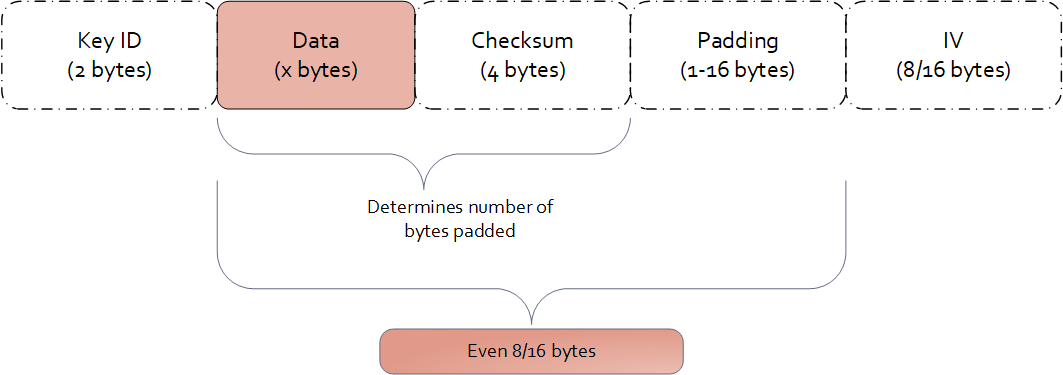
Examples of data length calculation by column types are provided in Examples of Column Sizes Calculation for Encryption.
1.3.4 -
Encryption Algorithm | Oracle |
3DES AES-128 AES-256 CUSP 3DES CUSP AES-128 CUSP AES-256 | varchar2 char number real float date raw blob clob |
1.3.5 -
The Protegrity solutions can encode data with the following encryption algorithms:
Table: Input Data Types Supported by Data Warehouse Protectors
| Encryption Algorithm | Teradata |
|---|---|
| 3DES AES-128 AES-256 CUSP 3DES CUSP AES-128 CUSP AES-256 | VARCHAR LATIN CHAR FLOAT DECIMAL DATE VARCHAR UNICODE SMALLINT INTEGER BIGINT JSON XML |
1.3.6 -
The Protegrity solutions can encode data with the following encryption algorithms:
Table: Input Data Types Supported by Application Protectors
| Encryption Algorithm | AP Java*1*2 | AP Python | AP C |
|---|---|---|---|
| 3DES AES-128 AES-256 CUSP 3DES CUSP AES-128 CUSP AES-256 | STRING CHAR[] BYTE[] | STRING BYTES INT LONG FLOAT | STRING CHAR[] BYTE[] |
*1 - If the input and output types of the API are BYTE [], the customer application should convert the input to a byte array. Then, call the API and convert the output from the byte array.
*2 - The output type is BYTE[] only. The input type String or Char is supported with the API that provides BYTE[] output type.
*3 - You must pass the encrypt_to=bytes keyword argument to the AP Python protect API for encrypting data. However, if you are encrypting or re-encrypting data already in bytes format, you do not need to pass the encrypt_to=bytes argument to the protect and reprotect APIs.
1.4 - No Encryption
The No Encryption protection method when applied lets sensitive data be stored in the clear. It is highly transparent, which means that the implementation of this method does not cause any changes in the target environment.
If you are reprotecting data using the No Encryption method, then the reprotect operation fails in the following scenarios:
- If the data was previously protected using a tokenization or encryption method.
- If the user performing the reprotection of data does not have the unprotect privileges on the data element that was used to protect the data.
Table: No Encryption Algorithm Properties
| Properties | Values |
|---|---|
| Name | No Encryption |
| Operation Mode | N/A |
| Length Preservation | Yes |
| Minimum Length | None |
| Maximum Length | ≥500 bytes |
| Specifics of algorithm | Does not protect data at rest by changing it. |
The following table shows examples of the way in which a value will be protected with the No Encryption algorithm.
Table: Output Values for No Encryption Algorithm
| Protection Method | Input Value | Output Value | Comments |
|---|---|---|---|
| No Encryption | Protegrity | Protegrity | The value is stored in the clear. |
No Encryption for Protectors
The Input type / Character set for all protectors vary across DBs. The Output type / Character set is the same as the input type. For example; if the input type is an integer, then the output type is also an integer.
Application Protector
Table: Input Data Types Supported by Application Protectors
| Protection Method | AP Java*1 | AP Python |
|---|---|---|
| NoEncryption | SHORT INT LONG FLOAT DOUBLE STRING CHAR[] BYTE[] | STRING BYTES FLOAT INT |
*1 - If the input and output types of the API are BYTE [], the customer application should convert the input to a byte array. Then, call the API and convert the output from the byte array.
For more information about Application protectors, refer to Application Protector.
Big Data Protector
Table: Input Data Types Supported by Big Data Protectors
| Protection Method*1 | MapReduce | Hive | Pig | HBase | Impala | Spark | Spark SQL | Trino |
|---|---|---|---|---|---|---|---|---|
| NoEncryption | BYTE[] INT LONG | CHAR STRING FLOAT DOUBLE INT BIGINT HIVEDECIMAL | CHARARRAY INT | BYTE[] | STRING INT FLOAT DOUBLE | BYTE[] STRING FLOAT DOUBLE SHORT INT LONG | STRING FLOAT DOUBLE SHORT INT LONG BIGDECIMAL*2 | VARCHAR SMALLINT INT BIGINT DATE TIMESTAMP DOUBLE DECIMAL |
*1 - The customer application should convert the input to and output from byte array.
*2 - If decimal format data is protected by the Decimal UDFs using the No Encryption data element, then the protected data is trimmed to the scale of 18 digits.
For more information about Big Data protectors, refer to Big Data Protector.
Data Warehouse Protector
Table: Input Data Types Supported for Data Warehouse Protectors
| Protection Method | Teradata |
|---|---|
| NoEncryption | VARCHAR CHAR INTEGER FLOAT DECIMAL DATE SMALLINT |
Database Protectors
Oracle Database Protector
The supported input data types for the Oracle Database Protector are listed below.
| Protection Method | Supported Input Data Types |
|---|---|
| NoEncryption | VARCHAR2 |
| NoEncryption | CHAR |
| NoEncryption | NUMBER |
| NoEncryption | REAL |
| NoEncryption | FLOAT |
| NoEncryption | DATE |
| NoEncryption | RAW |
| NoEncryption | BLOB |
| NoEncryption | CLOB |
1.5 - Monitoring
As an organization, if you plan to monitor and assess users that are trying to access the data without protection, choose the Monitor protection method. This element does not restrict any data security operation for any user, but instead audits attempts to add, access, or change data by users. The audit logs generated on the protectors are forwarded to Insight.
With the Monitor method, sensitive data is accessible by users. The usage of this data is monitored through audit logs that are generated on the protectors and then delivered to Insight.
The monitoring method is controlled by the security officer from the centrally administered ESA Appliance.
The Monitoring protection method works in a similar way as the No Encryption method. However, it gives full access to all users by default and does not require roles to be added to the policy. Access can be changed by adding a role and setting role permissions.
Table: Monitor Algorithm Properties
| Properties | Values |
|---|---|
| Name | Monitor |
| Operation Mode | N/A |
| Length Preservation with padding formula for non-length preserving algorithms | Yes |
| Specifics of algorithm | Does not protect data at rest by changing it. Used for monitoring and auditing. |
The following table shows examples of the way in which a value will be protected with the Monitor algorithm.
Table: Output Values for Monitor Algorithm
| Protection Method | Input Value | Output Value | Comments |
|---|---|---|---|
| Monitor | Protegrity | Protegrity | The value is stored in the clear. An audit log is generated. |
Monitoring for Protectors
The Input type / Character set for all protectors vary across DBs. The Output type / Character set is the same as the input type. For example; if the input type is an integer, then the output type is also an integer.
Application Protector
Table: Input Data Types Supported by Application Protectors
| Protection Method | AP Java | AP Python |
|---|---|---|
| Monitor | SHORT INT LONG FLOAT DOUBLE STRING CHAR[] BYTE[] | STRING BYTES FLOAT INT |
If the input and output types of the API are BYTE [], the customer application should convert the input to a byte array. Then, call the API and convert the output from the byte array.
For more information about Application protectors, refer to Application Protector.
Big Data Protector
Table: Input Data Types Supported by Big Data Protectors
| Protection Method*1 | MapReduce | Hive | Pig | HBase | Impala | Spark | Spark SQL | Trino |
|---|---|---|---|---|---|---|---|---|
| Monitor | BYTE[] INT LONG | CHAR STRING FLOAT DOUBLE INT BIGINT HIVEDECIMAL | CHARARRAY INT | BYTE[] | STRING INT FLOAT DOUBLE | BYTE[] STRING FLOAT DOUBLE SHORT INT LONG | STRING FLOAT DOUBLE SHORT INT LONG BIGDECIMAL*2 | VARCHAR SMALLINT INT BIGINT DATE TIMESTAMP DOUBLE DECIMAL |
*1 - The customer application should convert the input to and output from byte array.
*2 - If decimal format data is protected by the Decimal UDFs using the Monitor data element, then the protected data is trimmed to the scale of 18 digits.
For more information about Big Data protectors, refer to Big Data Protector.
Data Warehouse Protector
Table: Input Data Types Supported for Data Warehouse Protectors
| Protection Method | Teradata |
|---|---|
| Monitor | VARCHAR CHAR INTEGER FLOAT DECIMAL DATE SMALLINT |
Database Protectors
Oracle Database Protector
The supported input data types for the Oracle Database Protector are listed below.
| Protection Method | Supported Input Data Types |
|---|---|
| Monitor | VARCHAR2 |
| Monitor | CHAR |
| Monitor | NUMBER |
| Monitor | REAL |
| Monitor | FLOAT |
| Monitor | DATE |
| Monitor | RAW |
| Monitor | BLOB |
| Monitor | CLOB |
1.6 - Masking
As an organization, if you plan to restrict access such that only users with required privileges can view sensitive data, while other users view masked data, the Masking method can be used. Considering the sensitive data is residing in protection endpoint in clear, based on how the Masking data element is configured, users are granted view access. The masking data element as a default considers all users as restricted users and displays masked sensitive data. If any user must be granted access to view clear data, then it must be configured through roles.
For example, consider policy users user1 and user2 trying to access CCN data. As default, when policy with the masking data element is created, both users view the CCN data in masked format, such as ****45856655****.
If the user1 is granted privilege to view data in clear, then user1 sees the CCN data in clear while the user2 still sees masked CCN data.
With the Masking method, the users who should not use sensitive assets can be prevented from receiving this data, even if the data is stored in the clear.
Unlike Masking data element, masking cannot be enabled for No Encryption data element. It can only be mapped to roles in policy. In contrast, when masking is enabled through a Masking data element, the data is masked for all users unless authorized users have permission to view it in clear.
Similar to the No Encryption method, implementation of the Masking method does not cause any changes in the target environment.
The Masking data element is created in combination with the Masks option. The Masks option helps define how the masked data output format is visible to users.
The masking method is controlled by the security officer from the centrally administered ESA Appliance.
For more information about creating masks, refer to Creating a Mask.
Note:
If a masking data element is configured in the policy, and username is not specified in the policy, an error message will display when the data is protected. That error message appears as:The user does not have the appropriate permissions to perform the requested operation
Table: Masking Algorithm Properties
| Properties | Values |
|---|---|
| Name | Masking |
| Operation Mode | N/A |
| Length Preservation with padding formula for non-length preserving algorithms | Yes |
| Specifics of algorithm | Does not protect data at rest by changing it. Protection comes from masking. |
The following table shows examples in which a value will be protected with the Masking algorithm.
Table: Output Values for Masking Algorithm
| Protection Method | Roles in Data Element | Input Value | Output Value | Comments |
|---|---|---|---|---|
| Masking | None | Protegrity | None | The following error message appears: “The user does not have the appropriate permissions to perform the requested operation” |
| Masking | exampleuser1 with Unprotect access and output format is set to “Clear” | Protegrity | - All users: "****egrity" - exampleuser1: “Protegrity” | Any other user apart from exampleuser1 will see masked content. |
Using Masks
The Masks option is a data output restriction that is used in combination with the tokenization, encryption, no encryption, and masking protection methods. Masks define data output formatting, which means what data to disclose to users that want to view the data. The formatting includes unprotecting and transforming the result in a way that part of it is obfuscated. For example, a masked social security number could look like: 12345****, or ***456789.
Using a mask for the output is optional. If none is specified, then all data is returned in the masked output format by default for all users who are not a part of any policy. If users are a part of the policy:
- Data is shown in the clear for No Encryption data elements.
- Data is masked in output format for Masking data elements.
Masks are defined in the ESA and have the following properties:
- Mask name and description
- Number of characters from left
- Number of characters from right
- Whether “left” and “right” should be masked or clear
- Specific mask character - *,#,-,0,1,2,3,4,5,6,7,8, or 9.
The mask definition or how the mask looks like is implemented as per role and data element combination. This means that one data element can have multiple mask definitions.
When a mask is applied to data that is too short, that is, the data will not match to what has been defined in the mask, everything gets masked. For example, if a mask of 6 from the left and 2 from the right will be applied to data that has a length of 4, such as a name John, then all four characters will be masked.
If a user role is included in multiple policies with masks, then the masks may conflict in one of the following conditions:
- The user has different mask settings for both roles for the same data element. In this case, the unprotect access rights to the data element with the conflicting masks are revoked.
- The user has the data element with a mask in a role and another with no mask settings in the other role. In this case, the user’s access rights to the data element is set to the role with no mask settings.
For more information about masking rules for users in multiple roles, refer to Masking Rules for Users in Multiple Roles.
Important: Masking is supported only for character-based data types. If a role with masking is applied to unsupported data types, the operation will fail.
It is not recommended to use Masking with multibyte encodings, such as UTF-8, UTF-16, and so on, as it might corrupt the data.
| Properties | Examples |
|---|---|
| Sample Protected Data | Текст на русском |
| Left and Right Masking settings | L-3 and R-3 |
| Unprotected Data with Mask applied | ##?кст на русск?## |
| Sample Protected Data | Текст на русском |
| Left and Right Clear settings | L-3 and R-3 |
| Unprotected Data with Mask applied | Т?###### #### ##########?м |
The masked, unprotected value is distorted in the above case. Since each character in the input is represented by 2 bytes in UTF-8 encoding, we aim to preserve the first 3 bytes from the left and the next 3 bytes from the right. However, this approach results in a distorted output.
The following table shows examples of the way in which Masks can be used in combination with other protection methods.
Table: Examples of Masks
| Protection Method/ Mask | Input Value | Output Value | Comments |
|---|---|---|---|
| CCN 6x4 Left=6, Right=4, Clear, * | 4537432557929840 | 453743******9840 | Pre-defined mask: - Exposes the first 6 characters - Exposes the last 4 characters |
| CCN 12x0 Left=12, Right=0, Mask, * | 4537432557929840 | ************9840 | Pre-defined mask: - Hides the first 12 characters |
| CCN 4x4 Left=4, Right=4, Clear, * | 4537432557929840 | 4537********9840 | Pre-defined mask: - Exposes the first 4 characters - Exposes the last 4 characters |
| CCN 6x4 Left=6, Right=4, Clear, 1 | 4537432557929840 | 4537431111119840 | Pre-defined mask: - Exposes the first 6 characters - Exposes the last 4 characters |
| SSN x-4 Left=0, Right=4, Clear, * | 721-07-4426 | *******4426 | Pre-defined mask: - Exposes the last 4 characters |
| SSN 5-x Left=5, Right=0, Clear, * | 72107-4426 | 72107***** | Pre-defined mask: - Exposes the first 5 characters |
| SSN 5-x Left=5, Right=0, Clear, 0 | 72107-4426 | 7210700000 | Pre-defined mask: - Exposes the first 5 characters |
| CustomMask1 Left=6, Right=0, Mask, # | 721-07-4426 | ######-4426 | Custom mask: - Illustrates the usage of “#” mask character |
| CustomMask2 Left=4, Right=4, Mask, - | 4537432557929840 | ----43255792---- | Custom mask: - Illustrates the usage of “-” mask character |
| CustomMask3 Left=4, Right=4, Mask, 8 | 4537432557929840 | 8888432557928888 | Custom mask: - Illustrates the usage of “8” mask character |
Combining Data Elements and Masks
Masks are always applied using the supported Data Elements. The Masks are applied right before the data is presented to the end-user.
Tokenization, Encryption, FPE, No Encryption, and Masking Data Elements all support Masks, with some exceptions as to the configuration. Refer to support matrix below to check whether a specific Data Element and Mask combination is supported.
When combining Masks with tokenization, encryption, and FPE, sensitive data will be unprotected before a Mask is applied. In the case of the Masking Data Element, data is masked during the unprotect operation only.
Table: Data Element and Mask Support Matrix
| Data Element Method | Data Type | Mask Support |
|---|---|---|
| Tokenization | Numeric (0-9) | Yes |
| Integer | No | |
| Credit Card (0-9) | Yes | |
| Alpha (a-z, A-Z) | Yes | |
| Uppercase Alpha (A-Z) | Yes | |
| Uppercase Alpha-Numeric (0-9, A-Z) | Yes | |
| Lower ASCII | Yes | |
| DateTime | No | |
| Decimal | No | |
| Unicode Gen2 | No | |
| Binary | No | |
| Yes | ||
| Printable | Yes | |
| Date (YYYY-MM-DD, DD/MM/YYYY, MM.DD.YYYY) | No | |
| Unicode | No | |
| Unicode Base64 | No | |
| Encryption Algorithm | AES-128, AES-256, CUSP AES-128, CUSP AES-256, 3DES, CUSP 3DES | Yes |
| Format Preserving Encryption (FPE) | Yes, only in version 10.0.X, with ASCII plaintext encoding without Left and Right settings. | |
| No Encryption | Yes | |
| Masking | Yes |
Masking for Protectors
The Input type / Character set for all protectors vary across DBs. The Output type / Character set is the same as the input type. For example; if the input type is an integer, then the output type is also an integer.
Application Protector
Table: Input Data Types Supported by Application Protectors
| Protection Method | AP Java | AP Python |
|---|---|---|
| Masking | STRING CHAR[] BYTE[] | STRING BYTES |
If the input and output types of the API are BYTE [], the customer application should convert the input to a byte array. Then, call the API and convert the output from the byte array.
For more information about Application protectors, refer to Application Protector.
Big Data Protector
Table: Input Data Types Supported by Big Data Protectors
| Protection Method*1 | MapReduce | Hive | Pig | HBase | Impala | Spark | Spark SQL | Trino |
|---|---|---|---|---|---|---|---|---|
| Masking | BYTE[] | CHAR STRING | CHARARRAY | BYTE[] | STRING | BYTE[] STRING | STRING | VARCHAR |
*1 - The customer application should convert the input to and output from byte array.
For more information about Big Data protectors, refer to Big Data Protector.
Data Warehouse Protector
Table: Input Data Types Supported for Data Warehouse Protectors
| Protection Method | Teradata |
|---|---|
| Masking | VARCHAR CHAR INTEGER FLOAT DECIMAL DATE SMALLINT |
Important: Masking is supported only for character-based data types. If a data element with masking is applied to an unsupported data type, the operation will fail.
Database Protectors
Oracle Database Protector
The supported input data types for the Oracle Database Protector are listed below.
| Protection Method | Supported Input Data Types |
|---|---|
| Masking | VARCHAR2 |
| Masking | CHAR |
| Masking | NUMBER |
| Masking | REAL |
| Masking | FLOAT |
| Masking | DATE |
| Masking | BLOB |
| Masking | CLOB |
Note: While unprotecting the data, the masked value is passed to Oracle. These masked strings are not valid hex values. Therefore, the following error is observed;
ORA-06502: PL/SQL: numeric or value error: hex to raw conversion error.
Important: Masking is supported only for character-based data types. If a data element with masking is applied to an unsupported data type, the operation will fail.
1.7 - Hashing
A hash function produces a small number that serves as a digital fingerprint of the data. The resulting number is relatively small. The algorithm “chops and mixes” data to create fingerprints. For example, it substitutes or transposes the data.
Protegrity offers two different algorithms for creating hash values:
- The Hashed Message Authentication Code with SHA-256 (HMAC-SHA256) algorithm returns a 256 bit - 32 bytes hash value for any data.
- The HMAC-SHA1 algorithm returns a 160 bit - 20 bytes hash value for any data.
Deprecated
Starting from v10.0.x, the HMAC-SHA1 protection method is deprecated.
It is recommended to use the HMAC-SHA256 protection method instead of the HMAC-SHA1 protection method.
Hashing is utilized to transform sensitive data. HMAC-SHA1 and HMAC-SHA256 are specific hashing methods used for this purpose. Transformed data, which is the result of hashing, is irreversible as it is replaced with a checksum and not stored anywhere as an encrypted value. Unlike encryption, the original data can’t be retrieved back from the hashed value.
Table: Hashing Protection Algorithm Properties
Properties | Keyed Hash Algorithm | |
HMAC-SHA1 | HMAC-SHA256 | |
Operation Mode | N/A | N/A |
Encryption Properties - IV, CRC, Key ID | No | N/A |
Length Preservation with padding formula for non-length preserving algorithms | No Result is always 20 bytes regardless of input length. | No Result is always 32 bytes regardless of input length. |
Minimum Length | None | None |
Maximum Length | ≥ 500 bytes | ≥ 500 bytes |
Input type / Character set | Vary across DBs | Vary across DBs |
Output type / Character set | Binary | Binary |
Return of Protected value | No | No |
Specifics of algorithm | Irreversible protection method. Original data is replaced with a checksum and cannot be retrieved back, when decrypted. | Irreversible protection method. Original data is replaced with a checksum and cannot be retrieved back, when decrypted. |
The following table shows examples of the way in which a value will be replaced with the HMAC-SHA1 / HMAC-SHA256 hashing type.
Table: HMAC-SHA1 / HMAC-SHA256 Hashing Output Values
| Protection Method | Input Value | Output Value | Comments |
|---|---|---|---|
| HMAC-SHA1 | Protegrity | 0x5855682AB16B3C818C33CCA382B0F32A00EC2915 | Output value cannot be decrypted. |
| HMAC-SHA256 | Protegrity | 0x9EE0CD797365EA5E2A76DC6663E98D0147CAE004DE0D5E0D7F2730E7F9BF165A | Output value cannot be decrypted. |
Hashing for Protectors
Application Protector
Table: Supported Input Data Types by Application Protectors
| Protection Method | AP Java*1 | AP Python |
|---|---|---|
| HMAC-SHA1 | FLOAT DOUBLE STRING CHAR[] BYTE[] | STRING BYTES |
*1 - If the input and output types of the API are BYTE [], the customer application should convert the input to a byte array. Then, call the API and convert the output from the byte array.
For more information about Application protectors, refer to Application Protector.
Big Data Protector
Table: Supported Input Data Types for Big Data Protectors
| Protection Method*1 | MapReduce | Hive | Pig | HBase | Impala | Spark | Spark SQL | Trino |
|---|---|---|---|---|---|---|---|---|
| HMAC-SHA1 | BYTE[] | Not supported | Not supported | BYTE[] | Not supported | BYTE[] | Not supported | Not supported |
| HMAC-SHA256 | BYTE[] | Not supported | Not supported | BYTE[] | Not supported | BYTE[] | Not supported | Not supported |
*1 – The customer application should convert the input to and output from byte array.
For more information about Big Data protectors, refer to Big Data Protector.
Data Warehouse Protector
Table: Supported Input Data Types for Data Warehouse Protectors
| Protection Method | Teradata |
|---|---|
| HMAC-SHA1 | VARCHAR INTEGER FLOAT |
| HMAC-SHA256 | VARCHAR INTEGER FLOAT |
Database Protectors
Oracle Database Protector
The supported input data types for the Oracle Database Protector are listed below.
| Protection Method | Supported Input Data Types |
|---|---|
| HMAC-SHA1 | VARCHAR2 |
| HMAC-SHA1 | CHAR |
| HMAC-SHA256 | VARCHAR2 |
| HMAC-SHA256 | CHAR |
1.8 - ASCII Character Codes
Lower ASCII token – character codes 33-126 (Table A-1)
Printable token – character codes 32-126 (Table A-1), 160-255 (Table A-2)
Unicode token – character codes 32-127 (Table A-1), 128-255 (Table A-2), 0-31 (Table A-3)
Binary token – character codes 32-127 (Table A-1), 128-255 (Table A-2), 0-31 (Table A-3)
Table A-1: ASCII printable characters (character code 32-127)
Character ASCII code | Character Description | Character ASCII code | Character Description | ||||
DEC | HEX | Symbol | Description | DEC | HEX | Symbol | Description |
32 | 20 | Space | Space | 80 | 50 | P | Uppercase P |
33 | 21 | ! | Exclamation mark | 81 | 51 | Q | Uppercase Q |
34 | 22 | " | Double quotes (or speech marks) | 82 | 52 | R | Uppercase R |
35 | 23 | # | Number | 83 | 53 | S | Uppercase S |
36 | 24 | $ | Dollar | 84 | 54 | T | Uppercase T |
37 | 25 | % | Percent sign | 85 | 55 | U | Uppercase U |
38 | 26 | & | Ampersand | 86 | 56 | V | Uppercase V |
39 | 27 | ' | Single quote | 87 | 57 | W | Uppercase W |
40 | 28 | ( | Open parenthesis (or open bracket) | 88 | 58 | X | Uppercase X |
41 | 29 | ) | Close parenthesis (or close bracket) | 89 | 59 | Y | Uppercase Y |
42 | 2A | * | Asterisk | 90 | 5A | Z | Uppercase Z |
43 | 2B | + | Plus | 91 | 5B | [ | Opening bracket |
44 | 2C | , | Comma | 92 | 5C | \ | Backslash |
45 | 2D | - | Hyphen | 93 | 5D | ] | Closing bracket |
46 | 2E | . | Period, dot or full stop | 94 | 5E | ^ | Caret - circumflex |
47 | 2F | / | Slash or divide | 95 | 5F | _ | Underscore |
48 | 30 | 0 | Zero | 96 | 60 | ` | Grave accent |
49 | 31 | 1 | One | 97 | 61 | a | Lowercase a |
50 | 32 | 2 | Two | 98 | 62 | b | Lowercase b |
51 | 33 | 3 | Three | 99 | 63 | c | Lowercase c |
52 | 34 | 4 | Four | 100 | 64 | d | Lowercase d |
53 | 35 | 5 | Five | 101 | 65 | e | Lowercase e |
54 | 36 | 6 | Six | 102 | 66 | f | Lowercase f |
55 | 37 | 7 | Seven | 103 | 67 | g | Lowercase g |
56 | 38 | 8 | Eight | 104 | 68 | h | Lowercase h |
57 | 39 | 9 | Nine | 105 | 69 | i | Lowercase i |
58 | 3A | : | Colon | 106 | 6A | j | Lowercase j |
59 | 3B | ; | Semicolon | 107 | 6B | k | Lowercase k |
60 | 3C | Less than (or open angled bracket) | 108 | 6C | l | Lowercase l | |
61 | 3D | = | Equals | 109 | 6D | m | Lowercase m |
62 | 3E | Greater than (or close angled bracket) | 110 | 6E | n | Lowercase n | |
63 | 3F | ? | Question mark | 111 | 6F | o | Lowercase o |
64 | 40 | @ | At symbol | 112 | 70 | p | Lowercase p |
65 | 41 | A | Uppercase A | 113 | 71 | q | Lowercase q |
66 | 42 | B | Uppercase B | 114 | 72 | r | Lowercase r |
67 | 43 | C | Uppercase C | 115 | 73 | s | Lowercase s |
68 | 44 | D | Uppercase D | 116 | 74 | t | Lowercase t |
69 | 45 | E | Uppercase E | 117 | 75 | u | Lowercase u |
70 | 46 | F | Uppercase F | 118 | 76 | v | Lowercase v |
71 | 47 | G | Uppercase G | 119 | 77 | w | Lowercase w |
72 | 48 | H | Uppercase H | 120 | 78 | x | Lowercase x |
73 | 49 | I | Uppercase I | 121 | 79 | y | Lowercase y |
74 | 4A | J | Uppercase J | 122 | 7A | z | Lowercase z |
75 | 4B | K | Uppercase K | 123 | 7B | { | Opening brace |
76 | 4C | L | Uppercase L | 124 | 7C | | | Vertical bar |
77 | 4D | M | Uppercase M | 125 | 7D | } | Closing brace |
78 | 4E | N | Uppercase N | 126 | 7E | ~ | Equivalency sign - tilde |
79 | 4F | O | Uppercase O | 127 | 7F | (Delete) | Delete |
Table A-2: Extended ASCII codes (character code 128-255)
Character ASCII code | Character Description | Character ASCII code | Character Description | ||||
DEC | HEX | Symbol | Description | DEC | HEX | Symbol | Description |
128 | 80 | € | Euro sign | 192 | C0 | À | Latin capital letter A with grave |
129 | 81 | 193 | C1 | Á | Latin capital letter A with acute | ||
130 | 82 | ‚ | Single low-9 quotation mark | 194 | C2 | Â | Latin capital letter A with circumflex |
131 | 83 | ƒ | Latin small letter f with hook | 195 | C3 | Ã | Latin capital letter A with tilde |
132 | 84 | „ | Double low-9 quotation mark | 196 | C4 | Ä | Latin capital letter A with diaeresis |
133 | 85 | … | Horizontal ellipsis | 197 | C5 | Å | Latin capital letter A with ring above |
134 | 86 | † | Dagger | 198 | C6 | Æ | Latin capital letter AE |
135 | 87 | ‡ | Double dagger | 199 | C7 | Ç | Latin capital letter C with cedilla |
136 | 88 | ˆ | Modifier letter circumflex accent | 200 | C8 | È | Latin capital letter E with grave |
137 | 89 | ‰ | Per mille sign | 201 | C9 | É | Latin capital letter E with acute |
138 | 8A | Š | Latin capital letter S with caron | 202 | CA | Ê | Latin capital letter E with circumflex |
139 | 8B | ‹ | Single left-pointing angle quotation | 203 | CB | Ë | Latin capital letter E with diaeresis |
140 | 8C | Œ | Latin capital ligature OE | 204 | CC | Ì | Latin capital letter I with grave |
141 | 8D | 205 | CD | Í | Latin capital letter I with acute | ||
142 | 8E | Ž | Latin captial letter Z with caron | 206 | CE | Î | Latin capital letter I with circumflex |
143 | 8F | 207 | CF | Ï | Latin capital letter I with diaeresis | ||
144 | 90 | 208 | D0 | Ð | Latin capital letter ETH | ||
145 | 91 | ‘ | Left single quotation mark | 209 | D1 | Ñ | Latin capital letter N with tilde |
146 | 92 | ’ | Right single quotation mark | 210 | D2 | Ò | Latin capital letter O with grave |
147 | 93 | “ | Left double quotation mark | 211 | D3 | Ó | Latin capital letter O with acute |
148 | 94 | ” | Right double quotation mark | 212 | D4 | Ô | Latin capital letter O with circumflex |
149 | 95 | • | Bullet | 213 | D5 | Õ | Latin capital letter O with tilde |
150 | 96 | – | En dash | 214 | D6 | Ö | Latin capital letter O with diaeresis |
151 | 97 | — | Em dash | 215 | D7 | × | Multiplication sign |
152 | 98 | ˜ | Small tilde | 216 | D8 | Ø | Latin capital letter O with slash |
153 | 99 | ™ | Trade mark sign | 217 | D9 | Ù | Latin capital letter U with grave |
154 | 9A | š | Latin small letter S with caron | 218 | DA | Ú | Latin capital letter U with acute |
155 | 9B | › | Single right-pointing angle quotation mark | 219 | DB | Û | Latin capital letter U with circumflex |
156 | 9C | œ | Latin small ligature oe | 220 | DC | Ü | Latin capital letter U with diaeresis |
157 | 9D | 221 | DD | Ý | Latin capital letter Y with acute | ||
158 | 9E | ž | Latin small letter z with caron | 222 | DE | Þ | Latin capital letter THORN |
159 | 9F | Ÿ | Latin capital letter Y with diaeresis | 223 | DF | ß | Latin small letter sharp s - ess-zed |
160 | A0 | Non-breaking space | Non-breaking space | 224 | E0 | à | Latin small letter a with grave |
161 | A1 | ¡ | Inverted exclamation mark | 225 | E1 | á | Latin small letter a with acute |
162 | A2 | ¢ | Cent sign | 226 | E2 | â | Latin small letter a with circumflex |
163 | A3 | £ | Pound sign | 227 | E3 | ã | Latin small letter a with tilde |
164 | A4 | ¤ | Currency sign | 228 | E4 | ä | Latin small letter a with diaeresis |
165 | A5 | ¥ | Yen sign | 229 | E5 | å | Latin small letter a with ring above |
166 | A6 | ¦ | Pipe, Broken vertical bar | 230 | E6 | æ | Latin small letter ae |
167 | A7 | § | Section sign | 231 | E7 | ç | Latin small letter c with cedilla |
168 | A8 | ¨ | Spacing dieresis - umlaut | 232 | E8 | è | Latin small letter e with grave |
169 | A9 | © | Copyright sign | 233 | E9 | é | Latin small letter e with acute |
170 | AA | ª | Feminine ordinal indicator | 234 | EA | ê | Latin small letter e with circumflex |
171 | AB | « | Left double angle quotes | 235 | EB | ë | Latin small letter e with diaeresis |
172 | AC | ¬ | Not sign | 236 | EC | ì | Latin small letter i with grave |
173 | AD | Soft hyphen | Soft hyphen | 237 | ED | í | Latin small letter i with acute |
174 | AE | ® | Registered trade mark sign | 238 | EE | î | Latin small letter i with circumflex |
175 | AF | ¯ | Spacing macron - overline | 239 | EF | ï | Latin small letter i with diaeresis |
176 | B0 | ° | Degree sign | 240 | F0 | ð | Latin small letter eth |
177 | B1 | ± | Plus-or-minus sign | 241 | F1 | ñ | Latin small letter n with tilde |
178 | B2 | ² | Superscript two - squared | 242 | F2 | ò | Latin small letter o with grave |
179 | B3 | ³ | Superscript three - cubed | 243 | F3 | ó | Latin small letter o with acute |
180 | B4 | ´ | Acute accent - spacing acute | 244 | F4 | ô | Latin small letter o with circumflex |
181 | B5 | µ | Micro sign | 245 | F5 | õ | Latin small letter o with tilde |
182 | B6 | ¶ | Pilcrow sign - paragraph sign | 246 | F6 | ö | Latin small letter o with diaeresis |
183 | B7 | · | Middle dot - Georgian comma | 247 | F7 | ÷ | Division sign |
184 | B8 | ¸ | Spacing cedilla | 248 | F8 | ø | Latin small letter o with slash |
185 | B9 | ¹ | Superscript one | 249 | F9 | ù | Latin small letter u with grave |
186 | BA | º | Masculine ordinal indicator | 250 | FA | ú | Latin small letter u with acute |
187 | BB | » | Right double angle quotes | 251 | FB | û | Latin small letter u with circumflex |
188 | BC | ¼ | Fraction one quarter | 252 | FC | ü | Latin small letter u with diaeresis |
189 | BD | ½ | Fraction one half | 253 | FD | ý | Latin small letter y with acute |
190 | BE | ¾ | Fraction three quarters | 254 | FE | þ | Latin small letter thorn |
191 | BF | ¿ | Inverted question mark | 255 | FF | ÿ | Latin small letter y with diaeresis |
Table A-3: ASCII control characters (character code 0-31)
Character ASCII code | Character Description | Character ASCII code | Character Description | ||||
DEC | HEX | Symbol | Description | DEC | HEX | Symbol | Description |
0 | 0 | NUL | Null char | 16 | 10 | DLE | Data Line Escape |
1 | 1 | SOH | Start of Heading | 17 | 11 | DC1 | Device Control 1 (oft. XON) |
2 | 2 | STX | Start of Text | 18 | 12 | DC2 | Device Control 2 |
3 | 3 | ETX | End of Text | 19 | 13 | DC3 | Device Control 3 (oft. XOFF) |
4 | 4 | EOT | End of Transmission | 20 | 14 | DC4 | Device Control 4 |
5 | 5 | ENQ | Enquiry | 21 | 15 | NAK | Negative Acknowledgement |
6 | 6 | ACK | Acknowledgment | 22 | 16 | SYN | Synchronous Idle |
7 | 7 | BEL | Bell | 23 | 17 | ETB | End of Transmit Block |
8 | 8 | BS | Back Space | 24 | 18 | CAN | Cancel |
9 | 9 | HT | Horizontal Tab | 25 | 19 | EM | End of Medium |
10 | 0A | LF | Line Feed | 26 | 1A | SUB | Substitute |
11 | 0B | VT | Vertical Tab | 27 | 1B | ESC | Escape |
12 | 0C | FF | Form Feed | 28 | 1C | FS | File Separator |
13 | 0D | CR | Carriage Return | 29 | 1D | GS | Group Separator |
14 | 0E | SO | Shift Out / X-On | 30 | 1E | RS | Record Separator |
15 | 0F | SI | Shift In / X-Off | 31 | 1F | US | Unit Separator |
1.9 - Examples of Column Sized Calculation for AES and 3DES Encryption
The sizes of database native data types may vary, but the column sizes calculation provided in the following tables is generic.
Table: Column Sizes Calculation for AES encryption - AES-128 and AES-256
| Data Type | Size (bytes) | AES | AES-CRC | AES-IV | AES-IV-CRC | AES-IV-CRC-KeyID |
|---|---|---|---|---|---|---|
| Maximum padding size | - | 16 | 16 | 16 | 16 | 16 |
| Checksum size | - | 0 | 4 | 0 | 4 | 4 |
| IV Size | - | 0 | 0 | 16 | 16 | 16 |
| SMALLINT | 2 | 16 | 16 | 32 | 32 | 34 |
| INTEGER | 4 | 16 | 16 | 32 | 32 | 34 |
| BIGINT | 8 | 16 | 16 | 32 | 32 | 34 |
| DATE | 4 | 16 | 16 | 32 | 32 | 34 |
| DECIMAL(1..2) | 1 | 16 | 16 | 32 | 32 | 34 |
| DECIMAL(3..4) | 2 | 16 | 16 | 32 | 32 | 34 |
| DECIMAL(5..9) | 4 | 16 | 16 | 32 | 32 | 34 |
| DECIMAL(10..18) | 8 | 16 | 16 | 32 | 32 | 34 |
| DECIMAL(19..38) | 16 | 32 | 32 | 48 | 48 | 50 |
| FLOAT, REAL | 8 | 16 | 16 | 32 | 32 | 34 |
| Latin CHAR / VARCHAR | 5 | 16 | 16 | 32 | 32 | 34 |
| Unicode CHAR / VARCHAR | 5 | 16 | 16 | 32 | 32 | 34 |
The following table shows the column sized calculation for deprecated 3DES encryption.
Table: Column Sized Calculation for 3DES Encryption
| Data Type | Size (bytes) | 3DES | 3DES-CRC | 3DES-IV | 3DES-IV-CRC | 3DES-IV-CRC-KeyID |
|---|---|---|---|---|---|---|
| Maximum padding size | 8 | 8 | 8 | 8 | 8 | |
| Checksum size | 0 | 4 | 0 | 4 | 4 | |
| IV Size | 0 | 0 | 8 | 8 | 8 | |
| SMALLINT | 2 | 8 | 8 | 16 | 16 | 18 |
| INTEGER | 4 | 8 | 16 | 16 | 24 | 26 |
| BIGINT | 8 | 16 | 16 | 24 | 24 | 26 |
| DATE | 4 | 8 | 16 | 16 | 24 | 26 |
| DECIMAL(1..2) | 1 | 8 | 8 | 16 | 16 | 18 |
| DECIMAL(3..4) | 2 | 8 | 8 | 16 | 16 | 18 |
| DECIMAL(5..9) | 4 | 8 | 16 | 16 | 24 | 26 |
| DECIMAL(10..18) | 8 | 16 | 16 | 24 | 24 | 26 |
| DECIMAL(19..38) | 16 | 24 | 24 | 32 | 32 | 34 |
| FLOAT, REAL | 8 | 16 | 16 | 24 | 24 | 26 |
| Latin CHAR / VARCHAR | 5 | 8 | 16 | 16 | 24 | 26 |
| Unicode CHAR / VARCHAR | 5 | 16 | 16 | 24 | 24 | 26 |
1.10 - Empty String Handling by Protectors
Starting from v10.0.x, Protegrity Protectors handle empty string "" as NULL. If you protect an empty string, then the Protegrity APIs and UDFs will return a NULL value.
1.11 - Hashing Functions and Examples
Hashing is accomplished by two functions of the protector, an Insert hash function and an Update hash function. Both functions take the same parameters and return a hash value that is always a 160 bit (SHA1) or a 256 bit (SHA256) binary value. The difference between the functions is the access rights that they check.
Here is the functions syntax example, applicable to an Oracle database:
FUNCTION ins_hash_varchar2(dataelement IN CHAR, cdata IN VARCHAR, SCID IN BINARY_INTEGER) RETURN RAW;
FUNCTION upd_hash_varchar2(dataelement IN CHAR, cdata IN VARCHAR, SCID IN BINARY_INTEGER) RETURN RAW;
Table: Functions Syntax Example
| Where… | Is… |
|---|---|
| dataelement | The data element name. |
| cdata | The data. |
| SCID | The security ID. Not used parameter. It is kept in signature due to backwards compatibility reasons. |
There is no decrypt function since a hash is a checksum and not data.
1.11.1 - Hash Data column size
A hash value is always 160 bits / 20 bytes (SHA1) or 256 bits / 32 bytes (SHA256) long regardless of what data it’s calculated on. Basically you should have a table with a binary column of 20 bytes or 32 bytes for the hash value.
Here is an example of an Oracle table with hash value instead of name:
CREATE TABLE NAMETABLE ( ident NUMBER PRIMARY KEY,
                  name RAW(32));
1.11.2 - Using Hashing Triggers and View
Oracle example:
CREATE OR REPLACE TRIGGER SCOTT.NAMETABLE_INS
INSTEAD OF INSERT ON SCOTT.NAMETABLE
FOR EACH ROW
DECLARE
NAME_ RAW(2000) := NULL;

BEGIN
           **NAME\_:=PTY.INS\_HASH\_VARCHAR2\('HashDE', :new.NAME, 0\)**;

           INSERT INTO SCOTT.NAMETABLE_ENC(IDENT, NAME)
           VALUES(:new.IDENT, NAME_);
END;


CREATE OR REPLACE TRIGGER SCOTT.NAMETABLE_UPD
INSTEAD OF UPDATE ON SCOTT.NAMETABLE
FOR EACH ROW
DECLARE
NAME_ RAW(2000) := NULL;

BEGIN
           **PTY.SEL\_CHECK\('HashDE'\);

           NAME\_:=PTY.UPD\_HASH\_VARCHAR2\('HashDE', :new.NAME, 0\)**;

           IF: old.IDENT = :new.IDENT THEN
                      UPDATE NAMETABLE_ENC SET
                      NAME= NAME_,
                      WHERE IDENT=:old.IDENT;
           ELSE
                      UPDATE NAMETABLE_ENC SET
                      IDENT=:new.IDENT,
                      NAME= NAME_,
                      WHERE IDENT=:old.IDENT;
           END IF;
END;
The view selects the hash value directly from the table instead of running a decrypt function. To make this work as a normal trigger/view solution, the binary data type is cast into the original data type. In Oracle it should be VARCHAR2. The data type must be cast to insert data through the view as usual.
CREATE OR REPLACE VIEW SCOTT.NAMETABLE(IDENT,
NAME)
AS SELECT IDENT, utl\_raw.cast\_to\_varchar2\(NAME\))
FROM SCOTT.NAMETABLE_ENC;
The application handles the return value, which will now be a 20 byte or 32 byte binary string converted into a character string.
1.12 - Codebook Re-shuffling in the Data Security Gateway
You can enable the Codebook Re-shuffling in the Data Security Gateway (DSG) for all the tokenization data elements to generate unique tokens for protected values across the tokenization domains.
For more information about the Codebook Re-shuffling for the Data Security Gateway, refer to Codebook Re-shuffling.
Note: As the Codebook Re-shuffling feature is an advanced functionality, contact Protegrity Support.
1.13 -
Table: Supported Input Data Types for Data Warehouse Protectors
| Protection Method | Teradata |
|---|---|
| HMAC-SHA1 | VARCHAR INTEGER FLOAT |
| HMAC-SHA256 | VARCHAR INTEGER FLOAT |
1.14 -
Table: Input Data Types Supported for Data Warehouse Protectors
| Protection Method | Teradata |
|---|---|
| Masking | VARCHAR CHAR INTEGER FLOAT DECIMAL DATE SMALLINT |
Important: Masking is supported only for character-based data types. If a data element with masking is applied to an unsupported data type, the operation will fail.
1.15 -
Table: Input Data Types Supported for Data Warehouse Protectors
| Protection Method | Teradata |
|---|---|
| NoEncryption | VARCHAR CHAR INTEGER FLOAT DECIMAL DATE SMALLINT |
1.16 -
Table: Input Data Types Supported for Data Warehouse Protectors
| Protection Method | Teradata |
|---|---|
| Monitor | VARCHAR CHAR INTEGER FLOAT DECIMAL DATE SMALLINT |
2 - Big Data Protector
2.1 - Amazon Elastic MapReduce Protector
The Amazon EMR Protector on ARM64 architecture extends the Protegrity Big Data Protector capabilities to environments powered by ARM-based processors, such as AWS Graviton instances. This deployment model enables organizations to secure sensitive data in large-scale analytics workloads while benefiting from the cost efficiency and performance characteristics of ARM64-based infrastructure.
Built on the standard Protegrity Big Data Protector framework, the EMR Protector integrates directly with Amazon EMR clusters. This enables policy-driven data protection across distributed processing engines, such as, Apache Spark and Hive. Like its x86_64 counterpart, the protector is deployed on each cluster node, ensuring consistent enforcement of security policies across master, core, and task nodes.
On ARM64 platforms, the protector leverages architecture-compatible libraries and runtime components. This enables the protector to deliver seamless encryption, tokenization, and de-tokenization through User Defined Functions (UDFs) and APIs embedded within data processing workflows. This allows organizations to protect sensitive data in motion and at rest without modifying existing application logic.
By combining Protegrity’s centralized policy management with ARM64-based compute infrastructure, the EMR Protector supports scalable, high-performance data processing environments while maintaining compliance with data privacy and security requirements.
The Big Data Protector on EMR utilizes the following components to process and protect data:
- HBase
- Pig
- MapReduce
- Hive
- Spark
- SparkSQL
2.1.1 - Understanding the architecture
2.1.1.1 - Bootstrap installer architecture
The architecture for the EMR distribution of the Big Data Protector is depicted in the image below.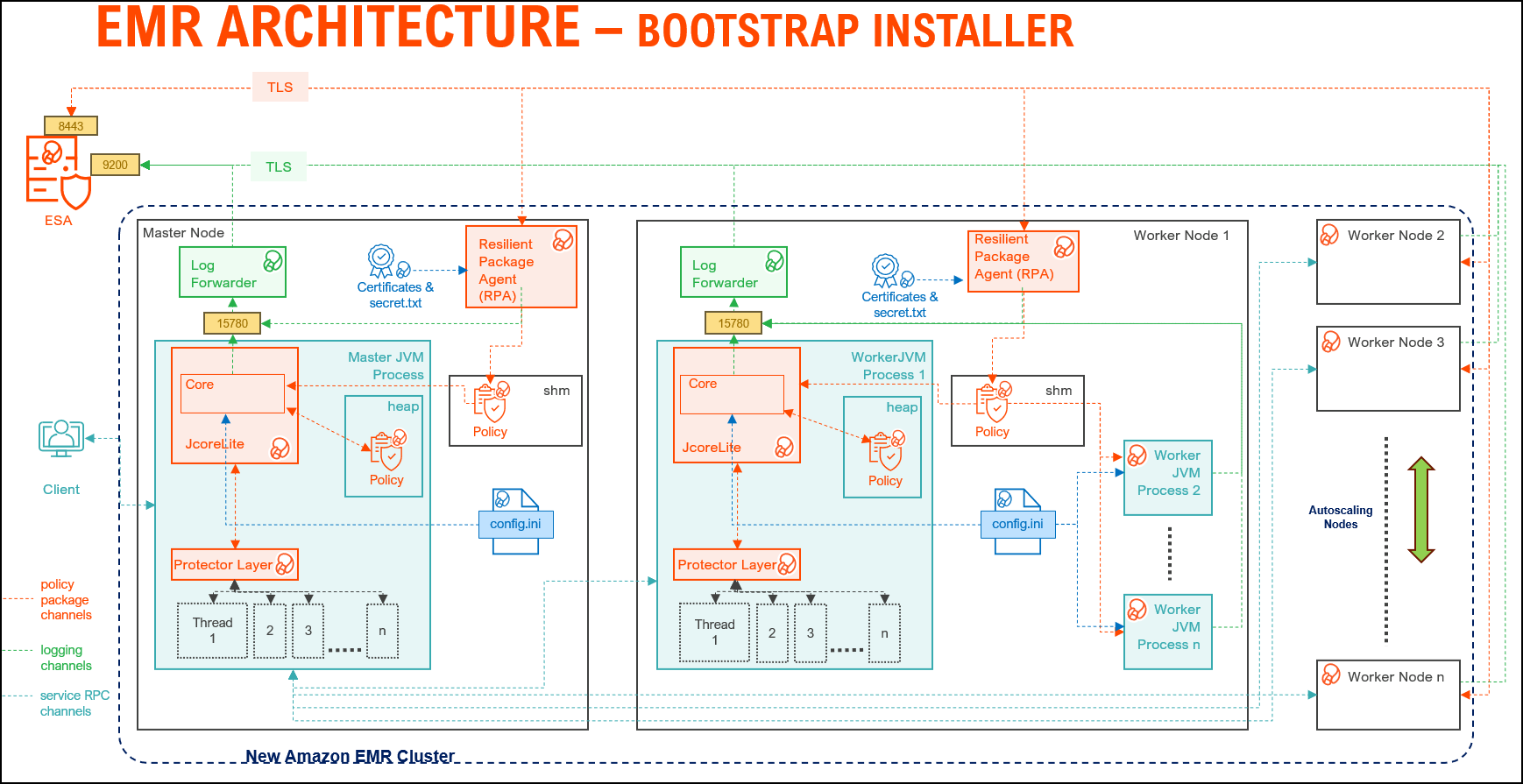
| Component | Description |
|---|---|
| RPAgent | A daemon running on each node that downloads the package from ESA over a TLS channel using the installed Certificates. |
| Log Forwarder | A daemon running on each node that routes the audit logs and application logs to ESA/Audit Store. |
| config.ini | A file on each node containing the set of configuration parameters to modify the protector behavior. |
| BDP Layer | Contains the Big Data Protector UDFs and APIs executing in the EMR environment. |
| JcoreLite | The JNI library that provides a Java API layer to the Core libraries. |
| Core | The set of various libraries that provide the Protegrity Core functionality. |
2.1.1.2 - Static installer architecture
The architecture for the EMR distribution of the Big Data Protector is depicted in the image below.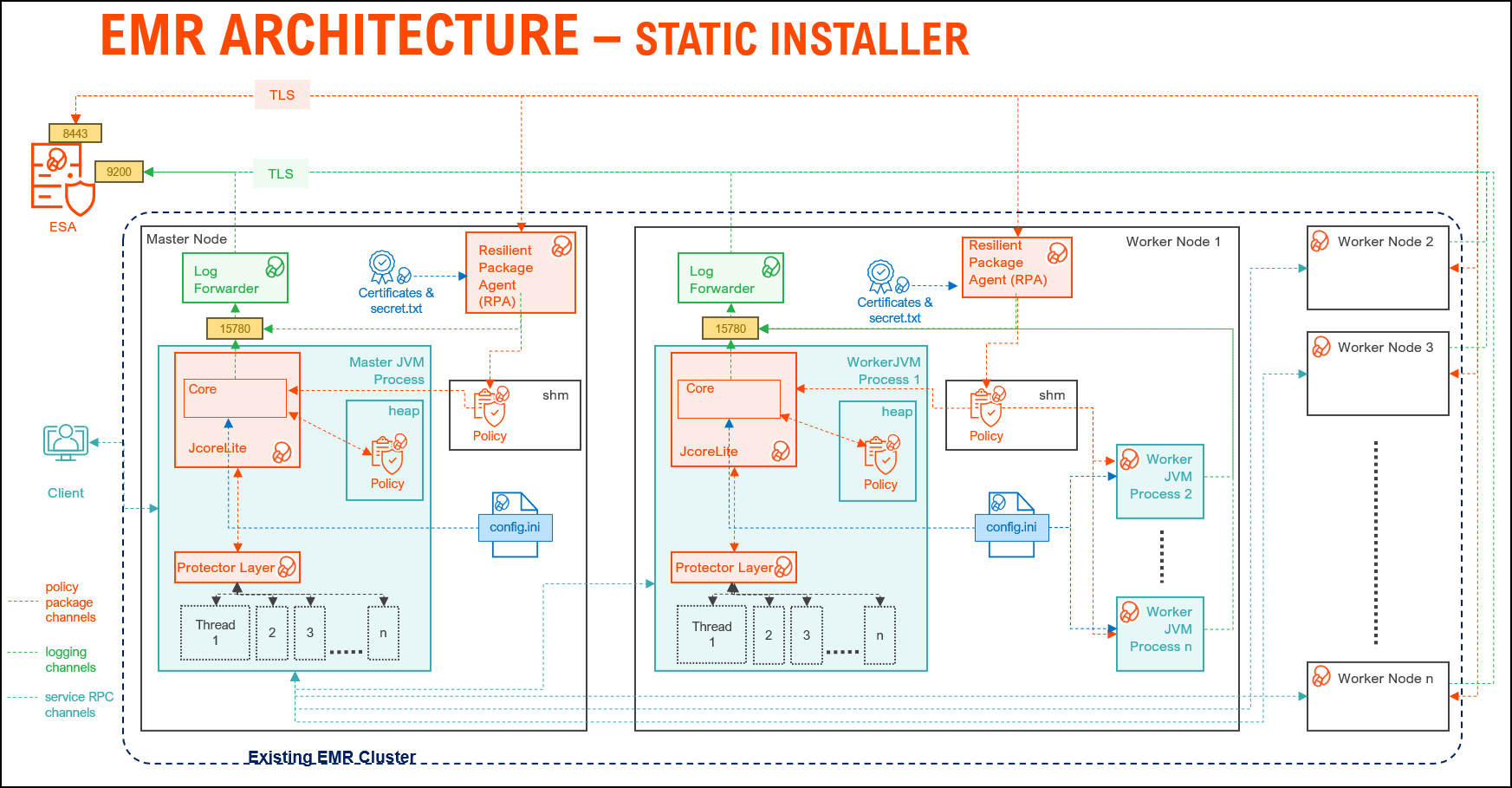
| Component | Description |
|---|---|
| RPAgent | A daemon running on each node that downloads the package from the ESA over a TLS channel using the installed Certificates. |
| Log Forwarder | A daemon running on each node that routes the audit logs and application logs to the ESA/Audit Store. |
| config.ini | A file on each node containing the set of configuration parameters to modify the protector behavior. |
| BDP Layer | Contains the Big Data Protector UDFs and APIs executing in the EMR environment. |
| JcoreLite | The JNI library that provides a Java API layer to the Core libraries. |
| Core | The set of various libraries that provide the Protegrity Core functionality. |
2.1.1.3 - EMR Serverless architecture
Amazon EMR Serverless is a modern, on-demand data processing architecture designed to eliminate the complexity of managing clusters for big data workloads. Unlike traditional EMR deployments, EMR Serverless dynamically provisions compute resources based on job requirements, enabling cost efficiency and scalability without manual intervention.
At its core, the architecture for EMR Serverless leverages containerized executors to run Spark or Hive applications in an isolated, secure environment. These containers are orchestrated by AWS, ensuring optimal resource utilization and fault tolerance. The design supports Protegrity data protection integration, making it suitable for enterprise-grade deployments where compliance and security are critical.
Key components include:
- Serverless Runtime: Supports Spark and Hive for analytics and ETL.
- Dynamic Scaling: Automatically adjusts resources to workload demands.
- Logging and Monitoring: Driver and executor logs are streamed to CloudWatch, with optional forwarding to external systems via Kinesis and Lambda for near real-time insights.
- Deployment Workflow: Applications are packaged as Docker images, stored in AWS ECR, and executed in EMR Serverless environments for consistent and reproducible runs.
The architecture for the EMR Serverless distribution of the Big Data Protector is depicted in the image below.
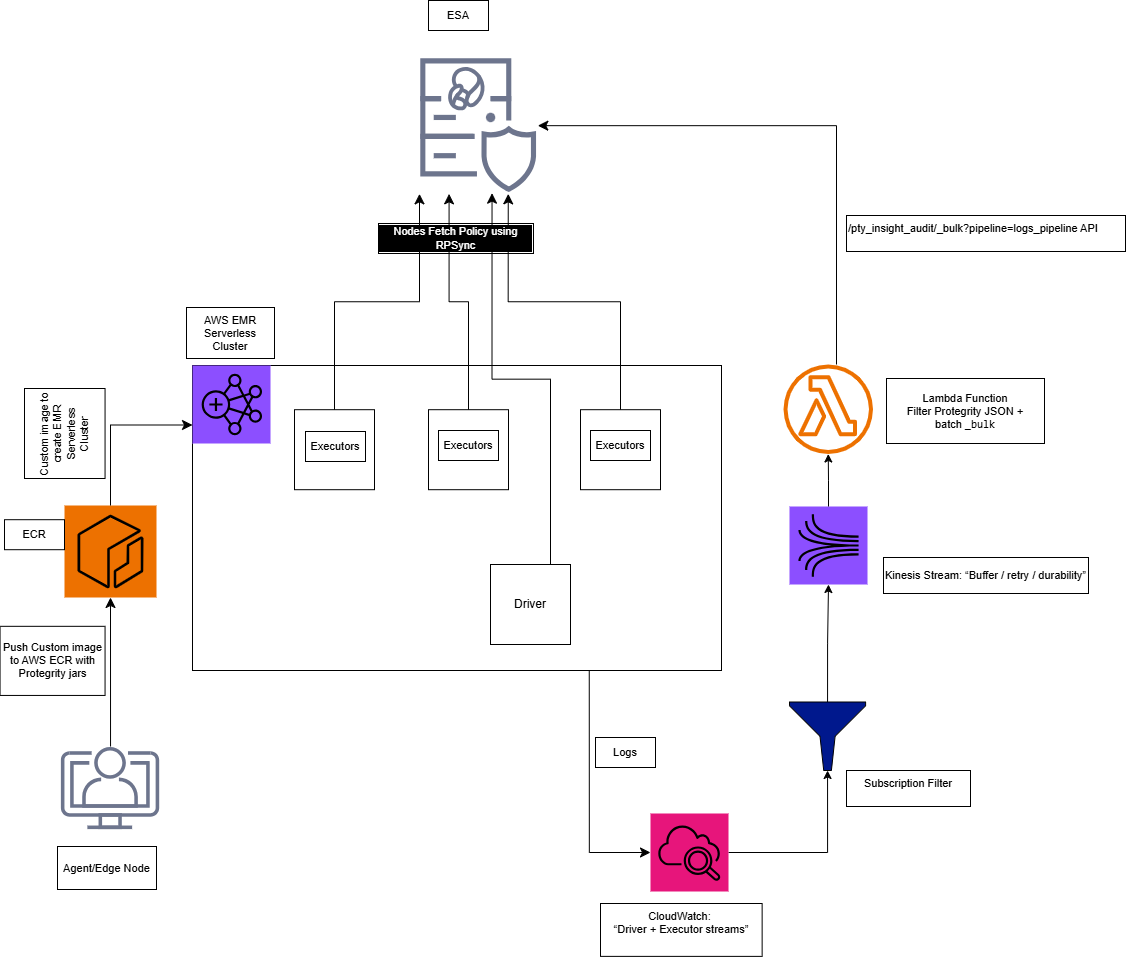
The overall process of installing the Big Data Protector in the EMR Serverless environment is outlined below.
Step 1: Executing the Configurator Script
- Interactive prompt collects all the configuration parameters.
- Input: ESA host/ports, AWS account/region, EMR Serverless application type, and ECR repository names.
- Output:
Installation_Files/directory withconfig.jsonand all the required files. - Files created:
config.json, copied JARs, scripts, and the certificate scripts.
Note: For more information, refer to Executing the Configurator Script.
Step 2: Deploying the BDP Image
python3 emr_serverless_setup_cli.py --config ../config.json deploy
Note: For more information, refer to EMR Serverless Setup CLI
Substep: Validating the Prerequisites
The script:
- Checks Docker, AWS CLI, credentials
- Verifies ECR repository exists
- Confirms all source files present
Substep: Preparing the Assets
The script:
- Reads
config.jsonandconfig.ini.template - Generates
config.iniwith:- [sync] section: ESA policy server connection (host:8443)
- [log] section: output=stdout
- Updates the
GetCertificates.shscript with ESA host/port
Note: After preparing the assets, if required, modify the
config.inifile as per requirements.
Substep: Generating the Dockerfile
The script:
- Generates the Dockerfile using the values from the
config.jsonfile.
Note: After generating the dockerfile, if required, modify the dockerfile as per requirements.
Substep: Building the Docker Image
The script:
- Prompts for ESA credentials (username/password or JWT token)
- Downloads the certificates from ESA:8443
- Builds the Docker image
Step 3: Pushing the Image to ECR
The script:
- Logs in to ECR using AWS CLI
- Pushes image to ECR repository
The Big Data Protector build provides an automated script to execute the above-mentioned steps. For more information, refer to EMR Serverless Setup CLI.
Understanding the Logging Architecture
- The driver/executor logs are written into the CloudWatch Log group.
- The CloudWatch Logs Subscription filter streams the matching log lines into Kinesis Data Streams.
- The Lambda function consumes the Kinesis batches, extracts only the Protegrity audit JSON lines, builds OpenSearch Bulk (_bulk) payload, and invokes the ESA endpoint.
Note: For the CloudWatch subscription filter, provide a filter according to the type of logs that are generated.
Note: For more information, refer to Setting up the Log Forwarder
2.1.2 - Preparing the environment
2.1.2.1 - Setting up for the Bootstrap Installer
The procedures mentioned in this section are applicable only for the Bootstrap installer approach to prepare the environment for the Big Data Protector.
2.1.2.1.1 - Verifying the prerequisites
The content mentioned in this section is applicable only for the Bootstrap approach to install the Big Data Protector.
Ensure the following prerequisites are available, before installing the Big Data Protector on an Amazon EMR cluster:
- It is recommended to be familiar with the following parts:
- The Amazon EMR environment
- Storage bucket, used to store the Big Data Protector installation files
- Bootstrap Action, used to invoke the installation of Big Data Protector
- Amazon Virtual Private Cloud (VPC)
- An ESA appliance v10.2.0 is installed and running.
- A host machine on the ARM64 architecture is available to execute the configurator script.
- EMR instance types supporting the Graviton architecture are available for the master, core, and task nodes. For example, m6g, r6g, or c6g.
- An S3 bucket is available to copy the Big Data Protector installation files, which are created using the Configurator script.
Note: For more information about creating an S3 bucket, refer to the Amazon documentation for creating the S3 bucket.
- The following table depicts the list of ports that are configured on ESA and the nodes in the cluster, which will run the Big Data Protector:
| Destination Port No. | Protocols | Sources | Destinations | Descriptions |
8443 | TCP | RPAgent on the Big Data Protector cluster node | ESA | The RPAgent communicates with ESA through port
8443 to download a Policy. |
9200 | Log Forwarder on the Big Data Protector cluster node | Protegrity Audit Store appliance | The Log Forwarder sends all the logs to the Protegrity
Audit Store appliance through port
9200. | |
15780 | Protector on the Big Data Protector cluster node | Log Forwarder on the Big Data Protector cluster node | The Big Data Protector writes Audit Logs to localhost
through port 15780. The RPAgent
Application Logs are also written to localhost through port
15780. The Log Forwarder reads the logs from
that socket. |
2.1.2.1.2 - Extracting the Big Data Protector Package
The steps mentioned in this section are applicable only for the Bootstrap approach to install the Big Data Protector.
After receiving the Big Data Protector installation package from Protegrity, copy it to any Amazon EC2 instance or any node that has connectivity to the ESA.
After downloading the Big Data Protector package, extract it to:
- Access the Configurator script and
- Install the Big Data Protector on all the nodes on an Amazon EMR cluster.
To extract the Configurator script from the installation package:
Log in to the CLI on a machine or an Amazon EC2 node that has connectivity to the ESA.
Note: The instance to extract the installation package must be on the ARM64 architecture.
Copy the Big Data Protector package
BigDataProtector_Linux-ALL-64_ARM64_EMR-<EMR_version>-64_<BDP_version>.tgzto any directory.For example, /opt/protegrity/.
To extract the contents of the package, run the following command:
tar -xvf BigDataProtector_Linux-ALL-64_ARM64_EMR-<EMR_version>-64_<BDP_version>.tgzPress ENTER.
The command extracts the installer package and the signature files.
BigDataProtector_Linux-ALL-64_ARM64_EMR-<EMR_version>-64_<BDP_version>.tgz
signatures/
signatures/BigDataProtector_Linux-ALL-64_ARM64_EMR-<EMR_version>-64_<BDP_version>.tgz_<BDP_version>.sig
Verify the authenticity of the build using the signatures folder. For more information, refer to Verification of Signed Protector Build.
To extract the configurator script, run the following command:
tar –xvf BigDataProtector_Linux-ALL-64_ARM64_EMR-<EMR_version>-64_<BDP_version>.tgzPress ENTER.
The command extracts the configurator script.
BDP_Configurator_EMR-<EMR_version>_<BDP_version>.sh
2.1.2.1.3 - Executing the Configurator Script
The steps mentioned in this section are applicable only for the Bootstrap approach to install the Big Data Protector.
Execute the configurator script to create the installation files for installing the Big Data Protector on an Amazon EMR cluster.
- New EMR cluster: For the bootstrap approach, the configurator script will:
- Download the certificates and key encryption files from ESA.
- Create the Big Data Protector installation files for a new EMR cluster.
- Create the bootstrap installer and classpath configurator script for a new EMR cluster.
- Copy the Big Data Protector installation files, bootstrap installer, and the classpath configurator script to the S3 bucket.
Before you begin:
- To export the variables for ESA IP and port, run the following command:
export ESA_IP=<ESA_IP_Address> export ESA_PORT=8443 - To create a directory for the certificates, run the following command:
sudo mkdir -p /opt/esa/certs - To download the Server certificate from ESA, run the following command:
openssl s_client -connect $ESA_IP:$ESA_PORT -servername $ESA_IP -showcerts </dev/null 2>/dev/null \ | sed -n '/-----BEGIN CERTIFICATE-----/,/-----END CERTIFICATE-----/p' \ | sudo tee /opt/esa/certs/ProtegrityCA.pem >/dev/null - To retrieve ESA FQDN, run the following command:
ESA_FQDN=$(openssl x509 -in /opt/esa/certs/ProtegrityCA.pem -noout -subject \ | grep -oP 'CN\s*=\s*\K[^,]+') echo "ESA FQDN: $ESA_FQDN" - To add the ESA FQDN and the IP Address to the
/etc/hostsfile, run the following command:echo "$ESA_IP $ESA_FQDN" | sudo tee -a /etc/hosts - Set the
SSL_CERT_FILEvariable on the instance where the configurator script will run. The variable must point to the location of the Server certificate. For example:export SSL_CERT_FILE=<full_path_to_the_server_certificate_file>
To execute the configurator script:
- Log in to the staging environment.
Note: The instance to execute the configurator script must be on the ARM64 architecture.
- Navigate to the directory that contains the
BDP_Configurator_EMR-<EMR_version>_<BDP_version>.shscript. - To execute the configurator script, run the following command:
./BDP_Configurator_EMR-<EMR_version>_<BDP_version>.sh - Press ENTER.
The prompt to continue the installation of the Big Data Protector appears.*********************************************************************** Welcome to the Big Data Protector Configurator Wizard *********************************************************************** This will create the Big Data Protector Installation files for AWS EMR. Do you want to continue? [yes or no]: - To continue, type
yes. - Press ENTER.
The prompt to create the Big Data Protector installation package, depending on the EMR cluster, appears.Protegrity Big Data Protector Configurator started... Enter the EMR deployment type for Big Data Protector: [ 1 ] : New EMR Cluster (Bootstrap) [ 2 ] : Existing EMR Cluster (Static) [ 3 ] : EMR Serverless (Containerized) [ 1, 2, or 3 ]: - To create the Big Data Protector installation package for a new EMR cluster, type
1. - Press ENTER.
The prompt to enter the S3 URI to upload the Big Data Protector installation files appears.Generating Big Data Protector for a new EMR cluster...... Enter the S3 URI where the BDP Installation files are to be uploaded. (E.g. s3://examplebucket/folder): - Type the path of the S3 storage bucket.
Note: Ensure that the path of the S3 storage bucket is in the following format:
where,s3://<bucket_name>/<folder_in_the_bucket>- <bucket_name> - specifies the name of the storage bucket.
- <folder_in_the_bucket> - specifies the directory within the bucket.
- Press ENTER.
The prompt to either upload the installation files to the S3 bucket or generate them locally appears.Choose one option among the following for BDP Installation files: [1] -> Upload files to 's3://<bucket_name>/<folder_in_the_bucket>' S3 URI. [2] -> Generate files locally to current working directory. (You would have to manually upload the files to the specified S3 URI) [ 1 or 2 ]: - To upload the installation files to the S3 storage bucket, type
1. - Press ENTER.
The prompt to select the type of AWS access key appears.Choose the Type of AWS Access Keys from the following options: [1] -> IAM User Access Keys (Permanent access key id & secret access key) [2] -> Temporary Security Credentials (Temporary access key id, secret access key & session token) [ 1 or 2 ]: - Depending on the type of AWS Access Keys you want to use, type
1or2. For example, to use the temporary security credentials, type2. - Press ENTER.
The prompt to enter the access key ID appears.Enter the Access Key ID: - Enter the access key ID.
- Press ENTER.
The prompt to enter the secret access key appears.Enter the Secret Access Key: - Enter the secret access key.
- Press ENTER.
The prompt to enter the security session token appears.Enter the Security Session Token: - Enter the Security Session Token.
- Press ENTER.
The prompt to enter ESA hostname appears.Enter ESA Hostname (FQDN, e.g. protegrity-esa.example.com): - Enter ESA hostname or FQDN.
- Press ENTER.
The prompt to enter the listening port for ESA appears.Using ESA_IP from environment: <ESA_IP_Address> Enter ESA host listening port: - Enter the listening port for ESA.
Alternatively, to use the default listening port, press ENTER. - Press ENTER.
The prompt to enter the JWT token appears.If you have an existing ESA JSON Web Token (JWT) with Export Certificates role, enter it otherwise enter 'no': - Enter the JWT token.
- Press ENTER.
The prompt to select the audit store type appears.Select the Audit Store type where Log Forwarder(s) should send logs to. [ 1 ] : Protegrity Audit Store [ 2 ] : External Audit Store [ 3 ] : Protegrity Audit Store + External Audit Store Enter the no.: - Depending on the Audit Store type, select any one of the following options:
Option Description 1To use the default setting using the Protegrity Audit Store appliance, type 1. If you enter1, then the default Fluent Bit configuration files are used and Fluent Bit will forward the logs to the Protegrity Audit Store appliances.2To use an external audit store, type 2. If you enter2, then the default Fluent Bit configuration files used for the External Audit Store are renamed. Theout.confandupstream.cfgin the/opt/protegrity/fluent-bit/data/config.d/directory are renamed toout.conf.bkpandupstream.cfg.bkprespectively. The renaming ensures these files will not be used by Fluent Bit. Additionally, the custom Fluent Bit configuration files for the external audit store are copied to the/opt/protegrity/fluent-bit/data/config.d/directory.3To use a combination of the default setting with an external audit store, type 3. If you enter3, then the default Fluent Bit configuration files used for the Protegrity Audit Store are not renamed. Theout.confandupstream.cfgin the/opt/protegrity/fluent-bit/data/config.d/directory retain the original name. However, the custom Fluent Bit configuration files for the external audit store are copied to the/opt/protegrity/fluent-bit/data/config.d/directory. - Press ENTER.
The prompt to enter the comma separated list of hostname or IP addresses appears.Enter comma-separated list of Hostnames/IP Addresses and/or Ports of Protegrity Audit Store. Allowed Syntax: hostname[:port][,hostname[:port],hostname[:port]...] (Default Value - <ESA_FQDN>:9200) Enter the list: - Enter the comma-separated IP addresses/ports in the correct syntax.
- Press ENTER.
The prompt to enter the local directory path that stores the custom Fluent Bit configuration file appears.Enter the local directory path on this node that stores the custom Fluent-Bit configuration files for External Audit Store:Note: The configurator script displays this prompt only for option
2or3in step 28. Selecting option2or3in step 28 copies the custom configuration files to the/<installation_directory>/fluent-bit/data/config.d/directory. This occurs during the execution of bootstrap script on the EMR nodes. - Enter the local directory path that stores the custom Fluent Bit configuration files.
- Press ENTER.
The prompt to generate the application logs for the RPAgent appears.Do you want RPAgent's log to be generated in a file? [yes or no]: - To generate the logs in a file, type
yes. - Press ENTER.
The script generates the installation files and uploads them to the specified S3 bucket.
RPAgent's log will be generated in a file. ************************************************************************************ Welcome to the RPAgent Setup Wizard. ************************************************************************************ Unpacking................... Extracting files... Unpacked rpagent compressed file... Temporarily setting up rpagent directory structure on current node... Unpacking... Extracting files... Certificate validation successful. Obtaining token from <ESA_FQDN>:8443... Downloading certificates from <ESA_FQDN>:8443... % Total % Received % Xferd Average Speed Time Time Time Current Dload Upload Total Spent Left Speed 100 11264 100 11264 0 0 163k 0 --:--:-- --:--:-- --:--:-- 164k Extracting certificates... Certificates successfully downloaded and stored in /<installation_dir>/rpagent/data Protegrity RPAgent installed in /<installation_dir>/rpagent. Retrieving the S3 bucket's AWS Region via AWS S3 REST API... Successfully retrieved S3 bucket's AWS region: <AWS_region_name> Started Uploading the generated installation files via AWS S3 REST API...... Uploading bdp_bootstrap_installer.sh to the S3 bucket. File uploaded to s3://<bucket_name>/<folder_in_the_bucket>/bdp_bootstrap_installer.sh Uploading bdp_classpath_configurator.py to the S3 bucket. File uploaded to s3://<bucket_name>/<folder_in_the_bucket>/bdp_classpath_configurator.py Uploading BigDataProtector_Linux-ALL-64_ARM64_EMR-<EMR_version>-64_<BDP_version>.tgz to the S3 bucket. File uploaded to s3://<bucket_name>/<folder_in_the_bucket>/BigDataProtector_Linux-ALL-64_ARM64_EMR-<EMR_version>-64_<BDP_version>.tgz Successfully Uploaded BigDataProtector_Linux-ALL-64_ARM64_EMR-<EMR_version>-64_<BDP_version>.tgz, bdp_bootstrap_installer.sh, bdp_classpath_configurator.py to S3 bucket 's3://<bucket_name>/<folder_in_the_bucket>' Successfully Generated installation files at ./Installation_Files/ directory. Successfully configured Big Data Protector for a new EMR cluster..
2.1.2.2 - Setting up for the Static Installer
The procedures mentioned in this section are applicable only for the Static installer approach to prepare the environment for the Big Data Protector.
2.1.2.2.1 - Verifying the prerequisites for Static Installer
The content mentioned in this section is applicable only for the Static installer approach to install the Big Data Protector.
Ensure the following prerequisites are available, before installing the Big Data Protector:
The EMR cluster is installed, configured, and running.
The ESA v10.2.0 instance is installed, configured, and running.
A host machine on the ARM64 architecture is available to execute the configurator script.
EMR instance types supporting the Graviton architecture are available for the master, core, and task nodes. For example, m6g, r6g, or c6g.
The static installer for EMR uses utilities, such as, pssh (parallel ssh) and pscp (parallel scp). These utilities require Python to be installed on the Primary node. To verify whether Python is installed on the Primary node, run the following command:
/usr/bin/env python --versionThe command returns the version of Python installed on the system.
If you are unable to detect Python on the Primary node, then ensure that you have a compatible version of Python installed on the lead node (preferably Python 3.x). Ensure that the utilities are able to detect the version of Python using the following command:
/usr/bin/env pythonA
sudoeruser account with privileges to perform the following tasks:- Update the system by modifying the configuration, permissions, or ownership of directories and files.
- Perform third party configuration.
- Create directories and files.
- Modify the permissions and ownership for the created directories and files.
- Set the required permissions to the create directories and files for the Protegrity Service Account.
- Permissions for using the SSH service.
The following user accounts are present to perform the required tasks:
ADMINISTRATOR_USERis the sudoer user account that is responsible to install and uninstall the Big Data Protector on the cluster. This user account must havesudoaccess to install the product.EXECUTOR_USER: is a user that has ownership of all Protegrity files, directories, and services.OPERATOR_USER: is responsible for performing tasks. The tasks include starting or stopping tasks, monitoring services, updating the configuration, and maintaining the cluster while the Big Data Protector is installed. To start, stop, or restart the Protegrity services, thensudoerprivileges is required for this user to impersonate theEXECUTOR_USER.- Depending on the requirements, a single user on the system may perform multiple roles. If a single user is performing multiple roles, then ensure that the following conditions are met:
- The user has the required permissions and privileges to impersonate the other user accounts, for performing their roles, and perform tasks as the impersonated user.
- The user is assigned the highest set of privileges, from the required roles that it needs to perform, to execute the required tasks. For example, if a single user is performing tasks as
ADMINISTRATOR_USER,EXECUTOR_USER, andOPERATOR_USER, ensure the user is assigned the privileges of theADMINISTRATOR_USER.
A Private Key file (.pem file) for the
sudoeruser is present on the Master node. The.pemfile is used to enable key-based authentication and to communicate with all the nodes in the EMR cluster.A key-based authentication for the
sudoeruser is provided for installing and using the Big Data Protector on the EMR cluster.Ensure that the
ADMINISTRATOR_USERorOPERATOR_USERattributes have the value of theNOPASSWDparameter set toALLin the sudoer’s file.The management scripts provided by the installer in the
cluster_utilsdirectory should be run only by the user (OPERATOR_USER) having privileges to impersonate theEXECUTOR_USER.- If the value of the
AUTOCREATE_PROTEGRITY_IT_USRparameter is set toNo, ensure a service group containing a user for running the Protegrity services on all the nodes in the cluster already exists. The parameter is available in theBDP.configfile. - If the Hadoop cluster is configured with AD or LDAP for user management, ensure to set the
AUTOCREATE_PROTEGRITY_IT_USRparameter toNo. The parameter is available in theBDP.configfile. Ensure that the required service account user is created on all the nodes in the cluster.
- If the value of the
The table lists the ports required for the EMR cluster.
| Destination Port No. | Protocols | Sources | Destinations | Descriptions |
8443 | TCP | RPAgent on the Big Data Protector cluster node | ESA | The RPAgent communicates with ESA through port
8443 to download a Policy. |
9200 | Log Forwarder on the Big Data Protector cluster node | Protegrity Audit Store appliance | The Log Forwarder sends all the logs to the Protegrity
Audit Store appliance through port
9200. | |
15780 | Protector on the Big Data Protector cluster node | Log Forwarder on the Big Data Protector cluster node | The Big Data Protector writes Audit Logs to localhost
through port 15780. The RPAgent
Application Logs are also written to localhost through port
15780. The Log Forwarder reads the logs from
that socket. |
2.1.2.2.2 - Executing the Configurator Script
Before you begin:
- To export the variables for ESA IP and port, run the following command:
export ESA_IP=<ESA_IP_Address> export ESA_PORT=8443 - To create a directory for the certificates, run the following command:
sudo mkdir -p /opt/esa/certs - To download the Server certificate from ESA, run the following command:
openssl s_client -connect $ESA_IP:$ESA_PORT -servername $ESA_IP -showcerts </dev/null 2>/dev/null \ | sed -n '/-----BEGIN CERTIFICATE-----/,/-----END CERTIFICATE-----/p' \ | sudo tee /opt/esa/certs/ProtegrityCA.pem >/dev/null - To retrieve ESA FQDN, run the following command:
ESA_FQDN=$(openssl x509 -in /opt/esa/certs/ProtegrityCA.pem -noout -subject \ | grep -oP 'CN\s*=\s*\K[^,]+') echo "ESA FQDN: $ESA_FQDN" - To add the ESA FQDN and the IP Address to the
/etc/hostsfile, run the following command:echo "$ESA_IP $ESA_FQDN" | sudo tee -a /etc/hosts - Set the
SSL_CERT_FILEvariable on the instance where the configurator script will run. The variable must point to the location of the Server certificate. For example:export SSL_CERT_FILE=<full_path_to_the_server_certificate_file>
To execute the configurator script:
Log in to the staging environment.
Note: The instance to execute the configurator script must be on the ARM64 architecture.
Navigate to the directory that contains the
BDP_Configurator_EMR-<EMR_version>_<BDP_version>.shscript.To execute the configurator script, run the following command:
./BDP_Configurator_EMR-<EMR_version>_<BDP_version>.shPress ENTER.
The prompt to continue the installation of the Big Data Protector appears.
***********************************************************************
        Welcome to the Big Data Protector Configurator Wizard
***********************************************************************
This will create the Big Data Protector Installation files for AWS EMR.
Do you want to continue? [yes or no]:
To continue, type
yes.Press ENTER.
The prompt to create the Big Data Protector installation package, depending on the EMR cluster, appears.
Protegrity Big Data Protector Configurator started...

Enter the EMR deployment type for Big Data Protector:
[ 1 ] : New EMR Cluster (Bootstrap)
[ 2 ] : Existing EMR Cluster (Static)
[ 3 ] : EMR Serverless (Containerized)
[ 1, 2, or 3 ]:
To create the Big Data Protector installation package for an existing EMR cluster, type
2.Press ENTER. The script generates the installation files to install the Big Data Protector on an existing EMR cluster.
Generating Big Data Protector for an existing EMR cluster..... Successfully configured Big Data Protector for an existing EMR cluster.. Use the ./Installation_Files/BigDataProtector_Linux-ALL-64_ARM64_EMR-<EMR_version>-64_<BDP_version>.tgz file to continue the installation.
2.1.2.2.3 - Extracting the Installation Package
The steps mentioned in this section are applicable only for the Static installer approach to install the Big Data Protector.
Note: The instance to extract the installation package must be on the ARM64 architecture.
To extract the files from the installation package:
- Copy the installation package
BigDataProtector_Linux-ALL-64_ARM64_EMR-<emr_version>-64_<BDP_version>.tgzto the Master node on the EMR cluster in any temporary directory. For example,/opt/protegrity/.
Note: The installation package is the artifact created by the configurator script. The installation package is available under the
/Installation_Files/directory from where the configurator script is executed.
To extract the files from the installation package, run the following command:
tar -xvf BigDataProtector_Linux-ALL-64_ARM64_EMR-<emr_version>-64_<BDP_version>.tgzPress ENTER. The command extracts the following files:
JcoreLiteSetup_Linux_arm64_<JcoreLite_version>.sh ptyLogAnalyzer.sh bdp_classpath_configurator.py RPAgent_Setup_Linux_arm64_<core_version>.sh PepMapreduce<MapReduce_version>Setup_Linux_emr-<emr_version>_<BDP_version>.sh uninstall.sh bdp_common/ bdp_common/bdp.properties.template bdp_common/config.ini.template Logforwarder_Setup_Linux_arm64_<core_version>.sh node_uninstall.sh ptyLog_Consolidator.sh BDP.config PepSpark<Spark_version>Setup_Linux_emr-<emr_version>_<BDP_version>.sh PepHive<Hive_version>Setup_Linux_emr-<emr_version>_<BDP_version>.sh bdp_classpath_deconfigurator.py PepHbaseProtector<HBase_version>Setup_Linux_emr-<emr_version>_<BDP_version>.sh PepPig<pig_version>Setup_Linux_emr-<emr_version>_<BDP_version>.sh BdpInstallx.x.x_Linux_<BDP_version>.sh
2.1.2.2.4 - Updating the BDP.Config File
The steps mentioned in this section are applicable only for the Static Installer approach to install the Big Data Protector.
Note: Ensure that the
BDP.configfile is updated before the Big Data Protector is installed.
Do not update the BDP.config file when the installation of the Big Data Protector is in progress.
To update the BDP.config file:
Create a
hostsfile containing the IP addresses of all the nodes in the cluster, except the Lead node, and specify them in theBDP.configfile.The installation script uses this file to install the Big Data Protector on the nodes.
Open the
BDP.configfile in any text editor and modify the following parameter values:HADOOP_DIR– is the installation home directory for the Hadoop distribution.PROTEGRITY_DIR– is the directory where the Big Data Protector will be installed.The examples used in this document assume that the Big Data Protector is installed in the
/opt/protegrity/directory.CLUSTERLIST_FILE– contains the host name or IP addresses all the nodes in the cluster, except the Lead node. The file lists one host name and IP address per line.Ensure that you specify the file name with the complete path.
SPARK_PROTECTOR– Specifies one of the following values, as required:Yes– installs the Spark protector. Set the value of this parameter toYes, to run Hive UDFs with Spark SQL. This value is also required to use the Spark protector samples if theINSTALL_DEMOparameter is set toYes.No– Specifies to skip installing the Spark protector.
AUTOCREATE_PROTEGRITY_IT_USR– Determines the Protegrity service account. The service group and service username specified in thePROTEGRITY_IT_USR_GROUPandPROTEGRITY_IT_USRparameters respectively will be created if this parameter is set toYes. One of the following values can be specified, as required:Yes– Instructs the installer to create the service groupPROTEGRITY_IT_USR_GROUPcontaining the userPROTEGRITY_IT_USRfor executing the Protegrity services on all the nodes in the cluster.If the service group or service user are already present, then the installer exits.
If you uninstall the Big Data Protector, then the service group and the service user are deleted.
No– Instructs the installer to skip creating a service groupPROTEGRITY_IT_USR_GROUPwith the service userPROTEGRITY_IT_USRfor executing the Protegrity services on all the nodes in the cluster.
PROTEGRITY_IT_USR_GROUP– is the service group required for running the Protegrity services on all the nodes in the cluster. All the Protegrity installation directories are owned by this service group.PROTEGRITY_IT_USR– is the service account user required for running the Protegrity services on all the nodes in the cluster and is a part of the groupPROTEGRITY_IT_USR_GROUP. All the Protegrity installation directories are owned by this service user.
2.1.2.3 - Setting up for the EMR Serverless Installer
The procedures mentioned in this section are applicable only for the Serverless approach to prepare the environment for the Big Data Protector.
2.1.2.3.1 - Extracting the Big Data Protector Package
The steps mentioned in this section are applicable only for the Serverless approach to install the Big Data Protector.
After receiving the Big Data Protector installation package from Protegrity, copy it to any Amazon EC2 instance or any node that has connectivity to the ESA.
To extract the Configurator script from the installation package:
Log in to the CLI on a machine or an Amazon EC2 node that has connectivity to the ESA.
Note: The instance to extract the installation package must be on the ARM64 architecture.
Copy the Big Data Protector package
BigDataProtector_Linux-ALL-64_ARM64_EMR-<EMR_version>-64_<BDP_version>.tgzto any directory.For example, /opt/protegrity/.
To extract the contents of the package, run the following command:
tar -xvf BigDataProtector_Linux-ALL-64_ARM64_EMR-<EMR_version>-64_<BDP_version>.tgzPress ENTER.
The command extracts the installer package and the signature files.
BigDataProtector_Linux-ALL-64_ARM64_EMR-<EMR_version>-64_<BDP_version>.tgz signatures/ signatures/BigDataProtector_Linux-ALL-64_ARM64_EMR-<EMR_version>-64_<BDP_version>.tgz_<BDP_version>.sigVerify the authenticity of the build using the signatures folder. For more information, refer to Verification of Signed Protector Build.
To extract the configurator script, run the following command:
tar –xvf BigDataProtector_Linux-ALL-64_ARM64_EMR-<EMR_version>-64_<BDP_version>.tgzPress ENTER.
The command extracts the configurator script.
BDP_Configurator_EMR-<EMR_version>_<BDP_version>.sh
2.1.2.3.2 - Executing the Configurator Script
The steps mentioned in this section are applicable only for the Serverless approach to install the Big Data Protector.
The Big Data Protector configurator script:
- Generates the
config.jsonfile. - Generates the EMR Serverless deployment scripts.
- Provides the runtime artifacts and common utilities.
Before you begin:
- To export the variables for ESA IP and port, run the following command:
export ESA_IP=<ESA_IP_Address> export ESA_PORT=8443 - To create a directory for the certificates, run the following command:
sudo mkdir -p /opt/esa/certs - To download the Server certificate from ESA, run the following command:
openssl s_client -connect $ESA_IP:$ESA_PORT -servername $ESA_IP -showcerts </dev/null 2>/dev/null \ | sed -n '/-----BEGIN CERTIFICATE-----/,/-----END CERTIFICATE-----/p' \ | sudo tee /opt/esa/certs/ProtegrityCA.pem >/dev/null - To retrieve ESA FQDN, run the following command:
ESA_FQDN=$(openssl x509 -in /opt/esa/certs/ProtegrityCA.pem -noout -subject \ | grep -oP 'CN\s*=\s*\K[^,]+') echo "ESA FQDN: $ESA_FQDN" - To add the ESA FQDN and the IP Address to the
/etc/hostsfile, run the following command:echo "$ESA_IP $ESA_FQDN" | sudo tee -a /etc/hosts - Set the
SSL_CERT_FILEvariable on the instance where the configurator script will run. The variable must point to the location of the Server certificate. For example:export SSL_CERT_FILE=<full_path_to_the_server_certificate_file>
To execute the configurator script:
- Log in to the CLI on a machine or an Amazon EC2 node that has connectivity to the ESA.
Note: The instance to execute the configurator script must be on the ARM64 architecture.
- Navigate to the directory where the installation files are available.
- To execute the script, run the following command:
./BDP_Configurator_EMR-<EMR_version>_<BDP_version>.sh - Press ENTER.
The Big Data Protector Configurator Wizard with the prompt to continue appears.*********************************************************************** Welcome to the Big Data Protector Configurator Wizard *********************************************************************** This will create the Big Data Protector Installation files for AWS EMR. Do you want to continue? [yes or no]: - To continue, type
yes. - Press ENTER.
The prompt to select the deployment type appears.Protegrity Big Data Protector Configurator started... Enter the EMR deployment type for Big Data Protector: [ 1 ] : New EMR Cluster (Bootstrap) [ 2 ] : Existing EMR Cluster (Static) [ 3 ] : EMR Serverless (Containerized) [ 1, 2, or 3 ]: - To install the Big Data Protector using the Serverless approach, type
3. - Press ENTER.
The prompt to select the configuration mode appears.Generating Big Data Protector for EMR Serverless...... ================================================================ EMR Serverless - Configuration Setup ================================================================ The EMR Serverless deployment requires configuration values to be stored in a config.json file. This file is used by Python scripts to: - Generate the Dockerfile with BDP components - Build and tag the Docker image - Push the image to AWS ECR - Configure certificate downloads from ESA You have two options to provide this configuration: ================================================================ OPTION 1: Interactive Mode (Recommended) ================================================================ - Guided prompts will collect all required information - Values are validated during input - config.json is automatically generated - Faster and less error-prone ================================================================ OPTION 2: Silent Mode ================================================================ - A template config.json file with placeholders is created - You manually edit the file and replace all placeholders - Useful if you prefer to script or automate configuration - Requires careful attention to JSON syntax ================================================================ Select configuration mode: [ 1 ] : Interactive Mode (Guided prompts) [ 2 ] : Silent Mode (Edit config.json template) Enter your choice [1 or 2]: - To use the interactive configuration mode, type
1. - Press ENTER.
The prompt to verify the prerequisites appears.[OK] Selected: Interactive Mode ================================================================ EMR Serverless - Prerequisites Checklist ================================================================ Before proceeding, please ensure you have the following information ready: [OK] ESA Configuration: - ESA Server FQDN (matching cert CN; used to fetch certs on build host) - ESA Server private IP (used as runtime [sync] host inside the image) - ESA Port (default: 8443) - ESA Admin Username & Password (prompted during build) [OK] EMR Serverless Configuration: [1/6] EMR Release Label (e.g., emr-6.15.0, emr-7.0.0) [2/6] Runtime Selection (Spark or Hive) [3/6] AWS Account ID (12-digit number) [4/6] AWS Region (e.g., us-east-1, us-west-2) [5/6] ECR Repository Name (where Docker image will be stored) [6/6] Docker Image Tag (e.g., latest, v1.0.0) ================================================================ Do you have all the required information to proceed? [yes/no]: - If all the prerequisites are available, type
yes. - Press ENTER.
The prompt to enter the ESA host name appears.[OK] Proceeding with interactive configuration... Enter ESA Hostname (FQDN, e.g. protegrity-esa.example.com): - Enter the ESA Hostname or fully qualified domain name (FQDN).
- Press ENTER.
The prompt to enter the IP Address for ESA appears.Enter the ESA private IP address (used as runtime [sync] host): - Enter the IP address of ESA.
- Press ENTER.
The prompt to enter the ESA listening port appears.Enter ESA host listening port [8443]: - Enter the listening port.
- Press ENTER.
The prompt to enter the EMR release label appears.================================================================ EMR Serverless Configuration - Step by Step ================================================================ ESA Server: <ESA_FQDN>:8443 (runtime IP: <ESA_IP_Address>) [1/6] EMR Release Label ------------------------------------------------------ Specify the EMR release version you want to use. Note: Not all EMR versions have serverless images available. For available versions, visit AWS EMR Serverless documentation. Enter EMR Release Label (e.g., emr-7.13.0): - Enter the EMR version.
- Press ENTER.
The prompt to select the processing engine appears.[2/6] Runtime Selection ------------------------------------------------------ Choose the processing engine for your EMR Serverless application. Spark: For data processing, ETL, and analytics Hive: For SQL queries on large datasets Select Runtime: [ 1 ] : Spark [ 2 ] : Hive Enter your choice [1 or 2]: - Depending on the requirements, type
1or2. - Press ENTER.
The prompt to enter the AWS Account ID appears.[3/6] AWS Account ID ------------------------------------------------------ Your 12-digit AWS Account ID is required to: - Access AWS ECR (Elastic Container Registry) - Identify your AWS resources Find it at: AWS Console > Account (top-right) > My Account Enter AWS Account ID (12 digits): - Enter the AWS Account ID.
- Press ENTER.
The prompt to enter the AWS region where the EMR Serverless resources will be deployed appears.[4/6] AWS Region ------------------------------------------------------ Specify the AWS region where your EMR Serverless resources will be deployed (e.g., us-east-1, us-west-2, eu-west-1). Note: - Your ECR repository and EMR Serverless application must be in same region. Enter AWS Region (e.g., us-east-1): - Enter the region name.
- Press ENTER.
The prompt to enter the ECR Repository Name appears.[5/6] ECR Repository Name ------------------------------------------------------ AWS ECR (Elastic Container Registry) repository where the BDP Docker image will be stored and pulled from. Repository naming rules: - Lowercase letters, numbers, hyphens, underscores, forward slashes - 2-256 characters long Enter ECR Repository Name: - Enter the ECR repository name.
- Press ENTER.
The prompt to enter the docker image tag appears.[6/6] Docker Image Tag ------------------------------------------------------ Tag for the Docker image in ECR. This helps identify different versions of your BDP image. Enter Docker Image Tag [default: latest]: - Enter the docker image tag.
- Press ENTER.
The script completes the EMR Serverless configuration.The directory structure of the artifacts, after executing the configurator script is listed below.================================================================ [OK] EMR Serverless configuration completed successfully! ================================================================ Generated config.json file successfully at <install_dir>/Installation_Files/config.json ================================================================ [OK] Successfully configured Big Data Protector for EMR Serverless! ================================================================ Generated Files in ./Installation_Files/ directory: - config.json - EMR Serverless configuration - scripts/ - Python deployment CLIs +-- emr_serverless_setup_cli.py - Main deployment CLI +-- lambda_function.py - Lambda for ESA audit log forwarding - runtime/ - BDP JAR files (Spark/Hive) - common/ - JcoreLite, config.ini, GetCertificates.sh - BigDataProtector_Linux-ALL-64_ARM64_<EMR_version>-64_<BDP_version>.tgz - Complete package tarball ================================================================ Using emr_serverless_setup_cli.py - Main Deployment Tool ================================================================ This Python CLI provides commands to build and deploy BDP Docker images: AVAILABLE COMMANDS: validate - Check prerequisites (Docker, AWS CLI, config.json) prepare-assets - Update config.ini and GetCertificates.sh with ESA details generate-dockerfile - Create Dockerfile from config.json build - Build Docker image locally (preserves manual edits) push - Push existing image to AWS ECR deploy - Full pipeline: validate -> prepare -> generate -> build -> push USAGE: cd ./Installation_Files/scripts python3 emr_serverless_setup_cli.py --config ../config.json <COMMAND> TYPICAL WORKFLOW: # Option 1: Full automated deployment python3 emr_serverless_setup_cli.py --config ../config.json deploy # Option 2: Step-by-step with manual edits python3 emr_serverless_setup_cli.py --config ../config.json validate python3 emr_serverless_setup_cli.py --config ../config.json prepare-assets python3 emr_serverless_setup_cli.py --config ../config.json generate-dockerfile # Manually edit Dockerfile if needed python3 emr_serverless_setup_cli.py --config ../config.json build python3 emr_serverless_setup_cli.py --config ../config.json push NOTES: - During 'deploy' or 'build', you'll be prompted for ESA credentials - Credentials are used during build only, NOT stored in image layers - ECR authentication is handled automatically by AWS CLI - Use 'build' command to preserve manual Dockerfile edits ================================================================ Audit Logging Configuration ================================================================ IMPORTANT: EMR Serverless uses stdout for audit log output. - All audit logs are written to standard output (stdout) - Logs are automatically captured by AWS CloudWatch Logs - CloudWatch logs are stored in your configured S3 bucket To access audit logs: 1. Via CloudWatch: AWS Console -> CloudWatch -> Log Groups 2. Via S3 Bucket: Check your EMR Serverless application's S3 logs location ================================================================ lambda_function.py - ESA Audit Log Forwarder ================================================================ For centralized audit log forwarding to ESA Audit Store, use the provided lambda_function.py - a ready-to-deploy AWS Lambda function. LOG FLOW: EMR Serverless (stdout) → CloudWatch Logs → Subscription Filter → Kinesis Data Stream → Lambda Function → ESA OpenSearch Endpoint LAMBDA FUNCTION FEATURES: - Triggered by Kinesis Data Stream events - Decodes and parses CloudWatch log data from Kinesis records - Forwards logs to ESA using OpenSearch bulk API - TLS encryption with certificate-based authentication - Automatic batching, retries, and error recovery REQUIRED ENVIRONMENT VARIABLES: ESA_BULK_URL - Full OpenSearch bulk API endpoint Example: https://<IP_Address>:9200/pty_insight_audit/_bulk?pipeline=logs_pipeline ESA_CA_SECRET_ID - AWS Secrets Manager ARN for CA certificate ESA_CA_SECRET_JSON_KEY- JSON key name in secret (default: ca_pem) ESA_CA_PATH - Local CA certificate path (default: ./CA.pem) HTTP_TIMEOUT_SEC - HTTP timeout in seconds (default: 120) BULK_MAX_BYTES - Max bulk request size (default: 5242880) ONLY_MATCH_SUBSTRING - Filter logs by substring (e.g., "logtype") For detailed deployment steps, refer to the EMR Serverless documentation. ================================================================A sample output of the config.json file is listed for reference.Installation_Files/ ├── config.json ├── scripts/ │ ├── emr_serverless_setup_cli.py | ├── lambda_function.py ├── runtime/ │ ├── pephive-3.1.3_v<BDP_version>.jar │ └── pepspark-3.5.6_v<BDP_version>.jar ├── common/ │ ├── jcorelite.jar │ ├── jcorelite.plm │ ├── GetCertificates.sh │ ├── config.ini.template └── BigDataProtector_Linux-ALL-64_ARM64_EMR.Serverless-<EMR_version>-64_<BDP_version>.tgz{ "_comment": "EMR Serverless Big Data Protector Configuration - Generated by configurator.sh", "runtime": "spark", "region": "<region_name>", "registryHostname": "<AWS_Account_ID>.dkr.ecr.<region_name>.amazonaws.com", "defaults": { "syncHost": "<ESA_FQDN>", "runtimeHost": "<ESA_IP_Address>", "syncPort": "8443", "syncProtocol": "https", "syncCAFile": "/opt/esacert/CA.pem", "syncCertFile": "/opt/esacert/cert.pem", "syncKeyFile": "/opt/esacert/cert.key", "syncSecretFile": "/opt/esacert/secret.txt", "syncRequestTimeout": 60, "certResource": "pty/v1/cert", "repositoryName": "<ecr_repo_name>", "imageTag": "<docker_image_tag>", "commonCopy": [ { "source": "common/jcorelite.jar", "destSpark": "/usr/lib/spark/jars/jcorelite.jar", "destHive": "/usr/lib/hive/lib/jcorelite.jar" }, { "source": "common/jcorelite.plm", "destSpark": "/usr/lib/spark/jars/jcorelite.plm", "destHive": "/usr/lib/hive/lib/jcorelite.plm" }, { "source": "common/GetCertificates.sh", "destSpark": "/opt/esacert/GetCertificates", "destHive": "/opt/esacert/GetCertificates" }, { "source": "common/config.ini", "destSpark": "/usr/lib/spark/data/config.ini", "destHive": "/usr/lib/hive/data/config.ini" } ] }, "runtimes": { "spark": { "baseImage": "public.ecr.aws/emr-serverless/spark/emr-7.13.0:latest", "contextDir": ".", "yumPackages": ["curl", "vim", "wget", "tar", "gzip"], "copy": [ { "source": "runtime/pepspark-*.jar", "dest": "/usr/lib/spark/jars/" } ], "chown": [ "/usr/lib/spark/jars", "/usr/lib/spark/lib", "/usr/lib/spark/data", "/opt/esacert" ], "user": "hadoop:hadoop" }, "hive": { "baseImage": "public.ecr.aws/emr-serverless/hive/emr-7.13.0:latest", "contextDir": ".", "yumPackages": ["curl", "vim", "wget", "tar", "gzip"], "copy": [ { "source": "runtime/pephive-*.jar", "dest": "/usr/lib/hive/lib/" } ], "chown": [ "/usr/lib/hive/lib", "/usr/lib/hive/data", "/opt/esacert" ], "user": "hadoop:hadoop" } } } - Set the following environment variables:
export AWS_ACCESS_KEY_ID="<AWS_ACCESS_KEY_ID>" export AWS_SECRET_ACCESS_KEY="<AWS_SECRET_ACCESS_KEY>" export AWS_SESSION_TOKEN="<AWS_SESSION_TOKEN>"
2.1.3 - Installing the protector
2.1.3.1 - Using the Bootstrap Installer
The Big Data Protector on Amazon EMR enables cluster creation using a bootstrap action. This action enables:
- Configuration of cluster instances
- Installation of custom and additional software
- Setting up of the environment variables
Bootstrap actions are scripts that run on cluster instances after they are launched. These scripts installs the specified applications during cluster creation and before the cluster nodes start processing data. To create a bootstrap action, can specify the script when creating the cluster in any one of the following methods:
- Amazon EMR console - pass the location of the script in the Bootstrap actions section.
- AWS CLI - pass the location of the script to the
--bootstrap-actionsparameter. - API
In this method of cluster creation, the nodes are automatically scaled depending on the workload. In case of instances where the workloads are minimal for a node, Amazon decommissions the node to balance the workload optimally.
2.1.3.1.1 - Creating a Cluster
The procedures mentioned in this section are applicable only for the Bootstrap approach to install the Big Data Protector.
Perform the following steps to create an EMR cluster on AWS and install Big Data Protector on all the nodes in the EMR cluster.
To install Big Data Protector on a New EMR Cluster:
On the AWS services screen, click EMR under the Analytics section. The Amazon EMR screen appears.
Click Create cluster. The Create Cluster - Quick Options screen appears.
Type the name of the cluster in the Cluster name box.
Depending on the requirements, enter the sum of the master and core nodes in the Number of instances box.
Click Create cluster. The Software and Steps tab on the Create Cluster - Advanced Options screen appears.
Depending on the requirements, select the components under the Software Configuration section.
Click Next. The Hardware tab on the Create Cluster - Advanced Options screen appears.
On the Hardware tab, if required, you can add or reduce the number of instances of the Master, Core, and Task nodes.
Click Next. The General Cluster Settings tab on the Create Cluster - Advanced Options screen appears.
Type the name of the cluster in the Cluster name box.
Under the Bootstrap Actions area, in the Add bootstrap action drop-down list, click Custom action. The Add Bootstrap Action dialog box appears.
Enter the name of the bootstrap action in the Name box.
To select the location of the bootstrap script, click the icon besides the Script location box. The Select S3 File dialog box appears.
Enter the path of the S3 bucket in the URL box. The contents of the S3 bucket appear.
Select the
bdp_bootstrap_installer.shfile from the S3 bucket.Click Select. The Big Data Protector bootstrap script file is selected and the Add Bootstrap Action dialog box appears.
To specify the directory to install the Big Data Protector on the nodes in the cluster, provide the directory path in the Optional arguments box. If an installation directory for the Big Data Protector is not specified, then
/opt/protegrity/is considered as the default directory.Click Add. The General Cluster Settings tab on the Create Cluster - Advanced Options screen appears and the Bootstrap actions are updated.
Click Next. The Security tab on the Create Cluster - Advanced Options screen appears.
Select the required EC2 key pair for the EMR cluster from the EC2 key pair drop-down list.
Click Create Cluster. The EMR cluster is created, Big Data Protector is installed on all the nodes in the cluster, and the required Big Data Protector parameters are configured.
Alternatively, create a new EMR cluster and install the Big Data Protector on the nodes in the cluster using the following command:
aws emr create-cluster --auto-scaling-role EMR_AutoScaling_DefaultRole --termination-protected --applications Name=Hadoop Name=Hive Name=Pig Name=Hue Name=Spark Name=Tez Name=HBase --bootstrap-actions '[{"Path":"<S3_Path_For_BootstrapInstaller>","Name":"<Script_Name>"}]' --ec2-attributes '{"KeyName":"<KEY_NAME>","InstanceProfile":"EMR_EC2_DefaultRole","EmrManagedSlaveSecurityGroup":"sg-c8ef00de","EmrManagedMasterSecurityGroup":"sg-2deb043b"}' --service-role EMR_DefaultRole --enable-debugging --release-label emr-<EMR_Version> --log-uri 's3n://aws-logs-406396743807-<region_name>/elasticmapreduce/' --name '<Cluster_Name>' --instance-groups '[{"InstanceCount":2,"InstanceGroupType":"CORE","InstanceType":"<instance_type>","Name":"Core - 2"},{"InstanceCount":1,"InstanceGroupType":"MASTER","InstanceType":"<instance_type>","Name":"Master - 1"}]' – scale-down-behavior TERMINATE_AT_INSTANCE_HOUR --region <region_name>where:
S3_Path_For_BootstrapInstaller: Specifies the S3 bucket path containing the Big Data Protector bootstrap installer script.Script_Name: Specifies the name of the Big Data Protector installation script.KEY_NAME: Specifies the Private Key file on the Master node in the EMR cluster, which is used to communicate with the other nodes in the cluster.Cluster_Name: Specifies the name of the new EMR cluster.
2.1.3.1.2 - Managing the Cluster Nodes
The steps mentioned in this section are applicable only for the Bootstrap approach to install the Big Data Protector.
Depending on the workload on the EMR cluster, you can add or remove the Big Data Protector nodes. You can either set the cluster to automatically scale or manually add or remove nodes in the EMR cluster. You can add or remove nodes in the EMR cluster either while you create the cluster or after you have created the cluster. Before you add or remove the nodes from the cluster, ensure that you save all your data to S3, as standard practice, to avoid any data loss.
This section covers the procedure to add or remove nodes from an Amazon EMR cluster after you have created it.
To add or remove nodes from an Amazon EMR cluster:
- On the AWS management console, expand Services and click Analytics.
The sub-menu appears. - From the sub-menu, click EMR.
The Amazon EMR page appears. - Click the required cluster.
The Properties tab of the cluster appears. - Click the Instances tab.
- To add an instance, perform the following steps:
- Under Instance groups, click Add task instance group. The Add task instance group page appears.
- In the Name box, enter the name to identify the node.
- From the Choose EC2 instance type list, select the required storage type.
- In the Instance group size box, enter the required number of instances.
- Click Add task instance group. The new instance is added to the node and appears on the Instances tab.
- To resize an instance, perform the following steps:
- Under Instance groups, select the required instance that you want to resize.
- Click Resize instance group. The Resize page appears.
- In the Instance group size box, enter the required number of instances.
- Click Resize. The instance is resized as per the inputs and appears on the Instances tab.
2.1.3.1.3 - Verifying the Parameters
The content mentioned in this section is applicable only for the Bootstrap approach to install the Big Data Protector.
Before using Big Data Protector, configure the required Protegrity-related parameters in EMR. The Big Data Protector configuration parameters are set for the EMR cluster when it is installed on all the nodes in the cluster.
The following table provides the parameters that are set for the existing Amazon EMR cluster before using the Big Data Protector:
| Component | Configuration File | Updated Classpath Parameter |
|---|---|---|
| MapReduce | /etc/hadoop/conf/mapred-site.xml | mapreduce.application.classpath : /opt/protegrity/pepmapreduce/lib/* /opt/protegrity/pephive/lib/* /opt/protegrity/bdp_version/ mapreduce.admin.user.env : LD_LIBRARY_PATH=/opt/protegrity/jpeplite/lib |
| Hive | /etc/hive/conf/hive-site.xml /etc/tez/conf/tez-site.xml /etc/hive/conf/hive-env.sh | hive.exec.pre.hooks : com.protegrity.hive.PtyHiveUserPreHook tez.cluster.additional.classpath.prefix:/opt/protegrity/pephive/lib/:/opt/protegrity/bdp_version/ tez.am.launch.env: LD_LIBRARY_PATH=/opt/protegrity/jpeplite/lib/ export HIVE_CLASSPATH=${HIVE_CLASSPATH}:/opt/protegrity/pephive/lib/:/opt/protegrity/bdp_version/ export JAVA_LIBRARY_PATH=${JAVA_LIBRARY_PATH}:/opt/protegrity/jpeplite/lib/ |
| Pig | /etc/pig/conf/pig-env.sh | PIG_CLASSPATH="/opt/protegrity/peppig/lib/*:/opt/protegrity/bdp_version/" export JAVA_LIBRARY_PATH=${JAVA_LIBRARY_PATH}:/opt/protegrity/jpeplite/lib/ |
| HBase | /etc/hbase/conf/hbase-site.xml /etc/hbase/conf/hbase-env.sh | hbase.coprocessor.region.classes:com.protegrity.hbase.PTYRegionObserver export HBASE_CLASSPATH=${HBASE_CLASSPATH}:/opt/protegrity/pephbase/lib/*:/opt/protegrity/bdp_version/ export JAVA_LIBRARY_PATH=${JAVA_LIBRARY_PATH}:/opt/protegrity/jpeplite/lib/ |
| Spark | /etc/spark/conf/spark-defaults.conf | spark.driver.extraClassPath=/opt/protegrity/pephive/lib/:/opt/protegrity/pepspark/lib/:/opt/protegrity/bdp_version/ spark.executor.extraClassPath=/opt/protegrity/pephive/lib/:/opt/protegrity/pepspark/lib/:/opt/protegrity/bdp_version/ spark.executor.extraLibraryPath= /opt/protegrity/jpeplite/lib spark.driver.extraLibraryPath= /opt/protegrity/jpeplite/lib |
2.1.3.2 - Using the Static Installer
The static installer method of installation is applicable where the Big Data Protector must be installed on an existing EMR cluster. Using the Static Installer, users can enforce data protection policies at a granular level. This feature helps organizations to define specific rules for data protection based on sensitivity and usage.
The nodes in the cluster created using the static installer are do not have auto-scaling enabled. The nodes must be manually added or decommissioned depending upon the usage. The installation provides additional scripts to monitor and control the cluster behavior. These scripts are available in the <installation_directory>/cluster_utils/ directory after installation.
2.1.3.2.1 - Installing the Protector on all the Nodes
The steps mentioned in this section are applicable only for the Static Installer approach to install the Big Data Protector.
Before you begin:
- To export the variables for ESA IP and port, run the following command:
export ESA_IP=<ESA_IP_Address> export ESA_PORT=8443 - To create a directory for the certificates, run the following command:
sudo mkdir -p /opt/esa/certs - To download the Server certificate from ESA, run the following command:
openssl s_client -connect $ESA_IP:$ESA_PORT -servername $ESA_IP -showcerts </dev/null 2>/dev/null \ | sed -n '/-----BEGIN CERTIFICATE-----/,/-----END CERTIFICATE-----/p' \ | sudo tee /opt/esa/certs/ProtegrityCA.pem >/dev/null - To retrieve ESA FQDN, run the following command:
ESA_FQDN=$(openssl x509 -in /opt/esa/certs/ProtegrityCA.pem -noout -subject \ | grep -oP 'CN\s*=\s*\K[^,]+') echo "ESA FQDN: $ESA_FQDN" - To add the ESA FQDN and the IP Address to the
/etc/hostsfile, run the following command:echo "$ESA_IP $ESA_FQDN" | sudo tee -a /etc/hosts - Set the
SSL_CERT_FILEvariable on the instance where the configurator script will run. The variable must point to the location of the Server certificate. For example:export SSL_CERT_FILE=<full_path_to_the_server_certificate_file>
To install the protector on all the nodes:
Log in to the Master or Lead node of the EMR cluster.
Navigate to the directory that contains the
BdpInstallx.x.x_Linux_<BDP_version>.shscript.To run the installer, execute the following script:
./BdpInstallx.x.x_Linux_<BDP_version>.shPress ENTER.
The prompt to continue the installation of the Big Data Protector appears.
************************************************************************************ Welcome to the Hadoop Big Data Protector Setup Wizard ************************************************************************************ This will install the Hadoop Big Data Protector on your system. This installation requires a Private Key file for communicating with other nodes in the cluster. Do you want to continue? [yes or no]:To continue, type
yes.Press ENTER.
The prompt to enter path of the Private Key file (.pem file) appears.
Big Data Protector installation started Enter the path of the Private Key (.PEM) file:Enter the path of the
.PEMfile.Press ENTER.
The prompt to enter the ESA hostname or FQDN appears.
libhadoop.so located in directory '/usr/lib/hadoop/lib/native' Unpacking... Extracting files... Preparing for cluster deploy, Wait... Enter ESA Hostname (FQDN, e.g. protegrity-esa.example.com):If you have installed a proxy, then enter the IP address of the proxy node. Alternatively, enter ESA FQDN.
Press ENTER.
The prompt to enter the listening port for ESA appears.
Using ESA_IP from environment: <ESA_IP_Address>
Enter ESA host listening port:
Enter the port for ESA.
Press ENTER.
The prompt to enter the JWT token appears.
If you have an existing ESA JSON Web Token (JWT) with Export Certificates role, enter it otherwise enter 'no':Enter the JWT token.
Press ENTER.
Note: Failure to provide a JWT token will trigger the prompt to enter the username and password for ESA.
JWT was not provided. Script will now prompt for ESA username and password. Enter ESA Username:Enter the username for ESA.
Press ENTER.
The prompt to enter the password appears.
************************************************************************************ Welcome to the RPAgent Setup Wizard. ************************************************************************************ Unpacking................... Extracting files... Unpacked rpagent compressed file... RPAgent Installing in Lead Node... Please enter the password for downloading certificates:Enter the password.
Press ENTER.
The script retrieves the JWT token from ESA, installs the RPAgent, and the prompt to select the Audit Store type appears.
Running RPAgent setup... Running RPAgentSetup against <ESA_FQDN>:8443 ... Unpacking... Extracting files... Certificate validation successful. Obtaining token from <ESA_FQDN>:8443... Downloading certificates from <ESA_FQDN>:8443... % Total % Received % Xferd Average Speed Time Time Time Current Dload Upload Total Spent Left Speed 100 11264 100 11264 0 0 230.4k 0 0 Extracting certificates... Certificates successfully downloaded and stored in /opt/protegrity/rpagent/data Protegrity RPAgent installed in /opt/protegrity/rpagent. ------------------------------------------------------------ RPAgent installed on Lead node at location /opt/protegrity/rpagent. Performing install on other nodes... RPAgent installed on other nodes at location /opt/protegrity/rpagent. Check the status in /opt/protegrity/logs/rpagent_setup.log Select the Audit Store type where Log Forwarder(s) should send logs to. [ 1 ] : Protegrity Audit Store [ 2 ] : External Audit Store [ 3 ] : Protegrity Audit Store + External Audit Store Enter the no.:Depending on the Audit Store type, select any one of the following options:
Option Description 1To use the default setting using the Protegrity Audit Store appliance, type 1. If you enter1, then the default Fluent Bit configuration files are used and Fluent Bit will forward the logs to the Protegrity Audit Store appliances.2To use an external audit store, type 2. If you enter2, then the default Fluent Bit configuration files used for the External Audit Store are renamed. Theout.confandupstream.cfgin the/opt/protegrity/fluent-bit/data/config.d/directory are renamed toout.conf.bkpandupstream.cfg.bkprespectively. The renaming ensures these files will not be used by Fluent Bit. Additionally, the custom Fluent Bit configuration files for the external audit store are copied to the/opt/protegrity/fluent-bit/data/config.d/directory.3To use a combination of the default setting with an external audit store, type 3. If you enter3, then the default Fluent Bit configuration files used for the Protegrity Audit Store are not renamed. Theout.confandupstream.cfgin the/opt/protegrity/fluent-bit/data/config.d/directory retain the original name. However, the custom Fluent Bit configuration files for the external audit store are copied to the/opt/protegrity/fluent-bit/data/config.d/directory.Press ENTER.
The prompt to enter the comma separated list of hostnames/IP addresses appears.
Enter comma-separated list of Hostnames/IP Addresses and/or Ports of Protegrity Audit Store. Allowed Syntax: hostname[:port][,hostname[:port],hostname[:port]...] (Default Value - <ESA_FQDN>:9200) Enter the list:To use the default value, press ENTER.
The prompt to enter the location of the Fluent Bit configuration file appears.
Enter the local directory path on this node that stores the custom Fluent-Bit configuration files for External Audit Store:Note: This prompt appears only for option
2in step19. Selecting option2in step 19 copies the custom configuration files to the/<Installation directory>/fluent-bit/data/config.d/directory on all the EMR nodes selected for installation.Enter the path that contains the Fluent Bit configuration file.
Press ENTER.
The prompt to save the RPAgent’s log in a file appears.
Do you want RPAgent's log to be generated in a file? [yes or no]:To generate the logs in a file, type
yes.Press ENTER.
The script installs the protector on all the nodes in the cluster.
RPAgent's log will be generated in a file.
************************************************************************************
                Welcome to the LogForwarder Setup Wizard.
************************************************************************************

Unpacking...................
Extracting files...
Unpacked logforwarder compressed file...
Logforwarder Installing in Lead Node...
Unpacking...
Extracting files...

Protegrity Log Forwarder installed in /opt/protegrity/logforwarder.

LogForwarder installed on Lead node at location /opt/protegrity/logforwarder.

Performing install on other nodes...

Logforwarder installed on other nodes at location /opt/protegrity/logforwarder.

Check the status in /opt/protegrity/logs/logforwarder_setup.log
************************************************************************************
                    Welcome to the JcoreLite Setup Wizard.
************************************************************************************

Unpacking...................
Extracting files...
Unpacked jcorelite compressed file...
Installing JcoreLite ....

JcoreLite installed on lead node at location /opt/protegrity/bdp/lib.

Performing install on other nodes...

JcoreLite installed on other nodes at location /opt/protegrity/bdp/lib.

Check the status in /opt/protegrity/logs/jcorelite_setup.log
************************************************************************************
                Welcome to the Hive Protector Setup Wizard.
************************************************************************************

Unpacking...................
Extracting files...
Unpacked pephive compressed file...

Hive Big Data Protector installed on lead node at location /opt/protegrity/bdp/lib/ and /opt/protegrity/pephive/scripts/.

Performing install on other nodes...

Hive Big Data Protector installed on other nodes at location /opt/protegrity/bdp/lib/ and /opt/protegrity/pephive/scripts/.

Check the status in /opt/protegrity/logs/pephive_setup.log
************************************************************************************
                    Welcome to the Pig Protector Setup Wizard.
************************************************************************************

Unpacking...................
Extracting files...
Unpacked peppig compressed file...

Pig Big Data Protector installed on lead node at location /opt/protegrity/bdp/lib/ and /opt/protegrity/peppig.

Performing install on other nodes...

Pig Big Data Protector installed on other nodes at location /opt/protegrity/bdp/lib/ and /opt/protegrity/peppig.

Check the status in /opt/protegrity/logs/peppig_setup.log
************************************************************************************
                Welcome to the MapReduce Protector Setup Wizard.
************************************************************************************

Unpacking...................
Extracting files...
Unpacked pepmapreduce compressed file...

Mapreduce Big Data Protector installed on lead node at location /opt/protegrity/bdp/lib/.

Performing install on other nodes...

Mapreduce Big Data Protector installed on other nodes at location /opt/protegrity/bdp/lib/.

Check the status in /opt/protegrity/logs/pepmapreduce_setup.log
************************************************************************************
                    Welcome to the Hbase Protector Setup Wizard.
************************************************************************************

Unpacking...................
Extracting files...
Unpacked pephbase compressed file...

Hbase Big Data Protector installed on lead node at location /opt/protegrity/bdp/lib/.

Performing install on other nodes...

Hbase Big Data Protector installed on other nodes at location /opt/protegrity/bdp/lib/.

Check the status in /opt/protegrity/logs/pephbase_setup.log
************************************************************************************
                Welcome to the Spark Protector Setup Wizard.
************************************************************************************

Unpacking...................
Extracting files...
Unpacked pepspark compressed file...

Spark Big Data Protector installed on lead node at location /opt/protegrity/bdp/lib/ and /opt/protegrity/pepspark/scripts/.

Performing install on other nodes...

Spark Big Data Protector installed on other nodes at location /opt/protegrity/bdp/lib/ and /opt/protegrity/pepspark/scripts/.

Check the status in /opt/protegrity/logs/pepspark_setup.log

Starting Logforwarder on lead node...

Starting Logforwarder on other nodes...

Starting RPAgent on lead node...

Seeding /etc/hosts with <ESA_IP_Address> <ESA_FQDN> on other nodes...

Starting RPAgent on other nodes...

Hadoop Big Data Protector installed in /opt/protegrity.

Generating Big Data Protector installation status report ...

Clearing previous logs files ...

Installation Status report generated in /opt/protegrity/cluster_utils/installation_report.txt

Restarting Hadoop services to apply 'ptyitusrgroup' group membership...
Hadoop service restart completed successfully.
Starting refreshed shell ('ptyitusrgroup' group active). Type 'exit' to return.

EEEEEEEEEEEEEEEEEEEE MMMMMMMM           MMMMMMMM RRRRRRRRRRRRRRR
E::::::::::::::::::E M:::::::M         M:::::::M R::::::::::::::R
EE:::::EEEEEEEEE:::E M::::::::M       M::::::::M R:::::RRRRRR:::::R
E::::E       EEEEE M:::::::::M     M:::::::::M RR::::R      R::::R
E::::E             M::::::M:::M   M:::M::::::M   R:::R      R::::R
E:::::EEEEEEEEEE   M:::::M M:::M M:::M M:::::M   R:::RRRRRR:::::R
E::::::::::::::E   M:::::M  M:::M:::M  M:::::M   R:::::::::::RR
E:::::EEEEEEEEEE   M:::::M   M:::::M   M:::::M   R:::RRRRRR::::R
E::::E             M:::::M    M:::M    M:::::M   R:::R      R::::R
E::::E       EEEEE M:::::M     MMM     M:::::M   R:::R      R::::R
EE:::::EEEEEEEE::::E M:::::M             M:::::M   R:::R      R::::R
E::::::::::::::::::E M:::::M             M:::::M RR::::R      R::::R
EEEEEEEEEEEEEEEEEEEE MMMMMMM             MMMMMMM RRRRRRR      RRRRRR
2.1.3.2.2 - Installing the Protector on Specific Nodes
The steps mentioned in this section are applicable only for the Static Installer approach to install the Big Data Protector.
Protegrity provides the BdpInstallx.x.x_Linux_<arch>_<BDP_version>.sh script to install the Big Data Protector on the new nodes that you add to an existing EMR cluster.
Note: Install the Big Data Protector from an account having full
sudoerprivileges.
Login to the Lead Node on the EMR cluster.
Navigate to the <PROTEGRITY_DIR>/cluster_utils directory.
In the
NEW_HOSTS_FILEfile, add an additional entry for each new node in the EMR cluster, on which you want to install the Big Data Protector. The new nodes from theNEW_HOSTS_FILEfile will be appended to theCLUSTERLIST_FILE.To install the Big Data Protector on the new nodes, run the following command:
./BdpInstallx.x.x_Linux_<arch>_<BDP_version>.sh –a <NEW_HOSTS_FILE>Press ENTER.
The prompt to enter the path of the Private Key file (.pem file) appears.
Enter the path of the Private Key file.
Press ENTER.
The script installs the Big Data Protector on the new nodes in the EMR cluster.
2.1.3.2.3 - Verifying the Parameters
The content in this section is applicable only for the Static installer approach to install the Big Data Protector.
Before using the Big Data Protector, configure the required Protegrity-related parameters in EMR. The Big Data Protector configuration parameters are set for the EMR cluster when it is installed on all the nodes in the cluster.
The following table provides the parameters that are set for the existing Amazon EMR cluster before using the Big Data Protector:
| Component | Configuration File | Updated Classpath Parameter |
|---|---|---|
| MapReduce | /etc/hadoop/conf/mapred-site.xml | mapreduce.application.classpath : /opt/protegrity/pepmapreduce/lib/* /opt/protegrity/pephive/lib/* /opt/protegrity/bdp_version/ mapreduce.admin.user.env : LD_LIBRARY_PATH=/opt/protegrity/jpeplite/lib |
| Hive | /etc/hive/conf/hive-site.xml /etc/tez/conf/tez-site.xml /etc/hive/conf/hive-env.sh | hive.exec.pre.hooks : com.protegrity.hive.PtyHiveUserPreHook tez.cluster.additional.classpath.prefix:/opt/protegrity/pephive/lib/:/opt/protegrity/bdp_version/ tez.am.launch.env: LD_LIBRARY_PATH=/opt/protegrity/jpeplite/lib/ export HIVE_CLASSPATH=${HIVE_CLASSPATH}:/opt/protegrity/pephive/lib/:/opt/protegrity/bdp_version/ export JAVA_LIBRARY_PATH=${JAVA_LIBRARY_PATH}:/opt/protegrity/jpeplite/lib/ |
| Pig | /etc/pig/conf/pig-env.sh | PIG_CLASSPATH="/opt/protegrity/peppig/lib/*:/opt/protegrity/bdp_version/" export JAVA_LIBRARY_PATH=${JAVA_LIBRARY_PATH}:/opt/protegrity/jpeplite/lib/ |
| HBase | /etc/hbase/conf/hbase-site.xml /etc/hbase/conf/hbase-env.sh | hbase.coprocessor.region.classes:com.protegrity.hbase.PTYRegionObserver export HBASE_CLASSPATH=${HBASE_CLASSPATH}:/opt/protegrity/pephbase/lib/*:/opt/protegrity/bdp_version/ export JAVA_LIBRARY_PATH=${JAVA_LIBRARY_PATH}:/opt/protegrity/jpeplite/lib/ |
| Spark | /etc/spark/conf/spark-defaults.conf | spark.driver.extraClassPath=/opt/protegrity/pephive/lib/:/opt/protegrity/pepspark/lib/:/opt/protegrity/bdp_version/ spark.executor.extraClassPath=/opt/protegrity/pephive/lib/:/opt/protegrity/pepspark/lib/:/opt/protegrity/bdp_version/ spark.executor.extraLibraryPath= /opt/protegrity/jpeplite/lib spark.driver.extraLibraryPath= /opt/protegrity/jpeplite/lib |
2.1.3.3 - Using the EMR Serverless Installer
The overall process of installing the Big Data Protector are explained in the following sections:
- Installing the EMR Serverless protector
- Setting up the Log Forwarder
2.1.3.3.1 - EMR Serverless Setup CLI
The instructions mentioned in the section are applicable only for the Serverless approach to install the Big Data Protector.
The EMR Serverless Setup CLI automates the complete Docker image build and deployment pipeline for the Big Data Protector. It validates the environment, prepares the configuration files, generates the Docker files, builds images with ESA certificate injection, and pushes the artifacts to AWS ECR.
To facilitate the installation, the configurator script generates a set of python scripts within the ./Installation_Files/ directory. The script and the arguments are listed below.
python3 scripts/emr_serverless_setup_cli.py <argument>
| Argument | Purpose |
|---|---|
validate | Verifies the working directory and config.json schema. Also validates AWS CLI connectivity and docker presence. |
prepare-assets | Updates the config.ini file and the GetCertificates.sh script with ESA details. |
generate-dockerfile | Creates the runtime-specific Dockerfile (Spark/Hive). |
build | Builds the Docker image with ESA certificate injection. |
push | Pushes the custom image to AWS ECR. |
deploy | Run the full pipeline together from validation to push in a single command, if required. |
Note: Execute the individual commands to accommodate custom modifications at any step.
Validating the Environment
The validate argument in the Python script:
- Validates the
config.jsonschema and the required parameters. - Verifies the Docker installation and the daemon status.
- Verifies the AWS CLI configuration and credentials.
- Tests ECR repository connectivity.
- Validates the presence of BDP artifacts, such as,
.jarand configuration files. - Tests ESA connectivity on the configured port.
To validate the environment:
- Log in to the CLI on a machine or an Amazon EC2 node that has connectivity to the ESA.
- Navigate to the directory where the installation files are extracted.
- To execute the Python script, run the following command:
python3 scripts/emr_serverless_setup_cli.py validate - Press ENTER.
The script performs the required validations and the status of each step appears.
[Validation]
============================================================
[OK] config.json schema valid
+ docker info
+ docker buildx version
+ aws sts get-caller-identity --output json
+ aws ecr describe-repositories --repository-names <repository_name> --region <region_name>

Summary:
[OK] Working directory
[OK] Host architecture (ARM64)
[OK] Config schema
[OK] Docker installed
[OK] Docker daemon
[OK] BuildKit support
[OK] AWS CLI installed
[OK] AWS credentials
[OK] Assets prepared
[OK] Dockerfile exists
[OK] COPY sources exist
[OK] ECR repo exists

[VALIDATION PASSED]
Deploying the Image
The deploy argument enables the execution of the complete pipeline starting from validation to deployment in a single command.
To deploy the image:
- Log in to the CLI on a machine or an Amazon EC2 node that has connectivity to the ESA.
- Navigate to the directory where the installation files are extracted.
- To execute the Python script, run the following command:
python3 scripts/emr_serverless_setup_cli.py deploy - Press ENTER.
The script starts the deployment. The prompt to select the authentication method appears.
[INFO] defaults.runtimeHost = '<ESA_IP_Address>' ============================================================ EMR Serverless BDP Image Deployment (Full Pipeline) ============================================================ Runtime: spark + docker info + docker buildx version + aws sts get-caller-identity --output json + aws ecr describe-repositories --repository-names <repository_name> --region <region_name> [Phase 1/3] Preparing assets... [Phase 1: Prepare Assets] ============================================================ [INFO] Runtime: SPARK [INFO] Log Output: stdout (audit logs will be sent to stdout) [OK] updated jni.jcorelite.path in [protector] and inserted [sync] after [protector] and updated [log] section (output=stdout, mode=drop) -> ../common/config.ini [OK] updated GetCertificates.sh -> ../common/GetCertificates.sh [Phase 1.5/3] Staging ESA certs on the build host ... ============================================================ ESA Authentication Required ============================================================ Credentials needed to fetch certificates during Docker build. NOT stored in config files or image layers. Passed securely via Docker BuildKit secrets. Authentication Method: [1] Username/Password [2] JWT Token Select authentication method (1 or 2): - To use the username/password for authentication, type
1. - Press ENTER.
The prompt to enter the username appears.
Enter ESA Username: - Enter the username.
- Press ENTER.
The prompt to enter the password appears.
Enter ESA Password: - Enter the password.
- Press ENTER.
The script completes all the deployment phases and a confirmation appears.
  [prefetch-certs] ESA FQDN     : <ESA_FQDN>
  [prefetch-certs] getCertPort  : 8443
  [prefetch-certs] certResource : pty/v1/cert
  [prefetch-certs] dest dir     : /<install_dir>/Installation_Files/common/prefetched_certs
  [prefetch-certs] SSL_CERT_FILE: /<install_dir>/certs/ProtegrityCA.pem
  [prefetch-certs] running GetCertificates.sh (credentials redacted) ...
  + bash /<install_dir>/Installation_Files/common/GetCertificates.sh -h <ESA_FQDN> --port 8443 -r pty/v1/cert -d /<install_dir>/Installation_Files/common/prefetched_certs -u admin -p ***
  Obtaining token from <ESA_FQDN>:8443...
  Downloading certificates from <ESA_FQDN>:8443...

  Extracting certificates...
  Certificates successfully downloaded and stored in /<install_dir>/Installation_Files/common/prefetched_certs

  [OK] Pre-fetched certs staged at /<install_dir>/Installation_Files/common/prefetched_certs (4 files)

  [Phase 2/3] Generating Dockerfile...

  [Phase 2: Generate Dockerfile]
  ============================================================
  [OK] Generated /<install_dir>/Installation_Files/Dockerfile


  [Phase 3/3] Building and pushing image...

  [Phase 3: Build]
  ============================================================
  + aws ecr describe-repositories --repository-names <repository_name> --region <region_name>
  + aws ecr get-login-password --region <region_name> | docker login --username AWS --password-stdin <AWS_Account_ID>.dkr.ecr.<region_name>.amazonaws.com
  + which docker 2>/dev/null
  + docker info 2>/dev/null | grep -i 'docker root dir' || true

  [BUILD] traditional Docker (no credentials passed -- certs are pre-fetched)
  + cd /<install_dir>/Installation_Files && DOCKER_BUILDKIT=1 docker build --platform linux/arm64  -t <repository_name>:<image_name> -f Dockerfile .

  [OK] Built local image <repository_name>:<image_name> for runtime 'spark'

  + docker tag <repository_name>:<image_name> <AWS_Account_ID>.dkr.ecr.<region_name>.amazonaws.com/<repository_name>:<image_name>
  + docker push <AWS_Account_ID>.dkr.ecr.<region_name>.amazonaws.com/<repository_name>:<image_name>

  [OK] Pushed <AWS_Account_ID>.dkr.ecr.<region_name>.amazonaws.com/<repository_name>:<image_name>


  ============================================================
  [SUCCESS] All phases completed
  ============================================================
2.1.3.3.2 - Setting up the Log Forwarder
The instructions mentioned in the section are applicable only for the Serverless approach to install the Big Data Protector.
In the native EMR setup, Protegrity processes could be managed directly within the cluster nodes. However, in the containerized EMR Serverless environment, this level of control is limited. As a result, logs must be redirected to either Amazon S3 or CloudWatch. Using a CloudWatch Logs subscription filter, relevant log entries are streamed into Amazon Kinesis Data Streams. A Lambda function then processes these Kinesis batches, extracts the Protegrity audit JSON lines, constructs an OpenSearch Bulk (_bulk) payload, and sends it to the ESA endpoint.
Note: CloudWatch log lines are not always “instant”. Some delay is observed. This is an expected behavior.
Important: The logging functionality will only work when the jobs are submitted using the AWS CLI with
aws emr-serverless start-job-runcommand. A sample command is listed below.
aws emr-serverless start-job-run \
  --region <region_name> \
  --application-id <application_id> \
  --execution-role-arn arn:aws:iam::<Account_ID>:role/EMR-Servlerless-Execution-Role \
  --job-driver '{
    "sparkSubmit": {
      "entryPoint": "s3://<script_path>/<script_name>.py"
    }
  }' \
  --configuration-overrides '{
    "monitoringConfiguration": {
      "cloudWatchLoggingConfiguration": {
        "enabled": true,
        "logGroupName": "<log_group_name>",
        "logStreamNamePrefix": "emrs",
        "logTypes": {
          "SPARK_DRIVER": ["STDOUT","STDERR"],
          "SPARK_EXECUTOR": ["STDOUT","STDERR"]
        }
      }
    }
  }'
Note: Only driver logs will be generated when a job is executed from the AWS Web UI. Therefore, execute the jobs only through the AWS CLI to generate both the driver and the executor logs in the CloudWatch Log group.
Prerequisites
The Lambda function is able to reach ESA
The ESA is configured in a private network. Therefore, the Lambda function must run in a VPC/subnet that have network route to that IP (VPN/TGW/peering/inside same network). Ensure the following:
- The Lambda function is attached to the VPC subnet that can route to the ESA IP address.
- The Security Group egress allows TCP 9200 to the ESA IP address.
- NACLs allow it.
- The TLS CA cert is available to the Lambda function.
The Lambda function is able to access the Kinesis Stream
The Lambda function reading from Kinesis must be able to reach the Kinesis API endpoints. If NAT is available, skip the endpoints.
The Kinesis Stream is able to retrieve the Logs from the CloudWatch Log group
The Kinesis Stream must be able to retrieve the Logs from the CloudWatch Log group.
EMR Serverless is able to send the logs to the CloudWatch Log group
The EMR Serverless cluster must be able to send the logs to the CloudWatch Log group.
Creating the Kinesis Data Stream
Log in to the AWS console.
Navigate to the Amazon Kinesis page.
Click Data streams.
Click Create Data stream.
In the Data stream name box, enter a name to identify the stream.
Under Capacity mode, select the required mode.
Note: In case of Provisioned mode, start with 1 shard. This can be increased later.
Click Create data stream.
After the data stream is created, open the data stream.
Note the ARN.
Note: The default retention period is 24 hours. To increase the retention period, set the required duration in the Retention period box under the Configuration tab.
Creating the IAM Role
CloudWatch requires permissions to write the logs into the Kinesis stream. Create an IAM role that grants the required permissions to CloudWatch for writing the logs into the Kinesis stream.
- To create the role, log in to the AWS console.
- Navigate to IAM > Roles > Create role.
- Set the Trusted entity as AWS service.
- Set the Use case as CloudWatch Events.
- Set a Name for the role.
- Include permissions for the policy. A sample is listed below.
{ "Version": "2012-10-17", "Statement": [ { "Sid": "AllowPutToKinesis", "Effect": "Allow", "Action": [ "kinesis:PutRecord", "kinesis:PutRecords" ], "Resource": "arn:aws:kinesis:<region_name>:<Account_ID>:stream/emr-protegrity-audit-stream" } ] } - Ensure the trust policy allows logs service.
{
"Version": "2012-10-17",
"Statement": [
 {
   "Effect": "Allow",
   "Principal": { "Service": "logs.<region_name>.amazonaws.com" },
   "Action": "sts:AssumeRole"
 }
]
}
Creating the CloudWatch Log group
- Log in to the AWS console.
- Navigate to the CloudWatch page.
- Navigate to Logs > Log management.
- Click Create log group.
- In the Log group name box, enter a name to identify the group in the following syntax:
/aws/<log_group_name> - From the Retention setting list, select the required option.
- From the Log class list, select the required option.
- Click Create.
Note: Assign the required IAM permissions to the Log group. The EMR Serverless application execution role must have permissions to access the above-created CloudWatch Log group.
Creating the CloudWatch Logs Subscription Filter
- Log in to the AWS console.
- Navigate to the CloudWatch page.
- Navigate to Logs > Log management.
- Select the CloudWatch log group name that is created.
- Select Actions > Create subscription filter.
- Select the required Destination account.
- Under Kinesis data stream, select the stream name that is created.
- Under IAM role, select the role that was created for the CloudWatch Log group.
- If the Protegrity JSON lines contain “logtype”, specify the filter pattern as logtype.
Note: If the JSON is embedded in other text, filter on a unique token, such as, correlationid or protection.
- Click Start streaming.
Note: CloudWatch Logs allows only a limited number of subscription filters per log group. The common limit is 2 subscription filters per log group.
Creating the Lambda Function
The Lambda function is responsible for sending the logs from the Kinesis stream to the ESA.
- Log in to the AWS console.
- Navigate to the Lambda page.
- To create a function, click Create function.
- Select the Author from scratch option.
- In the Function name box, enter a name to identify the function.
- From the Runtime list, select the required language, such as Python.
- Under Execution role, select the Create a new role with basic Lambda permissions option.
- Click Create function.
Note: Ensure that the Lambda function must have access to the Kinesis stream, SQS access. The function must also have the
LambdaBasicExecutionRolepermissions andLambdaVPCAccessExecutionRolepermissions.
Attaching a VPC to the Lambda Function
- To edit the function and attach a VPC, on the Lambda page, click the function name.
- Click the Configuration tab.
- From the left pane, click VPC.
- To modify the configuration, click Edit.
- From the VPC list, select the required VPC.
- From the Subnets list, select the required subnet.
Note: Ensure the subnet can connect to the ESA IP address.
- From the Security groups list, select the group that allows egress to the ESA IP address.
- To persist the changes, click Save.
Note: Attaching a Lambda function to a VPC without any NAT or endpoints can result in the Lambda function being unable to call the AWS APIs including the Kinesis stream.
Adding a Trigger to the Kinesis Stream
- To add a trigger to the Kinesis stream, click the Triggers tab.
- Click Add trigger.
- From the Trigger configuration list, select the source as Kinesis.
- From the Kinesis stream list, select the required stream.
- In the Batch size box, enter 200.
- In the Batch window box, enter any value between 1 and 5.
- Click Add.
- To configure the retry behavior, navigate to the Lambda page.
- Click Event source mappings.
- Click the required Kinesis trigger.
- Click the Configuration tab.
- Enable the Bisect batch on function error feature.
- Set the Maximum retry attempts to 10 or more.
- Set the Maximum record age to a longer duration.
Providing the CA.pem File to the Lambda Function
The CA.pem file must be provided to the Lambda function. The Curl component requires these certificates for TLS verification. The optimal and secure approach is to store the CA.pem file in the Secrets Manager.
Downloading the CA.pem File
Log in to the ESA through a terminal having the required permissions.
Navigate to the
/etc/ksa/certificates/plug/directory.Download the
CA.pemfile from this directory.After certificate is downloaded, open the PEM file in any text editor.
Replace all new lines with escaped new line: \n.
To escape new lines from command line, use one of the following commands depending on the operating system:
For Linux:
awk 'NF {printf "%s\\n",$0;}' CA.pem > output.txtFor Windows PowerShell:
(Get-Content '.\CA.pem') -join '\n' | Set-Content 'output.txt'
Storing the Certificates
- Log in to the AWS console.
- Navigate to the Secrets Manager page.
- Click Store a new secret.
- Under Secret type, select Other type of secret.
- In the Key box, enter ca_pem.
- In the value box, enter the contents of the
CA.pemfile. - Click Next.
- Enter a name to identify the secret.
- Click Next.
- Click Store.
- Note the Secret ARN.
Setting up the Lambda Function
To set up the Lambda function:
- Log in to the AWS console.
- Navigate to the Lambda page.
- Click the required function.
- Click the Code tab.
- Click the
lambda_function.pyfunction. - Paste the code from the
lambda_function.pyfile that was generated after executing the configurator script. - Click Deploy.
- Click the Configuration tab.
- From the left pane, click Permissions.
- Click the Role name to open the Role page.
- From the Add permissions list, select Create inline policy.
- Under Policy editor, select JSON.
- Paste the following policy:
{ "Version": "2012-10-17", "Statement": [ { "Sid": "AllowGetSpecificSecret", "Effect": "Allow", "Action": [ "secretsmanager:GetSecretValue", "secretsmanager:DescribeSecret" ], "Resource": "arn:aws:secretsmanager:<region_name>:<Account_ID>:secret:<secret_name>" } ] } - Click Next.
- In the Policy name box, enter a name for the policy.
- Click Create.
- Navigate to the Lambda page.
- Click the required function.
- From the left pane, click Environment variables.
- Click Edit and add the following variables in the
key:valueformat:
ESA_BULK_URL = https://<ESA_IP_Address>:9200/pty_insight_audit/_bulk?pipeline=logs_pipeline
ESA_CA_SECRET_ID = <ARN_of_the_Secret_from_Secret_Manager>
ESA_CA_SECRET_JSON_KEY = ca_pem
ONLY_MATCH_SUBSTRING = "logtype" (optional extra filter)
BULK_MAX_BYTES = 5242880 (5MB)
HTTP_TIMEOUT_SEC = 120
- To persist the changes, click Save.
Troubleshooting
Validate each hop before moving to the next. Most issues are isolated to one hop.
Verify logs are reaching CloudWatch
This section helps troubleshoot the logs coming from EMR to CloudWatch. Where to check:
- CloudWatch Logs → Log groups → /aws/<log_group_name>
- Open the latest log stream.
What to check:
- New log events should appear while the EMR Serverless job is running.
- If you do not see new events, the problem is upstream. For example, EMR monitoring config or EMR execution role permissions.
If this fails:
- Confirm the EMR Serverless job run has CloudWatch logging enabled.
- Confirm the execution role attached to the job/application has permissions to write to the log group/streams.
Verify CloudWatch Subscription Filter is configured
This section helps troubleshoot whether the CloudWatch subscription filter is configured to send logs to Kinesis. Where to check:
- CloudWatch Logs → Log groups → /aws/<log_group_name> → Subscription filters
What to check:
- A subscription filter exists.
- Destination is the correct Kinesis Data Stream.
- The filter pattern matches your logs.
Recommended test:
- Temporarily set a permissive filter (for testing):
- Match all: ""
- Or minimal match: “logtype”
- Save and observe whether data begins flowing into Kinesis.
If this fails:
- Most common cause is IAM permissions for CloudWatch Logs to write records into Kinesis (destination access role / resource policy).
Verify Kinesis is receiving events
This section helps troubleshoot whether Kinesis is able to ingest logs as expected. Where to check:
- Kinesis → Data streams → Monitoring
What to check:
- IncomingRecords should be greater than 0 during active logging.
- IncomingBytes should also increase.
If this fails:
- CloudWatch subscription filter is not delivering. Possible causes can include incorrect stream, incorrect filter pattern, or missing permissions.
Verify Lambda Function is triggered
This section helps troubleshoot whether Kinesis is able to trigger the Lambda function.
Where to check:
- Lambda → → Configuration → Triggers
- Lambda → Monitor
What to check:
- Kinesis trigger exists and is Enabled.
- Monitor metrics:
- Invocations should increase.
- Errors should be 0 or very low.
If this fails:
- Trigger/event source mapping may be disabled, misconfigured, or pointing to the wrong stream.
Validate Lambda processing and payload (Lambda internal validation)
Where to check:
- CloudWatch Logs → Log groups → /aws/lambda/
What to check:
- Confirm Lambda is actually parsing events:
- docs_seen= should be > 0
- bulk_calls= should be >= 1 when data exists
- Confirm outbound calls:
- Log should show ESA HTTP status=200
- ESA bulk response should not show errors:true
Common failure patterns:
- TLS/CA errors
- NO_CERTIFICATE - indicates the
CA.pemfile loaded from Secrets Manager is empty/malformed. - CERTIFICATE_VERIFY_FAILED - indicates incorrect CA chain or wrong certificate for the ESA endpoint.
- NO_CERTIFICATE - indicates the
- Filtering too strict
- If docs_seen=0, your ONLY_MATCH_SUBSTRING or JSON-line parsing is skipping everything.
Validate ESA ingestion (Lambda → ESA)
Where to check:
- Lambda log output for ESA bulk response.
- ESA/OpenSearch logs (if accessible).
- Index / pipeline configuration.
What to check:
- Bulk response should show:
- errors: false
- Successful item status (2xx)
- If errors: true, inspect first error item:
- Strict mapping exceptions indicate you are sending fields that are not allowed by index mapping.
- Pipeline errors indicate ingest pipeline expects different fields or types.
Quick Diagnosis Rules
- CloudWatch log streams have events, but Kinesis IncomingRecords=0 → Subscription filter / IAM permissions / wrong destination stream.
- Kinesis has IncomingRecords>0, but Lambda Invocations=0 → Kinesis trigger (event source mapping) disabled/misconfigured.
- Lambda invokes, but ESA is not receiving logs: → TLS/CA issue, ESA bulk endpoint issue, pipeline/mapping errors, or filter logic dropping events.
2.1.3.3.3 - Performing URP Operations
The instructions mentioned in the section are applicable only for the Serverless approach.
The Big Data Protector on the EMR Serverless architecture provides the following approaches to perform URP operations:
- AWS Web UI - operations using this approach returns only the driver logs.
- AWS CLI - operations using this approach returns both the driver and executor logs.
Creating the EMR Serverless Application for Spark
- Log in to the AWS console.
- Navigate to the EMR page.
- From the left pane, click EMR Serverless.
- Under Manage applications, select the required EMR studio.
- Click Manage applications.
- Click Create application.
- Under Application settings, specify a value for the following:
- Name
- Type
- Release version
- Under Application setup options, select the Use custom settings option.
- Under Custom image settings, select the Use the custom image with this application check box.
- Browse and select the required image from the Elastic Container Repository.
- Under Application logs and metrics, select the Deliver logs to Amazon CloudWatch check box.
- In the Log group name box, enter the name for the CloudWatch Log group. The name must be the same as that of the group created to fetch logs from the application.
- Under Interactive endpoint, select the Enable endpoint for EMR studio check box to analyze data in Jupyter notebooks on EMR Serverless. This is optional.
- Under Network connections, from the Virtual private cloud (VPC) list, select the required VPC.
- Select the required Subnets and the Security groups.
- Under Application behavior, set the required time to stop the application.
- Click Create and start application.
Submitting a Spark Job
- Create a Spark script using Protegrity functions.
- Upload the Spark script to the S3 bucket.
- Using the AWS CLI/CloudShell, submit the job.
A sample command is listed below.
aws emr-serverless start-job-run \
--region <region_name> \
--application-id <application_id> \
--execution-role-arn arn:aws:iam::<Account_ID>:role/EMR-Servlerless-Execution-Role \
--job-driver '{
    "sparkSubmit": {
    "entryPoint": "s3://<script_path>/<script_name>.py"
    }
}' \
--configuration-overrides '{
    "monitoringConfiguration": {
    "cloudWatchLoggingConfiguration": {
        "enabled": true,
        "logGroupName": "<log_group_name>",
        "logStreamNamePrefix": "emrs",
        "logTypes": {
        "SPARK_DRIVER": ["STDOUT","STDERR"],
        "SPARK_EXECUTOR": ["STDOUT","STDERR"]
        }
    }
    }
}'
2.1.4 - Configuring the protector
The Big Data Protector provides the following files that contain different parameters to control the protector behavior:
config.ini- provides parameters to control the protector behavior.rpagent.cfg- provides parameters to control the RPAgent behavior.
The procedure to access the configuration files and update the parameters is the same. However, the stage in which the modification is to be done differs between the bootstrap and the static installer.
- Bootstrap installer - modify the parameters after executing the configurator script and before uploading the files to the S3 bucket to create the cluster.
- Static installer - modify the parameters after installing the Big Data Protector.
Updating the parameters for the bootstrap installer
- Log in to the staging server.
- Navigate to the
/Installation_Files/directory, where the files are generated using the configurator script. - To create a directory to store the extracted files, run the following command:
mkdir extraction_dir/ - To extract the contents of the Big Data Protector archive, run the following command:
tar -xf BDP_Package_<version>_<tag>.tgz -C extraction_dir/ - Navigate to the directory that contains the
config.inifile. - Using an editor, open the
config.inifile. - Update the parameters as per requirements.
For more information about the parameters in theconfig.inifile, refer to Updating the Parameters. - Save the changes to the
config.inifile. - Navigate to the directory that contains the
rpagent.cfgfile. - Using an editor, open the
rpagent.cfgfile. - Update the parameters as per requirements.
For more information about the parameters in therpagent.cfgfile, refer to Updating the Parameters. - Save the changes to the
rpagent.cfgfile. - To recreate the Big Data Protector package, run the following command:
tar -zcf BDP_Package_<version>_<tag>.tgz -C extraction_dir/ $(ls extraction_dir) --owner=0 --group=0 - Manually upload the updated installation package to the S3 bucket. This location must be the same from where the cluster will retrieve the artifacts.
Updating the parameters in the config.ini file:
Log in to the master node.
Navigate to the
/opt/protegrity/bdp/datadirectory.To open the
config.inifile, run the following command:vi config.iniPress ENTER.
The command opens the
config.inifile.############################################################################### # Protector configuration ############################################################################### [protector] # Cadence determines how often the protector connects with ESA / proxy to fetch the policy updates in background. # Default is 60 seconds. So by default, every 60 seconds protector tries to fetch the policy updates. # If the cadence is set to "0", then the protector will get the policy only once. # # Default 60. cadence = 60 # Module that implements the data protection jni.jcorelite.path = /opt/protegrity/bdp/lib/jcorelite.plm ############################################################################### # Log Provider Config ############################################################################### [log] # In case that connection to log output is lost, set how audits/logs are handled # # drop : (default) Protector throws logs away if connection is lost # error : Protector returns error without protecting/unprotecting # data if connection is lost mode = drop # Set the output type for protections logs. Set to either tcp or stdout. # tcp = (default) Logs are sent to fluent-bit using tcp # stdout = Logs are sent to stdout output = tcpNote: For the EMR Serverless installer, the logs are sent to
stdout, by default. For the bootstrap and static installer approaches, the logs are sent to Fluent Bit throughtcp.Update the parameters, as per the description in the table.
Parameter Description cadenceSpecifies the frequency at which the protector connects to the ESA to fetch the policy. The default value is 60 seconds. If the cadence is set to “0”, then the protector will get the policy only once. modeSpecifies the approach of handling logs when the connection to the Log Forwarder is lost. outputSpecifies the output where the protection logs will be sent. Save the changes to the
config.inifile.For the static installer, use the
sync_config_ini.shscript to load the changes to the configuration files in all the cluster nodes.For more information about using the helper script, refer to Sync Config.ini
Updating the parameters in the rpagent.cfg file:
Log in to the master node.
Navigate to the
/opt/protegrity/rpagent/datadirectory.To open the
rpagent.cfgfile, run the following command:vi rpagent.cfgPress ENTER.
The command opens the
rpagent.cfgfile.############################################################################### # Resilient Package Sync Config ############################################################################### [sync] # Protocol to use when communicating with the service providing Resilient Packages. # Use 'https' for ESA or 'shmem' for local shared memory. protocol = https # Host/IP to the service providing Resilient Packages host = <IP_address> port = 8443 # Path to CA certificate ca = /opt/protegrity/rpagent/data/CA.pem # Path to client certificate cert = /opt/protegrity/rpagent/data/cert.pem # Path to client certificate key key = /opt/protegrity/rpagent/data/cert.key # Path to a secret file that is used to decrypt the client certificate key. # When using a custom certificate bundle, the 'secretcommand' can instead be # used to execute an external command that obtains the secret. secretfile = /opt/protegrity/rpagent/data/secret.txt ############################################################################### # Log Provider Config ############################################################################### [log] # In case that connection to fluent-bit is lost, set how audits/logs are handled # # drop : (default) Protector throws logs away if connection to the fluentbit is lost # error : Protector returns error without protecting/unprotecting # data if connection to the fluentbit is lost mode = drop # Host/IP to fluent-bit where audits/logs will be forwarded from the protector # # Default localhost host = localhostUpdate the parameters, as per the description in the table.
Parameter Description interval Specifies the frequency at which the RPAgent will fetch the policy from the ESA. The minimum value is 1 second and the maximum value is 86400 seconds. This is an optional parameter and must be included in the Syncsection of therpagent.cfgfile.protocol Specifies the protocol to use when communicating with the service providing Resilient Packages. host Specifies the hostname to the service providing the Resilient packages. port Specifies the port to the service providing the Resilient packages. ca Specifies the path to the CA certificate. cert Specifies the path to the client certificate. key Specifies the path to the client certificate key. secretfile Specifies the path to the secret file that is used to decrypt the client certificate key. mode Specifies the approach of handling logs when the connection to the Log Forwarder is lost. host Specifies the hostname or the IP address to where the Log Forwarder will forward the audit logs from the protector. Save the changes to the
rpagent.cfgfile.For the static installer, use the
sync_config_ini.shscript to load the changes to the configuration files in all the cluster nodes.For more information about using the helper script, refer to Sync RPAgent Configuration.
2.1.5 - Working with Cluster Utilities
The Big Data Protector package provides utility scripts to perform different operations on the EMR cluster. The scripts and their usage is listed in the table.
| Script | Description |
|---|---|
| RPAgent Control | Manages the RPAgent service across the cluster. |
| Log Forwarder Control | Manages the Log Forwarder service across the cluster. |
| Sync Configuration | Updates the configuration from the config.ini file across the nodes in the cluster. |
| RPAgent Configuration | Updates the RPAgent configuration from the rpagent.cfg file across the nodes in the cluster. |
| Log Forwarder Configuration | Updates the Log Forwarder configuration across the nodes in the cluster. |
2.1.5.1 - RPAgent Control Script
The cluster_rpagentctrl.sh script, in the <installation_directory>/cluster_utils directory, manages the RPAgent services on all
the nodes in the cluster that are listed in the BDP hosts file.
The utility provides the following options:
- Start – Starts the RPAgent on all the nodes in the cluster.
- Stop – Stops the RPAgent on all the nodes in the cluster.
- Restart – Restarts the RPAgent on all the nodes in the cluster.
- Status – Reports the status of the RPAgent on all the nodes in the cluster.
Note: While executing the RPAgent Control utility, the script will prompt to enter the path of the SSH private key file to securely login into the cluster nodes.
Verifying the Status of RPAgent
To verify the status of the RPAgent on all the nodes in the cluster:
Log in to the lead or Primary node.
Navigate to the
<installation_directory>/cluster_utilsdirectory.Run the following command:
./cluster_rpagentctrl.shPress ENTER.
The prompt to enter the path of the private key file appears.
Enter the path of the Private Key (.PEM) file:Enter the location of the Private Key (.PEM) file.
Press ENTER.
The script verifies the connectivity on the cluster nodes and the options appear.
Checking connectivity of cluster nodes...

Select option:
    1) Start
    2) Stop
    3) Restart
    4) Status
Option(1-4):
To verify the status of the RPAgent on all the nodes, type
4.Press ENTER.
The script checks the status of the RPAgent on all the nodes and appends the event details to a log file.
Checking status of RPAgent on current node...

Checking status of RPAgent on all nodes...

The script's logs and operation results are logged in /opt/protegrity/logs/cluster_rpagentctrl.log
Starting the RPAgent
To start the RPAgent on all the nodes in the cluster:
Log in to the lead or Primary node.
Navigate to the
<installation_directory>/cluster_utilsdirectory.Run the following command:
./cluster_rpagentctrl.shPress ENTER.
The prompt to enter the path of the private key file appears.
Enter the path of the Private Key (.PEM) file:Enter the location of the Private Key (.PEM) file.
Press ENTER.
The script verifies the connectivity on the cluster nodes and the options appear.
Checking connectivity of cluster nodes...

Select option:
    1) Start
    2) Stop
    3) Restart
    4) Status
Option(1-4):
To start the RPAgent on all the nodes, type
1.Press ENTER.
The script starts the RPAgent on all the nodes and appends the event details to a log file.
Starting RPAgent on current node...

RPAgent started on current node

Starting RPAgent on all nodes...

RPAgent started on all nodes

The script's logs and operation results are logged in /opt/protegrity/logs/cluster_rpagentctrl.log
Stopping the RPAgent
To stop the RPAgent on all the nodes in the cluster:
Log in to the lead or Primary node.
Navigate to the
<installation_directory>/cluster_utilsdirectory.Run the following command:
./cluster_rpagentctrl.shPress ENTER.
The prompt to enter the path of the private key file appears.
Enter the path of the Private Key (.PEM) file:Enter the location of the Private Key (.PEM) file.
Press ENTER.
The script verifies the connectivity on the cluster nodes and the options appear.
Checking connectivity of cluster nodes...

Select option:
    1) Start
    2) Stop
    3) Restart
    4) Status
Option(1-4):
To stop the RPAgent on all the nodes, type
2.Press ENTER.
The script stops the RPAgent on all the nodes and appends the event details to a log file.
Stopping RPAgent on current node...

RPAgent stopped on current node

Stopping RPAgent on all nodes...

RPAgent stopped on all nodes


The script's logs and operation results are logged in /opt/protegrity/logs/cluster_rpagentctrl.log
Restarting the RPAgent
To restart the RPAgent on all the nodes in the cluster:
Log in to the lead or Primary node.
Navigate to the
<installation_directory>/cluster_utilsdirectory.Run the following command:
./cluster_rpagentctrl.shPress ENTER.
The prompt to enter the path of the private key file appears.
Enter the path of the Private Key (.PEM) file:Enter the location of the Private Key (.PEM) file.
Press ENTER.
The script verifies the connectivity on the cluster nodes and the options appear.
Checking connectivity of cluster nodes...

Select option:
    1) Start
    2) Stop
    3) Restart
    4) Status
Option(1-4):
To restart the RPAgent on all the nodes, type
3.Press ENTER.
The script restarts the RPAgent on all the nodes and appends the event details to a log file.
Stopping RPAgent on current node...

RPAgent stopped on current node

Starting RPAgent on current node...

RPAgent started on current node

Stopping RPAgent on all nodes...

RPAgent stopped on all nodes

Starting RPAgent on all nodes...

RPAgent started on all nodes

The script's logs and operation results are logged in /opt/protegrity/logs/cluster_rpagentctrl.log
2.1.5.2 - Log Forwarder Control Script
The cluster_logforwarderctrl.sh script, in the <installation_directory>/cluster_utils directory, manages the Log Forwarder services on all
the nodes in the cluster that are listed in the BDP hosts file.
The utility provides the following options:
- Start – Starts the Log Forwarder on all the nodes in the cluster.
- Stop – Stops the Log Forwarder on all the nodes in the cluster.
- Restart – Restarts the Log Forwarder on all the nodes in the cluster.
- Status – Reports the status of the Log Forwarder on all the nodes in the cluster.
Note: While executing the Log Forwarder Control utility, the script prompt to enter the path of the SSH private key file to securely login into the cluster nodes.
Verifying the Status of Log Forwarder
To verify the status of the Log Forwarder on all the nodes in the cluster:
Log in to the lead or Primary node.
Navigate to the
<installation_directory>/cluster_utilsdirectory.Run the following command:
./cluster_logforwarderctrl.shPress ENTER.
The prompt to enter the path of the private key file appears.
Enter the path of the Private Key (.PEM) file:Enter the location of the Private Key (.PEM) file.
Press ENTER.
The script verifies the connectivity on the cluster nodes and the options appear.
Checking connectivity of cluster nodes...

Select option:
    1) Start
    2) Stop
    3) Restart
    4) Status
Option(1-4):
To verify the status of the Log Forwarder on all the nodes, type
4.Press ENTER.
The script checks the status of the Log Forwarder on all the nodes and appends the event details to a log file.
Checking status of Logforwarder on current node...

Checking status of Logforwarder on all nodes...

The script's logs and operation results are logged in /opt/protegrity/logs/cluster_logforwarderctrl.log
Starting the Log Forwarder
To start the Log Forwarder on all the nodes in the cluster:
Log in to the lead or Primary node.
Navigate to the
<installation_directory>/cluster_utilsdirectory.Run the following command:
./cluster_logforwarderctrl.shPress ENTER.
The prompt to enter the path of the private key file appears.
Enter the path of the Private Key (.PEM) file:Enter the location of the Private Key (.PEM) file.
Press ENTER.
The script verifies the connectivity on the cluster nodes and the options appear.
Checking connectivity of cluster nodes...

Select option:
    1) Start
    2) Stop
    3) Restart
    4) Status
Option(1-4):
To start the Log Forwarder on all the nodes, type
1.Press ENTER.
The script starts the Log Forwarder on all the nodes and appends the event details to a log file.
Starting Logforwarder on current node...

Logforwarder started on current node

Starting Logforwarder on all nodes...

Logforwarder started on all nodes

The script's logs and operation results are logged in /opt/protegrity/logs/cluster_logforwarderctrl.log
Stopping the Log Forwarder
To stop the Log Forwarder on all the nodes in the cluster:
Log in to the lead or Primary node.
Navigate to the
<installation_directory>/cluster_utilsdirectory.Run the following command:
./cluster_logforwarderctrl.shPress ENTER.
The prompt to enter the path of the private key file appears.
Enter the path of the Private Key (.PEM) file:Enter the location of the Private Key (.PEM) file.
Press ENTER.
The script verifies the connectivity on the cluster nodes and the options appear.
Checking connectivity of cluster nodes...

Select option:
    1) Start
    2) Stop
    3) Restart
    4) Status
Option(1-4):
To stop the Log Forwarder on all the nodes, type
2.Press ENTER.
The script stops the Log Forwarder on all the nodes and appends the event details to a log file.
Stopping Logforwarder on current node...

Logforwarder stopped on current node

Stopping Logforwarder on all nodes...

Logforwarder stopped on all nodes

The script's logs and operation results are logged in /opt/protegrity/logs/cluster_logforwarderctrl.log
Restarting the Log Forwarder
To restart the Log Forwarder on all the nodes in the cluster:
Log in to the lead or Primary node.
Navigate to the
<installation_directory>/cluster_utilsdirectory.Run the following command:
./cluster_logforwarderctrl.shPress ENTER.
The prompt to enter the path of the private key file appears.
Enter the path of the Private Key (.PEM) file:Enter the location of the Private Key (.PEM) file.
Press ENTER.
The script verifies the connectivity on the cluster nodes and the options appear.
Checking connectivity of cluster nodes...

Select option:
    1) Start
    2) Stop
    3) Restart
    4) Status
Option(1-4):
To restart the Log Forwarder on all the nodes, type
3.Press ENTER.
The script restarts the Log Forwarder on all the nodes and appends the event details to a log file.
Stopping Logforwarder on current node...

Logforwarder stopped on current node

Starting Logforwarder on current node...

Logforwarder started on current node

Stopping Logforwarder on all nodes...

Logforwarder stopped on all nodes

Starting Logforwarder on all nodes...

Logforwarder started on all nodes

The script's logs and operation results are logged in /opt/protegrity/logs/cluster_logforwarderctrl.log
2.1.5.3 - Sync Config.ini
The sync_config_ini.sh script in the <installation_directory>/cluster_utils/ directory, updates the config.ini parameters across all the nodes in the cluster.
For example, to update the config.ini file, edit the file on the Lead node and propagate the change to all the nodes in the cluster using the sync_config_ini.sh script.
Log in to the lead or the Primary node.
Navigate to the
<installation_directory>/cluster_utils/directory.To replicate the
config.inifile from the lead node to all the nodes, run the following command:./sync_config_ini.shPress ENTER.
The prompt to continue appears.
********************************************
Welcome to BDP Script for Cloning config.ini
********************************************

This will clone deployed config.ini from lead node to all other nodes.

Do you want to continue? [yes or no]:
To continue, type
yes.Press ENTER.
The prompt to enter the location of the Private Key file appears.
Big Data Protector config.ini cloning started
Enter the path of the Private Key (.PEM) file:
Enter the location of the Private Key file.
Press ENTER.
The script creates a backup, updates the configuration, and updates the file permissions on all the nodes.
Checking connectivity of cluster nodes...

Big Data Protector config.ini cloning started

Creating config.ini backup on all nodes...

Creating bdp/data_07-24-2025_07:44:54/ directory on all nodes...

Changing ownership of bdp/data_07-24-2025_07:44:54/ directory recursively on all nodes...

Changing permission of bdp/data_07-24-2025_07:44:54/ on all nodes...

Removing original config.ini from all nodes...
Removed config.ini from all nodes

Copying current node's config.ini to all other nodes...

Changing ownership of bdp/data_07-24-2025_07:44:54/config.ini...

Changing permission of bdp/data_07-24-2025_07:44:54/config.ini...

Moving bdp/data_07-24-2025_07:44:54/config.ini to bdp/data/...

Changing permission of bdp/data/config.ini...

Removing bdp/data_07-24-2025_07:44:54/ directory and config.ini backup file...

Successfully updated BDP config.ini across all cluster nodes. Please restart Hadoop Service daemons to reload new config.ini.

The script's logs and operation results are logged in /opt/protegrity/logs/sync_config_ini.log
2.1.5.4 - Sync Log Forwarder Configuration
The sync_logforwarder.sh script in the <installation_directory>/cluster_utils/ directory, updates the Log Forwarder configuration across the nodes in the cluster.
For example, to update the Log Forwarder configuration, edit the changes on the Lead node and propagate the change to all the nodes in the cluster using the sync_logforwarder.sh script.
Log in to the lead or the Primary node.
Navigate to the
<installation_directory>/cluster_utils/directory.To replicate the RPAgent configuration from the lead node to all the nodes, run the following command:
./sync_logforwarder.shPress ENTER.
The prompt to continue appears.
************************************************************
Welcome to BDP Script for Cloning Logforwarder Configuration
************************************************************

This will clone deployed Logforwarder configuration & files from lead node
to all other nodes.

Do you want to continue? [yes or no]:
To continue, type
yes.Press ENTER.
The prompt to enter the location of the Private Key file appears.
Big Data Protector Logforwarder Configuration cloning started
Enter the path of the Private Key (.PEM) file:
Enter the location of the Private Key file.
Press ENTER.
The script stops the Log Forwarder on all the nodes, creates a backup, updates the configuration, and restarts the Log Forwarder on all the nodes.
Checking connectivity of cluster nodes...

Big Data Protector Logforwarder Configuration cloning started

Stopping Logforwarder on current node...

Stopping Logforwarder on all nodes...

Creating logforwarder_old/data_07-24-2025_07:46:51/new_data directory on all nodes...

Changing ownership of logforwarder_old/ directory recursively on all nodes...

Changing permission of logforwarder_old/ on all nodes...

Removing Logforwarder Configuration from all nodes...
Removed /opt/protegrity/logforwarder/data/ from all nodes

Copying current node's logforwarder/data/ to all other nodes...

Changing ownership of logforwarder_old/data_07-24-2025_07:46:51/new_data/data.tgz...

Changing permission of logforwarder_old/data_07-24-2025_07:46:51/new_data/data.tgz...

Extracting logforwarder_old/data_07-24-2025_07:46:51/new_data/data.tgz to logforwarder/data/...

Changing permission of logforwarder/data/...

Removing backup directory logforwarder_old/...

Starting Logforwarder on current node...

Starting Logforwarder on all nodes...

Successfully updated Logforwarder Configuration across all cluster nodes

The script's logs and operation results are logged in /opt/protegrity/logs/sync_logforwarder.log
2.1.5.5 - Sync RPAgent Configuration
The sync_rpagent.sh script in the <installation_directory>/cluster_utils/ directory, updates the RPAgent configuration and the
certificates across the nodes in the cluster.
For example, to update the RPAgent configuration, make the changes on the Lead node and propagate the change to all the nodes in the cluster using the sync_rpagent.sh script.
Log in to the lead or the Primary node.
Navigate to the
<installation_directory>/cluster_utils/directory.To replicate the RPAgent configuration from the lead node to all the nodes, run the following command:
./sync_rpagent.shPress ENTER.
The prompt to continue appears.
**********************************************************************
Welcome to BDP Script for Cloning RPAgent Configuration & Certificates
**********************************************************************

This will clone deployed RPAgent configuration & files from lead node
to all other nodes.

Do you want to continue? [yes or no]:
To continue, type
yes.Press ENTER.
The prompt to enter the location of the Private Key file appears.
Big Data Protector RPAgent Configuration & Certificates cloning started
Enter the path of the Private Key (.PEM) file:
Enter the location of the Private Key file.
Press ENTER.
The script stops the RPAgent on all the nodes, creates a backup, updates the configuration, and restarts the RPAgent on all the nodes.
Checking connectivity of cluster nodes...

Big Data Protector RPAgent Configuration & Certificates cloning started

Stopping RPAgent on current node...

Stopping RPAgent on all nodes...

Creating rpagent_old/data_07-24-2025_07:45:43/new_data directory on all nodes...

Changing ownership of rpagent_old/ directory recursively on all nodes...

Changing permission of rpagent_old/ on all nodes...

Removing RPAgent Configuration & Certificates from all nodes...
Removed /opt/protegrity/rpagent/data/ from all nodes

Copying current node's rpagent/data/ to all other nodes...

Changing ownership of rpagent_old/data_07-24-2025_07:45:43/new_data/data.tgz...

Changing permission of rpagent_old/data_07-24-2025_07:45:43/new_data/data.tgz...

Extracting rpagent_old/data_07-24-2025_07:45:43/new_data/data.tgz to rpagent/data/...

Changing permission of rpagent/data/...

Removing backup directory rpagent_old/...

Starting RPAgent on current node...

Starting RPAgent on all nodes...

Successfully updated RPAgent Configuration and Certificates across all cluster nodes

The script's logs and operation results are logged in /opt/protegrity/logs/sync_rpagent.log
2.1.6 - Uninstalling the protector
2.1.6.1 - Uninstalling the Big Data Protector when Bootstrap is used
Note: This section is applicable only for the Bootstrap installer.
When the Bootstrap installer is used, the cluster auto scales as per the requirement. When the nodes are not required, they are automatically reduced.
2.1.6.2 - Uninstalling the Big Data Protector when Static installer is used
Note: This section is applicable only for the Static installer.
The procedures to uninstall the Big Data Protector from the EMR cluster are listed below. Use any one of the following methods to remove the Big Data Protector from the EMR cluster:
- Uninstalling the Big Data Protector from all the Nodes on the EMR Cluster
- Uninstalling the Big Data Protector from Selective Nodes on the EMR Cluster
2.1.6.2.1 - From all the Nodes
Log in to the Lead or Primary node as the
sudoeruser.Navigate to the
<installation_directory>/cluster_utilsdirectory.To remove the Big Data Protector from all the nodes in the cluster, execute the following script:
./uninstall.shPress ENTER.
The prompt to continue the uninstallation of the Big Data Protector appears.
************************************************************************************
     Welcome to the Hadoop Big Data Protector Uninstallation Wizard
************************************************************************************
This will uninstall the Hadoop Big Data Protector on your system.
Do you want to continue? [yes or no]:
To continue with the uninstall, type
yes.Press ENTER.
The prompt to enter the path of the private key file appears.
Big Data Protector uninstallation started
Enter the path of the Private Key (.PEM) file:
Enter the path of the Private Key (.PEM) file.
Press ENTER.
The script starts and completes the uninstallation process.
************************************************************************************
                Welcome to the RPAgent Setup Wizard.
************************************************************************************


Uninstalling RPAgent...
Stopping RPAgent. Please wait...

RPAgent uninstalled on Lead node at location /opt/protegrity/rpagent.

Performing uninstall on other nodes...

RPAgent uninstalled on other nodes at location /opt/protegrity/rpagent.

Check the status in /opt/protegrity/logs/rpagent_setup.log
************************************************************************************
                Welcome to the LogForwarder Setup Wizard.
************************************************************************************

Uninstalling LogForwarder....
Stopping Logforwarder. Please wait...

LogForwarder uninstalled on Lead node at location /opt/protegrity/logforwarder.

Performing uninstall on other nodes...

Logforwarder uninstalled on other nodes at location /opt/protegrity/logforwarder.

Check the status in /opt/protegrity/logs/logforwarder_setup.log
************************************************************************************
                    Welcome to the JcoreLite Setup Wizard.
************************************************************************************

Uninstalling JcoreLite ....

JcoreLite uninstalled on lead node at location /opt/protegrity/bdp/lib.

Performing uninstall on other nodes...

JcoreLite uninstalled on other nodes at location /opt/protegrity/bdp/lib.

Check the status in /opt/protegrity/logs/jcorelite_setup.log
************************************************************************************
                Welcome to the Hive Protector Setup Wizard.
************************************************************************************

Uninstalling PepHive ....

Hive Big Data Protector uninstalled on lead node at location /opt/protegrity/bdp/lib/ and /opt/protegrity/pephive/scripts/.

Performing uninstall on other nodes...

Hive Big Data Protector uninstalled on other nodes at location /opt/protegrity/bdp/lib/ and /opt/protegrity/pephive/scripts/.

Check the status in /opt/protegrity/logs/pephive_setup.log
************************************************************************************
                    Welcome to the Pig Protector Setup Wizard.
************************************************************************************

Uninstalling PepPig ....

Pig Big Data Protector uninstalled on lead node at location /opt/protegrity/bdp/lib/ and /opt/protegrity/peppig.

Performing uninstall on other nodes...

Pig Big Data Protector uninstalled on other nodes at location /opt/protegrity/bdp/lib/ and /opt/protegrity/peppig.

Check the status in /opt/protegrity/logs/peppig_setup.log
************************************************************************************
                Welcome to the MapReduce Protector Setup Wizard.
************************************************************************************

Uninstalling PepMapreduce ....

Mapreduce Big Data Protector uninstalled on lead node at location /opt/protegrity/bdp/lib/.

Performing uninstall on other nodes...

Mapreduce Big Data Protector uninstalled on other nodes at location /opt/protegrity/bdp/lib/.

Check the status in /opt/protegrity/logs/pepmapreduce_setup.log
************************************************************************************
                    Welcome to the Hbase Protector Setup Wizard.
************************************************************************************

Uninstalling PepHbase....

Hbase Big Data Protector uninstalled on lead node at location /opt/protegrity/bdp/lib/.

Performing uninstall on other nodes...

Hbase Big Data Protector uninstalled on other nodes at location /opt/protegrity/bdp/lib/.

Check the status in /opt/protegrity/logs/pephbase_setup.log
************************************************************************************
                Welcome to the Spark Protector Setup Wizard.
************************************************************************************


Spark Big Data Protector uninstalled on lead node at location /opt/protegrity/bdp/lib/ and /opt/protegrity/pepspark/scripts/.

Performing uninstall on other nodes...

Spark Big Data Protector uninstalled on other nodes at location /opt/protegrity/bdp/lib/ and /opt/protegrity/pepspark/scripts/.

Check the status in /opt/protegrity/logs/pepspark_setup.log

Clearing previous log files ...

Uninstallation Status report generated in /opt/protegrity/cluster_utils/uninstallation_report.txt

Removing Protegrity service user from all nodes...
Uninstallation process done.
2.1.6.2.2 - From Specific Nodes
To uninstall Big Data Protector from selective nodes in the EMR cluster, use the node_uninstall.sh script from the <installation_directory>/cluster_utils/ directory.
Note: Uninstall the Big Data Protector from an account having full
sudoerprivileges.
Login to the Lead node.
Navigate to the
<installation_directory>/cluster_utils/directory.Create a new hosts file.
For example,
NEW_HOSTS_FILE. TheNEW_HOSTS_FILEfile contains the required nodes in the EMR cluster from where the Big Data Protector must be uninstalled.Add the nodes on the EMR cluster, from which the Big Data Protector needs to be uninstalled in the
NEW_HOSTS_FILE.To remove the Big Data Protector from the nodes that are listed in the new hosts file, run the following command:
./node_uninstall.sh -c NEW_HOSTS_FILEPress ENTER.
The prompt to enter the path of the Private Key file (.pem file) appears.
Type the path of the private key file.
Press ENTER.
The Big Data Protector is uninstalled from the nodes in the EMR cluster, which are listed in the new hosts file.
Check whether the nodes from which the Big Data Protector is uninstalled in Step 5 are removed from the
CLUSTERLIST_FILEfile.
2.1.6.3 - Uninstalling the Big Data Protector when Serverless is used
The instructions mentioned in the section are applicable only for the EMR Serverless cluster.
To uninstall the Big Data Protector:
- Log in to the AWS console.
- Navigate to the Elastic Container Repository page.
- Click the required repository.
- From the Images page, select the check box against the required image.
- Click Delete.
A prompt to confirm the action appears.
Warning: Before proceeding to delete the image, ensure there are no dependencies linked to the image.
- Click Delete.
2.2 - User Defined Functions and APIs
2.2.1 - MapReduce APIs
This section describes the MapReduce APIs available for protection and unprotection in the Big Data Protector to build secure Big Data applications.
Warning: The Protegrity MapReduce protector only supports bytes converted from the string data type.
If any other data type is directly converted to bytes and passed as input to the API that supports byte as input and provides byte as output, then data corruption might occur.
Caution: If you are using the Protect, or Unprotect, or Reprotect API which accepts byte as input and provides byte as output, then ensure that you pass the charset argument in APIs with the charset used to encode the string input data type.
For example, if the input String was encoded using the UTF-16LE charset, then ensure to pass the “UTF-16LE” charset argument in the ByteIn or ByteOut APIs.
Note: If you perform a security operation on a single data item, then an exception appears in case of any error. Similarly, if you perform a security operation on bulk data, then an exception appears in case of any error except for the error codes 22, 23, and 44. Instead of an error message, the UDFs return an error list for the individual items in the bulk data. For more information about the API error return codes, refer Return Codes for the Big Data Protector.
If you are using the Bulk APIs for the MapReduce protector, then the following two modes for error handling and return codes are available:
Default mode: Starting with the Big Data Protector, version 6.6.4, the Bulk APIs in the MapReduce protector will return the detailed error and return codes instead of
0forfailureand1forsuccess. In addition, the MapReduce jobs involving Bulk APIs will provide error codes instead of throwing exceptions.
For more information about the return codes for the Big Data Protector, refer .Backward compatibility mode: If you need to continue using the error handling capabilities provided with Big Data Protector, version 6.6.3 or lower, that is
0forfailureand1forsuccess, then you can set this mode.
Sample Code Usage
The MapReduce sample program, described in this section, is an example on how to use the Protegrity MapReduce protector APIs. The sample program utilizes the following two Java classes:
ProtectData.java– is the main class that calls the Mapper job.ProtectDataMapper.java– is the Mapper class that contains the logic to fetch the input data and store the protected content as output.
Main Job Class – ProtectData.java
ProtectData.java
package com.protegrity.samples.mapreduce;

import org.apache.hadoop.conf.Configuration;
import org.apache.hadoop.conf.Configured;
import org.apache.hadoop.fs.Path;
import org.apache.hadoop.io.NullWritable;
import org.apache.hadoop.io.Text;
import org.apache.hadoop.mapreduce.Job;
import org.apache.hadoop.mapreduce.lib.input.FileInputFormat;
import org.apache.hadoop.mapreduce.lib.input.TextInputFormat;
import org.apache.hadoop.mapreduce.lib.output.FileOutputFormat;
import org.apache.hadoop.mapreduce.lib.output.TextOutputFormat;
import org.apache.hadoop.util.Tool;
import org.apache.hadoop.util.ToolRunner;

public class ProtectData extends Configured implements Tool {
  @Override
  public int run(String[] args) throws Exception {
    //Create the Job
    Job job = new Job(getConf(), "ProtectData");

    //Set the output key and value class
    job.setOutputKeyClass(NullWritable.class);
    job.setOutputValueClass(Text.class);

    //Set the output key and value class
    job.setMapOutputKeyClass(NullWritable.class);
    job.setMapOutputValueClass(Text.class);

    //Set the Mapper class which will perform the protect job
    job.setMapperClass(ProtectDataMapper.class);

    //Set number of reducer task
    job.setNumReduceTasks(0);

    //Set the input and output Format class
    job.setInputFormatClass(TextInputFormat.class);
    job.setOutputFormatClass(TextOutputFormat.class);

    //Set the jar class
    job.setJarByClass(ProtectData.class);

    //Store the input path and print the input path
    Path input = new Path(args[0]);
    System.out.println(input.getName());
    //Store the output path and print the output path
    Path output = new Path(args[1]);
    System.out.println(output.getName());

    //Add input and set output path
    FileInputFormat.addInputPath(job, new Path(args[0]));
    FileOutputFormat.setOutputPath(job, new Path(args[1]));

    //Call the job
    return job.waitForCompletion(true) ? 0 : 1;
  }

  public static void main(String args[]) throws Exception {
    System.exit(ToolRunner.run(new Configuration(), new ProtectData(), args));
  }
}
Mapper Class – ProtectDataMapper.java
ProtectDataMapper.java
package com.protegrity.samples.mapreduce;

import java.io.IOException;
import java.util.StringTokenizer;
import org.apache.hadoop.io.NullWritable;
import org.apache.hadoop.io.Text;
import org.apache.hadoop.mapreduce.Mapper;
//Need to import the ptyMapReduceProtector class to use the Protegrity MapReduce protector
import com.protegrity.hadoop.mapreduce.ptyMapReduceProtector;

//Create the Mapper class i.e. ProtectDataMapper which will extends the Mapper Class
public class ProtectDataMapper extends Mapper<Object, Text, NullWritable, Text> {

    //Declare the member variable for the ptyMapReduceProtector class
    private ptyMapReduceProtector mapReduceProtector;
    //Declare the Array of Data Elements which will be required to do the protection/unprotection
    private final String[] data_element_names = { "TOK_NAME", "TOK_PHONE", "TOK_CREDIT_CARD", "TOK_AMOUNT" };

    //Initialize the mapreduce protector i.e ptyMapReduceProtector in the default constructor
    public ProtectDataMapper() throws Exception {
        // Create the new object for the class ptyMapReduceProtector
        mapReduceProtector = new ptyMapReduceProtector();
        // Open the session using the method " openSession("0") "
        int openSessionStatus = mapReduceProtector.openSession("0");
    }

    //Override the map method to parse the text and process it line by line
    //Split the inputs separated by delimiter "," in the line
    //Apply the protect/unprotect operation
    //Create the output text which will have protected/unprotected outputs separated by delimiter ","
    //Write the output text to the context
    @Override
    public void map(Object key, Text value, Context context) throws IOException,
            InterruptedException
    {
        // Store the line in a variable strOneLine
        String strOneLine = value.toString();
        // Split the inputs separated by delimiter "," in the line
        StringTokenizer st = new StringTokenizer(strOneLine, ",");
        // Create the instance of StringBuilder to store the output
        StringBuilder sb = new StringBuilder();
        // Store the no of inputs in a line
        int noOfTokens = st.countTokens();
        if (mapReduceProtector != null) {
            //Iterate through the string token and apply the protect/unprotect operation
            for (int i = 0; st.hasMoreElements(); i++) {
                String data = (String)st.nextElement();
                if(i == 0) {
                    sb.append(new String(data));
                } else {
                    //To protect data, call the function protect method with parameters data element and input data in bytes
                    //mapReduceProtector.protect( <Data Element> , <Data in bytes> )
                    //Output will be returned in bytes
                    //To unprotect data, call the function unprotect method with parameters data element and input data in bytes
                    //mapReduceProtector.unprotect( <Data Element> , <Data in bytes> )
                    //Output will be returned in bytes
                    byte[] bResult =
                            mapReduceProtector.protect(data_element_names[i-1], data.trim().getBytes());
                    if (bResult != null) {
                        // Store the result in string and append it to the output sb
                        sb.append(new String(bResult));
                    }
                    else {
                        // If output will be null, then store the result as "cryptoError" and append it to the output sb
                        sb.append("cryptoError");
                    }
                }
                if(i < noOfTokens -1 ) {
                    // Append delimiter "," at the end of the processed result
                    sb.append(",");
                } } }
        // write the output text to context
        context.write(NullWritable.get(), new Text(sb.toString()));
    }
    //clean up the session and objects
    @Override
    protected void finalize() throws Throwable {
        //Close the session
        int closeSessionStatus = mapReduceProtector.closeSession();
        mapReduceProtector = null;
        super.finalize();
    }
}
openSession( )
This method opens a new user session for protect and unprotect operations. It is a good practice to create one session per user thread.
Warning: This API is redundant and will be removed in the future releases.
Signature:
public synchronized int openSession(String parameter)
Parameters:
parameter: An internal API requirement that should be set to 0.
Result:
1: The function returns1if the session is successfully created.
Example:
ptyMapReduceProtector mapReduceProtector = new ptyMapReduceProtector();
int openSessionStatus = mapReduceProtector.openSession("0");
Exception and Error Codes:
The function throws the ptyMapRedProtectorException exception if the session creation fails.
closeSession ()
This function closes the current open user session. Every instance of ptyMapReduceProtector opens only one session, and a session ID is not required to close it.
Warning: This API is redundant and will be removed in the future releases.
Signature:
public synchronized int closeSession()
Parameters:
- None
Result:
The function returns:
1- if the session is successfully closed.0- if the session closure is a failure.
Example
ptyMapReduceProtector mapReduceProtector = new ptyMapReduceProtector();
int openSessionStatus  = mapReduceProtector.openSession("0");
int closeSessionStatus = mapReduceProtector.closeSession();
Exception and Error Codes:
- None
getVersion()
The function returns the current version of the protector.
Signature:
public String getVersion()
Parameters:
- None
Result:
- The function returns the current version of the protector.
Example:
ptyMapReduceProtector mapReduceProtector = new ptyMapReduceProtector();
String version = mapReduceProtector.getVersion();
getVersionExtended()
The function returns the extended version information of the protector.
Signature:
public String getVersionExtended()
Parameters:
- None
Result:
The function returns a String in the following format:
"BDP: <1>; JcoreLite: <2>; CORE: <3>;"
where:
- 1 - Current version of Protector
- 2 - Jcorelite library version
- 3 - Core library version
Example:
ptyMapReduceProtector mapReduceProtector = new ptyMapReduceProtector();
String extendedVersion = mapReduceProtector.getVersionExtended();
checkAccess()
The function checks the access of the user for the specified data element(s).
Signature:
public boolean checkAccess(String dataElement, byte bAccessType, String... newDataElement)
Parameters:
dataElement: Specifies the name of the data element. (old data element when checking for reprotect access)bAccessType: Specifies the type of the access of the user for the data element(s).newDataElement: Specifies the name of the new data element when checking for reprotect access.The following are the different values for the bAccessType variable:
Access Value PROTECT 0x06 UNPROTECT 0x07 REPROTECT 0x08
Result:
- The function returns
trueif the user has access to the data element(s) for the specified operation. Else, the function returnsfalse.
Example:
ptyMapReduceProtector mapReduceProtector = new ptyMapReduceProtector();
byte bAccessType = 0x06;
boolean isAccess = mapReduceProtector.checkAccess("DE_PROTECT" , bAccessType );
checkAccess() with Permission enum argument
The function checks the access of the user for the specified data element(s).
Signature:
public boolean checkAccess(String dataElement, Permission permission, String... newDataElement)
Parameters:
dataElement: Specifies the name of the data element. (old data element when checking for reprotect access).permission: Specifies the type of the access using BDPProtector.Permission enum of the user for the data element(s).newDataElement: Specifies the name of the new data element when checking for reprotect access.The following are the different values for the permission variable:
Access Value PROTECT Permission.PROTECT UNPROTECT Permission.UNPROTECT REPROTECT Permission.REPROTECT
Result:
- The function returns
trueif the user has access to the data element(s) for the specified operation. Else, the function returnsfalse.
Example:
import com.protegrity.bdp.protector.BDPProtector.Permission;
String dataElement = "dataelement";

ptyMapReduceProtector protector = new ptyMapReduceProtector();

boolean accessProtectType = protector.checkAccess(dataElement, Permission.PROTECT);
boolean accessReprotectType = protector.checkAccess(dataElement, Permission.REPROTECT,dataElement);
boolean accessUnprotectType = protector.checkAccess(dataElement, Permission.UNPROTECT);
protect() - Byte array data
The function protects the data provided as a byte array. The type of protection applied is defined by the dataElement.
Note: For Date and Datetime type of data elements, the protect API returns an invalid input data error if the input value falls between the non-existent date range from 05-OCT-1582 to 14-OCT-1582 of the Gregorian Calendar.
For more information about the tokenization and de-tokenization of the cutover dates of the Proleptic Gregorian Calendar, refer the section Date and Datetime tokenization in Protection Method Reference.
Signature:
public byte[] protect(String dataElement, byte[] data, String... CharSet)
Parameters:
dataElement: Specifies the name of the data element to protect the data.data: Is the byte array of data to be protected.charset: Specifies the charset of the input data. The applicable charsets are UTF-8 (default), UTF-16LE, and UTF-16BE.
Warning: The Protegrity MapReduce protector only supports bytes converted from the string data type.
If any other data type is directly converted to bytes and passed as input to the API that supports byte as input and provides byte as output, then data corruption might occur.
Note: If you are using the Protect API which accepts byte as input and provides byte as output, then ensure that when unprotecting the data, the Unprotect API, with byte as input and byte as output is utilized. In addition, ensure that the byte data being provided as input to the Protect API has been converted from a string data type only.
Note: When the charset of input byte[] data is UTF-16LE or UTF-16BE, ensure to pass the charset argument.
Result:
- The function returns the byte array of protected data.
Exception:
- The function throws the
ptyMapRedProtectorExceptionin case of a failure to protect the data.
Example:
ptyMapReduceProtector mapReduceProtector = new ptyMapReduceProtector();
byte[] protectedResult = mapReduceProtector.protect("DE_PROTECT", "protegrity".getBytes(), "UTF-8");
Supported Protection Methods:
| Function Name | Tokenization | Encryption | FPE | No Encryption | Masking | Monitoring | HMAC |
| protect() - Byte array data |
|
| FPE (All) | Yes | Yes | Yes | Yes |
protect() - Int data
The function protects the data provided as an int. The type of protection applied is defined by the dataElement.
Signature:
public int protect(String dataElement, int data)
Parameters:
dataElement: Specifies the name of the data element to be protected.data: Specifies the data in theintegerformat to be protected.
Result:
- The function returns the protected
intdata.
Example:
ptyMapReduceProtector mapReduceProtector = new ptyMapReduceProtector();
int bResult = mapReduceProtector.protect("DE_PROTECT",1234);
Exception:
- The function throws the
ptyMapRedProtectorExceptionexception in case of failure to protect the data.
Supported Protection Methods:
| Function Name | Tokenization | Encryption | FPE | No Encryption | Masking | Monitoring |
|---|---|---|---|---|---|---|
| protect() - Int data | Integer (4 Bytes) | No | No | Yes | No | Yes |
protect() - Long data
This function protects the data provided as long. The type of protection applied is defined by dataElement.
Signature:
public long protect(String dataElement, long data)
Parameters:
dataElement: Specifies the name of the data element used to protect the data.data: Specifies the data in thelongformat to be protected.
Result:
- The function returns the protected data in the
longformat.
Example:
ptyMapReduceProtector mapReduceProtector = new ptyMapReduceProtector();
long bResult = mapReduceProtector.protect("DE_PROTECT",123412341234);
Exception:
- The function throws the
ptyMapRedProtectorExceptionexception in case of failure to protect the data.
Supported Protection Methods:
| Function Name | Tokenization | Encryption | FPE | No Encryption | Masking | Monitoring |
|---|---|---|---|---|---|---|
| protect() - Long data | Integer (8 Bytes) | No | No | Yes | No | Yes |
unprotect() - Byte array data
This function returns the data in its original form.
Note: For Date and Datetime type of data elements, the protect API returns an invalid input data error if the input value falls between the non-existent date range from 05-OCT-1582 to 14-OCT-1582 of the Gregorian Calendar.
For more information about the tokenization and de-tokenization of the cutover dates of the Proleptic Gregorian Calendar, refer the section Date and Datetime tokenization in Protection Method Reference.
Signature:
public byte[] unprotect(String dataElement, byte[] data, String... charset)
Parameters:
dataElement: Is the name of data element to be unprotected.data: Is anarrayof data to be unprotected.charset: Specifies the charset of the input data. The applicable charsets are UTF-8 (default), UTF-16LE, and UTF-16BE.
Note: When the charset of input byte[] data is UTF-16LE or UTF-16BE, ensure to pass the charset argument.
Note: The Protegrity MapReduce protector only supports bytes converted from the string data type.
If any other data type is directly converted to bytes and passed as input to the API that supports byte as input and provides byte as output, then data corruption might occur.
Result:
The function returns a byte array of unprotected data.
Example:
ptyMapReduceProtector mapReduceProtector = new ptyMapReduceProtector();
byte[] protectedResult   = mapReduceProtector.protect( "DE_PROTECT_UNPROTECT", "protegrity".getBytes(), "UTF-8" );
byte[] unprotectedResult = mapReduceProtector.unprotect( "DE_PROTECT_UNPROTECT", protectedResult, "UTF-8" );
Exception:
- The function throws the
ptyMapRedProtectorExceptionexception in case of a failure to unprotect the data.
Supported Protection Methods:
| Function Name | Tokenization | Encryption | FPE | No Encryption | Masking | Monitoring |
| unprotect() - Byte array data |
|
| FPE (All) | Yes | Yes | Yes |
unprotect() - Int data
This function returns the data in its original form.
Signature:
public int unprotect(String dataElement, int data)
Parameters:
dataElement: Specifies the name of data element to unprotect the data.data: Is the data in theintformat to unprotect.
Result:
- The function returns the unprotected
intdata.
Example:
ptyMapReduceProtector mapReduceProtector = new ptyMapReduceProtector();
int protectedResult = mapReduceProtector.protect( "DE_PROTECT_UNPROTECT",1234);
int unprotectedResult = mapReduceProtector.unprotect("DE_PROTECT_UNPROTECT", protectedResult);
Exception:
The function throws the ptyMapRedProtectorException exception in case of a failure to unprotect the data.
Supported Protection Methods:
| Function Name | Tokenization | Encryption | FPE | No Encryption | Masking | Monitoring |
|---|---|---|---|---|---|---|
| unprotect() - Int data | Integer (4 Bytes) | No | No | Yes | No | Yes |
unprotect() - Long data
This function returns the data in its original form.
Signature:
public long unprotect(String dataElement, long data)
Parameters:
dataElement: Specifies the name of data element to unprotect the data.data: Is the data in thelongformat to unprotect.
Result:
- The function returns the unprotected
longdata.
Example:
ptyMapReduceProtector mapReduceProtector = new ptyMapReduceProtector();
long protectedResult = mapReduceProtector.protect( "DE_PROTECT_UNPROTECT", 123412341234 );
long unprotectedResult = mapReduceProtector.unprotect("DE_PROTECT_UNPROTECT", protectedResult );
Exception:
The function throws the ptyMapRedProtectorException exception in case of a failure to unprotect the data.
Supported Protection Methods:
| Function Name | Tokenization | Encryption | FPE | No Encryption | Masking | Monitoring |
|---|---|---|---|---|---|---|
| unprotect() - Long data | Integer (8 Bytes) | No | No | Yes | No | Yes |
bulkProtect() - Byte array data
This is used when a set of data needs to be protected in a bulk operation. It helps to improve performance.
Note: For Date and Datetime type of data elements, the protect API returns an invalid input data error if the input value falls between the non-existent date range from 05-OCT-1582 to 14-OCT-1582 of the Gregorian Calendar.
For more information about the tokenization and de-tokenization of the cutover dates of the Proleptic Gregorian Calendar, refer the section Date and Datetime tokenization in the Protection Method Reference.
Signature:
public byte[][] bulkProtect(String dataElement, List<Integer> errorIndex, byte[][] inputDataItems, String... charset)
Parameters:
dataElement: Specifies the name of data element used to protect the data.errorIndex: Is a list used to store all the error indices encountered while protecting each data entry ininputDataItems.inputDataItems: Is a two-dimensionalarrayto store the bulk data for protection.charset: Specifies the charset of the input data. The applicable charsets are UTF-8 (default), UTF-16LE, and UTF-16BE.
Result:
- The function returns a two-dimensional byte array of protected data.
- If the Backward Compatibility mode is not set, then the appropriate error code appears. For more information about the return codes, refer
PEP Log Return CodesandPEP Result Codes. - If the Backward Compatibility mode is set, then the Error Index includes one of the following values, per entry in the bulk protect operation:
- 1: The protect operation for the entry is successful.
- 0: The protect operation for the entry is unsuccessful.
For more information about the failed entry, view the logs available in the ESA forensics. - Any other value or garbage return value: The protect operation for the entry is unsuccessful. For more information about the failed entry, view the logs available in ESA forensics.
Example:
 ptyMapReduceProtector mapReduceProtector = new ptyMapReduceProtector();
 List<Integer> errorIndex = new ArrayList<Integer>();

 byte[][] protectData     = {"protegrity".getBytes(), "protegrity".getBytes(), "protegrity".getBytes(), "protegrity".getBytes()};

 byte[][] protectedData = mapReduceProtector.bulkProtect( "DE_PROTECT", errorIndex, protectData, "UTF-8" );

 System.out.print("Protected Data: ");
 for(int i = 0; i < protectedData.length; i++)
     {
         //THIS WILL PRINT THE PROTECTED DATA
         System.out.print(protectedData[i] == null ? null : new String(protectedData[i]));
         if(i < protectedData.length - 1)
         {
         System.out.print(",");
         }
     }

 System.out.println("");
 System.out.print("Error Index: ");
 for(int i = 0; i < errorIndex.size(); i++)
 {
  System.out.print(errorIndex.get( i ));
  if(i < errorIndex.size() - 1)
  {
    System.out.print(",");
  }
 }
 //ABOVE CODE WILL PRINT THE ERROR INDEXES
Exception:
The function throws the ptyMapRedProtectorException if an error is encountered during bulk protection of the data.
Supported Protection Methods:
| Function Name | Tokenization | Encryption | FPE | No Encryption | Masking | Monitoring | HMAC |
| bulkProtect() - Byte array data |
|
| FPE (All) | Yes | Yes | Yes | Yes |
bulkProtect() - Int data
The function is used when a set of data needs to be protected in a bulk operation. It helps to improve performance.
Signature:
public int[] bulkProtect(String dataElement, List <Integer> errorIndex, int[] inputDataItems)
Parameters:
dataElement: Specifies the name of data element to protect the data..errorIndex: Is a list used to store all the error indices encountered while protecting each data entry in input Data Items.inputDataItems: Is anarrayto store the bulkintdata for protection.
Result:
The function returns the
intarray of protected data.If the Backward Compatibility mode is not set, then the appropriate error code appears. For more information about the return codes, refer PEP Log Return Codes and PEP Result Codes.
If the Backward Compatibility mode is set, then the Error Index includes one of the following values, per entry in the bulk protect operation:
- 1: The protect operation for the entry is successful.
- 0: The protect operation for the entry is unsuccessful.
For more information about the failed entry, view the logs available in the ESA forensics. - Any other value or garbage return value: The protect operation for the entry is unsuccessful.
For more information about the failed entry, view the logs available in ESA forensics.
Example:
 ptyMapReduceProtector mapReduceProtector = new ptyMapReduceProtector();
 List<Integer> errorIndex = new ArrayList<Integer>();

 int[] protectData     = {1234, 5678, 9012, 3456};

 int[] protectedData = mapReduceProtector.bulkProtect( "DE_PROTECT", errorIndex, protectData );

 //CHECK THE ERROR INDEXES FOR ERRORS
 System.out.print("Error Index: ");
 for(int i = 0; i < errorIndex.size(); i++)
 {
  System.out.print(errorIndex.get( i ));
  if(i < errorIndex.size() - 1)
     {
     System.out.print(",");
     }
 }
 //ABOVE CODE WILL ONLY PRINT THE ERROR INDEXES
Exception:
The function throws the ptyMapRedProtectorException exception if an error is encountered during bulk protection of the data.
Supported Protection Methods:
| Function Name | Tokenization | Encryption | FPE | No Encryption | Masking | Monitoring |
|---|---|---|---|---|---|---|
| bulkProtect() - Int data | Integer (4 Bytes) | No | No | Yes | No | Yes |
bulkProtect() - Long data
The function is used when a set of data needs to be protected in a bulk operation. It helps to improve performance.
Signature:
public long[] bulkProtect(String dataElement, List <Integer> errorIndex, long[] inputDataItems)
Parameters:
dataElement: Specifies the name of data element to protect the data.errorIndex: Is a list used to store all the error indices encountered while protecting each data entry in input Data Items.inputDataItems: Is the array to store the data for protection.
Result:
- The function returns the long array of protected data.
- If the Backward Compatibility mode is not set, then the appropriate error code appears. For more information about the return codes, refer.
- If the Backward Compatibility mode is set, then the Error Index includes one of the following values, per entry in the bulk protect operation:
- 1: The protect operation for the entry is successful.
- 0: The protect operation for the entry is unsuccessful.
For more information about the failed entry, view the logs available in the ESA forensics. - Any other value or garbage return value: The protect operation for the entry is unsuccessful.
For more information about the failed entry, view the logs available in the ESA forensics.
Example:
ptyMapReduceProtector mapReduceProtector = new ptyMapReduceProtector();
List<Integer> errorIndex = new ArrayList<Integer>();
long[] protectData = {123412341234, 567856785678, 901290129012, 345634563456};
long[] protectedData = mapReduceProtector.bulkProtect( "DE_PROTECT", errorIndex, protectData );
//CHECK THE ERROR INDEXES FOR ERRORS
System.out.print("Error Index: ");
for(int i = 0; i < errorIndex.size(); i++)
    {
    System.out.print(errorIndex.get( i ));
    if(i < errorIndex.size() - 1)
    {
    System.out.print(",");
    }
    }
//ABOVE CODE WILL ONLY PRINT THE ERROR INDEXES
Exception:
The function throws the ptyMapRedProtectorException exception if an error is encountered during bulk protection of the data.
Supported Protection Methods:
| Function Name | Tokenization | Encryption | FPE | No Encryption | Masking | Monitoring |
|---|---|---|---|---|---|---|
| bulkProtect() - Long data | Integer (8 Bytes) | No | No | Yes | No | Yes |
bulkUnprotect() - Byte array data
This method unprotects in bulk the inputDataItems with the required data element.
Note: For Date and Datetime type of data elements, the protect API returns an invalid input data error if the input value falls between the non-existent date range from 05-OCT-1582 to 14-OCT-1582 of the Gregorian Calendar. For more information about the tokenization and de-tokenization of the cutover dates of the Proleptic Gregorian Calendar, refer Date and Datetime tokenization.
Signature:
public byte[][] bulkUnprotect(String dataElement, List<Integer> errorIndex, byte[][] inputDataItems, String... charset)
Parameters:
dataElement: Specifies the name of data element to unprotect the data.errorIndex: Is a list of the error indices encountered while unprotecting each data entry ininputDataItems.inputDataItems: Is a two-dimensionalarrayto store the bulk data to unrpotect.charset: Specifies the charset of the input data. The applicable charsets are UTF-8 (default), UTF-16LE, and UTF-16BE.
Result:
The function returns the two-dimensional byte array of unprotected data.
- If the Backward Compatibility mode is not set, then the appropriate error code appears. For more information about the return codes, refer PEP Log Return Codes and PEP Result Codes.
- If the Backward Compatibility mode is set, then the Error Index includes one of the following values, per entry in the bulk unprotect operation:
- 1: The unprotect operation for the entry is successful.
- 0: The unprotect operation for the entry is unsuccessful.
For more information about the failed entry, view the logs available in ESA forensics. - Any other value or garbage return value: The unprotect operation for the entry is unsuccessful.
For more information about the failed entry, view the logs available in ESA forensics.
Example:
ptyMapReduceProtector mapReduceProtector = new ptyMapReduceProtector();
List<Integer> errorIndex = new ArrayList<Integer>();

byte[][] protectData     = {"protegrity".getBytes(), "protegrity".getBytes(), "protegrity".getBytes(), "protegrity".getBytes()};
byte[][] protectedData = mapReduceProtector.bulkProtect( "DE_PROTECT", errorIndex, protectData, "UTF-8" );

//THIS WILL PRINT THE PROTECTED DATA
System.out.print("Protected Data: ");
for(int i = 0; i < protectedData.length; i++)
{
    System.out.print(protectedData[i] == null ? null : new String(protectedData[i]));
    if(i < protectedData.length - 1)
    {
       System.out.print(",");
    }
}

//THIS WILL PRINT THE ERROR INDEX FOR PROTECT OPERATION
System.out.println("");
System.out.print("Error Index: ");
for(int i = 0; i < errorIndex.size(); i++)
{
     System.out.print(errorIndex.get( i ));
     if(i < errorIndex.size() - 1)
     {
       System.out.print(",");
     }
}

byte[][] unprotectedData = mapReduceProtector.bulkUnprotect( "DE_PROTECT", errorIndex, protectedData, "UTF-8" );

//THIS WILL PRINT THE UNPROTECTED DATA
System.out.print("UnProtected Data: ");
for(int i = 0; i < unprotectedData.length; i++)
{
    System.out.print(unprotectedData[i] == null ? null : new String(unprotectedData[i]));
    if(i < unprotectedData.length - 1)
    {
       System.out.print(",");
    }
}

//THIS WILL PRINT THE ERROR INDEX FOR UNPROTECT OPERATION
System.out.println("");
System.out.print("Error Index: ");
for(int i = 0; i < errorIndex.size(); i++)
{
     System.out.print(errorIndex.get( i ));
     if(i < errorIndex.size() - 1)
     {
       System.out.print(",");
     }
}
Exception:
The function throws the ptyMapRedProtectorException exception for errors when unprotecting the data.
Supported Protection Methods:
| MapReduce APIs | Tokenization | Encryption | FPE | No Encryption | Masking | Monitoring |
| bulkUnprotect() - Byte array data |
|
| FPE (All) | Yes | Yes | Yes |
bulkUnprotect() - Int data
This method unprotects in bulk the inputDataItems with the required data element.
Signature:
public int[] bulkUnprotect(String dataElement, List<Integer> errorIndex, int[] inputDataItems)
Parameters:
dataElement: Specifies the name of data element to unprotect the data.errorIndex: Is a list of the error indices encountered while unprotecting each data entry ininputDataItems.inputDataItems: Is theintarray that contains the data to be unprotected.
Result:
- The function returns the unprotected
intarray data. - If the Backward Compatibility mode is not set, then the appropriate error code appears.
For more information about the return codes, refer PEP Log Return Codes and PEP Result Codes. - If the Backward Compatibility mode is set, then the Error Index includes one of the following values, per entry in the bulk unprotect operation:
- 1: The unprotect operation for the entry is successful.
- 0: The unprotect operation for the entry is unsuccessful.
For more information about the failed entry, view the logs available in ESA forensics. - Any other value or garbage return value: The unprotect operation for the entry is unsuccessful. For more information about the failed entry, view the logs available in ESA forensics.
Example:
ptyMapReduceProtector mapReduceProtector = new ptyMapReduceProtector();
List<Integer> errorIndex = new ArrayList<Integer>();
int[] protectData = {1234, 5678,9012,3456 };
int[] protectedData = mapReduceProtector.bulkProtect( "DE_PROTECT", errorIndex, protectData );
//THIS WILL PRINT THE ERROR INDEX FOR PROTECT OPERATION
System.out.println("");
System.out.print("Error Index: ");
for(int i = 0; i < errorIndex.size(); i++)
{
System.out.print(errorIndex.get( i ));
if(i < errorIndex.size() - 1)
{
System.out.print(",");
}
}
int[] unprotectedData = mapReduceProtector.bulkUnprotect( "DE_PROTECT", errorIndex, protectedData );
//THIS WILL PRINT THE ERROR INDEX FOR UNPROTECT OPERATION
System.out.println("");
System.out.print("Error Index: ");
for(int i = 0; i < errorIndex.size(); i++)
{
System.out.print(errorIndex.get( i ));
if(i < errorIndex.size() - 1)
{
System.out.print(",");
}
}
Exception:
The function throws the ptyMapRedProtectorException exception for errors while unprotecting the data.
Supported Protection Methods:
| Function Name | Tokenization | Encryption | FPE | No Encryption | Masking | Monitoring |
|---|---|---|---|---|---|---|
| bulkUnprotect() - Int data | Integer (4 Bytes) | No | No | Yes | No | Yes |
bulkUnprotect() - Long data
This method unprotects in bulk the inputDataItems array with the required data element.
Signature:
public long[] bulkUnprotect(String dataElement, List<Integer> errorIndex, long[] inputDataItems)
Parameters:
dataElement: Specifies the name of data element to unprotect the data.errorIndex: Is a list of the error indices encountered while unprotecting each data entry ininputDataItemsinputDataItems: Is the longarraythat contains the data to unprotect.
Result:
- The function returns the unprotected
longarray data. - If the Backward Compatibility mode is not set, then the appropriate error code appears. For more information about the return codes, refer PEP Log Return Codes and PEP Result Codes.
- If the Backward Compatibility mode is set, then the Error Index includes one of the following values, per entry in the bulk unprotect operation:
- 1: The unprotect operation for the entry is successful.
- 0: The unprotect operation for the entry is unsuccessful.
For more information about the failed entry, view the logs available in the ESA forensics. - Any other value or garbage return value: The unprotect operation for the entry is unsuccessful. For more information about the failed entry, view the logs available in ESA forensics.
Example:
ptyMapReduceProtector mapReduceProtector = new ptyMapReduceProtector();
List<Integer> errorIndex = new ArrayList<Integer>();
long[] protectData = { 123412341234, 567856785678, 901290129012, 345634563456 };
long[] protectedData = mapReduceProtector.bulkProtect( "DE_PROTECT", errorIndex, protectData );
//THIS WILL PRINT THE ERROR INDEX FOR PROTECT OPERATION
System.out.println("");
System.out.print("Error Index: ");
for(int i = 0; i < errorIndex.size(); i++)
{
System.out.print(errorIndex.get( i ));
if(i < errorIndex.size() - 1)
{
System.out.print(",");
}
}
long[] unprotectedData = mapReduceProtector.bulkUnprotect( "DE_PROTECT", errorIndex, protectedData );
//THIS WILL PRINT THE ERROR INDEX FOR UNPROTECT OPERATION
System.out.println("");
System.out.print("Error Index: ");
for(int i = 0; i < errorIndex.size(); i++)
{
System.out.print(errorIndex.get( i ));
if(i < errorIndex.size() - 1)
{
System.out.print(",");
}
}
Exception:
- The function throws the
ptyMapRedProtectorExceptionfor errors when unprotecting data.
Supported Protection Methods:
| Function Name | Tokenization | Encryption | FPE | No Encryption | Masking | Monitoring |
|---|---|---|---|---|---|---|
| bulkUnprotect() - Long data | Integer (8 Bytes) | No | No | Yes | No | Yes |
reprotect() - Byte array data
The function is used to reprotect the data that is protected earlier with a separate data element.
Signature:
public byte[] reprotect(String oldDataElement, String newDataElement, byte[] data, String... charset)
Parameters:
oldDataElement: Specifies the name of data element to protect the data earlier.newDataElement: Specifies the name of new data element to protect the data.data: Is an array that contains the data to be protected.charset: Specifies the charset of the input data. The applicable charsets are UTF-8 (default), UTF-16LE, and UTF-16BE.
Note: If you are using Format Preserving Encryption (FPE) and Byte APIs, then ensure that the encoding, which is used to convert the string input data to bytes, matches the encoding that is selected in the Plaintext Encoding drop-down for the required FPE data element.
Result:
- The function returns the byte array of reprotected data.
Example:
ptyMapReduceProtector mapReduceProtector = new ptyMapReduceProtector();
byte[] protectedResult = mapReduceProtector.protect( "DE_PROTECT_1", "protegrity".getBytes(), "UTF-8" );
byte[] reprotectedResult = mapReduceProtector.reprotect( "DE_PROTECT_1", "DE_PROTECT_2", protectedResult, "UTF-8" );
Exception:
- The function throws the
ptyMapRedProtectorExceptionfor errors while reprotecting the data.
Supported Protection Methods:
| Function Name | Tokenization | Encryption | FPE | No Encryption | Masking | Monitoring |
| reprotect() - Byte array data |
|
| FPE (All) | Yes | Yes | Yes |
reprotect() - Int data
The function is used to protect the data again, that is protected earlier, with a new data element.
Signature:
public int reprotect(String oldDataElement, String newDataElement, int data)
Parameters:
oldDataElement: Specifies the name of data element to protect the data earlier.newDataElement: Specifies the name of new data element to protect the data.data: Is an array that contains the data to be protected.
Result:
- The function returns the reprotected int data.
Example:
ptyMapReduceProtector mapReduceProtector = new ptyMapReduceProtector();
int protectedResult = mapReduceProtector.protect( "DE_PROTECT_1", 1234 );
int reprotectedResult = mapReduceProtector.reprotect( "DE_PROTECT_1", "DE_PROTECT_2", protectedResult );
Exception:
- The function throws the
ptyMapRedProtectorExceptionfor errors while reprotecting the data.
Supported Protection Methods:
| Function Name | Tokenization | Encryption | FPE | No Encryption | Masking | Monitoring |
|---|---|---|---|---|---|---|
| reprotect() - Int data | Integer (4 Bytes) | No | No | Yes | No | Yes |
reprotect() - Long data
The function is used to re-protect the data that has been protected earlier with a separate data element.
Signature:
public long reprotect(String oldDataElement, String newDataElement, long data)
Parameters:
oldDataElement: Specifies the name of data element to protect the data earlier.newDataElement: Specifies the name of new data element to protect the data.data: Is an array that contains the data to be protected.
Result:
- The function returns the reprotected long data.
Example:
ptyMapReduceProtector mapReduceProtector = new ptyMapReduceProtector();
long protectedResult = mapReduceProtector.protect( "DE_PROTECT_1", 123412341234 );
long reprotectedResult = mapReduceProtector.reprotect( "DE_PROTECT_1", "DE_PROTECT_2", protectedResult );
Exception:
- The function throws the
ptyMapRedProtectorExceptionfor errors while reprotecting the data.
Supported Protection Methods:
| Function Name | Tokenization | Encryption | FPE | No Encryption | Masking | Monitoring |
|---|---|---|---|---|---|---|
| reprotect() - Long data | Integer (8 Bytes) | No | No | Yes | No | Yes |
hmac()
Warning: It is recommended to use the HMAC data element with the protect() and bulkProtect() Byte APIs for hashing byte array data, instead of using the hmac() API.
This method performs data hashing using the HMAC operation on a single data item with a data element, which is associated with hmac. It returns hmac value of the given data with the given data element.
Warning: This function is marked for deprecation and will be removed from the future releases.
Signature:
public byte[] hmac(String dataElement, byte[] data)
Parameters:
String dataElement: Specifies the name of the data element to hash the data.byte[] data: Is an array that contains the data to be hashed.
Result:
- The function returns the byte array of HMAC data.
Example:
ptyMapReduceProtector mapReduceProtector = new ptyMapReduceProtector();
byte[] protectedResult = mapReduceProtector.hmac( "HMAC_DE", "protegrity".getBytes() );
Exception:
- The function throws the
ptyMapRedProtectorExceptionif an error occurs while hashing the data.
Supported Protection Methods:
| Function Name | Tokenization | Encryption | FPE | No Encryption | Masking | Monitoring |
|---|---|---|---|---|---|---|
| hmac() | HMAC | No | No | Yes | No | Yes |
2.2.2 - Hive UDFs
Warning: If you are using Ranger or Sentry, then ensure that your policy provides create access permissions to the required UDFs.
This section lists the Hive UDFs available for protection and unprotection in the Big Data Protector.
ptyGetVersion()
This UDF returns the current version of the protector.
ptyGetVersion()
Parameters:
- None
Result:
- The UDF returns the current version of the protector.
Example:
create temporary function ptyGetVersion AS 'com.protegrity.hive.udf.ptyGetVersion';
select ptyGetVersion();
ptyGetVersionExtended()
This UDF returns the extended version information of the protector.
ptyGetVersionExtended();
Parameters:
- None
Result:
The UDF returns a String in the following format:
BDP: <1>; JcoreLite: <2>; CORE: <3>;
where:
- is the current version of the Protector
- is the Jcorelite library version
- is the Core library version
Example:
create temporary function ptyGetVersionExtended AS 'com.protegrity.hive.udf.ptyGetVersionExtended';
select ptyGetVersionExtended();
ptyWhoAmI()
This UDF returns the current logged in user.
ptyWhoAmI()
Parameters:
- None
Result:
- The UDF returns the current logged in user.
Example:
create temporary function ptyWhoAmI AS 'com.protegrity.hive.udf.ptyWhoAmI';
select ptyWhoAmI();
ptyProtectStr()
This UDF protects the string values.
Note: For Date and Datetime type of data elements, the protect API returns an invalid input data error if the input value falls between the non-existent date range from 05-OCT-1582 to 14-OCT-1582 of the Gregorian Calendar. For more information about the tokenization and de-tokenization of the cutover dates of the Proleptic Gregorian Calendar, refer Date and Datetime tokenization.
ptyProtectStr(String input, String dataElement)
Parameters:
String input: Specifies theStringvalue to protect.String dataElement: Is the name of the data element to protect the string value.
Result:
- The UDF returns the protected
stringvalue.
Example:
create temporary function ptyProtectStr AS 'com.protegrity.hive.udf.ptyProtectStr';
drop table if exists test_data_table;
drop table if exists temp_table;
create table temp_table(val string) row format delimited fields terminated by ',' stored as textfile;
create table test_data_table(val string) row format delimited fields terminated by ','stored as textfile;
LOAD DATA LOCAL INPATH 'test_data.csv' OVERWRITE INTO TABLE temp_table;
insert overwrite table test_data_table select (val) from temp_table;
select ptyProtectStr(val, 'Token_alpha') from test_data_table;
Supported Protection Methods:
| Function Name | Tokenization | Encryption | FPE | No Encryption | Masking | Monitoring |
| ptyProtectStr() |
| No | Yes | Yes | Yes | Yes |
ptyUnprotectStr()
The UDF unprotects the protected string value.
Note: For Date and Datetime type of data elements, the protect API returns an invalid input data error if the input value falls between the non-existent date range from 05-OCT-1582 to 14-OCT-1582 of the Gregorian Calendar. For more information about the tokenization and de-tokenization of the cutover dates of the Proleptic Gregorian Calendar, refer Date and Datetime tokenization.
ptyUnprotectStr(String input, String dataElement)
Parameters:
String input: Specifies the protectedStringvalue to uprotect.String dataElement: Is the name of the data element to unprotect the string value.
Result:
- The UDF returns the unprotected
stringvalue.
Example:
create temporary function ptyProtectStr AS 'com.protegrity.hive.udf.ptyProtectStr';
create temporary function ptyUnprotectStr AS 'com.protegrity.hive.udf.ptyUnprotectStr';
drop table if exists test_data_table;
drop table if exists temp_table;
drop table if exists protected_data_table;
create table temp_table(val string) row format delimited fields terminated by ',' stored as textfile;
create table test_data_table(val string) row format delimited fields terminated by ',' stored as textfile;
create table protected_data_table(protectedValue string) row format delimited fields terminated by ',' stored as textfile;
LOAD DATA LOCAL INPATH 'test_data.csv' OVERWRITE INTO TABLE temp_table;
insert overwrite table test_data_table select (val) from temp_table;
insert overwrite table protected_data_table select ptyProtectStr(val, 'Token_alpha') from test_data_table;
select ptyUnprotectStr(protectedValue, 'Token_alpha') from protected_data_table;
Supported Protection Methods:
| Function Name | Tokenization | Encryption | FPE | No Encryption | Masking | Monitoring |
| ptyUnprotectStr() |
| No | Yes | Yes | Yes | Yes |
ptyReprotect() - String Data
The UDF reprotects string format protected data, which was earlier protected using the ptyProtectStr UDF, with a different data element.
ptyReprotect(String input, String oldDataElement, String newDataElement)
Parameters:
String input: Specifies theStringvalue to reprotect.String oldDataElement: Specifies the name of the data element used to protect the data earlier.String newDataElement: Specifies the name of the new data element to reprotect the data.
Result:
- The UDF returns the protected string value.
Example:
create temporary function ptyProtectStr AS 'com.protegrity.hive.udf.ptyProtectStr';
create temporary function ptyReprotect AS 'com.protegrity.hive.udf.ptyReprotect';
drop table if exists test_data_table;
drop table if exists temp_table;
create table temp_table(val string) row format delimited fields terminated by ',' stored as textfile;
create table test_data_table(val string) row format delimited fields terminated by ',' stored as textfile;
create table test_protected_data_table(val string) row format delimited fields terminated by ',' stored as textfile;
LOAD DATA LOCAL INPATH 'test_data.csv' OVERWRITE INTO TABLE temp_table;
insert overwrite table test_data_table select (val) from temp_table;
insert overwrite table test_protected_data_table select ptyProtectStr(val,'Token_alpha') from test_data_table;
create table test_reprotected_data_table(val string) row format delimited fields terminated by ',' stored as textfile;
insert overwrite table test_reprotected_data_table select ptyReprotect(val, 'Token_alpha', 'new_Token_alpha') from test_protected_data_table;
Supported Protection Methods:
| Function Name | Tokenization | Encryption | FPE | No Encryption | Masking | Monitoring |
| ptyReprotect() |
| No | Yes | Yes | Yes | Yes |
ptyProtectUnicode()
The UDF protects string (Unicode) values.
Warning: This UDF should be used only if you want to tokenize the Unicode data in Hive, and migrate the tokenized data from Hive to a Teradata database and detokenize the data using the Protegrity Database Protector. Ensure that you use this UDF with a Unicode tokenization data element only.
Signature:
ptyProtectUnicode(String input, String dataElement)
Parameters:
String input: Specifies thestring (Unicode)value to protect.String dataElement: Specifies the name of the data element to protect thestring (Unicode)value.
Result:
- The UDF returns the protected
stringvalue.
Example:
create temporary function ptyProtectUnicode AS 'com.protegrity.hive.udf.ptyProtectUnicode';
drop table if exists temp_table;
create table temp_table(val string) row format delimited fields terminated by ',' stored as textfile;
LOAD DATA LOCAL INPATH 'test_data.csv' OVERWRITE INTO TABLE temp_table;
select ptyProtectUnicode(val, 'Token_unicode') from temp_table;
Supported Protection Methods:
| Function Name | Tokenization | Encryption | FPE | No Encryption | Masking | Monitoring |
|---|---|---|---|---|---|---|
| ptyProtectUnicode() | - Unicode (Legacy) - Unicode Base64 | No | No | Yes | No | Yes |
ptyUnprotectUnicode()
The UDF unprotects the protected string (Unicode) value.
ptyUnprotectUnicode(String input, String dataElement)
Parameters:
String input: Specifies thestring (Unicode)value to unprotect.String dataElement: Specifies the name of the data element to unprotect thestring (Unicode)value.
Warning: This UDF should be used only if you want to tokenize the Unicode data in Teradata using the Protegrity Database Protector, and migrate the tokenized data from a Teradata database to Hive and detokenize the data using the Protegrity Big Data Protector for Hive. Ensure that you use this UDF with a Unicode tokenization data element only.
Result:
- The UDF returns the unprotected
string (Unicode)value.
Example:
create temporary function ptyProtectUnicode AS 'com.protegrity.hive.udf.ptyProtectUnicode';
create temporary function ptyUnprotectUnicode AS 'com.protegrity.hive.udf.ptyUnprotectUnicode';
drop table if exists temp_table;
drop table if exists protected_data_table;
create table temp_table(val string) row format delimited fields terminated by ',' stored as textfile;
create table protected_data_table(protectedValue string) row format delimited fields terminated by ',' stored as textfile;
LOAD DATA LOCAL INPATH 'test_data.csv' OVERWRITE INTO TABLE temp_table;
insert overwrite table protected_data_table select ptyProtectUnicode(val, 'Token_unicode') from temp_table;
select ptyUnprotectUnicode(protectedValue, 'Token_unicode') from protected_data_table;
Supported Protection Methods:
| Function Name | Tokenization | Encryption | FPE | No Encryption | Masking | Monitoring |
|---|---|---|---|---|---|---|
| ptyUnprotectUnicode() | - Unicode (Legacy) - Unicode Base64 | No | No | Yes | No | Yes |
ptyReprotectUnicode()
The UDF reprotects the string format protected data, which was protected earlier using the ptyProtectUnicode UDF, with a different data element.
Warning: This UDF should be used only if you want to tokenize the Unicode data in Hive, and migrate the tokenized data from Hive to a Teradata database and detokenize the data using the Protegrity Database Protector. Ensure that you use this UDF with a Unicode tokenization data element only.
Signature:
ptyReprotectUnicode(String input, String oldDataElement, String newDataElement)
Parameters:
String input: Specifies theString(Unicode)value to reprotect.String oldDataElement: Specifies the name of the data element used to protect the data earlier.String newDataElement: Specifies the name of the new data element to reprotect the data.
Result:
- The UDF returns the protected
stringvalue.
Example:
create temporary function ptyProtectUnicode AS
'com.protegrity.hive.udf.ptyProtectUnicode';
create temporary function ptyReprotectUnicode AS
'com.protegrity.hive.udf.ptyReprotectUnicode';
drop table if exists test_data_table;
drop table if exists temp_table;
create table temp_table(val string) row format delimited fields terminated by ',' stored as textfile;
create table test_data_table(val string) row format delimited fields terminated by ','
stored as textfile;
create table test_protected_data_table(val string) row format delimited fields terminated by ',' stored as textfile;
LOAD DATA LOCAL INPATH 'test_data.csv' OVERWRITE INTO TABLE temp_table;
insert overwrite table test_data_table select cast(val) from temp_table;
insert overwrite table test_protected_data_table select ptyProtectUnicode(val, 'Unicode_Token') from test_data_table;
create table test_reprotected_data_table(val string) row format delimited fields terminated by ',' stored as textfile;
insert overwrite table test_reprotected_data_table select ptyReprotectUnicode(val, 'Unicode_Token','new_Unicode_Token') from test_data_table;
Supported Protection Methods:
| Function Name | Tokenization | Encryption | FPE | No Encryption | Masking | Monitoring |
|---|---|---|---|---|---|---|
| ptyReprotectUnicode() | - Unicode (Legacy) - Unicode Base64 | No | No | Yes | No | Yes |
ptyProtectShort()
The UDF protects the SmallInt (Short) values.
Signature:
ptyProtectShort(SmallInt input, String dataElement)
Parameters:
SmallInt input: Specifies theSmallIntvalue to protect.String dataElement: Specifies the name of the data element to protect theSmallIntvalue.
Result:
- The UDF returns the protected
SmallIntvalue.
Example:
create temporary function ptyProtectShort AS 'com.protegrity.hive.udf.ptyProtectShort';
drop table if exists test_data_table;
drop table if exists temp_table;
create table temp_table(val string) row format delimited fields terminated by ',' stored as textfile;
create table test_data_table(val smallint) row format delimited fields terminated by ',' stored as textfile;
LOAD DATA LOCAL INPATH 'test_data.csv' OVERWRITE INTO TABLE temp_table;
insert overwrite table test_data_table select cast(val) as smallint from temp_table;
select ptyProtectShort(val, 'Token_Integer_2') from test_data_table;
Supported Protection Methods:
| Function Name | Tokenization | Encryption | FPE | No Encryption | Masking | Monitoring |
|---|---|---|---|---|---|---|
| ptyProtectShort() | Integer 2 Bytes | No | No | Yes | No | Yes |
ptyUnprotectShort()
The UDF unprotects the protected SmallInt (Short) values.
Signature:
ptyUnprotectShort(SmallInt input, String dataElement)
Parameters:
SmallInt input: Specifies the protectedSmallIntvalue to unprotect.String dataElement: Specifies the name of the data element to unprotect theSmallIntvalue.
Result:
- The UDF returns the unprotected
SmallIntvalue.
Example:
create temporary function ptyProtectShort AS 'com.protegrity.hive.udf.ptyProtectShort';
create temporary function ptyUnprotectShort AS 'com.protegrity.hive.udf.ptyUnprotectShort';
drop table if exists test_data_table;
drop table if exists temp_table;
drop table if exists protected_data_table;
create table temp_table(val string) row format delimited fields terminated by ',' stored as textfile;
create table test_data_table(val smallint) row format delimited fields terminated by ',' stored as textfile;
create table protected_data_table(protectedValue smallint) row format delimited fields terminated by ',' stored as textfile;
LOAD DATA LOCAL INPATH 'test_data.csv' OVERWRITE INTO TABLE temp_table;
insert overwrite table test_data_table select cast(val) as smallint from temp_table;
insert overwrite table protected_data_table select ptyProtectShort(val, 'Token_Integer_2') from test_data_table;
select ptyUnprotectShort(protectedValue, 'Token_Integer_2') from protected_data_table;
Supported Protection Methods:
| Function Name | Tokenization | Encryption | FPE | No Encryption | Masking | Monitoring |
|---|---|---|---|---|---|---|
| ptyUnprotectShort() | Integer 2 Bytes | No | No | Yes | No | Yes |
ptyReprotect() - Short Data
The UDF reprotects the protected SmallInt (Short) data with a different data element.
Signature:
ptyReprotect(SmallInt input, String oldDataElement, String newDataElement)
Parameters:
SmallInt input: Specifies the SmallInt value to reprotect.String oldDataElement: Specifies the nName of the data element used to protect the data earlier.String newDataElement: Specifies the name of the new data element used to reprotect the data.
Result
The UDF returns the reprotected SmallInt value.
Example
create temporary function ptyProtectShort AS 'com.protegrity.hive.udf.ptyProtectShort';
create temporary function ptyReprotect AS 'com.protegrity.hive.udf.ptyReprotect';
drop table if exists test_data_table;
drop table if exists temp_table;
create table temp_table(val string) row format delimited fields terminated by ',' stored as textfile;
create table test_data_table(val smallint) row format delimited fields terminated by ',' stored as textfile;
create table test_protected_data_table(val smallint) row format delimited fields terminated by ',' stored as textfile;
LOAD DATA LOCAL INPATH 'test_data.csv' OVERWRITE INTO TABLE temp_table;
insert overwrite table test_data_table select cast(val) as smallint from temp_table;
insert overwrite table test_protected_data_table select ptyProtectShort(val, ' Token_Integer_2') from test_data_table;
create table test_reprotected_data_table(val smallint) row format delimited fields terminated by ',' stored as textfile;
insert overwrite table test_reprotected_data_table select ptyReprotect(val, 'Token_Integer_2', 'new_Token_Integer_2') from test_protected_data_table;
Supported Protection Methods:
| Function Name | Tokenization | Encryption | FPE | No Encryption | Masking | Monitoring |
|---|---|---|---|---|---|---|
| ptyReprotect() | Integer 2 Bytes | No | No | Yes | No | Yes |
ptyProtectInt()
The UDF protects integer values.
Signature:
ptyProtectInt(int input, String dataElement)
Parameters:
int input: Specifies theIntegervalue to protect.String dataElement: Specifies the name of the data element to protect theintegervalue.
Result:
- The UDF returns the protected
integervalue.
Example:
create temporary function ptyProtectInt AS 'com.protegrity.hive.udf.ptyProtectInt';
drop table if exists test_data_table;
drop table if exists temp_table;
create table temp_table(val string) row format delimited fields terminated by ',' stored as textfile;
create table test_data_table(val int) row format delimited fields terminated by ',' stored as textfile;
LOAD DATA LOCAL INPATH 'test_data.csv' OVERWRITE INTO TABLE temp_table;
insert overwrite table test_data_table select cast(val) as int from temp_table;
select ptyProtectInt(val, 'Token_numeric') from test_data_table;
Supported Protection Methods:
| Function Name | Tokenization | Encryption | FPE | No Encryption | Masking | Monitoring |
|---|---|---|---|---|---|---|
| ptyProtectInt() | Integer 4 Bytes | No | No | Yes | No | Yes |
ptyUnprotectInt()
The UDF unprotects the protected integer value.
Signature:
ptyUnprotectInt(int input, String dataElement)
Parameters:
int input: Specifies theIntegervalue to unprotect.String dataElement: Specifies the name of the data element to uprotect theintegervalue.
Result:
- The UDF returns the unprotected
integervalue.
Example:
create temporary function ptyProtectInt AS 'com.protegrity.hive.udf.ptyProtectInt';
create temporary function ptyUnprotectInt AS 'com.protegrity.hive.udf.ptyUnprotectInt';
drop table if exists test_data_table;
drop table if exists temp_table;
drop table if exists protected_data_table;
create table temp_table(val string) row format delimited fields terminated by ',' stored as textfile;
create table test_data_table(val int) row format delimited fields terminated by ',' stored as textfile;
create table protected_data_table(protectedValue int) row format delimited fields terminated by ',' stored as textfile;
LOAD DATA LOCAL INPATH 'test_data.csv' OVERWRITE INTO TABLE temp_table;
insert overwrite table test_data_table select cast(val) as int from temp_table;
insert overwrite table protected_data_table select ptyProtectInt(val, 'Token_numeric') from test_data_table;
select ptyUnprotectInt(protectedValue, 'Token_numeric') from protected_data_table;
Supported Protection Methods:
| Function Name | Tokenization | Encryption | FPE | No Encryption | Masking | Monitoring |
|---|---|---|---|---|---|---|
| ptyUnprotectInt() | Integer 4 Bytes | No | No | Yes | No | Yes |
ptyReprotect() - Int Data
The UDF reprotects the protected integer data with a different data element.
Signature:
ptyReprotect(int input, String oldDataElement, String newDataElement)
Parameters:
int input: Specifies theIntegervalue to unprotect.String olddataElement: Specifies the name of the data element used to protect theintegervalue earlier.String newdataElement: Specifies the name of the new data element to reprotect theintegervalue.
Result:
- The UDF returns the protected
integervalue.
Example:
create temporary function ptyProtectInt AS 'com.protegrity.hive.udf.ptyProtectInt';
create temporary function ptyReprotect AS 'com.protegrity.hive.udf.ptyReprotect';
drop table if exists test_data_table;
drop table if exists temp_table;
create table temp_table(val int) row format delimited fields terminated by ',' stored as textfile;
create table test_data_table(val int) row format delimited fields terminated by ',' stored as textfile;
create table test_protected_data_table(val int) row format delimited fields terminated by ',' stored as textfile;
LOAD DATA LOCAL INPATH 'test_data.csv' OVERWRITE INTO TABLE temp_table;
insert overwrite table test_data_table select cast(val) as int from temp_table;
insert overwrite table test_protected_data_table select ptyProtectInt(val, 'Token_Integer') from test_data_table;
create table test_reprotected_data_table(val int) row format delimited fields terminated by ',' stored as textfile;
insert overwrite table test_reprotected_data_table select ptyReprotect(val, 'Token_Integer', 'new_Token_Integer') from test_protected_data_table;
Supported Protection Methods:
| Function Name | Tokenization | Encryption | FPE | No Encryption | Masking | Monitoring |
|---|---|---|---|---|---|---|
| ptyReprotect() | Integer 4 Bytes | No | No | Yes | No | Yes |
ptyProtectBigInt()
The UDF protects the BigInt value.
Signature:
ptyProtectBigInt(BigInt input, String dataElement)
Parameters:
BigInt input: Specifies theBigIntvalue to protect.String dataElement: Specifies the name of the data element to protect theBigIntvalue.
Result:
- The UDF returns the protected
BigIntvalue.
Example:
create temporary function ptyProtectBigInt as 'com.protegrity.hive.udf.ptyProtectBigInt';
drop table if exists test_data_table;
drop table if exists temp_table;
create table temp_table(val bigint) row format delimited fields terminated by ',' stored as textfile;
create table test_data_table(val bigint) row format delimited fields terminated by ',' stored as textfile;
load data local inpath 'test_data.csv' overwrite into table temp_table;
insert overwrite table test_data_table select cast(val) as bigint from temp_table;
select ptyProtectBigInt(val, 'BIGINT_DE') from test_data_table;
Supported Protection Methods:
| Function Name | Tokenization | Encryption | FPE | No Encryption | Masking | Monitoring |
|---|---|---|---|---|---|---|
| ptyProtectBigInt() | Integer 8 Bytes | No | No | Yes | No | Yes |
ptyUnprotectBigInt()
The UDF unprotects the protected BigInt value.
Signature:
ptyUnprotectBigInt(BigInt input, String dataElement)
Parameters:
BigInt input: Specifies the protectedBigIntvalue to unprotect.String dataElement: Specifies the name of the data element to unprotect theBigIntvalue.
Result:
- The UDF returns the unprotected
BigIntegervalue.
Example:
create temporary function ptyProtectBigInt as 'com.protegrity.hive.udf.ptyProtectBigInt';
create temporary function ptyUnprotectBigInt as 'com.protegrity.hive.udf.ptyUnprotectBigInt';
drop table if exists test_data_table;
drop table if exists temp_table;
drop table if exists protected_data_table;
create table temp_table(val bigint) row format delimited fields terminated by ',' stored as textfile;
create table test_data_table(val bigint) row format delimited fields terminated by ',' stored as textfile;
create table protected_data_table(protectedValue bigint) row format delimited fields terminated by ',' stored as textfile;
load data local inpath 'test_data.csv' overwrite into table temp_table;
insert overwrite table test_data_table select cast(val) as bigint from temp_table;
insert overwrite table protected_data_table select ptyProtectBigInt(val, 'BIGINT_DE') from test_data_table;
select ptyUnprotectBigInt(protectedValue, 'BIGINT_DE') from protected_data_table;
Supported Protection Methods:
| Function Name | Tokenization | Encryption | FPE | No Encryption | Masking | Monitoring |
|---|---|---|---|---|---|---|
| ptyUnprotectBigInt() | Integer 8 Bytes | No | No | Yes | No | Yes |
ptyReprotect() - BigInt Data
The UDF reprotects the protected BigInt format data with a different data element.
Signature:
ptyReprotect(Bigint input, String oldDataElement, String newDataElement)
Parameters:
BigInt input: Specifies theBigIntvalue to unprotect.String olddataElement: Specifies the name of the data element used to protect theBigIntvalue earlier.String newdataElement: Specifies the name of the new data element to reprotect theBigIntvalue.
Result:
- The UDF returns the protected
BigIntvalue.
Example:
create temporary function ptyProtectBigInt AS 'com.protegrity.hive.udf.ptyProtectBigInt';
create temporary function ptyReprotect AS 'com.protegrity.hive.udf.ptyReprotect';
drop table if exists test_data_table;
drop table if exists temp_table;
create table temp_table(val bigint) row format delimited fields terminated by ',' stored as textfile;
create table test_data_table(val bigint) row format delimited fields terminated by ',' stored as textfile;
create table test_protected_data_table(val bigint) row format delimited fields terminated by ',' stored as textfile;
LOAD DATA LOCAL INPATH 'test_data.csv' OVERWRITE INTO TABLE temp_table;
insert overwrite table test_data_table select cast(val) as bigint from temp_table;
insert overwrite table test_protected_data_table select ptyProtectBigInt(val, 'Token_BigInteger') from test_data_table;
create table test_reprotected_data_table(val bigint) row format delimited fields terminated by ',' stored as textfile;
insert overwrite table test_reprotected_data_table select ptyReprotect(val, ' 'BIGINT_DE', 'new_BIGINT_DE') from test_protected_data_table;
Supported Protection Methods:
| Function Name | Tokenization | Encryption | FPE | No Encryption | Masking | Monitoring |
|---|---|---|---|---|---|---|
| ptyReprotect() | Integer 8 Bytes | No | No | Yes | No | Yes |
ptyProtectFloat()
The UDF protects the float value.
Signature:
ptyProtectFloat(Float input, String dataElement)
Parameters:
Float input: Specifies theFloatvalue to protect.String dataElement: Specifies the name of the data element to protect thefloatvalue.
Warning: Ensure that you use the data element with the No Encryption method only. Using any other data element might cause data corruption.
Result:
- The UDF returns the protected
floatvalue.
Example:
create temporary function ptyProtectFloat as 'com.protegrity.hive.udf.ptyProtectFloat';
drop table if exists test_data_table;
drop table if exists temp_table;
create table temp_table(val string) row format delimited fields terminated by ',' stored as textfile;
create table test_data_table(val float) row format delimited fields terminated by ',' stored as textfile;
load data local inpath 'test_data.csv' overwrite into table temp_table;
insert overwrite table test_data_table select cast(val) as float from temp_table;
select ptyProtectFloat(val, 'FLOAT_DE') from test_data_table;
Supported Protection Methods:
| Function Name | Tokenization | Encryption | FPE | No Encryption | Masking | Monitoring |
|---|---|---|---|---|---|---|
| ptyProtectFloat() | No | No | No | Yes | No | Yes |
ptyUnprotectFloat()
The UDF unprotects the protected float value.
Signature:
ptyUnprotectFloat(Float input, String dataElement)
Parameters:
Float input: Specifies theFloatvalue to unprotect.String dataElement: Specifies the name of the data element to unprotect thefloatvalue.
Warning: Ensure that you use the data element with the No Encryption method only. Using any other data element might cause data corruption.
Result:
- The UDF returns the unprotected
floatvalue.
Example:
create temporary function ptyProtectFloat as 'com.protegrity.hive.udf.ptyProtectFloat';
create temporary function ptyUnprotectFloat as 'com.protegrity.hive.udf.ptyUnprotectFloat';
drop table if exists test_data_table;
drop table if exists temp_table;
drop table if exists protected_data_table;
create table temp_table(val string) row format delimited fields terminated by ',' stored as textfile;
create table test_data_table(val float) row format delimited fields terminated by ',' stored as textfile;
create table protected_data_table(protectedValue float) row format delimited fields terminated by ',' stored as textfile;
load data local inpath 'test_data.csv' overwrite into table temp_table;
insert overwrite table test_data_table select cast(val) as float from temp_table;
insert overwrite table protected_data_table select ptyProtectFloat(val, 'FLOAT_DE') from test_data_table;
select ptyUnprotectFloat(protectedValue, 'FLOAT_DE') from protected_data_table;
Supported Protection Methods:
| Function Name | Tokenization | Encryption | FPE | No Encryption | Masking | Monitoring |
|---|---|---|---|---|---|---|
| ptyUnprotectFloat() | No | No | No | Yes | No | Yes |
ptyReprotect() - Float Data
The UDF reprotects the float format protected data with a different data element.
Signature:
ptyReprotect(Float input, String oldDataElement, String newDataElement)
Parameters:
Float input: Specifies theFloatvalue to unprotect.String olddataElement: Specifies the name of the data element used to protect theFloatvalue earlier.String newdataElement: Specifies the name of the new data element to reprotect theFloatvalue.
Warning: Ensure that you use the data element with the No Encryption method only. Using any other data element might cause data corruption.
Result:
- The UDF returns the protected
floatvalue.
Example:
create temporary function ptyProtectFloat AS 'com.protegrity.hive.udf.ptyProtectFloat';
create temporary function ptyReprotect AS 'com.protegrity.hive.udf.ptyReprotect';
drop table if exists test_data_table;
drop table if exists temp_table;
create table temp_table(val float) row format delimited fields terminated by ',' stored as textfile;
create table test_data_table(val float) row format delimited fields terminated by ',' stored as textfile;
create table test_protected_data_table(val float) row format delimited fields terminated by ',' stored as textfile;
LOAD DATA LOCAL INPATH 'test_data.csv' OVERWRITE INTO TABLE temp_table;
insert overwrite table test_data_table select cast(val) as float from temp_table;
insert overwrite table test_protected_data_table select ptyProtectFloat(val, 'NoEncryption') from test_data_table;
create table test_reprotected_data_table(val float) row format delimited fields terminated by ',' stored as textfile;
insert overwrite table test_reprotected_data_table select ptyReprotect(val, 'NoEncryption','NoEncryption') from test_protected_data_table;
Supported Protection Methods:
| Function Name | Tokenization | Encryption | FPE | No Encryption | Masking | Monitoring |
|---|---|---|---|---|---|---|
| ptyReprotect() | No | No | No | Yes | No | Yes |
ptyProtectDouble()
The UDF protects the double value.
Signature:
ptyProtectDouble(Double input, String dataElement)
Parameters:
Double input: Specifies theDoublevalue to protect.String dataElement: Specifies the name of the data element to protect thedoublevalue.
Warning: Ensure that you use the data element with the No Encryption method only. Using any other data element might cause data corruption.
Result:
- The UDF returns the protected
doublevalue.
Example:
create temporary function ptyProtectDouble as 'com.protegrity.hive.udf.ptyProtectDouble';
drop table if exists test_data_table;
drop table if exists temp_table;
create table temp_table(val string) row format delimited fields terminated by ',' stored as textfile;
create table test_data_table(val double) row format delimited fields terminated by ',' stored as textfile;
load data local inpath 'test_data.csv' overwrite into table temp_table;
insert overwrite table test_data_table select cast(val) as double from temp_table;
select ptyProtectDouble(val, 'DOUBLE_DE') from test_data_table;
Supported Protection Methods:
| Function Name | Tokenization | Encryption | FPE | No Encryption | Masking | Monitoring |
|---|---|---|---|---|---|---|
| ptyProtectDouble() | No | No | No | Yes | No | Yes |
ptyUnprotectDouble()
The UDF unprotects the protected double value.
Signature:
ptyUnprotectDouble(Double input, String dataElement)
Parameters:
Double input: Specifies theDoublevalue to uprotect.String dataElement: Specifies the name of the data element to uprotect thedoublevalue.
Warning: Ensure that you use the data element with the No Encryption method only. Using any other data element might cause data corruption.
Result:
- The UDF returns the unprotected
doublevalue.
Example:
create temporary function ptyProtectDouble as 'com.protegrity.hive.udf.ptyProtectDouble';
create temporary function ptyUnprotectDouble as 'com.protegrity.hive.udf.ptyUnprotectDouble';
drop table if exists test_data_table;
drop table if exists temp_table;
drop table if exists protected_data_table;
create table temp_table(val double) row format delimited fields terminated by ',' stored as textfile;
create table test_data_table(val double) row format delimited fields terminated by ',' stored as textfile;
create table protected_data_table(protectedValue double) row format delimited fields terminated by ',' stored as textfile;
load data local inpath 'test_data.csv' overwrite into table temp_table;
insert overwrite table test_data_table select cast(val) as double from temp_table;
insert overwrite table protected_data_table select ptyProtectDouble(val, 'DOUBLE_DE') from test_data_table;
select ptyUnprotectDouble(protectedValue, 'DOUBLE_DE') from protected_data_table;
Supported Protection Methods:
| Function Name | Tokenization | Encryption | FPE | No Encryption | Masking | Monitoring |
|---|---|---|---|---|---|---|
| ptyUnprotectDouble() | No | No | No | Yes | No | Yes |
ptyReprotect() - Double Data
The UDF reprotects the double format protected data with a different data element.
Signature:
ptyReprotect(Double input, String oldDataElement, String newDataElement)
Parameters:
Double input: Specifies thedoublevalue to reprotect.String oldDataElement: Specifies the name of the data element used to protect the data earlier.String newDataElement: Specifies the name of the new data element to reprotect the data.
Warning: Ensure that you use the data element with the No Encryption method only. Using any other data element might cause data corruption.
Result:
- The UDF returns the protected
doublevalue.
Example:
create temporary function ptyProtectDouble AS 'com.protegrity.hive.udf.ptyProtectDouble';
create temporary function ptyReprotect AS 'com.protegrity.hive.udf.ptyReprotect';
drop table if exists test_data_table;
drop table if exists temp_table;
create table temp_table(val double) row format delimited fields terminated by ',' stored as textfile;
create table test_data_table(val double) row format delimited fields terminated by ',' stored as textfile;
create table test_protected_data_table(val double) row format delimited fields terminated by ',' stored as textfile;
LOAD DATA LOCAL INPATH 'test_data.csv' OVERWRITE INTO TABLE temp_table;
insert overwrite table test_data_table select cast(val) as double from temp_table;
insert overwrite table test_protected_data_table select ptyProtectDouble(val,'NoEncryption') from test_data_table;
create table test_reprotected_data_table(val double) row format delimited fields terminated by ',' stored as textfile;
insert overwrite table test_reprotected_data_table select ptyReprotect(val, 'NoEncryption','NoEncryption') from test_protected_data_table;
Supported Protection Methods:
| Function Name | Tokenization | Encryption | FPE | No Encryption | Masking | Monitoring |
|---|---|---|---|---|---|---|
| ptyReprotect() | No | No | No | Yes | No | Yes |
ptyProtectDec()
The UDF protects the decimal value.
Note: This API works only with the CDH 4.3 distribution.
Signature:
ptyProtectDec(Decimal input, String dataElement)
Parameters:
Decimal input: Specifies thedecimalvalue to protect.String dataElement: Specifies the name of the data element to protect thedecimalvalue.
Warning: Ensure that you use the data element with the No Encryption method only. Using any other data element might cause data corruption.
Result:
- The UDF returns the protected
decimalvalue.
Example:
create temporary function ptyProtectDec as 'com.protegrity.hive.udf.ptyProtectDec';
drop table if exists test_data_table;
drop table if exists temp_table;
create table temp_table(val decimal) row format delimited fields terminated by ',' stored as textfile;
create table test_data_table(val decimal) row format delimited fields terminated by ',' stored as textfile;
load data local inpath 'test_data.csv' overwrite into table temp_table;
insert overwrite table test_data_table select cast(val) as decimal from temp_table;
select ptyProtectDec(val, 'BIGDECIMAL_DE') from test_data_table;
Supported Protection Methods:
| Function Name | Tokenization | Encryption | FPE | No Encryption | Masking | Monitoring |
|---|---|---|---|---|---|---|
| ptyProtectDec() | No | No | No | Yes | No | Yes |
ptyUnprotectDec()
The UDF unprotects the protected decimal value.
Note: This API works only with the CDH 4.3 distribution.
Signature:
ptyUnprotectDec(Decimal input, String dataElement)
Parameters:
Decimal input: Specifies thedecimalvalue to unprotect.String dataElement: Specifies the name of the data element to unprotect thedecimalvalue.
Result:
- The UDF returns the unprotected
decimalvalue.
Example:
create temporary function ptyProtectDec as 'com.protegrity.hive.udf.ptyProtectDec';
create temporary function ptyUnprotectDec as 'com.protegrity.hive.udf.ptyUnprotectDec';
drop table if exists test_data_table;
drop table if exists temp_table;
drop table if exists protected_data_table;
create table temp_table(val string) row format delimited fields terminated by ',' stored as textfile;
create table test_data_table(val decimal) row format delimited fields terminated by ',' stored as textfile;
create table protected_data_table(protectedValue decimal) row format delimited fields terminated by ',' stored as textfile;
load data local inpath 'test_data.csv' overwrite into table temp_table;
insert overwrite table test_data_table select cast(val) as decimal from temp_table;
insert overwrite table protected_data_table select ptyProtectDec(val, 'BIGDECIMAL_DE') from test_data_table;
select ptyUnprotectDec(protectedValue, 'BIGDECIMAL_DE') from protected_data_table;
Supported Protection Methods:
| Function Name | Tokenization | Encryption | FPE | No Encryption | Masking | Monitoring |
|---|---|---|---|---|---|---|
| ptyUnprotectDec() | No | No | No | Yes | No | Yes |
ptyProtectHiveDecimal()
The UDF protects the decimal value.
Note: This API works only for distributions which include Hive, Version 0.11 and later.
Signature:
ptyProtectHiveDecimal(Decimal input, String dataElement)
Parameters:
Decimal input: Specifies thedecimalvalue to protect.String dataElement: Specifies the name of the data element to protect thedecimalvalue.
Warning: Ensure that you use the data element with the No Encryption method only. Using any other data element might cause data corruption.
Caution: Before the ptyProtectHiveDecimal() UDF is called, Hive rounds off the decimal value in the table to 18 digits in scale, irrespective of the length of the data.
Result:
- The UDF returns the protected
decimalvalue.
Example:
create temporary function ptyProtectHiveDecimal as
'com.protegrity.hive.udf.ptyProtectHiveDecimal';
drop table if exists test_data_table;
drop table if exists temp_table;
create table temp_table(val string) row format delimited fields terminated by ',' stored as textfile;
create table test_data_table(val decimal) row format delimited fields terminated by ',' stored as textfile;
load data local inpath 'test_data.csv' overwrite into table temp_table;
insert overwrite table test_data_table select cast(val) as decimal from temp_table;
select ptyProtectHiveDecimal(val, 'BIGDECIMAL_DE') from test_data_table;
Supported Protection Methods:
| Function Name | Tokenization | Encryption | FPE | No Encryption | Masking | Monitoring |
|---|---|---|---|---|---|---|
| ptyProtectHiveDecimal() | No | No | No | Yes | No | Yes |
ptyUnprotectHiveDecimal()
The UDF unprotects the protected decimal value.
Note: This API works only for distributions which include Hive, Version 0.11 and later.
Signature:
ptyUnprotectHiveDecimal(Decimal input, String dataElement)
Parameters:
Decimal input: Specifies thedecimalvalue to unprotect.String dataElement: Specifies the name of the data element to unprotect thedecimalvalue.
Result:
- The UDF returns the unprotected
decimalvalue.
Example:
create temporary function ptyProtectHiveDecimal as 'com.protegrity.hive.udf.ptyProtectHiveDecimal';
create temporary function ptyUnprotectHiveDecimal as 'com.protegrity.hive.udf.ptyUnprotectHiveDecimal';
drop table if exists test_data_table;
drop table if exists temp_table;
drop table if exists protected_data_table;
create table temp_table(val string) row format delimited fields terminated by ',' stored as textfile;
create table test_data_table(val decimal) row format delimited fields terminated by ',' stored as textfile;
create table protected_data_table(protectedValue decimal) row format delimited fields terminated by ',' stored as textfile;
load data local inpath 'test_data.csv' overwrite into table temp_table;
insert overwrite table test_data_table select cast(val) as decimal from temp_table;
insert overwrite table protected_data_table select ptyProtectHiveDecimal(val,'BIGDECIMAL_DE') from test_data_table;
select ptyUnprotectHiveDecimal(protectedValue, 'BIGDECIMAL_DE') from protected_data_table;
Supported Protection Methods:
| Function Name | Tokenization | Encryption | FPE | No Encryption | Masking | Monitoring |
|---|---|---|---|---|---|---|
| ptyUnprotectHiveDecimal() | No | No | No | Yes | No | Yes |
ptyReprotect() - Decimal Data
The UDF reprotects the decimal format protected data with a different data element.
Note: This API works only for distributions which include Hive, Version 0.11 and later.
Signature:
ptyReprotect(Decimal input, String oldDataElement, String newDataElement)
Parameters:
Decimal input: Specifies thedecimalvalue to reprotect.String oldDataElement: Specifies the name of the data element used to protect the data earlier.String newDataElement: Specifies the name of the new data element to reprotect the data.
Warning: Ensure that you use the data element with the No Encryption method only. Using any other data element might cause data corruption.
Result:
- The UDF returns the protected
decimalvalue.
Example:
create temporary function ptyProtectHiveDecimal AS 'com.protegrity.hive.udf.ptyProtectHiveDecimal';
create temporary function ptyReprotect AS 'com.protegrity.hive.udf.ptyReprotect';
drop table if exists test_data_table;
drop table if exists temp_table;
create table temp_table(val decimal) row format delimited fields terminated by ',' stored as textfile;
create table test_data_table(val decimal) row format delimited fields terminated by ',' stored as textfile;
create table test_protected_data_table(val decimal) row format delimited fields terminated by ',' stored as textfile;
LOAD DATA LOCAL INPATH 'test_data.csv' OVERWRITE INTO TABLE temp_table;
insert overwrite table test_data_table select cast(val) as decimal from temp_table;
insert overwrite table test_protected_data_table select ptyProtectHiveDecimal(val, 'NoEncryption') from test_data_table;
create table test_reprotected_data_table(val decimal) row format delimited fields terminated by ',' stored as textfile;
insert overwrite table test_reprotected_data_table select ptyReprotect(val, 'NoEncryption','NoEncyption') from test_protected_data_table;
Supported Protection Methods:
| Function Name | Tokenization | Encryption | FPE | No Encryption | Masking | Monitoring |
|---|---|---|---|---|---|---|
| ptyReprotect() | No | No | No | Yes | No | Yes |
ptyProtectDate()
The UDF protects the date format data, which is provided as an input.
Signature:
ptyProtectDate(Date input, String dataElement)
Parameters:
Date input: Specifies thedateformat data to protect.String dataElement: Specifies the name of the data element protect thedateformat data.
Result:
- The UDF returns the protected
dateformat data.
Example:
create temporary function ptyProtectDate AS 'com.protegrity.hive.udf.ptyProtectDate';
drop table if exists test_data_table;
drop table if exists temp_table;
create table temp_table(val date) row format delimited fields terminated by ',' stored as textfile;
create table test_data_table(val date) row format delimited fields terminated by ',' stored as textfile;
LOAD DATA LOCAL INPATH 'test_data.csv' OVERWRITE INTO TABLE temp_table;
insert overwrite table test_data_table select cast(val) as date from temp_table;
select ptyProtectDate(val, 'Token_Date') from test_data_table;
Supported Protection Methods:
| Function Name | Tokenization | Encryption | FPE | No Encryption | Masking | Monitoring |
|---|---|---|---|---|---|---|
| ptyProtectDate() | Date | No | No | Yes | No | Yes |
ptyUnprotectDate()
The UDF unprotects the protected date format data, provided as an input.
Signature:
ptyUnprotectDate(Date input, String dataElement)
Parameters:
Date input: Specifies thedateformat data to unprotect.String dataElement: Specifies the name of the data element unprotect thedateformat data.
Result:
- The UDF returns the unprotected
dateformat data.
Example:
create temporary function ptyProtectDate AS 'com.protegrity.hive.udf.ptyProtectDate';
create temporary function ptyUnprotectDate AS 'com.protegrity.hive.udf.ptyUnprotectDate';
drop table if exists test_data_table;
drop table if exists temp_table;
drop table if exists protected_data_table;
create table temp_table(val date) row format delimited fields terminated by ',' stored as textfile;
create table test_data_table(val date) row format delimited fields terminated by ',' stored as textfile;
create table protected_data_table(protectedValue date) row format delimited fields terminated by ',' stored as textfile;
LOAD DATA LOCAL INPATH 'test_data.csv' OVERWRITE INTO TABLE temp_table;
insert overwrite table test_data_table select cast(val) as date from temp_table;
insert overwrite table protected_data_table select ptyProtectDate(val, 'Token_Date') from test_data_table;
select ptyUnprotectDate(protectedValue, 'Token_Date') from protected_data_table;
Supported Protection Methods:
| Function Name | Tokenization | Encryption | FPE | No Encryption | Masking | Monitoring |
|---|---|---|---|---|---|---|
| ptyUnprotectDate() | Date | No | No | Yes | No | Yes |
ptyReprotect() - Date Data
The UDF reprotects the date format protected data, which was earlier protected using the ptyProtectDate UDF, with a different data element.
Signature:
ptyReprotect(Date input, String oldDataElement, String newDataElement)
Parameters:
Date input: Specifies thedateformat data to reprotect.String oldDataElement: Specifies the name of the data element used to protect the data earlier.String newDataElement: Specifies the name of the new data element to reprotect the data.
Result:
- The UDF returns the protected
dateformat data.
Example:
create temporary function ptyProtectDate AS 'com.protegrity.hive.udf.ptyProtectDate';
create temporary function ptyReprotect AS 'com.protegrity.hive.udf.ptyReprotect';
drop table if exists test_data_table;
drop table if exists temp_table;
create table temp_table(val date) row format delimited fields terminated by ',' stored as textfile;
create table test_data_table(val date) row format delimited fields terminated by ',' stored as textfile;
create table test_protected_data_table(val date) row format delimited fields terminated by ',' stored as textfile;
LOAD DATA LOCAL INPATH 'test_data.csv' OVERWRITE INTO TABLE temp_table;
insert overwrite table test_data_table select cast(val) as date from temp_table;
insert overwrite table test_protected_data_table select ptyProtectDate(val,'Token_Date') from test_data_table;
create table test_reprotected_data_table(val date) row format delimited fields terminated by ',' stored as textfile;
insert overwrite table test_reprotected_data_table select ptyReprotect(val, 'Token_Date', 'new_Token_Date') from test_protected_data_table;
Supported Protection Methods:
| Function Name | Tokenization | Encryption | FPE | No Encryption | Masking | Monitoring |
|---|---|---|---|---|---|---|
| ptyReprotect() | Date | No | No | Yes | No | Yes |
ptyProtectDateTime()
The UDF protects the timestamp format data provided as an input.
Signature:
ptyProtectDateTime(Timestamp input, String dataElement)
Parameters:
Timestamp input: Specifies the data in thetimestampformat to be protect.String dataElement: Specifies the name of the data element to protect thetimestampformat data.
Result:
- The UDF returns the protected
timestampdata.
Example:
create temporary function ptyProtectDateTime AS 'com.protegrity.hive.udf.ptyProtectDateTime';
drop table if exists test_data_table;
drop table if exists temp_table;
create table temp_table(val timestamp) row format delimited fields terminated by ',' stored as textfile;
create table test_data_table(val timestamp) row format delimited fields terminated by ',' stored as textfile;
LOAD DATA LOCAL INPATH 'test_data.csv' OVERWRITE INTO TABLE temp_table;
insert overwrite table test_data_table select cast(val) as timestamp from temp_table;
select ptyProtectDateTime(val, 'Token_Timestamp') from test_data_table;
Supported Protection Methods:
| Function Name | Tokenization | Encryption | FPE | No Encryption | Masking | Monitoring |
|---|---|---|---|---|---|---|
| ptyProtectDateTime() | Datetime | No | No | Yes | No | Yes |
ptyUnprotectDateTime()
The UDF unprotects the protected timestamp format data provided as an input.
Signature:
ptyUnprotectDateTime(Timestamp input, String dataElement)
Parameters:
Timestamp input: Specifies thetimestampformat protected data to unprotect.String dataElement: Specifies the name of the data element to unprotect thetimestampformat data.
Result:
- The UDF returns the unprotected
timestampformat data.
Example:
create temporary function ptyProtectDateTime AS 'com.protegrity.hive.udf.ptyProtectDateTime';
create temporary function ptyUnprotectDateTime AS 'com.protegrity.hive.udf.ptyUnprotectDateTime';
drop table if exists test_data_table;
drop table if exists temp_table;
drop table if exists protected_data_table;
create table temp_table(val timestamp) row format delimited fields terminated by ',' stored as textfile;
create table test_data_table(val timestamp) row format delimited fields terminated by ',' stored as textfile;
create table protected_data_table(protectedValue timestamp) row format delimited fields terminated by ',' stored as textfile;
LOAD DATA LOCAL INPATH 'test_data.csv' OVERWRITE INTO TABLE temp_table;
insert overwrite table test_data_table select cast(val) as timestamp from temp_table;
insert overwrite table protected_data_table select ptyProtectDateTime(val, 'Token_Timestamp') from test_data_table;
select ptyUnprotectDateTime(protectedValue, 'Token_Timestamp') from protected_data_table;
Supported Protection Methods:
| Function Name | Tokenization | Encryption | FPE | No Encryption | Masking | Monitoring |
|---|---|---|---|---|---|---|
| ptyUnprotectDateTime() | Datetime | No | No | Yes | No | Yes |
ptyReprotect() - DateTime Data
The UDF reprotects the timestamp format protected data, which was earlier protected using the ptyProtectDateTime UDF, with a different data element.
Signature:
ptyReprotect(Timestamp input, String oldDataElement, String newDataElement)
Parameters:
Timestamp input: Specifies the data in thetimestampformat to reprotect.String oldDataElement: Specifies the name of the data element that was used to protect the data earlier.String newDataElement: Specifies the name of the new data element to reprotect the data.
Result:
- The UDF returns the protected
timestampformat data.
Example:
create temporary function ptyProtectDateTime AS 'com.protegrity.hive.udf.ptyProtectDateTime';
create temporary function ptyReprotect AS 'com.protegrity.hive.udf.ptyReprotect';
drop table if exists test_data_table;
drop table if exists temp_table;
create table temp_table(val timestamp) row format delimited fields terminated by ',' stored as textfile;
create table test_data_table(val timestamp) row format delimited fields terminated by ',' stored as textfile;
create table test_protected_data_table(val timestamp) row format delimited fields terminated by ',' stored as textfile;
LOAD DATA LOCAL INPATH 'test_data.csv' OVERWRITE INTO TABLE temp_table;
insert overwrite table test_data_table select cast(val) as timestamp from temp_table;
insert overwrite table test_protected_data_table select ptyProtectDateTime(val,‘Token_Timestamp’) from test_data_table;
create table test_reprotected_data_table(val timestamp) row format delimited fields terminated by ',' stored as textfile;
insert overwrite table test_reprotected_data_table select ptyReprotect(val,‘Token_Timestamp’, 'new_Token_Timestamp') from test_protected_data_table;
Supported Protection Methods:
| Function Name | Tokenization | Encryption | FPE | No Encryption | Masking | Monitoring |
|---|---|---|---|---|---|---|
| ptyReprotect() | Datetime | No | No | Yes | No | Yes |
ptyProtectChar()
The UDF protects the char value.
Note: It is recommended to use the String UDFs, such as,
ptyProtectStr(),ptyUnprotectStr(), orptyReprotect()instead of the respective Char UDFs, such as,ptyProtectChar(),ptyUnprotectChar(), orptyReprotect()unless it is required to use the char data type only.
Note: For Date and Datetime type of data elements, the protect API returns an invalid input data error if the input value falls between the non-existent date range from 05-OCT-1582 to 14-OCT-1582 of the Gregorian Calendar.
For more information about the tokenization and de-tokenization of the cutover dates of the Proleptic Gregorian Calendar, refer Date and Datetime tokenization.
Signature:
ptyProtectChar(Char input, String dataElement)
Parameters:
Char input: Specifies thecharvalue to protect.String DataElement: Specifies the name of the data element to protect thecharvalue.
Warning: If you have fixed length data fields and the input data is shorter than the length of the field, then
ensure that you truncate the trailing white spaces and leading white spaces, if applicable, before passing the input to the respective Protect and Unprotect UDFs. The truncation of the white spaces ensures that the results of the protection and unprotection
operations will result in consistent data output across the Protegrity products.
Ensure that the lengths of the Char column in the source and target Hive tables are the same to avoid data corruption, since as per Hive behaviour, characters that exceed the defined Char column size, are truncated.
The UDF only supports Numeric, Alpha, Alpha Numeric, Upper-case Alpha, Upper Alpha-Numeric, and
Email tokenization data elements, and with length preservation selected.
Using any other data elements with this UDF is not supported.
Using non-length preserving data elements with this UDF is not supported.
Result:
- The UDF returns the protected
charvalue.
Example:
create temporary function ptyProtectChar AS 'com.protegrity.hive.udf.ptyProtectChar';
drop table if exists temp_table;
create table temp_table(val char(10)) row format delimited fields terminated by ',' stored as textfile;
LOAD DATA LOCAL INPATH 'test_data.csv' OVERWRITE INTO TABLE temp_table;
select ptyProtectChar(val, 'TOKEN_ELEMENT') from temp_table;
Exception:
ptyHiveProtectorException: 21, Input or Output buffer too smallA non-length preserving data element is provided.
Supported Protection Methods:
| Function Name | Tokenization | Encryption | FPE | No Encryption | Masking | Monitoring |
|---|---|---|---|---|---|---|
| ptyProtectChar() | All length preserving tokens | No | No | Yes | No | Yes |
ptyUnprotectChar()
The UDF unprotects the char value.
Note: It is recommended to use the String UDFs, such as,
ptyProtectStr(),ptyUnprotectStr(), orptyReprotect()instead of the respective Char UDFs, such as,ptyProtectChar(),ptyUnprotectChar(), orptyReprotect()unless it is required to use the char data type only.
Note: For Date and Datetime type of data elements, the protect API returns an invalid input data error if the input value falls between the non-existent date range from 05-OCT-1582 to 14-OCT-1582 of the Gregorian Calendar.
For more information about the tokenization and de-tokenization of the cutover dates of the Proleptic Gregorian Calendar, refer Date and Datetime tokenization.
Signature:
ptyUnprotectChar(Char input, String dataElement)
Parameters:
Char input: Specifies the protectedcharvalue to unprotect.String DataElement: Specifies the name of the data element to unprotect thecharvalue.
Warning: If you have fixed length data fields and the input data is shorter than the length of the field, then
ensure that you truncate the trailing white spaces and leading white spaces, if applicable, before
passing the input to the respective Protect and Unprotect UDFs.
The truncation of the white spaces ensures that the results of the protection and unprotection
operations will result in consistent data output across the Protegrity products.
Ensure that the lengths of the Char column in the source and target Hive tables are the same to avoid
data corruption, since as per Hive behaviour, characters that exceed the defined Char column size, are
truncated.
The UDF only supports Numeric, Alpha, Alpha Numeric, Upper-case Alpha, Upper Alpha-Numeric, and
Email tokenization data elements, and with length preservation selected.
Using any other data elements with this UDF is not supported.
Using non-length preserving data elements with this UDF is not supported.
Result:
- The UDF returns the unprotected
charvalue.
Example:
create temporary function ptyProtectChar AS 'com.protegrity.hive.udf.ptyProtectChar';
create temporary function ptyUnprotectChar AS 'com.protegrity.hive.udf.ptyUnprotectChar';
drop table if exists test_data_table;
drop table if exists protected_data_table;
create table test_data_table(val char(10)) row format delimited fields terminated by ',' stored as textfile;
LOAD DATA LOCAL INPATH 'test_data.csv' OVERWRITE INTO TABLE test_data_table;
create table protected_data_table(protectedValue char(10)) row format delimited fields terminated by ',' stored as textfile;
insert overwrite table protected_data_table select ptyProtectChar(val, 'TOKEN_ELEMENT') from test_data_table;
select ptyUnprotectChar(protectedValue,'TOKEN_ELEMENT') FROM protected_data_table;
Exception:
ptyHiveProtectorException: 21, Input or Output buffer too smallA non-length preserving data element is provided.
Supported Protection Methods:
| Function Name | Tokenization | Encryption | FPE | No Encryption | Masking | Monitoring |
|---|---|---|---|---|---|---|
| ptyUnprotectChar() | All length preserving tokens | No | No | Yes | No | Yes |
ptyReprotect() - Char data
The UDF reprotects char format protected data with a different data element.
Note: It is recommended to use the String UDFs, such as,
ptyProtectStr(),ptyUnprotectStr(), orptyReprotect()instead of the respective Char UDFs, such as,ptyProtectChar(),ptyUnprotectChar(), orptyReprotect()unless it is required to use the char data type only.
Signature:
ptyReprotect(Char input, String oldDataElement, String newDataElement)
Parameters:
Char input: Specifies thecharvalue to reprotect.String oldDataElement: Specifies the name of the data element used to protect thecharvalue.String newDataElement: Specifies the name of the new data element to reprotect thecharvalue.
Warning: If you have fixed length data fields and the input data is shorter than the length of the field, then
ensure that you truncate the trailing white spaces and leading white spaces, if applicable, before
passing the input to the respective Protect and Unprotect UDFs.
The truncation of the white spaces ensures that the results of the protection and unprotection operations will result in consistent data output across the Protegrity products.
Ensure that the lengths of the Char column in the source and target Hive tables are the same to avoid data corruption, since as per Hive behaviour, characters that exceed the defined Char column size, are truncated.
The UDF only supports Numeric, Alpha, Alpha Numeric, Upper-case Alpha, Upper Alpha-Numeric, and Email tokenization data elements with length preservation selected.
Using any other data elements with this UDF is not supported.
Using non-length preserving data elements with this UDF is not supported.
Result:
- The UDF returns the protected
charvalue.
Example:
create temporary function ptyProtectChar AS 'com.protegrity.hive.udf.ptyProtectChar';
create temporary function ptyUnprotectChar AS 'com.protegrity.hive.udf.ptyUnprotectChar';
create temporary function ptyReprotect AS 'com.protegrity.hive.udf.ptyReprotect';
drop table if exists test_data_table;
drop table if exists protected_data_table;
drop table if exists unprotected_data_table;
drop table if exists reprotected_data_table;
create table test_data_table(val char(10)) row format delimited fields terminated by ',' stored as textfile;
LOAD DATA LOCAL INPATH 'test_data.csv' OVERWRITE INTO TABLE test_data_table;
create table protected_data_table(val char(10)) row format delimited fields terminated by ',' stored as textfile;
insert overwrite table protected_data_table select ptyProtectChar(val, 'TOKEN_ELEMENT') from test_data_table;
create table reprotected_data_table(val char(10)) row format delimited fields terminated by ',' stored as textfile;
insert overwrite table reprotected_data_table select ptyReprotect(val,'old_Token_alpha', 'new_Token_alpha') from protected_data_table;
create table unprotected_data_table(val char(10)) row format delimited fields terminated by ',' stored as textfile;
insert overwrite table unprotected_data_table select ptyUnprotectChar(val,'TOKEN_ELEMENT') from reprotected_data_table;
Exception:
ptyHiveProtectorException: 21, Input or Output buffer too smallA non-length preserving data element is provided.
Supported Protection Methods:
| Function Name | Tokenization | Encryption | FPE | No Encryption | Masking | Monitoring |
|---|---|---|---|---|---|---|
| ptyReprotect() - Char data | All length preserving tokens | No | No | Yes | No | Yes |
ptyStringEnc()
The UDF encrypts the string value.
Signature:
ptyStringEnc(String input, String DataElement)
Parameters:
String input: Specifies thestringvalue to encrypt.String DataElement: Specifies the name of the data element to encrypt thestringvalue.
Warning:
- The string encryption UDFs are limited to accept 2 GB data size at maximum as input.
- Ensure that the field size for the protected binary data post the required encoding does not exceed the 2 GB input limit.
- The field size to store the input data is dependent on the encryption algorithm selected, such as, AES-128, AES-256, 3DES, and CUSP, and the encoding type selected, such as No Encoding, Base64, and Hex.
- Ensure that you set the input data size based on the required encryption algorithm and encoding to avoid exceeding the 2 GB input limit.
Result:
- The UDF returns an encrypted
binaryvalue.
Example:
create temporary function ptyStringEnc as 'com.protegrity.hive.udf.ptyStringEnc';
DROP TABLE IF EXISTS stringenc_data;
DROP TABLE IF EXISTS stringenc_data_protect;
CREATE TABLE stringenc_data (stringdata String) row format delimited fields terminated by ',' stored as textfile;
LOAD DATA INPATH '/tmp/stringdata.csv' OVERWRITE INTO TABLE stringenc_data;
CREATE TABLE stringenc_data_protect (stringdata String) stored as textfile;
INSERT OVERWRITE TABLE stringenc_data_protect SELECT base64(ptyStringEnc(stringdata,'AES128')) FROM stringenc_data;
Exception:
ptyHiveProtectorException: INPUT-ERROR: Tokenization or Format Preserving Data Elements are not supported: A data element, which is unsupported, is provided.java.io.IOException: Too many bytes before newline: 2147483648: The length of the input needs to be less than the maximum limit of 2 GB.
Supported Protection Methods:
| Function Name | Tokenization | Encryption | FPE | No Encryption | Masking | Monitoring |
| ptyStringEnc() | No |
| No | Yes | No | Yes |
Guidelines for Estimating Field Size of Data
The encryption algorithm and the field sizes in bytes required by the features, such as, Key ID (KID), Initialization Vector (IV), and Integrity Check (CRC) is listed in the following table.
| Encryption Algorithm | KID (size in Bytes) | IV (size in Bytes) | CRC (size in Bytes) |
|---|---|---|---|
| AES | 16 | 16 | 4 |
| 3DES | 8 | 8 | 4 |
| CUSP_TRDES | 2 | N/A | 4 |
| CUSP_AES | 2 | N/A | 4 |
Note: The number of bytes considered for 1 GB and 2 GB are
1073741824and2147483648respectively.
The byte sizes required by the input file, encoding type selected, and the encryption algorithm with the features selected is listed in the following table:
| Encoding Type | Encryption Algorithm | |||
| AES | 3DES | CUSP_TRDES | CUSP_AES | |
| AES | (Input file size in Bytes) + (Bytes needed by Encryption Algorithm and Features) <= 2147483647 | (Input file size in Bytes) + (Bytes needed by Encryption Algorithm and Features) <= 2147483648 | ||
| 3DES | (Input file size in Bytes) + (Bytes needed by Encryption Algorithm and Features) <= 1073741823 | (Input file size in Bytes) + (Bytes needed by Encryption Algorithm and Features) <= 1073741824 | ||
| CUSP_TRDES | (Input file size in Bytes) + (Bytes needed by Encryption Algorithm and Features) <= 1610612735 | (Input file size in Bytes) + (Bytes needed by Encryption Algorithm and Features) <= 1610612736 | ||
ptyStringDec()
The UDF decrypts the binary value.
Signature:
ptyStringDec(Binary input, String DataElement)
Parameters:
Binary input: Specifies the protectedBinaryvalue to unprotect.String DataElement: Specifies the name of the data element that was used to encrypt thestringvalue, to decrypt thebinaryvalue.
Result:
- The UDF returns the decrypted
stringvalue
Example:
create temporary function ptyStringEnc as 'com.protegrity.hive.udf.ptyStringEnc';
create temporary function ptyStringDec as 'com.protegrity.hive.udf.ptyStringDec';
DROP TABLE IF EXISTS stringenc_data;
DROP TABLE IF EXISTS stringenc_data_protect;
DROP TABLE IF EXISTS stringenc_data_unprotect;
CREATE TABLE stringenc_data (stringdata String) row format delimited fields terminated by ',' stored as textfile;
LOAD DATA INPATH '/tmp/stringdata.csv' OVERWRITE INTO TABLE stringenc_data;
CREATE TABLE stringenc_data_protect (stringdata String) stored as textfile;
INSERT OVERWRITE TABLE stringenc_data_protect SELECT base64(ptyStringEnc(stringdata,'AES128')) FROM stringenc_data;
CREATE TABLE stringenc_data_unprotect (stringdata String) stored as textfile;
INSERT OVERWRITE TABLE stringenc_data_unprotect SELECT
ptyStringDec(unbase64(stringdata),'AES128') FROM stringenc_data_protect;
Exception:
ptyHiveProtectorException: INPUT-ERROR: First argument (Input Data to be unprotected) is not a valid Binary Datatype: The input data, which is not in binary format is provided.ptyHiveProtectorException: INPUT-ERROR: Tokenization or Format Preserving Data Elements are not supported: A data element, which is unsupported, is provided.
Supported Protection Methods:
| Function Name | Tokenization | Encryption | FPE | No Encryption | Masking | Monitoring |
| ptyStringDec() | No |
| No | Yes | No | Yes |
ptyStringReEnc()
The UDF re-encrypts the binary format encrypted data, with a different data element.
Signature:
ptyStringReEnc(Binary input, String oldDataElement, String newDataElement)
Parameters:
Binary input: Specifies thebinaryvalue to reencrypt.String oldDataElement: Specifies the name of the data element used to encrypt the data earlier.String newDataElement: Specifies the name of the new data element to reencrypt the data.
Result:
- The UDF returns the re-encrypted
binarydata.
Example:
create temporary function ptyStringEnc as 'com.protegrity.hive.udf.ptyStringEnc';
create temporary function ptyStringDec as 'com.protegrity.hive.udf.ptyStringDec';
create temporary function ptyStringReEnc as 'com.protegrity.hive.udf.ptyStringReEnc';
DROP TABLE IF EXISTS stringenc_data;
DROP TABLE IF EXISTS stringenc_data_protect;
DROP TABLE IF EXISTS stringenc_data_unprotect;
DROP TABLE IF EXISTS stringenc_data_reprotect;
DROP TABLE IF EXISTS stringenc_data_unprotect_after_reprotect;
CREATE TABLE stringenc_data (stringdata String) row format delimited fields terminated by ',' stored as textfile;
LOAD DATA INPATH '/tmp/stringdata.csv' OVERWRITE INTO TABLE stringenc_data;
CREATE TABLE stringenc_data_protect (stringdata String) stored as textfile;
INSERT OVERWRITE TABLE stringenc_data_protect SELECT base64(ptyStringEnc(stringdata,'AES128')) FROM stringenc_data;
CREATE TABLE stringenc_data_unprotect (stringdata String) stored as textfile;
INSERT OVERWRITE TABLE stringenc_data_unprotect SELECT ptyStringDec(unbase64(stringdata),'AES128') FROM stringenc_data_protect;
CREATE TABLE stringenc_data_reprotect (stringdata String) stored as textfile;
INSERT OVERWRITE TABLE stringenc_data_reprotect SELECT base64(ptyStringReEnc(unbase64(stringdata),'AES128','AES128_KID')) FROM
stringenc_data_protect;
CREATE TABLE stringenc_data_unprotect_after_reprotect (stringdata String) stored as textfile;
INSERT OVERWRITE TABLE stringenc_data_unprotect_after_reprotect SELECT ptyStringDec(unbase64(stringdata),'AES128_KID') FROM stringenc_data_reprotect;
Exception:
ptyHiveProtectorException: INPUT-ERROR: First argument (Input Data to be reprotected) is not a valid Binary Datatype: The input data, which is not in binary format is provided.java.io.IOException: Too many bytes before newline: 2147483648: The length of the input needs to be less than the maximum limit of 2 GB.com.protegrity.hive.udf.ptyHiveProtectorException: 26, Unsupported algorithm or unsupported action for the specific data element: The data element is not supported for this UDF.
Supported Protection Methods:
| Function Name | Tokenization | Encryption | FPE | No Encryption | Masking | Monitoring |
| ptyStringReEnc() | No |
| No | Yes | No | Yes |
2.2.3 - Pig UDFs
ptyGetVersion()
The function returns the current version of the protector.
Signature:
ptyGetVersion()
Parameters:
- None
Result:
- The function returns the version number in a chararray.
Example:
REGISTER </path/to/bdp/lib/>/peppig-<jar_version>.jar;
// register pep pig version
DEFINE ptyGetVersion com.protegrity.pig.udf.ptyGetVersion;
//define UDF
employees = LOAD ‘employee.csv’ using PigStorage(‘,’) AS (eid:chararray,name:chararray, ssn:chararray);
// load employee.csv from HDFS path
version = FOREACH employees GENERATE ptyGetVersion();
DUMP version;
ptyGetVersionExtended()
The function returns the extended version information of the protector.
Signature:
ptyGetVersionExtended()
Parameters:
- None
Result:
- The function returns a chararray in the following format:where,
BDP: <1>; JcoreLite: <2>; CORE: <3>;- is the current version of the Protector
- is the Jcorelite library version
- is the Core library version
Example:
REGISTER </path/to/bdp/lib/>/peppig-<jar_version>.jar;
// register pep pig version
DEFINE ptyGetVersionExtended com.protegrity.pig.udf.ptyGetVersionExtended;
//define UDF
employees = LOAD ‘employee.csv’ using PigStorage(‘,’) AS (eid:chararray,name:chararray, ssn:chararray);
// load employee.csv from HDFS path
version = FOREACH employees GENERATE ptyGetVersionExtended();
DUMP version;
ptyWhoAmI()
The function returns the current logged in user name.
ptyWhoAmI()
Parameters:
None
Result:
- The function returns the User name in a chararray.
Example:
REGISTER </path/to/bdp/lib/>/peppig-<jar_version>.jar;
DEFINE ptyWhoAmI com.protegrity.pig.udf.ptyWhoAmI;
employees = LOAD ‘employee.csv’ using PigStorage(‘,’) AS (eid:chararray, name:chararray, ssn:chararray);
username = FOREACH employees GENERATE ptyWhoAmI();
DUMP username;
ptyProtectInt()
The function returns the protected value for integer data.
ptyProtectInt (int data, chararray dataElement)
Parameters:
int data: Specifies the data to protect.chararray dataElement: Specifies the name of the data element to use for data protection.
Result:
- The function returns the protected value for the given numeric data.
Example:
REGISTER </path/to/bdp/lib/>/peppig-<jar_version>.jar;
DEFINE ptyProtectInt com.protegrity.pig.udf.ptyProtectInt;
employees = LOAD ‘employee.csv’ using PigStorage(‘,’) AS (eid:int, name:chararray, ssn:chararray);
data_p = FOREACH employees GENERATE ptyProtectInt(eid, ‘token_integer’);
DUMP data_p;
Supported Protection Methods:
| Function Name | Tokenization | Encryption | FPE | No Encryption | Masking | Monitoring |
|---|---|---|---|---|---|---|
| ptyProtectInt() | Integer 4 Bytes | No | No | Yes | No | Yes |
ptyUnprotectInt()
The function returns the unprotected value for protected data in the integer format.
ptyUnprotectInt (int data, chararray dataElement)
Parameters:
int data: Is the protected data.chararray dataElement: Specifies the name of the data element to unprotect the data.
Result:
The function returns the unprotected value for the specified protected integer data.
Example:
REGISTER </path/to/bdp/lib/>/peppig-<jar_version>.jar;
DEFINE ptyProtectInt com.protegrity.pig.udf.ptyProtectInt;
DEFINE ptyUnprotectInt com.protegrity.pig.udf.ptyUnProtectInt;
employees = LOAD ‘employee.csv’ using PigStorage(‘,’) AS (eid:int, name:chararray, ssn:chararray);
data_p = FOREACH employees GENERATE ptyProtectInt(eid, ‘token_integer’);
data_u = FOREACH data_p GENERATE ptyUnprotectInt(eid, ‘token_integer’);
DUMP data_u;
Supported Protection Methods:
| Function Name | Tokenization | Encryption | FPE | No Encryption | Masking | Monitoring |
|---|---|---|---|---|---|---|
| ptyUnprotectInt() | Integer 4 Bytes | No | No | Yes | No | Yes |
ptyProtectStr()
The function protects the string value.
Note: For Date and Datetime type of data elements, the protect API returns an invalid input data error if the
input value falls between the non-existent date range from 05-OCT-1582 to 14-OCT-1582 of the Gregorian
Calendar.
For more information about the tokenization and de-tokenization of the cutover dates of the Proleptic
Gregorian Calendar, refer Date and Datetime tokenization.
ptyProtectStr(chararray input, chararray dataElement)
Parameters:
chararray data: Specifies thestringvalue to protect.chararray dataElement: Specifies the name of the data element to protect the string value.
Result:
- The function returns the protected
stringvalue in a chararray.
Example:
REGISTER </path/to/bdp/lib/>/peppig-<jar_version>.jar;
DEFINE ptyProtectStr com.protegrity.pig.udf.ptyProtectStr;
employees = LOAD ‘employee.csv’ using PigStorage(‘,’) AS (eid:chararray, name:chararray, ssn:chararray);
data_p = FOREACH employees GENERATE ptyProtectIntStr(name, ‘token_alphanumeric’);
DUMP data_p
Supported Protection Methods:
| Function Name | Tokenization | Encryption | FPE | No Encryption | Masking | Monitoring |
| ptyProtectStr() |
| No | Yes | Yes | Yes | Yes |
ptyUnprotectStr()
The function unprotects the protected string value.
Note: For Date and Datetime type of data elements, the protect API returns an invalid input data error if the
input value falls between the non-existent date range from 05-OCT-1582 to 14-OCT-1582 of the Gregorian
Calendar.
For more information about the tokenization and de-tokenization of the cutover dates of the Proleptic
Gregorian Calendar, refer Date and Datetime tokenization.
ptyUnprotectStr (chararray input, chararray dataElement)
Parameters:
chararray input: Specifies the protectedstringvalue.chararray dataElement: Specifies the name of the data element to unprotect thestringvalue.
Result:
- The function returns the unprotected value in a chararray.
Example:
REGISTER </path/to/bdp/lib/>/peppig-<jar_version>.jar;
DEFINE ptyProtectInt com.protegrity.pig.udf.ptyProtectStr;
DEFINE ptyUnprotectInt com.protegrity.pig.udf.ptyUnProtectStr;
employees = LOAD ‘employee.csv’ using PigStorage(‘,’) AS (eid:chararray, name:chararray, ssn:chararray);
data_p = FOREACH employees
GENERATE ptyProtectStr(name, ‘token_alphanumeric’) as name:chararray
DUMP data_p;
data_u = FOREACH data_p GENERATE ptyUnprotectStr(ssn, ‘Token_alphanumeric’);
DUMP data_u;
Supported Protection Methods:
| Function Name | Tokenization | Encryption | FPE | No Encryption | Masking | Monitoring |
| ptyUnprotectStr() |
| No | Yes | Yes | Yes | Yes |
2.2.4 - HBase Commands
HBase is a database, which provides random read and write access to tables, consisting of rows and columns, in real-time. HBase is designed to run on commodity servers, to automatically scale as more servers are added, and is fault tolerant as data is divided across servers in the cluster. HBase tables are partitioned into multiple regions. Each region stores a range of rows in the table. Regions contain a datastore in memory and a persistent datastore (HFile). The Name node assigns multiple regions to a region server. The Name node manages the cluster and the region servers store portions of the HBase tables and perform the work on the data.
Overview of the HBase Protector
The Protegrity HBase protector extends the functionality of the data storage framework. It provides transparent data protection and unprotection using coprocessors. These coprocessors provide the functionality to run code directly on the region servers. The Protegrity coprocessor for HBase runs on the region servers and protects the data stored in the servers. All clients which work with HBase are supported. The data is transparently protected or unprotected, as required, utilizing the coprocessor framework.
HBase Protector Usage
The Protegrity HBase protector utilizes the get, put, and scan commands and calls the Protegrity coprocessor for the HBase protector. The Protegrity coprocessor for the HBase protector locates the metadata associated with the requested column qualifier and the current logged in user. If the data element is associated with the column qualifier and the current logged in user, then the HBase protector processes the data in a row based on the data elements defined by the security policy deployed in the Big Data Protector.
Warning: The Protegrity HBase coprocessor only supports bytes converted from the string data type. If any other data type is directly converted to bytes and inserted in an HBase table, which is configured with the Protegrity HBase coprocessor, then data corruption might occur.
Adding Data Elements and Column Qualifier Mappings to a New Table
In an HBase table, every column family of a table stores metadata for that family, which contain the column qualifier and data element mappings. Users need to add metadata to the column families for defining mappings between the data element and column qualifier, when a new HBase table is created. The following command creates a new HBase table with one column family.
create 'table', { NAME => 'column_family_1', METADATA => {'DATA_ELEMENT:credit_card'=>'CC_NUMBER','DATA_ELEMENT:name'=>'TOK_CUSTOMER_NAME' } }
Parameters:
table: Name of the table.column_family_1: Name of the column family.METADATA: Data associated with the column family.DATA_ELEMENT: Contains the column qualifier name. In the example, the column qualifier names credit_card and name, correspond to data elements CC_NUMBER and TOK_CUSTOMER_NAME respectively.
Adding Data Elements and Column Qualifier Mappings to an Existing Table
Users can add data elements and column qualifiers to an existing HBase table. Users need to alter the table to add metadata to the column families for defining mappings between the data element and column qualifier. The following command adds data elements and column qualifier mappings to a column in an existing HBase table.
alter 'table', { NAME => 'column_family_1', METADATA => { 'DATA_ELEMENT:credit_card'=>'CC_NUMBER', 'DATA_ELEMENT:name'=>'TOK_CUSTOMER_NAME' } }
Parameters:
table: Name of the table.column_family_1: Name of the column family.METADATA: Data associated with the column family.DATA_ELEMENT: Contains the column qualifier name. In the example, the column qualifier names credit_card and name, correspond to data elements CC_NUMBER and TOK_CUSTOMER_NAME respectively.
Inserting Protected Data into a Protected Table
Users can ingest protected data into a protected table in HBase using the BYPASS_COPROCESSOR flag. If the BYPASS_COPROCESSOR flag is set while inserting data in the HBase table, then the Protegrity coprocessor for HBase is bypassed. The following command bypasses the Protegrity coprocessor for HBase and ingests protected data into an HBase table.
put 'table', 'row_2', 'column_family:credit_card', '3603144224586181', {ATTRIBUTES => {'BYPASS_COPROCESSOR'=>'1'}}
Parameters:
table: Name of the table.column_family: Name of the column family.METADATA: Data associated with the column family.ATTRIBUTES: Additional parameters to consider when ingesting the protected data. In the example, the flag to bypass the Protegrity coprocessor for HBase is set.
Retrieving Protected Data from a Table
If users need to retrieve protected data from an HBase table, then they need to set the BYPASS_COPROCESSOR flag to retrieve the data. This is necessary to retain the protected data as is since HBase performs protects and unprotects the data transparently. The following command bypasses the Protegrity coprocessor for HBase and retrieves protected data from an HBase table.
scan 'table', { ATTRIBUTES => {'BYPASS_COPROCESSOR'=>'1'}}
Parameters
table: Name of the table.ATTRIBUTES: Additional parameters to consider when ingesting the protected data. In the example, the flag to bypass the Protegrity coprocessor for HBase is set.
Hadoop provides shell commands to ingest, extract, and display the data in an HBase table.
Warning: If you are using the HBase shell, it is not recommended to use Format Preserving Encryption (FPE). If you are using HBase Java API (Byte APIs), then ensure that the encoding, which is used to convert the string input data to bytes is set in the PTY_CHARSET operation attribute as shown in the following sections.
put
This command ingests the data provided by the user in protected form, using the configured data elements, into the required row and column of an HBase table. You can use this command to ingest data into all the columns for the required row of the HBase table.
For Date and Datetime type of data elements, the protect API returns an invalid input data error if the input value falls between the non-existent date range from 05-OCT-1582 to 14-OCT-1582 of the Gregorian Calendar. For more information about the tokenization and de-tokenization of the cutover dates of the Proleptic Gregorian Calendar, refer Date and Datetime tokenization.
put '<table_name>','<row_number>', '<column_family>:<column_name>', '<data>'
If the data bytes are not in UTF-8 encoding, then ensure to set the PTY_CHARSET attribute:
put '<table_name>','<row_number>', '<column_family>:<column_name>', '<data>', {ATTRIBUTES => {'PTY_CHARSET' => '<charset>'}}
The
charsetcan be UTF-8, UTF-16LE or UTF-16BE.
Put put = new Put(inputString.getBytes("<charset>"));
put.setAttribute("PTY_CHARSET", Bytes.toBytes("<charset>"));
// <charset> can be UTF-8, UTF-16LE or UTF-16BE
Parameters:
table_name: Specifies the name of the table.row_number: Specifies the number of the row in the HBase table.column_family: Specifies the name of the column family.
get
This command displays the protected data from the required row and column of an HBase table in the cleartext form. You can use this command to display the data contained in all the columns of the required row of the HBase table.
get '<table_name>','<row_number>', '<column_family>:<column_name>'
If the data bytes are not in the UTF-8 encoding, then ensure to set the PTY_CHARSET attribute:
get '<table_name>', '<row_number>', {COLUMN => '<column_family>:<column_name>', ATTRIBUTES => {'PTY_CHARSET' => '<charset>'}}
The
charsetcan be UTF-8, UTF-16LE or UTF-16BE.
Get get = new Get();
get.setAttribute("PTY_CHARSET", Bytes.toBytes("<charset>"));
// <charset> can be UTF-8, UTF-16LE or UTF-16BE
Parameters:
table_name: Specifies the name of the table.row_number: Specifies the number of the row in the HBase table.column_family: Specifies the name of the column family.
Ensure that the logged in user has the permissions to view the protected data in cleartext form. If the user does not have the permissions to view the protected data, then only the protected data appears.
scan
This command displays the data from the HBase table in the protected or unprotected form.
Scan scan = new Scan();
scan.setAttribute("PTY_CHARSET", Bytes.toBytes("<charset>"));
// <charset> can be UTF-8, UTF-16LE or UTF-16BE
You can use the following commands to view the data:
Protected Data:
scan '<table_name>', { ATTRIBUTES => {'BYPASS_COPROCESSOR'=>'1'}}Unprotected Data:
scan '<table_name>'If the data bytes are not in UTF-8 encoding, then ensure to set the PTY_CHARSET attribute:
scan '<table_name>', {ATTRIBUTES => {'PTY_CHARSET' => '<charset>'}}The
charsetcan be UTF-8, UTF-16LE or UTF-16BE.
Parameters:
table_name: Specifies the name of the table.ATTRIBUTES: Specifies the additional parameters to consider when displaying the protected or unprotected data.
Ensure that the logged in user has the permissions to unprotect the protected data. If the user does not have the permissions to unprotect the protected data, then only the protected data appears.
2.2.5 - Impala UDFs
This section explains the Impala protector, the UDFs provided, and the commands for protecting and unprotecting data in an Impala table.
Overview of the Impala Protector
Impala is an MPP SQL query engine for querying the data stored in a cluster. The Protegrity Impala protector extends the functionality of the Impala query engine and provides UDFs which protect or unprotect the data as it is stored or retrieved.
Impala Protector Usage
The Protegrity Impala protector provides UDFs for protecting data using encryption or tokenization, and unprotecting data by using decryption or detokenization.
Ensure that the /user/impala path exists in HDFS with the Impala supergroup permissions. To verify the path, use the following command:
# hadoop fs –ls /user
Creating the /user/impala path in Impala with Supergroup permissions
If the /user/impala path does not exist or does not have supergroup permissions, then perform the following steps.
To create the
/user/impaladirectory in HDFS, run the following command:# sudo –u hdfs hadoop –mkdir /user/impalaTo assign Impala supergroup permissions to the
/user/impalapath, run the following command:# sudo –u hdfs hadoop –chown –R impala:supergroup /user/impala
Inserting Data from a File into a Table
To insert data from a file into an Impala table, ensure that the required user permissions for the directory path in HDFS are assigned for the Impala table.
Preparing the environment for the basic_sample.csv file
- To assign permissions to the path where data from the
basic_sample.csvfile needs to be copied, run the following command:sudo -u hdfs hadoop fs -chown root:root /tmp/basic_sample/sample/ - To copy the
basic_sample.csvfile into HDFS, run the following command:hdfs dfs -put basic_sample.csv /tmp/basic_sample/sample/ - To verify the presence of the
basic_sample.csvfile in the HDFS path, run the following command:hdfs dfs -ls /tmp/basic_sample/sample/ - To assign permissions for Impala to the path where the
basic_sample.csvfile is located, run the following command:sudo -u hdfs hadoop fs -chown impala:supergroup /path/
Populating the table sample_table from the basic_sample_data.csv file
You can use the following command populate the basic_sample table with the data from the basic_sample_data.csv file:
create table sample_table(colname1 colname1_format, colname2 colname2_format, colname3 colname3_format) row format delimited fields terminated by ',';
LOAD DATA INPATH '/tmp/basic_sample/sample/basic_sample.csv' INTO TABLE sample_table;
Parameters:
sample_table: Name of the Impala table created to load the data from the input CSV file from the required path.colname1, colname2, colname3: Name of the columns.colname1_format, colname2_format, colname3_format: The data types contained in the respective columns. The data types can only be of typesSTRING,INT,DOUBLE, orFLOAT.ATTRIBUTES: Additional parameters to consider when ingesting the data. In the example, the row format is delimited using the ‘,’ character because the row format in the input file is comma separated. If the input file is tab separated, then the the row format is delimited using ‘\t’.
Protecting Existing Data
To protect existing data, you must define the mappings between the columns and their respective data elements in the data security policy. The following commands ingest cleartext data from the basic_sample table to the basic_sample_protected table in protected form using Impala UDFs.
create table basic_sample_protected (colname1 colname1_format, colname2 colname2_format, colname3 colname3_format);
insert into basic_sample_protected(colname1, colname2, colname3) select ID,pty_stringins(colname1, dataElement1),pty_stringins(colname2, dataElement2),pty_stringins(colname3, dataElement3) from basic_sample;
Parameters:
basic_sample_protected: Table to store protected data.colname1, colname2, colname3: Name of the columns.dataElement1, dataElement2, dataElement3: The data elements corresponding to the columns.basic_sample: Table containing the original data in cleartext form.
Unprotecting Protected Data
To unprotect the protected data, you must specify the name of the table which contains the protected data, the table which would store the unprotected data, and the columns and their respective data elements. Ensure that the user performing the task has permissions to unprotect the data as required in the data security policy. The following commands unprotect the protected data in a table and stores the data in cleartext form in to a different table, if the user has the required permissions.
create table table_unprotected (colname1 colname1_format, colname2 colname2_format, colname3 colname3_format);
insert into table_unprotected (colname1, colname2, colname3) select ID,pty_stringsel(colname1,dataElement1), pty_stringsel(colname2, dataElement2),pty_stringsel(colname3, dataElement3) from table_protected;
Parameters:
table_unprotected: Table to store unprotected data.colname1, colname2, colname3: Name of the columns.dataElement1, dataElement2, dataElement3: The data elements corresponding to the columns.table_protected: Table containing protected data.
Retrieving Data from a Table
To retrieve data from a table, you must have access to the table. The following command displays the data contained in the table.
select * from table;
Parameters:
table: Name of the table.
Impala UDFs
pty_GetVersion()
The UDF returns the PepImpala version.
Signature:
pty_getversion()
Parameters:
- None
Result:
- The UDF returns the PepImpala version.
Example:
select pty_GetVersion();
pty_GetVersionExtended()
The UDF returns the extended version information.
Signature:
pty_getversionextended();
Parameters:
- None
Result:
- The UDF returns a string in the following format:where,
Impala: <1>; CORE: <2>;- Is the PepImpala version
- Is the Core library version
Example:
select pty_getversionextended();
pty_WhoAmI()
The UDF returns the logged in user name.
Signature:
pty_WhoAmI()
Parameters:
- None
Result:
- The UDF returns the logged in user name.
Example:
select pty_WhoAmI();
pty_StringEnc()
The UDF returns the encrypted value for a column containing String format data.
Signature:
pty_StringEnc(data string, dataElement string)
Parameters:
data: Specifies the column name of the data to encrypt in the table.dataElement: Specifies the name of the data element to encrypt the string value.
Result:
- The UDF returns the
stringvalue.
Example:
select pty_StringEnc(column_name,'enc_3des') from table_name;
Supported Protection Methods:
| Function Name | Tokenization | Encryption | FPE | No Encryption | Masking | Monitoring |
| pty_StringEnc() | No |
| No | Yes | Yes | Yes |
pty_StringDec()
The UDF returns the decrypted value for a column containing String format data.
Signature:
pty_StringDec(data string, dataElement string)
Parameters:
data: Specifies the column name of the data to decrypt in the table.dataElement: Is the variable specifying the unprotection method.
Result:
- The UDF returns the
stringvalue.
Example:
select pty_StringDec(column_name,'enc_3des') from table_name;
Supported Protection Methods:
| Function Name | Tokenization | Encryption | FPE | No Encryption | Masking | Monitoring |
| pty_StringDec() | No |
| No | Yes | Yes | Yes |
pty_StringIns()
The UDF returns the tokenized value for a column containing String format data.
Note: For Date and Datetime type of data elements, the protect API returns an invalid input data error if the
input value falls between the non-existent date range from 05-OCT-1582 to 14-OCT-1582 of the Gregorian
Calendar.
For more information about the tokenization and de-tokenization of the cutover dates of the Proleptic
Gregorian Calendar, refer to the section Date and Datetime tokenization.
Signature:
pty_StringIns(data string, dataElement string)
Parameters:
data: Specifies the column name of the data to tokenize in the table.dataElement: Specifies the name of the data element to protect the string value.
Result:
- The UDF returns the tokenized
stringvalue.
Example:
select pty_StringIns(column_name, 'TOK_NAME') from table_name;
Supported Protection Methods:
| Function Name | Tokenization | Encryption | FPE | No Encryption | Masking | Monitoring |
| pty_StringIns() |
| No | Yes | Yes | Yes | Yes |
pty_StringSel()
The UDF returns the detokenized value for a column containing String format data.
Note: For Date and Datetime type of data elements, the protect API returns an invalid input data error if the
input value falls between the non-existent date range from 05-OCT-1582 to 14-OCT-1582 of the Gregorian
Calendar.
For more information about the tokenization and de-tokenization of the cutover dates of the Proleptic
Gregorian Calendar, refer Date and Datetime tokenization.
Signature:
pty_StringSel(data string, dataElement string)
Parameters:
data: Specifies the column name of the data to detokenize in the table.dataElement: Specifies the name of the data element to unprotect the string value.
Result:
- The UDF returns the detokenized
stringvalue.
Example:
select pty_StringSel(column_name, 'TOK_NAME') from table_name;
Supported Protection Methods:
| Function Name | Tokenization | Encryption | FPE | No Encryption | Masking | Monitoring |
| pty_StringSel() |
| No | Yes | Yes | Yes | Yes |
pty_UnicodeStringIns()
The UDF returns the tokenized value for a column containing String (Unicode) format data.
Signature:
pty_UnicodeStringIns(data string, dataElement string)
Parameters:
data: Specifies the column name of thestring (Unicode)format data to tokenize in the table.dataElement: Specifies the name of the data element to protect thestring (Unicode)value.
Warning: This UDF should be used only if you want to tokenize Unicode data in Impala, and migrate the tokenized data from Impala to a Teradata database and detokenize the data using the Protegrity Database Protector. Ensure that you use this UDF with a Unicode tokenization data element only.
Result:
- The UDF returns the protected
stringvalue.
Example:
select pty_UnicodeStringIns(column_name, 'Token_unicode') from temp_table;
Supported Protection Methods:
| Function Name | Tokenization | Encryption | FPE | No Encryption | Masking | Monitoring |
|---|---|---|---|---|---|---|
| pty_UnicodeStringIns() | - Unicode (Legacy) - Unicode (Base64) | No | No | Yes | No | Yes |
pty_UnicodeStringSel()
The UDF unprotects the existing protected String value.
Signature:
pty_UnicodeStringSel(data string, dataElement string)
Parameters:
data: Specifies the column name of the string format data to detokenize in the table.varchar dataElement: Specifies the name of data element to unprotect thestringvalue.
Warning: This UDF should be used only if you want to tokenize Unicode data in Teradata using the Protegrity Database Protector, and migrate the tokenized data from a Teradata database to Impala and detokenize the data using the Protegrity Big Data Protector for Impala. Ensure that you use this UDF with a Unicode tokenization data element only.
Result:
- The UDF returns the detokenized
string(Unicode) value.
Example:
select pty_UnicodeStringSel(column_name, 'Token_unicode') from temp_table;
Supported Protection Methods:
| Function Name | Tokenization | Encryption | FPE | No Encryption | Masking | Monitoring |
|---|---|---|---|---|---|---|
| pty_UnicodeStringSel() | - Unicode (Legacy) - Unicode (Base64) | No | No | Yes | No | Yes |
pty_UnicodeStringFPEIns()
The UDF returns the encrypted value for a column containing String (Unicode) format data with Format Preserving Encryption (FPE) as the protection method.
Note: Ensure that you use this UDF with an FPE data element only.
Warning: The pty_UnicodeStringFPEIns() UDF will be deprecated from the future releases. This UDF is retained in this build for backward compatibility purposes only.
Signature:
pty_UnicodeStringFPEIns(data string, dataElement string)
Parameters:
data: Specifies the column name of the data to encrypt in the table.dataElement: Specifies the name of the FPE data element to protect the string value.
Result:
- The UDF returns the
stringvalue.
Example:
SELECT pty_unicodestringfpeins(column_name,'<DataElement>') from table_name;
Supported Protection Methods:
| Function Name | Tokenization | Encryption | FPE | No Encryption | Masking | Monitoring |
|---|---|---|---|---|---|---|
| pty_UnicodeStringFPEIns() | No | No | FPE (All) | Yes | No | Yes |
pty_UnicodeStringFPESel()
The UDF unprotects the existing encrypted String value that was encrypted using the FPE enabled data element.
Note: Ensure that you use this UDF with an FPE data element only.
Warning: The pty_UnicodeStringFPESel() UDF will be deprecated from the future releases. This UDF is retained in this build for backward compatibility purposes only.
Signature:
pty_UnicodeStringFPESel(data string, dataElement string)
Parameters:
data: Specifies the column name of the data to decrypt in the table.varchar dataElement: Is the variable specifying the detokenization method. Note: Ensure that the FPE data element used to tokenize and detokenize the data is same.
Result:
- The UDF returns the decrypted
string(Unicode) value.
Example:
select pty_unicodestringfpesel(NAME,'<DataElement>') from table_name;
Supported Protection Methods:
| Function Name | Tokenization | Encryption | FPE | No Encryption | Masking | Monitoring |
|---|---|---|---|---|---|---|
| pty_UnicodeStringFPESel() | No | No | FPE (All) | Yes | No | Yes |
pty_IntegerEnc()
The UDF returns an encrypted value for a column containing Integer format data.
Signature:
pty_IntegerEnc(data integer, dataElement string)
Parameters:
data: Specifies the column name of the data to encrypt in the table.dataElement: Specifies the name of the data element to encrypt the integer value.
Result:
- The UDF returns a
stringvalue.
Example:
select pty_IntegerEnc(column_name,'enc_3des') from table_name;
Supported Protection Methods:
| Function Name | Tokenization | Encryption | FPE | No Encryption | Masking | Monitoring |
| pty_IntegerEnc() | No |
| No | Yes | No | Yes |
pty_IntegerDec()
The UDF returns the decrypted value for a column containing Integer format data.
Signature:
pty_IntegerDec(data string, dataElement string)
Parameters:
data: Specifies the column name of the data to decrypt in the table.dataElement: Specifies the name of the data element to decrypt the integer value.
Result:
- The UDF returns an
integervalue.
Example:
select pty_IntegerDec(column_name,'enc_3des') from table_name;
Supported Protection Methods:
| Function Name | Tokenization | Encryption | FPE | No Encryption | Masking | Monitoring |
| pty_IntegerDec() | No |
| No | Yes | No | Yes |
pty_IntegerIns()
The UDF returns the tokenized value for a column containing Integer format data.
Signature:
pty_IntegerIns(data integer, dataElement string)
Parameters:
data: Specifies the column name of the data to tokenize in the table.dataElement: Specifies the name of the data element to protect the integer value.
Result:
- The UDF returns the tokenized
integervalue.
Example:
select pty_IntegerIns(column_name,'integer_de') from table_name;
Supported Protection Methods:
| Function Name | Tokenization | Encryption | FPE | No Encryption | Masking | Monitoring |
|---|---|---|---|---|---|---|
| pty_IntegerIns() | Integer (4 Bytes) | No | No | Yes | No | Yes |
pty_IntegerSel()
The UDF returns the detokenized value for a column containing Integer format data.
Signature:
pty_IntegerSel(data integer, dataElement string)
Parameters:
data: Specifies the column name of the data to detokenize in the table.dataElement: Specifies the name of the data element to unprotect the integer value.
Result:
- The UDF returns the detokenized
integervalue.
Example:
select pty_IntegerSel(column_name,'integer_de') from table_name;
Supported Protection Methods:
| Function Name | Tokenization | Encryption | FPE | No Encryption | Masking | Monitoring |
|---|---|---|---|---|---|---|
| pty_IntegerSel() | Integer (4 Bytes) | No | No | Yes | No | Yes |
pty_FloatEnc()
The UDF returns the encrypted value for a column containing Float format data.
Signature:
pty_FloatEnc(data float, dataElement string)
Parameters:
data: Specifies the column name of the data to encrypt in the table.dataElement: Specifies the name of the data element to encrypt the float value.
Result:
- The UDF returns a
stringvalue.
Example:
select pty_FloatEnc(column_name,'enc_3des') from table_name;
Supported Protection Methods:
| Function Name | Tokenization | Encryption | FPE | No Encryption | Masking | Monitoring |
| pty_FloatEnc() | No |
| No | Yes | No | Yes |
pty_FloatDec()
The UDF returns the decrypted value for a column containing Float format data.
Signature:
pty_FloatDec(data string, dataElement string)
Parameters:
data: Specifies the column name of the data to decrypt in the table.dataElement: Specifies the name of the data element to decrypt the float value.
Result:
- The UDF returns a
stringvalue.
Example:
select pty_FloatDec(column_name,'enc_3des') from table_name;
Supported Protection Methods:
| Function Name | Tokenization | Encryption | FPE | No Encryption | Masking | Monitoring |
| pty_FloatDec() | No |
| No | Yes | No | Yes |
pty_FloatIns()
The UDF returns the tokenized value for a column containing Float format data.
Signature:
pty_FloatIns(data float, dataElement string)
Parameters:
data: Specifies the column name of the data to tokenize in the table.dataElement: Specifies the name of the data element to protect the float value.
Result:
- The UDF returns the tokenized
floatvalue.
Example:
select pty_FloatIns(cast(12.3 as float), 'no_enc');
Warning: Ensure that you use the data element with the No Encryption method only. Using any other data element would return an error mentioning that the operation is not supported for that data type. If you want to tokenize the Float column, then load the Float column into a String column and use the pty_StringIns() UDF to tokenize the column. For more information about pty_StringIns() UDF, refer section pty_StringIns().
Supported Protection Methods:
| Function Name | Tokenization | Encryption | FPE | No Encryption | Masking | Monitoring |
|---|---|---|---|---|---|---|
| pty_FloatIns() | No | No | No | Yes | No | Yes |
pty_FloatSel()
The UDF returns the detokenized value for a column containing Float format data.
Signature:
pty_FloatSel(data float, dataElement string)
Parameters:
data: Specifies the column name of the data to detokenize in the table.dataElement: Specifies the name of the data element to unprotect the float value.
Result:
- The UDF returns the detokenized
floatvalue.
Example:
select pty_FloatSel(tokenized_value, 'no_enc');
Warning: Ensure that you use the data element with the No Encryption method only. Using any other data element would return an error mentioning that the operation is not supported for that data type.
Supported Protection Methods:
| Function Name | Tokenization | Encryption | FPE | No Encryption | Masking | Monitoring |
|---|---|---|---|---|---|---|
| pty_FloatSel() | No | No | No | Yes | No | Yes |
pty_DoubleEnc()
The UDF returns the encrypted value for a column containing Double format data.
Signature:
pty_DoubleEnc(data double, dataElement string)
Parameters:
data: Specifies thedoubledata column to encrypt in the table.dataElement: Specifies the name of the data element to encrypt the double value.
Result:
- The UDF returns a
string.
Example:
select pty_DoubleEnc(column_name,'enc_3des') from table_name;
Supported Protection Methods:
| Function Name | Tokenization | Encryption | FPE | No Encryption | Masking | Monitoring |
| pty_DoubleEnc() | No |
| No | Yes | No | Yes |
pty_DoubleDec()
The UDF returns the decrypted value for a column containing Double format data.
Signature:
Pty_DoubleDec(data string, dataElement string)
Parameters:
data: Specifies thedoubledata column to decrypt in the table.dataElement: Specifies the name of the data element to decrypt thedoublevalue.
Result:
- The UDF returns a
doublevalue.
Example:
select pty_DoubleDec(column_name,'enc_3des') from table_name;
Supported Protection Methods:
| Function Name | Tokenization | Encryption | FPE | No Encryption | Masking | Monitoring |
| pty_DoubleDec() | No |
| No | Yes | No | Yes |
pty_DoubleIns()
The UDF returns the tokenized value for a column containing Double format data.
Signature:
pty_DoubleIns(data double, dataElement string)
Parameters:
data: Specifies the column name of the data to tokenize in the table.dataElement: Specifies the name of the data element to protect the double value.
Result:
- The UDF returns the
doublevalue.
Example:
select pty_DoubleIns(cast(1.2 as double), 'no_enc');
Warning: Ensure that you use the data element with the No Encryption method only. Using any other data element would return an error mentioning that the operation is not supported for that data type. If you want to tokenize the Double column, then load the Double column into a String column and use the pty_StringIns() UDF to tokenize the column. For more information about pty_StringIns() UDF, refer pty_StringIns().
Supported Protection Methods:
| Function Name | Tokenization | Encryption | FPE | No Encryption | Masking | Monitoring |
|---|---|---|---|---|---|---|
| pty_DoubleIns() | No | No | No | Yes | No | Yes |
pty_DoubleSel()
The UDF returns the detokenized value for a column containing Double format data.
Signature:
pty_DoubleSel(data double, dataElement string)
Parameters:
data: Specifies the column name of the data to detokenize in the table.dataElement: Specifies the name of the data element to unprotect the double value.
Result:
- The UDF Returns the detokenized
doublevalue.
Example:
select pty_DoubleSel(tokenized_value, 'no_enc');
Warning: Ensure that you use the data element with the No Encryption method only. Using any other data element would return an error mentioning that the operation is not supported for that data type.
Supported Protection Methods:
| Function Name | Tokenization | Encryption | FPE | No Encryption | Masking | Monitoring |
|---|---|---|---|---|---|---|
| pty_DoubleSel() | No | No | No | Yes | No | Yes |
pty_SmallIntEnc()
The UDF returns the encrypted value for a column containing SmallInt format data.
Signature:
pty_SmallIntEnc(data SmallInt, dataElement string)
Parameters:
data: Specifies the column name of the data to encrypt in the table.dataElement: Specifies the name of the data element to encrypt theSmallIntvalue.
Result:
- The UDF returns a
stringvalue.
Example:
select pty_SmallIntEnc(column_name,'enc_3des') from table_name;
Supported Protection Methods:
| Function Name | Tokenization | Encryption | FPE | No Encryption | Masking | Monitoring |
| pty_SmallIntEnc() | No |
| No | Yes | No | Yes |
pty_SmallIntDec()
The UDF returns the decrypted value for a column containing SmallInt format data.
Signature:
pty_SmallIntDec(data string, dataElement string)
Parameters:
data: Specifies the column name of the data, to decrypt, in the table.dataElement: Specifies the name of the data element to decrypt theSmallIntvalue.
Result:
- The UDF returns a
SmallIntvalue.
Example:
select pty_SmallIntDec(column_name,'enc_3des') from table_name;
Supported Protection Methods:
| Function Name | Tokenization | Encryption | FPE | No Encryption | Masking | Monitoring |
| pty_SmallIntDec() | No |
| No | Yes | No | Yes |
pty_SmallIntIns()
The UDF returns the tokenized value for a column containing SmallInt format data.
Signature:
pty_SmallIntIns(data SmallInt, dataElement string)
Parameters:
data: Specifies the column name of the data, to tokenize, in the table.dataElement: Specifies the name of the data element to protect theSmallIntvalue.
Result:
- The UDF returns the tokenized
SmallIntvalue.
Example:
select pty_SmallIntIns(column_name,'integer_de') from table_name;
Supported Protection Methods:
| Function Name | Tokenization | Encryption | FPE | No Encryption | Masking | Monitoring |
|---|---|---|---|---|---|---|
| pty_SmallIntIns() | Integer (2 Bytes) | No | No | Yes | No | Yes |
pty_SmallIntSel()
The UDF the detokenized value for a column containing SmallInt format data.
Signature:
pty_SmallIntSel(data SmallInt, dataElement string)
Parameters:
data: Specifies the column name of the data, to detokenize, in the table.dataElement: Specifies the name of the data element to unprotect theSmallIntvalue.
Result:
- The UDF returns the detokenized
SmallIntvalue.
Example:
select pty_SmallIntSel(column_name,'integer_de') from table_name;
Supported Protection Methods:
| Function Name | Tokenization | Encryption | FPE | No Encryption | Masking | Monitoring |
|---|---|---|---|---|---|---|
| pty_SmallIntSel() | Integer (2 Bytes) | No | No | Yes | No | Yes |
pty_BigIntEnc()
The UDF returns the encrypted value for a column containing BigInt format data.
Signature:
pty_BigIntEnc(data BigInt, dataElement string)
Parameters:
data: Specifies the column name of the data, to encrypt, in the table.dataElement: Specifies the name of the data element to encrypt theBigIntvalue.
Result:
- The UDF returns a
stringvalue.
Example:
select pty_BigIntEnc(column_name,'enc_3des') from table_name;
Supported Protection Methods:
| Function Name | Tokenization | Encryption | FPE | No Encryption | Masking | Monitoring |
| pty_BigIntEnc() | No |
| No | Yes | No | Yes |
pty_BigIntDec()
The UDF returns the decrypted value for a column containing BigInt format data.
Signature:
pty_BigIntDec(data string, dataElement string)
Parameters:
data: Specifies the column name of the data, to decrypt, in the table.dataElement: Specifies the name of the data element to decrypt theBigIntvalue.
Result:
- The UDF returns a
BigIntvalue.
Example:
select pty_BigIntDec(column_name,'enc_3des') from table_name;
Supported Protection Methods:
| Function Name | Tokenization | Encryption | FPE | No Encryption | Masking | Monitoring |
| pty_BigIntDec() | No |
| No | Yes | No | Yes |
pty_BigIntIns()
The UDF returns the tokenized value for a column containing BigInt format data.
Signature:
pty_BigIntIns(data BigInt, dataElement string)
Parameters:
data: Specifies the column name of the data, to tokenize, in the table.dataElement: Specifies the name of the data element to protect theBigIntvalue.
Result:
- The UDF returns the tokenized
BigIntvalue.
Example:
select pty_BigIntIns(column_name,'BigInt_de') from table_name;
Supported Protection Methods:
| Function Name | Tokenization | Encryption | FPE | No Encryption | Masking | Monitoring |
|---|---|---|---|---|---|---|
| pty_BigIntIns() | Integer (8 Bytes) | No | No | Yes | No | Yes |
pty_BigIntSel()
The UDF returns the detokenized value for a column containing BigInt format data.
Signature:
pty_BigIntSel(data BigInt, dataElement string)
Parameters:
data: Specifies the column name of the data, to detokenize, in the table.dataElement: Specifies the name of the data element to unprotect theBigIntvalue.
Result:
- The UDF returns the detokenized
BigIntvalue.
Example:
select pty_BigIntSel(column_name,'BigInt_de') from table_name;
Supported Protection Methods:
| Function Name | Tokenization | Encryption | FPE | No Encryption | Masking | Monitoring |
|---|---|---|---|---|---|---|
| pty_BigIntSel() | Integer (8 Bytes) | No | No | Yes | No | Yes |
pty_DateEnc()
The UDF returns the encrypted value for a column containing Date format data.
Signature:
pty_DateEnc(data Date, dataElement string)
Parameters:
data: Specifies the column name of the data, to encrypt, in the table.dataElement: Specifies the name of the data element to encypt thedatevalue.
Result:
- The UDF returns a
stringvalue.
Example:
select pty_DateEnc(column_name,'enc_3des') from table_name;
Note: For the Date UDFs:
- Impala supports the date range from
0001-01-01to9999-12-31. - Protegrity supports the date range from
0600-01-01to3337-11-27.
Supported Protection Methods:
| Function Name | Tokenization | Encryption | FPE | No Encryption | Masking | Monitoring |
| pty_DateEnc() | No |
| No | Yes | No | Yes |
pty_DateDec()
The UDF returns the decrypted value for a column containing Date format data.
Signature:
pty_DateDec(data string, dataElement string)
Parameters:
data: Specifies the column name of the data, to decrypt, in the table.dataElement: Specifies the name of the data element to decypt thedatevalue.
Result:
- The UDF returns the
Datevalue.
Example:
select pty_DateDec(column_name,'enc_3des') from table_name;
Note: For the Date UDFs:
- Impala supports the date range from
0001-01-01to9999-12-31. - Protegrity supports the date range from
0600-01-01to3337-11-27.
Supported Protection Methods:
| Function Name | Tokenization | Encryption | FPE | No Encryption | Masking | Monitoring |
| pty_DateDec() | No |
| No | Yes | No | Yes |
pty_DateIns()
The UDF returns the tokenized value for a column containing Date format data.
Signature:
pty_DateIns(data Date, dataElement string)
Parameters:
data: Specifies the column name of the data, to tokenize, in the table.dataElement: Specifies the name of the data element to protect thedatevalue.
Result:
- The UDF returns the tokenized
Datevalue
Example:
select pty_DateIns(column_name,'Date_de') from table_name;
Note: For the Date UDFs:
- Impala supports the date range from
0001-01-01to9999-12-31. - Protegrity supports the date range from
0600-01-01to3337-11-27.
Supported Protection Methods:
| Function Name | Tokenization | Encryption | FPE | No Encryption | Masking | Monitoring |
|---|---|---|---|---|---|---|
| pty_DateIns() | Date Data Elements | No | No | Yes | No | Yes |
pty_DateSel()
The UDF returns the detokenized value for a column containing Date format data.
Signature:
pty_DateSel(data Date, dataElement string)
Parameters:
data: Specifies the column name of the data, to detokenize, in the table.dataElement: Specifies the name of the data element to unprotect thedatevalue.
Result:
- The UDF returns the detokenized
Datevalue.
Example:
select pty_DateSel(column_name,'Date_de') from table_name;
Note: For the Date UDFs:
- Impala supports the date range from
0001-01-01to9999-12-31. - Protegrity supports the date range from
0600-01-01to3337-11-27.
Supported Protection Methods:
| Function Name | Tokenization | Encryption | FPE | No Encryption | Masking | Monitoring |
|---|---|---|---|---|---|---|
| pty_DateSel() | Date Data Elements | No | No | Yes | No | Yes |
2.2.6 - Spark Java APIs
All the Spark Java APIs that are available for protection and unprotection in Big Data Protector to build secure Big Data applications are listed here.
Spark is an execution engine that carries out batch processing of jobs in-memory and handles a wider range of computational workloads. In addition to processing a batch of stored data, Spark is capable of manipulating data in real time.
Spark leverages the physical memory of the Hadoop system. It utilizes the Resilient Distributed Datasets (RDDs) to store the data in-memory and lowers latency, if the data fits in the memory size. The data is saved on the hard drive only if required. RDDs being the basic units of abstraction and computation in Spark, you can use the Spark protection and unprotection APIs to perform transformation operations on an RDD.
If you want to use the Spark Protector API in a Spark Java job, then you must implement the function interface as per the Spark Java programming specifications. Subsequently, you can use it in the required transformation of an RDD to tokenize the data.
Overview of the Spark Protector
The Protegrity Spark protector extends the functionality of the Spark engine and provides APIs that protect or unprotect the data as it is stored or retrieved.
Spark Protector Usage
The Protegrity Spark protector provides APIs for protecting and reprotecting the data using encryption or tokenization, and unprotecting data by using decryption or detokenization. Note: Ensure that you configure the Spark protector after installing the Big Data Protector.
Spark Scala
The Protegrity Spark protector (Java) can be used with Scala to protect the data by using encryption or tokenization. You can also use it with Scala to unprotect the data using decryption or detokenization.
Sample Code Usage for Spark (Scala)
The Spark protector sample program, described in this section, is an example on how to use the Protegrity Spark protector APIs with Scala.
The sample program utilizes the following three Scala classes for protecting and unprotecting data:
ProtectData.scala– This main class creates the Spark context object and calls the DataLoader class for reading cleartext data.UnProtectData.scala- This main class creates the Spark Context object and calls the DataLoader class for reading protected data.DataLoader.scala- This loader class fetches the input from the input path, calls the ProtectFunction to protect the data, and stores the protected data as output in the output path. In addition, it fetches the input from the protected path, calls the UnProtectFunction to unprotect the data, and stores the cleartext content as output.
The following functions perform protection for every new line in the input or unprotection for every new line in the output.
ProtectFunction- This class calls the Spark protector for every new line specified in the input to protect data.UnProtectFunction- This class calls the Spark protector for every new line specified in the input to unprotect data.
Main Job Class for Protect Operation – ProtectData.scala
ProtectData.scala
package com.protegrity.samples.spark.scala
import org.apache.spark.SparkConf
import org.apache.spark.SparkContext
object ProtectData {
def main(args: Array[String]) {
// create a SparkContext object, which tells Spark how to access a cluster.
val sparkContext = new SparkContext(new SparkConf())
// create the new object for class DataLoader
val protector = new DataLoader(sparkContext)
// Call writeProtectedData method which read clear data from input Path i.e (args[0]) and
write data in output path after protect operation
protector.writeProtectedData(args(0), args(1), ",")
}
}
Main Job Class for Unprotect Operation – UnProtectData.scala
UnProtectData.scala
package com.protegrity.samples.spark.scala
import org.apache.spark.SparkConf
import org.apache.spark.SparkContext
object UnProtectData {
def main(args: Array[String]) {
val sparkContext = new SparkContext(new SparkConf())
val protector = new DataLoader(sparkContext)
protector.unprotectData(args(0), args(1), ",")
}
}
Utility to call Protect or Unprotect Function – DataLoader.scala
DataLoader.scala
package com.protegrity.samples.spark.scala
import org.apache.log4j.Logger
import org.apache.spark.SparkContext
object DataLoader {
private val logger = Logger.getLogger(classOf[DataLoader])
}
/**
* A Data loader utility for reading & writing protected and un-protected data
*/
class DataLoader(private var sparkContext: SparkContext) {
private var data_element_names: Array[String] = Array("TOK_NAME", "TOK_PHONE",
"TOK_CREDIT_CARD", "TOK_AMOUNT")
private var appid: String = sparkContext.getConf.getAppId
/**
* Writes protected data to the output path delimited by the input delimiter
*
* @param inputPath - path of the input employee info file
* @param outputPath - path where the output should be saved
* @param delim - denotes the delimiter between the fields in the file
*/
def writeProtectedData(inputPath: String, outputPath: String, delim: String) {
// read lines from the input path & create RDD
val rdd = sparkContext.textFile(inputPath)
//import ProtectFunction
import com.protegrity.samples.spark.scala.ProtectFunction._
//call ProtectFunction on rdd
rdd.ProtectFunction(delim, appid, data_element_names, outputPath)
}
/**
* Reads protected data from the input path delimited by the input delimiter
*
* @param protectedInputPath - path of the protected employee data
* @param unprotectedOutputPath - output path where unprotected data should be stored.
* @param delim
*/
def unprotectData(protectedInputPath: String, unprotectedOutputPath: String, delim: String)
{
// read lines from the protectedInputPath & create RDD
val protectedRdd = sparkContext.textFile(protectedInputPath)
//import UnProtectFunction
import com.protegrity.samples.spark.scala.UnProtectFunction._
//call UnprotectFunction on rdd
protectedRdd.UnprotectFunction(delim, appid, data_element_names, unprotectedOutputPath)
}
}
ProtectFunction.scala
package com.protegrity.samples.spark.scala
import java.util.ArrayList
import org.apache.spark.rdd.RDD
import com.protegrity.spark.Protector
import com.protegrity.spark.PtySparkProtector
object ProtectFunction {
/*Defining this class as implicit,so that we can add new functionality to an RDD on the fly.
implicits are lexically bounded i.e If we import this class, then only we can use it's
functions otherwise not*/
implicit class Protect(rdd: RDD[String]) {
def ProtectFunction(delim: String, appid: String, dataElement: Array[String],
protectoutputpath: String) =
{
val protectedRDD = rdd.map { line =>
// splits the input seperated by delimiter in the line
val splits = line.split(delim)
// store first split in protectedString as we are not going to protect first split.
var protectedString = splits(0)
// Initialize input size
val input = Array.ofDim[String](splits.length)
// Initialize output size
val output = Array.ofDim[String](splits.length)
// Initialize errorList
val errorList = new ArrayList[Integer]()
// create the new object for class ptySparkProtector
var protector: Protector = new PtySparkProtector(appid)
// Iterate through the splits and call protect operation
for (i <- 1 until splits.length) {
input(i) = splits(i)
// To protect data, call protect method with parameter dataElement, errorList,
input array and output array.output will be stored in output[]
protector.protect(dataElement(i - 1), errorList, input, output)
//Apppend output with protectedString
protectedString += delim + output(i)
}
protectedString
}
// Save protectedRDD into output path
protectedRDD.saveAsTextFile(protectoutputpath)
}
}
}
UnprotectFunction.scala
package com.protegrity.samples.spark.scala

import java.util.ArrayList
import org.apache.spark.rdd.RDD
import com.protegrity.spark.Protector
import com.protegrity.spark.PtySparkProtector


object UnProtectFunction {
  /*Defining this class as implicit,so that we can add new functionality to an RDD on the fly.
  implicits are lexically bounded i.e If we import this class, then only we can use it's functions otherwise not*/
  implicit class Unprotect(protectedRDD: RDD[String]) {
    def UnprotectFunction(delim: String, appid: String, dataElement: Array[String], unprotectoutputpath: String) =
      {
        val unprotectedRDD = protectedRDD.map { line =>
          // splits the input seperated by delimiter in the line
          val splits = line.split(delim)
          // store first split in unprotectedString
          var unprotectedString = splits(0)
          // Initialize input size
          val input = Array.ofDim[String](splits.length)
          // Initialize output size
          val output = Array.ofDim[String](splits.length)
          // Initialize errorList
          val errorList = new ArrayList[Integer]()
          // create the object for class ptySparkProtector
          var protector: Protector = new PtySparkProtector(appid)
          // Iterate through the splits and call unprotect operation
          for (i <- 1 until splits.length) {
            input(i) = splits(i)
            // To unprotect data, call unprotect method with parameter dataElement, errorList, input array and output array.output will be stored in output[]
            protector.unprotect(dataElement(i - 1), errorList, input, output)
            //Apppend output with protectedString
            unprotectedString += delim + output(i)
          }
          unprotectedString
        }

        // Save unprotectedRDD into output path
        unprotectedRDD.saveAsTextFile(unprotectoutputpath)
      }
  }
}
Spark APIs and supported protection methods
The following table lists the Spark APIs, the input and output data types, and the supported Protection Methods:
| Operation | Input | Output | Protection Method Supported |
|---|---|---|---|
| Protect | Byte | Byte | Tokenization, Encryption, No Encyption, CUSP |
| Protect | Short | Short | Tokenization, No Encyption |
| Protect | Short | Byte | Encryption, CUSP |
| Protect | Int | Int | Tokenization, No Encyption |
| Protect | Int | Byte | Encryption, CUSP |
| Protect | Long | Long | Tokenization, No Encyption |
| Protect | Long | Byte | Encryption, CUSP |
| Protect | Float | Float | Tokenization, No Encyption |
| Protect | Float | Byte | Encryption, CUSP |
| Protect | Double | Double | Tokenization, No Encyption |
| Protect | Double | Byte | Encryption, CUSP |
| Protect | String | String | Tokenization, No Encyption |
| Protect | String | Byte | Encryption, CUSP |
| Unprotect | Byte | Byte | Tokenization, Encryption, No Encyption, CUSP |
| Unprotect | Short | Short | Tokenization, NoEncyption |
| Unprotect | Byte | Short | Encryption, CUSP |
| Unprotect | Int | Int | Tokenization, No Encyption |
| Unprotect | Byte | Int | Encryption, CUSP |
| Unprotect | Long | Long | Tokenization, No Encyption |
| Unprotect | Byte | Long | Encryption, CUSP |
| Unprotect | Float | Float | Tokenization, No Encyption |
| Unprotect | Byte | Float | Encryption, CUSP |
| Unprotect | Double | Double | Tokenization, No Encyption |
| Unprotect | Byte | Double | Encryption, CUSP |
| Unprotect | String | String | Tokenization, No Encyption |
| Unprotect | Byte | String | Encryption, CUSP |
| Reprotect | Byte | Byte | Tokenization, Encryption, CUSP |
| Reprotect | Short | Short | Tokenization |
| Reprotect | Int | Int | Tokenization |
| Reprotect | Long | Long | Tokenization |
| Reprotect | Float | Float | Tokenization |
| Reprotect | Double | Double | Tokenization |
| Reprotect | String | String | Tokenization |
Note: If a protected value is generated using Byte as both Input and Output, then only Encryption/CUSP is supported.
Loading the Cleartext Data from a File to HDFS
You must first create a sample csv file that contains the cleartext data in comma separated value
format. For example, create the basic_sample_data.csv file with the contents listed below.
| ID | Name | Phone | Credit Card | Amount |
|---|---|---|---|---|
| 928724 | Hultgren Caylor | 9823750987 | 376235139103947 | 6959123 |
| 928725 | Bourne Jose | 9823350487 | 6226600538383292 | 42964354 |
| 928726 | Sorce Hatti | 9824757883 | 6226540862865375 | 7257656 |
| 928727 | Lorie Garvey | 9913730982 | 5464987835837424 | 85447788 |
| 928728 | Belva Beeson | 9948752198 | 5539455602750205 | 59040774 |
| 928729 | Hultgren Caylor | 9823750987 | 376235139103947 | 3245234 |
| 928730 | Bourne Jose | 9823350487 | 6226600538383292 | 2300567 |
| 928731 | Lorie Garvey | 9913730982 | 5464987835837424 | 85447788 |
| 928732 | Bourne Jose | 9823350487 | 6226600538383292 | 3096233 |
| 928733 | Hultgren Caylor | 9823750987 | 376235139103947 | 5167763 |
| 928734 | Lorie Garvey | 9913730982 | 5464987835837424 | 85447788 |
To load the cleartext data from the basic_sample_data.csv file to HDFS, run the following command:
hadoop fs -put <Local_Filesystem_Path>/basic_sample_data.csv <Path_of_Cleartext_data_file>
where,
basic_sample_data.csv: Specifies the name of the file containing cleartext data.<Local_Filesystem_Path>: Specifies the directory path on the local machine where the basic_sample_data.csv file is saved.<Path_of_Cleartext_data_file>: Specifies the HDFS directory path for the file with the cleartext data.
Note: Ensure that the user who is running the command has read and write access to this location.
Protecting the Existing Data
To protect cleartext data, you must specify the name of the file, which contains the cleartext data and the name of the location that contains the file which would store the protected data. The following command reads the cleartext data from the basic_sample_data.csv file and stores it in the basic_sample_protected directory in protected form using the Spark APIs.
./spark-submit --master yarn --class com.protegrity.spark.ProtectData <PROTEGRITY_DIR>/samples/spark/lib/spark_protector_demo.jar
<Path_of_Cleartext_data_file>/basic_sample_data.csv
<Path_of_Protected_data_file>/basic_sample_protected
Note: Ensure that the user performing the task has the permissions to protect the data, as required, in the data security policy.
com.protegrity.spark.ProtectData: Specifies the Spark protector class for protecting the data.spark_protector_demo.jar: Specifies the sample.jarfile utilizing the Spark protector API to protect the data in the.csvfile. You must create this sample.jarfile by compiling the scala class files.<Path_of_Cleartext_data_file>: Specifies the HDFS directory path for the file with cleartext data.<Path_of_Protected_data_file>: Specifies the HDFS directory path for the file with protected data.basic_sample_data: Specifies the name of the file to read cleartext data.
Unprotecting the Protected Data
To unprotect the protected data, you must specify the name of the location that contains the file, which stores the protected data and the name of the location that contains the file to store the unprotected data. To retrieve the protected data from the basic_sample_protected directory and save it in the basic_sample_unprotected directory in unprotected form, use the following command.
./spark-submit --master yarn --class com.protegrity.spark.UnProtectData <PROTEGRITY_DIR>/samples/spark/lib/spark_protector_demo.jar
<Path_of_Protected_data_file>/basic_sample_protected_data <Path_of_Unprotected_data_file>/basic_sample_unprotected_data
Note: Ensure that the user performing the task has the permissions to unprotect the data, as required, in the data security policy.
where,
com.protegrity.spark.UnProtectData: Specifies the Spark protector class for unprotecting the data.spark_protector_demo.jar: Specifies the sample.jarfile utilizing the Spark protector API to unprotect the data in the.csvfile. You must create the sample.jarfile by compiling the scala class files.<Path_of_Protected_data_file>/basic_sample_protected_data: Specifies the HDFS directory path for the file with protected data.<Path_of_Protected_data_file>: Specifies the HDFS directory path for the file with protected data.<Path_of_Unprotected_data_file>/basic_sample_unprotected_data: Specifies the HDFS directory path for the file to store the unprotected data.
Retrieving the Unprotected Data from a File
To retrieve data from a file containing protected data, you must have access to the file. To view the unprotected data contained in the file, use the following command.
hadoop fs -cat <Path_of_Unprotected_data_file> /basic_sample_unprotected_data/part*
where,
<Path_of_Unprotected_data_file>/basic_sample_unprotected_data: Specifies the HDFS directory path for the file that contains the unprotected data.
getVersion()
The function returns the current version of the protector.
Signature:
public String getVersion()
Parameters:
- None
Result:
- The function returns the current version of the protector.
Example:
String applicationId = sparkContext.getConf().getAppId();
Protector protector = new PtySparkProtector(applicationId);
String version = protector.getVersion();
Exception:
- The function throws the
PtySparkProtectorExceptionif it is unable to return the current version of the Spark protector.
getVersionExtended()
The function returns the extended version information of the protector.
Signature:
public String getVersionExtended()
Parameters:
- None
Result:
- The function returns a String in the following format:where,
"BDP: <1>; JcoreLite: <2>; CORE: <3>;"- Is the current version of the Protector
- Is the Jcorelite library version
- Is the Core library version
Example:
String applicationId = sparkContext.getConf().getAppId();
Protector protector = new PtySparkProtector(applicationId);
String version = protector.getVersionExtended();
Exception:
- The function throws the
PtySparkProtectorExceptionif it is unable to return the current version of the Spark protector.
checkAccess()
The function checks the access permissions of the user for the specified data element(s).
Signature:
public boolean checkAccess(String dataElement, Permission permission, String... newDataElement)
Parameters:
dataElement: Specifies the name of the data element. (old data element when checking for reprotect access).Permission: Specifies the type of the access of the user for the data element(s).newDataElement: Specifies the name of the new data element when checking for reprotect access.
Result:
- The function returns the following values:
true: If the user has access to the data element(s).false: If the user does not have access to the data element(s).
Example:
import com.protegrity.bdp.protector.BDPProtector.Permission;
String dataElement = "dataelement";

Protector protector = new PtySparkProtector("protectAppId");

boolean accessProtectType = protector.checkAccess(dataElement, Permission.PROTECT);
boolean accessReprotectType = protector.checkAccess(dataElement, Permission.REPROTECT, dataElement);
boolean accessUnprotectType = protector.checkAccess(dataElement, Permission.UNPROTECT);
Exception:
- The function throws the
PtySparkProtectorExceptionif it is unable to verify the access of the user for the data element(s).
hmac()
Warning: The function is marked for deprecation and will be removed from the future releases.
Warning: It is recommended to use the HMAC data element with the protect() Byte API for hashing byte array data, instead of using the hmac() API.
The function performs hashing of the data using the HMAC operation on a single data item with a data element, which is associated with HMAC. It returns the hmac value of the data with the data element.
Signature:
public byte[] hmac(String dataElement, byte[] input)
Parameters:
dataElement: Specifies the name of the data element for HMAC.data: Specifies the bytearrayof data for HMAC.
Result:
- The function returns the
Byte arrayof HMAC data.
Example:
String applicationId = sparkContext.getConf().getAppId()
Protector protector = new PtySparkProtector(applicationId);
byte[] output = protector.hmac("HMAC-SHA1", "test1".getBytes());
Exception:
- The function throws the
PtySparkProtectorExceptionif it is unable to protect the data.
Supported Protection Methods:
| Function Name | Tokenization | Encryption | FPE | No Encryption | Masking | Monitoring | HMAC |
|---|---|---|---|---|---|---|---|
| hmac() | No | No | No | Yes | No | Yes | Yes |
protect() - Byte array data
The function protects the data provided as an array of a byte array. The type of protection applied is defined by the data element.
Note: For Date and Datetime type of data elements, the protect API returns an invalid input data error if the
input value falls between the non-existent date range from 05-OCT-1582 to 14-OCT-1582 of the Gregorian
Calendar.
For more information about the tokenization and de-tokenization of the cutover dates of the Proleptic
Gregorian Calendar, refer Date and Datetime tokenization.
Signature:
public void protect(String dataElement, List<Integer> errorIndex, byte[][] input, byte[][] output, String... charset)
Parameters:
dataElement: Specifies the name of the data element used for protection.errorIndex: Specifies the list of the Error Index.input: Specifies an array of the byte array type that contains the data to protect.output: Specifies an array of the byte array type that contains the protected data.charset: Specifies the charset of the input data. The applicable charsets are UTF-8 (default), UTF-16LE, and UTF-16BE.
Note: The Protegrity Spark protector only supports bytes converted from the string data type. If any other data type is directly converted to bytes and passed as input to the API that supports byte as input and provides byte as output, then data corruption might occur.
Warning: If you are using the Protect API, which accepts byte as input and provides byte as output, then ensure that when unprotecting the data, the Unprotect API, with byte as input and byte as output is utilized. In addition, ensure that the byte data being provided as input to the Protect API has been converted from a string data type only.
Result:
- The
outputvariable in the method signature contains the protected data.
Example:
String applicationId = sparkContext.getConf().getAppId();
Protector protector = new PtySparkProtector (applicationId);
String dataElement=”Binary”;
byte[][] input = new byte[][]{“test1”.getbytes(),”test2”.getbytes()};
byte[][] output = new byte[input.length][];
List<Integer> errorIndexList = new ArrayList<Integer>();
protector.protect(dataElement, errorIndexList, input, output, "UTF-8");
Exception:
- The function throws the
PtySparkProtectorExceptionif it is unable to protect the data.
Supported Protection Methods:
| Function Name | Tokenization | Encryption | FPE | No Encryption | Masking | Monitoring | HMAC |
| protect() - Byte array data |
|
| FPE (All) | Yes | Yes | Yes | Yes |
protect() - Short array data
The function protects the short format data provided as a short array. The type of protection applied is defined by dataElement.
Signature:
public void protect(String dataElement, List<Integer> errorIndex, short[] input, short[] output)
Parameters:
dataElement: Specifies the name of the data element used for protection.errorIndex: List of the Error Indexinput: Specifies the short array type that contains the data to protect.output: Specifies the short array type that contains the protected data.
Result:
- The
outputvariable in the method signature contains the protected data.
Example:
String applicationId = sparkContext.getConf().getAppId();
Protector protector = new PtySparkProtector (applicationId);
String dataElement=”short”;
short[] input = new short[] {1234, 4545};
short[] output = new short[input.length];
List<Integer> errorIndexList = new ArrayList<Integer>();
protector.protect(dataElement, errorIndexList, input, output);
Exception:
- The function throws the
PtySparkProtectorExceptionif it is unable to protect the data.
Supported Protection Methods:
| Function Name | Tokenization | Encryption | FPE | No Encryption | Masking | Monitoring |
|---|---|---|---|---|---|---|
| protect() - Short array data | Integer (2 Bytes) | No | No | Yes | No | Yes |
protect() - Short array data for encryption
The function encrypts the short format data provided as a short array. The type of encryption applied is defined by dataElement.
Signature:
public void protect(String dataElement, List<Integer> errorIndex, short[] input, byte[][] output)
Parameters:
dataElement: Specifies the name of the data element used for encryption.errorIndex: List of the Error Index.input: Specifies a short array type that contains the data to be encrypted.output: Specifies an encrypted array of byte array that contains the encrypted data.
Result:
- The
outputvariable in the method signature contains the encrypted data.
Example:
String applicationId = sparkContext.getConf().getAppId();
Protector protector = new PtySparkProtector (applicationId);
String dataElement= "AES-256";
short[] input = new short[] {1234, 4545};
byte[][] output = new byte[input.length][];
List<Integer> errorIndexList = new ArrayList<Integer>();
protector.protect(dataElement, errorIndexList, input, output);
Exception:
- The function throws the
PtySparkProtectorExceptionif it is unable to encrypt the data.
Supported Protection Methods:
| Function Name | Tokenization | Encryption | FPE | No Encryption | Masking | Monitoring |
| protect() - Short array data for encryption | No |
| No | Yes | No | Yes |
protect() - Int array
The function protects the data provided as int array. The type of protection applied is defined by the dataElement.
Signature:
public void protect(String dataElement, List<Integer> errorIndex, int[] input, int[] output)
Parameters:
dataElement: Specifies the name of the data element to protect the data.errorIndex: Is the list of the Error Index.input: Is anintarray of data to be protected.output: Is anintarray containing the protected data.
Result:
- The output variable in the method signature contains the protected
intdata.
Example:
String applicationId = sparkContext.getConf().getAppId();
Protector protector = new PtySparkProtector (applicationId);
String dataElement = "int";
int[] input = new int[]{1234, 4545};
int[] output = new int[input.length];
List<Integer> errorIndexList = new ArrayList<Integer>();
protector.protect(dataElement, errorIndexList, input, output);
Supported Protection Methods:
| Function Name | Tokenization | Encryption | FPE | No Encryption | Masking | Monitoring |
|---|---|---|---|---|---|---|
| protect() - Int array | Integer (4 Bytes) | No | No | Yes | No | Yes |
protect() - Int array data for encryption
The function encrypts the data provided as int array. The type of encryption applied is defined by the dataElement.
Signature:
public void protect(String dataElement, List<Integer> errorIndex, int[] input, byte[][] output)
Parameters:
dataElement: Specifies the name of the data element to encrypt the data.errorIndex: Is the list of the Error Index.input: Is anintarray of data to be encrypted.output: Is an array of byte array containing the encrypted data.
Result:
- The output variable in the method signature contains the encrypted data.
Example:
String applicationId = sparkContext.getConf().getAppId();
Protector protector = new PtySparkProtector (applicationId);
String dataElement = "AES-256";
int[] input = new int[]{1234, 4545};
byte[][] output = new byte[input.length][];
List<Integer> errorIndexList = new ArrayList<Integer>();
protector.protect(dataElement, errorIndexList, input, output);
Exception:
- The function throws the
PtySparkProtectorExceptionif it is unable to encrypt the data.
Supported Protection Methods:
| Function Name | Tokenization | Encryption | FPE | No Encryption | Masking | Monitoring |
| protect() - Int array data for encryption | No |
| No | Yes | No | Yes |
protect() - Long array data
The function protects the data provided as long byte array. The type of protection applied is defined by the dataElement.
Signature:
public void protect(String dataElement, List<Integer> errorIndex, long[] input, long[] output)
Parameters:
dataElement: Specifies the name of the data element to protect the data.errorIndex: Is the list of the error index.input: Is thelongarray of data to be protected.output: Is thelongarray containing the protected data.
Result:
- The
outputvariable in the method signature contains the protected data
Example:
String applicationId = sparkContext.getConf().getAppId();
Protector protector = new PtySparkProtector (applicationId);
String dataElement = "long";
long[] input = new long[] {1234, 4545};
long[] output = new long[input.length];
List<Integer> errorIndexList = new ArrayList<Integer>();
protector.protect(dataElement, errorIndexList, input, output);
Exception:
- The function throws the
PtySparkProtectorExceptionif it is unable to protect the data.
Supported Protection Methods:
| Function Name | Tokenization | Encryption | FPE | No Encryption | Masking | Monitoring |
|---|---|---|---|---|---|---|
| protect() - Long array data | Integer (8 Bytes) | No | No | Yes | No | Yes |
protect() - Long array data for encryption
The function encrypts the data provided as long byte array. The type of protection applied is defined by the dataElement.
Signature:
public void protect(String dataElement, List<Integer> errorIndex, long[] input, byte[][] output)
Parameters:
dataElement: Specifies the name of the data element to encrypt the data.errorIndex: Is the list of the error index.input: Is thelongarray of data to be encrypted.output: Is an array of a byte array containing the encrypted data.
Result:
- The
outputvariable in the method signature contains the encrypted data.
Example:
String applicationId = sparkContext.getConf().getAppId();
Protector protector = new PtySparkProtector (applicationId);
String dataElement = "long";
long[] input = new long[] {1234, 4545};
long[] output = new long[input.length];
List<Integer> errorIndexList = new ArrayList<Integer>();
protector.protect(dataElement, errorIndexList, input, output);
Exception:
- The function throws the
PtySparkProtectorExceptionif it is unable to protect the data.
Supported Protection Methods:
| Function Name | Tokenization | Encryption | FPE | No Encryption | Masking | Monitoring |
| protect() - Long array data for encryption | No |
| No | Yes | No | Yes |
protect() - Float array data
The function protects the data provided as a float array. The type of protection applied is defined by the dataElement.
Signature:
public void protect(String dataElement, List<Integer> errorIndex, float[] input, float[] output)
Parameters:
dataElement: Specifies the name of the data element to protect the data.errorIndex: Is the list of the Error Index.input: Specifies thefloatarray of data to be protected.output: Specifies thefloatarray containing the protected data.
Result:
- The
outputvariable in the method signature contains the protectedfloatdata.
Example:
String applicationId = sparkContext.getConf().getAppId();
Protector protector = new PtySparkProtector (applicationId);
String dataElement = "float";
float[] input = new float[] {123.4f, 454.5f};
float[] output = new float[input.length];
List<Integer> errorIndexList = new ArrayList<Integer>();
protector.protect(dataElement, errorIndexList, input, output);
Exception:
- The function throws the
PtySparkProtectorExceptionif it fails to protect the data.
Supported Protection Methods:
| Function Name | Tokenization | Encryption | FPE | No Encryption | Masking | Monitoring |
|---|---|---|---|---|---|---|
| protect() - Float array data | No | No | No | Yes | No | Yes |
protect() - Float array data for encryption
The function encrypts the data provided as a float array. The type of protection applied is defined by the dataElement.
Signature:
public void protect(String dataElement, List<Integer> errorIndex, float[] input, byte[][] output)
Parameters:
dataElement: Specifies the name of the data element to encrypt the data.errorIndex: Is the list of the Error Index.input: Specifies thefloatarray of data to be encrypted.output: Specifies the array of byte array containing the encrypted data.
Result:
- The
outputvariable in the method signature contains the encrypted data.
Example:
String applicationId = sparkContext.getConf().getAppId();
Protector protector = new PtySparkProtector (applicationId);
String dataElement = "AES-256";
float[] input = new float[] {123.4f, 454.5f};
byte[][] output = new byte[input.length][];
List<Integer> errorIndexList = new ArrayList<Integer>();
protector.protect(dataElement, errorIndexList, input, output);
Exception:
- The function throws the
PtySparkProtectorExceptionif it fails to encrypt the data.
Supported Protection Methods:
| Function Name | Tokenization | Encryption | FPE | No Encryption | Masking | Monitoring |
| protect() - Float array data for encryption | No |
| No | Yes | No | Yes |
protect() - Double array data
The function protects the data provided as a double array. The type of protection applied is defined by the dataElement.
Signature:
public void protect(String dataElement, List<Integer> errorIndex, double[] input, double[] output)
Parameters:
dataElement: Specifies the name of the data element to protect the data.errorIndex: Is the list of the error index.input: Is thedoublearray of data to be protected.output: Is thedoublearray containing the protected data.
Warning: Ensure that you use the data element with the No Encryption method only. Using any other data element might cause corruption of data.
Result:
- The output variable in the method signature contains the protected
doubledata.
Example:
String applicationId = sparkContext.getConf().getAppId();
Protector protector = new PtySparkProtector (applicationId);
String dataElement = "double";
double[] input = new double[] {123.4, 454.5};
double[] output = new double[input.length];
List<Integer> errorIndexList = new ArrayList<Integer>();
protector.protect(dataElement, errorIndexList, input, output);
Exception:
- The function throws the
PtySparkProtectorExceptionif it fails to protect the data.
Supported Protection Methods:
| Function Name | Tokenization | Encryption | FPE | No Encryption | Masking | Monitoring |
|---|---|---|---|---|---|---|
| protect() - Double array data | No | No | No | Yes | No | Yes |
protect() - Double array data for encryption
The function encrypts the data provided as a double array. The type of protection applied is defined by the dataElement.
Signature:
public void protect(String dataElement, List<Integer> errorIndex, double[] input, byte[][] output)
Parameters:
dataElement: Specifies the name of the data element to encrypt the data.errorIndex: Is the list of the Error Index.input: Specifies thedoublearray of data to be encrypted.output: Specifies an array of byte array containing the encrypted data.
Result:
- The
outputvariable in the method signature contains the encrypted data.
Example:
String applicationId = sparkContext.getConf().getAppId();
Protector protector = new PtySparkProtector (applicationId);
String dataElement = "AES-256";
double[] input = new double[] {123.4, 454.5};
byte[][] output = new byte[input.length][];
List<Integer> errorIndexList = new ArrayList<Integer>();
protector.protect(dataElement, errorIndexList, input, output);
Exception:
- The function throws the
PtySparkProtectorExceptionif it fails to encrypt the data.
Supported Protection Methods:
| Function Name | Tokenization | Encryption | FPE | No Encryption | Masking | Monitoring |
| protect() - Double array data for encryption | No |
| No | Yes | No | Yes |
protect() - String array data
The function protects the data provided as a string array. The type of protection applied is defined by the dataElement.
Note: For Date and Datetime type of data elements, the protect API returns an invalid input data error if the input value falls between the non-existent date range from 05-OCT-1582 to 14-OCT-1582 of the Gregorian Calendar.
For more information about the tokenization and de-tokenization of the cutover dates of the Proleptic Gregorian Calendar, refer Date and Datetime tokenization.
Signature:
public void protect(String dataElement, List<Integer> errorIndex, String[] input, String[] output)
Parameters:
dataElement: Specifies the name of the data element to protect the data.errorIndex: Is the list of the error index.input: Is theStringarray of data to be protected.output: Is theStringarray containing the protected data.
Result:
- The output variable in the method signature contains the protected
Stringdata.
Example:
String applicationId = sparkContext.getConf().getAppId();
Protector protector = new PtySparkProtector (applicationId);
String dataElement = "AlphaNum";
String[] input = new String[] {"test1", "test2"};
String[] output = new String[input.length];
List<Integer> errorIndexList = new ArrayList<Integer>();
protector.protect(dataElement, errorIndexList, input, output);
Exception:
- The function throws the
PtySparkProtectorExceptionif it fails to protect the data.
Supported Protection Methods:
| Function Name | Tokenization | Encryption | FPE | No Encryption | Masking | Monitoring | HMAC |
| protect() - String array data |
| No | FPE (All) | Yes | Yes | Yes | Yes |
protect() - String array data for encryption
The function encrypts the data provided as a String array. The type of protection applied is defined by the dataElement.
Signature:
public void protect(String dataElement, List<Integer> errorIndex, String[] input, byte[][] output)
Parameters:
dataElement: Specifies the name of the data element to encrypt the data.errorIndex: Is the list of the Error Index.input: Specifies theStringarray of data to be encrypted.output: Specifies the array of byte array containing the encrypted data.
Result:
- The
outputvariable in the method signature contains the encrypted data.
Example:
String applicationId = sparkContext.getConf().getAppId();
Protector protector = new PtySparkProtector (applicationId);
String dataElement = "AES-256";
String[] input = new String[] {"test1", "test2"};
byte[][] output = new byte[input.length][];
List<Integer> errorIndexList = new ArrayList<Integer>();
protector.protect(dataElement, errorIndexList, input, output);
Exception:
- The function throws the
PtySparkProtectorExceptionif it fails to encrypt the data.
Supported Protection Methods:
| Function Name | Tokenization | Encryption | FPE | No Encryption | Masking | Monitoring |
| protect() - String array data for encryption | No |
| No | Yes | No | Yes |
unprotect() - Byte array data
The function unprotects the data provided as an array of a byte array. The type of unprotection applied is defined by the dataElement.
Note: For Date and Datetime type of data elements, the protect API returns an invalid input data error if the input value falls between the non-existent date range from 05-OCT-1582 to 14-OCT-1582 of the Gregorian Calendar.
For more information about the tokenization and de-tokenization of the cutover dates of the Proleptic Gregorian Calendar, refer Date and Datetime tokenization.
Signature:
public void unprotect(String dataElement, List<Integer> errorIndex, byte[][] inputDataItems, byte[][] output, String... charset)
Parameters:
dataElement: Specifies the name of the data element to unprotect the data.errorIndex: Specifies the list of the Error Index.input: Specifies an array of the byte array type that contains the data to unprotect.output: Specifies an array of the byte array type that contains the unprotected data.charset: Specifies the charset of the input data. The applicable charsets are UTF-8 (default), UTF-16LE, and UTF-16BE.
Warning: The Protegrity Spark protector only supports bytes converted from the string data type. If any other data type is directly converted to bytes and passed as input to the API that supports byte as input and provides byte as output, then data corruption might occur.
Result:
- The
outputvariable in the method signature contains the unprotected data.
Example:
String applicationId = sparkContext.getConf().getAppId();
Protector protector = new PtySparkProtector (applicationId);
String dataElement = "Binary";
byte[][] input = new byte[][] {“test1”.getbytes(), ”test2”.getbytes()};
byte[][] output = new byte[input.length][];
List<Integer> errorIndexList = new ArrayList<Integer>();
protector.unprotect(dataElement, errorIndexList, input, output, "UTF-8");
Exception:
- The function throws the
PtySparkProtectorExceptionif it is unable to unprotect the data.
Supported Protection Methods:
| Function Name | Tokenization | Encryption | FPE | No Encryption | Masking | Monitoring |
| unprotect() - Byte array data |
|
| FPE (All) | Yes | Yes | Yes |
unprotect() - Short array data
The function unprotects the short format data provided as a short array. The type of protection applied is defined by the dataElement.
Signature:
public void unprotect(String dataElement, List<Integer> errorIndex, short[] input, short[] output)
Parameters:
dataElement: Specifies the name of the data element used to unprotect the data.errorIndex: List of the Error Indexinput: Specifies the short array type that contains the data to unprotect.output: Specifies the short array type that contains the unprotected data.
Result:
- The
outputvariable in the method signature contains the unprotected data.
Example:
String applicationId = sparkContext.getConf().getAppId();
Protector protector = new PtySparkProtector (applicationId);
String dataElement = "short";
short[] input = new short[]{1234, 4545};
short[] output = new short[input.length];
List<Integer> errorIndexList = new ArrayList<Integer>();
protector.unprotect(dataElement, errorIndexList, input, output);
Exception:
- The function throws the
PtySparkProtectorExceptionif it is unable to unprotect the data.
Supported Protection Methods:
| Function Name | Tokenization | Encryption | FPE | No Encryption | Masking | Monitoring |
|---|---|---|---|---|---|---|
| unprotect() - Short array data | Integer (2 Bytes) | No | No | Yes | No | Yes |
unprotect() - Short array data for decryption
The function decrypts the array of byte array to get short array. The type of encryption applied is defined by the dataElement.
Signature:
public void unprotect(String dataElement, List<Integer> errorIndex, byte[][] input, short[] output)
Parameters:
dataElement: Specifies the name of the data element used to decrypt the data.errorIndex: Is the list of the Error Index.input: Specifies an array of the byte array type that contains the data to be decrypted.output: Specifies theshortarray that contains the decrypted data.
Result:
- The
outputvariable in the method signature contains the decrypted data.
Example:
String applicationId = sparkContext.getConf().getAppId();
Protector protector = new PtySparkProtector (applicationId);
String dataElement = "AES-256";
// here input is encrypted short array created using our below API
// public void protect(String dataElement, List<Integer> errorIndex, short[] input,
byte[][] output) throws PtySparkProtectorException;
byte[][] input = { <encrypted short array> }
short[] output = new short[input.length];
List<Integer> errorIndexList = new ArrayList<Integer>();
protector.unprotect(dataElement, errorIndexList, input, output);
Exception:
- The function throws the
PtySparkProtectorExceptionif it is unable to decrypt the data.
Supported Protection Methods:
| Function Name | Tokenization | Encryption | FPE | No Encryption | Masking | Monitoring |
| unprotect() - Short array data for decryption | No |
| No | Yes | No | Yes |
unprotect() - Int array data
The function unprotects the data provided as int array. The type of unprotection applied is defined by the dataElement.
Signature:
public void protect(String dataElement, List<Integer> errorIndex, int[] input, int[] output)
Parameters:
dataElement: Specifies the name of the data element to unprotect the data.errorIndex: Is the list of the Error Index.input: Is anintarray of data to be unprotected.output: Is anintarray containing the unprotected data.
Result:
- The output variable in the method signature contains the unprotected
intdata.
Example:
String applicationId = sparkContext.getConf().getAppId();
Protector protector = new PtySparkProtector (applicationId);
String dataElement = "int";
int[] input = new int[]{1234, 4545};
int[] output = new int[input.length];
List<Integer> errorIndexList = new ArrayList<Integer>();
protector.unprotect(dataElement, errorIndexList, input, output);
Supported Protection Methods:
| Function Name | Tokenization | Encryption | FPE | No Encryption | Masking | Monitoring |
|---|---|---|---|---|---|---|
| unprotect() - Int array | Integer (4 Bytes) | No | No | Yes | No | Yes |
unprotect() - Int array data for decryption
The function decrypts an array of byte array to get an int array. The type of decryption applied is defined by the dataElement.
Signature:
public void unprotect(String dataElement, List<Integer> errorIndex, byte[][] input, int[] output)
Parameters:
dataElement: Specifies the name of the data element to decrypt the data.errorIndex: Is the list of the Error Indexinput: Is an array of abytearray containing the encrypted data.output: Is anintarray containing the decrypted data.
Result:
- The output variable in the method signature contains the decrypted data.
Example:
String applicationId = sparkContext.getConf().getAppId();
Protector protector = new PtySparkProtector (applicationId);
String dataElement = "AES-256";
// here input is encrypted int array created using our below API
// public void protect(String dataElement, List<Integer> errorIndex, int[] input, byte[]
[] output) throws PtySparkProtectorException;
byte[][] input = {<encrypted int array>};
int[] output = new int[input.length];
List<Integer> errorIndexList = new ArrayList<Integer>();
protector.unprotect(dataElement, errorIndexList, input, output);
Exception:
- The function throws the
PtySparkProtectorExceptionif it is unable to decrypt the data.
Supported Protection Methods:
| Function Name | Tokenization | Encryption | FPE | No Encryption | Masking | Monitoring |
| unprotect() - Int array data for decryption | No |
| No | Yes | No | Yes |
unprotect() - Long array data
The function unprotects the data provided as long array. The type of unprotection applied is defined by the dataElement.
Signature:
public void unprotect(String dataElement, List<Integer> errorIndex, long[] input, long[] output)
Parameters:
dataElement: Specifies the name of the data element to unprotect the data.errorIndex: Is the list of the error index.input: Is thelongarray of data to be unprotected.output: Is thelongarray containing the unprotected data.
Result:
- The
outputvariable in the method signature contains the unprotected data.
Example:
String applicationId = sparkContext.getConf().getAppId();
Protector protector = new PtySparkProtector (applicationId);
String dataElement = "long";
long[] input = new long[] {1234, 4545};
long[] output = new long[input.length];
List<Integer> errorIndexList = new ArrayList<Integer>();
protector.unprotect(dataElement, errorIndexList, input, output);
Exception:
- The function throws the
PtySparkProtectorExceptionif it is unable to unprotect the data.
Supported Protection Methods:
| Function Name | Tokenization | Encryption | FPE | No Encryption | Masking | Monitoring |
|---|---|---|---|---|---|---|
| unprotect() - Long array data | Integer (8 Bytes) | No | No | Yes | No | Yes |
unprotect() - Long array data for decryption
The function decrypts an array of byte array to get a long array. The type of decryption applied is defined by the dataElement.
Signature:
public void unprotect(String dataElement, List<Integer> errorIndex, byte[][] input, long[] output)
Parameters:
dataElement: Specifies the name of the data element to decrypt the data.errorIndex: Is the list of the error index.input: Is an array of byte array of data to be decrypted.output: Is alongarray containing the decrypted data.
Result:
- The
outputvariable in the method signature contains the decrypted data.
Example:
String applicationId = sparkContext.getConf().getAppId();
Protector protector = new PtySparkProtector (applicationId);
String dataElement = "AES-256";
// here input is encrypted long array created using our below API
// public void protect(String dataElement, List<Integer> errorIndex, long[] input,
byte[][] output) throws PtySparkProtectorException;
byte[][] input = { <encrypted long array> };
long[] output = new long[input.length];
List<Integer> errorIndexList = new ArrayList<Integer>();
protector.unprotect(dataElement, errorIndexList, input, output);
Exception:
- The function throws the
PtySparkProtectorExceptionif it is unable to decrypt the data.
Supported Protection Methods:
| Function Name | Tokenization | Encryption | FPE | No Encryption | Masking | Monitoring |
| unprotect() - Long array data for decryption | No |
| No | Yes | No | Yes |
unprotect() - Float array data
The function unprotects the data provided as a float array. The type of unprotection applied is defined by the dataElement.
Signature:
public void unprotect(String dataElement, List<Integer> errorIndex, float[] input, float[] output)
Parameters:
dataElement: Specifies the name of the data element to unprotect the data.errorIndex: Is the list of the Error Index.input: Specifies thefloatarray of data to be unprotected.output: Specifies thefloatarray containing the unprotected data.
Result:
- The
outputvariable in the method signature contains the unprotectedfloatdata.
Warning: Ensure that you use the data element with the No Encryption method only. Using any other data element might cause data corruption.
Example:
String applicationId = sparkContext.getConf().getAppId();
Protector protector = new PtySparkProtector (applicationId);
String dataElement = "float";
float[] input = new float[] {123.4f, 454.5f};
float[] output = new float[input.length];
List<Integer> errorIndexList = new ArrayList<Integer>();
protector.unprotect(dataElement, errorIndexList, input, output);
Exception:
- The function throws the
PtySparkProtectorExceptionif it fails to unprotect the data.
Supported Protection Methods:
| Function Name | Tokenization | Encryption | FPE | No Encryption | Masking | Monitoring |
|---|---|---|---|---|---|---|
| unprotect() - Float array data | No | No | No | Yes | No | Yes |
unprotect() - Float array data for decryption
The function decrypts an array of byte array to get a float array. The type of decryption applied is defined by the dataElement.
Signature:
public void unprotect(String dataElement, List<Integer> errorIndex, byte[][] input, float[] output)
Parameters:
dataElement: Specifies the name of the data element to decrypt the data.errorIndex: Is the list of the Error Index.input: Is an array of abytearray containing the encrypted data.output: Specifies thefloatarray containing the decrypted data.
Warning: Ensure that you use the data element with either the No Encryption method or Encryption data element only. Using any other data element might cause data corruption.
Result:
- The
outputvariable in the method signature contains the decrypted data.
Example:
String applicationId = sparkContext.getConf().getAppId();
Protector protector = new PtySparkProtector (applicationId);
String dataElement = "AES-256";
// here input is encrypted float array created using our below API
// public void protect(String dataElement, List<Integer> errorIndex, float[] input,
byte[][] output) throws PtySparkProtectorException;
byte[][] input = { <encrypted float array> };
float[] output = new float[input.length][];
List<Integer> errorIndexList = new ArrayList<Integer>();
protector.unprotect(dataElement, errorIndexList, input, output);
Exception:
- The function throws the
PtySparkProtectorExceptionif it fails to decrypt the data.
Supported Protection Methods:
| Function Name | Tokenization | Encryption | FPE | No Encryption | Masking | Monitoring |
| unprotect() - Float array data for decryption | No |
| No | Yes | No | Yes |
unprotect() - Double array data
The function unprotects the data provided as a double array. The type of unprotection applied is defined by the dataElement.
Signature:
public void unprotect(String dataElement, List<Integer> errorIndex, double[] input, double[] output)
Parameters:
dataElement: Specifies the name of the data element to unprotect the data.errorIndex: Is the list of the error index.input: Is thedoublearray of data to be unprotected.output: Is thedoublearray containing the unprotected data.
Warning: Ensure that you use the data element with the No Encryption method only. Using any other data element might cause corruption of data.
Result:
- The output variable in the method signature contains the unprotected
doubledata.
Example:
String applicationId = sparkContext.getConf().getAppId();
Protector protector = new PtySparkProtector (applicationId);
String dataElement = "double";
double[] input = new double[] {123.4, 454.5};
double[] output = new double[input.length];
List<Integer> errorIndexList = new ArrayList<Integer>();
protector.unprotect(dataElement, errorIndexList, input, output);
Exception:
- The function throws the
PtySparkProtectorExceptionif it fails to unprotect the data.
Supported Protection Methods:
| Function Name | Tokenization | Encryption | FPE | No Encryption | Masking | Monitoring |
|---|---|---|---|---|---|---|
| unprotect() - Double array data | No | No | No | Yes | No | Yes |
unprotect() - Double array data for decryption
The function decrypts an array of byte array to get a double array. The type of decryption applied is defined by the dataElement.
Signature:
public void protect(String dataElement, List<Integer> errorIndex, byte[][] input, double[] output)
Parameters:
dataElement: Specifies the name of the data element to decrypt the data.errorIndex: Is the list of the Error Index.input: Specifies an array of a byte array containing the encrypted data.output: Specifies thedoublearray containing the decrypted data.
Warning: Ensure that you use the data element with either the No Encryption method or Encryption data element only. Using any other data element might cause data corruption.
Result:
- The
outputvariable in the method signature contains the decrypted data.
Example:
String applicationId = sparkContext.getConf().getAppId();
Protector protector = new PtySparkProtector (applicationId);
String dataElement = "AES-256";
// here input is encrypted double array created using our below API
// public void protect(String dataElement, List<Integer> errorIndex, double[] input,
byte[][] output) throws PtySparkProtectorException;
byte[][] input = { <encrypted double array> };
double[] output = new double[input.length];
List<Integer> errorIndexList = new ArrayList<Integer>();
protector.unprotect(dataElement, errorIndexList, input, output);
Exception:
- The function throws the
PtySparkProtectorExceptionif it fails to decrypt the data.
Supported Protection Methods:
| Function Name | Tokenization | Encryption | FPE | No Encryption | Masking | Monitoring |
| unprotect() - Double array data for decryption | No |
| No | Yes | No | Yes |
unprotect() - String array data
The function unprotects the data provided as a String array. The type of protection applied is defined by the dataElement.
Note: For Date and Datetime type of data elements, the protect API returns an invalid input data error if the input value falls between the non-existent date range from 05-OCT-1582 to 14-OCT-1582 of the Gregorian Calendar.
For more information about the tokenization and de-tokenization of the cutover dates of the Proleptic
Gregorian Calendar, refer Date and Datetime tokenization.
Signature:
public void unprotect(String dataElement, List<Integer> errorIndex, String[] input, String[] output)
Parameters:
dataElement: Specifies the name of the data element to unprotect the data.errorIndex: Is the list of the error index.input: Is theStringarray of data to be unprotected.output: Is theStringarray containing the unprotected data.
Result:
- The output variable in the method signature contains the unprotected data.
Example:
String applicationId = sparkContext.getConf().getAppId();
Protector protector = new PtySparkProtector (applicationId);
String dataElement = "AlphaNum";
String[] input = new String[] {"test1", "test2"};
String[] output = new String[input.length];
List<Integer> errorIndexList = new ArrayList<Integer>();
protector.unprotect(dataElement, errorIndexList, input, output);
Exception:
- The function throws the
PtySparkProtectorExceptionif it fails to unprotect the data.
Supported Protection Methods:
| Function Name | Tokenization | Encryption | FPE | No Encryption | Masking | Monitoring |
| unprotect() - String array data |
| No | FPE (All) | Yes | Yes | Yes |
unprotect() - String array data for decryption
The function decrypts an array of byte array to get a String array. The type of protection applied is defined by the dataElement.
Signature:
public void unprotect(String dataElement, List<Integer> errorIndex, byte[][] input, String[] output)
Parameters:
dataElement: Specifies the name of the data element to decrypt the data.errorIndex: Is the list of the Error Index.input: Specifies the array of byte array containing the encrypted data.output: Specifies theStringarray containing the decrypted data.
Result:
- The
outputvariable in the method signature contains the decrypted data.
Example:
String applicationId = sparkContext.getConf().getAppId();
Protector protector = new PtySparkProtector (applicationId);
String dataElement = "AES-256";
// here input is encrypted String array created using our below API
// public void protect(String dataElement, List<Integer> errorIndex, String[] input,
byte[][] output) throws PtySparkProtectorException;
byte[][] input = { <encrypted string array> };
String[] output = new String[input.length];
List<Integer> errorIndexList = new ArrayList<Integer>();
protector.unprotect(dataElement, errorIndexList, input, output);
Exception:
- The function throws the
PtySparkProtectorExceptionif it fails to encrypt the data.
Supported Protection Methods:
| Function Name | Tokenization | Encryption | FPE | No Encryption | Masking | Monitoring |
| unprotect() - String array data for decryption | No |
| No | Yes | No | Yes |
reprotect() - Byte array data
The function reprotects the array of byte array data, protected earlier, with a different data element.
Signature:
public void reprotect(String oldDataElement, String newDataElement, List<Integer> errorIndex, byte[][] input, byte[][] output, String... charset)
Parameters:
oldDataElement: Specifies the name of the data element with which data was protected earlier.newDataElement: Specifies the name of the new data element to reprotect the data.errorIndex: Specifies the list of the Error Indexinput: Is an array of a byte array that contains the data to be encrypted.output: Is an array of a byte array containing the reprotected data.charset: Specifies the charset of the input data. The applicable charsets are UTF-8 (default), UTF-16LE, and UTF-16BE.
Result:
- The
outputvariable in the method signature contains the reprotected data.
Example:
String applicationId = sparkContext.getConf().getAppId();
Protector protector = new PtySparkProtector (applicationId);
String oldDataElement = "Binary";
String newDataElement = "Binary_1";
byte[][] input = new byte[][] {"test1".getBytes(), "test2".getBytes()};
byte[][] output = new byte[input.length][];
List<Integer> errorIndexList = new ArrayList<Integer>();
protector.reprotect(oldDataElement, newDataElement, errorIndexList, input, output, "UTF-8");
Exception:
- The function throws the
PtySparkProtectorExceptionif it fails to reprotect the data.
Supported Protection Methods:
| Function Name | Tokenization | Encryption | FPE | No Encryption | Masking | Monitoring |
| reprotect() - Byte array data |
|
| FPE (All) | Yes | Yes | Yes |
reprotect() - Short array data
The function reprotects the short array data that was protected earlier with a different data element.
Signature:
public void reprotect(String oldDataElement, String newDataElement, List<Integer> errorIndex, short[] input, short[] output)
Parameters:
oldDataElement: Specifies the name of the data element with which data was protected earlier.newDataElement: Specifies the name of the new data element to reprotect the data.errorIndex: Specifies the list of the Error Indexinput: Specifies theshortarray of data to be reprotected.output: Specifies theshortarray containing the reprotected data.
Result:
- The
outputvariable in the method signature contains the reprotected data.
Example:
String applicationId = sparkContext.getConf().getAppId();
Protector protector = new PtySparkProtector (applicationId);
String oldDataElement = "short";
String newDataElement = "short_1";
short[] input = new short[] {135, 136};
short[] output = new short[input.length];
List<Integer> errorIndexList = new ArrayList<Integer>();
protector.reprotect(oldDataElement, newDataElement, errorIndexList, input, output);
Exception:
- The function throws the
PtySparkProtectorExceptionif it is unable to reprotect the data.
Supported Protection Methods:
| Function Name | Tokenization | Encryption | FPE | No Encryption | Masking | Monitoring |
|---|---|---|---|---|---|---|
| reprotect() - Short array data | Integer (2 Bytes) | No | No | Yes | No | Yes |
reprotect() - Int array data
The function reprotects the int array data that was protected earlier with a different data element.
Signature:
public void reprotect(String oldDataElement, String newDataElement, List<Integer> errorIndex, int[] input, int[] output)
Parameters:
oldDataElement: Specifies the name of the data element with which data was protected earlier.newDataElement: Specifies the name of the new data element to reprotect the data.errorIndex: Specifies the list of the Error Indexinput: Specifies theintarray of data to be reprotected.output: Specifies theintarray containing the reprotected data.
Result:
- The
outputvariable in the method signature contains the reprotected data.
Example:
String applicationId = sparkContext.getConf().getAppId();
Protector protector = new PtySparkProtector (applicationId);
String oldDataElement = "int";
String newDataElement = "int_1";
int[] input = new int[] {234,351};
int[] output = new int[input.length];
List<Integer> errorIndexList = new ArrayList<Integer>();
protector.reprotect(oldDataElement, newDataElement, errorIndexList, input, output);
Exception:
- The function throws the
PtySparkProtectorExceptionif it is unable to reprotect the data.
Supported Protection Methods:
| Function Name | Tokenization | Encryption | FPE | No Encryption | Masking | Monitoring |
|---|---|---|---|---|---|---|
| reprotect() - Int array data | Integer (4 Bytes) | No | No | Yes | No | Yes |
reprotect() - Long array data
The function reprotects the long array data that was protected earlier with a different data element.
Signature:
public void reprotect(String oldDataElement, String newDataElement, List<Integer> errorIndex, long[] input, long[] output)
Parameters:
oldDataElement: Specifies the name of the data element with which data was protected earlier.newDataElement: Specifies the name of the new data element to reprotect the data.errorIndex: Specifies the list of the Error Indexinput: Specifies thelongarray of data to be reprotected.output: Specifies thelongarray containing the reprotected data.
Result:
- The
outputvariable in the method signature contains the reprotected data.
Example:
String applicationId = sparkContext.getConf().getAppId();
Protector protector = new PtySparkProtector (applicationId);
String oldDataElement = "long";
String newDataElement = "long_1";
long[] input = new long[] {1234, 135};
long[] output = new long[input.length];
List<Integer> errorIndexList = new ArrayList<Integer>();
protector.reprotect(oldDataElement, newDataElement, errorIndexList, input, output);
Exception:
- The function throws the
PtySparkProtectorExceptionif it is unable to reprotect the data.
Supported Protection Methods:
| Function Name | Tokenization | Encryption | FPE | No Encryption | Masking | Monitoring |
|---|---|---|---|---|---|---|
| reprotect() - Long array data | Integer (8 Bytes) | No | No | Yes | No | Yes |
reprotect() - Float array data
The function reprotects the float array data that was protected earlier with a different data element.
Signature:
public void reprotect(String oldDataElement, String newDataElement, List<Integer> errorIndex, float[] input, float[] output)
Parameters:
oldDataElement: Specifies the name of the data element with which data was protected earlier.newDataElement: Specifies the name of the new data element to reprotect the data.errorIndex: Specifies the list of the Error Indexinput: Specifies thefloatarray of data to be reprotected.output: Specifies thefloatarray containing the reprotected data.
Warning: Ensure that you use the data element with the No Encryption method only. Using any other data element might cause data corruption.
Result:
- The
outputvariable in the method signature contains the reprotected data.
Example:
String applicationId = sparkContext.getConf().getAppId();
Protector protector = new PtySparkProtector (applicationId);
String oldDataElement = "NoEnc";
String newDataElement = "NoEnc_1";
float[] input = new float[] {23.56f, 26.43f}};
float[] output = new float[input.length];
List<Integer> errorIndexList = new ArrayList<Integer>();
protector.reprotect(oldDataElement, newDataElement, errorIndexList, input, output);
Exception:
- The function throws the
PtySparkProtectorExceptionif it is unable to reprotect the data.
Supported Protection Methods:
| Function Name | Tokenization | Encryption | FPE | No Encryption | Masking | Monitoring |
|---|---|---|---|---|---|---|
| reprotect() - Float array data | No | No | No | Yes | No | Yes |
reprotect() - Double array data
The function reprotects the double array data that was protected earlier with a different data element.
Signature:
public void reprotect(String oldDataElement, String newDataElement, List<Integer> errorIndex, double[] input, double[] output)
Parameters:
oldDataElement: Specifies the name of the data element with which data was protected earlier.newDataElement: Specifies the name of the new data element to reprotect the data.errorIndex: Specifies the list of the Error Indexinput: Specifies thedoublearray of data to be reprotected.output: Specifies thedoublearray containing the reprotected data.
Warning: Ensure that you use the data element with the No Encryption method only. Using any other data element might cause data corruption.
Result:
- The
outputvariable in the method signature contains the reprotected data.
Example:
String applicationId = sparkContext.getConf().getAppId();
Protector protector = new PtySparkProtector (applicationId);
String oldDataElement = "NoEnc";
String newDataElement = "NoEnc_1";
double[] input = new double[] {235.5, 1235.66};
double[] output = new double[input.length];
List<Integer> errorIndexList = new ArrayList<Integer>();
protector.reprotect(oldDataElement, newDataElement, errorIndexList, input, output);
Exception:
- The function throws the
PtySparkProtectorExceptionif it is unable to reprotect the data.
Supported Protection Methods:
| Function Name | Tokenization | Encryption | FPE | No Encryption | Masking | Monitoring |
|---|---|---|---|---|---|---|
| reprotect() - Double array data | No | No | No | Yes | No | Yes |
reprotect() - String array data
The function reprotects the String array data that was protected earlier with a different data element.
Signature:
public void reprotect(String oldDataElement, String newDataElement, List<Integer> errorIndex, String[] input, String[] output)
Parameters:
oldDataElement: Specifies the name of the data element with which data was protected earlier.newDataElement: Specifies the name of the new data element to reprotect the data.errorIndex: Specifies the list of the Error Indexinput: Specifies theStringarray of data to be reprotected.output: Specifies theStringarray containing the reprotected data.
Result:
- The
outputvariable in the method signature contains the reprotected data.
Example:
String applicationId = sparkContext.getConf().getAppId();
Protector protector = new PtySparkProtector (applicationId);
String oldDataElement = "AlphaNum";
String newDataElement = "AlphaNum_1";
String[] input = new String[] {"test1", "test2"};
String[] output = new String[input.length];
List<Integer> errorIndexList = new ArrayList<Integer>();
protector.reprotect(oldDataElement, newDataElement, errorIndexList, input, output);
Exception:
- The function throws the
PtySparkProtectorExceptionif it is unable to reprotect the data.
Supported Protection Methods:
| Function Name | Tokenization | Encryption | FPE | No Encryption | Masking | Monitoring |
| reprotect() - String array data |
| No | FPE (All) | Yes | Yes | Yes |
2.2.7 - Spark SQL UDFs
All the Spark SQL UDFs that are available for protection and unprotection in Big Data Protector to build secure Big Data applications are listed here.
Introduction
The Spark SQL module provides relational data processing capabilities to Spark. The module allows you to run SQL queries with Spark programs. It contains DataFrames, which is an RDD with an associated schema, that provide support for processing structured data in Hive tables.
Spark SQL enables structured data processing and programming of RDDs providing relational and procedural processing through a DataFrame API that integrates with Spark.
Note: The example code snippets provided in this section utilize SQL queries to invoke the UDFs, after they are registered, using the sqlContext.sql() method.
DataFrames
A DataFrame is a distributed collection of data, such as RDDs, with a corresponding schema. DataFrames can be created from a wide array of sources, such as Hive tables, external databases, structured data files, or existing RDDs. It can act as a distributed SQL query engine and is equivalent to a table in a relational database that can be manipulated, similar to RDDs. To optimize execution, DataFrames support relational operations and track their schema.
SQLContext
A SQLContext is a class that is used to initialize Spark SQL. It enables applications to run SQL queries, while running SQL functions, and provides the result as a DataFrame.
HiveContext extends the functionality of SQLContext and provides capabilities to use Hive UDFs, create Hive queries, and access and modify the data in Hive tables.
The Spark SQL CLI is used to run the Hive metastore service in local mode and execute queries. When we run Spark SQL (spark-sql), which is the client for running queries in Spark, it creates a SparkContext defined as sc and HiveContext defined as sqlContext.
Inserting Data from a File into a Table
The following commands create a class named Person with columns to store data.
scala> import sqlContext.implicits._
scala> case class Person(colname1: colname1_format, colname2: colname2_format, colname3: colname3_format)
The following command reads the local sample file basic_sample_data.csv:
scala> val input = sc.textFile("file:///opt/protegrity/samples/data/basic_sample_data.csv")
The following command creates a DataFrame by mapping the RDD to the RDD [Person] object.
scala> val df = input.map(x => x.split(",")).map(p => Person(p(0).toInt, p(1), p(2), p(3))).toDF()
The following command registers the temporary table sample_table.
scala> df.registerTempTable("sample_table")
The following commands save the table sample_table to a Parquet file.
scala> import org.apache.spark.sql.SaveMode
scala> df.write.mode(SaveMode.Ignore).save("sample_table.parquet")
where,
sample_table: Specifies the name of the table created to load the data from the input CSV file from the required path.colname1, colname2, colname3: Specifies the name of the columns.colname1_format, colname2_format, colname3_format: Specifies the data types contained in the respective columns.
Protecting Existing Data
This following command creates a Spark SQL table with the protected data.
"SELECT ID, " +
"ptyProtectStr(colname1, 'dataElement1') as colname1," +
"ptyProtectStr(colname1, 'dataElement2') as colname2," +
"ptyProtectStr(colname3, 'dataElement3') as colname3," + "FROM basic_sample".registerTempTable("basic_sample_protected")
Note: Ensure that the user performing the task has the permissions to protect the data, as required, in the data security policy.
where,
basic_sample_protected: Specifies the table to store the protected data.colname1, colname2, colname3: Specifies the name of the columns.dataElement1, dataElement2, dataElement3: Specifies the data elements corresponding to the columns.basic_sample: Specifies the table containing the original data in the cleartext format.basic_sample_protected: Specifies the table to store the protected data.
Unprotecting and Viewing the Protected Data
To unprotect and view the protected data, you need to specify the name of the table which contains the protected data, and the columns and their respective data elements.
Ensure that the user performing the task has permissions to unprotect the data as required in the data security policy. The following commands unprotect the protected data from the table table_protected.
scala> drop table if exists table_unprotected;
scala> create table table_unprotected (colname1 colname1_format, colname2 colname2_format,
colname3 colname3_format) distributed randomly;
scala> sqlContext.sql(
"SELECT ID," +
"ptyUnprotectStr(colname1, 'dataElement1') as colname1," +
"ptyUnprotectStr(colname2, 'dataElement2') as colname2," +
"ptyUnprotectStr(colname3, 'dataElement3') as colname3," +
"FROM table_protected"
).show(false)
where,
ptyUnprotectStr: Is the Protegrity Spark SQL UDF to unprotect theStringdata.colname1, colname2, colname3: Specifies the names of the columns.dataElement1, dataElement2, dataElement3: Specifies the data elements corresponding to the columns.table_protected: Specifies the table containing the protected data.
Retrieving Data from a Table
To retrieve data from a table, you must have access to the table.
The following command displays the data contained in the table.
scala> sqlContext.sql("SELECT * table").show()
where,
table: Specifies the name of the table.
Calling Spark SQL UDFs from Domain Specific Language (DSL)
You can utilize the functions of the Domain-Specific Langugage (DSL) and call Spark SQL UDFs to protect or unprotect data from the Dataframe APIs. The following sample snippet describes how to call the Spark SQL UDFs from a DSL:
package com.protegrity.spark.dsl
import com.protegrity.spark.PtySparkProtectorException
import org.apache.spark.sql.{Column, DataFrame, UserDefinedFunction}
/**
* DSL API for applying protection on DataFrames implicitly.
*
* e.g
* import sqlContext.implicits._
* import com.protegrity.spark.dsl.PtySparkDSL._
* val df = sc.parallelize(List("hello", "world")).toDF()
* df.protect("_1", "AlphaNum")
* .withColumnRenamed("_1", "protected")
* .show()
*/
object PtySparkDSL {
implicit class PtySparkDSL(dataFrame: DataFrame) {
import org.apache.spark.sql.functions._
private def applyUDFOnColumns(colname: String,
dataElement: String,
func: UserDefinedFunction): Seq[Column] = {
dataFrame.schema.map { field =>
val name = field.name
if (name.equals(colname)) {
func(col(colname), lit(dataElement)).as(colname)
} else {
column(name)
}
}
}
private def applyUDFOnColumns(colname: String, oldDataElement: String, newDataElement: String, func: UserDefinedFunction): Seq[Column] = {
dataFrame.schema.map { field =>
val name = field.name
if (name.equals(colname)) {
func(col(colname), lit(oldDataElement), lit(newDataElement)).as(colname)
} else {
column(name)
}
}
}
/**
* Returns data type of input field from DataFrame
* @param colname
* @return data type of the column
*/
private def getFieldType(colname: String): String = {
try {
dataFrame.schema(colname).dataType.typeName
} catch {
case e: IllegalArgumentException =>
throw new PtySparkProtectorException(e.getMessage)
}
}
def protect(colname: String, dataElement: String): DataFrame = {
val dataType = getFieldType(colname)
val function = dataType match {
case "short" => udf(com.protegrity.spark.udf.ptyProtectShort _)
case "integer" => udf(com.protegrity.spark.udf.ptyProtectInt _)
case "long" => udf(com.protegrity.spark.udf.ptyProtectLong _)
case "float" => udf(com.protegrity.spark.udf.ptyProtectFloat _)
case "double" => udf(com.protegrity.spark.udf.ptyProtectDouble _)
case "decimal(38,18)" =>
udf(com.protegrity.spark.udf.ptyProtectDecimal _)
case "string" => udf(com.protegrity.spark.udf.ptyProtectStr _)
case "date" => udf(com.protegrity.spark.udf.ptyProtectDate _)
case "timestamp" => udf(com.protegrity.spark.udf.ptyProtectDateTime _)
case _ =>
throw new PtySparkProtectorException(
"Error!! DSL API invoked on unsupported column type - " + dataType)
}
val columns = applyUDFOnColumns(colname, dataElement, function)
dataFrame.select(columns: _*)
}
def protectUnicode(colname: String, dataElement: String): DataFrame = {
val function = udf(com.protegrity.spark.udf.ptyProtectUnicode _)
val columns = applyUDFOnColumns(colname, dataElement, function)
dataFrame.select(columns: _*)
}
def unprotect(colname: String, dataElement: String): DataFrame = {
val dataType = getFieldType(colname)
val function = dataType match {
case "short" => udf(com.protegrity.spark.udf.ptyUnprotectShort _)
case "integer" => udf(com.protegrity.spark.udf.ptyUnprotectInt _)
case "long" => udf(com.protegrity.spark.udf.ptyUnprotectLong _)
case "float" => udf(com.protegrity.spark.udf.ptyUnprotectFloat _)
case "double" => udf(com.protegrity.spark.udf.ptyUnprotectDouble _)
case "decimal(38,18)" =>
udf(com.protegrity.spark.udf.ptyUnprotectDecimal _)
case "string" => udf(com.protegrity.spark.udf.ptyUnprotectStr _)
case "date" => udf(com.protegrity.spark.udf.ptyUnprotectDate _)
case "timestamp" =>
udf(com.protegrity.spark.udf.ptyUnprotectDateTime _)
case _ =>
throw new PtySparkProtectorException(
"Error!! DSL API invoked on unsupported column type - " + dataType)
}
val columns = applyUDFOnColumns(colname, dataElement, function)
dataFrame.select(columns: _*)
}
def unprotectUnicode(colname: String, dataElement: String): DataFrame = {
val function = udf(com.protegrity.spark.udf.ptyUnprotectUnicode _)
val columns = applyUDFOnColumns(colname, dataElement, function)
dataFrame.select(columns: _*)
}
def reprotect(colname: String, oldDataElement: String, newDataElement: String): DataFrame = {
val dataType = getFieldType(colname)
val function = dataType match {
case "short" => udf(com.protegrity.spark.udf.ptyReprotectShort _)
case "integer" => udf(com.protegrity.spark.udf.ptyReprotectInt _)
case "long" => udf(com.protegrity.spark.udf.ptyReprotectLong _)
case "float" => udf(com.protegrity.spark.udf.ptyReprotectFloat _)
case "double" => udf(com.protegrity.spark.udf.ptyReprotectDouble _)
case "decimal(38,18)" =>
udf(com.protegrity.spark.udf.ptyReprotectDecimal _)
case "string" => udf(com.protegrity.spark.udf.ptyReprotectStr _)
case "date" =>
udf(com.protegrity.spark.udf.ptyReprotectDate _)
case "timestamp" =>
udf(com.protegrity.spark.udf.ptyReprotectDateTime _)
case _ =>
throw new PtySparkProtectorException(
"Error!! DSL API invoked on unsupported column type - " + dataType)
}
val columns = applyUDFOnColumns(colname, oldDataElement, newDataElement, function)
dataFrame.select(columns: _*)
}
def reprotectUnicode(colname: String, oldDataElement: String, newDataElement: String): DataFrame = {
val function = udf(com.protegrity.spark.udf.ptyReprotectUnicode _)
val columns = applyUDFOnColumns(colname, oldDataElement, newDataElement, function)
dataFrame.select(columns: _*)
}
}
}
ptyGetVersion()
The UDF returns the current version of the protector.
Signature:
ptyGetVersion()
Parameters:
- None
Result:
- The UDF returns the current version of the protector.
Example:
sqlContext.udf.register("ptyGetVersion", com.protegrity.spark.udf.ptyGetVersion _)
sqlContext.sql("select ptyGetVersion()").show()
ptyGetVersionExtended()
The UDF returns the extended version information of the protector.
Signature:
ptyGetVersionExtended()
Parameters:
- None
Result:
The UDF returns a String in the following format:
"BDP: <1>; JcoreLite: <2>; CORE: <3>;"where,
- Is the current Protector version.
- Is the Jcorelite library version.
- Is the Core library version.
Example:
sqlContext.udf.register("ptyGetVersionExtended", com.protegrity.spark.udf.ptyGetVersionExtended _)
sqlContext.sql("select ptyGetVersionExtended()").show()
ptyWhoAmI()
The UDF returns the current logged in user.
Signature:
ptyWhoAmI()
Parameters:
- None
Result:
- The UDF returns the current logged in user.
Example:
sqlContext.udf.register("ptyWhoAmI", com.protegrity.spark.udf.ptyWhoAmI _)
sqlContext.sql("select ptyWhoAmI()").show()
ptyProtectStr()
The UDF protects the string format data that is provided as an input.
Note: For Date and Datetime type of data elements, the protect API returns an invalid input data error if the input value falls between the non-existent date range from 05-OCT-1582 to 14-OCT-1582 of the Gregorian Calendar.
For more information about the tokenization and de-tokenization of the cutover dates of the Proleptic Gregorian Calendar, refer to Date and Datetime tokenization.
Signature:
ptyProtectStr(String colName, String dataElement)
Parameters:
colName: Specifies the column that contains data in thestringformat to be protected.dataElement: Specifies the data element to protect thestringformat data.
Result:
- The UDF returns the protected
stringformat data.
Example:
import sqlContext.implicits._
val df = sc.parallelize(List("hello", "world")).toDF("string_col")
val protectStrUDF = sqlContext.udf
.register("ptyProtectStr", com.protegrity.spark.udf.ptyProtectStr _)
df.registerTempTable("string_test")
sqlContext
.sql( "select ptyProtectStr(string_col, 'Token_Alphanum') as protected from string_test")
.show(false)
Supported Protection Methods:
| Function Name | Tokenization | Encryption | FPE | No Encryption | Masking | Monitoring |
| ptyProtectStr() |
| No | Yes | Yes | Yes | Yes |
ptyProtectUnicode()
The UDF protects the string (Unicode) format data, which is provided as input.
Warning: This UDF should be used only if you want to tokenize the Unicode data in SparkSQL, and migrate the tokenized data from SparkSQL to a Teradata database and detokenize the data using the Protegrity Database Protector. Ensure that you use this UDF with a Unicode tokenization data element only.
Signature:
ptyProtectUnicode(String colName, String dataElement)
Parameters:
colName: Specifies the column that contains the data in theString(Unicode) format to be protected.dataElement: Specifies the data element to protect thestring(Unicode) format data.
Result:
- The UDF returns the protected
stringformat data.
Example:
import sqlContext.implicits._
val df = sc.parallelize(List("瀚聪Marylène", "瀚聪")).toDF("unicode_col")
val protectUnicodeUDF = sqlContext.udf.register(
"ptyProtectUnicode",
com.protegrity.spark.udf.ptyProtectUnicode _)
df.registerTempTable("unicode_test")
sqlContext
.sql(
"select ptyProtectUnicode(unicode_col, 'Token_Unicode') as protected from unicode_test")
.show(false)
Supported Protection Methods:
| Function Name | Tokenization | Encryption | FPE | No Encryption | Masking | Monitoring |
|---|---|---|---|---|---|---|
| ptyProtectUnicode() | - Unicode (Legacy) - Unicode (Base64) | No | No | Yes | No | Yes |
ptyProtectInt()
The UDF protects the integer format data, which is provided as input.
Signature:
ptyProtectInt(Int colName, String dataElement)
Parameters:
colName: Specifies the column that contains the data in theintegerformat to be protected.dataElement: Specifies the data element to protect theintegerformat data.
Result:
- The UDF returns the protected
integerformat data.
Example:
import sqlContext.implicits._
val df = sc.parallelize(List(1234, 2345)).toDF("int_col")
val protectIntUDF = sqlContext.udf.register("ptyProtectInt", com.protegrity.spark.udf.ptyProtectInt _)
df.registerTempTable("int_test")
sqlContext.sql("select ptyProtectInt(int_col, 'Token_Int') as protected from int_test")
.show(false)
Supported Protection Methods:
| Function Name | Tokenization | Encryption | FPE | No Encryption | Masking | Monitoring |
|---|---|---|---|---|---|---|
| ptyProtectInt() | Integer (4 Bytes) | No | No | Yes | No | Yes |
ptyProtectShort()
The UDF protects the short format data, which is provided as input.
Signature:
ptyProtectShort(Short colName, String dataElement)
Parameters:
colName: Specifies the column that contains the data in theshortformat to be protected.dataElement: Specifies the data element to protect theshortformat data.
Result:
- The UDF returns the protected
shortformat data.
Example:
import sqlContext.implicits._
val df = sc.parallelize(List(1234, 2345)).map{x =>
ShortClass(x.toShort)
}.toDF("short_col")
val protectShortUDF = sqlContext.udf.register("ptyProtectShort", com.protegrity.spark.udf.ptyProtectShort _)
df.registerTempTable("short_test")
sqlContext.sql("select ptyProtectShort(short_col, 'Token_Short') as protected from short_test")
.show(false)
Supported Protection Methods:
| Function Name | Tokenization | Encryption | FPE | No Encryption | Masking | Monitoring |
|---|---|---|---|---|---|---|
| ptyProtectShort() | Integer (2 Bytes) | No | No | Yes | No | Yes |
ptyProtectLong()
The UDF protects the long format data, which is provided as input.
Signature:
ptyProtectLong(Long colName, String dataElement)
Parameters:
colName: Specifies the column that contains the data in thelongformat to be protected.dataElement: Specifies the data element to protect thelongformat data.
Result:
- The UDF returns the protected
longformat data.
Example:
import sqlContext.implicits._
val df = sc.parallelize(List(1234l, 2345l)).toDF("long_col")
val protectLongUDF = sqlContext.udf
.register("ptyProtectLong", com.protegrity.spark.udf.ptyProtectLong _)
df.registerTempTable("long_test")
sqlContext
.sql("select ptyProtectLong(long_col, 'Token_Long') as protected from long_test")
.show(false)
Supported Protection Methods:
| Function Name | Tokenization | Encryption | FPE | No Encryption | Masking | Monitoring |
|---|---|---|---|---|---|---|
| ptyProtectLong() | Integer (8 Bytes) | No | No | Yes | No | Yes |
ptyProtectDate()
The UDF protects the date format data, which is provided as input.
Signature:
ptyProtectDate(Date colName, String dataElement)
Parameters:
colName: Specifies the column that contains the data in thedateformat to be protected.dataElement: Specifies the data element to protect thedateformat data.
Result:
- The UDF returns the protected
dateformat data.
Example:
import sqlContext.implicits._
val d1 = Date.valueOf("2016-12-28")
val d2 = Date.valueOf("2016-12-28")
val df = sc.parallelize(Seq((d1, d2))).toDF("date_col1","date_col2")
val protectDateUDF = sqlContext.udf
.register("ptyProtectDate", com.protegrity.spark.udf.ptyProtectDate _)
df.registerTempTable("date_test")
sqlContext
.sql("select ptyProtectDate(date_col1, 'Token_Date') as protected from date_test")
.show(false)
Supported Protection Methods:
| Function Name | Tokenization | Encryption | FPE | No Encryption | Masking | Monitoring |
|---|---|---|---|---|---|---|
| ptyProtectDate() | Date | No | No | Yes | No | Yes |
ptyProtectDateTime()
The UDF protects the timestamp format data, which is provided as input.
Signature:
ptyProtectDateTime(Timestamp colName, String dataElement)
Parameters:
colName: Specifies the column that contains the data in thetimestampformat to be protected.dataElement: Specifies the data element to protect thetimestampformat data.
Result:
- The UDF returns the protected
timestampformat data.
Example:
import sqlContext.implicits._
val d1 = Timestamp.valueOf("2016-12-28 13:09:38.104")
val d2 = Timestamp.valueOf("2016-12-29 12:09:38.104")
val df = sc.parallelize(Seq((d1, d2))).toDF("datetime_col1","datetime_col2")
val protectDateTimeUDF = sqlContext.udf.register(
"ptyProtectDateTime",com.protegrity.spark.udf.ptyProtectDateTime _)
df.registerTempTable("datetime_test")
sqlContext
.sql(
"select ptyProtectDateTime(datetime_col1, 'Token_Datetime') as protected from
datetime_test")
.show(false)
Supported Protection Methods:
| Function Name | Tokenization | Encryption | FPE | No Encryption | Masking | Monitoring |
|---|---|---|---|---|---|---|
| ptyProtectDateTime() | Datetime (YYYY-MM-DD HH:MM:SS) | No | No | Yes | No | Yes |
ptyProtectFloat()
The UDF protects the float format data, which is provided as input.
Signature:
ptyProtectFloat(Float colName, String dataElement)
Parameters:
colName: Specifies the column that contains the data in thefloatformat to be protected.dataElement: Specifies the data element to protect thefloatformat data.
Warning: Ensure that you use the No Encryption data element only. Using any other data element might cause corruption of data.
Result:
- The UDF returns the protected
floatformat data.
Example:
import sqlContext.implicits._
val input = Seq((1234.345f, 1343.3345f))
val df = sc.parallelize(input).toDF("float_col1","float_col2")
val protectFloatUDF = sqlContext.udf
.register("ptyProtectFloat", com.protegrity.spark.udf.ptyProtectFloat _)
df.registerTempTable("float_test")
sqlContext
.sql(
"select ptyProtectFloat(float_col1, 'Token_NoEncryption') as protected from float_test")
.show(false)
Supported Protection Methods:
| Function Name | Tokenization | Encryption | FPE | No Encryption | Masking | Monitoring |
|---|---|---|---|---|---|---|
| ptyProtectFloat() | No | No | No | Yes | No | Yes |
ptyProtectDouble()
The UDF protects the double format data, which is provided as input.
Signature:
ptyProtectDouble(Double colName, String dataElement)
Parameters:
colName: Specifies the column that contains the data in thedoubleformat to be protected.dataElement: Specifies the data element to protect thedoubleformat data.
Warning: Ensure that you use the No Encryption data element only. Using any other data element might cause corruption of data.
Result:
- The UDF returns the protected
doubleformat data.
Example:
import sqlContext.implicits._
val input = Seq((1234.345, 1343.3345))
val df = sc.parallelize(input).toDF("double_col1","double_col2")
val protectDoubleUDF = sqlContext.udf.register(
"ptyProtectDouble",com.protegrity.spark.udf.ptyProtectDouble _)
df.registerTempTable("double_test")
sqlContext.sql("select ptyProtectDouble(double_col1, 'Token_NoEncryption') as protected from double_test")
.show(false)
Supported Protection Methods:
| Function Name | Tokenization | Encryption | FPE | No Encryption | Masking | Monitoring |
|---|---|---|---|---|---|---|
| ptyProtectDouble() | No | No | No | Yes | No | Yes |
ptyProtectDecimal()
The UDF protects the decimal format data, which is provided as input.
Signature:
ptyProtectDecimal(Decimal colName, String dataElement)
Parameters:
colName: Specifies the column that contains the data in theDecimalformat to be protected.dataElement: Specifies the data element to protect theDecimalformat data.
Warning: Ensure that you use the No Encryption data element only. Using any other data element might cause corruption of data.
Result:
- The UDF returns the protected
Decimalformat data.
Example:
import sqlContext.implicits._
val input = Seq((math.BigDecimal.valueOf(1234.345), math.BigDecimal.valueOf(1343.3345)))
val df = sc.parallelize(input).toDF("decimal_col1","decimal_col2")
val protectDecimalUDF = sqlContext.udf.register("ptyProtectDecimal",com.protegrity.spark.udf.ptyProtectDecimal _)
df.registerTempTable("decimal_test")
sqlContext.sql("select ptyProtectDecimal(decimal_col1, 'Token_NoEncryption') as protected from decimal_test").show(false)
Supported Protection Methods:
| Function Name | Tokenization | Encryption | FPE | No Encryption | Masking | Monitoring |
|---|---|---|---|---|---|---|
| ptyProtectDecimal() | No | No | No | Yes | No | Yes |
ptyUnprotectStr()
The UDF unprotects the protected string format data.
Note: For Date and Datetime type of data elements, the protect API returns an invalid input data error if the input value falls between the non-existent date range from 05-OCT-1582 to 14-OCT-1582 of the Gregorian Calendar.
For more information about the tokenization and de-tokenization of the cutover dates of the Proleptic Gregorian Calendar, refer Date and Datetime tokenization.
Signature:
ptyUnprotectStr(String colName, String dataElement)
Parameters:
colName: Specifies the column that contains the data in thestringformat to unprotect.dataElement: Specifies the data element to unprotect thestringformat data.
Result:
- The UDF returns the unprotected
stringformat data.
Example:
import sqlContext.implicits._
val df = sc.parallelize(List("A2yae", "2LbRS")).toDF("string_col")
val unprotectStrUDF = sqlContext.udf
.register("ptyUnprotectStr", com.protegrity.spark.udf.ptyUnprotectStr _)
df.registerTempTable("string_test")
sqlContext
.sql(
"select ptyUnprotectStr(string_col, 'Token_Alphanum') as unprotected from string_test")
.show(false)
Supported Protection Methods:
| Function Name | Tokenization | Encryption | FPE | No Encryption | Masking | Monitoring |
| ptyUnprotectStr() |
| No | Yes | Yes | Yes | Yes |
ptyUnprotectUnicode()
The UDF unprotects the protected string format data.
Warning: This UDF should be used only if you want to tokenize the Unicode data in Teradata using the Protegrity Database Protector,and migrate the tokenized data from a Teradata database to SparkSQL and detokenize the data using the Protegrity Big Data Protector for SparkSQL. Ensure that you use this UDF with a Unicode tokenization data element only.
Signature:
ptyUnprotectUnicode(String colName, String dataElement)
Parameters:
colName: Specifies the column that contains the data in thestringformat to unprotect.dataElement: Specifies the data element to unprotect thestringformat data.
Result:
- The UDF returns the unprotected
string(Unicode) format data.
Example:
import sqlContext.implicits._
val df =
sc.parallelize(List("jmR6Dw4Tqzlw441n5qEMtMEUKsI", "Q1dwK")).toDF("unicode_col")
val unprotectUnicodeUDF = sqlContext.udf.register(
"ptyUnprotectUnicode",
com.protegrity.spark.udf.ptyUnprotectUnicode _)
df.registerTempTable("unicode_test")
sqlContext
.sql(
"select ptyUnprotectUnicode(unicode_col, 'Token_Unicode') as unprotected from
unicode_test")
.show(false)
Supported Protection Methods:
| Function Name | Tokenization | Encryption | FPE | No Encryption | Masking | Monitoring |
|---|---|---|---|---|---|---|
| ptyUnprotectUnicode() | - Unicode (Legacy) - Unicode (Base64) | No | No | Yes | No | Yes |
ptyUnprotectInt()
The UDF unprotects the integer format data, which is provided as input.
Signature:
ptyUnprotectInt(Int colName, String dataElement)
Parameters:
colName: Specifies the column that contains the data, in theintegerformat, to unprotect.dataElement: Specifies the data element to unprotect theintegerformat data.
Caution: If an unauthorized user, with no privileges to unprotect data in the security policy, and the output value set to NULL, attempts to unprotect the protected data of Numeric type data containing Short, Int, Float, Long, Double, and Decimal format values using the respective Spark SQL UDFs, then the output is 0.
Result:
- The UDF returns the unprotected
integerformat data.
Example:
import sqlContext.implicits._
val df = sc.parallelize(List(1234, 2345)).toDF("int_col")
val protectIntUDF = sqlContext.udf.register("ptyProtectInt", com.protegrity.spark.udf.ptyProtectInt _)
df.registerTempTable("int_test")
sqlContext.sql("select ptyProtectInt(int_col, 'Token_Int') as protected from int_test")
.show(false)
Supported Protection Methods:
| Function Name | Tokenization | Encryption | FPE | No Encryption | Masking | Monitoring |
|---|---|---|---|---|---|---|
| ptyUnprotectInt() | Integer (4 Bytes) | No | No | Yes | No | Yes |
ptyUnprotectShort()
The UDF unprotects the short format data, which is provided as input.
Signature:
ptyUnprotectShort(Short colName, String dataElement)
Parameters:
colName: Specifies the column that contains the data, in theshortformat, to unprotect.dataElement: Specifies the data element to unprotect theshortformat data.
Caution: If an unauthorized user, with no privileges to unprotect data in the security policy, and the output value set to NULL, attempts to unprotect the protected data of Numeric type data containing Short, Int, Float, Long, Double, and Decimal format values using the respective Spark SQL UDFs, then the output is 0.
Result:
- The UDF returns the unprotected
shortformat data.
Example:
import sqlContext.implicits._
val df = sc.parallelize(List(-24453, 1827)).map(x =>
ShortClass(x.toShort))toDF("short_col")
val unprotectShortUDF = sqlContext.udf.register("ptyUnprotectShort", com.protegrity.spark.udf.ptyUnprotectShort _)
df.registerTempTable("short_test")
sqlContext.sql("select ptyUnprotectShort(short_col, 'Token_Short') as unprotected from short_test")
.show(false)
Supported Protection Methods:
| Function Name | Tokenization | Encryption | FPE | No Encryption | Masking | Monitoring |
|---|---|---|---|---|---|---|
| ptyUnprotectShort() | Integer (2 Bytes) | No | No | Yes | No | Yes |
ptyUnprotectLong()
The UDF unprotects the long format data, which is provided as input.
Signature:
ptyUnprotectLong(Long colName, String dataElement)
Parameters:
colName: Specifies the column that contains the data, in thelongformat, to unprotect.dataElement: Specifies the data element to unprotect thelongformat data.
Caution: If an unauthorized user, with no privileges to unprotect data in the security policy, and the output value set to NULL, attempts to unprotect the protected data of Numeric type data containing Short, Int, Float, Long, Double, and Decimal format values using the respective Spark SQL UDFs, then the output is 0.
Result:
- The UDF returns the unprotected
longformat data.
Example:
import sqlContext.implicits._
val df = sc.parallelize(List(4960833108022315290l, -1854566784751726548l)).toDF("long_col")
val unprotectLongUDF = sqlContext.udf.register("ptyUnprotectLong", com.protegrity.spark.udf.ptyUnprotectLong _)
df.registerTempTable("long_test")
sqlContext.sql("select ptyUnprotectLong(long_col, 'Token_Long') as unprotected from long_test")
.show(false)
Supported Protection Methods:
| Function Name | Tokenization | Encryption | FPE | No Encryption | Masking | Monitoring |
|---|---|---|---|---|---|---|
| ptyUnprotectLong() | Integer (8 Bytes) | No | No | Yes | No | Yes |
ptyUnprotectDate()
The UDF unprotects the date format data, which is provided as input.
Signature:
ptyUnprotectDate(Date colName, String dataElement)
Parameters:
colName: Specifies the column that contains the data, in thedateformat, to unprotect.dataElement: Specifies the data element to unprotect thedateformat data.
Result:
- The UDF returns the unprotected
dateformat data.
Example:
import sqlContext.implicits._
val d1 = Date.valueOf("1881-04-07") //new Date(System.currentTimeMillis())
val d2 = Date.valueOf("2016-12-28") //new Date(System.currentTimeMillis())
val df = sc.parallelize(Seq((d1, d2))).toDF("date_col1", "date_col2")
val unprotectDateUDF = sqlContext.udf.register("ptyUnprotectDate", com.protegrity.spark.udf.ptyUnprotectDate _)
df.registerTempTable("date_test")
sqlContext.sql("select ptyUnprotectDate(date_col1, 'Token_Date') as unprotected from date_test")
.show(false)
Supported Protection Methods:
| Function Name | Tokenization | Encryption | FPE | No Encryption | Masking | Monitoring |
|---|---|---|---|---|---|---|
| ptyUnprotectDate() | Date | No | No | Yes | No | Yes |
ptyUnprotectDateTime()
The UDF unprotects the timestamp format data, which is provided as input.
Signature:
ptyUnprotectDateTime(Timestamp colName, String dataElement)
Parameters:
colName: Specifies the column that contains the data, in thetimestampformat, to unprotect.dataElement: Specifies the data element to unprotect thetimestampformat data.
Result:
- The UDF returns the unprotected
timestampformat data.
Example:
import sqlContext.implicits._
val d1 = Timestamp.valueOf("1197-02-10 13:09:38.104")
val d2 = Timestamp.valueOf("2016-12-29 12:09:38.104")
val df = sc.parallelize(Seq((d1, d2))).toDF("datetime_col1", "datetime_col2")
val unprotectDateTimeUDF = sqlContext.udf.register("ptyUnprotectDateTime", com.protegrity.spark.udf.ptyUnprotectDateTime _)
df.registerTempTable("datetime_test")
sqlContext.sql("select ptyUnprotectDateTime(datetime_col1, 'Token_Datetime') as unprotected from datetime_test")
.show(false)
Supported Protection Methods:
| Function Name | Tokenization | Encryption | FPE | No Encryption | Masking | Monitoring |
|---|---|---|---|---|---|---|
| ptyUnprotectDateTime() | Datetime (YYYY-MM-DD HH:MM:SS) | No | No | Yes | No | Yes |
ptyUnprotectFloat()
The UDF unprotects the float format data, which is provided as input.
Signature:
ptyUnprotectFloat(Float colName, String dataElement)
Parameters:
colName: Specifies the column that contains the data, in thefloatformat, to unprotect.dataElement: Specifies the data element to unprotect thefloatformat data.
Warning: Ensure that you use the No Encryption data element only. Using any other data element might cause corruption of data.
Caution: If an unauthorized user, with no privileges to unprotect data in the security policy, and the output value set to NULL, attempts to unprotect the protected data of Numeric type data containing Short, Int, Float, Long, Double, and Decimal format values using the respective Spark SQL UDFs, then the output is 0.
Result:
- The UDF returns the unprotected
floatformat data.
Example:
import sqlContext.implicits._
val input = Seq((1234.345f, 1343.3345f))
val df = sc.parallelize(input).toDF("float_col1","float_col2")
val unprotectFloatUDF = sqlContext.udf.register( "ptyUnprotectFloat", com.protegrity.spark.udf.ptyUnprotectFloat _)
df.registerTempTable("float_test")
sqlContext.sql("select ptyUnprotectFloat(float_col1, 'Token_NoEncryption') as unprotected from float_test")
.show(false)
Supported Protection Methods:
| Function Name | Tokenization | Encryption | FPE | No Encryption | Masking | Monitoring |
|---|---|---|---|---|---|---|
| ptyUnprotectFloat() | No | No | No | Yes | No | Yes |
ptyUnprotectDouble()
The UDF unprotects the double format data, which is provided as input.
Signature:
ptyUnprotectDouble(Double colName, String dataElement)
Parameters:
colName: Specifies the column that contains the data, in thedoubleformat, to unprotect.dataElement: Specifies the data element to unprotect thedoubleformat data.
Warning: Ensure that you use the No Encryption data element only. Using any other data element might cause corruption of data.
Caution: If an unauthorized user, with no privileges to unprotect data in the security policy, and the output value set to NULL, attempts to unprotect the protected data of Numeric type data containing Short, Int, Float, Long, Double, and Decimal format values using the respective Spark SQL UDFs, then the output is 0.
Result:
- The UDF returns the unprotected
doubleformat data.
Example:
import sqlContext.implicits._
val input = Seq((1234.345, 1343.3345))
val df = sc.parallelize(input).toDF("double_col1", "double_col2'")
val unprotectDoubleUDF = sqlContext.udf.register("ptyUnprotectDouble", com.protegrity.spark.udf.ptyUnprotectDouble _)
df.registerTempTable("double_test")
sqlContext.sql("select ptyUnprotectDouble(double_col1, 'Token_NoEncryption') as unprotected from double_test")
.show(false)
Supported Protection Methods:
| Function Name | Tokenization | Encryption | FPE | No Encryption | Masking | Monitoring |
|---|---|---|---|---|---|---|
| ptyUnprotectDouble() | No | No | No | Yes | No | Yes |
ptyUnprotectDecimal()
The UDF unprotects the decimal format data, which is provided as input.
Signature:
ptyUnprotectDecimal(Decimal colName, String dataElement)
Parameters:
colName: Specifies the column that contains the data, in theDecimalformat, to unprotect.dataElement: Specifies the data element to unprotect theDecimalformat data.
Warning: Ensure that you use the No Encryption data element only. Using any other data element might cause corruption of data.
Caution: Before the ptyUnprotectDecimal() UDF is called, Spark SQL rounds off the decimal value in the table to 18 digits in scale, irrespective of the length of the data.
Caution: If an unauthorized user, with no privileges to unprotect data in the security policy, and the output value set to NULL, attempts to unprotect the protected data of Numeric type data containing Short, Int, Float, Long, Double, and Decimal format values using the respective Spark SQL UDFs, then the output is 0.
Result:
- The UDF returns the unprotected
Decimalformat data.
Example:
import sqlContext.implicits._
val input = Seq((math.BigDecimal.valueOf(1234.345), math.BigDecimal.valueOf(1343.3345)))
val df = sc.parallelize(input).toDF("decimal_col1","decimal_col2")
val unprotectDecimalUDF = sqlContext.udf.register("ptyUnprotectDecimal",com.protegrity.spark.udf.ptyUnprotectDecimal _)
df.registerTempTable("decimal_test")
sqlContext.sql("select ptyUnprotectDecimal(decimal_col1, 'Token_NoEncryption') as unprotected from decimal_test").show(false)
Supported Protection Methods:
| Function Name | Tokenization | Encryption | FPE | No Encryption | Masking | Monitoring |
|---|---|---|---|---|---|---|
| ptyUnprotectDecimal() | No | No | No | Yes | No | Yes |
ptyReprotectStr()
The UDF reprotects the protected string format data, which was earlier protected using the ptyProtectStr UDF, with a different data element.
Signature:
ptyReprotectStr(String colName, String oldDataElement, String newDataElement)
Parameters:
colName: Specifies the column that contains thestringformat data to reprotect.oldDataElement: Specifies the data element that was used to protect the data earlier.newDataElement: Specifies the new data element that will be used to reprotect the data.
Result:
- The UDF returns the protected
stringformat data.
Example:
import sqlContext.implicits._
val df = sc.parallelize(List("hello", "world")).toDF("string_col")
val reprotectStrUDF = sqlContext.udf
.register("ptyReprotectStr", com.protegrity.spark.udf.ptyReprotectStr _)
df.registerTempTable("string_test")
sqlContext
.sql("select ptyReprotectStr(string_col, 'Token_Alphanum', ' Token_Alphanum_1') as reprotected from string_test")
.show(false)
Supported Protection Methods:
| Function Name | Tokenization | Encryption | FPE | No Encryption | Masking | Monitoring |
| ptyReprotectStr() |
| No | Yes | Yes | Yes | Yes |
ptyReprotectUnicode()
The UDF reprotects the protected string format data, which was earlier protected using the ptyProtectUnicode UDF, with a different data element.
Warning: This UDF should be used only if you want to tokenize the Unicode data in SparkSQL, and migrate the tokenized data from SparkSQL to a Teradata database and detokenize the data using the Protegrity Database Protector. Ensure that you use this UDF with a Unicode tokenization data element only.
Signature:
ptyReprotectUnicode(String colName, String oldDataElement, String newDataElement)
Parameters:
colName: Specifies the column that contains thestringformat data to reprotect.oldDataElement: Specifies the data element that was used to protect the data earlier.newDataElement: Specifies the new data element that will be used to reprotect the data.
Result:
- The UDF returns the protected
stringformat data.
Example:
import sqlContext.implicits._
val df = sc.parallelize(List("##Marylène", "##")).toDF("unicode_col")
val reprotectUnicodeUDF = sqlContext.udf.register( "ptyReprotectUnicode", com.protegrity.spark.udf.ptyReprotectUnicode _)
df.registerTempTable("unicode_test")
sqlContext
.sql("select ptyReprotectUnicode(unicode_col, 'Token_Unicode', 'Token_Unicode_1') as reprotected from unicode_test")
.show(false)
Supported Protection Methods:
| Function Name | Tokenization | Encryption | FPE | No Encryption | Masking | Monitoring |
|---|---|---|---|---|---|---|
| ptyReprotectUnicode() | - Unicode (Legacy) - Unicode (Base64) | No | No | Yes | No | Yes |
ptyReprotectInt()
The UDF reprotects the protected integer format data, which was earlier protected with a different data element.
Signature:
ptyReprotectInt(Int colName, String oldDataElement, String newDataElement)
Parameters:
colName: Specifies the column that contains theIntegerformat data to reprotect.oldDataElement: Specifies the data element that was used to protect the data earlier.newDataElement: Specifies the new data element that will be used to reprotect the data.
Result:
- The UDF returns the protected
Integerformat data.
Example:
import sqlContext.implicits._
val df = sc.parallelize(List(1234, 2345)).toDF("int_col")
val reprotectIntUDF = sqlContext.udf
.register("ptyReprotectInt", com.protegrity.spark.udf.ptyReprotectInt _)
df.registerTempTable("int_test")
sqlContext
.sql("select ptyReprotectInt(int_col, 'Token_Int', ' Token_Int_1') as reprotected from int_test")
.show(false)
Supported Protection Methods:
| Function Name | Tokenization | Encryption | FPE | No Encryption | Masking | Monitoring |
|---|---|---|---|---|---|---|
| ptyReprotectInt() | Integer 4 bytes | No | No | Yes | No | Yes |
ptyReprotectShort()
The UDF reprotects the protected short format data, which was earlier protected with a different data element.
Signature:
ptyReprotectShort(Short colName, String oldDataElement, String newDataElement)
Parameters:
colName: Specifies the column that contains theShortformat data to reprotect.oldDataElement: Specifies the data element that was used to protect the data earlier.newDataElement: Specifies the new data element that will be used to reprotect the data.
Result:
- The UDF returns the protected
Shortformat data.
Example:
import sqlContext.implicits._
val df = sc.parallelize(List(1234, 2345)).map(x =>
ShortClass(x.toShort)).toDF("short_col")
val reprotectShortUDF = sqlContext.udf.register("ptyReprotectShort", com.protegrity.spark.udf.ptyReprotectShort _)
df.registerTempTable("short_test")
sqlContext
.sql("select ptyReprotectShort(short_col, 'Token_Short', ' Token_Short_1') as reprotected from short_test")
.show(false)
Supported Protection Methods:
| Function Name | Tokenization | Encryption | FPE | No Encryption | Masking | Monitoring |
|---|---|---|---|---|---|---|
| ptyReprotectShort() | Integer 2 Bytes | No | No | Yes | No | Yes |
ptyReprotectLong()
The UDF reprotects the protected long format data, which was earlier protected with a different data element.
Signature:
ptyReprotectLong(Long colName, String oldDataElement, String newDataElement)
Parameters:
colName: Specifies the column that contains thelongformat data to reprotect.oldDataElement: Specifies the data element that was used to protect the data earlier.newDataElement: Specifies the new data element that will be used to reprotect the data.
Result:
- The UDF returns the protected
longformat data.
Example:
import sqlContext.implicits._
val df = sc.parallelize(List(1234l, 2345l)).toDF("long_col")
val reprotectLongUDF = sqlContext.udf.register("ptyReprotectLong", com.protegrity.spark.udf.ptyReprotectLong _)
df.registerTempTable("long_test")
sqlContext
.sql("select ptyReprotectLong(long_col, 'Token_Long', 'Token_Long_1') as reprotected from long_test")
.show(false)
Supported Protection Methods:
| Function Name | Tokenization | Encryption | FPE | No Encryption | Masking | Monitoring |
|---|---|---|---|---|---|---|
| ptyReprotectLong() | Integer 8 Bytes | No | No | Yes | No | Yes |
ptyReprotectDate()
The UDF reprotects the protected date format data, which was earlier protected with a different data element.
Signature:
ptyReprotectDate(Date colName, String oldDataElement, String newDataElement)
Parameters:
colName: Specifies the column that contains thedateformat data to reprotect.oldDataElement: Specifies the data element that was used to protect the data earlier.newDataElement: Specifies the new data element that will be used to reprotect the data.
Result:
- The UDF returns the protected
dateformat data.
Example:
import sqlContext.implicits._
val d1 = Date.valueOf("2016-12-28")
val d2 = Date.valueOf("2016-12-28")
val df = sc.parallelize(Seq((d1, d2))).toDF("date_col1", "date_col2")
val reprotectDateUDF = sqlContext.udf.register("ptyReprotectDate", com.protegrity.spark.udf.ptyReprotectDate _)
df.registerTempTable("date_test")
sqlContext.sql("select ptyReprotectDate(date_col1, 'Token_Date', 'Token_Date_1') as reprotected from date_test")
.show(false)
Supported Protection Methods:
| Function Name | Tokenization | Encryption | FPE | No Encryption | Masking | Monitoring |
|---|---|---|---|---|---|---|
| ptyReprotectDate() | Date | No | No | Yes | No | Yes |
ptyReprotectDateTime()
The UDF reprotects the protected timestamp format data, which was earlier protected with a different data element.
Signature:
ptyReprotectDateTime(Timestamp colName, String oldDataElement, String newDataElement)
Parameters:
colName: Specifies the column that contains thetimestampformat data to reprotect.oldDataElement: Specifies the data element that was used to protect the data earlier.newDataElement: Specifies the new data element that will be used to reprotect the data.
Result:
- The UDF returns the protected
timestampformat data.
Example:
import sqlContext.implicits._
val d1 = Timestamp.valueOf("2016-12-28 13:09:38.104")
val d2 = Timestamp.valueOf("2016-12-29 12:09:38.104")
val df = sc.parallelize(Seq((d1, d2))).toDF("datetime_col1", "datetime_col2")
val reprotectDateTimeUDF = sqlContext.udf.register( "ptyReprotectDateTime", com.protegrity.spark.udf.ptyReprotectDateTime _)
df.registerTempTable("datetime_test")
sqlContext
.sql("select ptyReprotectDateTime(datetime_col1, 'Token_Datetime', 'Token_Datetime_1') as reprotected from datetime_test")
.show(false)
Supported Protection Methods:
| Function Name | Tokenization | Encryption | FPE | No Encryption | Masking | Monitoring |
|---|---|---|---|---|---|---|
| ptyReprotectDateTime() | DateTime (YYYY-MM-DD HH:MM:SS) | No | No | Yes | No | Yes |
ptyReprotectFloat()
The UDF reprotects the protected float format data, which was earlier protected with a different data element.
Signature:
ptyReprotectFloat(Float colName, String oldDataElement, String newDataElement)
Parameters:
colName: Specifies the column that contains thefloatformat data to reprotect.oldDataElement: Specifies the data element that was used to protect the data earlier.newDataElement: Specifies the new data element that will be used to reprotect the data.
Warning: Ensure that you use the No Encryption data element only. Using any other data element might cause corruption of data.
Result:
- The UDF returns the protected
floatformat data.
Example:
import sqlContext.implicits._
val input = Seq((1234.345f, 1343.3345f))
val df = sc.parallelize(input).toDF("float_col1", "float_col2")
val reprotectFloatUDF = sqlContext.udf.register("ptyReprotectFloat", com.protegrity.spark.udf.ptyReprotectFloat _)
df.registerTempTable("float_test")
sqlContext
.sql("select ptyReprotectFloat(float_col1, 'Token_NoEncryption', 'Token_NoEncryption') as reprotected from float_test")
.show(false)
Supported Protection Methods:
| Function Name | Tokenization | Encryption | FPE | No Encryption | Masking | Monitoring |
|---|---|---|---|---|---|---|
| ptyReprotectFloat() | No | No | No | Yes | No | Yes |
ptyReprotectDouble()
The UDF reprotects the protected double format data, which was earlier protected with a different data element.
Signature:
ptyReprotectDouble(Double colName, String oldDataElement, String newDataElement)
Parameters:
colName: Specifies the column that contains thedoubleformat data to reprotect.oldDataElement: Specifies the data element that was used to protect the data earlier.newDataElement: Specifies the new data element that will be used to reprotect the data.
Warning: Ensure that you use the No Encryption data element only. Using any other data element might cause corruption of data.
Result:
- The UDF returns the protected
doubleformat data.
Example:
import sqlContext.implicits._
val input = Seq((1234.345, 1343.3345))
val df = sc.parallelize(input).toDF("double_col1", "double_col2")
val reprotectDoubleUDF = sqlContext.udf.register("ptyReprotectDouble", com.protegrity.spark.udf.ptyReprotectDouble _)
df.registerTempTable("double_test")
sqlContext
.sql("select ptyReprotectDouble(double_col1, 'Token_NoEncryption', 'Token_NoEncryption') as reprotected from double_test")
.show(false)
Supported Protection Methods:
| Function Name | Tokenization | Encryption | FPE | No Encryption | Masking | Monitoring |
|---|---|---|---|---|---|---|
| ptyReprotectDouble() | No | No | No | Yes | No | Yes |
ptyReprotectDecimal()
The UDF reprotects the protected decimal format data, which was earlier protected with a different data element.
Signature:
ptyReprotectDecimal(Decimal colName, String oldDataElement, String newDataElement)
Parameters:
colName: Specifies the column that contains theDecimalformat data to reprotect.oldDataElement: Specifies the data element that was used to protect the data earlier.newDataElement: Specifies the new data element that will be used to reprotect the data.
Warning: Ensure that you use the No Encryption data element only. Using any other data element might cause corruption of data.
Caution: Before the ptyReprotectDecimal() UDF is called, Spark SQL rounds off the decimal value in the table to 18 digits in scale, irrespective of the length of the data.
Result:
- The UDF returns the protected
Decimalformat data.
Example:
import sqlContext.implicits._
val input = Seq((math.BigDecimal.valueOf(1234.345), math.BigDecimal.valueOf(1343.3345)))
val df = sc.parallelize(input).toDF("decimal_col1", "decimal_col2")
val reprotectDecimalUDF = sqlContext.udf.register("ptyReprotectDecimal", com.protegrity.spark.udf.ptyReprotectDecimal _)
df.registerTempTable("decimal_test")
sqlContext
.sql("select ptyReprotectDecimal(decimal_col1, 'Token_NoEncryption', 'Token_NoEncryption') as reprotected from decimal_test")
.show(false)
Supported Protection Methods:
| Function Name | Tokenization | Encryption | FPE | No Encryption | Masking | Monitoring |
|---|---|---|---|---|---|---|
| ptyReprotectDecimal() | No | No | No | Yes | No | Yes |
ptyStringEnc()
The UDF encrypts a string value to get binary data.
Signature:
ptyStringEnc(String input, String DataElement)
Parameters:
String input: Specifies thestringvalue to encrypt.String DataElement: Specifies the name of the data element to encrypt thestringvalue.
Result:
- The UDF returns an encrypted
binaryvalue.
Note: To store the binary output of the ptyStringEnc UDF in a string column, use the built-in Base64 Spark SQL function to convert the output encrypted bytes into a Base64 encoded string.
Example:
import org.apache.spark.sql.SQLContext
val sqlContext = new SQLContext(sc)
import sqlContext.implicits._
val protectStrEncUDF = sqlContext.udf.register("ptyStringEnc",com.protegrity.spark.udf.ptyStringEnc _)
val pepTest = sc.parallelize(List("hello", "world")).toDF("col1")
pepTest.registerTempTable("spark_clear_table")
val encr_spark = sqlContext.sql("select base64(ptyStringEnc(col1,'AES128_CRC')) as col1
spark_clear_table").toDF()
encr_spark.show()
encr_spark.registerTempTable("encrypted_spark")
Exception:
java.lang.OutOfMemoryError: Requested array size exceeds VM limit: The length of the input needs to be less than the maximum limit of 512 MB.
Supported Protection Methods:
| Function Name | Tokenization | Encryption | FPE | No Encryption | Masking | Monitoring |
| ptyStringEnc | No |
| No | Yes | No | Yes |
Guidelines to estimate the field size of the data
The encryption algorithm and the field sizes (in bytes) required by the features, such as, Key ID (KID), Initialization Vector (IV), and Integrity Check (CRC) is listed in the following table:
| Encryption Algorithm | KID (size in Bytes) | IV (size in Bytes) | CRC (size in Bytes) |
|---|---|---|---|
| AES | 16 | 16 | 4 |
| 3DES | 8 | 8 | 4 |
| CUSP_TRDES | 2 | N/A | 4 |
| CUSP_AES | 2 | N/A | 4 |
The byte sizes required by the input file and the encryption algorithm with the features selected is listed in the following table:
| Encryption Algorithm | Maximum Input size in bytes eligible for Encryption | Maximum Input size in bytes eligible for Decryption and Re-Encryption |
|---|---|---|
| 3DES | Less than <= 535000000 Approximately 512 MB | Less than <= 715120000 Approximately 682 MB |
| AES-128 | ||
| AES-256 | ||
| CUSP 3DES | ||
| CUSP AES-128 | ||
| CUSP AES-256 |
ptyStringDec()
The UDF decrypts a binary value to get string data.
Signature:
ptyStringDec(Binary input, String DataElement)
Parameters:
Binary input: Specifies the protectedBinaryvalue to unprotect.String DataElement: Specifies the name of the data element that was used to encrypt the string value, to decrypt the binary value.
Result:
- The UDF returns the decrypted
stringvalue.
Note: If you have previously stored the encrypted bytes as a Base64-encoded string, then decode them using the unbase64 Spark SQL built-in function before passing to the ptyStringDec UDF.
Example:
import org.apache.spark.sql.SQLContext
val sqlContext = new SQLContext(sc)
import sqlContext.implicits._
val protectStrDecUDF = sqlContext.udf.register("ptyStringDec",com.protegrity.spark.udf.ptyStringDec _)
val decyrpt_spark = sqlContext.sql("select ptyStringDec(unbase64(col1),'AES128_CRC') as col1 from encrypted_spark").toDF()
decyrpt_spark.show()
Exception:
java.lang.OutOfMemoryError: Requested array size exceeds VM limit: The length of the input needs to be less than the maximum limit of 512 MB.
Supported Protection Methods:
| Function Name | Tokenization | Encryption | FPE | No Encryption | Masking | Monitoring |
| ptyStringDec() | No |
| No | Yes | No | Yes |
ptyStringReEnc()
The UDF re-encrypts the Binary format encrypted data with a different data element to get another binary data.
Signature:
ptyStringReEnc(Binary input, String oldDataElement, String newDataElement)
Parameters:
Binary input: Specifies thebinaryvalue to re-encrypt.String oldDataElement: Specifies the data element that was used to encrypt the data earlier.String newDataElementt: Specifies the new data element to re-encrypt the data.
Result:
- The UDF returns the re-encrypted
binaryformat data.
Note:
- If you have previously stored the encrypted bytes as a Base64 encoded string, then decode them using the unbase64 Spark SQL built-in function before passing to the
ptyStringReEncUDF. - To store the Binary output of the
ptyStringReEncUDF in a String column, use the Base64 Spark SQL built-in function to convert the output re-encrypted bytes into a Base64 encoded string.
Example:
import org.apache.spark.sql.SQLContext
val sqlContext = new SQLContext(sc)
import sqlContext.implicits._
val protectStrReEncUDF = sqlContext.udf.register("ptyStringReEnc",com.protegrity.spark.udf.ptyStringReEnc _)
val reencyrpt_spark = sqlContext.sql("select base64(ptyStringReEnc(unbase64(col1),'AES128_CRC','AES128_CRC')) as col1 from
encrypted_spark").toDF()
reencyrpt_spark.show()
Exception:
java.lang.OutOfMemoryError: Requested array size exceeds VM limit: The length of the input needs to be less than the maximum limit of 512 MB.
Supported Protection Methods:
| Function Name | Tokenization | Encryption | FPE | No Encryption | Masking | Monitoring |
| ptyStringReEnc() | No |
| No | Yes | No | Yes |
2.2.8 - PySpark - Scala Wrapper UDFs
All the Spark Scala Wrapper UDFs that are available for protection and unprotection in Big Data Protector to build secure Big Data applications are listed here.
For each of the Spark SQL UDF in Spark SQL UDFs, a Scala UDF wrapper class is created so that it can be registered in the PySpark and invoked using the spark.sql() method.
ptyGetVersionScalaWrapper()
The UDF returns the current version of the protector.
Signature:
ptyGetVersionScalaWrapper()
Parameters:
- None
Result:
- The UDF returns the current version of the protector.
Example:
spark.udf.registerJavaFunction("ptyGetVersionScalaWrapper", "com.protegrity.spark.wrapper.ptyGetVersion")
spark.sql("select ptyGetVersionScalaWrapper()").show(truncate = False)
ptyGetVersionExtendedScalaWrapper()
The UDF returns the extended version information of the protector.
Signature:
ptyGetVersionExtendedScalaWrapper()
Parameters:
- None
Result:
- The UDF returns a String in the following format:where,
"BDP: <1>; JcoreLite: <2>; CORE: <3>;"- Is the current version of the Protector.
- Is the Jcorelite library version.
- Is the Core library version
Example:
spark.udf.registerJavaFunction("ptyGetVersionExtendedScalaWrapper","com.protegrity.spark.wrapper.ptyGetVersionExtended")
spark.sql("select ptyGetVersionExtendedScalaWrapper()").show(truncate = False)
ptyWhoAmIScalaWrapper()
The UDF returns the current logged in user.
Signature:
ptyWhoAmIScalaWrapper()
Parameters:
- None
Result:
- The UDF returns the current logged in user.
Example:
spark.udf.registerJavaFunction("ptyWhoAmIScalaWrapper", "com.protegrity.spark.wrapper.ptyWhoAmI")
spark.sql("select ptyWhoAmIScalaWrapper()").show(truncate = False)
ptyProtectStrScalaWrapper()
The UDF protects the string format data that is provided as an input.
Note: For Date and Datetime type of data elements, the protect API returns an invalid input data error if the
input value falls between the non-existent date range from 05-OCT-1582 to 14-OCT-1582 of the Gregorian
Calendar.
For more information about the tokenization and de-tokenization of the cutover dates of the Proleptic
Gregorian Calendar, refer Date and Datetime tokenization.
Signature:
ptyProtectStrScalaWrapper(String colName, String dataElement)
Parameters:
colName: Specifies the column that contains the data in thestringformat to protect.dataElement: Specifies the data element to protect thestringformat data.
Result:
- The UDF returns the protected data in the
stringformat.
Example:
from pyspark.sql.types import *
spark.udf.registerJavaFunction("ptyProtectStrScalaWrapper", "com.protegrity.spark.wrapper.ptyProtectStr", StringType())
spark.sql("select ptyProtectStrScalaWrapper(column1, 'Data_Element') from table1;").show(truncate = False)
ptyProtectUnicodeScalaWrapper()
The UDF protects the string (Unicode) format data, which is provided as an input.
Warning: This UDF should be used only if you want to tokenize the Unicode data in PySpark, and migrate the tokenized data from Pyspark to a Teradata database and detokenize the data using the Protegrity Database Protector. Ensure that you use this UDF with a Unicode tokenization data element only.
Signature:
ptyProtectUnicodeScalaWrapper(String colName, String dataElement)
Parameters:
colName: Specifies the column that contains the data in thestring(Unicode) format to protect.dataElement: Specifies the data element to protect thestring(Unicode) format data.
Result:
- The UDF returns the protected data in the
stringformat.
Example:
from pyspark.sql.types import *
spark.udf.registerJavaFunction("ptyProtectUnicodeScalaWrapper", "com.protegrity.spark.wrapper.ptyProtectUnicode", StringType())
spark.sql("select ptyProtectUnicodeScalaWrapper(column1, 'Data_Element') from table1;").show(truncate = False)
ptyProtectIntScalaWrapper()
The UDF protects the integer format data, which is provided as an input.
Signature:
ptyProtectIntScalaWrapper(Int input, String dataElement)
Parameters:
colName: Specifies the column that contains the data in theintegerformat to protect.dataElement: Specifies the data element to protect theintegerformat data.
Result:
- The UDF returns the protected data in the
integerformat.
Example:
from pyspark.sql.types import *
spark.udf.registerJavaFunction("ptyProtectIntScalaWrapper", "com.protegrity.spark.wrapper.ptyProtectInt", IntegerType())
spark.sql("select ptyProtectIntScalaWrapper(column1, 'Data_Element') from table1;").show(truncate = False)
ptyProtectShortScalaWrapper()
The UDF protects the short format data, which is provided as an input.
Signature:
ptyProtectShortScalaWrapper(Short colName, String dataElement)
Parameters:
colName: Specifies the column that contains the data in theshortformat to protect.dataElement: Specifies the data element to protect theshortformat data.
Result:
- The UDF returns the protected data in the
shortformat.
Example:
from pyspark.sql.types import *
spark.udf.registerJavaFunction("ptyProtectShortScalaWrapper", "com.protegrity.spark.wrapper.ptyProtectShort", ShortType())
spark.sql("select ptyProtectShortScalaWrapper(column1, 'Data_Element') from table1;").show(truncate = False)
ptyProtectLongScalaWrapper()
The UDF protects the long format data, which is provided as an input.
Signature:
ptyProtectLongScalaWrapper(Long colName, String dataElement)
Parameters:
colName: Specifies the column that contains the data in thelongformat to protect.dataElement: Specifies the data element to protect thelongformat data.
Result:
- The UDF returns the protected data in the
longformat.
Example:
from pyspark.sql.types import *
spark.udf.registerJavaFunction("ptyProtectLongScalaWrapper", "com.protegrity.spark.wrapper.ptyProtectLong", LongType())
spark.sql("select ptyProtectLongScalaWrapper(column1, 'Data_Element') from table1;").show(truncate = False)
ptyProtectDateScalaWrapper()
The UDF protects the date format data, which is provided as an input.
Signature:
ptyProtectDateScalaWrapper(Date colName, String dataElement)
Parameters:
colName: Specifies the column that contains the data in thedateformat to protect.dataElement: Specifies the data element to protect thedateformat data.
Result:
- The UDF returns the protected data in the
dateformat.
Example:
from pyspark.sql.types import *
spark.udf.registerJavaFunction("ptyProtectDateScalaWrapper", "com.protegrity.spark.wrapper.ptyProtectDate", DateType())
spark.sql("select ptyProtectDateScalaWrapper(column1, 'Data_Element') from table1;").show(truncate = False)
ptyProtectDateTimeScalaWrapper()
The UDF protects the timestamp format data, which is provided as an input.
Signature:
ptyProtectDateTimeScalaWrapper(Timestamp colName, String dataElement)
Parameters:
colName: Specifies the column that contains the data in thetimestampformat to protect.dataElement: Specifies the data element to protect thetimestampformat data.
Result:
- The UDF returns the protected data in the
timestampformat.
Example:
from pyspark.sql.types import *
spark.udf.registerJavaFunction("ptyProtectDateTimeScalaWrapper", "com.protegrity.spark.wrapper.ptyProtectDateTime", TimestampType())
spark.sql("select ptyProtectDateTimeScalaWrapper(column1, 'Data_Element') from table1;").show(truncate = False)
ptyProtectFloatScalaWrapper()
The UDF protects the float format data, which is provided as an input.
Caution: The Float, Double, and Decimal UDFs will be deprecated in a future version of the Big Data Protector and should not be used.
It is recommended not to use the Float or Double or Decimal data type directly in the Float or Double or Decimal UDFs of Protegrity.
If you want to protect the Float data type, then convert the Float data to String data type and pass the Float converted String data type to the ptyProtectStrScalaWrapper() UDF with the Float tokenizer. Ensure that the right precision and scale of input data are maintained during conversion.
If there is a Float datatype UDF with the Float input, then convert the Float to string data type and pass the Float converted string data type to ptyProtectStrScalaWrapper() UDF with the Float tokenizer.
Warning: Protegrity will not be responsible for any type of data conversion error that might occur during conversion.
Signature:
ptyProtectFloatScalaWrapper(Float colName, String dataElement)
Parameters:
colName: Specifies the column that contains the data in thefloatformat to protect.dataElement: Specifies the data element to protect thefloatformat data.
Warning: Ensure that you use the No Encryption data element only. Using any other data element might cause corruption of data.
Result:
- The UDF returns the protected data in the
floatformat.
Example:
from pyspark.sql.types import *
spark.udf.registerJavaFunction("ptyProtectFloatScalaWrapper", "com.protegrity.spark.wrapper.ptyProtectFloat", FloatType())
spark.sql("select ptyProtectFloatScalaWrapper(column1, 'Data_Element') from table1;").show(truncate = False)
ptyProtectDoubleScalaWrapper()
The UDF protects the double format data, which is provided as an input.
Caution: The Float, Double, and Decimal UDFs will be deprecated in a future version of the Big Data Protector and should not be used.
It is recommended not to use the Float or Double or Decimal data type directly in the Float or Double or Decimal UDFs of Protegrity.
If you want to protect the Double data type, then convert the Double data to String data type and pass the Double converted String data type to the ptyProtectStrScalaWrapper() UDF with the Double tokenizer. Ensure that the right precision and scale of input data are maintained during conversion.
If there is a Double datatype UDF with the Double input, then convert the Double to string data type and pass the Double converted string data type to ptyProtectStrScalaWrapper() UDF with the Double tokenizer.
Warning: Protegrity will not be responsible for any type of data conversion error that might occur during conversion.
Signature:
ptyProtectDoubleScalaWrapper(Double colName, String dataElement)
Parameters:
colName: Specifies the column that contains the data in thedoubleformat to protect.dataElement: Specifies the data element to protect thedoubleformat data.
Warning: Ensure that you use the No Encryption data element only. Using any other data element might cause corruption of data.
Result:
- The UDF returns the protected data in the
doubleformat.
Example:
from pyspark.sql.types import *
spark.udf.registerJavaFunction("ptyProtectDoubleScalaWrapper", "com.protegrity.spark.wrapper.ptyProtectDouble", DoubleType())
spark.sql("select ptyProtectDoubleScalaWrapper(column1, 'Data_Element') from table1;").show(truncate = False)
ptyProtectDecimalScalaWrapper()
The UDF protects the decimal format data, which is provided as an input.
Caution: The Float, Double, and Decimal UDFs will be deprecated in a future version of the Big Data Protector and should not be used.
It is recommended not to use the Float or Double or Decimal data type directly in the Float or Double or Decimal UDFs of Protegrity.
If you want to protect the Decimal data type, then convert the Decimal data to String data type and pass the Decimal converted String data type to the ptyProtectStrScalaWrapper() UDF with the Decimal tokenizer. Ensure that the right precision and scale of input data are maintained during conversion.
If there is a Decimal datatype UDF with the Decimal input, then convert the Decimal to string data type and pass the Decimal converted string data type to ptyProtectStrScalaWrapper() UDF with the decimal tokenizer.
Warning: Protegrity will not be responsible for any type of data conversion error that might occur during conversion.
Signature:
ptyProtectDecimalScalaWrapper(Decimal colName, String dataElement)
Parameters:
colName: Specifies the column that contains the data in theDecimalformat to protect.dataElement: Specifies the data element to protect theDecimalformat data.
Warning: Ensure that you use the No Encryption data element only. Using any other data element might cause corruption of data.
Caution: Before the ptyProtectDecimalScalaWrapper() UDF is called, Spark SQL rounds off the decimal value in the table to 18 digits in scale, irrespective of the length of the data.
Result:
- The UDF returns the protected data in the
Decimalformat.
Example:
from pyspark.sql.types import *
spark.udf.registerJavaFunction("ptyProtectDecimalScalaWrapper", "com.protegrity.spark.wrapper.ptyProtectDecimal", DecimalType(precision=10, scale=4))
spark.sql("select ptyProtectDecimalScalaWrapper(column1, 'Data_Element') from table1;").show(truncate = False)
ptyUnprotectStrScalaWrapper()
The UDF unprotects the string format data, which is provided as an input.
Note: For Date and Datetime type of data elements, the protect API returns an invalid input data error if the input value falls between the non-existent date range from 05-OCT-1582 to 14-OCT-1582 of the Gregorian Calendar.
For more information about the tokenization and de-tokenization of the cutover dates of the Proleptic Gregorian Calendar, refer Date and Datetime tokenization.
Signature:
ptyUnprotectStrScalaWrapper(String colName, String dataElement)
Parameters:
colName: Specifies the column that contains the data in thestringformat to unprotect.dataElement: Specifies the data element to protect thestringformat data.
Warning: Ensure that you use the No Encryption data element only. Using any other data element might cause corruption of data.
Result:
- The UDF returns the unprotected data in the
stringformat.
Example:
from pyspark.sql.types import *
spark.udf.registerJavaFunction("ptyUnprotectStrScalaWrapper", "com.protegrity.spark.wrapper.ptyUnprotectStr", StringType())
spark.sql("select ptyUnprotectStrScalaWrapper(column1, 'Data_Element') from table1;").show(truncate = False)
ptyUnprotectUnicodeScalaWrapper()
The UDF unprotects the string (unicode) format data, which is provided as an input.
Warning: This UDF should be used only if you want to tokenize the Unicode data in Teradata using the Protegrity Database Protector, and migrate the tokenized data from a Teradata database to PySpark and detokenize the data using the Protegrity Big Data Protector for PySpark. Ensure that you use this UDF with a Unicode tokenization data element only.
Signature:
ptyUnprotectUnicodeScalaWrapper(String colName, String dataElement)
Parameters:
colName: Specifies the column that contains the data in thestring(unicode) format to unprotect.dataElement: Specifies the data element to protect thestring(unicode) format data.
Warning: Ensure that you use the No Encryption data element only. Using any other data element might cause corruption of data.
Result:
- The UDF returns the unprotected data in the
string(unicode) format.
Example:
from pyspark.sql.types import *
spark.udf.registerJavaFunction("ptyUnprotectUnicodeScalaWrapper", "com.protegrity.spark.wrapper.ptyUnprotectUnicode", StringType())
spark.sql("select ptyUnprotectUnicodeScalaWrapper(column1, 'Data_Element') from table1;").show(truncate = False)
ptyUnprotectIntScalaWrapper()
The UDF unprotects the integer format data, which is provided as an input.
Signature:
ptyUnprotectIntScalaWrapper(Int colName, String dataElement)
Parameters:
colName: Specifies the column that contains the data in theintegerformat to unprotect.dataElement: Specifies the data element to protect theintegerformat data.
Caution: If an unauthorized user, with no privileges to unprotect data in the security policy, and the output value set to NULL, attempts to unprotect the protected data of Numeric type data containing Short, Int, Float, Long, Double, and Decimal format values using the respective Spark SQL UDFs, then the output is 0.
Result:
- The UDF returns the unprotected data in the
integerformat.
Example:
from pyspark.sql.types import *
spark.udf.registerJavaFunction("ptyUnprotectIntScalaWrapper", "com.protegrity.spark.wrapper.ptyUnprotectInt", IntegerType())
spark.sql("select ptyUnprotectIntScalaWrapper(column1, 'Data_Element') from table1;").show(truncate = False)
ptyUnprotectShortScalaWrapper()
The UDF unprotects the short format data, which is provided as an input.
Signature:
ptyUnprotectShortScalaWrapper(Short colName, String dataElement)
Parameters:
colName: Specifies the column that contains the data in theshortformat to unprotect.dataElement: Specifies the data element to protect theshortformat data.
Caution: If an unauthorized user, with no privileges to unprotect data in the security policy, and the output value set to NULL, attempts to unprotect the protected data of Numeric type data containing Short, Int, Float, Long, Double, and Decimal format values using the respective Spark SQL UDFs, then the output is 0.
Result:
- The UDF returns the unprotected data in the
shortformat.
Example:
from pyspark.sql.types import *
spark.udf.registerJavaFunction("ptyUnprotectShortScalaWrapper", "com.protegrity.spark.wrapper.ptyUnprotectShort", ShortType())
spark.sql("select ptyUnprotectShortScalaWrapper(column1, 'Data_Element') from table1;").show(truncate = False)
ptyUnprotectLongScalaWrapper()
The UDF unprotects the long format data, which is provided as an input.
Signature:
ptyUnprotectLongScalaWrapper(Long colName, String dataElement)
Parameters:
colName: Specifies the column that contains the data in thelongformat to unprotect.dataElement: Specifies the data element to protect thelongformat data.
Caution: If an unauthorized user, with no privileges to unprotect data in the security policy, and the output value set to NULL, attempts to unprotect the protected data of Numeric type data containing Short, Int, Float, Long, Double, and Decimal format values using the respective Spark SQL UDFs, then the output is 0.
Result:
- The UDF returns the unprotected data in the
longformat.
Example:
from pyspark.sql.types import *
spark.udf.registerJavaFunction("ptyUnprotectLongScalaWrapper", "com.protegrity.spark.wrapper.ptyUnprotectLong", LongType())
spark.sql("select ptyUnprotectLongScalaWrapper(column1, 'Data_Element') from table1;").show(truncate = False)
ptyUnprotectDateScalaWrapper()
The UDF unprotects the date format data, which is provided as an input.
Signature:
ptyUnprotectDateScalaWrapper(Date colName, String dataElement)
Parameters:
colName: Specifies the column that contains the data in thedateformat to unprotect.dataElement: Specifies the data element to protect thedateformat data.
Result:
- The UDF returns the unprotected data in the
dateformat.
Example:
from pyspark.sql.types import *
spark.udf.registerJavaFunction("ptyUnprotectDateScalaWrapper", "com.protegrity.spark.wrapper.ptyUnprotectDate", DateType())
spark.sql("select ptyUnprotectDateScalaWrapper(column1, 'Data_Element') from table1;").show(truncate = False)
ptyUnprotectDateTimeScalaWrapper()
The UDF unprotects the timestamp format data, which is provided as an input.
Signature:
ptyUnprotectDateTimeScalaWrapper(Timestamp colName, String dataElement)
Parameters:
colName: Specifies the column that contains the data in thetimestampformat to unprotect.dataElement: Specifies the data element to protect thetimestampformat data.
Result:
- The UDF returns the unprotected data in the
timestampformat.
Example:
from pyspark.sql.types import *
spark.udf.registerJavaFunction("ptyUnprotectDateTimeScalaWrapper", "com.protegrity.spark.wrapper.ptyUnprotectDateTime", TimestampType())
spark.sql("select ptyUnprotectDateTimeScalaWrapper(column1, 'Data_Element') from table1;").show(truncate = False)
ptyUnprotectFloatScalaWrapper()
The UDF unprotects the float format data, which is provided as an input.
Caution: The Float, Double, and Decimal UDFs will be deprecated in a future version of the Big Data Protector and should not be used.
It is recommended not to use the Float or Double or Decimal data type directly in the Float or Double or Decimal UDFs of Protegrity.
If you want to protect the Float data type, then convert the Float data to String data type and pass the Float converted String data type to the ptyProtectStrScalaWrapper() UDF with the Float tokenizer. Ensure that the right precision and scale of input data are maintained during conversion.
If there is a Float datatype UDF with the Float input, then convert the Float to string data type and pass the Float converted string data type to ptyProtectStrScalaWrapper() UDF with the Float tokenizer.
Warning: Protegrity will not be responsible for any type of data conversion error that might occur during conversion.
Signature:
ptyUnprotectFloatScalaWrapper(Float colName, String dataElement)
Parameters:
colName: Specifies the column that contains the data in thefloatformat to unprotect.dataElement: Specifies the data element to unprotect thefloatformat data.
Warning: Ensure that you use the No Encryption data element only. Using any other data element might cause corruption of data.
Caution: If an unauthorized user, with no privileges to unprotect data in the security policy, and the output value set to NULL, attempts to unprotect the protected data of Numeric type data containing Short, Int, Float, Long, Double, and Decimal format values using the respective Spark SQL UDFs, then the output is 0.
Result:
- The UDF returns the unprotected data in the
floatformat.
Example:
from pyspark.sql.types import *
spark.udf.registerJavaFunction("ptyUnprotectFloatScalaWrapper", "com.protegrity.spark.wrapper.ptyUnprotectFloat", FloatType())
spark.sql("select ptyUnprotectFloatScalaWrapper(column1, 'Data_Element') from table1;").show(truncate = False)
ptyUnprotectDoubleScalaWrapper()
The UDF unprotects the double format data, which is provided as an input.
Caution: The Float, Double, and Decimal UDFs will be deprecated in a future version of the Big Data Protector and should not be used.
It is recommended not to use the Float or Double or Decimal data type directly in the Float or Double or Decimal UDFs of Protegrity.
If you want to protect the Double data type, then convert the Double data to String data type and pass the Double converted String data type to the ptyProtectStrScalaWrapper() UDF with the Double tokenizer. Ensure that the right precision and scale of input data are maintained during conversion.
If there is a Double datatype UDF with the Double input, then convert the Double to string data type and pass the Double converted string data type to ptyProtectStrScalaWrapper() UDF with the Double tokenizer.
Warning: Protegrity will not be responsible for any type of data conversion error that might occur during conversion.
Signature:
ptyUnprotectDoubleScalaWrapper(Double colName, String dataElement)
Parameters:
colName: Specifies the column that contains the data in thedoubleformat to unprotect.dataElement: Specifies the data element to unprotect thedoubleformat data.
Warning: Ensure that you use the No Encryption data element only. Using any other data element might cause corruption of data.
Result:
- The UDF returns the unprotected data in the
doubleformat.
Example:
from pyspark.sql.types import *
spark.udf.registerJavaFunction("ptyUnprotectDoubleScalaWrapper", "com.protegrity.spark.wrapper.ptyUnprotectDouble", DoubleType())
spark.sql("select ptyUnprotectDoubleScalaWrapper(column1, 'Data_Element') from table1;").show(truncate = False)
ptyUnprotectDecimalScalaWrapper()
The UDF unprotects the decimal format data, which is provided as an input.
Caution: The Float, Double, and Decimal UDFs will be deprecated in a future version of the Big Data Protector and should not be used.
It is recommended not to use the Float or Double or Decimal data type directly in the Float or Double or Decimal UDFs of Protegrity.
If you want to protect the Decimal data type, then convert the Decimal data to String data type and pass the Decimal converted String data type to the ptyProtectStrScalaWrapper() UDF with the Decimal tokenizer. Ensure that the right precision and scale of input data are maintained during conversion.
If there is a Decimal datatype UDF with the Decimal input, then convert the Decimal to string data type and pass the Decimal converted string data type to ptyProtectStrScalaWrapper() UDF with the decimal tokenizer.
Warning: Protegrity will not be responsible for any type of data conversion error that might occur during conversion.
Signature:
ptyUnprotectDecimalScalaWrapper(Decimal colName, String dataElement)
Parameters:
colName: Specifies the column that contains the data in theDecimalformat to unprotect.dataElement: Specifies the data element to unprotect theDecimalformat data.
Warning: Ensure that you use the No Encryption data element only. Using any other data element might cause corruption of data.
Caution: Before the ptyProtectDecimalScalaWrapper() UDF is called, Spark SQL rounds off the decimal value in the table to 18 digits in scale, irrespective of the length of the data.
Caution: If an unauthorized user, with no privileges to unprotect data in the security policy, and the output value set to NULL, attempts to unprotect the protected data of Numeric type data containing Short, Int, Float, Long, Double, and Decimal format values using the respective Spark SQL UDFs, then the output is 0.
Result:
- The UDF returns the unprotected data in the
Decimalformat.
Example:
from pyspark.sql.types import *
spark.udf.registerJavaFunction("ptyUnprotectDecimalScalaWrapper", "com.protegrity.spark.wrapper.ptyUnprotectDecimal", DecimalType(precision=10, scale=4))
spark.sql("select ptyUnprotectDecimalScalaWrapper(column1, 'Data_Element') from table1;").show(truncate = False)
ptyReprotectStrScalaWrapper()
The UDF reprotects the string format protected data that was earlier protected using the ptyProtectStrScalaWrapper UDF, with a different data element.
Signature:
ptyReprotectStrScalaWrapper(String colName, String oldDataElement, String newDataElement)
Parameters:
colName: Specifies the column that contains the data in thestringformat to be reprotected.oldDataElement: Specifies the data element that was used to protect the data earlier.newDataElement: Specifies the new data element that will be used to reprotect the data.
Result:
- The UDF returns the protected
stringformat data.
Example:
from pyspark.sql.types import *
spark.udf.registerJavaFunction("ptyReprotectStrScalaWrapper", "com.protegrity.spark.wrapper.ptyReprotectStr", StringType())
spark.sql("select ptyReprotectStrScalaWrapper(column1, 'Data_Element') from table1;").show(truncate = False)
ptyReprotectUnicodeScalaWrapper()
The UDF reprotects the string format protected data that was earlier protected using the ptyProtectUnicodeScalaWrapper UDF, with a different data element.
Warning: This UDF should be used only if you want to tokenize the Unicode data in PySpark, and migrate the tokenized data from Pyspark to a Teradata database and detokenize the data using the Protegrity Database Protector. Ensure that you use this UDF with a Unicode tokenization data element only.
Signature:
ptyReprotectUnicodeScalaWrapper(String colName, String oldDataElement, String newDataElement)
Parameters:
colName: Specifies the column that contains the data in thestringformat to be reprotected.oldDataElement: Specifies the data element that was used to protect the data earlier.newDataElement: Specifies the new data element that will be used to reprotect the data.
Result:
- The UDF returns the protected
stringformat data.
Example:
from pyspark.sql.types import *
spark.udf.registerJavaFunction("ptyReprotectUnicodeScalaWrapper", "com.protegrity.spark.wrapper.ptyReprotectUnicode", StringType())
spark.sql("select ptyReprotectUnicodeScalaWrapper(column1, 'Data_Element') from table1;").show(truncate = False)
ptyReprotectIntScalaWrapper()
The UDF reprotects the integer format protected data that was earlier protected with a different data element.
Signature:
ptyReprotectIntScalaWrapper(Int colName, String oldDataElement, String newDataElement)
Parameters:
colName: Specifies the column that contains the data in theintegerformat to be reprotected.oldDataElement: Specifies the data element that was used to protect the data earlier.newDataElement: Specifies the new data element that will be used to reprotect the data.
Result:
- The UDF returns the protected
integerformat data.
Example:
from pyspark.sql.types import *
spark.udf.registerJavaFunction("ptyReprotectIntScalaWrapper", "com.protegrity.spark.wrapper.ptyReprotectInt", IntegerType())
spark.sql("select ptyReprotectIntScalaWrapper(column1, 'Data_Element') from table1;").show(truncate = False)
ptyReprotectShortScalaWrapper()
The UDF reprotects the short format protected data that was earlier protected with a different data element.
Signature:
ptyReprotectShortScalaWrapper(Short colName, String oldDataElement, String newDataElement)
Parameters:
colName: Specifies the column that contains the data in theshortformat to be reprotected.oldDataElement: Specifies the data element that was used to protect the data earlier.newDataElement: Specifies the new data element that will be used to reprotect the data.
Result:
- The UDF returns the protected
shortformat data.
Example:
from pyspark.sql.types import *
spark.udf.registerJavaFunction("ptyReprotectShortScalaWrapper", "com.protegrity.spark.wrapper.ptyReprotectShort", ShortType())
spark.sql("select ptyReprotectShortScalaWrapper(column1, 'Data_Element') from table1;").show(truncate = False)
ptyReprotectLongScalaWrapper()
The UDF reprotects the long format protected data that was earlier protected with a different data element.
Signature:
ptyReprotectLongScalaWrapper(Long colName, String oldDataElement, String newDataElement)
Parameters:
colName: Specifies the column that contains the data in thelongformat to be reprotected.oldDataElement: Specifies the data element that was used to protect the data earlier.newDataElement: Specifies the new data element that will be used to reprotect the data.
Result:
- The UDF returns the protected
longformat data.
Example:
from pyspark.sql.types import *
spark.udf.registerJavaFunction("ptyReprotectLongScalaWrapper", "com.protegrity.spark.wrapper.ptyReprotectLong", LongType())
spark.sql("select ptyReprotectLongScalaWrapper(column1, 'Data_Element') from table1;").show(truncate = False)
ptyReprotectDateScalaWrapper()
The UDF reprotects the date format protected data that was earlier protected with a different data element.
Signature:
ptyReprotectDateScalaWrapper(Date colName, String oldDataElement, String newDataElement)
Parameters:
colName: Specifies the column that contains the data in thedateformat to be reprotected.oldDataElement: Specifies the data element that was used to protect the data earlier.newDataElement: Specifies the new data element that will be used to reprotect the data.
Result:
- The UDF returns the protected
dateformat data.
Example:
from pyspark.sql.types import *
spark.udf.registerJavaFunction("ptyReprotectDateScalaWrapper", "com.protegrity.spark.wrapper.ptyReprotectDate", DateType())
spark.sql("select ptyReprotectDateScalaWrapper(column1, 'Data_Element') from table1;").show(truncate = False)
ptyReprotectDateTimeScalaWrapper()
The UDF reprotects the timestamp format protected data that was earlier protected with a different data element.
Signature:
ptyReprotectDateTimeScalaWrapper(Timestamp colName, String oldDataElement, String newDataElement)
Parameters:
colName: Specifies the column that contains the data in thetimestampformat to be reprotected.oldDataElement: Specifies the data element that was used to protect the data earlier.newDataElement: Specifies the new data element that will be used to reprotect the data.
Result:
- The UDF returns the protected
timestampformat data.
Example:
from pyspark.sql.types import *
spark.udf.registerJavaFunction("ptyReprotectDateTimeScalaWrapper", "com.protegrity.spark.wrapper.ptyReprotectDateTime", TimestampType())
spark.sql("select ptyReprotectDateTimeScalaWrapper(column1, 'Data_Element') from table1;").show(truncate = False)
ptyReprotectFloatScalaWrapper()
The UDF reprotects the float format data, which is provided as an input.
Caution: The Float, Double, and Decimal UDFs will be deprecated in a future version of the Big Data Protector and should not be used.
It is recommended not to use the Float or Double or Decimal data type directly in the Float or Double or Decimal UDFs of Protegrity.
If you want to protect the Float data type, then convert the Float data to String data type and pass the Float converted String data type to the ptyProtectStrScalaWrapper() UDF with the Float tokenizer. Ensure that the right precision and scale of input data are maintained during conversion.
If there is a Float datatype UDF with the Float input, then convert the Float to string data type and pass the Float converted string data type to ptyProtectStrScalaWrapper() UDF with the Float tokenizer.
Warning: Protegrity will not be responsible for any type of data conversion error that might occur during conversion.
Signature:
ptyReprotectFloatScalaWrapper(Float colName, String oldDataElement, String newDataElement)
Parameters:
colName: Specifies the column that contains the data in thefloatformat to be reprotected.oldDataElement: Specifies the data element that was used to protect the data earlier.newDataElement: Specifies the new data element that will be used to reprotect the data.
Warning: Ensure that you use the No Encryption data element only. Using any other data element might cause corruption of data.
Result:
- The UDF returns the protected data in the
floatformat.
Example:
from pyspark.sql.types import *
spark.udf.registerJavaFunction("ptyReprotectFloatScalaWrapper", "com.protegrity.spark.wrapper.ptyReprotectFloat", FloatType())
spark.sql("select ptyReprotectFloatScalaWrapper(column1, 'Data_Element') from table1;").show(truncate = False)
ptyReprotectDoubleScalaWrapper()
The UDF reprotects the double format data, which is provided as an input.
Caution: The Float, Double, and Decimal UDFs will be deprecated in a future version of the Big Data Protector and should not be used.
It is recommended not to use the Float or Double or Decimal data type directly in the Float or Double or Decimal UDFs of Protegrity.
If you want to protect the Double data type, then convert the Double data to String data type and pass the Double converted String data type to the ptyProtectStr() UDF with the Double tokenizer. Ensure that the right precision and scale of input data are maintained during conversion.
If there is a Double datatype UDF with the Double input, then convert the Double to string data type and pass the Double converted string data type to ptyProtectStr() UDF with the Double tokenizer.
Warning: Protegrity will not be responsible for any type of data conversion error that might occur during conversion.
Signature:
ptyReprotectDoubleScalaWrapper(Double colName, String oldDataElement, String newDataElement)
Parameters:
colName: Specifies the column that contains the data in thedoubleformat to be reprotected.oldDataElement: Specifies the data element that was used to protect the data earlier.newDataElement: Specifies the new data element that will be used to reprotect the data.
Warning: Ensure that you use the No Encryption data element only. Using any other data element might cause corruption of data.
Result:
- The UDF returns the protected data in the
doubleformat.
Example:
from pyspark.sql.types import *
spark.udf.registerJavaFunction("ptyReprotectDoubleScalaWrapper", "com.protegrity.spark.wrapper.ptyReprotectDouble", DoubleType())
spark.sql("select ptyReprotectDoubleScalaWrapper(column1, 'Data_Element') from table1;").show(truncate = False)
ptyReprotectDecimalScalaWrapper()
The UDF reprotects the decimal format data, which is provided as an input.
Caution: The Float, Double, and Decimal UDFs will be deprecated in a future version of the Big Data Protector and should not be used.
It is recommended not to use the Float or Double or Decimal data type directly in the Float or Double or Decimal UDFs of Protegrity.
If you want to protect the Decimal data type, then convert the Decimal data to String data type and pass the Decimal converted String data type to the ptyProtectStrScalaWrapper() UDF with the Decimal tokenizer. Ensure that the right precision and scale of input data are maintained during conversion.
If there is a Decimal datatype UDF with the Decimal input, then convert the Decimal to string data type and pass the Decimal converted string data type to ptyProtectStrScalaWrapper() UDF with the decimal tokenizer.
Warning: Protegrity will not be responsible for any type of data conversion error that might occur during conversion.
Signature:
ptyReprotectDecimalScalaWrapper(Decimal colName, String oldDataElement, String newDataElement)
Parameters:
colName: Specifies the column that contains the data in theDecimalformat to be reprotected.oldDataElement: Specifies the data element that was used to protect the data earlier.newDataElement: Specifies the new data element that will be used to reprotect the data.
Warning: Ensure that you use the No Encryption data element only. Using any other data element might cause corruption of data.
Caution: Before the ptyReprotectDecimal() UDF is called, Spark SQL rounds off the decimal value in the table to 18 digits in scale, irrespective of the length of the data.
Result:
- The UDF returns the protected data in the
Decimalformat.
Example:
from pyspark.sql.types import *
spark.udf.registerJavaFunction("ptyReprotectDecimalScalaWrapper", "com.protegrity.spark.wrapper.ptyReprotectDecimal", DecimalType(precision=10, scale=4))
spark.sql("select ptyReprotectDecimalScalaWrapper(column1, 'Data_Element') from table1;").show(truncate = False)
ptyStringEncScalaWrapper()
The UDF encrypts the string value, provided as an input, to get binary data.
Signature:
ptyStringEncScalaWrapper(String colName, String dataElement)
Parameters:
colName: Specifies the column that contains data inStringformat to be encrypted.dataElement: The data element in theStringformat that will be used to encrypt the data.
Result:
- The UDF returns the encrypted binary format data.
Example:
from pyspark.sql.types import *
spark.udf.registerJavaFunction("ptyStringEncScalaWrapper", "com.protegrity.spark.wrapper.ptyStringEnc", BinaryType())
spark.sql("select ptyStringEncScalaWrapper (column1, 'Data_Element') from table1;").show(truncate = False)
ptyStringDecScalaWrapper()
The UDF decrypts the binary value, provided as an input, to get string data.
Signature:
ptyStringDecScalaWrapper(Binary colName, String dataElement)
Parameters:
colName: Specifies the column that contains data inbinrayformat to be decrypted.dataElement: The data element in theStringformat that will be used to decrypt the data.
Result:
- The UDF returns the decrypted
stringformat data.
Example:
from pyspark.sql.types import *
spark.udf.registerJavaFunction("ptyStringDecScalaWrapper", "com.protegrity.spark.wrapper.ptyStringDec", StringType())
spark.sql("select ptyStringDecScalaWrapper (column1, 'Data_Element') from table1;").show(truncate = False)
ptyStringReEncScalaWrapper()
The UDF re-encrypts the binary value, provided as an input, to get another binary data.
Signature:
ptyStringReEncScalaWrapper (Binary colName, String oldDataElement, String newDataElement)
Parameters:
colName: Specifies the column that contains data in theBinaryformat to be re-encrypted.oldDataElement: Specifies the data element name in theStringformat that was previously used to encrypt the data.newDataElement: Specifies the name of the new data element in theStringformat to re-encrypt the data.
Result:
- The UDF returns the re-encrypted
binaryformat data.
Example:
from pyspark.sql.types import *
spark.udf.registerJavaFunction("ptyStringReEncScalaWrapper", "com.protegrity.spark.wrapper.ptyStringReEnc", BinaryType())
spark.sql("select ptyStringReEncScalaWrapper (column1, 'Old_Data_Element', 'New_Data_Element' ) from table1;").show(truncate = False)
2.2.9 - Unity Catalog Batch Python UDFs
The UDFs in this section is applicable only to install and configure the Big Data Protector using the Standard Compute in Databricks. The information presented in this section will not apply to the Dedicated Compute as well as SQL Warehouse.
This version of the build only supports Unity Catalog Batch Python UDFs that use the Cloud Protect APIs. The Hive and Spark UDFs and APIs that provide native protection within the cluster nodes are not packaged in this build. If you want to use those features, please use the 9.1.0.0 builds.
pty_protect_binary()
This UDF protects the BINARY format data, which is provided as input.
Signature:
pty_protect_binary (input BINARY, data_element STRING)
Parameters:
| Name | Description |
|---|---|
input | Specifies the column that contains data in BINARY format, which needs to be protected. |
data_element | Specifies the data element used to protect the BINARY format data. |
Returns:
This UDF returns the BINARY format data, which is protected.
Example:
SELECT pty_protect_binary(<column_with_binary_data>, "<binary_data_element>");
pty_unprotect_binary()
This UDF unprotects the protected BINARY data, which is provided as an input.
Signature:
pty_unprotect_binary (input BINARY, data_element STRING)
Parameters:
| Name | Description |
|---|---|
input | Specifies the column that contains data in BINARY format, which needs to be unprotected. |
data_element | Specifies the data element used to unprotect the BINARY format data. |
Returns:
This UDF returns the BINARY format data, which is unprotected.
Example:
SELECT pty_unprotect_binary(<column_with_protected_binary_data>, "<binary_data_element>");
pty_protect_date()
This UDF protects the DATE format data, which is provided as input.
Signature:
pty_protect_date (input DATE, data_element STRING)
The supported DATE format is YYYY-MM-DD.
Parameters:
| Name | Description |
|---|---|
input | Specifies the column that contains data in DATE format, which needs to be protected. |
data_element | Specifies the data element used to protect the DATE format data. |
Returns:
This UDF returns the DATE format data, which is protected.
Example:
SELECT pty_protect_date(<column_with_date_data>, "de_date");
pty_unprotect_date()
This UDF unprotects the protected DATE data, which is provided as an input.
Signature:
pty_unprotect_date (input DATE, data_element STRING)
The supported DATE format is YYYY-MM-DD.
Parameters:
| Name | Description |
|---|---|
input | Specifies the column that contains data in DATE format, which needs to be unprotected. |
data_element | Specifies the data element used to unprotect the DATE format data. |
Returns:
This UDF returns the DATE format data, which is unprotected.
Example:
SELECT pty_unprotect_date(<column_with_protected_date_data>, "de_date");
pty_protect_int()
This UDF protects the INT format data, which is provided as input.
Signature:
pty_protect_int (input INT, data_element STRING)
Parameters:
| Name | Description |
|---|---|
input | Specifies the column that contains data in INT format, which needs to be protected. |
data_element | Specifies the data element used to protect the INT format data. |
Returns:
This UDF returns the INT format data, which is protected.
Example:
SELECT pty_protect_int(<column_with_int_data>, "de_int4");
pty_unprotect_int()
This UDF unprotects the protected INT data, which is provided as an input.
Signature:
pty_unprotect_int (input INT, data_element STRING)
Parameters:
| Name | Description |
|---|---|
input | Specifies the column that contains data in INT format, which needs to be unprotected. |
data_element | Specifies the data element used to unprotect the INT format data. |
Returns:
This UDF returns the INT format data, which is unprotected.
Example:
SELECT pty_unprotect_int(<column_with_protected_int_data>, "de_int4");
pty_protect_smallint()
This UDF protects the SMALLINT format data, which is provided as input.
Signature:
pty_protect_smallint (input SMALLINT, data_element STRING)
Parameters:
| Name | Description |
|---|---|
input | Specifies the column that contains data in SMALLINT format, which needs to be protected. |
data_element | Specifies the data element used to protect the SMALLINT format data. |
Returns:
This UDF returns the SMALLINT format data, which is protected.
Example:
SELECT pty_protect_smallint(<column_with_smallint_data>, "de_int2");
pty_unprotect_smallint()
This UDF unprotects the protected SMALLINT data, which is provided as an input.
Signature:
pty_unprotect_smallint (input SMALLINT, data_element STRING)
Parameters:
| Name | Description |
|---|---|
input | Specifies the column that contains data in SMALLINT format, which needs to be unprotected. |
data_element | Specifies the data element used to unprotect the SMALLINT format data. |
Returns:
This UDF returns the SMALLINT format data, which is unprotected.
Example:
SELECT pty_unprotect_smallint(<column_with_protected_smallint_data>, "de_int2");
pty_protect_string()
This UDF protects the STRING format data, which is provided as input.
For BIGINT, DATETIME, DECIMAL, DOUBLE, and FLOAT data types, it is recommended to use the pty_protect_string() UDF.
For example:
SELECT pty_protect_string(CAST(<column_with_input_data> AS STRING), "<data_element>");
It is recommended to use the following data elements corresponding to their input data type:
- For
BIGINTinput, use an integer data element.SELECT pty_protect_string(CAST(<column_with_bigint_data> AS STRING), "de_int8"); - For DATETIME input, use a date or date time data element.
SELECT pty_protect_string(CAST(<column_with_datetime_data> AS STRING), "de_datetime");SELECT pty_protect_string(CAST(<column_with_datetime_data> AS STRING), "de_date"); - For
DECIMALinput, use a decimal data element.SELECT pty_protect_string(CAST(<column_with_decimal_data> AS STRING), "de_decimal"); - For
DOUBLEinput, either use a decimal, numeric, or a no encryption data element.SELECT pty_protect_string(CAST(<column_with_double_data> AS STRING), "de_decimal");SELECT pty_protect_string(CAST(<column_with_double_data> AS STRING), "de_numeric"); - For
FLOATinput, either use a decimal, numeric, or a no encryption data element.SELECT pty_protect_string(CAST(<column_with_float_data> AS STRING), "de_decimal");SELECT pty_protect_string(CAST(<column_with_float_data> AS STRING), "de_numeric");
Signature:
pty_protect_string (input STRING, data_element STRING)
The UDF accepts a maximum input length of 4081 characters.
Parameters:
| Name | Description |
|---|---|
input | Specifies the column that contains data in STRING format, which needs to be protected. |
data_element | Specifies the data element used to protect the STRING format data. |
Returns:
This UDF returns the STRING format data, which is protected.
Example:
SELECT pty_protect_string(<column_with_string_data>, "de_alphanum");
pty_unprotect_string()
This UDF unprotects the STRING format data, which is provided as input.
For BIGINT, DATETIME, DECIMAL, DOUBLE, and FLOAT data types, it is recommended to use the pty_unprotect_string() UDF.
For example:
SELECT pty_unprotect_string(CAST(<column_with_protected_data> AS STRING), "<data_element>");
It is recommended to use the following data elements corresponding to their input data type:
- For
BIGINTinput, use an integer data element.SELECT pty_unprotect_string(CAST(<column_with_protected_bigint_data> AS STRING), "de_int8"); - For DATETIME input, use a date or date time data element.
SELECT pty_unprotect_string(CAST(<column_with_protected_datetime_data> AS STRING), "de_datetime");SELECT pty_unprotect_string(CAST(<column_with_protected_datetime_data> AS STRING), "de_date"); - For
DECIMALinput, use a decimal data element.SELECT pty_unprotect_string(CAST(<column_with_protected_decimal_data> AS STRING), "de_decimal"); - For
DOUBLEinput, either use a decimal, numeric, or a no encryption data element.SELECT pty_unprotect_string(CAST(<column_with_protected_double_data> AS STRING), "de_decimal");SELECT pty_unprotect_string(CAST(<column_with_protected_double_data> AS STRING), "de_numeric"); - For
FLOATinput, either use a decimal, numeric, or a no encryption data element.SELECT pty_unprotect_string(CAST(<column_with_protected_float_data> AS STRING), "de_decimal");SELECT pty_unprotect_string(CAST(<column_with_protected_float_data> AS STRING), "de_numeric");
Signature:
pty_unprotect_string (input STRING, data_element STRING)
Parameters:
| Name | Description |
|---|---|
input | Specifies the column that contains data in STRING format, which needs to be unprotected. |
data_element | Specifies the data element used to unprotect the STRING format data. |
Returns:
This UDF returns the STRING format data, which is unprotected.
Example:
SELECT pty_unprotect_string(<column_with_protected_string_data>, "de_alphanum");
pty_encrypt_string()
This UDF encrypts STRING format data, which is provided as input.
Signature:
pty_encrypt_string (input STRING, data_element STRING)
Parameters:
| Name | Description |
|---|---|
input | Specifies the column that contains data in STRING format, which needs to be encrypted. |
data_element | Specifies the data element used to encrypt the STRING format data. |
Returns:
This UDF returns the BINARY format data, which is encrypted.
Example:
SELECT pty_encrypt_string(<column_with_string_data>, "<encryption_data_element>");
pty_decrypt_string()
This UDF decrypts the encrypted BINARY data, which is provided as an input.
Signature:
pty_decrypt_string (input BINARY, data_element STRING)
Parameters:
| Name | Description |
|---|---|
input | Specifies the column that contains the data in the BINARY format, which needs to be decrypted. |
data_element | Specifies the data element used to decrypt the BINARY format data. |
Returns:
This UDF returns the STRING format data, which is decrypted.
Example:
SELECT pty_decrypt_string(<column_with_encrypted_string_data>, "<encryption_data_element>");
2.3 - Additional Information
2.3.1 - Migrating Tokenized Unicode Data
The procedure to migrate tokenized Unicode data from and to a Teradata database are listed below.
This section is only applicable for Legacy Unicode and Base64 Unicode data element.
This section considers the Teradata database for reference.
In addition to the Teradata database, the Big Data Protector works with other databases, such as Netezza and Greenplum.
Migrating Tokenized Unicode Data from a Teradata Database
This section describes the task to unprotect the tokenized Unicode data in Hive, Impala, or Spark, which was tokenized in the Teradata database using the Protegrity Database Protector and then migrated to Hive, Impala, MapReduce, or Spark.
Ensure that the data elements used in the data security policy, deployed on the Teradata Database Protector and Big Data Protector machines are uniform.
From Teradata Database to Hive or Impala
To migrate Tokenized Unicode data from Teradata database to Hive or Impala and unprotect it using Hive or Impala protector:
- Tokenize the Unicode data in the Teradata database using Protegrity Database Protector.
- Migrate the tokenized Unicode data from the Teradata database to Hive or Impala.
- To unprotect the tokenized Unicode data on Hive or Impala, ensure that the following UDFs are used, as required:
- Hive:
ptyUnprotectUnicode() - Impala:
pty_UnicodeStringSel()
- Hive:
From Teradata database to Hadoop
To migrate Tokenized Unicode data from a Teradata database to Hadoop and unprotect it using MapReduce or Spark protector:
- Migrate the tokenized Unicode data to the Hadoop ecosystem using any data migration utilities.
- To unprotect the tokenized Unicode data using MapReduce or Spark, ensure that the following APIs are used, as required:
- MapReduce: public byte[] unprotect(String dataElement, byte[] data)
- Spark: void unprotect(String dataElement, List
errorIndex, byte[][] input, byte[][] output)
- Convert the protected tokens to bytes using UTF-8 encoding.
- Send the data as input to the Unprotect API in the MapReduce or Spark protector, as required.
- Convert the unprotected output in bytes to String using UTF-16LE encoding. The string data will display the data in cleartext format.
The following sample code snippet describes how to unprotect the Tokenized Unicode data, that is migrated from a Teradata database to Hadoop, using the MapReduce or Spark protector.
private Protector protector = null;
String[] unprotectinput= new String[SIZE] ;
byte[][] inputValueByte = new byte [unprotectinput.length][];
StringBuilder unprotectedString = new StringBuilder();
int x=0;
for (x=0; x< unprotectinput.length; x++)
inputValueByte[x]= unprotectinput[x].getBytes(StandardCharsets.UTF_8); // Point a implementation
protector.unprotect(DATAELEMENT_NAME, errorIndexList, inputValueByte, outputValueByte); //Point b implementation
unprotectedString.apprend(new String(outputValueByte[j],StandardCharsets.UTF_16LE))//Point c implementation
Migrating Tokenized Unicode Data to a Teradata Database
The steps to protect Unicode data in Hive, Impala, MapReduce, or Spark, migrate it to a Teradata database, and then unprotect the tokenized Unicode data using the Protegrity Database Protector are listed below.
Ensure that the data elements used in the data security policy, deployed on the Teradata Database Protector and Big Data Protector machines are uniform.
Migrating Tokenized Unicode data using Hive or Impala
To migrate Tokenized Unicode data using Hive or Impala protector to Teradata database:
- To protect the Unicode data on Hive or Impala, ensure that the following UDFs are used, as required:
- Hive:
ptyProtectUnicode() - Impala:
pty_UnicodeStringIns()
- Hive:
- Migrate the tokenized Unicode data from Hive or Impala to the Teradata database.
- To unprotect the tokenized Unicode data in the Teradata database, use the Protegrity Database Protector.
Migrating Unicode data using MapReduce or Spark protector
To protect Unicode data using MapReduce or Spark protector and migrate it to a Teradata database:
- Convert the cleartext format Unicode data to bytes using UTF-16LE encoding.
- To migrate the tokenized Unicode data using MapReduce or Spark to the Teradata database, ensure that the following APIs are used, as required:
- MapReduce:
public byte[] protect(String dataElement, byte[] data) - Spark:
void protect(String dataElement, List<Integer> errorIndex, byte[][] input, byte[][] output)
- MapReduce:
- Send the data as input to the Protect API in the MapReduce or Spark protector, as required.
- Convert the protected output in bytes to String using UTF-8 encoding. The output is protected tokenized data.
- Migrate the protected data to the Teradata database using any data migration utilities.
The following sample code snippet describes how to protect Unicode data using the MapReduce or Spark protector, and migrating it to a Teradata database.
private Protector protector = null;
String[] clear_data = new String[SIZE] ;
byte[][] inputValueByte = new byte [clear_data.length][];
StringBuilder protectedString = new StringBuilder();
inputValueByte= data.getBytes(StandardCharsets.UTF_16LE); //Point a implementation
protector.protect(DATAELEMENT_NAME, errorIndexList, inputValueByte, outputValueByte); //Point b implementation
int x=0;
for (x=0; x<outputValueByte.length; x++)
protectedString.append(new String(outputValueByte[x],StandardCharsets.UTF_8)); //Point c implementation
2.3.2 - Return Codes for the Big Data Protector
If you are using the Big Data Protector and any failures occur, then the protector throws an exception. The exception consists of an error code and error message. All the possible error codes and error messages are described below.
The following table lists all errors returned from the Core layer that are logged.
| Code | Error | Error Message |
|---|---|---|
| 0 | NONE | |
| 1 | USER_NOT_FOUND | The username could not be found in the policy. |
| 2 | DATA_ELEMENT_NOT_FOUND | The data element could not be found in the policy. |
| 3 | PERMISSION_DENIED | The user does not have the appropriate permissions to perform the requested operation. |
| 4 | TWEAK_NULL | Tweak is null. |
| 5 | INTEGRITY_CHECK_FAILED | Integrity check failed. |
| 6 | PROTECT_SUCCESS | Data protect operation was successful. |
| 7 | PROTECT_FAILED | Data protect operation failed. |
| 8 | UNPROTECT_SUCCESS | Data unprotect operation was successful. |
| 9 | UNPROTECT_FAILED | Data unprotect operation failed. |
| 10 | OK_ACCESS | The user has appropriate permissions to perform the requested operation but no data has been protected/unprotected. |
| 11 | INACTIVE_KEYID_USED | Data unprotect operation was successful with use of an inactive keyid. |
| 12 | INVALID_PARAM | Input is null or not within allowed limits. |
| 13 | INTERNAL_ERROR | Internal error occurring in a function call after the Core Provider has been opened. |
| 14 | LOAD_KEY_FAILED | Failed to load data encryption key. |
| 15 | TWEAK_INPUT_TOO_LONG | Tweak input is too long. |
| 17 | INIT_FAILED | Failed to initialize the CORE - This is a fatal error |
| 19 | UNSUPPORTED_TWEAK | Unsupported tweak action for the specified FPE data element. |
| 20 | OUT_OF_MEMORY | Failed to allocate memory. |
| 21 | BUFFER_TOO_SMALL | Input or output buffer is too small. |
| 22 | INPUT_TOO_SHORT | Data is too short to be protected/unprotected. |
| 23 | INPUT_TOO_LONG | Data is too long to be protected/unprotected. |
| 25 | USERNAME_TOO_LONG | Username too long. |
| 26 | UNSUPPORTED | Unsupported algorithm or unsupported action for the specific data element. |
| 27 | APPLICATION_AUTHORIZED | Application has been authorized. |
| 28 | APPLICATION_NOT_AUTHORIZED | Application has not been authorized. |
| 31 | EMPTY_POLICY | Policy not available. |
| 40 | LICENSE_EXPIRED | No valid license or current date is beyond the license expiration date. |
| 41 | METHOD_RESTRICTED | The use of the protection method is restricted by license. |
| 42 | LICENSE_INVALID | Invalid license or time is before licensestart. |
| 44 | INVALID_FORMAT | The content of the input data is not valid. |
| 49 | LOG_UNSUPPORTED_ENCODING | Unsupported input encoding for the specific data element. |
| 50 | REPROTECT_SUCCESS | Data reprotect operation was successful. |
| 51 | LOG_LOG_UNREACHABLE | Failed to send logs, connection refused. |
The following table lists all the error messages returned from the Core layer that are NOT logged.
| Code | Error | Error Message |
|---|---|---|
| 1 | SUCCESS | The operation was successful. |
| 0 | FAILED | The operation failed. |
| -1 | INVALID_PARAMETER | The parameter is invalid. |
| -2 | EOF | The end of file was reached. |
| -3 | BUSY | The operation is already in progress or object already locked. |
| -4 | TIMEOUT | Time-out waiting for response or operation took too long. |
| -5 | ALREADY_EXISTS | The object, such as file, already exists. |
| -6 | ACCESS_DENIED | The permission to access the object was denied. |
| -7 | PARSE_ERROR | Error when parsing contents, e.g. ini file, or user supplied data. |
| -8 | NOT_FOUND | The search operation was not successful. |
| -9 | NOT_SUPPORTED | The operation is not supported. |
| -10 | CONNECTION_REFUSED | The connection was refused. |
| -11 | DISCONNECTED | The connection was disconnected. |
| -12 | UNREACHABLE | The Internet link is down or the host is not reachable. |
| -13 | ADDRESS_IN_USE | The IP Address or port is already utilized. |
| -14 | OUT_OF_MEMORY | The operation to allocate memory failed. |
| -15 | CRC_ERROR | The CRC check failed. |
| -16 | BUFFER_TOO_SMALL | The buffer size is very small. |
| -17 | BAD_REQUEST | A malformed message request was received. |
| -18 | INVALID_STRING_LENGTH | The input string is too long. |
| -19 | INVALID_TYPE | The wrong type was used. |
| -20 | READONLY_OBJECT | Unable to write to read-only object. |
| -21 | SERVICE_FAILED | The service failed. |
| -22 | ALREADY_CONNECTED | The Administrator is already connected to the server. |
| -23 | INVALID_KEY | The key is invalid. |
| -24 | INTEGRITY_ERROR | The integrity check failed. |
| -25 | LOGIN_FAILED | The attempt to login failed. |
| -26 | NOT_AVAILABLE | The object is not available. |
| -27 | NOT_EXIST | The object does not exist. |
| -28 | SET_FAILED | The Set operation failed. |
| -29 | GET_FAILED | The Get operation failed. |
| -30 | READ_FAILED | The Read operation failed. |
| -31 | WRITE_FAILED | The Write operation failed. |
| -33 | REWRITE_FAILED | The Rewrite operation failed. |
| -34 | DELETE_FAILED | The Delete operation failed. |
| -35 | UPDATE_FAILED | The Update operation failed. |
| -36 | SIGN_FAILED | The Sign operation failed. |
| -37 | VERIFY_FAILED | The Verification failed. |
| -38 | ENCRYPT_FAILED | The Encrypt operation failed. |
| -39 | DECRYPT_FAILED | The Decrypt operation failed. |
| -40 | REENCRYPT_FAILED | The Reencrypt operation failed. |
| -41 | EXPIRED | The object has expired. |
| -42 | REVOKED | The object has been revoked. |
| -43 | INVALID_FORMAT | The format is invalid. |
| -44 | HASH_FAILED | The Hash operation failed. |
| -45 | NOT_DEFINED | The property or setting is not defined. |
| -46 | NOT_INITIALIZED | The service requested or function is performed on an object that is not initialized. |
| -47 | POLICY_LOCKED | The Policy is locked for some reason. |
| -48 | THROW_EXCEPTION | The error message is used to convey that an exception should be thrown during decryption. |
| -49 | USER_AUTHENTICATION_FAILED | The Authentication operation failed. |
| -54 | INVALID_CARD_TYPE | The credit card number provided does not confirm to the required credit card format. |
| -55 | LICENSE_AUDITONLY | The License provided is for the audit functionality and only No Encryption data elements are allowed. |
| -56 | NO_VALID_CIPHERS | No valid ciphers were found. |
| -57 | NO_VALID_PROTOCOLS | No valid protocols were found. |
| -61 | SEND_LOG_FAILED | Failed to send logs to logforwarder. |
| -201 | CRYPT_KEY_DATA_ILLEGAL | The key data specified is invalid. |
| -202 | CRYPT_INTEGRITY_ERROR | The integrity check for the data failed. |
| -203 | CRYPT_DATA_LEN_ILLEGAL | The data length specified is invalid. |
| -204 | CRYPT_LOGIN_FAILURE | The Crypto login failed. |
| -205 | CRYPT_CONTEXT_IN_USE | An attempt to close a key being used is made. |
| -206 | CRYPT_NO_TOKEN | The hardware token is available. |
| -207 | CRYPT_OBJECT_EXISTS | The object to be created already exists. |
| -208 | CRYPT_OBJECT_MISSING | A request for a non-existing object is made. |
| -221 | X509_SET_DATA | The operation to set data in the object failed. |
| -222 | X509_GET_DATA | The operation to get data from the object failed. |
| -223 | X509_SIGN_OBJECT | The operation to sign the object failed. |
| -224 | X509_VERIFY_OBJECT | The verification operation for the object failed. |
| -231 | SSL_CERT_EXPIRED | The certificate has expired. |
| -232 | SSL_CERT_REVOKED | The certificate has been revoked. |
| -233 | SSL_CERT_UNKNOWN | The Trusted certificate was not found. |
| -234 | SSL_CERT_VERIFY_FAILED | The certificate cound not be verified. |
| -235 | SSL_FAILED | A general SSL error occurs. |
| -241 | KEY_ID_FORMAT_ERROR | The format on the Key ID is invalid. |
| -242 | KEY_CLASS_FORMAT_ERROR | The format on the KeyClass is invalid. |
| -243 | KEY_EXPIRED | The key expired. |
| -250 | FIPS_MODE_FAILED | The FIPS mode failed. |